
GSR 18V90 FC Professional - Drill BOSCH - Free user manual and instructions
Find the device manual for free GSR 18V90 FC Professional BOSCH in PDF.



User questions about GSR 18V90 FC Professional BOSCH
0 question about this device. Answer the ones you know or ask your own.
Ask a new question about this device
Download the instructions for your Drill in PDF format for free! Find your manual GSR 18V90 FC Professional - BOSCH and take your electronic device back in hand. On this page are published all the documents necessary for the use of your device. GSR 18V90 FC Professional by BOSCH.
USER MANUAL GSR 18V90 FC Professional BOSCH
natural_image
Illustration of a black-and-white photo of a handheld electric drill press and its corresponding disassembled drill cas (no text or symbols visible)en Original instructions
fr Notice originale
pt Manual original
es Manual original
English ...... Page 8
Français ...... Page 16
6
English
Safety Instructions
General Power Tool Safety Warnings
WARNING Read all safety warnings, instructions, illustrations and specifica-
tions provided with this power tool. Failure to follow all instructions listed below may result in electric shock, fire and/or serious injury.
Save all warnings and instructions for future reference.
The term "power tool" in the warnings refers to your mains-operated (corded) power tool or battery-operated (cordless) power tool.
Work area safety
▶ Keep work area clean and well lit. Cluttered or dark areas invite accidents.
▶ Do not operate power tools in explosive atmospheres, such as in the presence of flammable liquids, gases or dust. Power tools create sparks which may ignite the dust or fumes.
▶ Keep children and bystanders away while operating a power tool. Distractions can cause you to lose control.
Electrical safety
▶ Power tool plugs must match the outlet. Never modify the plug in any way. Do not use any adapter plugs with earthed (grounded) power tools. Unmodified plugs and matching outlets will reduce risk of electric shock.
▶ Avoid body contact with earthed or grounded surfaces, such as pipes, radiators, ranges and refrigerators. There is an increased risk of electric shock if your body is earthed or grounded.
▶ Do not expose power tools to rain or wet conditions. Water entering a power tool will increase the risk of electric shock.
▶ Do not abuse the cord. Never use the cord for carrying, pulling or unplugging the power tool. Keep cord away from heat, oil, sharp edges or moving parts.
Damaged or entangled cords increase the risk of electric shock.
▶ When operating a power tool outdoors, use an extension cord suitable for outdoor use. Use of a cord suitable for outdoor use reduces the risk of electric shock.
▶ If operating a power tool in a damp location is unavoidable, use a residual current device (RCD) protected supply. Use of an RCD reduces the risk of electric shock.
Personal safety
▶ Stay alert, watch what you are doing and use common sense when operating a power tool. Do not use a power tool while you are tired or under the influence of drugs, alcohol or medication. A moment of inatten-
tion while operating power tools may result in serious personal injury.
▶ Use personal protective equipment. Always wear eye protection. Protective equipment such as a dust mask, non-skid safety shoes, hard hat or hearing protection used for appropriate conditions will reduce personal injuries.
▶ Prevent unintentional starting. Ensure the switch is in the off-position before connecting to power source and/or battery pack, picking up or carrying the tool. Carrying power tools with your finger on the switch or energising power tools that have the switch on invites accidents.
Remove any adjusting key or wrench before turning the power tool on. A wrench or a key left attached to a rotating part of the power tool may result in personal injury.
▶ Do not overreach. Keep proper footing and balance at all times. This enables better control of the power tool in unexpected situations.
▶ Dress properly. Do not wear loose clothing or jewellery. Keep your hair and clothing away from moving parts. Loose clothes, jewellery or long hair can be caught in moving parts.
▶ If devices are provided for the connection of dust extraction and collection facilities, ensure these are connected and properly used. Use of dust collection can reduce dust-related hazards.
▶ Do not let familiarity gained from frequent use of tools allow you to become complacent and ignore tool safety principles. A careless action can cause severe injury within a fraction of a second.
Power tool use and care
▶ Do not force the power tool. Use the correct power tool for your application. The correct power tool will do the job better and safer at the rate for which it was designed.
▶ Do not use the power tool if the switch does not turn it on and off. Any power tool that cannot be controlled with the switch is dangerous and must be repaired.
▶ Disconnect the plug from the power source and/or remove the battery pack, if detachable, from the power tool before making any adjustments, changing accessories, or storing power tools. Such preventive safety measures reduce the risk of starting the power tool accidentally.
▶ Store idle power tools out of the reach of children and do not allow persons unfamiliar with the power tool or these instructions to operate the power tool. Power tools are dangerous in the hands of untrained users.
- Maintain power tools and accessories. Check for misalignment or binding of moving parts, breakage of parts and any other condition that may affect the power tool's operation. If damaged, have the power tool repaired before use. Many accidents are caused by poorly maintained power tools.
▶ Keep cutting tools sharp and clean. Properly maintained cutting tools with sharp cutting edges are less likely to bind and are easier to control.
▶ Use the power tool, accessories and tool bits etc. in accordance with these instructions, taking into account the working conditions and the work to be performed. Use of the power tool for operations different from those intended could result in a hazardous situation.
▶ Keep handles and grasping surfaces dry, clean and free from oil and grease. Slippery handles and grasping surfaces do not allow for safe handling and control of the tool in unexpected situations.
Battery tool use and care
▶ Recharge only with the charger specified by the manufacturer. A charger that is suitable for one type of battery pack may create a risk of fire when used with another battery pack.
▶ Use power tools only with specifically designated battery packs. Use of any other battery packs may create a risk of injury and fire.
When battery pack is not in use, keep it away from other metal objects, like paper clips, coins, keys, nails, screws or other small metal objects, that can make a connection from one terminal to another. Shorting the battery terminals together may cause burns or a fire.
▶ Under abusive conditions, liquid may be ejected from the battery; avoid contact. If contact accidentally occurs, flush with water. If liquid contacts eyes, additionally seek medical help. Liquid ejected from the battery may cause irritation or burns.
▶ Do not use a battery pack or tool that is damaged or modified. Damaged or modified batteries may exhibit unpredictable behaviour resulting in fire, explosion or risk of injury.
▶ Do not expose a battery pack or tool to fire or excessive temperature. Exposure to fire or temperature above 130°C may cause explosion.
▶ Follow all charging instructions and do not charge the battery pack or tool outside the temperature range specified in the instructions. Charging improperly or at temperatures outside the specified range may damage the battery and increase the risk of fire.
Service
▶ Have your power tool serviced by a qualified repair person using only identical replacement parts. This will ensure that the safety of the power tool is maintained.
▶ Never service damaged battery packs. Service of battery packs should only be performed by the manufacturer or authorized service providers.
Safety information for screwdrivers
Safety instructions for all operations
▶ Hold the power tool by insulated gripping surfaces, when performing an operation where the cutting ac-
cessory or fasteners may contact hidden wiring. Cutting accessory or fasteners contacting a "live" wire may make exposed metal parts of the power tool "live" and could give the operator an electric shock.
Safety instructions when using long drill bits
▶ Never operate at higher speed than the maximum speed rating of the drill bit. At higher speeds, the bit is likely to bend if allowed to rotate freely without contacting the workpiece, resulting in personal injury.
▶ Always start drilling at low speed and with the bit tip in contact with the workpiece. At higher speeds, the bit is likely to bend if allowed to rotate freely without contacting the workpiece, resulting in personal injury.
▶ Apply pressure only in direct line with the bit and do not apply excessive pressure. Bits can bend causing breakage or loss of control, resulting in personal injury.
Additional safety information
▶ Secure the workpiece. A workpiece clamped with clamping devices or in a vice is held more secure than by hand.
▶ Always wait until the power tool has come to a complete stop before placing it down. The application tool can jam and cause you to lose control of the power tool.
▶ Switch the power tool off immediately if the application tool becomes blocked. Be prepared for high torque reactions which cause kickback. The application tool becomes blocked when it becomes jammed in the workpiece or when the power tool becomes overloaded.
▶ Use suitable detectors to determine if there are hidden supply lines or contact the local utility company for assistance. Contact with electric cables can cause fire and electric shock. Damaging gas lines can lead to explosion. Breaking water pipes causes property damage.
▶ Hold the power tool securely. When tightening and loosening screws be prepared for temporarily high torque reactions.
In case of damage and improper use of the battery, vapours may be emitted. The battery can set alight or explode. Ensure the area is well ventilated and seek medical attention should you experience any adverse effects. The vapours may irritate the respiratory system.
▶ Do not modify or open the battery. There is a risk of short-circuiting.
The battery can be damaged by pointed objects such as nails or screwdrivers or by force applied externally. An internal short circuit may occur, causing the battery to burn, smoke, explode or overheat.
▶ Only use the battery in the manufacturer's products. This is the only way in which you can protect the battery against dangerous overload.

Protect the battery against heat, e.g. against continuous intense sunlight, fire, dirt, water and moisture. There is a risk of explosion and short-circuiting.
10 | English
▶ Caution! When using the power tool with Bluetooth ^® , a fault may occur in other devices and systems, aeroplanes and medical devices (e.g. pacemakers, hearing aids). Also, damage to people and animals in the immediate vicinity cannot be completely excluded. Do not use the power tool with Bluetooth ^® in the vicinity of medical devices, petrol stations, chemical plants, areas with a potentially explosive atmosphere or in blasting areas. Do not use the power tool with Bluetooth ^® in aircraft. Avoid using the product near your body for extended periods.
The Bluetooth® word mark and logos are registered trademarks owned by Bluetooth SIG, Inc. and any use of such marks by Robert Bosch Power Tools GmbH is under license.
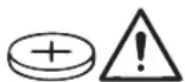
WARNING

Ensure that the coin cell is kept out of the reach of children. Coin cells are dangerous.
▶ Coin cells must never be swallowed or inserted into any other part of the body. If you suspect that someone has swallowed a coin cell or that a coin cell has entered the body in another way, seek medical attention immediately. Swallowing coin cells can result in severe internal burns and death within 2 hours.
▶ Ensure that coin cell replacement is carried out properly. There is a risk of explosion.
▶ Only use the coin cells listed in this operating manual. Do not use any other coin cells or other forms of electrical power supply.
▶ Do not attempt to recharge the coin cell and do not short circuit the coin cell. The coin cell may leak, explode, catch fire and cause personal injury.
▶ Remove and dispose of drained coin cell correctly. Drained coin cell may leak and damage the product or cause personal injury.
▶ Do not overheat the coin cell or throw it into fire. The coin cell may leak, explode, catch fire and cause personal injury.
▶ Do not damage the coin cell and take the coin cell apart. The coin cell may leak, explode, catch fire and cause personal injury.
▶ Do not allow damaged coin cells to come into contact with water. Leaking lithium may mix with water to create hydrogen, which could cause a fire, an explosion, or personal injury.
Product Description and Specifications

Read all the safety and general instructions. Failure to observe the safety and general instructions may result in electric shock, fire and/or serious injury.
Please observe the illustrations at the beginning of this operating manual.
Intended use
The power tool is intended for driving and loosening screws and for drilling in wood, metal and plastic.
The power tool can be used with a right angle adapter (GFA 18-W), right angle adapter with metal drill chuck (GFA 18-WM), off-set angle adapter (GFA 18-E), drill chuck adapter (GFA 18-B), metal drill chuck adapter (GFA 18-M) or rotary hammer adapter (GFA 18-H).
With the Bluetooth ^® Low Energy Module GCY 42 / GCY 42 NC inserted, power tool data and settings can be transferred between the power tool and a mobile device by means of Bluetooth ^® wireless technology.
Product Features
The numbering of the product features refers to the diagram of the power tool on the graphics page.
(1) Tool holder
(2) Locking sleeve
(3) Torque presetting ring
(4) Gear selector switch
(5) Bluetooth® Low Energy Module cover GCY 42 / GCY 42 NC
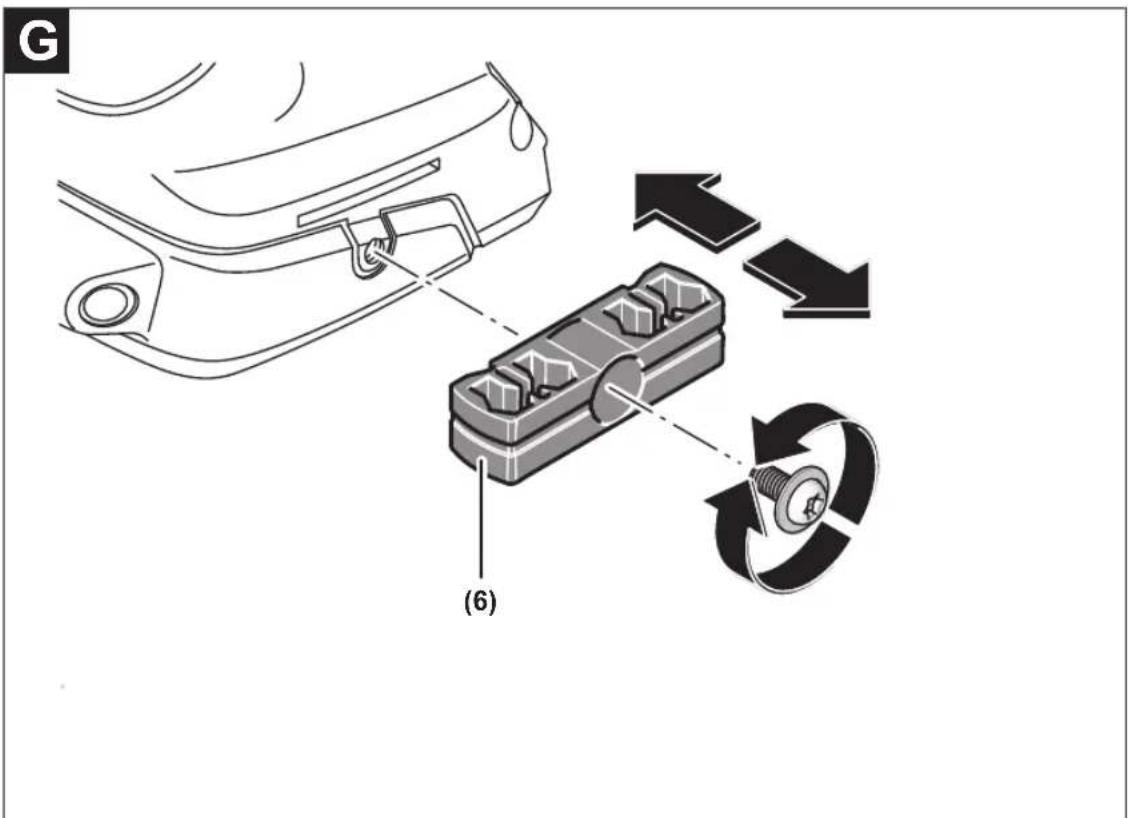
(6) Bit holder ^a)
(7) Belt clip ^a)
(8) Rechargeable battery ^a)
(9) Battery release button ^a)
(10) User interface
(11) Rotational direction switch
(12) On/off switch
(13) Handle (insulated gripping surface)
(14) Metal drill chuck adapter GFA 18-M ^a)
(15) Drill chuck adapter GFA 18-B ^a)
(16) Right angle adapter GFA 18-W ^a)
(17) Off-set angle adapter GFA 18-E ^a)
(18) Right angle adapter with metal drill chuck GFA 18-WM ^3)
(19) Rotary hammer adapter GFA 18-H ^a)
(20) Locking ring ^a)
User interface
(21) Status indicator for power tool
(22) LED for KickBack Control
English | 11
(23) Button for KickBack Control
(24) Worklight (LED)
(25) Precision clutch button
(26) LED for precision clutch
a) This accessory is not part of the standard scope of delivery.
Technical Data
| Cordless Drill/Driver GSR 18V-90 FC GFA 18-M GFA 18-W GFA 18-E GFA 18-WM | ||||||
| Article number | 3 601 JK6 2.. | ---- | ||||
| Rated voltage V= 18 - - - - | ||||||
| No-load speed ^A) | ||||||
| - First gear min | - | 0-630 | ---- | |||
| 1 | ||||||
| - Second gear min | - | 0-2100 | ---- | |||
| 1 | ||||||
| Max. torque (soft) ^A) | Nm 36 - - - - | |||||
| Max. torque (hard) ^A) | Nm 64 - - - - | |||||
| Max. drilling diameter | ||||||
| - Wood mm 68 - - - - | ||||||
| - Steel mm 13 - - - - | ||||||
| - Concrete mm 10 - - - - | ||||||
| Max. screw diameter mm 12 - - - - | ||||||
| Tool holder mm 6.35 | 1.5-13 | 6.35 | 6.35 | 1.5-13 | ||
| 14 " Internal hexagon | 14 " Internal hexagon | 14 " Internal hexagon | ||||
| Weight ^B) | kg | 1.3-2.3 ^C) | 0.38 | 0.44 | 0.44 | 0.66 |
| Recommended ambient temper- ature during charging | °C | 0 to +35 | ||||
| Permitted ambient temperature during operation and during stor- age | °C | -20 to +50 | ||||
| Recommended rechargeable bat- teries | GBA 18V...ProCORE18V... | ---- | ||||
| Recommended battery chargers | GAL 18...GAX 18...GAL 36... | ---- | ||||
A) Measured at 20–25 °C with rechargeable battery GBA 18V 5.0Ah
B) Depending on battery in use
C) Measured with GBA 18V 1.5Ah and GBA 18V 12.0Ah.
Values can vary depending on the product, scope of application and environmental conditions. To find out more, visit www.bosch-professional.com/wac.
Noise/Vibration Information
| GSR 18V-90 FC | GFA 18-M | GFA 18-W | GFA 18-E | GFA 18-WM | |
| Noise emission values determined according to EN 62841-2-1 for GFA 18-M, GFA 18-WM. | |||||
| Noise emission values determined according to EN 62841-2-2 for GSR 18V-90 FC, GFA 18-W, GFA 18-E. | |||||
| Typically, the A-weighted noise level of the power tool is | |||||
| Sound pressure level | dB(A) | 77.5 | 78 | 78.5 | 78.5 |
| dB(A) | 85.5 | 86 | 86.5 | 86.5 | |
| Sound power level | dB | 3 | 5 | 3 | 3 |
| Uncertainty K | |||||
Bosch Power Tools
1 609 92A 9UZ | (09.10.2024)
12 | English
GSR 18V-90 FC GFA 18-M GFA 18-W GFA 18-E GFA 18-WM
Wear hearing protection!
Vibration total values a_h (triax vector sum) and uncertainty K determined according to EN 62841-2-1 for GFA 18-M, GFA 18-WM:
Vibration total values a_h (triax vector sum) and uncertainty K determined according to EN 62841-2-2 for GSR 18V-90 FC GFA 18-W, GFA 18-E:
Drilling in metal:
| a_h | m/s^2 | - | < 2.5 | - | - | < 2.5 |
| K | m/s^2 | - | 1.5 | - | - | 1.5 |
| Screwdriving: | ||||||
| a_h | m/s^2 | < 2.5 | - | < 2.5 | < 2.5 | - |
| K | m/s^2 | 1.5 | - | 1.5 | 1.5 | - |
The vibration level and noise emission value given in these instructions have been measured in accordance with a standardised measuring procedure and may be used to compare power tools. They may also be used for a preliminary estimation of vibration and noise emissions.
The stated vibration level and noise emission value represent the main applications of the power tool. However, if the power tool is used for other applications, with different accessories or is poorly maintained, the vibration level and noise emission value may differ. This may significantly increase the vibration and noise emissions over the total working period.
To estimate vibration and noise emissions accurately, the times when the tool is switched off or when it is running but not actually being used should also be taken into account. This may significantly reduce vibration and noise emissions over the total working period.
Implement additional safety measures to protect the operator from the effects of vibration, such as servicing the power tool and accessories, keeping their hands warm, and organising workflows correctly.
Rechargeable battery
Bosch sells some cordless power tools without a rechargeable battery. You can tell whether a rechargeable battery is included with the power tool by looking at the packaging.
Charging the battery
▶ Use only the chargers listed in the technical data. Only these chargers are matched to the lithium-ion battery of your power tool.
Note: Lithium-ion rechargeable batteries are supplied partially charged according to international transport regulations. To ensure full rechargeable battery capacity, fully charge the rechargeable battery before using your tool for the first time.
Inserting the Battery
Push the charged battery into the battery holder until it clicks into place.
Removing the Battery
To remove the rechargeable battery, press the battery release button and pull the battery out. Do not use force to do this.
The rechargeable battery has two locking levels to prevent the battery from falling out if the battery release button is pressed unintentionally. The rechargeable battery is held in place by a spring when fitted in the power tool.
Battery charge indicator
Note: Not all battery types have a battery charge indicator.
The green LEDs on the battery charge indicator indicate the state of charge of the battery. For safety reasons, it is only possible to check the state of charge when the power tool is not in operation.
Press the button for the battery charge indicator or to show the state of charge. This is also possible when the battery is removed.
If no LED lights up after pressing the button for the battery charge indicator, then the battery is defective and must be replaced.
The state of charge of the battery is also displayed on the user interface (see "Status Indications", page 15).
Battery model GBA 18V...


LED Capacity
| 3× continuous green light 60–100 % |
| 2× continuous green light 30–60 % |
| 1× continuous green light 5–30 % |
| 1× flashing green light 0–5 % |
Battery model ProCORE18V...

LED Capacity
| 5 × continuous green light 80–100 % |
| 4 × continuous green light 60–80 % |
| 3 × continuous green light 40–60 % |
| 2 × continuous green light 20–40 % |
| 1 × continuous green light 5–20 % |
| 1 × flashing green light 0–5 % |
Recommendations for Optimal Handling of the Battery
Protect the battery against moisture and water.
Only store the battery within a temperature range of -20 to 50°C. Do not leave the battery in your car in the summer, for example.
Occasionally clean the ventilation slots on the battery using a soft brush that is clean and dry.
A significantly reduced operating time after charging indicates that the battery has deteriorated and must be replaced. Follow the instructions on correct disposal.
Assembly
Before carrying out any work on the power tool (e.g. maintenance, tool change etc.), remove the battery from the power tool. There is risk of injury from unintentionally pressing the on/off switch.
Inserting the Bluetooth® Low Energy Module GCY 42 / GCY 42 NC
Read the corresponding operating instructions for information about the Bluetooth® Low Energy Module GCY 42 / GCY 42 NC.
Changing the Tool
Inserting the application tool (see figure A)
Push the locking sleeve (2) back and insert the application tool by turning it into the holder (1). Release the locking sleeve (2) to lock the application tool.
Removing the application tool
Push the locking sleeve (2) back and pull the application tool out of the holder (1).
Fitting the adapter (see figure B)
Remove the application tool.
Insert the adapter into the holder (1). Turn the locking ring (20) until it audibly clicks into place.
Inserting the application tool into the adapter
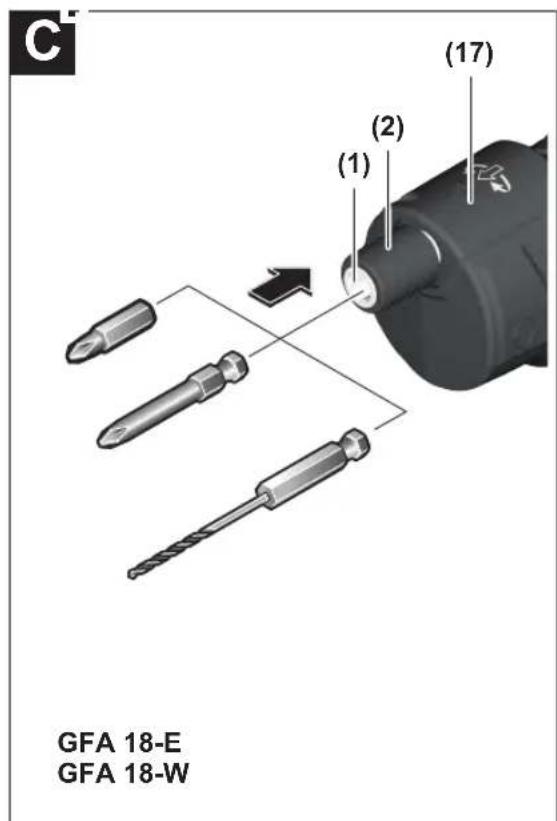
GFA 18-E/GFA 18-W (see figure C):
Push the locking sleeve (2) back and insert the application tool by turning it into the holder (1). Release the locking sleeve (2) to lock the application tool.
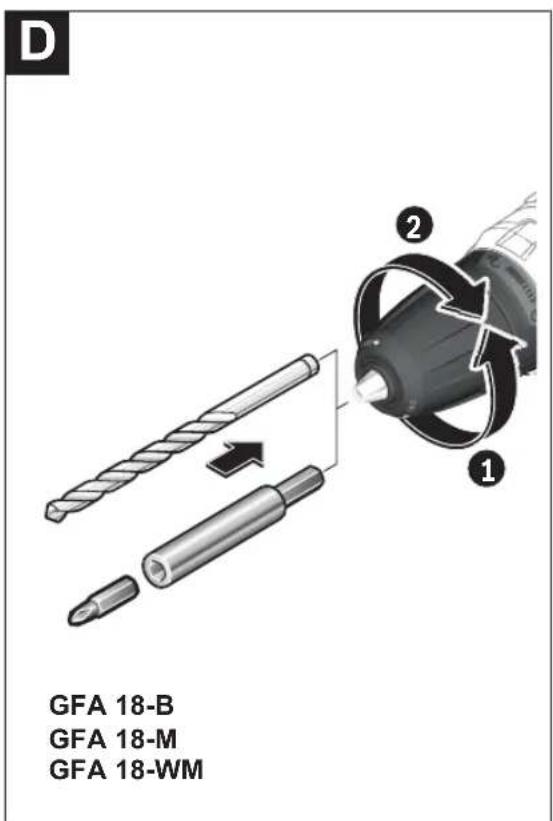
GFA 18-M/GFA 18-B/GFA 18-WM (see figure D):
Open the drill chuck adapter by turning it in the direction of rotation ① until the application tool can be inserted. Insert the application tool.
Firmly tighten the sleeve of the drill chuck adapter by turning it by hand in the direction of rotation ②. This will automatically lock the drill chuck.
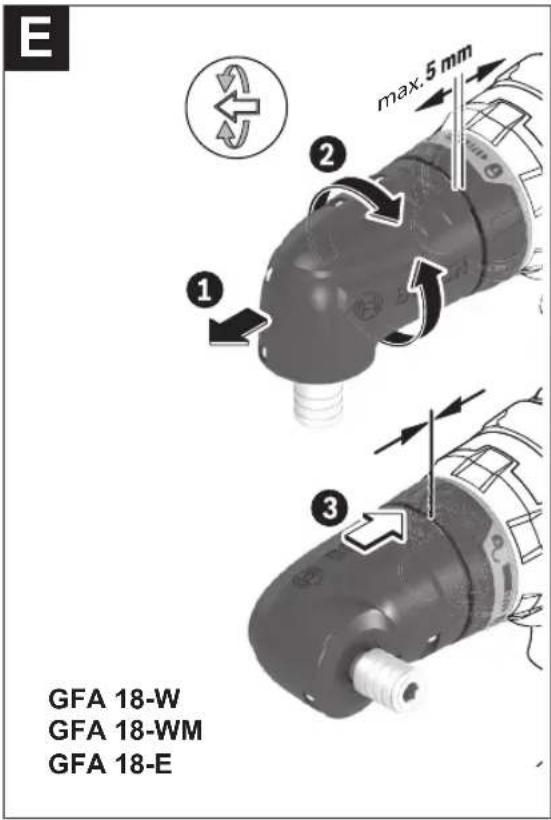
Turning the Adapter (GFA 18-W, GFA 18-E, GFA 18-WM) (see figure E)
Pull the adapter forwards. Turn the adapter to the required position and then let it go to lock it. The adapter clicks into place in 16 positions around a 360° axis.
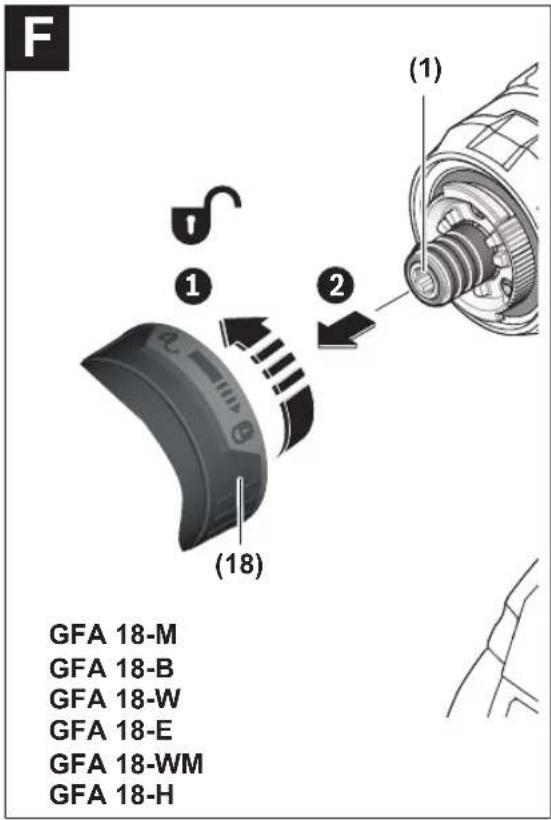
Removing the adapter (see figure F)
Remove the application tool.
Unlock the adapter in direction and pull it off the holder (1).
Dust/Chip Extraction
Dust from materials such as lead-containing coatings, some wood types, minerals and metal can be harmful to one's health. Touching or breathing-in the dust can cause allergic reactions and/or lead to respiratory infections of the user or bystanders.
Certain dust, such as oak or beech dust, is considered carcinogenic, especially in connection with wood-treatment additives (chromate, wood preservative). Materials containing asbestos may only be worked by specialists.
- Provide for good ventilation of the working place.
- It is recommended to wear a P2 filter-class respirator.
Observe the relevant regulations in your country for the materials to be worked.
- Avoid dust accumulation at the workplace. Dust can easily ignite.
Operation
Starting Operation
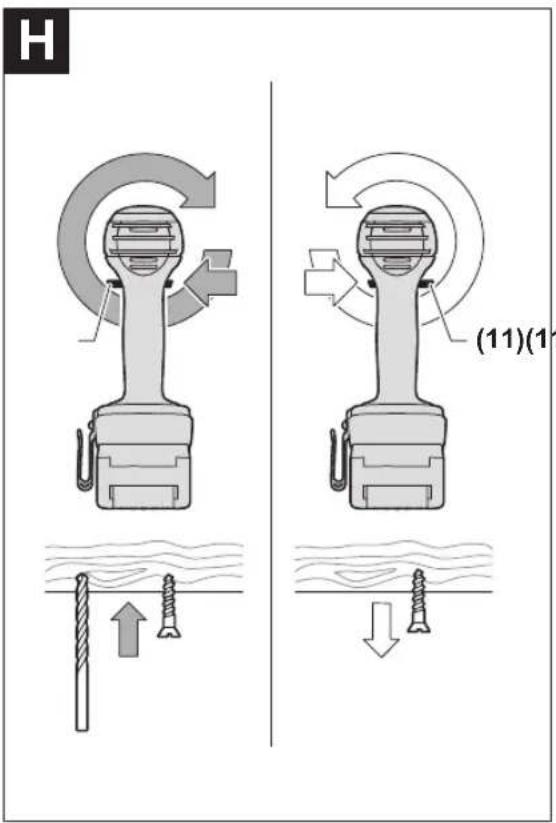
Setting the rotational direction (see figure H)
▶ Only operate the rotational direction switch (11) when the power tool is not in use.
The rotational direction switch (11) is used to change the rotational direction of the power tool. However, this is not possible while the on/off switch (12) is being pressed.
Right rotation: To drill and to drive in screws, press the rotational direction switch (11) through to the left stop.
Left Rotation: To loosen and unscrew screws and nuts, press the rotational direction switch (11) through to the right stop.
14 | English
Preselecting the Torque
The torque presetting ring (3) can be used to pre-select the required torque in 20 stages. When the correct setting is used, the application tool will be stopped when the screw is driven flush into the material or once the set torque has been reached. In position the overload clutch is deactivated, e.g. for drilling.
When unscrewing screws, it may be advisable to select a higher setting or the symbol.
In position, the maximum torque for drilling and screw-driving is achieved.
Mechanical gear selection
▶ Only operate the gear selector (4) when the power tool is not in use.
▶ Always push the gear selector switch as far as it will go. Otherwise, the power tool may become damaged.
You can preselect two speed ranges with the gear selector (4).
| Gear selector switch (4) position | Speed Torque Application range |
1 Low High For heavy-duty ap-
plications:
e.g. drilling and screwdriving with large diameters
2 High Low For light-duty ap-
plications:
e.g. drilling and screwdriving with small diameters
Setting the Operating Mode

Drilling
Set the torque presetting ring (3) to the "drilling" symbol to achieve the maximum torque for drilling and screwdriving.

Screwdriving
Set the torque presetting ring (3) to the required torque setting.
Switching on/off
To start the power tool, press and hold the on/off switch (12).
The worklight (24) lights up when the on/off switch (12) is lightly or fully pressed, allowing the work area to be illuminated in poor lighting conditions.
Adjusting the speed
You can adjust the speed of the power tool when it is on by pressing in the on/off switch (12) to varying extents.
A light pressure on the on/off switch (12) results in a low rotational speed. Increased pressure on the switch causes an increase in speed.
Temperature-dependent overload protection
When used as intended, the power tool cannot be overloaded. If the power tool is overloaded or not kept within the permitted operating temperature range, the speed is reduced or the power tool is switched off. The power tool will not run at full speed again until the permitted operating temperature has been reached.
Activation of the temperature-controlled overload protector is indicated by the LED on the power tool lighting up red.
- To return to within the permitted operating temperature range, run the power tool at no load or wait until the LED lights up green again.
When the LED lights up green, the tool has returned to within the permitted operating temperature range.
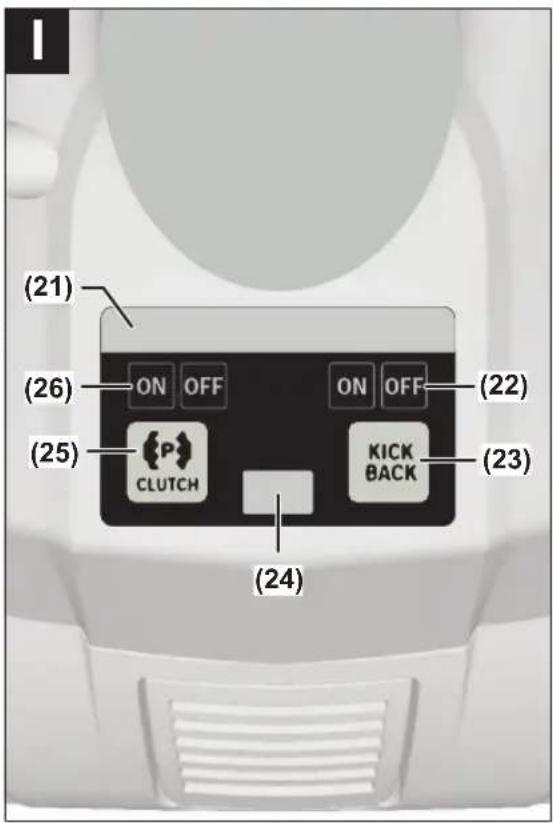
User Interface (see figure I)
The user interface (10) is used to activate and deactivate the precision clutch and for the "KickBack Control" rapid shut-off, as well as for the status indicator of the power tool.
Precision Clutch
The precision clutch stops overlocking when the set torque is reached, thereby reducing clutch wear and the resulting noise.
The precision clutch can be deactivated on the e (10) with the precision clutch button (25).
The current status is shown via the LED for precision clutch (26) on the user interface (10).
Rapid Shut-off (KickBack Control)

The rapid shut-off function (KickBack Control) gives the user greater control over the power tool and offers them better protection than power tools that do not have Kick-Back Control. The power tool will switch off
if it suddenly and unforeseeably rotates around the drilling axis.
The rapid shut-off is indicated by the LED (21) flashing red, flashing from the worklight (24) and the LED of the KickBack Control (22) lighting up red on the power tool.
To switch the tool back on, release the on/off switch and then press it again.
It will no longer be possible to switch the power tool on if the KickBack Control function is faulty. Have the power tool serviced by a qualified repair person using only original replacement parts.
The rapid shut-off function can be deactivated on the user interface (10) with the KickBack Control button (23). If the power tool is not used for longer than 5 minutes or if the rechargeable battery is removed, the rapid shut-off function automatically switches back on. The current status is shown via the KickBack Control LED (22) on the user interface (10).
▶ Note: The warning light of the LEDs is not visible from all directions! The warning light is difficult to see in bright sunlight.
Status Indications
| Status indicator for power tool | Meaning/cause Solution | |
| Green Status OK – | ||
| Yellow Critical temperature has been reached, rechargeable battery is almost empty, or KickBack Control is switched off | Run the power tool at no load and allow it to cool down, replace or charge the rechargeable battery soon, or press the KickBack Control button | |
| Illuminated red Power tool has overheated or rechargeable battery is empty | Allow the power tool to cool down, or replace or charge the rechargeable battery | |
| Flashing red Rapid shut-off is triggered Switch the power tool off and on again | ||
| Flashing blue Power tool is connected to a mobile device or settings are being transferred | - | |
Connectivity functions
In conjunction with the Bluetooth® Low Energy Module GCY 42 / GCY 42 NC, the following connectivity functions are available for the power tool:
- Registration and personalisation
- Status check, output of warning messages
- General information
- Management
- Switching the worklight on and off
- Setting the worklight brightness and afterglow duration
- Setting the brightness and backlight duration of the user interface
Read the corresponding operating instructions for information about the Bluetooth® Low Energy Module GCY 42 / GCY 42 NC.
Practical advice
The power tool with inserted Bluetooth Low Energy Module GCY 42 / GCY 42 NC (accessory) is equipped with a radio interface. Local operating restrictions, e.g. in aircraft or hospitals, must be observed.
▶ Only apply the power tool to the screw when the tool is switched off. Rotating application tools can slip off.
Belt clip
You can use the belt clip (7) to hang the power tool on a belt, for example. You then have both hands free and the power tool is always at hand.
Maintenance and Service
Maintenance and Cleaning
▶ Before carrying out any work on the power tool (e.g. maintenance, tool change etc.), remove the battery from the power tool. There is risk of injury from unintentionally pressing the on/off switch.
▶ To ensure safe and efficient operation, always keep the power tool and the ventilation slots clean.
After-Sales Service and Application Service
Our after-sales service responds to your questions concerning maintenance and repair of your product as well as spare parts. You can find explosion drawings and information on spare parts at: www.bosch-pt.com
The Bosch product use advice team will be happy to help you with any questions about our products and their accessories.
In all correspondence and spare parts orders, please always include the 10-digit article number given on the nameplate of the product.
Malaysia
Robert Bosch Sdn. Bhd.(220975-V) PT/SMY
No. 8A, Jalan 13/6
46200 Petaling Jaya
Selangor
Tel.: (03) 79663194
Toll-Free: 1800 880188
Fax: (03) 79583838
E-Mail: kiathoe.chong@my.bosch.com
www.bosch-pt.com.my
You can find further service addresses at:
www.bosch-pt.com/serviceaddresses
Transport
The recommended lithium-ion batteries are subject to legislation on the transport of dangerous goods. The user can transport the batteries by road without further requirements.
When the batteries are shipped by third parties (e.g. air transport or forwarding agency), special requirements on packaging and labelling (e.g. ADR regulations) must be met. A dangerous goods expert must be consulted when preparing the items for shipping.
Dispatch battery packs only when the housing is undamaged. Tape or mask off open contacts and pack up the battery in such a manner that it cannot move around in the packaging. Please also observe the possibility of more detailed national regulations.
16 | Français
Disposal

Power tools, rechargeable batteries, accessories and packaging should be sorted for environmental-friendly recycling.
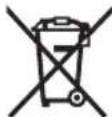
Do not dispose of power tools and batteries/re-chargeable batteries into household waste!
Battery packs/batteries:
Li-ion:
Please observe the notes in the section on transport (see "Transport", page 15).
Français
GFA 18-M/GFA 18-B/GFA 18-WM (voir figure D) :
Robert Bosch Morocco SARL
53, Rue Lieutenant Mahroud Mohamed
20300 Casablanca
Tel.: +212 5 29 31 43 27
E-Mail : sav.outillage@ma.bosch.com
www.bosch-pt.com/serviceaddresses
Transport
www.bosch-pt.com/serviceaddresses
Transporte
GFA 18-E/GFA 18-W (ver figura C):
Calle Robert Bosch No. 405
www.bosch-pt.com/serviceaddresses
Transporte
www.bosch-pt.com/serviceaddresses
搬运
www.bosch-pt.com/serviceaddresses
搬運
www.bosch-pt.com/serviceaddresses
การขนสง
GFA 18-E/GFA 18-W (lihat gambar C):
Memutar adaptor (GFA 18-W, GFA 18-E, GFA 18-WM) (lihat gambar E)
www.bosch-pt.com/serviceaddresses
Transpor
ل Effect. Departices Marketing for the Practure of the Practure of the Practure of the Practure of the Practure of the Practure of the Practure of the Practure of the Practure of the Practure of the Practure of the Practure of the Practure of the Practure of the Practure of the Practure of the Practure of the Practure of the Practure of the Practure of the Practure.
(A.GBA 18V 5.0Ah شار
www.bosch-pt.com/serviceaddresses
جمل و نقل
Legal Information and Licenses
Library NanoPb version 0.3.9.2:
Copyright © 2011 Petteri Aimonen
This software is provided 'as-is', without any express or implied warranty. In no event will the authors be held liable for any damages arising from the use of this software.
Permission is granted to anyone to use this software for any purpose, including commercial applications, and to alter it and redistribute it freely, subject to the following restrictions:
- The origin of this software must not be misrepresented; you must not claim that you wrote the original software. If you use this software in a product, an acknowledgment in the product documentation would be appreciated but is not required.
- Altered source versions must be plainly marked as such, and must not be misrepresented as being the original software.
- This notice may not be removed or altered from any source distribution.
Library TLE version 1.5.0:
Copyright © 2015, Infineon Technologies AG
All rights reserved.
Redistribution and use in source and binary forms, with or without modification, are permitted provided that the following conditions are met:
- Redistributions of source code must retain the above copyright notice, this list of conditions and the following disclaimer.
- Redistributions in binary form must reproduce the above copyright notice, this list of conditions and the following disclaimer in the documentation and/or other materials provided with the distribution.
- Neither the name of the copyright holders nor the names of its contributors may be used to endorse or promote products derived from this software without specific prior written permission.
THIS SOFTWARE IS PROVIDED BY THE COPYRIGHT HOLDERS AND CONTRIBUTORS "AS IS" AND ANY EXPRESS OR IMPLIED WARRANTIES, INCLUDING, BUT NOT LIMITED TO, THE IMPLIED WARRANTIES OF MERCHANTABILITY AND FITNESS FOR A PARTICULAR PURPOSE ARE DISCLAIMED. IN NO EVENT SHALL THE COPYRIGHT HOLDER OR CONTRIBUTORS BE LIABLE FOR ANY DIRECT, INDIRECT, INCIDENTAL, SPECIAL, EXEMPLARY, OR CONSEQUENTIAL DAMAGES (INCLUDING, BUT NOT LIMITED TO, PROCUREMENT OF SUBSTITUTE GOODS OR SERVICES; LOSS OF USE, DATA, OR PROFITS; OR BUSINESS INTERRUPTION) HOWEVER CAUSED AND ON ANY THEORY OF LIABILITY, WHETHER IN CONTRACT, STRICT LIABILITY, OR TORT (INCLUDING NEGLIGENCE OR OTHERWISE) ARISING IN ANY WAY OUT OF THE USE OF THIS SOFTWARE, EVEN IF ADVISED OF THE POSSIBILITY OF SUCH DAMAGE.
Library ARM CMSIS 4:
ARM CMSIS CORTEX-M CORE version 3.20
Copyright © 2009-2015 ARM LIMITED
All rights reserved.
Redistribution and use in source and binary forms, with or without modification, are permitted provided that the following conditions are met:
- Redistributions of source code must retain the above copyright notice, this list of conditions and the following disclaimer.
- Redistributions in binary form must reproduce the above copyright notice, this list of conditions and the following disclaimer in the documentation and/or other materials provided with the distribution.
- Neither the name of ARM nor the names of its contributors may be used to endorse or promote products derived from this software without specific prior written permission.
THIS SOFTWARE IS PROVIDED BY THE COPYRIGHT HOLDERS AND CONTRIBUTORS "AS IS" AND ANY EXPRESS OR IMPLIED WARRANTIES, INCLUDING, BUT NOT LIMITED TO, THE IMPLIED WARRANTIES OF MERCHANTABILITY AND FITNESS FOR A PARTICULAR PURPOSE ARE DISCLAIMED. IN NO EVENT SHALL COPYRIGHT HOLDERS AND CONTRIBUTORS BE LIABLE FOR ANY DIRECT, INDIRECT, INCIDENTAL, SPECIAL, EXEMPLARY, OR CONSEQUENTIAL DAMAGES (INCLUDING, BUT NOT LIMITED TO, PROCUREMENT OF SUBSTITUTE GOODS OR SERVICES; LOSS OF USE, DATA, OR PROFITS; OR BUSINESS INTERRUPTION) HOWEVER CAUSED AND ON ANY THEORY OF LIABILITY, WHETHER IN CONTRACT, STRICT LIABILITY, OR TORT (INCLUDING NEGLIGENCE OR OTHERWISE) ARISING IN ANY WAY OUT OF THE USE OF THIS SOFTWARE, EVEN IF ADVISED OF THE POSSIBILITY OF SUCH DAMAGE.
Library ARM CMSIS 4:
Copyright © 2009-2015 ARM LIMITED
All rights reserved.
Redistribution and use in source and binary forms, with or without modification, are permitted provided that the following conditions are met:
- Redistributions of source code must retain the above copyright notice, this list of conditions and the following disclaimer.
- Redistributions in binary form must reproduce the above copyright notice, this list of conditions and the following disclaimer in the documentation and/or other materials provided with the distribution.
- Neither the name of ARM nor the names of its contributors may be used to endorse or promote products derived from this software without specific prior written permission.
THIS SOFTWARE IS PROVIDED BY THE COPYRIGHT HOLDERS AND CONTRIBUTORS "AS IS" AND ANY EXPRESS OR IMPLIED WARRANTIES, INCLUDING, BUT NOT LIMITED TO, THE IMPLIED WARRANTIES OF MERCHANTABILITY AND FITNESS FOR A PARTICULAR PURPOSE ARE DISCLAIMED. IN NO EVENT SHALL COPYRIGHT HOLDERS AND CONTRIBUTORS BE LIABLE FOR ANY DIRECT, INDIRECT, INCIDENTAL, SPECIAL, EXEMPLARY, OR CONSEQUENTIAL DAMAGES (INCLUDING, BUT NOT LIMITED TO, PROCUREMENT OF SUBSTITUTE GOODS OR SERVICES; LOSS OF USE, DATA, OR PROFITS; OR BUSINESS INTERRUPTION) HOWEVER CAUSED AND ON ANY THEORY OF LIABILITY, WHETHER IN CONTRACT, STRICT LIABILITY, OR TORT (INCLUDING NEGLIGENCE OR OTHERWISE) ARISING IN ANY WAY OUT OF THE USE OF THIS SOFTWARE, EVEN IF ADVISED OF THE POSSIBILITY OF SUCH DAMAGE.
STM32F0:
ST Product License: V2
Copyright © 2014 STMicroelectronics
Under STMicroelectronics' intellectual property rights, the redistribution, reproduction and use in source and binary forms of the software or any part thereof, with or without modification, are permitted provided that the following conditions are met:
110 | Legal Information and Licenses
- Redistribution of source code (modified or not) must retain any copyright notice, this list of conditions and the disclaimer set forth below as items 10 and 11.
- Redistributions in binary form, except as embedded into microcontroller or microprocessor device manufactured by or for STMicroelectronics or a software update for such device, must reproduce any copyright notice provided with the binary code, this list of conditions, and the disclaimer set forth below as items 10 and 11, in documentation and/or other materials provided with the distribution.
- Neither the name of STMicroelectronics nor the names of other contributors to this software may be used to endorse or promote products derived from this software or part thereof without specific written permission.
- This software or any part thereof, including modifications and/or derivative works of this software, must be used and execute solely and exclusively on or in combination with a microcontroller or microprocessor device manufactured by or for STMicroelectronics.
- No use, reproduction or redistribution of this software partially or totally may be done in any manner that would subject this software to any Open Source Terms. "Open Source Terms" shall mean any open source license which requires as part of distribution of software that the source code of such software is distributed therewith or otherwise made available, or open source license that substantially complies with the Open Source definition specified at www.opensource.org and any other comparable open source license such as for example GNU General Public License (GPL), Eclipse Public License (EPL), Apache Software License, BSD license or MIT license.
- STMicroelectronics has no obligation to provide any maintenance, support or updates for the software.
- The software is and will remain the exclusive property of STMicroelectronics and its licensors. The recipient will not take any action that jeopardizes STMicroelectronics and its licensors' proprietary rights or acquire any rights in the software, except the limited rights specified hereunder.
- The recipient shall comply with all applicable laws and regulations affecting the use of the software or any part thereof including any applicable export control law or regulation.
- Redistribution and use of this software or any part thereof other than as permitted under this license is void and will automatically terminate your rights under this license.
- THIS SOFTWARE IS PROVIDED BY STMICROELECTRONICS AND CONTRIBUTORS "AS IS" AND ANY EXPRESS, IMPLIED OR STATUTORY WARRANTIES, INCLUDING, BUT NOT LIMITED TO, THE IMPLIED WARRANTIES OF MERCHANTABILITY, FITNESS FOR A PARTICULAR PURPOSE AND NON-INFRINGEMENT OF THIRD PARTY INTELLECTUAL PROPERTY RIGHTS, WHICH ARE DISCLAIMED TO THE FULLEST EXTENT PERMITTED BY LAW. IN NO EVENT SHALL STMICROELECTRONICS OR CONTRIBUTORS BE LIABLE FOR ANY DIRECT, INDIRECT, INCIDENTAL, SPECIAL, EXEMPLARY, OR CONSEQUENTIAL DAMAGES (INCLUDING, BUT NOT LIMITED TO, PROCUREMENT OF SUBSTITUTE GOODS OR SERVICES; LOSS OF USE, DATA, OR PROFITS; OR BUSINESS INTERRUPTION) HOWEVER CAUSED AND ON ANY THEORY OF LIABILITY, WHETHER IN CONTRACT, STRICT LIABILITY, OR TORT (INCLUDING NEGLIGENCE OR OTHERWISE) ARISING IN ANY WAY OUT OF THE USE OF THIS SOFTWARE, EVEN IF ADVISED OF THE POSSIBILITY OF SUCH DAMAGE.
- EXCEPT AS EXPRESSLY PERMITTED HEREUNDER, NO LICENSE OR OTHER RIGHTS, WHETHER EXPRESS OR IMPLIED, ARE GRANTED UNDER ANY PATENT OR OTHER INTELLECTUAL PROPERTY RIGHTS OF STMICROELECTRONICS OR ANY THIRD PARTY.
Licenses that apply are included in this manual under "Legal Information and Licenses".
Warranty Disclaimer
This product contains Open Source Software components which underly Open Source Software Licenses. Please note that Open Source Licenses contain disclaimer clauses. The text of the Open Source