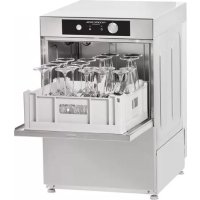
GD400BDD - Dishwasher Scancool - Free user manual and instructions
Find the device manual for free GD400BDD Scancool in PDF.



| Product type | Professional dishwasher |
| Brand | Scancool |
| Model | GD400BDD |
| Supply voltage | 230 V ~ 50/60 Hz |
| Total power | 3.1 kW |
| Rated current | 13.3 A |
| Net weight | 41 kg |
| Washing capacity | 40 baskets/hour |
| Number of wash cycles | 3 cycles (90 s, 120 s, 180 s) |
| Rinse temperature | 85 °C |
| Wash temperature | 55 °C (minimum) |
| Water consumption | Approx. 2.5 L/cycle |
| Drain type | Gravity or pump (model B) |
| Detergent dispenser | Integrated (model DD) |
| Rinse aid dispenser | Adjustable mechanical |
| Cold rinse | Yes (on OEM-400 models) |
| Thermo-stop | Yes (on GM/GT models) |
| Regeneration cycle | Yes (SOFT models) |
| Routine maintenance | Daily cleaning of filters, wash arms and overflow |
| Installation | By certified technician, electrical and hydraulic connection |
Frequently Asked Questions - GD400BDD Scancool
User questions about GD400BDD Scancool
0 question about this device. Answer the ones you know or ask your own.
Ask a new question about this device
Download the instructions for your Dishwasher in PDF format for free! Find your manual GD400BDD - Scancool and take your electronic device back in hand. On this page are published all the documents necessary for the use of your device. GD400BDD by Scancool.
USER MANUAL GD400BDD Scancool
EN INSTALLATION, USE AND MAINTENANCE INSTRUCTIONS GLASSWASHER
ENGLISH (GLASSWASHER)......42
DEUTSCH (GLÄSERSPÜLER)......58
ITALIANO (LAVAVABICCHIERI)....75
POLSKI (ZMYWARKI DO SZKŁA) 91
NEDERLANDS (GLAZENSPOELMACHINE)......107
SVENSKA (GLASTVÄTT)......123
РУССКИЙ (СТАКАНОМОЙКА)......139
DANSK (GLASOPVASKEMASKINER) 155
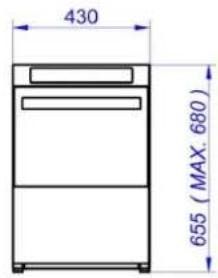
DIMENSIONES GENERALES Y ACOMETIDAS (mm) WYMIARY OGÓLNE I PODŁĄCZENIA (mm)
DIMENSIONS GÉNÉRALES ET BRANCHEMENTS (mm) ALGEMENE MATEN EN AANSLUITINGEN (mm)
GENERAL MEASUREMENTS AND CONNECTIONS (mm) ALLMÄNNA MÄTT OCH ANSLUTNINGAR (mm)
ALLGEMEINE ABMESSUNGEN UND ZULEITUNGEN (mm) ОБЩИЕ РАЗМЕРЫ И РАЗЪЕМЫ (мм)
DIMENSIONI GENERALI E CONNESSIONI (mm) GENERELLE DIMENSIONER OG TILSLUTNING (mm)
Fig. 1
(G/T)-OEM-350

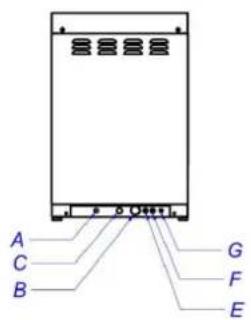
(G/T)-OEM-400


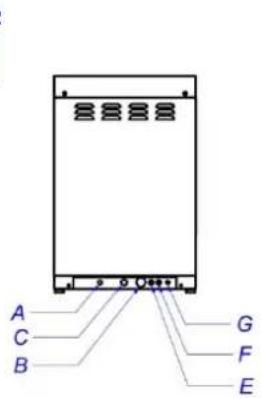

| A | B C | E F | G | R | ||
| Toma de agua | Manguera Desagüe | Manguera eléctrica Entrada Abrillantador | Entrada detergente | Equipotencial | Regleta conexión | |
| Prise d'eau | Tuyau vidange Gaine électrique Lustrant entrée Détergent Entrée | Équipotentialité | Réglette raccordement | |||
| Water inlet | Drain hose | Power Supply Cable Strain Relief | Rinse aid inlet Detergent Inlet | Equipotential bond | Terminal Box | |
| Wasseranschluß | Schlauch Wasserauslauf | Kabelschlauch Klarspül mittel einlass Spülmittel einlass | Potentialausgleich | Anschlußleiste | ||
| Presa dácqua | Tubo di scarico | Cavo elettrico | Entrata brillantante | Entrada detersivo | Equipotenziale | Morsettiera |
| Doprowadzenie wody | Wąż spustowy | Przewód elektryczny | wlot element płukającego | wlot deteregentu | Ekwiptencjalnie | Listwa zaciskowa |
| Waterinlaat | Afvoerslang | Voedingskabel Trekontlasting | Glansspoelmiddelinlaat | Wasmiddelinlaat | Potentiaalvereffeningsleiding | Klemmenkast |
| Vatteninlopp | Dräneringsslang | Strömsladdhållare | Sköljmedelsinlopp | Diskmedelsinlopp | Ekvipotentiell fog | Anslutningslåda |
| Впуск воды | Сливной шланг | Кабель питания | Ополаскивающее средство | Моющее средство | Разъем с выравниванием потенциала | Клеммная коробка |
| Vandforsyning | Alløbsslange | Elkabel | skylleelementindløb | vaskemiddelindløb | Ekvipotential | Skrueterminal |
| Fig. 2 Fig. 3 | ||
 |  | |
| Fig. 4 Fig. 5 | ||
 |  | |
| Fig. 6 | a = azul / bleu / blue / blau / blu/ niebieski / blauw / blà / cuniǔ / blàm = marrón / brown / braun / marrone/ brąz / bruin/ brun / коричневый/ brunr = rojo / rouge / red / rot / rosso/ czerwony / rood/ röd / красный/ rødn = negro / noir / black / Schwarz / nero/ czarny / zwart / svart / черный/ sort | |
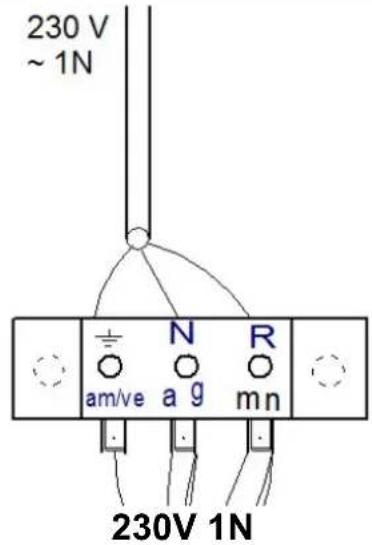 | ||
Fig. 7 Modelo / Modèle / Model / Modell / Modello / Mode / Model / Modell / ModelModель G
G-OEM-350

G-OEM-350 B


G-OEM-400

Fig. 8 Modelo / Modèle / Model / Modell / Modello / Mode / Model / Modell / ModelModель G/M
G/M-OEM-350 & 400

G/M-OEM-400 SOFT
flowchart
graph TD
    A["I"] --> B["Power"]
    C["J"] --> D["Motor"]
    E["N"] --> F["Switch"]
    G["K"] --> H["Switch"]
    I["L"] --> J["Switch"]
    K["M"] --> L["Switch"]
    style A fill:#f9f,stroke:#333
    style C fill:#ccf,stroke:#333
    style E fill:#cfc,stroke:#333
    style G fill:#fcc,stroke:#333
    style I fill:#ffc,stroke:#333
    style K fill:#cff,stroke:#333
    style L fill:#ffc,stroke:#333
Fig. 9 Modelo / Modèle / Model / Modell / Modello / Mode / Model / Modell / ModelModель G/T
G/T-OEM-350 & 400

flowchart
graph TD
    I["Input"] --> Power["Power"]
    Power --> Display1["Display"]
    Display1 --> Display2["Display"]
    Display2 --> Display3["Display"]
    Display3 --> Feedback["Feedback Loop"]
    Feedback --> K["Feedback Loop"]
    Feedback --> L["Feedback Loop"]
    Feedback --> M["Feedback Loop"]
G/T-OEM-400 SOFT

Vaciado
flowchart
graph TD
    A["Gear Icon"] --> B["Gear Icon"]
    B --> C["Gear Icon"]
Notas:
natural_image
Simple line drawing of a mechanical component with rotational arrows indicating motion (no text or symbols)7. RECICLAJE DEL PRODUCTO

Vidange
Guide rapide
GM-OEM-350 & GM-OEM-400 SERIES
Guide rapide
GT-OEM-350 & GT-OEM-400 SERIES
3. DONNÉES DU PRODUIT
7. RECYCLAGE DU PRODUIT

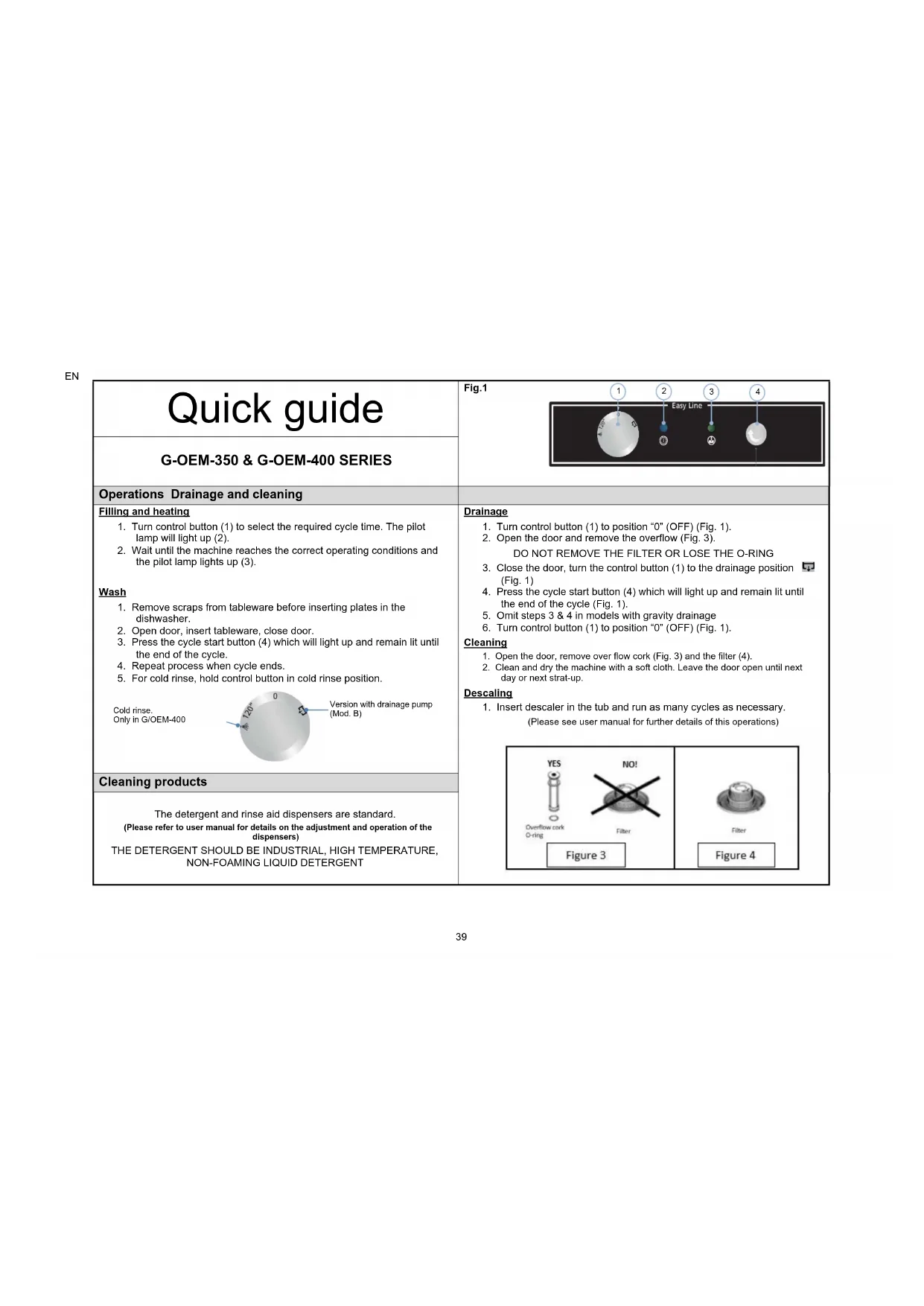
| Quick guideG-OEM-350 & G-OEM-400 SERIES | Fig.1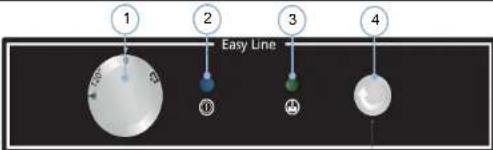 | |
| Operations Drainage and cleaning | ||
| Filling and heatingTurn control button (1) to select the required cycle time. The pilot lamp will light up (2).Wait until the machine reaches the correct operating conditions and the pilot lamp lights up (3).WashRemove scraps from tableware before inserting plates in the dishwasher.Open door, insert tableware, close door.Press the cycle start button (4) which will light up and remain lit until the end of the cycle.Repeat process when cycle ends.For cold rinse, hold control button in cold rinse position.Cold rinse.______Version with drainage pump [Mod. B] Only in G/OEM-400 | DrainageTurn control button (1) to position "0" (OFF) (Fig. 1).Open the door and remove the overflow (Fig. 3).DO NOT REMOVE THE FILTER OR LOSE THE O-RINGClose the door, turn the control button (1) to the drainage position(Fig. 1)Press the cycle start button (4) which will light up and remain lit until the end of the cycle (Fig. 1).Omit steps 3 & 4 in models with gravity drainageTurn control button (1) to position "0" (OFF) (Fig. 1).CleaningOpen the door, remove over flow cork (Fig. 3) and the filter (4).Clean and dry the machine with a soft cloth. Leave the door open until next day or next strat-up.DescalingInsert descaler in the tub and run as many cycles as necessary.(Please see user manual for further details of this operations)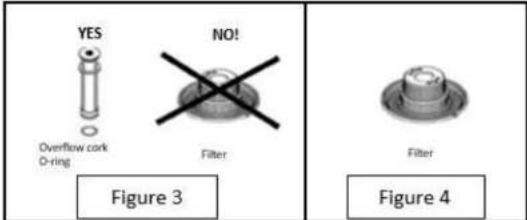 | |
| Cleaning productsThe detergent and rinse aid dispensers are standard.(Please refer to user manual for details on the adjustment and operation of the dispensers)THE DETERGENT SHOULD BE INDUSTRIAL, HIGH TEMPERATURE, NON-FOAMING LIQUID DETERGENT | ||
EN
| Quick guide | Fig.1 |
| GM-OEM-350 & GM-OEM-400 SERIES | |
| Operations Drainage and cleaning | |
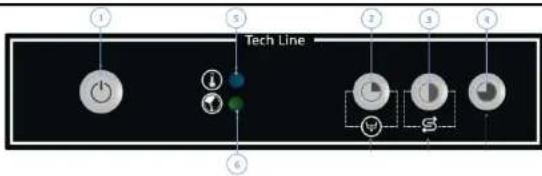
Filling and heating1. Close the door, push button (1). The led inside the button (1) will light.2. Wait until the machine reaches the correct working temperature and the led lights (5) up.Wash1. Remove scraps from tableware before inserting plates in the dishwasher.2. Open door, insert tableware, close door.3. Select cycle by pressing button (2), (3) or (4). The leds inside the cycle start button, indicate the machine is running.4. Repeat process when cycle ends.5. In GM-OEM-400 models without soft version, button (4) has double function.Hold it down to obtain cold rinsing. | Drainage1. While the machine is turned on, open the door.2. Remove the overflow (Fig. 3).DO NOT REMOVE THE FILTER OR LOSE THE O-RING3. Close the door, push the button (2) for 3 seconds to run draining. The led light inside the button (2) starts blinking4. Wait until the (2) button led light off.5. Omit steps 3 & 4 in models with gravity drainage6. Push button (1) to switch off the machine and close the door.Regeneration1. Regeneration cycle in SOFT models has to be done after the draining cycle. Machine must be empty.2. If the Led light (2) is on, fill the can of salts inside the machine3. Open the door.4. Push button (3) during 3 seconds.5. Once the led light inside the button (3) starts blinking, close the door.6. Wait until the (3) button led light off.7. Clean internal part of machineCleaning1. Open the door, remove over flow cork (Fig. 3) and the filter (4).2. Clean and dry the machine with a soft cloth. Leave the door open until next day or next strat-up.Descaling1. Insert descaler in the tub and run as many cycles as necessary.(Please see user manual for further details of this operations)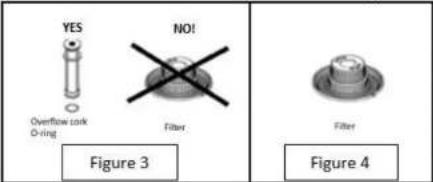 |
| Cleaning products | |
| The detergent and rinse aid dispensers are standard.(Please refer to user manual for details on the adjustment and operation of the dispensers)THE DETERGENT SHOULD BE INDUSTRIAL, HIGH TEMPERATURE, NON-FOAMING LIQUID DETERGENT |
Quick guide
EN
 | Fig.1 |
| GT-OEM-350 & GT-OEM-400 SERIES | |
| Operations Drainage and cleaning | |
Filling and heating1. Close the door, push button (1). The led inside the button (1) will light.2. Wait until the machine reaches the correct operating conditions. The rinse temperature (3) must be at least 85°C and the tank temperature (4) should be at least 55°C.Wash1. Remove scraps from tableware before inserting plates in the dishwasher.2. Open door, insert tableware, close door.3. Select cycle by pressing button (5), (6) or (7). The leds inside the cycle start button, indicate the machine is running.4. Repeat process when cycle ends.5. In GM-OEM-400 models without soft version, button (7) has double function.Hold it down to obtain cold rinsing. | Drainage1. While the machine is turned on, open the door.2. Remove the overflow (Fig. 3).DO NOT REMOVE THE FILTER OR LOSE THE O-RING3. Close the door, push the button (2) for 3 seconds to run draining. The led light inside the button (2) starts blinking4. Wait until the (2) button led light off.5. Omit steps 3 & 4 in models with gravity drainage6. Push button (1) to switch off the machine and close the door.Regeneration1. Regeneration cycle in SOFT models has to be done after the draining cycle. Machine must be empty.2. If the Led light (2) is on, fill the can of salts inside the machine3. Open the door.4. Push button (6) during 3 seconds.5. Once the led light inside the button (6) starts blinking, close the door.6. Wait until the (6) button led light off.7. Clean internal part of machineCleaning1. Open the door, remove over flow cork (Fig. 3) and the filter (4).2. Clean and dry the machine with a soft cloth. Leave the door open until next day or next strat-up.Descalling1. Insert descaler in the tub and run as many cycles as necessary.(Please see user manual for further details of this operations) |
| Cleaning products | |
| The detergent and rinse aid dispensers are standard.(Please refer to user manual for details on the adjustment and operation of the dispensers)THE DETERGENT SHOULD BE INDUSTRIAL, HIGH TEMPERATURE, NON-FOAMING LIQUID DETERGENT |
1. INDEX
- INDEX 42
- GENERAL INFORMATION AND WARNINGS.... 43
- PRODUCT DETAILS 44
3.1 General specifications 44
3.2 Specific characteristics 44
- INSTALLATION INSTRUCTIONS 45
4.1 Removal of packaging 45
4.2 Positioning and levelling 45
4.3 Electrical connection....45
4.3.1 Electrical specifications of the installation 46
4.4 Hydraulic connection 46
4.5 Drainage connection.... 47
4.6 Mechanical rinse aid dispenser 47
4.7 Detergent dispenser (Optional.... 47
4.8 Recycling 48
- USE AND MAINTENANCE INSTRUCTIONS 49
5.1 Operation 49
5.1.1 Control panel symbols Fig. 7 49
5.1.2 Control panel symbols Fig. 8....49
5.1.3 Control panel symbols Fig. 9 49
5.1.4 Switching on the machine.... 49
5.1.5 Filling and heating.... 50
5.1.6 Preparation of the dishes.... 50
5.1.7 Selecting the wash cycle 50
5.1.8 Thermo-stop.... 50
5.1.9 Stopping the wash cycle and end of wash cycle 50
5.1.10 Cold rinse (only OEM-400 MOD. and versions) 51
5.1.11 Drainage of the machine.... 51
5.1.12 Regeneration cycle (only SOFT models).... 51
5.1.13 Switching off the machine.... 51
5.1.14 Cleaning the machine at the end of the day 52
5.2 Useful tips 52
5.2.1 Maintenance 52
5.2.2 Rinse aid and detergent.... 52
5.2.3 Hygiene regulations....52
5.2.4 Optimum results.... 52
5.2.5 Prolonged non use.... 52
- FAULTS, ALARMS AND BREAKDOWNS 53
6.1 Error diagnosis (Fig.8) 54 - RECYCLING THE PRODUCT....54
2. GENERAL INFORMATION AND WARNINGS
This manual has been created to help you understand the operation, installation and maintenance of the machine. It contains all the necessary information and warnings to ensure that the appliance is installed and used correctly, together with information about the characteristics and possibilities offered, so that you may enjoy your machine to the full.

BEFORE STARTING THE APPLIANCE, PLEASE READ THE INSTRUCTIONS CONTAINED IN THIS MANUAL CAREFULLY.
The manual should be kept safely to hand for future reference.
If the machine is sold or transferred, please pass the manual to the new user.

THIS APPLIANCE IS EXCLUSIVELY FOR PROFESSIONAL USE, AND SHOULD ONLY BE USED BY QUALIFIED PERSONNEL.
- The choice of materials, construction in conformity with CE safety directives (2014/35/EC-Low Voltage Directive, 2014/30/EC-EMC Directive, 2006/42/EC-Machinery Directive, 2011/65/EU-RoHS2) and complete testing ensure the quality of this machine. In addition to this manual, you will find in the machine: wiring diagram and topographic table.
- The positioning and installation, and all repairs or modifications, should always be carried out by an AUTHORISED TECHNICIAN, in accordance with the applicable legislation of the country. The manufacturer does not accept liability if the machine is incorrectly installed.
- The installation, incorrect adjustment, inappropriate maintenance or use of the appliance may cause material damages and injuries.
- The glasswasher should be correctly levelled and care taken to ensure that none of the electric cables, water or drainage hoses are trapped or kinked.
- DO NOT climb on top of the dishwasher or place heavy objects on top of the machine as it has only been designed to bear the weight of the basket of plates to be washed.
- This glass washer is designed to wash saucers, glasses and similar tableware containing food and drink waste. Any other use will be considered inadequate. Objects other than those described above, or objects contaminated with petrol, paint, steel or iron shavings, fragile objects or those which are not dishwasher-resistant must NOT be washed in the dishwasher.

- If your machine breaks down, please call the Technical Service Centre.
- Unqualified or unauthorised personnel must NOT try to repair the machine.
- Use of spare parts other than original parts will cancel the guarantee.
- During all maintenance operations, the dishwasher must be disconnected from the main power supply at the mains power switch, and the water intake tap must be closed.
- Abrasive or corrosive products, acids, solvents and chlorine-based detergents must NOT be used to clean the appliance, as this may damage the components.
- This appliance has been designed for use in ambient temperatures between 5^ and 40^ .
- Only the baskets, soaps and rinse aids recommended by the manufacturer should be used.

FAILURE TO COMPLY WITH THESE INSTRUCTIONS OR THE INCORRECT USE OF THE APPLIANCE SHALL RELIEVE THE MANUFACTURER OF ANY OBLIGATIONS REGARDING THE GUARANTEE OR POSSIBLE CLAIMS.
EN
3. PRODUCT DETAILS
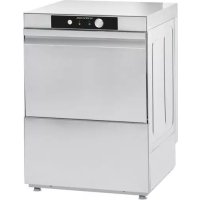
The machine which you have just purchased is specially designed for cleaning tableware, glassware and other items of kitchenware, used in the hotel and catering sector. As it is an industrial product, it is characterised for having a high dishwashing capacity.
All the appliances have a specifications plate which identifies the appliance and indicates its technical characteristics, it is located on one side of the machine. Don't remove the specifications plate from the unit.
SPECIFICATIONS PLATE
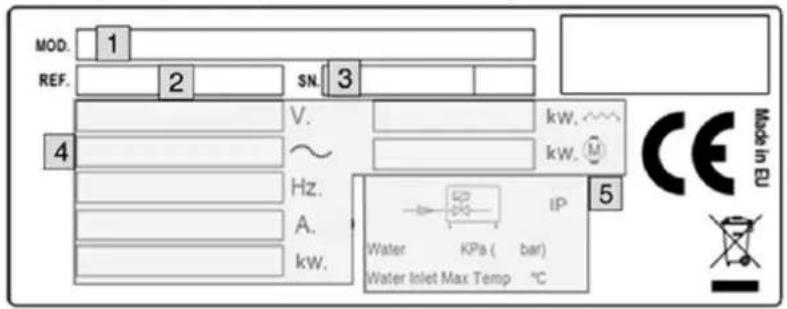
1: APPLIANCE MODEL NAME
2: APPLIANCE REFERENCE
3: SERIAL NUMBER + MANUFACTURE DATE
4: ELECTRICAL SPECIFICATIONS
5: WATER INLET SPECIFICATIONS
These details should be quoted when the technical service is called.
3.1 General specifications
| MOD. OPTIONS | VOLTAGE SUPPLY | BOILER TANK | WATER CONS.(l/cycle) | SOUND LEVEL | ||||||
| Cap. | Temp. | Pow.(W) Cap. | Temp. | Pow.(W) | ||||||
| G-OEM-350 | (B/DD/SA/UK) | 230V 1N 50Hz | 5 l 85°C | 2400 11 l | 15 l 2 | 60°C 2000 | 2 | 65 dBA | ||
| GM-OEM-350 | 230V 1N 50/60Hz | |||||||||
| GT-OEM-350 | ||||||||||
| G-OEM-400 | (SOFT/B/DD/SA) | 230V 1N 50Hz | 2800 | 15 l 2 | 5 | |||||
| GM-OEM-400 | 230V 1N 50/60Hz | |||||||||
| GT-OEM-400 | ||||||||||
| G-OEM-400 | (SOFT/B/DD/SA) UK | 230V 1N 50Hz | 2400 | |||||||
| GM-OEM-400 | 230V 1N 50/60Hz | |||||||||
| GT-OEM-400 | ||||||||||
3.2 Specific characteristics
| MOD. | WASH CYCLES | COLD RINSE | DRAINAGE PUMP | DETERG. DOSE | SOFTENER | THERMO STOP | WASH CAPACITY (baskets/h) | |
| N° | WASH CYCLES (s) | |||||||
| G-OEM-350 | 1 120 | - | -- | - | NO | 30 | ||
| G-OEM-350 B | YES | - | - | |||||
| G-OEM-350 DD | - | YES | - | |||||
| G-OEM-350 SA | -- | - | ||||||
| G-OEM-350 UK | -- | - | ||||||
| G-OEM-400 | YES | -- | - | |||||
| G-OEM-400 B | YES | - | - | |||||
| G-OEM-400 DD | - | YES | - | |||||
| G-OEM-400 SA | -- | - | ||||||
| G-OEM-400 UK | -- | - | ||||||
| G(M/T)-OEM-350 | 3 | 90120180 | - | -- | - | YES | 40 | |
| G(M/T)-OEM-350 B | YES | - | - | |||||
| G(M/T)-OEM-350 DD | - | YES | - | |||||
| G(M/T)-OEM-350 SA | -- | - | ||||||
| G(M/T)-OEM-350 UK | -- | - | ||||||
| G(M/T)-OEM-400 | YES | -- | - | |||||
| G(M/T)-OEM-400 B | YES | - | - | |||||
| G(M/T)-OEM-400 DD | - | YES | - | |||||
| G(M/T)-OEM-400 SA | -- | - | ||||||
| G(M/T)-OEM-400 UK | -- | - | ||||||
| G(M/T)-OEM-400 SOFT | NO | -- | YES | |||||
4. INSTALLATION INSTRUCTIONS

The positioning and installation, and all repairs or modifications, should always be carried out by an AUTHORISED TECHNICIAN, in accordance with the applicable legislation of the country.
The installation, incorrect adjustment, inappropriate maintenance or use of the appliance may cause material damages and injuries.
4.1 Removal of packaging
Remove packaging from the machine and check for damage during transportation. If any damage is observed, immediately notify the supplier and the transport company. In the event of doubt, do not use the machine until the problem has been assessed.

Packaging (plastic, expanded polyurethane, staples, etc...) must not be left in the reach of children, they are a potential hazard.
The machine should be moved using a fork-lift truck or similar to avoid damage to the structure.
Transport the machine to the installation location and then remove packaging.
All the packaging can be recycled. Dispose of packaging correctly.
4.2 Positioning and levelling
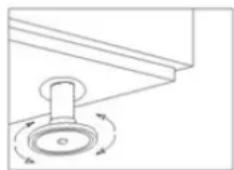
This appliance has adjustable feet to allow it to be adjusted to the correct height, this is done by turning the foot to the desired height. For optimum operation, it is essential that the machine is correctly levelled. The flooring on which the machine is to be installed must be able to bear the full weight of the machine.
Inspect final location of the machine prior to installation to prevent damage during use.
natural_image
Simple line drawing of a mechanical component with rotational arrows indicating motion (no text or symbols)4.3 Electrical connection
An AUTHORISED TECHNICIAN should always carry out the appliance's electrical connection.
The legal standards in force in each country regarding connection to the mains should be taken into account.

- Check that the mains voltage corresponds to that indicated on the nameplate.
- The electric cable should be flexible, with an oil-proof covering, and it should not weigh less than the cable in an ordinary sleeve made of standard polychloroprene or an equivalent synthetic elastomer (H07RN-F).
- The cross-section of the power cable must be suitable for the rated current of the machine.
- An easily accessible switch device should be installed next to the appliance for all the phases, with a minimum gap of 3 mm between contacts. This switch should be used to disconnect the appliance during installation, repair, cleaning and maintenance work. The switch should have fuses suitable for use with the rated current (A) of the machine. Alternatively, a suitable magneto-thermal switch may be used.
- The appliance must be earthed using a differential protector. The manufacturer will not be held liable for damage originated by failure to observe this requirement.
- If any faults are observed during the installation, the supplier should be notified immediately.

The manufacturer will not be held liable for any personal or material damage to the machine resulting from incorrect installation or failure to comply with the manufacturer's specifications.
4.3.1 Electrical specifications of the installation
| MOD. OPTIONS | SUPPLY VOLTAGE | MAX ELECTRIC POWER | AMP. | NET WEIGHT | |
| G-OEM-350 | (B/DD/SA/UK) | 230V 1N~ 50Hz | 2,7kW | 11.6 A | 34 kg |
| GM-OEM-350 | 230V 1N~ 50/60Hz | ||||
| GT-OEM-350 | |||||
| G-OEM-400 UK | (SOFT/B/DD/SA) | 230V 1N~ 50Hz | 41 kg | ||
| GM-OEM-400 UK | 230V 1N~ 50/60Hz | ||||
| GT-OEM-400 UK | |||||
| G-OEM-400 | (SOFT/B/DD/SA) | 230V 1N~ 50Hz | 3,1 kW 13,3 A | ||
| GM-OEM-400 | 230V 1N~ 50/60Hz | ||||
| GT-OEM-400 | |||||
4.4 Hydraulic connection
The new hoses supplied with the appliance should be used (do not reuse old hoses).
Before connecting the machine to the water supply, the water quality should be tested.
Recommended water quality:
| Water temperature (T): max. | 60 °C | Total water hardness: | 5 – 10 °fH (French degrees) |
| pH: 6.5 - 7.5 | 7 – 14 °eH (English degrees) | ||
| Impurities: ∅ < 0.08 mm | 9 – 18 °dH (German degrees) | ||
| Chlorides: max. 150 mg/l Conductivity: 400 - 1,000 μS/cm | |||
| Cl: 0.2 - 0.5 mg/l | |||
If the water hardness is more than 10 ^ (French degrees), a descaler must be installed.
In addition to water quality, the pressure of the mains water supply must be considered. This is important to ensure the machine operates correctly.
Required water pressure:
| Min. | Max. | |||||||
| DYNAMIC PRESSURE | bar | kPa | kg/cm^2 | psi | bar | kPa | kg/cm^2 | psi |
| 2 | 200 | 2,03 | 29 | 4 | 400 | 4,07 | 58,01 | |
If the water pressure is higher than the recommended pressure, a pressure regulator must be mounted at the output Fig. 2. If the mains water pressure is lower than the recommended pressure, a pressure pump should be mounted at the mains water supply Fig. 3.
Fig. 2. Direct connection of water input hose.
Fig. 3. Pressure pump connection.
S → SHUT-OFF COCK F → FILTER H → WATER HOSE ^3
E → ELECTROVALVE B → ELECTRIC PRESSURE PUMP
The following requirements are necessary for the correct hydraulic installation of the machine.
- The hydraulic circuit must be fitted with a valve to shut-off the water supply.
- Check that the mains pressure is within the range indicated above.
- To optimise the working of the machine, the manufacturer recommends that the water temperature at the machine intake is within the following range.
| Cold H_2O | Hot H_2O |
| 5^ < T^a < 35^ / 41^ < T^a < 95^ | 50^ < T^a ≤ 60^ / 122^ < T^a < 140^ |
• If using hot water, the water temperature must not exceed 60 ^ / 140 ^ .
- All the machines should have a 3/4 screw-on connection.

Non-compliance of these recommendations can seriously damage the machine, and may also cause damage to the user
UK Only
IRN R160: A compliant double check valve or some other no less effective device providing backflow prevention protection to at least fluid category three shall be fitted at the point of connection(s) between the water supply and the fitting or appliance.
4.5 Drainage connection
The water draining from the machine must flow freely and therefore the drainage pipe should be lower than the drainage outlet Fig. 4. If the drainage pipe is not lower, a drainage pump will be required. This must not be mounted at a height of more than 680 mm Fig. 5. In this case, the pump may be requested at the time of purchase or subsequently.
Fig. 4. Drainage installation. ^4
Fig. 5. Installation of drainage at a height using drainage pump.

The drainage pump must only be installed by personnel authorised by the manufacturer, and the manufacturer does not accept liability in the event of incorrect installation.
4.6 Mechanical rinse aid dispenser
Installation: Take the tube located in the back or your machine marked "Rinse Aid" and place inside rinse container.
Tubes are transparent to provide you visible mean that chemicals are being dispensed.
Operation: This dispenser absorbs the rinse aid when it detects a loss in pressure during rinsing. That is, when the filling solenoid valve closes, a vacuum is created that makes the rinse aid dispenser absorb the fluid to which it is connected.
Adjustment: The dispenser should be adjusted when the machine is installed to ensure that the wash is optimised from the start. The setting should be adjusted according to the type of rinse aid and the water hardness. In each rinse cycle, a rinse aid quantity adjustable between 0 and 4.5 cm ^3 is injected, equivalent to a rinse aid displacement in the suction pipe between 0 and 40 cm in length.
For each turn of the adjusting screw, the dosage varies by approx. 4.4 cm in length in the suction pipe (0.5 cm3/turn).
4.7 Detergent dispenser (Optional
Use ONLY Commercial Grade, High Temperature, Low Suds Liquid Detergent. Manufacturer doesn't recommend any specific brand name of chemicals. Contact your local chemical distributor for questions concerning your chemical needs.
Installation: the detergent dispenser input is in the wash tank front part, above the maximum water level.
Take the tube located in the back or your machine marked "Detergent" and place inside detergent container.
This ensures that the correct measure of detergent is supplied to the machine. Fig. 1
Installation: the detergent dispenser input must be in the tub of the machine, above the maximum water level. Please see the electrical circuit diagram for details of the electrical connection. The tub has an opening for the installation of the dispenser, marked with an adhesive label as "DETERGENT CONNEXION".
Operation: the detergent dispenser is activated when the machine is taking water, whether it is in rinse cycle or whether it is filling. Settings: the measure of detergent used should be adjusted when the component is installed to ensure that the wash is optimised from the start. To do this, turn the adjusting screw until the desired amount is reached (turn clockwise to increase and counter-clockwise to reduce the dosage).
It is recommended that the detergent and the dispenser setting are defined by a technician specialised in the use of chemical products to ensure a more efficient wash.
4.8 Recycling
The product packaging consists of:
- A wooden pallet.
- Cardboard.
• A polypropylene band. - Expanded polyethylene.

All the packaging used around the machine can be recycled; The correct disposal of these products will help to protect the environment. For further information regarding the recycling of these products, please refer to the relevant office of the local body. Dispose of these materials in accordance with current legislation.
5. USE AND MAINTENANCE INSTRUCTIONS


BEFORE STARTING THE APPLIANCE, PLEASE READ THE INSTRUCTIONS CONTAINED IN THIS MANUAL CAREFULLY.
THE APPLIANCE IS EXCLUSIVELY FOR PROFESSIONAL USE, AND SHOULD ONLY BE USED BY QUALIFIED PERSONNEL.
5.1 Operation
The steps required to optimise the operation of your dishwasher are shown below, with all the available options.
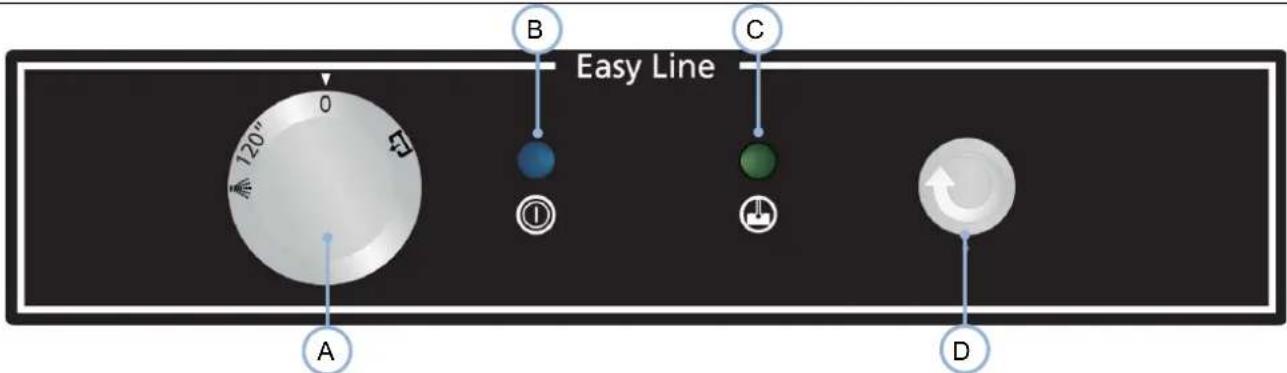
5.1.1 Control panel symbols Fig. 7
| A. Cycle selector button E. Machine OFF | |
| B. Machine on pilot light F. Wash cycle (120s) | |
| C. Machine ready pilot light G. Cold rinse cycle (Mod. | 400) |
| D. Ignition button H. Drainage cycle (Onl Mod. B) |
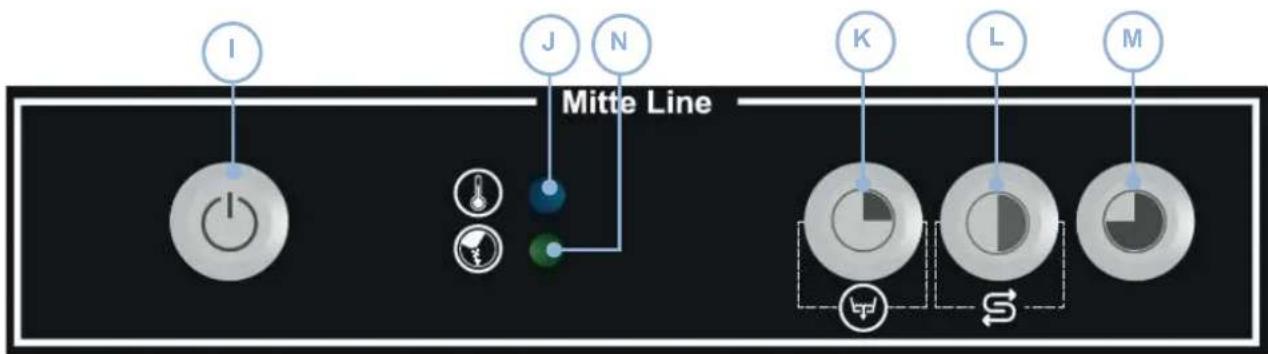
5.1.2 Control panel symbols Fig. 8
| I. Button (ON/OFF) K. Wash Cycle 1 (90 s) / Drainage (Mod. B) |
| J. Machine on pilot light L. Wash Cycle 2 (120 s) / Regeneration (Mod.SOFT) |
| N. Salt need pilot light Mod. SOFT M. Wash Cycle 3 (180 s+ Cold rinsing) |
5.1.3 Control panel symbols Fig. 9
| I. Button (ON/OFF) K. Wash Cycle 1 (90 s) / Drainage (Mod. B) | |
| O. Boiler water temperature display L. Wash Cycle 2 (120 s) / Regeneration (Mod.SOFT) | |
| P. Tank water temperature display M. Wash Cycle 3 (+ Cold rinsing) | |
| Q. Salt need pilot light Mod. SOFT | |
5.1.4 Switching on the machine
Before switching on the machine, check the following:
√ The mains switch must be on.
√ The water stop cock must be open.
√ There must be water in the mains network.
√ The corresponding filters must be in place.
√ The overflow should be mounted in place.
To switch on the machine in the G models (Fig.7), turn the selector switch from 0 to WASH CYCLE. In GM (Fig. 8) & GT (Fig. 9) models, just press the ON/OFF button once for 1.5 seconds.
5.1.5 Filling and heating
When the machine is switched on, it will start to fill. First the rinse boiler is filled and then the wash tub. The filling process may last a few minutes. Once the wash tub is full, the boiler and the tub start to heat up. Although it is possible to start the wash process, this is not recommended as the water inside the machine is not yet at the ideal temperature.
In G (Fig. 7) and GM (Fig.8) models, when machine reaches optimum washing temperature, green led light will light up, while in GT (Fig.9), working temperature can be visualized in the display (O & P).
The temperature in the boiler should be between 82-90 °C and in the tank between 57-62 °C (see figure).

It is recommended to change the water in the dishwasher every 40/50 washes or twice a day.

The door must be closed for the machine to start filling. For safety reasons, if the door is open, the machine will not fill.
The machine you have purchased has a safety thermostat in the boiler and another for the tub, so that in the event of the breakdown of any of the main thermostats, the safety thermostats switch off the corresponding heating.

During the first heating of the day, the boiler may reach a higher temperature than that mentioned above due to heating inertia. This is normal. If pressurised steam is observed coming out of the rinse branch nozzles, while the boiler is heating, the technical service should be notified.
5.1.6 Preparation of the dishes
Before washing the dishes, the preparatory steps below should be followed:
- Remove the largest pieces of waste from the dishes before placing them in the baskets.
- Wash glassware first.
- Put the plates in the rack basket.
- Place the glasses upside down.
- Place the cutlery in the cutlery baskets with the handles downwards. The different pieces of cutlery can be mixed.
- Place the cutlery baskets in the lower baskets.
5.1.7 Selecting the wash cycle
Before starting the wash cycle, place the corresponding basket containing the dishes in the machine and close the door. In G (Fig.7) models a wash cycle must be selected in order to start the wash. Each wash cycle corresponds to a wash time that should be selected according to the user requirements. Then press START and the wash cycle will start automatically.
In the GM (Fig. 8) & GT (Fig. 9) models, to start the wash process, select the wash cycle you wish to run by pressing one of the three cycles. Each wash cycle (90s /120s /180s) corresponds to a wash time that should be selected according to end users needs. Once selected the cycle will run automatically.

The door must be closed for the machine to start the wash cycle. For safety reasons, if the door is open, the wash cycle will not start.
5.1.8 Thermo-stop
GM (Fig. 8) & GT (Fig. 9) models, have the thermo-stop function. The thermo-stop guarantees a constant rinse at a temperature of 85^ . This means that the machine continues washing until the boiler reaches the ideal temperature. Then the rinse cycle starts.
5.1.9 Stopping the wash cycle and end of wash cycle
The wash cycle can be stopped in the following ways:
- By switching off the machine the cycle stops completely.
- By opening the door when the door is closed, the cycle continues.
At the end of the wash cycle, remove the basket and leave the dishes to dry naturally. Remove the dishes from the basket with clean hands, take care not to burn yourself as the dishes are extremely hot.
5.1.10 Cold rinse (only OEM-400 MOD. and versions)
The COLD versions have a cold rinse programme.
In the G (Fig.7) models, to run this programme, keep the cycle selector switch set to cold rinse (D) for the required time. While the switch is held in this position, the machine will run a rinse using cold water from the mains supply.
In the (Fig. 8) & GT (Fig. 9) models, hold the button M once for 3 seconds and the machine will run a rinse using cold water from the mains supply.
5.1.11 Drainage of the machine
The dishwashers have two types of drainage; gravity drainage or using a drainage pump.
5.1.11.1 Drainage by gravity
To drain the machine in this way, just remove the overflow from the machine and it will drain naturally. For reasons of safety, this method of drainage should only be used with the machine switched off.
5.1.11.2 Drainage using the drainage pump (optional)
The drainage using the drainage pump option is only available on request. The drainage pipe must always be fitted on a siphon to prevent the return of odours.
In G (Fig.7) model machine, proceed with the draining as follows:
- Remove the overflow valve.
- Select the drainage function on the selector switch (H).
- Close the door and press the start cycle button (D), the drainage cycle will start automatically.
- At the end of the cycle (approx. 160 s), replace the overflow valve. The machine may be switched off.
In the (Fig. 8) & GT (Fig. 9) models, proceed as follows:
- Remove the overflow valve.
- Open the door and press the button K for 3 seconds and the drainage cycle will start automatically.
- At the end of the cycle, the machine may be switched off.

To drain the machine with the drainage pump, the hose must be at a height (max. 680 mm).
5.1.12 Regeneration cycle (only SOFT models)
In the (Fig. 8) & GT (Fig. 9) models, the dishwasher is fitted with a manual regeneration or descaling system for water with a hardness equal to or greater than 10 °fH . This means that the water entering the machine must be softened. If this system is not fitted, the machine pipes may become blocked due to the build-up of too much limescale.
To ensure that the system operates correctly, proceed as follows:
- Open the door.
- Remove the overflow and wait for the tank to drain.
- When the tank has drained and with the door open, select the regeneration cycle by pressing L for 3 seconds until the pilot light stays on.
- Close the door and the regeneration cycle starts, the pilot light stays on and flashing until the end of the cycle.
- After approximately 20 minutes, the pilot light goes out indicating that the regeneration cycle has finished.
- When the regeneration cycle has finished, open the door and mount the overflow in place.
- Close the door and the machine will start to fill the tank as it is empty.
- Fill the tank with salt every week, closing the cap correctly.

The appearance of streaks of lime on the clean dishes is an indication of the need to urgently run the descaling or regeneration cycle.

It is recommended to clean the inside of the machine once the regeneration cycle has been completed.
5.1.13 Switching off the machine
In the G (Fig.7) models, to switch off the machine, turn the selector to 0.
In the (Fig. 8) & GT (Fig. 9) models, the dishwasher is switched off by pressing the ON/OFF button for 1.5 seconds.
The machine should not be switched off during the wash process as this will stop the tableware inside the machine from being cleaned properly.
5.1.14 Cleaning the machine at the end of the day
At the end of the day, the filters, wash distributors, rinse branches and other accessories must be cleaned. This is necessary to prolong the service life of the machine. To ensure the efficient washing of the dishes, the dishwasher must be perfectly clean and disinfected.
5.2 Useful tips
Read the useful tips listed below carefully to allow you to get the most out of your dishwasher.
5.2.1 Maintenance
Always clean the machine correctly to prolong the service life of the machine.
- Remove any waste from the machine at the end of each day.
- Do not use abrasive, corrosive or acid products, chlorine-based detergents, solvents or petrol derivatives to clean the machine.
- Do not spray off the machine and the immediate vicinity (walls, floors) with a water hose, steam cleaner or pressure washer.
- In order to prevent water from entering into the machine uncontrolledly, make sure that the machine's plinth is not flooded when cleaning the floor.
- Only wash tableware, glassware or kitchenware that has been used for human food.
- Check that the wash distributors rotate correctly every day.
- Check the salt, rinse aid and detergent levels at the start of each day.
- Call the technical service twice a year to have the machine serviced:
○ Cleaning of water filter. - Cleaning of limescale on the resistors.
○ Inspection of the condition of the seals. - Inspection of the condition of the parts.
○ Adjustment of the dispensers. - Tightening of the electrical connections on the terminals.
- If the power cable is damaged, it must be replaced by the manufacturer, after-sales service or authorised technical personnel in order to prevent risks.
5.2.2 Rinse aid and detergent
If you change the rinse aid or detergent, the settings should be adjusted accordingly. This adjustment must be carried out by qualified personnel. Only use detergents suitable for industrial dishwashers. Do not use foam-producing detergents. Detergents designed for domestic use should not be used under any circumstances.

When handling chemical substances, the safety instructions must be observed. Use suitable protective clothing, gloves and safety goggles when handling chemical substances. Do not mix different detergents.
5.2.3 Hygiene regulations
- Do not touch clean dishes with dirty or greasy hands.
- Use clean sterilised cloths to thoroughly dry the dishes.
- We recommend you wait until the machine reaches the correct wash temperature as this will ensure a more thorough disinfection and wash.
- Drain the wash tub at least twice a day or every 40/50 wash cycles.
5.2.4 Optimum results
To obtain optimum dishwashing results, the manufacturer recommends you proceed as follows:
- Wash the dishes when the machine is ready.
• Always ensure the different dispensers are correctly adjusted. - Keep the dishwasher thoroughly clean.
5.2.5 Prolonged non use
If the machine is kept out of service for a long period of time (holidays, temporary closure...), please observe the following:
- Drain the machine completely, including the boiler.
- Clean the machine thoroughly.
- Leave the door of the machine open.
- Close the water intake valve.
- Switch off the mains power supply.
- If there is a risk of frosts, ask your technical service to protect the machine against frosts.
6. FAULTS, ALARMS AND BREAKDOWNS
The steps to be followed in the event of a fault or operating error are described below. The possible causes and possible solutions are listed in the following table. In the event of doubt, or if you are unable to resolve the problem, please contact the technical service.

Do not handle electrical components, as there is a risk of death as the components are live.
| FAULT POSSIBLE CAUSE | SOLUTION | |
| The machine does not come on. | There is no power supply. | Check whether the magneto-thermal circuit breaker has been triggered. |
| The fuses have blown. Call the technical service to analyse the reason why. | ||
| Main switch open. Close switch. | ||
| The machine does not fill with water. | Water entrance valve closed. Open the water valve. | |
| Rinse nozzles blocked. | Clean nozzles and check branches for build-up of lime. | |
| Solenoid valve filter blocked. Call the technical service to clean the filter. | ||
| Pressostat is broken. | Call the technical service to replace the pressure switch. | |
| Unsatisfactory wash. | Wash distributors obstructed. Clean distributors thoroughly. | |
| Shortage of detergent. Call the technical service to reset the dispenser. | ||
| Dirty filters. Clean the filters thoroughly. | ||
| Presence of foam. | Unsuitable detergent. Call the technical service to supply correct detergent. | |
| Too much rinse aid. Call the technical service to reset the dispenser. | ||
| Temperature of lower tub at 50 °C / 122 °F. | Thermostat faulty or incorrectly set. Call the technical service to repair it. | |
| Length of cycle too short for level of dirt on dishes. | Select a longer cycle. | |
| Water too dirty. Drain the wash tub and fill with clean water. | ||
| Dishes and kitchenware are not dry. | There is no rinse aid Fill the rinse aid container. | |
| Rinse aid low. Call technical service to adjust dispenser. | ||
| Dishes left inside dishwasher for too long. | When the dishwasher finishes, remove the basket from the machine and allow to dry naturally. | |
| Rinse temperature lower than 80 °C / 176 °F. | Call technical service to analyse problem. | |
| Scratches or stains on dishes. | Too much rinse aid. Call technical service to adjust rinse aid dispenser. | |
| Water too chalky. | Check water hardness and if possible run regeneration cycle immediately. | |
| Not enough salt in salt deposit. | Fill salt deposit where applicable. | |
| Traces of salt in tub. | When filling the salt deposit, take care not to spill salt in the tub. | |
EN
| Machine stops during operation. | Electrical installation overloaded. | Call technical service to modify electrical installation. |
| Machine protection has tripped. | Reset safety device and if it trips again, call technical service. | |
| Machine stops and fills with water when it is washing. | Pressure switch pipe blocked. | Empty the tub and clean thoroughly. |
| Pressure switch faulty. Call the technical service to replace it. | ||
| Overflow incorrectly mounted. | Mount overflow correctly. | |
| The machine does not start with the wash cycle. | Door is not closed properly. | Close the door correctly and if it is seen to re-open alone, call the technical services to adjust the tensioneers. |
| Door micro switch faulty. Call the technical service to replace it. | ||
| Machine does not drain completely. | Machine not levelled correctly. | Level the machine In the event of doubt, please contact your technical service. |
| Pressure switch faulty. | Call the technical service to replace the pressure switch. | |

NOTE: If a fault occurs and is not listed in the above table, please call the technical service. The manufacturer reserves the right to modify the technical characteristics with prior warning.
6.1 Error diagnosis (Fig.8)
| ERROR | DESCRIPTION CONSEQUENCE | |
| E1 | OPEN DOOR | The ON/OFF LED lights up for 0.5 seconds and then remains unlit for 2 seconds before lighting up again. This continues as long as the door is open and the selected cycle is unfinished. |
| E2 | TANK FILL | The ON/OFF LED light up twice for 0.5 seconds each time and then remains unlit for 2 seconds, then lighting up again twice. This continues while the water in the tank does not reach the correct level in the specified time. |
| E3 | TANK DRAINAGE | The ON/OFF LED lights up three times for 0.5 seconds each time and then remains unlit for 2 seconds, then lighting up again three times. This continues while the drainage pump does not drain the water in the tank to the correct level in the specified time. |
| E4 | BOILER HEATING | The ON/OFF LED lights up four times for 0.5 seconds each time and then remains unlit for 2 seconds, then lighting up again four times. This continues while the water in the boiler does not reach the correct temperature in the specified time. |
| E5 | TANK HEATING | The ON/OFF LED lights up five times for 0.5 seconds each time and then remains unlit for 2 seconds, then lighting up again five times. This continues while the water in the tank does not reach the correct temperature in the specified time. |
7. RECYCLING THE PRODUCT

The European Directive 2012/19/EU relating to Waste Electrical and Electronic Equipment (WEEE) states that household appliances should not be disposed of using the normal solid urban waste cycle. Exhausted appliances should be collected separately in order to optimise the cost of re-using and recycling the materials inside the machine, while preventing potential damage to the atmosphere and to public health. The crossed-out dustbin is marked on all products to remind the owner of their obligations regarding separated waste collection. For more information relating to the correct disposal of household appliances, owners should contact their local authorities or appliance dealer.
Kurzanleitung
G-OEM-350 & G-OEM-400 SERIES
Entleeren
Entleeren
- INSTALLATIONSANWEISUNG....61
Scarico
Scarico
natural_image
Simple line drawing of a mechanical component with rotational arrows indicating motion (no text or symbols)E → ELETTROVALVOLA B → ELETTROPOMPA A PRESSIONE
DETERGENT POWINNY BYĆ PŁYNNY, PRZEMYSŁOWY, WYSOKOTEMPERATUROWY I NIEPALNY
Rys.1

Drenaż
DETERGENT POWINNY BYĆ PŁYNNY, PRZEMYSŁOWY, WYSOKOTEMPERATUROWY I NIEPALNY
Rys.1
Drenaž
DETERGENT POWINNY BYĆ PŁYNNY, PRZEMYSŁOWY, WYSOKOTEMPERATUROWY I NIEPALNY

Drenaż
natural_image
Simple line drawing of a mechanical component with rotational arrows indicating motion (no text or symbols)Drainage
NL
Snelgids
GM-OEM-350 & GM-OEM-400 SERIE
Bewerkingen Drainage en reiniging
Vullen en verwarmen
NL
Snelgids
GT-OEM-350 & GT-OEM-400 SERIE
Bewerkingen Drainage en reiniging
Vullen en verwarmen
Drainage
1. INHOUDSOPGAVE
- INHOUDSOPGAVE 107
- ALGEMENE INFORMATIE EN WAARSCHUWINGEN 108
- PRODUCTBESCHRIJVING 109
3.1 Algemene technische gegevens.... 109
3.2 Specifieke kenmerken 109
- INSTRUCTIES VOOR INSTALLATIE 110
2. ALGEMENE INFORMATIE EN WAARSCHUWINGEN
3. PRODUCTBESCHRIJVING
1: MODELNAAM APPARAAT
2: APPARAATREFERENTIE
3: SERIENUMMER + FABRICAGEDATUM
4: ELEKTRISCHE SPECIFICATIES
5: WATERINLAAT SPECIFICATIES
natural_image
Simple line drawing of a mechanical component with rotational arrows indicating motion (no text or symbols)| Koud H_2O | Warm H_2O |
| 5^ < T < 35^ / 41^ < T < 95^ | 50^ < T ≤ 60^ / 122^ < T < 140^ |
Fig.1
Tömning
SW
Snabbguide
GT-OEM-350-SERIEN OCH GT-OEM-400-SERIEN
Tömning
1. INNEHÅLL
- INNEHÅLL 123
- ALLMÄN INFORMATION OCH VARNINGAR.... 124
- PRODUKTINFORMATION 125
natural_image
Pure mechanical diagram showing a rotating component with rotational arrows, no text or symbols present4.3 Elektrisk anslutning
Чистящие вещества
Слив
RU
Рис.1
Слив
1: НАЗВАНИЕ МОДЕЛИ
2: АРТИКУЛ МОДЕЛИ
Dræning
Fig.1
Dræning
Dræning
natural_image
Simple line drawing of a mechanical component with rotational arrows indicating motion (no text or symbols)4.3 Elektrisk tilslutning


- Vaciado
- Notas:
- RECICLAJE DEL PRODUCTO
- Vidange
- Guide rapide
- GM-OEM-350 & GM-OEM-400 SERIES
- GT-OEM-350 & GT-OEM-400 SERIES
- DONNÉES DU PRODUIT
- RECYCLAGE DU PRODUIT
- Quick guide
- INDEX
- GENERAL INFORMATION AND WARNINGS
- BEFORE STARTING THE APPLIANCE, PLEASE READ THE INSTRUCTIONS CONTAINED IN THIS MANUAL CAREFULLY.
- THIS APPLIANCE IS EXCLUSIVELY FOR PROFESSIONAL USE, AND SHOULD ONLY BE USED BY QUALIFIED PERSONNEL.
- FAILURE TO COMPLY WITH THESE INSTRUCTIONS OR THE INCORRECT USE OF THE APPLIANCE SHALL RELIEVE THE MANUFACTURER OF ANY OBLIGATIONS REGARDING THE GUARANTEE OR POSSIBLE CLAIMS.
- PRODUCT DETAILS
- General specifications
- Specific characteristics
- INSTALLATION INSTRUCTIONS
- Removal of packaging
- Positioning and levelling
- Electrical connection
- Hydraulic connection
- UK Only
- Drainage connection
- Mechanical rinse aid dispenser
- Detergent dispenser (Optional
- Recycling
- USE AND MAINTENANCE INSTRUCTIONS
- THE APPLIANCE IS EXCLUSIVELY FOR PROFESSIONAL USE, AND SHOULD ONLY BE USED BY QUALIFIED PERSONNEL.
- Operation
- Control panel symbols Fig. 7
- Control panel symbols Fig. 8
- Control panel symbols Fig. 9
- Switching on the machine
- Filling and heating
- Preparation of the dishes
- Selecting the wash cycle
- Thermo-stop
- Stopping the wash cycle and end of wash cycle
- Cold rinse (only OEM-400 MOD. and versions)
- Drainage of the machine
- Drainage by gravity
- Drainage using the drainage pump (optional)
- Regeneration cycle (only SOFT models)
- Switching off the machine
- Cleaning the machine at the end of the day
- Useful tips
- Maintenance
- Rinse aid and detergent
- Hygiene regulations
- Optimum results
- Prolonged non use
- FAULTS, ALARMS AND BREAKDOWNS
- Error diagnosis (Fig.8)
- RECYCLING THE PRODUCT
- Kurzanleitung
- G-OEM-350 & G-OEM-400 SERIES
- Entleeren
- Scarico
- Drenaż
- Drenaž
- Drainage
- Snelgids
- GM-OEM-350 & GM-OEM-400 SERIE
- Bewerkingen Drainage en reiniging
- Vullen en verwarmen
- GT-OEM-350 & GT-OEM-400 SERIE
- INHOUDSOPGAVE
- ALGEMENE INFORMATIE EN WAARSCHUWINGEN
- PRODUCTBESCHRIJVING
- Tömning
- Snabbguide
- GT-OEM-350-SERIEN OCH GT-OEM-400-SERIEN
- INNEHÅLL
- Elektrisk anslutning
- Чистящие вещества
- Слив
- Dræning
- Elektrisk tilslutning
Brand : Scancool
Model : GD400BDD
Category : Dishwasher