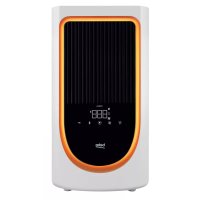
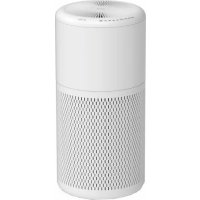
ATP5500N - Air purifier BEKO - Free user manual and instructions
Find the device manual for free ATP5500N BEKO in PDF.



| Product Type | Air Purifier |
| Brand | Beko |
| Model | ATP5500N |
| Rated Power | 36 W |
| Input Voltage | 100-240 V~ |
| Frequency | 50/60 Hz |
| Filter Type | HEPA 13 + activated carbon (2 in 1) |
| Filter Efficiency | 99.97% of particles 0.3 µm |
| Air Quality Sensor | PM2.5 |
| Fan Speeds | 4 levels: sleep, low, medium, high |
| Operating Modes | Normal, Sleep, Night |
| Ionizer | Yes, built-in |
| Bluetooth | Yes, name: Beko_ATP5500N |
| Wireless Charger | Yes, Qi compatible |
| Night Light | Yes, switchable |
| Aromatherapy | Yes, with removable aroma box |
| Pre-filter | Washable (back cover) |
| Maintenance | Exterior: damp cloth; cover: washable; HEPA filter: not washable |
| Safety | Shutdown if cover open; child protection (children over 8 years under supervision) |
| Compliance | WEEE, RoHS, CE |
| Power Supply | AC adapter 12 V DC, 3 A |
| Importer France | BEKO France, La Plaine Saint-Denis |
Frequently Asked Questions - ATP5500N BEKO
User questions about ATP5500N BEKO
0 question about this device. Answer the ones you know or ask your own.
Ask a new question about this device
Download the instructions for your Air purifier in PDF format for free! Find your manual ATP5500N - BEKO and take your electronic device back in hand. On this page are published all the documents necessary for the use of your device. ATP5500N by BEKO.
USER MANUAL ATP5500N BEKO
EN-DE-FR-IT-RO-NL-PL-CZ
CONTENTS
ENGLISH04-16
DEUTSCH17-31
FRANÇAIS32-47
ITALIANO48-63
ROMÂNĂ 64-80
NEDERLANDS81-95
POLSKI96-110
ČEŠTINA 111-128
Please read this user manual first!
Dear Valued Customer,
Thank you for preferring this Beko appliance. We hope that you get the best results from your appliance which has been manufactured with high quality and state-of-the-art technology. For this reason, please read this entire user manual and all other accompanying documents carefully before using the appliance and keep it as a reference for future use. If you hand over the appliance to someone else, give the user manual as well. Follow the instructions by paying attention to all the information and warnings in the user manual.
Remember that this user manual may also apply to other models. Differences between models are explicitly described in the manual.
Meanings of the Symbols
Following symbols are used in various sections of this user manual:

Important information and useful hints about usage.

WARNING: Warnings against dangerous situations concerning the security of life and property.

This product has been manufactured at modern facilities respectful to the environment without harming nature.
1 Important safety and environmental instructions

NOTE: Before reading these instructions, please view the corresponding illustrations. (fig.1/Page7)

NOTE: Carefully read and retain all instructions before using the air purifier.
1.1 General Safety
- Check if the voltage indicated on the appliance corresponding to the local mains voltage before you connect the appliance.
- The appliance is only to be used with the power supply unit provided with the appliance.
- To avoid fire hazard, never put the cord under rugs, or near any heat source.
- Carefully discard any plastic wrapping that was used for the packaging.
- Do not use the air purifier outside.
- Do not place the unit near any heat source or in direct sunlight.
- Always unplug the air purifier before removing the grill, changing the filters, cleaning the air purifier or whenever it is not in use.
- Do not use in or around water or any other liquids. Do not attempt to wash the unit under running water.
- Use appliance only for intended house hold use as described in this manual.
- Ensure that all air openings are not restricted or covered in any way.
- Do not place anything on top of the unit.
- Never insert any object into any openings.
- Do not use the air purifier if any part is missing or damaged in any way.
- Do not attempt to repair or adjust any mechanical functions of this unit. If the unit becomes damaged call the service number on the back of this manual.
- If the supply cord is damaged, it must be replaced by the manufacturer, its service agent or similarly qualified persons in order to avoid a hazard.
- The air purifier contains no user serviceable parts and should the product suffer damage or breakdown call the service number on the back of this manual.
- Should the air purifier stop working, first check the fuse/circuit breaker at the distribution board is operating, before contacting the place of purchase.
- This appliance is not intended for use by persons (including children) with reduced physical, sensory or mental capabilities, or lack of experience and knowledge, unless they have been given super-vision or instruction concerning use of the appliance by a person responsible for their safety.
•Children should be supervised to
1 Important safety and environmental instructions
ensure that they do not play with the appliance. This appliance can be used by children aged from 8 years and above and persons with reduced physical, sensory or mental capabilities or lack of experience and knowledge if they have been given supervision or instruction concerning use of the appliance in a safe way and understand the hazards involved. Children shall not play with the appliance. Cleaning and user maintenance shall not be made by children without supervision
- This appliance is intended to be used in household and similar applications such as:
- Staff kitchen areas in shops, offices and other working environments;
- Farm houses;
- By clients in hotels, motels and other residential type environments;
- Bed and breakfast type environments.
- Save these instructions
CAUTION: To prevent risk of electric shock, remove cord plug from outlet before activating the appliance. To prevent risk of fire, inspect and clean equipment regularly as noted in this manual.
- If the supply cord is damaged, it must be replaced by the manufacturer, its service agent or similarly qualified persons in order to avoid a hazard.
1.2 Compliance with the WEEE Directive and Disposing of the Waste Product:
This product complies with EU WEEE Directive (2012/19/EU). This product bears a classification symbol for waste electrical and electronic equipment (WEEE).
This symbol indicates that this product shall not be disposed with other household wastes at the end of its service life.
Used device must be returned to official collection point for recycling of electrical and electronic devices. To find these collection systems please contact to your local authorities or retailer where the product was purchased. Each house hold performs important role in recovering and recycling of old appliance. Appropriate disposal of used appliance helps prevent potential negative consequences for the environment and human health.
1.3 Compliance with RoHS Directive
The product you have purchased complies with EU RoHS Directive (2011/65/EU). It does not contain harmful and prohibited materials specified in the Directive.
1 Important safety and environmental instructions
1.4 Package Information

Packaging materials of the product are manufactured from recyclable materials in accordance with our National Environment Regulations. Do not dispose of the packaging materials together with the domestic or other wastes. Take them to the packaging material collection points designated by the local authorities.
1.5 Cleaning And Maintenance
- Turn the air purifier off and unplug it before cleaning.
- The outside of the air purifier can be cleaned with a soft, clean dampened cloth.
- The air outlet and air inlet grill can be cleaned of dust with a small, soft brush.
- If you wish to clean the inside of the air purifier, please only use a dry, soft cloth to wipe it down.
- Wash the back cover by following the operation described in the section of "VACUUM OR WASH THE BACK COVER."
- Do not wash the HEPA filter.

WARNING!
Do not allow moisture to come in contact with the body of the air purifier.
1.6 Vacuum or Wash Back cover with Pre-filter
Occasionally vacuum the back cover with pre-filter to remove dust. Always unplug the unit before removing the back cover.
- Carefully open the back cover.
- Remove the back cover from body
- Washing the back cover.
- After the back cover with pre-filter is cleaned well and dried cover the back cover.
1.7 Conformity declaration for CE
| Frequency Band | 2.400-2484 GHz |
| Maks. Transmission Power | < 100 mW |
| Arcelik A.S. hereby declares that this appliance complies with Directive 2014/53/EU. The complete text of the EU declaration of conformity is available in the following internet address: — Products, from : support.beko.com | |
2 How The Air Purifier Works
The air purifier removes up to 99.97% of airborne allergens as small as 0.3 microns, including ragweed pollen, grass pollen, tree pollen, household dust, dust mite debris, pet dander, smoke and odour from the air passing through the filter.
3 Know Your Air Purifier
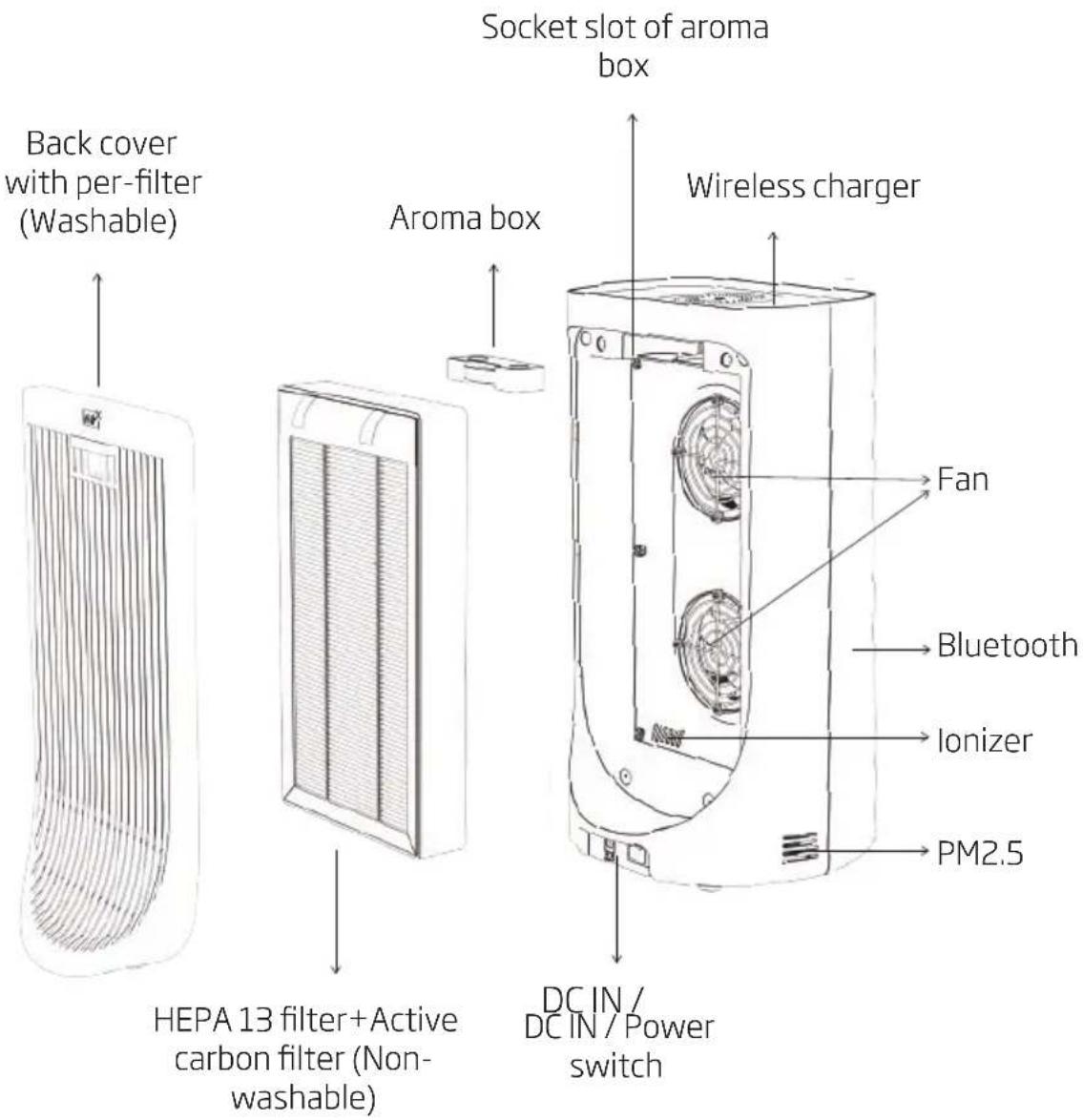
4 Control Panel Introduction
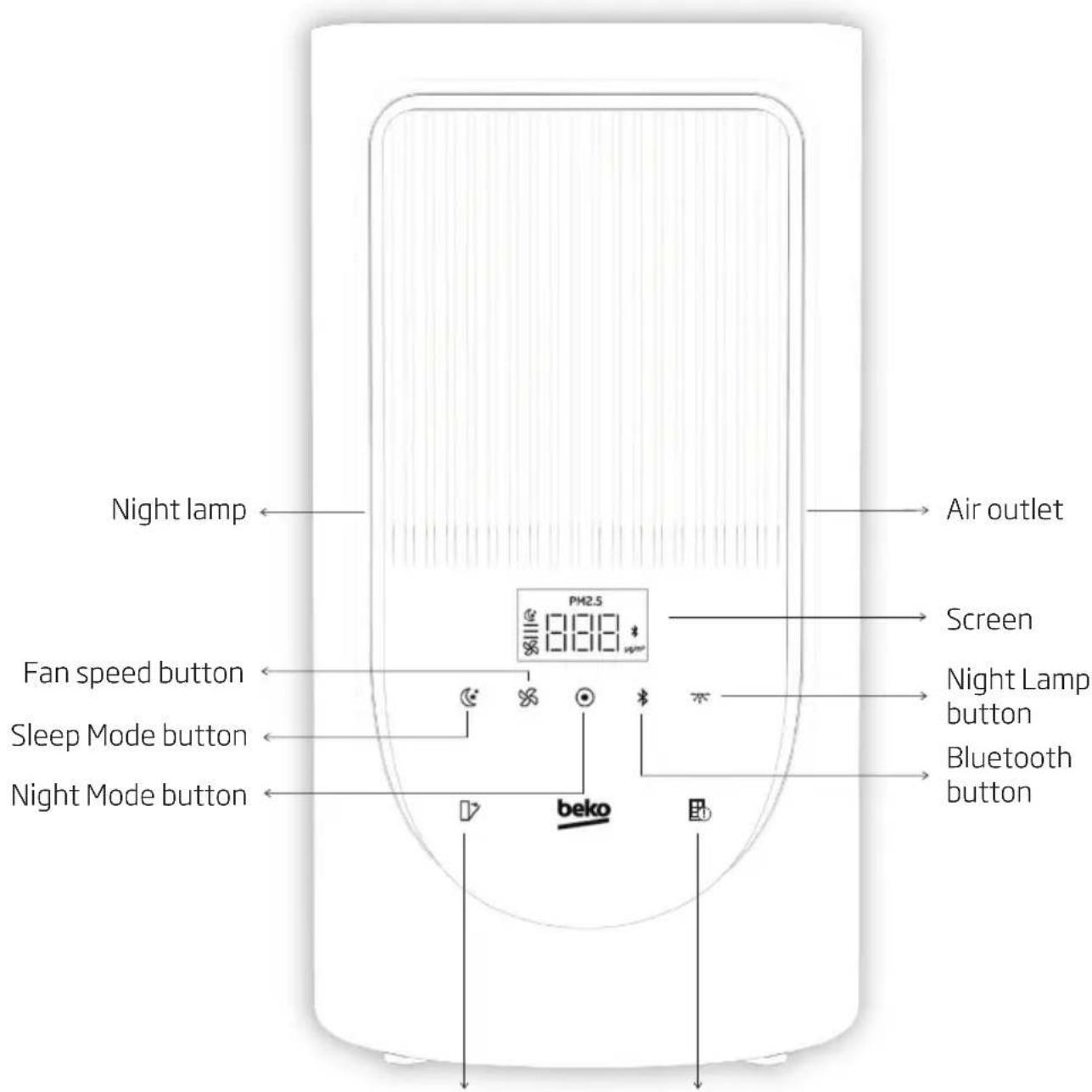
Filter change indicatorBack cover indicator
5 Operating Instructions
- Carefully unpack your air purifier.
- Select a firm level place where there are no obstructions to the air inlet grill or air outlet.
- Remove all PE bags from filters before use.
- Do not point air outlet towards wall.
6 Introduction for Operation
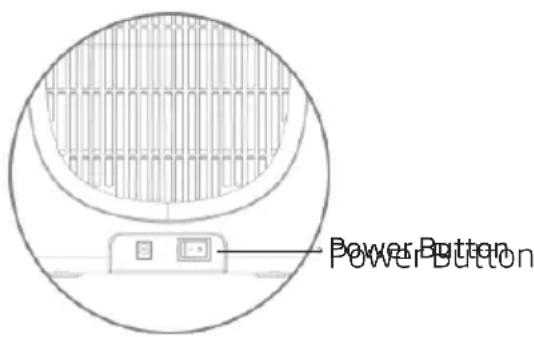
Power Button
Push the Power button, the machine will start running under the default Medium fan setting, and the indicator Medium fan setting will illuminate.
Fan speed button
There are 4 speed setting including Sleep, Low, Medium and High fan levels for selection. Touch the Fan speed button to select your desired speed setting. The default air speed is medium level
Night Mode
Only the wireless charging and lonizer work on this mode. All icons are off.
Sleep Mode
On this mode, fan speed is sleep level.
Bluetooth button
Press the Bluetooth button to match with the mobile phone. The default machine name is Beko_ATP5500N, the pairing time is about 1 minute, and repeated operation is required for timeout.
Night lamp
While working on normal mode and on Sleep Mode, nightlamp can be turned on.
Back cover indicator
Make sure that the back cover is completely closed before operating. Other wise, If the icon blinks, the machine is not operating.
Filter change indicator
If this icon starts blinking, HEPA filter is needed to be changed with the new one.
6 Introduction for Operation
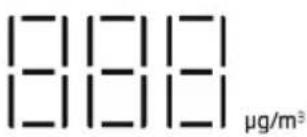
PM2.5 Display
This Air Purifier has PM2.5 dust sensor which detect the PM2.5 level of the current environment in real time. The PM2.5 display shows the real time PM2.5 level.
PM2.5
Wireless Charger
Wireless charging unit is always on.
natural_image
Technical line drawing of a circular mechanical component with concentric rings and a central hole (no text or symbols)Remarks:
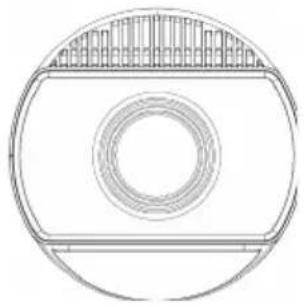
• Automatic operation of lonizer and releases negative ions into outgoing filtered air to help the air purification process.
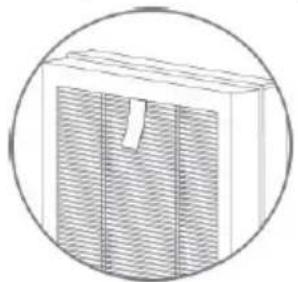
•Always unplug the unit before removing the back cover and take out the dirty filter and put new one. When installing filter, please ensure that the strip side is facing out.
natural_image
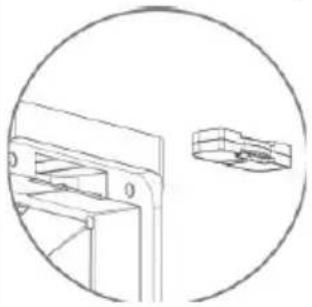
Simple line drawing of a rectangular box with vertical striped pattern and a small notch, enclosed in a circle (no text or symbols)- Always unplug the unit before removing the back cover and take out the aroma box. Please drop your own essential oil into the "filling mouth" of the fragrance box and put the aroma box onto the air purifier body.
natural_image
Technical line drawing of a mechanical bracket and housing component (no text or symbols)6 Introduction for Operation
| Category AIR QUALITY INDEX | Particulate Matter (μg/m3)PM2.5 |
| Good Up to 50 0-12.0 | |
| Moderate 51-100 12.1-35.4 | |
| Unhealthy for Sensitive Groups | 101-150 35.5-55.4 |
| Unhealthy 151-200 55.5-150.4 | |
| Very Unhealthy 201-300 | 150.5-250.4 |
| Hazardous 301-500 250.5-500.4 |
*Table: Cautionary Statements for Guidance on the Air Quality index (AQI) and PM2.5 level. (According to U.S. Environmental Protection Agency (EPA) Office of Air Quality Planning and S Reporting of Daily Air Quality- the Air Quality Index (AQI). EPA 454/B-18-007. September 20 assistance-document-sept2018.pdf)
7
Operation of Air Purifier
| Buttons and Fuctions | |||
| Icon Operation Button Name Function description | |||
 | Long press | Normal Mode | lonizer, wireless charging, PM2.5 sensor and fan work normally. |
| Night Mode | lonizer and wireless charger work normally. The fan, PM2.5 sensor are off. | ||
 | Short press Sleep Mode | lonizer, wireless charging, PM2.5 sensor and fan work normally.Fan speed level is sleep level. | |
 | Short press Fan level 1-2-3 Fan speed settings. | ||
 | Short press Bluetooth | After successful pairing, the Bluetooth icon is always on. | |
 | Short press Night lamp ON and Off the night lamp | ||
| Default operation mode is normal mode and fan level is 2. | |||
8
Changing the HEPA Filter

NOTE: Always unplug the unit before changing the HEPA filter.
- When the filter change indicator illuminates it's time to change the HEPA filter.
- Turn off the unit and unplug it.
- Carefully remove the back cover.
- Remove the HEPA filter out.
- Replace a new HEPA filter.
- Cover the back cover.
9
Troubleshooting
| Problem Solution | |
| Back cover indicator blink | □ Please make sure closed that the back cover is closed. |
| Filter change indicator blink | □ Please replaced the filter. |
| Bluetooth connection failed | □ Please press bluetooth icon and contact again, Please select the correct name: BEKO_ATP5500N, the Bluetooth icon stop blink. |
| The phone can not be charge on wireless charging area | □ Please check the suitability of your phone with wireless charging |
| Unit will not operate. □ Check to | make sure the unit is plugged in.□ Check to make sure the unit is on.□ Check condition of the filter and replace if necessary.□ Check to ensure nothing is blocking the air inlet and filtered air outlet.□ Be sure the plastic bag has been removed from the filter. |
| Decreased air flow. |
10 Technical Data
| Technical and design modifications reserved. | |
| Made in P.R.C. | |
| Model no: ATP5500N | |
| Rated Power: 36 W | |
| Contact details for obtaining more information: | Arcelik A.S. SUTLUCE, Karaagac cad. 2-6, 34445 Beyoglu Istanbul Turkei |
| Parameter of external power supply | |
| Manufacturer: E-TEK Electronics Manufactory Co.,Ltd. | |
| Model identifier: ZD36W120300D | |
| Input Voltage: 100-240V~ | |
| Input Frequency: 50/60 Hz | |
| Input Current: 1.0 A | |
| Output Voltage: 12.0 V DC | |
| Output Current: 3.0 A | |
| Output Power: 36.0 W | |
| Average active efficiency: 87.5 % | |
| Efficiency at low load (10%): 86.0 % | |
| No-load power consumption: 0.08 W | |
10 Technical Data
| Parameter of external power supply | |
| Manufacturer: Foshan Shunde Guanyuda Power Supply Co., Ltd. | |
| Model identifier: GM39-120300-D | |
| Input Voltage: 100-240V~ | |
| Input Frequency: 50/60 Hz | |
| Input Current: 1.5 A | |
| Output Voltage: 12.0 V DC | |
| Output Current: 3.0 A | |
| Output Power: 36.0 W | |
| Average active efficiency: 88.08 % | |
| Efficiency at low load (10%): 87.5 % | |
| No-load power consumption: 0.057 W | |
10
Technical Data
| Importer in PolandImporter w PolsceBeko S.A.ul. Puławska 36602-819 Warszawawww.beko.pl | Importer in Czech RepublicDovozce do České republikyBEKO S.A., organizační složkaBucharova 1423/6, Praha 13 – Nové Butovice, 158 00www.bekocr.cz | Importer in SlovakiaDovozca na SlovenskoBEKO Slovakia s.r.o.Suché myto 1811 03 Bratislavawww.bekosk.sk | Importer in EstoniaImportija EestiBeko S.A.Tānav Puławska 36602-819 Varssavi (Poola) | Importer in NorwayKarenslyst Allè 20278 Oslo | ||
| Importer in UKBEKO Plc, Beko House,1 Greenhill Crescent,Watford, Herts,WD18 8QU | Importer in GermanyBeko Grundig Deutschland GmbHThomas-Edison-Platz 363263 Neu-Isenburg | KSA ImporterHUSSEIN & ALHASSAN G. SHAKERBROS. FOR MODERN TRADING CO. LTD.Hail Street - Al Bughdadiyah AIGharbeyah District Shaker Building - 6th floor(+966)126454227 | Importer in FranceBEKO France / ImmeubleStadium, 266, Avenue duPrésident Wilson 93218La Plaine Saint-Denis Cedex | |||
| Importer in SpainBEKO ELECTRONICSESPANA S.L.C / Provenza,388. 3a planta, 08025Barcelona | Importer for MaltaETV LTD119/120Archbishop StreetVALLETTA MALTA | Importer in LatviaImportētāja LatvijāBeko S.A.lelas Puławska 36602-819 Varšava (Polija) | Importer in SwitzerlandSecomp AGGrindelstrasse 6CH-8303 BassersdorfSwitzerland | Importer in LithuaniaImportuotojas LietuvojeBeko S.A.Gatvé Puławska 36602-819 Varšuva (Lenkija) | ||
| importer in AustriaELEKTRA BREGENZ AGPFARRGASSE 77VIENNA post code 1230 | Importer in SwedenGrundig Nordic ABKlarabergsviaduktenSE-11164 Stockholm | Importer in HungaryHauser Magyarorszag imitedBaross utca 89 PC: 2040Budaörs / Hungary | Importer in SloveniaBIG BANG, D.O.O.Šmartinska cesta 152PC: 1000Ljubljana/Slovenia | Importer in ItalyBEKO ITALY SRLViale Del Ghisallo,20/I-20151 Milano (MI) | ||
| importer in RomaniaARCTIC S.A.Str. 13 Decembrie, nr.210Găești, 135200, Româniawww.arctic.ro | Importer in BelgiumAsogem NV/SASchalienhoevedreef 262800 Mechelen Belgium | Importer in GreecePAR. SEITANIDIS S.A.Polistilo, P.O. Box:1402Kavala, 64003 | Importer in BulgariaVIDEOLUX Ltd.265, Okolovrasten pat Str.Mladost 4,1766 Sofia, Bulgaria | Importer in CroatiaE PLUS doo ZA Unutarnju /GOSPODARSKA 16c /10225 GORNJISTUPNIK / ZAGREP | ||
| Importer in Russia Импортер на территории РФ: ООО «БЕКО», РФ, 601021, Владимирская обл., Киржачский р-НМуниципальное образование сельское поселение Першинское, дер. Федоровское, ул. Сельская, д. 49Бесплатная линия сервисного обслуживания и информационной поддержки по установке и эксплуатации (только длязвонков по России) 8-800-200-23-56Изготовитель: Arcelik A.Ş. Турция, Karaagac Caddesi No: 2-6 Istanbul 34445 Sutluce, Istanbul | ||||||
| Виробник: "Arçelik A.S." Karaagaç Caddesi No: 2-6 Sütlüce, 34445, Turkey/ "Arçelik A.S.", м. Стамбул, Сютлюдже, вул.Караагач No 2-6, 34445, Туреччина, Термін служби 10 роківИмпортер на території України: ТОВ «Беко Україна», адреса:03150, м. Київ, вул. Антоновича, буд. 72тел/факс.:0-800-500-4-3-2 | ||||||
| Manufactured by Arcelik A.S. Karaagac Cd. No:2-6 34445 Sutluce, Beyoglu, Istanbul, Turkey SDA-HVAC-11-20-05 | ||||||
natural_image
Technical line drawing of a circular mechanical component with concentric rings and a central hole (no text or symbols)Anmerkungen:
natural_image
Diagram of a rectangular box with vertical striped pattern inside, enclosed in a circle (no text or symbols)natural_image
Technical line drawing of a mechanical bracket and housing component (no text or symbols)natural_image
Technical line drawing of a circular mechanical component with concentric rings and a flat top surface (no text or symbols)natural_image
Simple line drawing of a rectangular box with vertical striped pattern inside, enclosed in a circle (no text or symbols)natural_image
Technical line drawing of a mechanical bracket and housing component, enclosed in a circular boundary (no text or symbols)natural_image
Technical line drawing of a circular mechanical component with concentric rings and a flat top surface (no text or symbols)Consigli:
natural_image
Simple line drawing of a rectangular box with vertical striped pattern and a small tab, enclosed in a circle (no text or symbols)natural_image
Technical line drawing of a mechanical bracket and housing component, no text or symbols present*Tabella: Cautionary Statements for Guidance on the Air Quality Index (AQI) and PM2.5 level, (According to U.S. Environmental Protection Agency (EPA) Office of Air Quality Planning and S Reporting of Daily Air Quality - the Air Quality Index (AQI), EPA 454/B-18-007, September 20 assistance-document-sept2018.pdf)
Indicator Back cover (Capac spate)
natural_image
Simple line drawing of a circular object with concentric rings and a top panel (no text or symbols)Observații:
natural_image
Simple line drawing of a rectangular box with vertical grooves and a slot, enclosed in a circle (no text or symbols)natural_image
Technical line drawing of a mechanical bracket and housing component (no text or symbols)natural_image
Technical line drawing of a circular mechanical component with concentric rings and a central hole (no text or symbols)Opmerkingen:
natural_image
Simple line drawing of a rectangular box with vertical striped pattern and a small cutout, enclosed in a circle (no text or symbols)natural_image
Technical line drawing of a mechanical bracket and a separate view of a component (no text or symbols)natural_image
Technical line drawing of a circular mechanical component with concentric rings and a central hole (no text or symbols)Uwagi:
natural_image
Simple line drawing of a rectangular box with vertical striped pattern and a small notch, enclosed in a circle (no text or symbols)natural_image
Technical line drawing of a mechanical bracket and housing component, enclosed in a circular boundary (no text or symbols)natural_image
Technical line drawing of a circular mechanical component with concentric rings and a central hole (no text or symbols)Poznámky:
natural_image
Simple line drawing of a rectangular box with vertical slats and a slot, enclosed in a circle (no text or symbols)natural_image
Technical line drawing of a mechanical bracket and housing component (no text or symbols)6 Úvod k obsluze
Beyoglu, Istanbul, Turkiye
www.beko.com
- CONTENTS
- Please read this user manual first!
- Meanings of the Symbols
- Important safety and environmental instructions
- General Safety
- Compliance with the WEEE Directive and Disposing of the Waste Product:
- Compliance with RoHS Directive
- Package Information
- Cleaning And Maintenance
- WARNING!
- Vacuum or Wash Back cover with Pre-filter
- Conformity declaration for CE
- How The Air Purifier Works
- Know Your Air Purifier
- Control Panel Introduction
- Operating Instructions
- Introduction for Operation
- Power Button
- Fan speed button
- Night Mode
- Sleep Mode
- Bluetooth button
- Night lamp
- Back cover indicator
- Filter change indicator
- PM2.5 Display
- Wireless Charger
- Remarks:
- 7
- Operation of Air Purifier
- 8
- Changing the HEPA Filter
- 9
- Troubleshooting
- Technical Data
- 10
- Technical Data
- Anmerkungen:
- Consigli:
- Indicator Back cover (Capac spate)
- Observații:
- Opmerkingen:
- Uwagi:
- Poznámky:
- Úvod k obsluze
Brand : BEKO
Model : ATP5500N
Category : Air purifier