Watchy Teddy Geometric - Smartwatch Motus - Free user manual and instructions
Find the device manual for free Watchy Teddy Geometric Motus in PDF.



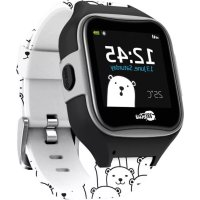
| Product Type | Smartwatch |
| Brand | Motus |
| Model | Watchy Teddy Geometric |
| Water Resistance | IP68 (resistant to fresh water, not recommended in hot bath, hot shower or sauna) |
| Connectivity | Bluetooth 3.0 and 4.0 |
| Required App | Fundo (Android/iOS) |
| Charging Type | Magnetic, via included cable |
| Charging Voltage | 5V (USB port or standard charger) |
| Full Charge Time | Approximately 70 minutes |
| Screen | Touch, with backlight |
| Sensors | Accelerometer, heart rate monitor |
| Main Functions | Calls, SMS, notifications, pedometer, heart rate monitor, sleep tracking, running, remote photo, audio player, alarm, stopwatch, calculator, calendar, weather, altitude, anti-loss protection, gestures |
| Box Contents | Smartband, additional strap, user manual, warranty card, charging cable |
| Language Management | Automatic synchronization with phone language, manual selection possible |
| Safety Precautions | Avoid contact of charging points with conductive objects; do not wear in hot bath, hot shower or sauna |
| Force Restart | Press and hold the power button for 10 seconds |
| Warranty | Damage caused by steam not covered |
Frequently Asked Questions - Watchy Teddy Geometric Motus
User questions about Watchy Teddy Geometric Motus
0 question about this device. Answer the ones you know or ask your own.
Ask a new question about this device
Download the instructions for your Smartwatch in PDF format for free! Find your manual Watchy Teddy Geometric - Motus and take your electronic device back in hand. On this page are published all the documents necessary for the use of your device. Watchy Teddy Geometric by Motus.
USER MANUAL Watchy Teddy Geometric Motus
natural_image
Pure mechanical component diagram without any text, numbers, or symbolstext_image
QR code with a central logo, likely linking to a digital service or applicationtext_image
Technical diagram of a circular mechanical component with labeled parts 1 and 2Thank you for choosing our product!
To have a comprehensive understanding and using this device, to know all the features and simple operation method, please read this manual first.
The functions on the user manual may be little different with physical, please make the final products as the standard.
The typing errors in this manual and discrepancies will be timely updated with the latest products. If we have updates, this manual will be subject to change without notice. Our company reserves the right of final interpretation.
Package: One gift box, one user manual, one smart band unit.
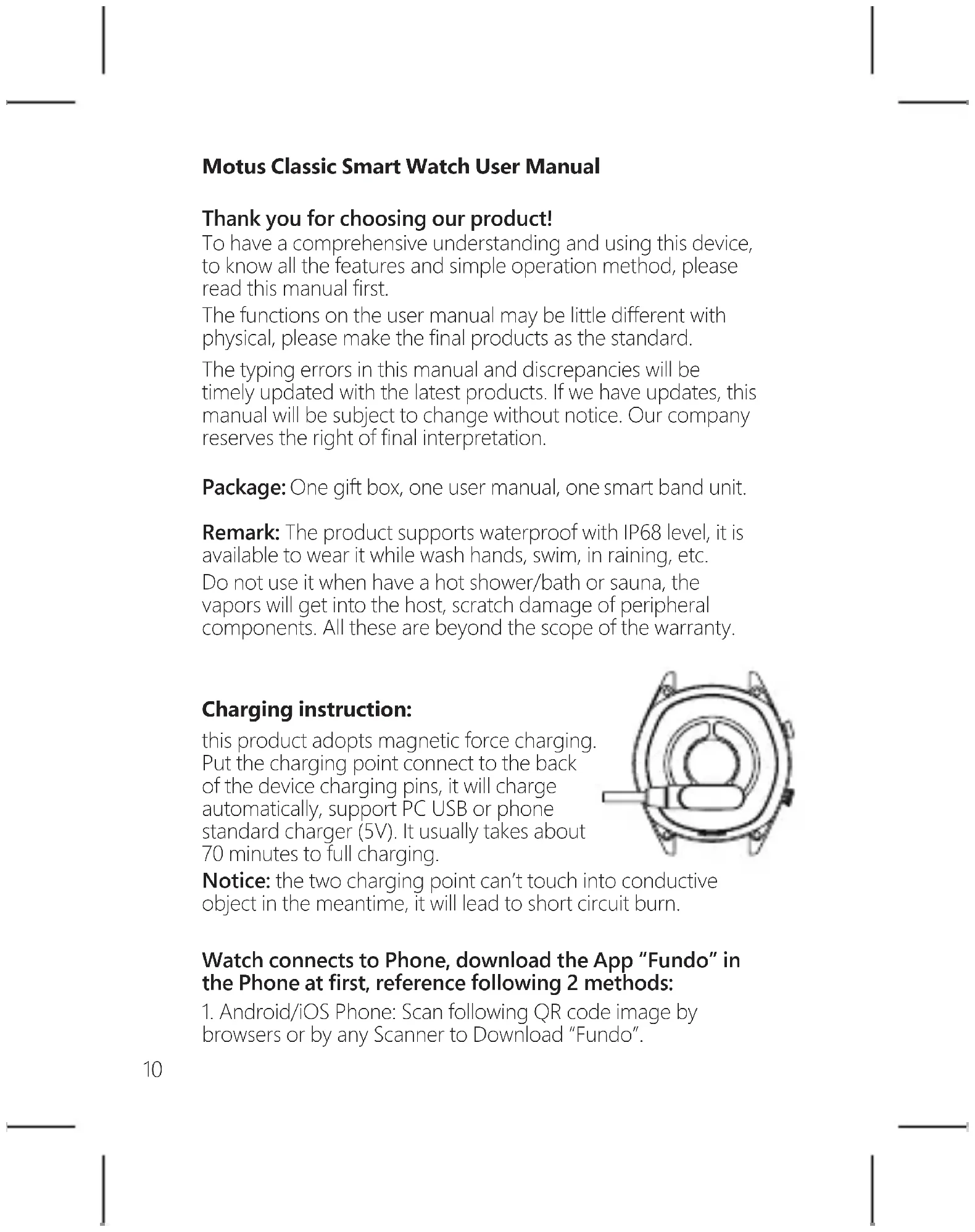
Remark: The product supports waterproof with IP68 level, it is available to wear it while wash hands, swim, in raining, etc.
Do not use it when have a hot shower/bath or sauna, the vapors will get into the host, scratch damage of peripheral components. All these are beyond the scope of the warranty.
Charging instruction:
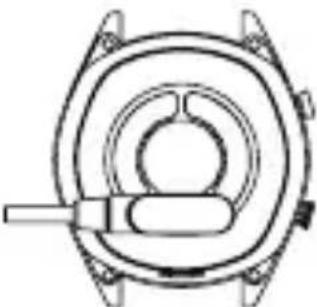
this product adopts magnetic force charging. Put the charging point connect to the back of the device charging pins, it will charge automatically, support PC USB or phone standard charger (5V). It usually takes about 70 minutes to full charging.
natural_image
Pure mechanical component diagram without any text, numbers, or symbolsNotice: the two charging point can't touch into conductive object in the meantime, it will lead to short circuit burn.
Watch connects to Phone, download the App "Fundo" in the Phone at first, reference following 2 methods:
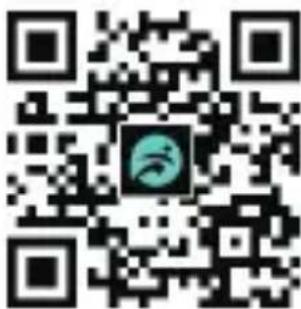
- Android/iOS Phone: Scan following QR code image by browsers or by any Scanner to Download "Fundo".
text_image
QR code with a central logo featuring a stylized face or mask design- Android Phone: search and download "Fundo" app from Google Play;
After installation, turn on cellphone Bluetooth and Fundo App, confirm the notification enable, tap "More" at right bottom corner, enter add device, search "Motus Classic" device and tap connect, then you are succeeding connected the Bluetooth 4.0;
Next go to watch side Bluetooth-searching Bluetooth-select turn on Bluetooth-tap your cellphone name in the list-confirm the connection at your cellphone end. Then you are succeeding connected Bluetooth 3.0;
Only when Bluetooth 3.0 & 4.0 both connected the watch can be abled full performance, slide down the watch you will see the Bluetooth icon, green color at upper means Bluetooth 3.0 is connected, Blue color at bottom means Bluetooth 4.0 is connected.
How to setting notification: into phone's Settings-App Management, find "Fundo"-Authority Management, open all allow. Into Notifications- find "Fundo", open all allow. Into "Fundo"- "Application push", select all allow.
As the Bluetooth protocol is different between all the mobile phone brands. Sometimes the Bluetooth connection will be instability between mobile phone and smart watch. Please restart the Bluetooth, then try to connect again, or restore factory settings. If appear system halted, please long press power button about 10 seconds to restart watch.
Operation Guide
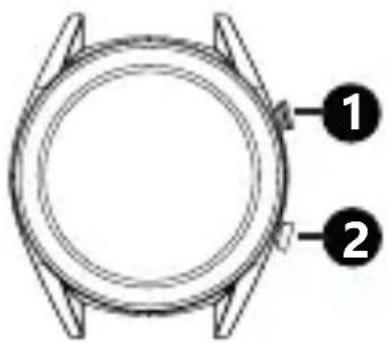
The side top button (1): short press enter pedometer, will show steps, calories, distance.
The side bottom button (2):
long press to switch watch, short press to return to the standby interface, when watch crashed, long press 10 seconds to restart.
text_image
Diagram of a wristwatch with labeled parts 1 and 2TP gestures: slide right/left/up to enter the main menu, after entering each function, slip from left to right for return, slip from right to left for confirmation
Watch face switch: long press the screen, there will be a dial choice, tap confirm.
Status bar: slide down to enter, it tells Bluetooth status, battery life, time etc.
Main function
Calling
Dial: Bluetooth call via cellphone, talk at the watch end.
Phonebook: Sync all the contacts in the cellphone, max is 400 person.
Call logs: Sync all the calls history in the cellphone.
SMS: Sync all the messages in the cellphone (Not support iOS phone yet).
Bluetooth: Search the device you want connect, or disconnect the devices.
Notification: It will remind all the notifications from cellphone, such as Facebook, Email, WhatsApp, SMS etc. it has to connect "Fundo" first.
Sleep monitor: The smart watch will turn on it automatically from 9p.m to 9a.m. It records your sleep duration and quality,
help you adjust a better rest time, improve sleep quality. Slide up enter options; Status, On and Off; History, check out deep sleep and light sleep; instruction.
Heart rate monitor: wear the watch tightly with your wrist, best position would be upper of the hand-wrist, around 20 seconds it will shows the real time heart rate data, slide down menu into history, mode includes single measure and continuous measure; and instruction. Generally speaking normal value is 60-90 times/min.
ECG: adopt optical heart rate and ECG combine technology, about 30 seconds can show the data, after test will appear ToAPP, means ECG data save to phone " Fundo".
Blood pressure: in the measuring time, please lay the hand flat, about 48 seconds later will show the data. Generally speaking, blood pressure increases with age, female lower than male.
Running: accurate monitoring the movement data, in the meantime will start heart rate monitor. Slide up enter heart rate value, show you current heart rate. Slide down return sport mode, click the button sport mode, will popup Stop and Pause.
Pedometer: check the steps you walked during the day, calories burn and walk distance. Everyday 0 o'clock all the data will be saved automatically and reset to 0. Slide up enter option; status, on and off; history, it can check 7 days local records; Goal, set a target for everyday steps; put into all your information, such as Gender, Height, Weight etc. for more accurate measure your steps data.
Remote shot (while connected with cellphone): Turn on the camera in cellphone, turn the remote camera in the watch, take a photo by watch, photo save in cellphone side.
Music Player: Bluetooth Music is able to control the music playing in mobile.
Anti-lost: click "find phone", connected phone will be ringing warning, after find the phone, tap "End" of the phone to stop the alarm, it works both watch and Apps sides.
Face: have two standby face can be choose.
Gesture: support for call turnover mute, alarm flip over mute, gesture wake up system (ie It is to raise the hand to automatically light screen), shake to answer the call;
Altitude: connected with phone App, phone must have network and GPS available, achieve to the city altitude and air pressure data.
Weather: connected with phone App, phone must have net-work and GPS available, achieve to the city weather information.
Alarm: can setting 5 alarm, long press can cancel alarm.
Stopwatch: Single timing, tap the left icon to start timing, and tap to pause, tap again for cumulative time.
Calculator: Allows you to make simple calculations.
Calendar: Scroll up and down to display more days. Tap on the calendar icon to display months, and later scroll up / down to display the following months.
Multi-languages: Auto synchronization is turned on by default. After the mobile phone is connected, the mobile phone language will be synchronized. To manually select the language, turn it off;
Bluetooth Setting: Turn on/off the Bluetooth in watch.
Clock: clock type, there are 4 standby watch faces to choose;
Time synchronization: the default is on, after connecting to the phone will sync the phone time, if you want to manually adjust the time, you need turn it off;
Sound: you can select the caller profile, select Ringtones, select notification ringtones;
Volume: adjustable volume for media, ring tones, notifications, etc.;
Power-saving mode: turn watch on to enter clock mode, other functions are turned off; display, access to adjustable screen brightness and backlight off duration;
Unit: select the data unit is metric or imperial;
QR code: enter into QR code, mobile browser open scan can download " Fundo"
Sedentary: Set a long-time reminder of sit, remind you have a stand when time up.
Restore the factory settings: generally, if there is a software problem happens, restore the factory settings can be resolved;
About: you can view the watch model and software version.
Data transmission: mobile phone to download Fundo App, after the connection is successful, either steps data, heart rate data, the sleep quality, multiple sports can be transmitted to the mobile end.
EN
natural_image
Pure mechanical component diagram without any text, numbers, or symbolstext_image
QR code with a central logo, likely linking to a digital service or applicationDE
natural_image
Pure mechanical component diagram without any text, numbers, or symbolstext_image
QR code with a central logo, likely linking to a digital resource or website.text_image
Technical diagram of a circular mechanical component with labeled parts 1 and 2Alap funkciók
Hívások
natural_image
Pure technical line drawing of a mechanical component without any text, numbers, or symbolstext_image
QR code with a central logo, likely linking to a digital service or applicationnatural_image
Technical line drawing of a mechanical component with concentric rings and a central shaft (no text or symbols)
text_image
QR code with a central logo, likely linking to a digital service or application- Android: Vyhl'adat' a stiahnut' aplikáciu "Fundo" z Google Play; iOS phone: Vyhl'adat' a stiahnut' aplikáciu "Fundo" z Apps Store;
natural_image
Technical line drawing of a mechanical component with concentric rings and mounting holes (no text or symbols)text_image
QR code with a central logo, likely linking to a digital resource or website.natural_image
Pure mechanical component diagram without any text, numbers, or symbolstext_image
QR code with a central logo, likely linking to a digital resource or website.natural_image
Technical line drawing of a mechanical component with concentric rings and a central shaft (no text or symbols)text_image
QR code with a central logo featuring a stylized face or mask designnatural_image
Pure mechanical component diagram without any text, numbers, or symbolstext_image
QR code with a central logo, likely linking to a digital resource or website.natural_image
Pure white background with no text, symbols, or discernible features
natural_image
Pure white background with no text, symbols, or discernible features
natural_image
Pure white background with no text, symbols, or discernible featuresMOTUSXD.PL