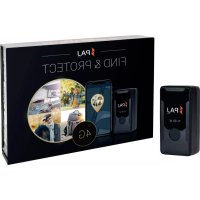
Easy Finder 4G - GPS device PAJ GPS - Free user manual and instructions
Find the device manual for free Easy Finder 4G PAJ GPS in PDF.



| Product Type | GPS Tracker with 4G/LTE and GSM connection |
| Brand | PAJ GPS |
| Model | Easy Finder 4G |
| Dimensions | 78 x 39 x 29 mm |
| Weight | 123 g |
| Battery | Lithium polymer 3.7 V, 3000 mAh |
| Battery Life | Approximately 7 days with active tracking 1 h/day |
| Charging Time | 8 to 12 hours for first charge |
| GPS Accuracy | Up to 3 meters |
| Network | LTE/4G (bands B1/B3/B5/B7/B8/B20) and GSM 900/1800 MHz |
| GPS Chip | AT6558R |
| GSM/GPRS Module | SIMCOM 7670E |
| Protection Rating | IP65 (protected against water jets) |
| Operating Temperature | -20 °C to +55 °C |
| Storage Temperature | -20 °C to +55 °C |
| Admissible Humidity | 10% to 85% |
| Charger | Input AC 110-240V 50 Hz, output DC 5V 1A |
| Main Functions | Real-time GPS tracking, SOS button, movement alerts, trip history, geofencing |
| LED Indicators | GPS LED (blue), GSM LED (orange), charge indicator (red) |
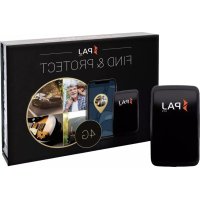
| Delivery Contents | Device, USB charger, mains adapter, lanyard, preinstalled M2M SIM card |
| Care and Cleaning | Clean with a slightly damp cloth, without harsh products. Do not immerse. |
| Safety | Do not open the casing, use only original accessories, keep out of reach of children |
| Spare Parts and Repairability | Battery not user-replaceable. Contact PAJ GPS support for any repairs. |
| General Information | Compliant with directive 2014/53/EU. Declaration of conformity available at paj-gps.de |
Frequently Asked Questions - Easy Finder 4G PAJ GPS
User questions about Easy Finder 4G PAJ GPS
0 question about this device. Answer the ones you know or ask your own.
Ask a new question about this device
Download the instructions for your GPS device in PDF format for free! Find your manual Easy Finder 4G - PAJ GPS and take your electronic device back in hand. On this page are published all the documents necessary for the use of your device. Easy Finder 4G by PAJ GPS.
USER MANUAL Easy Finder 4G PAJ GPS
Thank you for purchasing our FINDER!
Before starting: Read the instructions carefully,
before using the FINDER for the first time. Please keep this user manual
in a safe place in case you may need it in the future.
2.1 Scope of delivery 25
2.2 Product description 26
2.3 Instructions for charging 26
2.4 Activation 27
2.5Turning on 28
2.6 Use 29
2.7 Meaning LED lights 32
2.8 Use of the SOS button 33
2.9 Technical details 34
2.10 Safety instructions 36
2.11 Disposal of used batteries 41
2.12 Disposal of electrical devices 42
NOTE!
We update our user manuals on a regular basis, in order to keep them up to date. The latest version can be viewed at any time at www.paj-gps.de/finder.
2.1 Scope of delivery
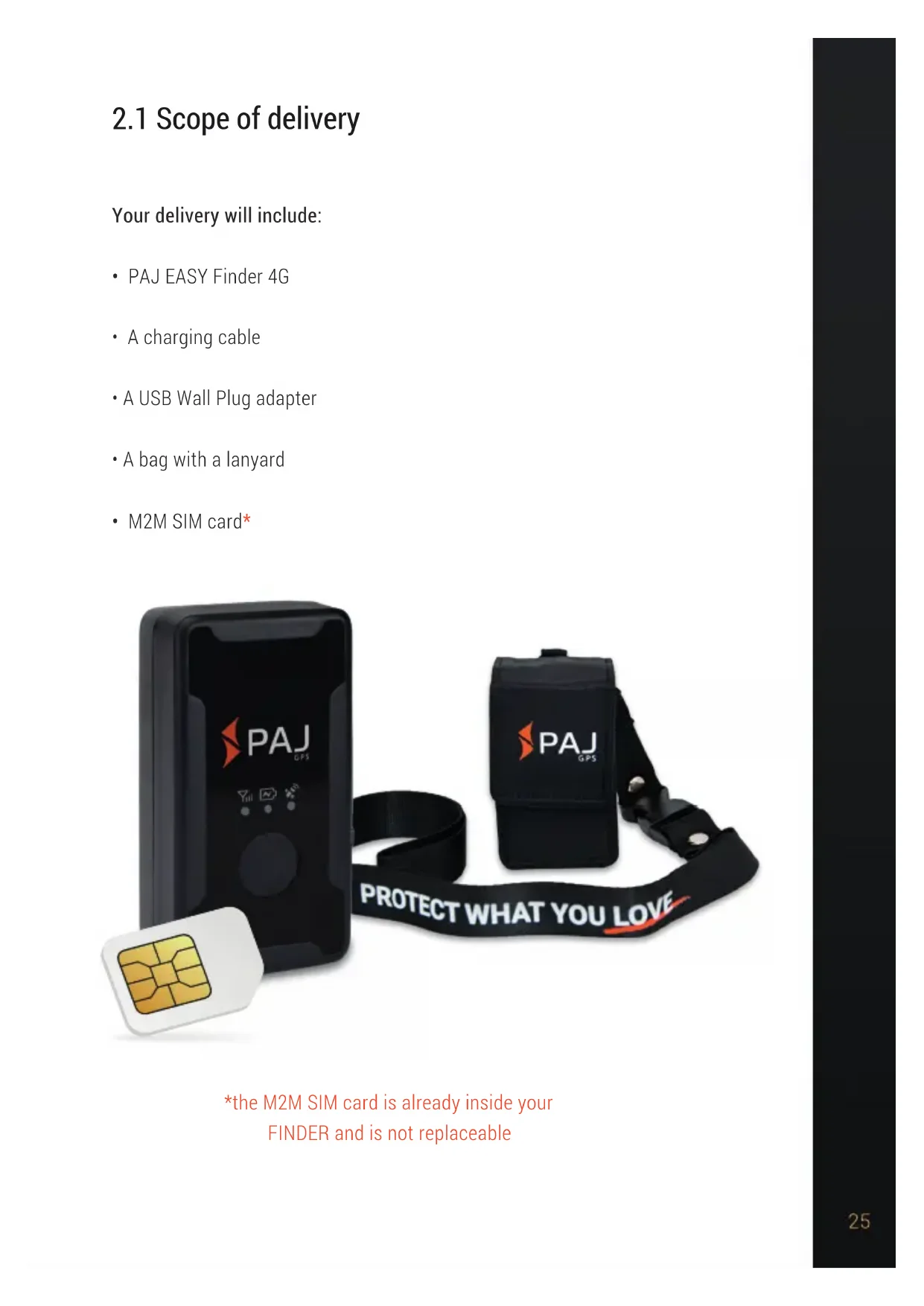
Your delivery will include:
- PAJ EASY Finder 4G
A charging cable
A USB Wall Plug adapter
A bag with a lanyard
M2M SIM card*

*the M2M SIM card is already inside your
FINDER and is not replaceable
2.2 Product description

2.3 Instructions for charging
Before starting your device for the first time you should charge it for about 8 to 12 hours. Connect the charging cable, which you will first connect to the USB Wall plug adapter, to the device's charger port. Once you plug everything and your device is connected to the power source, charge it until the red LED light turns off.
NOTE!
With an active tracking time of approximately 1 hour per day, the EASY Finder offers a battery duration about 7 days without having to charge it in this time! However, beware that the battery duration will depend on how often or how long the EASY Finder is in motion; or how many alarms are being sent.
2.4 Activation
In order to use your EASY Finder 4G, you will need to previously activate it online. Enter the following link and follow the instructions:

NOTE!
For a detailed explanation of the activation process, you can simply click on the following link or scan the QR code:
If the activation is successfully carried out, the FINDER is ready to be switched on. The on/off button is in the middle of the FINDER.
Switch on: Press the button briefly once to the turn the device on. The LEDs then switch on. For information regarding the LED lights, see section 1.7 Meaning of the LED lights.
Switch off: Press the button 5 times within 5 seconds. The blue and orange LEDs will then blink for about 5 seconds and the FINDER turns off.

NOTE!
We recommend that after you start your device for the first time you move it in an open space. This can speed up the connection process, meaning that your device will connect to the best available network more quickly. A good network connection is required in order for the device to send and log data in the FINDER Portal.
2.6 Use

As soon as your device has been successfully activated, started up and has sent and logged data for the first time, you can place it wherever you choose and use your phone, tablet or PC to start tracking it! You will be able to do this in our App or enter the following link to the desktop version:
www.v2 finder-portal.com


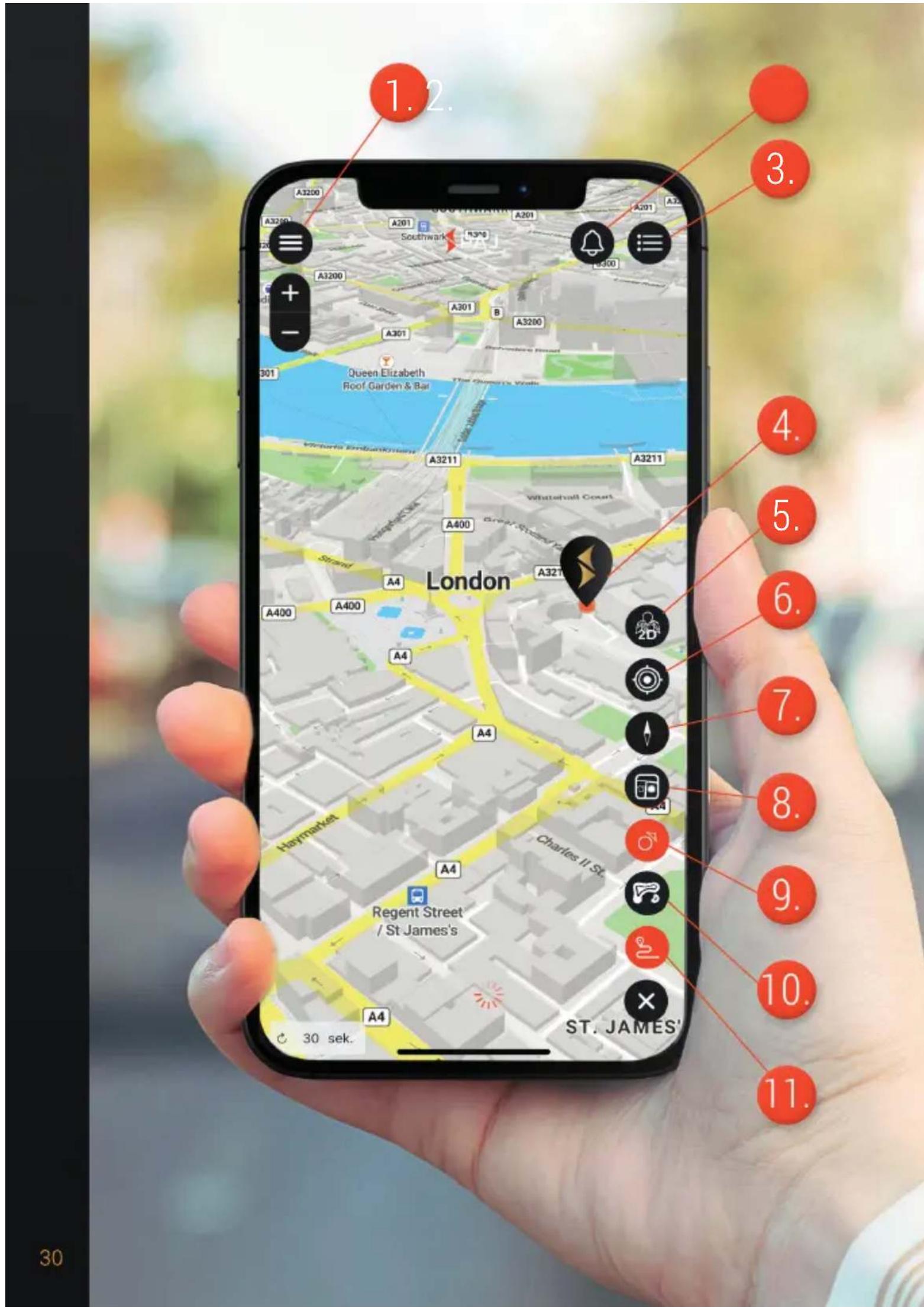
- Menu
- Notifications
- Devices menu
- Device position
- 2D / 3D setting
- Own location
- Map adjustment
- Alarms / Stops on the route
- Route points
- Heat map
- Routes
2.7 Meaning LED lights

GPS LED - blue
The LED is off
The FINDER is in standby mode.
Should the device no longer move, the GPS signal will switch off. As soon as the FINDER moves again, the GPS signal will switch on automatically.
The LED is fixed
GPS reception is available.
The LED is flashing quickly
There is no available signal. The GPS tracker is looking for a signal.

POWER LED - red
The LED is off
(If the charging cable is connected) the FINDER is fully charged.
The LED is fixed
(If the charging cable is connected) the FINDER is charging.

GSM LED - orange
The LED is off
The FINDER is in standby mode.*
The LED is fixed
GSM reception is available.
The LED is flashing quickly
There is no available signal. The GPS tracker is looking for a signal.
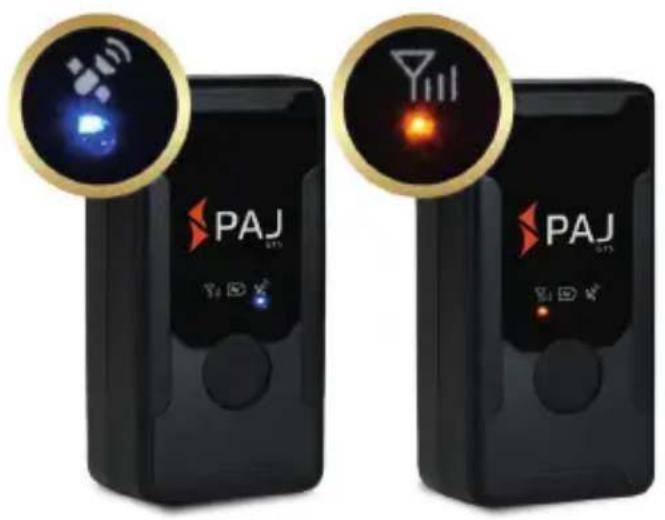
GPS LED and GSM LED The LEDs flash at the same time for 5 seconds
The FINDER has been turned off.
The LEDs flash alternately for 12 seconds
The SOS button has been pressed and an SOS signal has been sent.
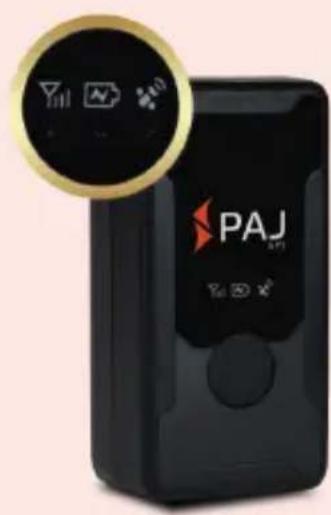
*NOTE! The FINDER will only be in standby mode if all three LED lights are off.
2.8 Use of the SOS button
Hold the button down for 5 seconds in a row and the FINDER will send the alarm. You will be able to know whether the alarm was sent or not by taking a look at the blue and orange LEDs. They will light alternately for 12 seconds (2 seconds blue, 2 seconds orange, etc.).

2.9 Technical Details

Dimensions 78mm× 39mm× 29mm
GPS accuracy Up to 3 meters
Battery 3,7 V 3000 mAh Li-ion
Weight 123 g
| Start time | Cold start: 30 s |
| Standby: 30 s | |
| Operating/running: 1 s |
Network LTE/GSM
| Bandwidth | LTE/4G |
| LTE-FDD:B1/B3/B5/B7/B8/B20 (max. 2W) | |
| GPRS/2G | |
| GSM 900 MHz. (max. 2W) | |
| DCS 1800 MHz. (max. 1W) |
GPS-Chip AT6558R
GSM-/GPRS-Module SIMCOM 7670E
GPS Reception -162 dBm
| Charger | INPUT: AC 110-240V 50 Hz OUTPUT: DC 5V 1A |
Storage temperature From -20 °C to +55 °C
Operating environment From -20 °C to +55 °C
Humidity From 10% to 85%
Waterproof level Waterproof according to IP65
2.10 Safety Instructions
Signal words
The following signal words are used in these operating instructions:
NOTE!
This signal word is used to draw your attention to an issue or situation. It also serves as a recommendation for proper use. Possible damage to property or personal injury can be prevented if this is observed.
WARNING!
This classifies a hazard of medium risk level. Failure to observe the warning may result in serious injury or damage.
Proper use
Read these safety instructions for this GPS tracker carefully before using it for the first time in order to use it properly. The intended use of the GPS Tracker to locate an object or a living being is only that described in this manual. Please note that it is a criminal offence to monitor third parties using a GPS tracker without their consent. If you use it in any other way, it will be considered improper and may result in damage to property or even personal injury. Please note that the GPS Tracker is not a child's toy. In other countries and regions there are different laws concerning digital positioning and tracking of people, animals and/or objects. Salind UG cannot be held responsible if such laws or regulations are violated. The user is held solely responsible for this.
NOTE!
The manufacturer and dealer accept no liability for damage caused by improper or incorrect use.
Safety

WARNING! RISK OF ELECTRIC SHOCK!
A faulty electrical installation or a mains voltage that is too high can lead to an electric shock. Before use, check the mains voltage of the socket with the information on the rating plate. Before use, check the mains voltage of the socket with the information on the rating plate. To ensure that you can disconnect the charging cable from the mains as quickly as possible in the event of a fault, connect the mains adapter so that it is easily accessible. If you notice any visible damage to your GPS Tracker or the charging cable, do not use it. Only use the original parts supplied to charge the GPS Tracker. If the charging cable is damaged, replace it only with original accessories from the manufacturer. Never place the GPS Tracker near flames or hot surfaces. The GPS Tracker is waterproof according to IP65. However, we recommend that you use it in dry environments if possible. The charging cable should only be used indoors. Keep it away from moisture and do not bend it. Do not open the housing of the GPS tracker. Leave the repair work to qualified specialists. However, if you carry out repairs yourself, connect the GPS Tracker improperly or operate it incorrectly, liability and warranty claims are excluded.
Hazards for children and vulnerable people

WARNING! DANGER OF SUFFOCATION!
Please do not allow the GPS Tracker to be used unsupervised by people (including children) with reduced physical, sensory or mental capabilities. The exception is if they have been instructed beforehand by the person responsible for their safety of how to use the appliance. Make sure that your child does not handle small parts (e.g. accessories, etc.). These can be swallowed and lead to suffocation.
NOTE!
Inform your child about the dangers and use of the GPS tracker.
The battery

WARNING! EXPLOSION AND FIRE HAZARD!
Hereafter, you will find information and notes regarding the handling of the battery: The GPS Tracker is powered by a lithium polymer battery. This is not replaceable and must not be removed or opened. Keep the GPS Tracker away from heat sources and high temperatures, such as direct sunlight in a vehicle. Failure to beware of this warning may result in the destruction of the battery, overheating, explosion and fire. Do not burn or punch the GPS Tracker. Protect it from mechanical damage. Do not remove, drop, disassemble or modify the battery with pointed or sharp objects. If a child swallows the battery, seek medical help immediately! If you need to have the battery replaced, please contact our support team.

WARNING! RISK OF CHEMICAL BURNS!
Batteries that leak due to damage can cause burns if they come into contact with the skin. Therefore, never open the battery. However, if the battery leaks, please wear protective gloves.
Electromagnetic compatibility
Please observe all prohibitions and switch off the GPS tracker immediately in dangerous areas and if it can cause interference. It should not be used near, for example, medical equipment, fuels and chemicals, or in blasting areas. Mobile devices may cause interference that can affect performance. Transformers and very strong magnetic fields must be avoided. Otherwise, deviations in the transmission may occur.
NOTE!
Failure to observe these recommendations may result in malfunctions or damage to the GPS tracker.
Cleaning

WARNING! RISK OF DAMAGE!
In the following you will find information and instructions on how to clean the GPS tracker. Do not use aggressive cleaning agents or brushes. Do not clean the GPS Tracker with cleaning objects (e.g. knives, metal sponges). This can damage the surface. Never put the GPS Tracker into water, in a dishwasher (or similar) and do not use a steam cleaner. The surface can be wiped with a slightly damp cloth. The GPS Tracker should be wiped completely dry afterwards.
Storage
If you are not going to use the GPS Tracker for a long period of time, switch it off. Place the tracker in its original packaging or in a same size box. Protect the tracker from dirt and moisture.
NOTE!
Keep the FINDER away of children's reach in order to avoid possible damage to property or personal injury.
Declaration of conformity
Hereby, PAJ UG (haftungsbeschränkt) declares that the tracker, EASY Finder 4G, is in conformity with the Directive 2014/53/EU. The complete text of the EU Declaration of Conformity can be found at the following Internet address: paj-gps.de/konformitaetserklaerung/

Packaging disposal
Dispose of the packaging according to type. Throw cardboard and paper to the corresponding container. Foil belongs in the recyclables collection.

2.11 Disposal of used batteries
The following note is addressed to those who use batteries or products with products with built-in batteries and who will not resell them in the form in which they were supplied to them (end users).
Free recall of used batteries.
Batteries must not be disposed of with waste. You are legally obliged to return used batteries so that proper disposal can be guaranteed. You can return used batteries to a local collection point or to your local retailer. As a distributor of batteries, we are also to take back used batteries, although our obligation to take back used is limited to the type which we carry or have carried as batteries in our range. Used batteries of the aforementioned type can therefore either be returned to us with sufficient postage or handed in directly to our dispatch warehouse at the following address free of charge:
Meaning of the battery symbols
Batteries are marked with the symbol of a crossed-out dustbin (see illustration). This symbol indicates that batteries must not be disposed of in household waste. Batteries containing more than 0.0005% mercury by mass, more than 0.002% cadmium by mass or more than 0.004% lead by mass are also marked with the chemical name of the pollutant below the dustbin symbol.
The abbreviation "Cd" stands for cadmium, "Pb" for lead and "Hg" for mercury.

2.12 Disposal of electrical devices
The Electrical and Electronic Equipment Act (ElektroG) contains a large number of requirements for the handling of electrical and electronic equipment. The most important ones are summarised here.
- Separate collection of WEEE:
Waste Electrical and Electronic Equipment that has become waste is referred to as WEEE. Owners of WEEE must dispose of it separately from unsorted local waste. In particular, WEEE does not belong in household waste, but in special collection and return systems.
- Batteries and accumulators:
As a rule, owners of WEEE must separate spent batteries and accumulators that are not enclosed in the WEEE before handing them over at a collection point. This does not apply if the WEEE is handed over to public waste management authorities and separated from other WEEE there for the purpose of preparation for reuse.
- Options for returning old appliances (WEEE):
Owners of WEEE from private households can hand it in to public waste management authorities or at the collection points set up by manufacturers or distributors as defined by the ElektroG. An online directory of collection and collection points can be found here:
Old equipment often contains sensitive personal data. This applies in particular to information and telecommunication technology devices such as computers and smartphones. For your own sake, please note that each end-user is responsible for deleting the data on the old equipment to be disposed of.
- Meaning of the "crossed-out dustbin" symbol:
The symbol of a crossed-out dustbin regularly displayed on electrical and electronic equipment indicates that the respective device must be separated from assorted local waste at the end of its service life.

- Manufacturer registration number
As a manufacturer, within the meaning of the ElektroG, we are registered with the responsible foundation Elektro-Altgeräte Register (Benno-Strauß-Str. 1, 90763 Fürth) under the following registration number: DE33887550.
DO YOU HAVE ANY QUESTIONS?



In this case, please contact us and we will be delighted to help you!
The PAJ GPS Team wishes you to enjoy your EASY Finder 4G!
Contenu

VOUS AVEZ DES QUESTIONS?


Impermeable Impermeable: IP65
- NOTE!
- Scope of delivery
- Product description
- Instructions for charging
- Activation
- Use
- Meaning LED lights
- GPS LED - blue
- The LED is off
- The LED is fixed
- The LED is flashing quickly
- POWER LED - red
- GSM LED - orange
- GPS LED and GSM LED The LEDs flash at the same time for 5 seconds
- The LEDs flash alternately for 12 seconds
- Use of the SOS button
- Technical Details
- Safety Instructions
- Signal words
- WARNING!
- Proper use
- Safety
- WARNING! RISK OF ELECTRIC SHOCK!
- Hazards for children and vulnerable people
- WARNING! DANGER OF SUFFOCATION!
- The battery
- WARNING! EXPLOSION AND FIRE HAZARD!
- WARNING! RISK OF CHEMICAL BURNS!
- Electromagnetic compatibility
- Cleaning
- WARNING! RISK OF DAMAGE!
- Storage
- Declaration of conformity
- Packaging disposal
- Disposal of used batteries
- Free recall of used batteries.
- Meaning of the battery symbols
- Disposal of electrical devices
- DO YOU HAVE ANY QUESTIONS?
- Contenu
- VOUS AVEZ DES QUESTIONS?
Brand : PAJ GPS
Model : Easy Finder 4G
Category : GPS device