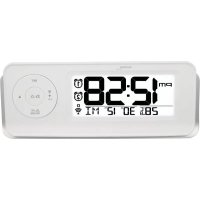
WT 498s - Alarm Clock TECHNOLINE - Free user manual and instructions
Find the device manual for free WT 498s TECHNOLINE in PDF.


| Product type | Alarm clock radio |
| Brand | TECHNOLINE |
| Model | WT 498s |
| Main power supply | AC/DC power adapter 5 V DC (included) |
| Backup power supply | 2 AA 1.5 V batteries (not included) |
| Time reception | DCF radio-controlled (automatic and manual) |
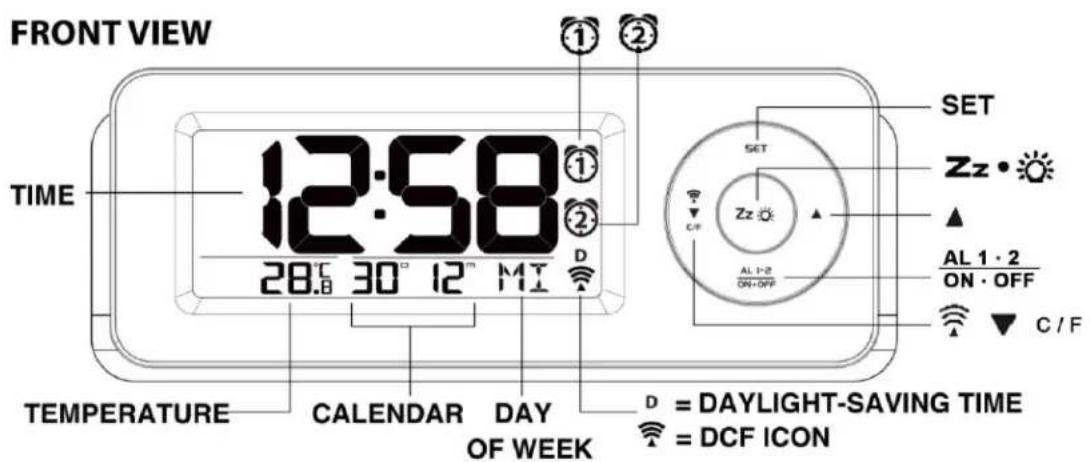
| Display | Time, calendar, day of week, indoor temperature |
| Dual alarm | Yes, with snooze function adjustable from 5 to 60 minutes |
| Temperature | Range: 0 °C to +50 °C, resolution 0.1 °C, display in °C or °F |
| Backlight | Automatic with light sensor |
| Time formats | 12 h or 24 h |
| Day languages | German, English, Italian, French, Dutch, Spanish, Danish |
| Alarm duration | 2 minutes |
| Cleaning and maintenance | Clean with a soft dry cloth. Do not use abrasive cleaners. Avoid moisture. |
| Safety | Use only non-rechargeable alkaline batteries. Do not expose to water, fire or shock. |
| Repairability | Repair by an authorized after-sales service only. Do not open the housing. |
| Intended use | Indoor only |
Frequently Asked Questions - WT 498s TECHNOLINE
User questions about WT 498s TECHNOLINE
0 question about this device. Answer the ones you know or ask your own.
Ask a new question about this device
Download the instructions for your Alarm Clock in PDF format for free! Find your manual WT 498s - TECHNOLINE and take your electronic device back in hand. On this page are published all the documents necessary for the use of your device. WT 498s by TECHNOLINE.
USER MANUAL WT 498s TECHNOLINE
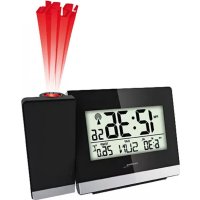
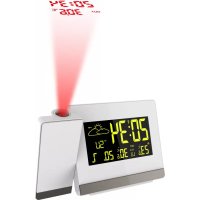
Radio Controlled Alarm Clock with Temperature and Calendar
GB
natural_image
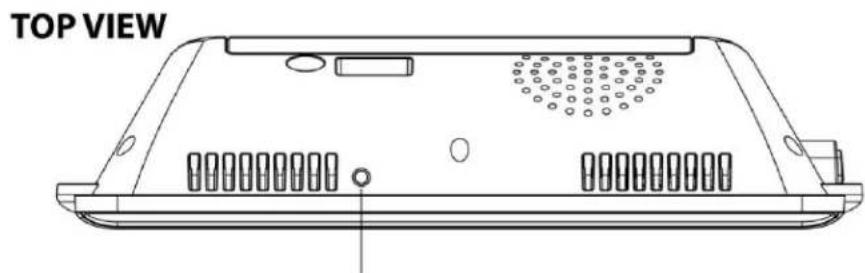
Top view diagram of a computer chassis panel with ventilation slots and a central vent (no text or symbols)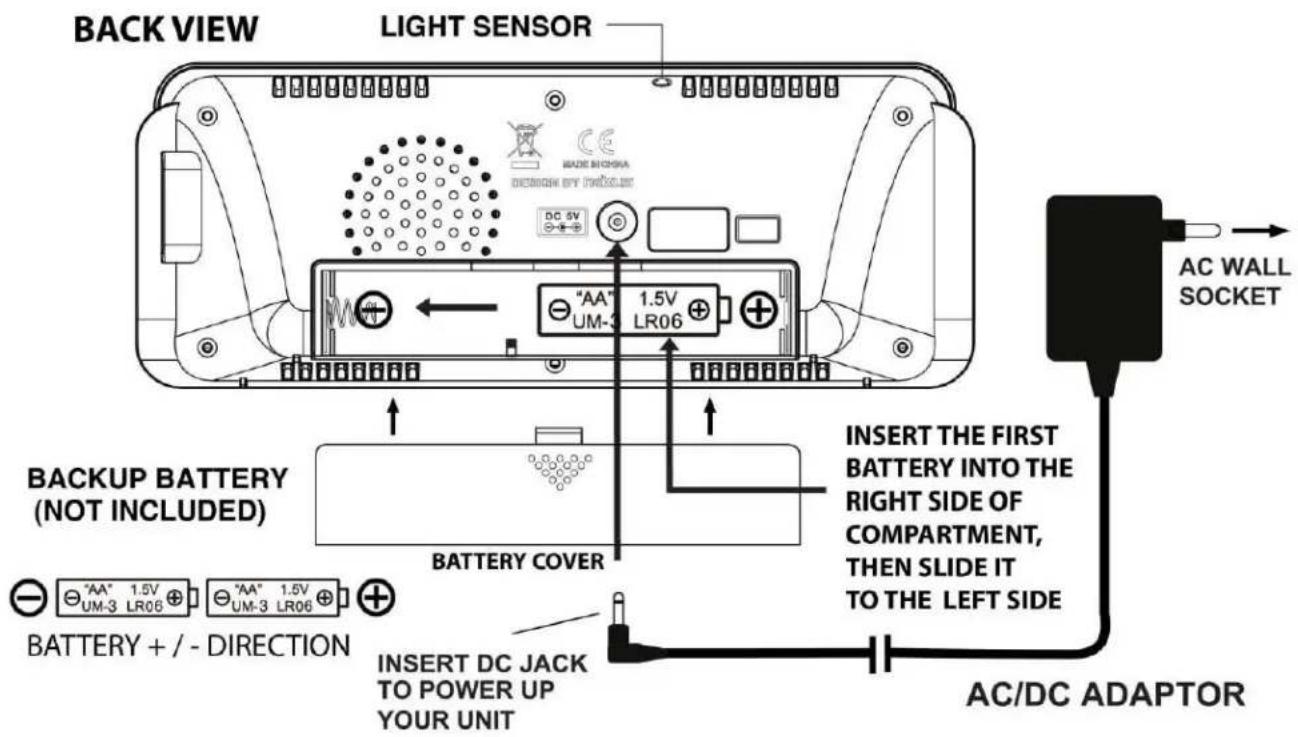
INSTALLATION
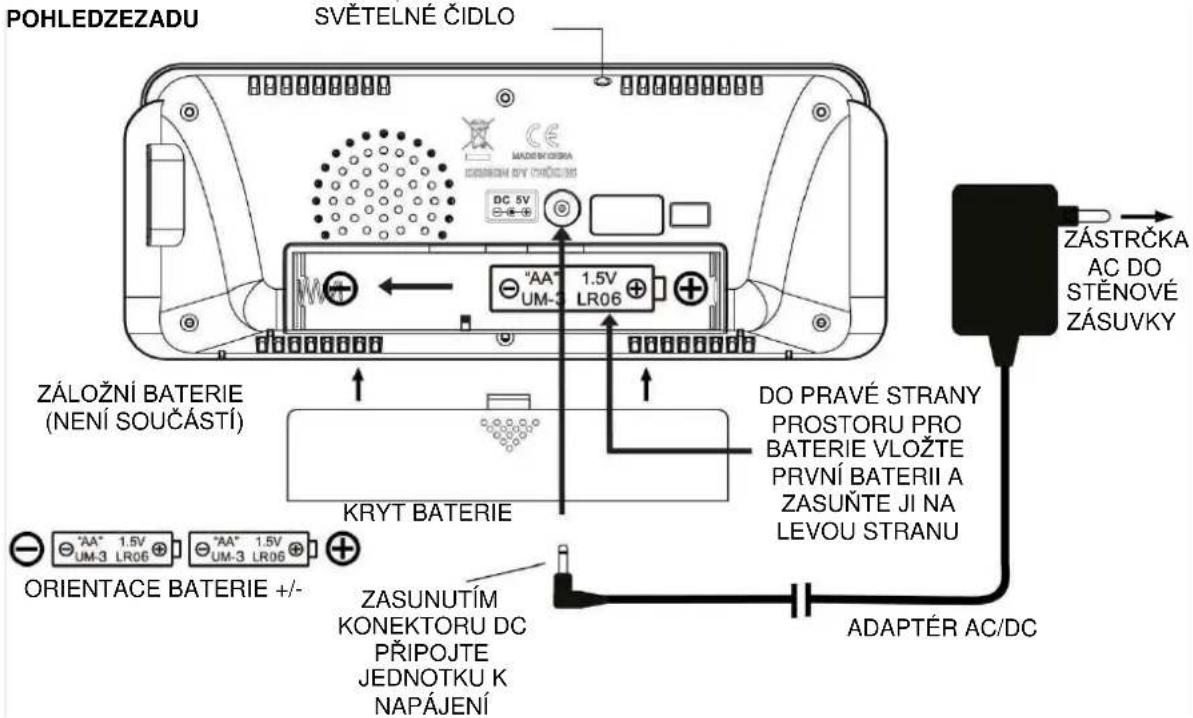
For best reception of radio controlled signal, keep your clock close to a window and away from metal surfaces, electrical appliances and magnetic fields. Keep your clock at least 3 feet away from the AC outlet or the AC/DC adaptor. Plug the AC/DC adaptor to an AC household outlet, then plug the DC jack to the back of the clock. Your clock is ready to work for you.
BATTERY BACK-UP INSTALLATION
- Slide open the battery cover at the back of your unit.
- Insert the first AA battery into the right side of the battery compartment and slide the battery to the left side. Then insert the second AA battery into the right side again by observe the correct + / - polarity inside the battery compartment.
- Replace the battery cover.
- When only batteries are being used, the always-on backlight is off.
DCF SIGNAL RECEPTION AND SIGNAL INDICATOR
After your clock is powered up, it starts to receive DCF signal. The 📤icon flashes.
Weak or no DCF signal (only icon flashing)
Receiving strong DCF signal ( icon flashing)
Successful Reception (icon becomes static)
Failed Reception ( icon disappear)
AUTOMATIC RECEPTION AND MANUAL RECEPTION
Your clock starts automatic reception everyday at 1:00, 2:00, 3:00. If it fails to receive the DCF time signal at 3:00, it will start reception at 4:00. If it fails again it will start reception at 5:00. If it fails again it will start automatic reception at 1:00 again in the next day.
Manual reception: Press and hold for 2 seconds ▼ 📋 button to start manual reception. Press and hold ▼ 🔊 button for 2 seconds to stop the reception.
Remark: when your clock is receiving radio controlled time signal, all buttons except the snooze / light button do not function.
TO SET CALENDAR, 12/24 TIME AND TIME
- Press and hold SET for 2 seconds, time digits change to "00" and flash. Press ▲ or ▼ button to select time zone:
$$ " 0 0" = \text { GMT } + 1 \text { hour (e.g. Germany) } $$
$$ " 0 1" = \text { GMT } + 2 \text { hours (e.g. Finland) } $$
$$ - 0 1 = \text { GMT } 0 0 \text { hour (e.g. U.K.) } $$
-
Then press SET once again, hour digits flash. Press ▲ or ▼ button to set hour. Press and hold ▲ or ▼ will accelerate setting at high speed.
-
Then press SET once again, minute digits flash. Press ▲ or ▼ button to set minute.
Press and hold ▲or ▼will accelerate setting at high speed.
- Then press SET once again, time digits change to "24 Hr" and flash, press ▲ or ▼ to select "12 Hr" time format. PM will appear on the display to indicate afternoon time. There is no AM indicator.
- Then press SET once again, time digits change to year "2014" and flash. Press ▲ or ▼ to set the year.
- Then press SET once again, month digits flash. Press ▲ or ▼ button to set month.
- Then press SET once again, date digits flash. Press ▲ or ▼ button to set date.
- Then press SET once again, the 1 ^D 1 ^M flash. Press ▲ or ▼ to select Month-date or Date-Month display.
- Then press SET once again, day of week digits flash. Press ▲ or ▼ button to select the language of day of week:
GE = German
EN = English
IT = Italian
FR = French
DU = Dutch
SP = Spanish
DA = Danish
- Press SET once again, time digits change to "05", press ▲ or ▼ to adjust the snooze duration from 5 minutes to 60 minutes.
- Press SET to return to normal mode, or it will return to normal mode in around 10 seconds if no press of any other buttons.
TO SET ALARM 1
- At normal time display, press SET once, 6:00 (AM) and R I appears.
- Press and hold SET until the hour digit flash. Then press ▲ or ▼ to set alarm 1's hours. Press and hold ▲ or ▼ to accelerate setting in fast speed. PM will appear on the display to indicate afternoon time. There is no AM indicator.
- Press SET once again, alarm's 1 minute digits flash. Then press ▲ or ▼ to set alarm 1's minutes. Press and hold ▲ or ▼ to accelerate setting at high speed.
- Press SET once again or if no key pressed for approx. 10 seconds to exit the Alarm 1's setting mode.
TO SET ALARM 2
- At normal time display, press SET twice, 6:00 (AM) and R 2 appears.
- Press and hold SET until the hour digits flash. Then press ▲ or ▼ to set Alarm 2's hours. Press and hold ▲ or ▼ to accelerate setting in fast speed. PM will appear on the display to indicate afternoon time. There is no AM indicator.
-
Press SET once again, the minute digits flash. Then press ▲ or ▼ to set Alarm 2's minutes. Press and hold ▲ or ▼ to accelerate setting at high speed.
-
Press SET once again or if no key pressed for approx. 10 seconds to exit the Alarm 2's setting mode.
TO TURN ON OR OFF ALARM 1 AND 2
- At normal time display, press AL 1.2 / ON·OFF once to activate Alarm 1, ① appears.
- Press once again to activate Alarm 2. ② appears.
- Press again to activate both Alarm 1 and 2. Both ① and ② appear.
- Press again to deactivate both alarms (both and disappear).
TO STOP AND RESET THE ALARM TO COME ON THE NEXT DAY
When alarm 1 or 2 is sounding, the related alarm icon flashes. Press the AL 1-2 ON.
OFF once to stop the alarm and reset it to come on the following day. After that both and/or ② remains on the display.
TO ACTIVATE THE SNOOZE FUNCTION (default snooze duration is 5 minutes)
When alarm is sounding, press once, the alarm will be silenced and come on again after the set snooze duration.
Note: if your second alarm activates while the first alarm is sounding or it is in the snooze mode, the second alarm overrides the first alarm (the first alarm is reset to come on the next day).
Alarm Duration : 2 minutes
AUTOMATIC LIGHT SENSOR
Your clock is equipped with an automatic light sensor at the top of the back case. The brightness of backlight will be adjusted to lower level when your room environment is dim.
Please keep your clock at least 60-cm distance away from any objects on top.
TO DISPLAY TEMPERATURE IN DEGREE °C OR °F
Simply press ▼ 📋 C/F to display temperature in degree °C or degree °F.
TROUBLE SHOOTING
If your clock displays irrelevant time or does not function properly, which maybe caused by electro-static discharge or other interference, unplug the DC jack to disconnect the AC power (and remove the backup battery), then hold the button 3 seconds. The clock radio will be reset to default settings and you need to set it again.
SPECIFICATIONS
Indoor Temperature Range 0^ C to +50^ C ( +32^ F to +122^ F)
Temperature Resolution 0.1C
Alarm Duration 2 minutes
Snooze Duration 5 minutes
Environmental reception effects
The clock obtains the accurate time with wireless technology. Same as all wireless devices, the reception is maybe affected by the following circumstances:
- long transmitting distance
• nearby mountains and valleys - near freeway, railway, airports, high voltage cable etc.
- near construction site
• among tall buildings
• inside concrete buildings - near electrical appliances (computers, TV's, etc) and metallic structures
• inside moving vehicles
Place the clock at a location with optimal signal, i.e. close to a window and away from metal surfaces or electrical appliances.
Precautions
- This main unit is intended to be used only indoors.
- Do not subject the unit to excessive force or shock.
- Do not expose the unit to extreme temperatures, direct sunlight, dust or humidity.
- Do not immerse in water.
- Avoid contact with any corrosive materials.
- Do not dispose this unit in a fire as it may explode.
- Do not open the inner back case or tamper with any components of this unit.
Batteries safety warnings
- Use only alkaline batteries, not rechargeable batteries.
• Install batteries correctly by matching the polarities (+/-).
• Always replace a complete set of batteries. - Never mix used and new batteries.
- Remove exhausted batteries immediately.
- Remove batteries when not in use.
- Do not recharge and do not dispose of batteries in fire as the batteries may explode.
- Ensure batteries are stored away from metal objects as contact may cause a short circuit.
- Avoid exposing batteries to extreme temperature or humidity or direct sunlight.
- Keep all batteries out of reach from children. They are a choking hazard.
Use the product only for its intended purpose!
Consideration of duty according to the battery law
Old batteries do not belong to domestic waste because they could cause damages of health and environment. You can return used batteries free of charge to your dealer and collection points. As end-user you are committed by law to bring back needed batteries to distributors and other collecting points!
Consideration of duty according to the law of electrical devices
This symbol means that you must dispose of electrical devices separated from the General household waste when it reaches the end of its useful life. Take your unit to your local waste collection point or recycling centre. This applies to all countries of the European Union, and to other European countries with a separate waste collection system.
GUIDE D'UTILISATION WT 498S
FR
INSTALACE
- Radio Controlled Alarm Clock with Temperature and Calendar
- INSTALLATION
- BATTERY BACK-UP INSTALLATION
- DCF SIGNAL RECEPTION AND SIGNAL INDICATOR
- AUTOMATIC RECEPTION AND MANUAL RECEPTION
- TO SET CALENDAR, 12/24 TIME AND TIME
- TO SET ALARM 1
- TO SET ALARM 2
- TO TURN ON OR OFF ALARM 1 AND 2
- TO STOP AND RESET THE ALARM TO COME ON THE NEXT DAY
- TO ACTIVATE THE SNOOZE FUNCTION (default snooze duration is 5 minutes)
- AUTOMATIC LIGHT SENSOR
- TO DISPLAY TEMPERATURE IN DEGREE °C OR °F
- TROUBLE SHOOTING
- SPECIFICATIONS
- Environmental reception effects
- Precautions
- Batteries safety warnings
- Consideration of duty according to the battery law
- Consideration of duty according to the law of electrical devices
- GUIDE D'UTILISATION WT 498S
- INSTALACE
Brand : TECHNOLINE
Model : WT 498s
Category : Alarm Clock