WS 9420 - Thermometer TECHNOLINE - Free user manual and instructions
Find the device manual for free WS 9420 TECHNOLINE in PDF.

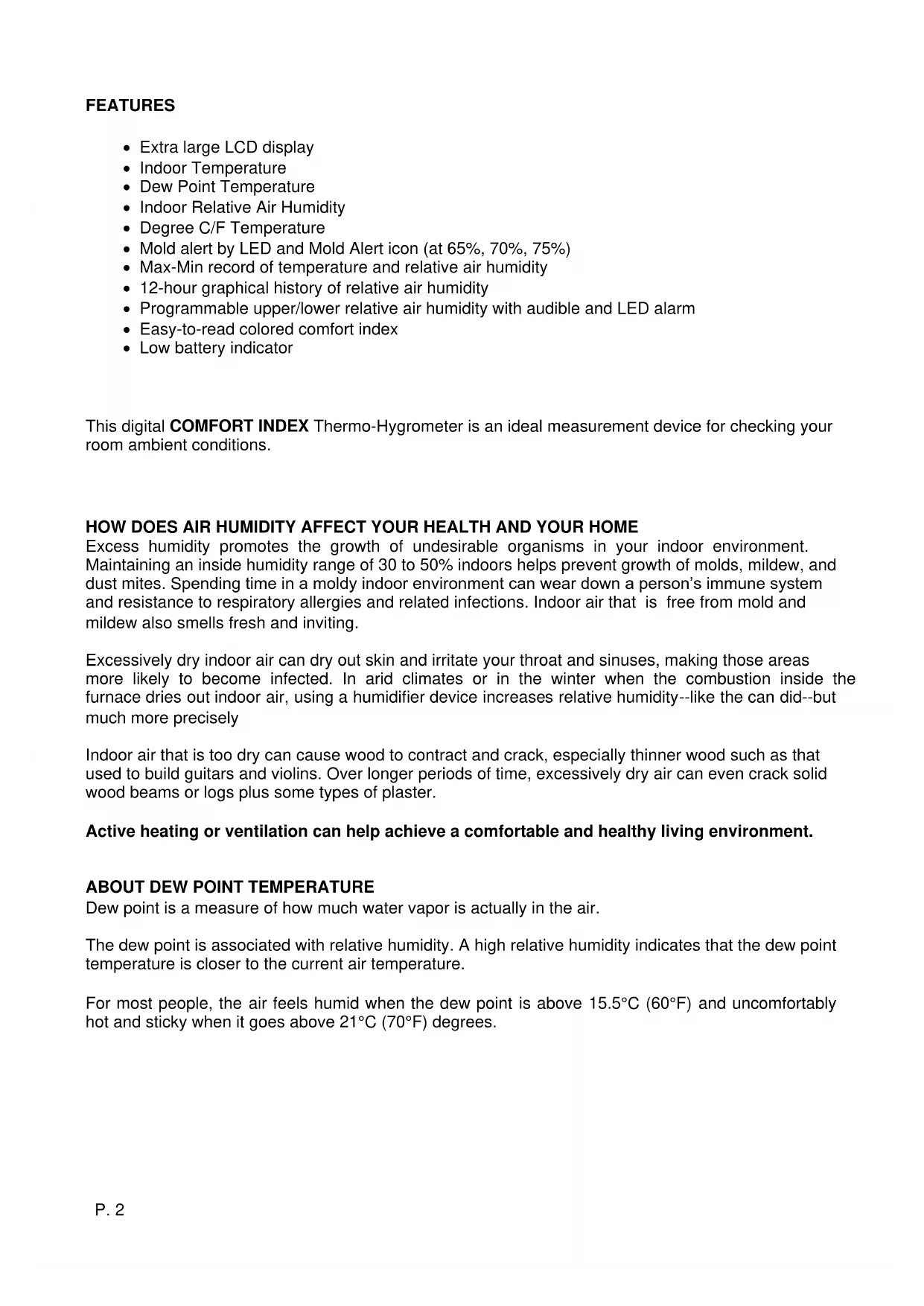


| Product Type | Digital Thermo-Hygrometer |
| Brand | TECHNOLINE |
| Model | WS 9420 |
| Approximate Dimensions | 100 x 80 x 20 mm |
| Approximate Weight | 200 g |
| Power Supply | 2 AA batteries (alkaline recommended, not included) |
| Temperature Measurement Range | 0 °C to +50 °C |
| Temperature Accuracy | ±1 °C |
| Relative Humidity Measurement Range | 20 % to 95 % RH |
| Relative Humidity Accuracy | ±5 % |
| Humidity Resolution | 1 % |
| Display | Large, clear color LCD |
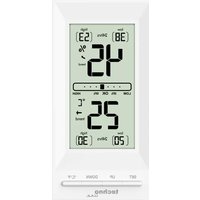
| Main Functions | Indoor temperature, relative humidity, dew point, 12-hour humidity bar graph, humidity alarm (high/low threshold), mold warning (thresholds 65%, 70%, 75%), min/max display, alarm LED nightlight |
| Temperature Units | °C / °F (selectable) |
| Mounting | Table stand (included) or wall mount (foldable stand) |
| Low Battery Indicator | Yes, battery power visualization |
| Maintenance | Clean with a soft, dry cloth; do not use solvents or immerse in water |
| Safety | Use only alkaline batteries; do not open the device; avoid shocks, humidity, extreme temperatures, and contact with corrosive materials |
| Repairability | Device not user repairable; contact after-sales service |
| Supplied Accessories | User manual; batteries not included |
Frequently Asked Questions - WS 9420 TECHNOLINE
User questions about WS 9420 TECHNOLINE
0 question about this device. Answer the ones you know or ask your own.
Ask a new question about this device
Download the instructions for your Thermometer in PDF format for free! Find your manual WS 9420 - TECHNOLINE and take your electronic device back in hand. On this page are published all the documents necessary for the use of your device. WS 9420 by TECHNOLINE.
USER MANUAL WS 9420 TECHNOLINE
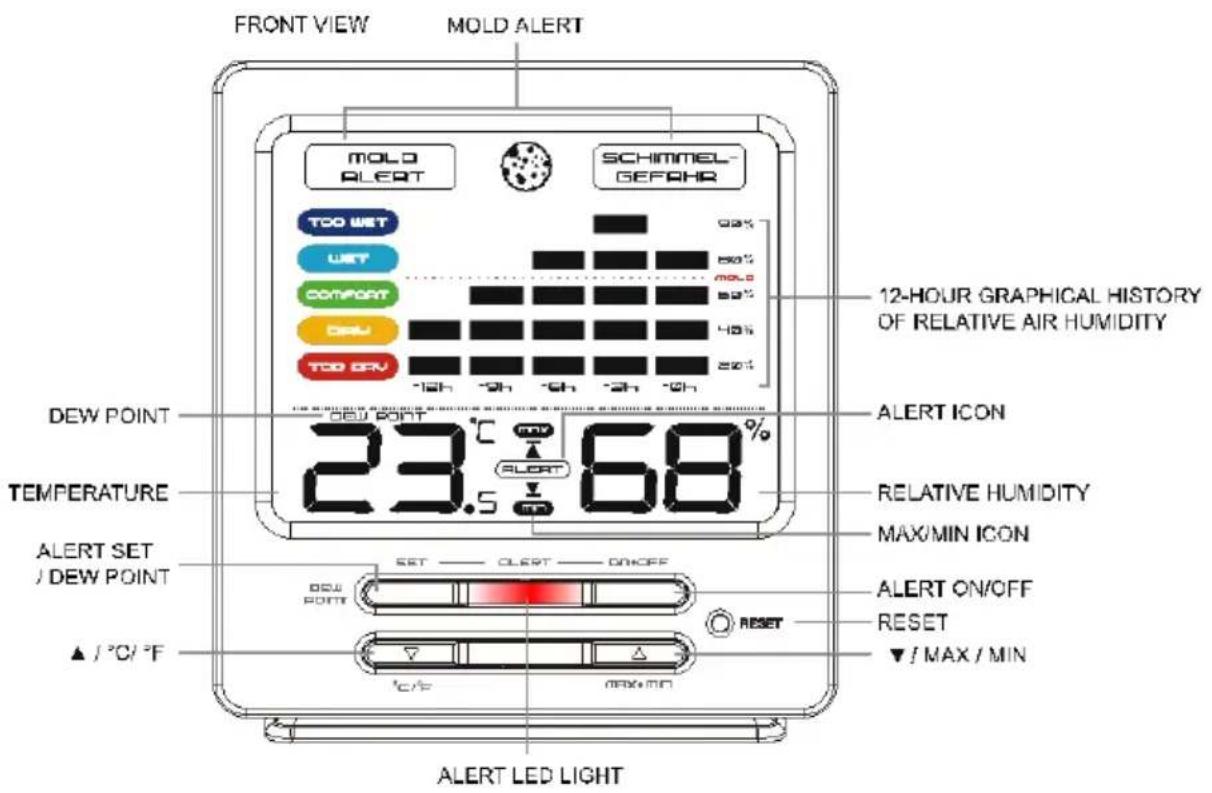
Words in the figure:
| Figure 1: | ENGLISH | Other Language |
| FRONT VIEW | Frontansicht | |
| MOLD ALERT | Schimmelalarm | |
| 12-HOUR GRAPHICAL HISTORY OF RELATIVE AIR HUMIDITY | 12 Historie der Luftfeuchtigkeit | |
| ALERT ICON | Alarmsymbol | |
| RELATIVE HUMIDITY | Relative Luftfeuchtigkeit | |
| MAX / MIN ICON | MAX / MIN Symbol | |
| ALERT ON / OFF | Alarm ON / OFF | |
| RESET | Reset | |
| ▲ / MAX / MIN | ▲ / MAX / MIN | |
| ALERT LED LIGHT | Alarm LED Licht | |
| / °C/ °F | / °C/ °F | |
| ALERT SET / DEW POINT | Alarm / Taupunkt | |
| TEMPERATURE | Temperatur | |
| DEW POINT | Taupunkt | |
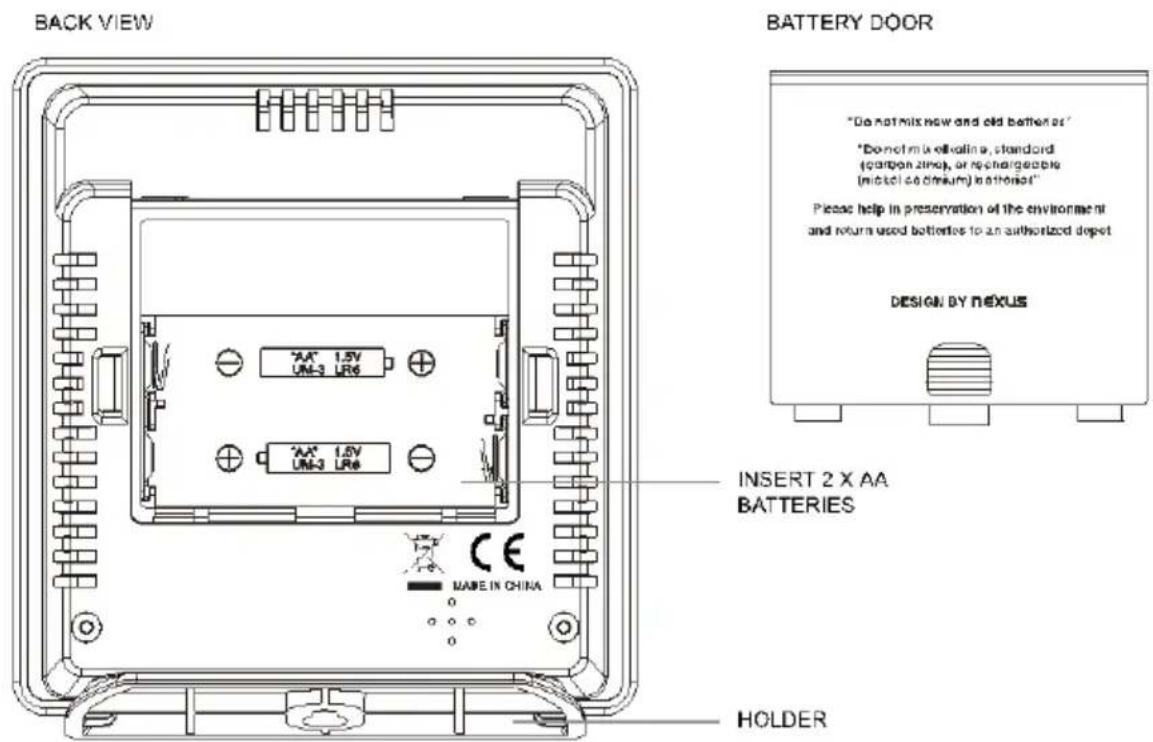
| BACK VIEW | Rückansicht | |
| INSERT 2 X AA BATTERIES | 2 x AA Batterien einlagen | |
| HOLDER | Ständer | |
| BATTERY DOOR | Batteriedeckel | |
INSTRUCTION MANUAL for WS 9420
Digital COMFORT INDEX Thermometer-Hygrometer with Mold Alert and Dew Point Temperature
FEATURES
- Extra large LCD display
- Indoor Temperature
- Dew Point Temperature
- Indoor Relative Air Humidity
- Degree C/F Temperature
- Mold alert by LED and Mold Alert icon (at 65%, 70%, 75%)
Max-Min record of temperature and relative air humidity
12-hour graphical history of relative air humidity - Programmable upper/lower relative air humidity with audible and LED alarm
- Easy-to-read colored comfort index
- Low battery indicator
This digital COMFORT INDEX Thermo-Hygrometer is an ideal measurement device for checking your room ambient conditions.
HOW DOES AIR HUMIDITY AFFECT YOUR HEALTH AND YOUR HOME
Excess humidity promotes the growth of undesirable organisms in your indoor environment. Maintaining an inside humidity range of 30 to 50% indoors helps prevent growth of molds, mildew, and dust mites. Spending time in a moldy indoor environment can wear down a person's immune system and resistance to respiratory allergies and related infections. Indoor air that is free from mold and mildew also smells fresh and inviting.
Excessively dry indoor air can dry out skin and irritate your throat and sinuses, making those areas more likely to become infected. In arid climates or in the winter when the combustion inside the furnace dries out indoor air, using a humidifier device increases relative humidity--like the can did--but much more precisely
Indoor air that is too dry can cause wood to contract and crack, especially thinner wood such as that used to build guitars and violins. Over longer periods of time, excessively dry air can even crack solid wood beams or logs plus some types of plaster.
Active heating or ventilation can help achieve a comfortable and healthy living environment.
ABOUT DEW POINT TEMPERATURE
Dew point is a measure of how much water vapor is actually in the air.
The dew point is associated with relative humidity. A high relative humidity indicates that the dew point temperature is closer to the current air temperature.
For most people, the air feels humid when the dew point is above 15.5°C (60°F) and uncomfortably hot and sticky when it goes above 21°C (70°F) degrees.
| Dew Point °C | Dew Point °F | Human Perception | Relative Humidity at 32 °C (90 °F) |
| >Higher than 26 °C | >Higher than 80 °F | Severely high. Even bad for asthma related illnesses | 65% and higher |
| 24 – 26 °C | 75 - 80 °F | Extremely uncomfortable, fairly oppressive | 62% |
| 21 – 24 °C | 70 - 74 °F | Very humid, quite uncomfortable | 52% - 60% |
| 18 – 21 °C | 65 - 69 °F | Somewhat uncomfortable for most people at upper edge | 44% - 52% |
| 16 – 18 °C | 60 - 64 °F | OK for most, but all perceive the humidity at upper edge | 37% - 46% |
| 13 – 16 °C | 55 - 59 °F | Comfortable | 38% - 41% |
| 10 – 12 °C | 50 - 54 °F | Very comfortable | 31% - 37% |
| <10 °C | <49 °F | A bit dry for some | 30% |
BATTERY INSTALLATION
- Slide open the battery cover at the back of your mold alert thermo-hygrometer
- Insert 2 × AA batteries (alkaline batteries preferred) into the battery compartment by observing the correct + / - polarity signs inside the battery compartment.
- Replace the battery cover. The unit is now ready to use.
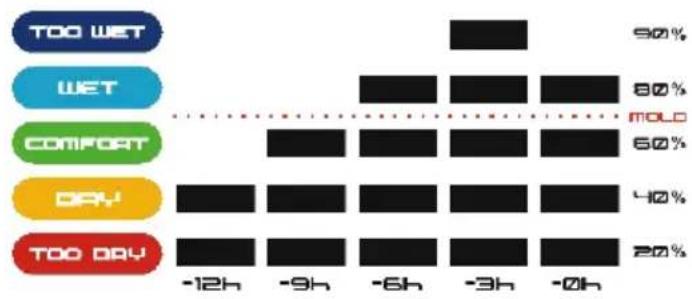
12-HOUR GRAPHICAL HISTORY OF RELATIVE AIR HUMIDITY
You could easily view the comfort level of your room conditions in accordance with the last 12-hour relative humidity records.
| COMFORT LEVEL | RELATIVE HUMIDITY |
| TOO WET | 81% to 90% |
| WET | 61% to 80% |
| COMFORT | 41% to 60% |
| DRY | 31% to 40% |
| TOO DRY | 20% to 30% |
TO USE THE HUMIDITY ALARM
- To set the humidity alarm, press and hold SET, both ALERT and appears at lower LCD, the humidity digits flash. Press or to set the upper humidity limit in every 5% increment.
- Press SET once, both (ALERT) and V appears at lower LCD, the humidity digits flash. Press or to set the lower humidity limit in every 5% increment.
- Press SET once or wait for around 10 seconds to return to normal display condition.
- To turn on the humidity alarm, press ON.OFF once. (ALERT) appears on the LCD.
- When air humidity exceeds the set limit, both the or will flash with with flashing LED.
- Press any key to stop the alarm and flashing LED. ▲ or ▼ remains flashing on the LCD.
- To turn off the humidity alarm, press ON.OFF once. (ALERT) and the or disappears on the LCD.
Remark: Alarm and flashing LED duration 1 minute
MOLD ALERT
- To select the mold alert humidity, press and hold the /°C / °F . MOLD ALERT SCHIMMEL- appears on the upper LCD and humidity digits flash, press or to select mold alert humidity value at 65% 70% 75%
- Press and hold / o C / o F or wait for around 10 seconds to return to normal display condition.
- If air humidity exceeds the mold alert humidity value, there is a risk of mould formation. The MOLD will appear on the LCD, the red LED will flash every 5 seconds.
- Press and key to stop the LED from flashing, remains on the LCD until the measured air humidity is lower than the preset mold alert value.
Default mold alert humidity: 65%
TO READ DEGREE C/F TEMPERATURE READOUT
Simply press °C/°F to select degree C or F readout.
Press MAX.MIN one at a time to view the maximum or the minimum temperature and relative humidity since the last reset.
When the maximum temperature and humidity are displayed with maxs and hold the MAX/MIN will clear the maximums and the unit will start to record and display fresh data again.
When the minimum temperature and humidity are displayed with p s and hold the MAX/MIN will clear the minimums and the unit will start to record and display fresh data again.
TROUBLE SHOOTING
In case your wireless thermometer-clock shows irrelevant information or digits, it maybe affected by electrostatic discharge or interferences from other devices. Press the RESET. Your unit will be reset to default setting and you need set humidity alarm and mold alert values again.
PLACING OR HANGING UP THE UNIT
Insert the holder to the bottom your unit for desktop display, insert it onto the rear side of your unit for hanging on the wall.
Since the humidity levels vary greatly according to the location, mount the unit so that it will monitor the conditions in a location likely to be subject to the most problems.

Precautions
- This main unit is intended to be used only indoors.
- Do not subject the unit to excessive force or shock.
- Do not expose the unit to extreme temperatures, direct sunlight, dust or humidity.
- Do not immerse in water.
- Avoid contact with any corrosive materials.
- Do not dispose this unit in a fire as it may explode.
- Do not open the inner back case or tamper with any components of this unit.
Batteries safety warnings
- Use only alkaline batteries, not rechargeable batteries.
Install batteries correctly by matching the polarities (+ / - )
Always replace a complete set of batteries. - Never mix used and new batteries.
- Remove exhausted batteries immediately.
-
Remove batteries when not in use.
-
Do not recharge and do not dispose of batteries in fire as the batteries may explode.
- Ensure batteries are stored away from metal objects as contact may cause a short circuit.
- Avoid exposing batteries to extreme temperature or humidity or direct sunlight.
- Keep all batteries out of reach from children. They are a choking hazard.
SPECIFICATIONS
Temperature Range 0°C to +50°C
Tolerance + / - 1°C
Relative Humidity Range 20% - 95%
Tolerance +/- 5%
Temperature Resolution 0.1°C
Relative Humidity Resolution 1%
Words in the figure:
| Figure 1: | ENGLISH | Other Language |
| FRONT VIEW | ||
| MOLD ALERT | ||
| 12-HOUR GRAPHICAL HISTORY OF RELATIVE AIR HUMIDITY | ||
| ALERT ICON | ||
| RELATIVE HUMIDITY | ||
| MAX / MIN ICON | ||
| ALERT ON / OFF | ||
| RESET | ||
| ▲ / MAX / MIN | ||
| ALERT LED LIGHT | ||
| / °C/ °F | ||
| ALERT SET / DEW POINT | ||
| TEMPERATURE | ||
| DEW POINT | ||
| BACK VIEW | ||
| INSERT 2 X AA BATTERIES | ||
| HOLDER | ||
| BATTERY DOOR | ||
Consideration of duty according to the battery law
Old batteries do not belong to domestic waste because they could cause damages of health and environment. You can return used batteries free of charge to your dealer and collection points. As end-user you are committed by law to bring back needed batteries to distributors and other collecting points!
Consideration of duty according to the law of electrical devices
This symbol means that you must dispose of electrical devices separated from the General household waste when it reaches the end of its useful life. Take your unit to your local waste collection point or recycling centre. This applies to all countries of the European Union, and to other European countries with a separate waste collection system.
Words in the figure:
| Figure 1: | ENGLISH | Other Language |
| FRONT VIEW | VISTA FRONTAL | |
| MOLD ALERT | ALERTA DE MOHO | |
| 12-HOUR GRAPHICAL HISTORY OF RELATIVE AIR HUMIDITY | HISTORIAL GRAFICO DE 12 HORAS DE HUMEDAD RELATIVA | |
| ALERT ICON | ICONO DE ALERTA | |
| RELATIVE HUMIDITY | HUMEDAD RELATIVA | |
| MAX / MIN ICON | ICONO MAX / MIN | |
| ALERT ON / OFF | ALERTA ON / OFF | |
| RESET | RESTABLECER | |
| ▲ / MAX / MIN | ▲ / MAX / MIN | |
| ALERT LED LIGHT | LED DE ALERTA | |
| / °C/ °F | / °C/ °F | |
| ALERT SET / DEW POINT | CONFIGURAR ALERTA / PUNTO DE CONDENSACION | |
| TEMPERATURE | TEMPERATURA | |
| DEW POINT | PUNTO DE CONDENSACION | |
| BACK VIEW | VISTA TRASERA | |
| INSERT 2 X AA BATTERIES | INSERTAR 2 X PILAS AA | |
| HOLDER | SOPORTE | |
| BATTERY DOOR | TAPA DE LA BATERIA | |
SCHIMMELWAARSCHUWING
INFORMACE O TEPLOTE ROSNEHO BODU
UMISTENI NEBO ZAVESENI JEDNOTKY
JAK KORZYSTAC Z ALARMU WILGOTNOSCI
- INSTRUCTION MANUAL FOR WS 9420
- DIGITAL COMFORT INDEX THERMOMETER-HYGROMETER WITH MOLD ALERT AND DEW POINT TEMPERATURE
- FEATURES
- HOW DOES AIR HUMIDITY AFFECT YOUR HEALTH AND YOUR HOME
- ABOUT DEW POINT TEMPERATURE
- BATTERY INSTALLATION
- 12-HOUR GRAPHICAL HISTORY OF RELATIVE AIR HUMIDITY
- TO USE THE HUMIDITY ALARM
- MOLD ALERT
- TO READ DEGREE C/F TEMPERATURE READOUT
- TROUBLE SHOOTING
- PLACING OR HANGING UP THE UNIT
- PRECAUTIONS
- BATTERIES SAFETY WARNINGS
- SPECIFICATIONS
- CONSIDERATION OF DUTY ACCORDING TO THE BATTERY LAW
- CONSIDERATION OF DUTY ACCORDING TO THE LAW OF ELECTRICAL DEVICES
- SCHIMMELWAARSCHUWING
- INFORMACE O TEPLOTE ROSNEHO BODU
- UMISTENI NEBO ZAVESENI JEDNOTKY
- JAK KORZYSTAC Z ALARMU WILGOTNOSCI
Brand : TECHNOLINE
Model : WS 9420
Category : Thermometer