10035128 - Pan Klarstein - Free user manual and instructions
Find the device manual for free 10035128 Klarstein in PDF.


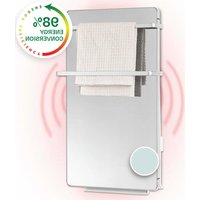
| Product type | Wall-mounted radiant electric heater |
| Brand | Klarstein |
| Model | 10035128 |
| Dimensions | 120 × 60 cm |
| Power | 700 W |
| Power supply | 220-240 V ~ 50 Hz |
| WiFi | Standard 802.11 b/g/n, frequency 2.4 GHz |
| Operating modes | Manual, smart (4 periods/day, 7 days), holiday |
| Open window detection | Yes, automatic shutdown after 30 minutes |
| Timer | Up to 24 hours |
| Display | Digital display with day, time, temperature, modes |
| Remote control | Not included, control via smartphone |
| Installation | Vertical wall mounting, wall plugs and screws included |
| Safety distance | 20 cm from walls and objects, 20 cm from floor |
| Cleaning | Soft dry cloth or glass cleaner (glass models) |
| Safety | Automatic shutdown in case of overheating, open window detection |
| Recycling | Do not dispose with household waste, take to WEEE collection point |
| Country of origin | Imported by Chal-Tec GmbH, Germany |
Frequently Asked Questions - 10035128 Klarstein
User questions about 10035128 Klarstein
0 question about this device. Answer the ones you know or ask your own.
Ask a new question about this device
Download the instructions for your Pan in PDF format for free! Find your manual 10035128 - Klarstein and take your electronic device back in hand. On this page are published all the documents necessary for the use of your device. 10035128 by Klarstein.
USER MANUAL 10035128 Klarstein
WONDERWALL AIR ART SMART
Infrarot-Heizung Infrared Heater Radiador infrarrojo Radiateur Infrarouge Radiatore a infrarossi
Note: This product is only suitable for well insulated spaces or occasional use.
text_image
QR code image containing encoded data, no visible human-readable textINHALTSVERZEICHNIS
Technische Daten 4
Produktdatenblatt 6
natural_image
Simple line drawing of a mechanical device with a rod and base, connected to a diagonal line (no text or symbols)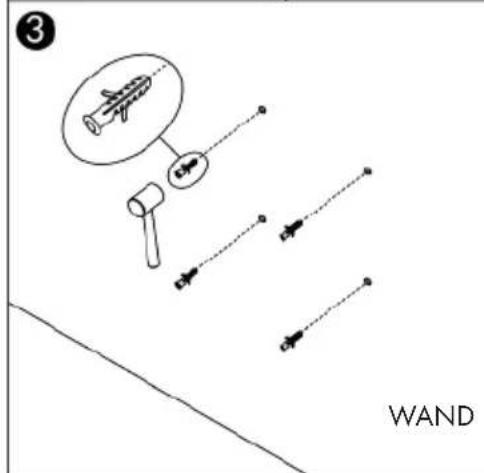
text_image
3 WAND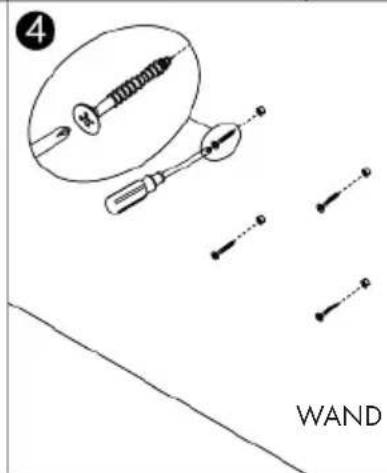
text_image
WAND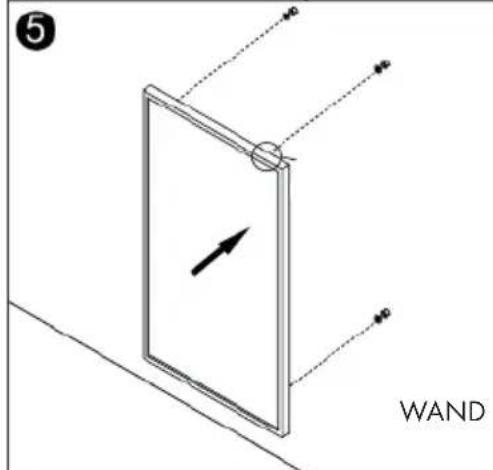
text_image
WAND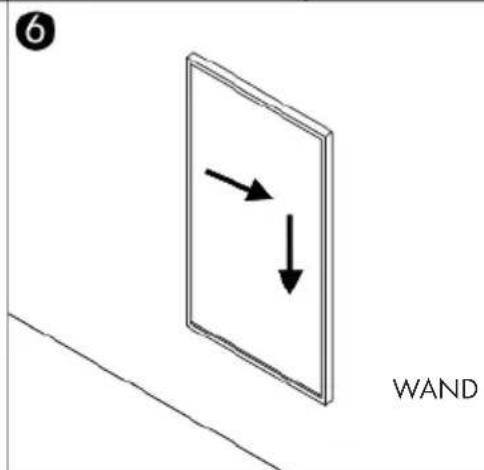
text_image
6 WANDTemperaturkalibration
natural_image
Symbol of a trash bin crossed with a diagonal line, no text or labels presentBerlin Brands Group UK Ltd
PO Box 1145
Oxford, OX1 9UW
United Kingdom
Congratulations on purchasing this device. Please read the following instructions carefully and follow them to prevent possible damages. We assume no liability for damage caused by disregard of the instructions and improper use. Scan the QR code to get access to the latest user manual and more product information.

text_image
QR code image containing encoded data, no visible human-readable textCONTENT
Product Data Sheet 26
Safety Instructions 30
Wall installation 31
Device Overview and Function Keys 33
Commissioning and Operation 34
Manual Operation 35
Cleaning and Maintenance 35
Device Control by Smartphone 36
Cleaning and Care 38
Disposal Considerations 39
Declaration of Conformity 39
TECHNICAL DATA
| Item number | 10035112 1003511310035114 1003511510035116 1003511710037816 1003781810037819 1003782010037821 1003782210037823 1003782410037825 1003782610037827 1003782810037829 1003783010037831 1003783210037833 1003783410037835 10037836 | 10035118 1003511910037837 1003783810037839 1003784010037841 1003784210037843 1003784410037845 1003784610037847 1003784810037849 1003785010037851 1003785210037853 10037854 |
| Power supply 220-240 V ~ 50 Hz | ||
| Performance 350 W 350 W | ||
| Dimensions 60*60 cm 120*30 cm | ||
| WiFi standard | 802.11 b/g/n | |
| WiFi frequency | 2,4 GHz | |
| WiFi radio-frequency power (max.) | 20 dBm | |
| Item number | 10035120 10035121 10035122 10035123 1003512410035125 10035126 10041362 10041364 |
| Power supply 220-240 V | ~ 50 Hz |
| Performance 500 W | |
| Dimensions | 60*80 cm |
| WiFi standard | 802.11 b/g/n |
| WiFi frequency | 2,4 GHz |
| WiFi radio-frequency power (max.) | 20 dBm |
| Item number | 10035127 10035128 10035129 10035130 1003513110035132 10035133 10035134 10037871 1003787210037873 10037874 10037875 10037876 1003787710037878 10037881 10037882 10037883 1003788410037885 10037886 10037887 10037888 1003788910037890 10037891 10037892 10037893 1003789410037895 10037896 10037897 10037898 1003789910037900 10037901 10037902 10037903 1003790410037905 10037906 10037907 10037908 1003790910037910 10037911 10037912 10037913 1003791410037915 10037916 10037917 10037918 1003791910037920 10037921 10037922 10037923 1003792410037925 10037926 10037927 10037928 1004136310041365 |
| Power supply 220-240 V ~ 50 Hz | |
| Performance 700 W | |
| Dimensions 120*60 cm | |
| WiFi standard | 802.11 b/g/n |
| WiFi frequency | 2,4 GHz |
| WiFi radio-frequency power (max.) | 20 dBm |
PRODUCT DATA SHEET
| Model identifier(s): 10037816 | 10037818 10037819 10037820 10037821 10037822 1003782310037824 10037825 10037826 10037827 10037828 10037829 1003783010037831 10037832 10037833 10037834 10037835 10037836 1003511210035113 10035114 10035115 10035116 10035117 | |||||
| Item Symbol Value Unit | Item | Unit | ||||
| Heat output | Type of heat input, for electric storage local space heaters only | |||||
| Nominal heat output | P_nom | 0.35 | kW | manual heat charge control, with integrated thermostat | no | |
| Minimum heat output (indicative) | P_min | 0.0 | kW | manual heat charge control with room and/or outdoor temperature feedback | no | |
| Maximum continuous heat output | P_max,c | 0.35 | kW | electronic heat charge control with room and/or outdoor temperature feedback | no | |
| Auxiliary electricity consumption | fan assisted heat output | no | ||||
| At nominal heat output (fan motor) | e|_max | 0.35 | kW | Type of heat output/room temperature control | ||
| At minimum heat output (fan motor) | e|_min | 0.000 | kW | single stage heat output and no room temperature control | no | |
| In standby mode | e|_SB | 0.001 | W | Two or more manual stages, no room temperature control | no | |
| with mechanic thermostat room temperature control | no | |||||
| with electronic room temperature control | no | |||||
| electronic room temperature control plus day timer | no | |||||
| electronic room temperature control plus week timer | yes | |||||
| Other control options (multiple selections possible) | ||||||
| room temperature control, with presence detection | no | |||||
| room temperature control, with open window detection | yes | |||||
| with distance control option | no | |||||
| with adaptive start control no | ||||||
| with working time limitation | no | |||||
| with black bulb sensor | no | |||||
| Contact details | Chal-Tec GmbH, Wallstraße 16, 10179, Berlin, Germany | |||||
| Model identifier(s): 10037837 | 10037838 10037839 10037840 10037841 10037842 1003784310037844 10037845 10037846 10037847 10037848 10037849 1003785010037851 10037852 10037853 10037854 10035118 10035119 | |||||
| Item Symbol Value Unit Item Unit | ||||||
| Heat output Type of heat input, for electric storage local space | heaters only | |||||
| Nominal heat output | P_nom | 0.35 | kW | manual heat charge control, with integrated thermostat | no | |
| Minimum heat output (indicative) | P_min | 0.0 | kW | manual heat charge control with room and/or outdoor temperature feedback | no | |
| Maximum continuous heat output | P_max,c | 0.35 | kW | electronic heat charge control with room and/or outdoor temperature feedback | no | |
| Auxiliary electricity consumption | fan assisted heat output | no | ||||
| At nominal heat output (fan motor) | el_max | 0.35 | kW | Type of heat output/room temperature control | ||
| At minimum heat output (fan motor) | el_min | 0.000 | kW | single stage heat output and no room temperature control | no | |
| In standby mode | el_SB | 0.001 | W | Two or more manual stages, no room temperature control | no | |
| with mechanic thermostat room temperature control | no | |||||
| with electronic room temperature control | no | |||||
| electronic room temperature control plus day timer | no | |||||
| electronic room temperature control plus week timer | yes | |||||
| Other control options (multiple selections possible) | ||||||
| room temperature control, with presence detection | no | |||||
| room temperature control, with open window detection | yes | |||||
| with distance control option | no | |||||
| with adaptive start control no | ||||||
| with working time limitation | no | |||||
| with black bulb sensor | no | |||||
| Contact details | Chal-Tec GmbH, Wallstraße 16, 10179, Berlin, Germany | |||||
| Model identifier(s): 10035120, 10035121, 10035122, 10035123, 10035124, 10035125, 10035126 | ||||||
| Item Symbol Value Unit Item Unit | ||||||
| Heat output Type of heat input, for electric storage local space | heaters only | |||||
| Nominal heat output P | nom | 0.5 kW | manual heat | at | charge control, with integrated thermostat | no |
| Minimum heat output (indicative) | Pmin | 0.0 kW | manual heat | at | charge control with room and/or outdoor temperature feedback | no |
| Maximum continuous heat output | Pmax,c | 0.5 kW | electronic heat | heat | charge control with room and/or outdoor temperature feedback | no |
| Auxiliary electricity consumption | fan assisted heat output no | |||||
| At nominal heat output (fan motor) | elmax | 0.5 kW | Type of heat output/room temperature control | |||
| At minimum heat output (fan motor) | elmin | 0.000 kW | single stage | heat | heat output and no room temperature control | no |
| In standby mode | elSB | 0.001 | W | Two or more manual stages, no room temperature control | no | |
| with mechanic thermostat room temperature control | no | |||||
| with electronic room temperature control no | ||||||
| electronic room temperature control plus day timer | no | |||||
| electronic room temperature control plus week timer | yes | |||||
| Other control options (multiple selections possible) | ||||||
| room temperature control, with presence detection | no | |||||
| room temperature control, with open window detection | yes | |||||
| with distance control option | no | |||||
| with adaptive start control no | ||||||
| with working time limitation | no | |||||
| with black bulb sensor | no | |||||
| Contact details | Chal-Tec GmbH, Wallstraße 16, 10179, Berlin, Germany | |||||
| Model identifier(s): 10037871 | 10037872 | 10037873 | 10037874 | 10037875 | 10037876 | 10037877 |
| 10037878 | 10037881 | 10037882 | 10037883 | 10037884 | 10037885 | |
| 10037887 | 10037888 | 10037889 | 10037890 | 10037891 | 10037892 | |
| 10037894 | 10037895 | 10037896 | 10037897 | 10037898 | 10037899 | |
| 10037901 | 10037902 | 10037903 | 10037904 | 10037905 | 10037906 | |
| 10037908 | 10037909 | 10037910 | 10037911 | 10037912 | 10037913 | |
| 10037915 | 10037916 | 10037917 | 10037918 | 10037919 | 10037920 | |
| 10037922 | 10037923 | 10037924 | 10037925 | 10037926 | 10037927 | |
| 10035127 | 10035128 | 10035129 | 10035130 | 10035131 | 10035132 | |
| 10035134 | ||||||
| Item | Symbol | Value | Unit | Item | Unit | |
| Heat output | Type of heat input, for electric storage local space heaters only | |||||
| Nominal heat output | P_nom | 0.7 | kW | manual heat charge control, with integrated thermostat | no | |
| Minimum heat output (indicative) | P_min | 0.0 | kW | manual heat charge control with room and/or outdoor temperature feedback | no | |
| Maximum continuous heat output | P_max,c | 0.7 | kW | electronic heat charge control with room and/or outdoor temperature feedback | no | |
| Auxiliary electricity consumption | fan assisted heat output | no | ||||
| At nominal heat output (fan motor) | el_max | 0.7 | kW | Type of heat output/room temperature control | ||
| At minimum heat output (fan motor) | el_min | 0.000 | kW | single stage heat output and no room temperature control | no | |
| In standby mode | el_SB | 0.001 | W | Two or more manual stages, no room temperature control | no | |
| with mechanic thermostat room temperature control | no | |||||
| with electronic room temperature control | no | |||||
| electronic room temperature control plus day timer | no | |||||
| electronic room temperature control plus week timer | yes | |||||
| Other control options (multiple selections possible) | ||||||
| room temperature control, with presence detection | no | |||||
| room temperature control, with open window detection | yes | |||||
| with distance control option | no | |||||
| with adaptive start control no | ||||||
| with working time limitation | no | |||||
| with black bulb sensor | no | |||||
| Contact details | Chal-Tec GmbH, Wallstraße 16, 10179, Berlin, Germany | |||||
SAFETYINSTRUCTIONS
- Do not use the appliance until it is securely fixed as described in this manual.
- Check that the voltage indicates on the data plate corresponds with that of the local network before connecting the appliance to the mains power supply.
- If the supply cord is damaged, it must be replaced by a qualified engineer in order to avoid a hazard.
- The heater must not be positioned directly under the power socket.
- Keep furniture, curtains and other fl ammable material at least 1 meter away from the appliance.
- Do not leave the appliance unattended during use.
- Do not leave the appliance unattended whilst connected to the mains supply.
- Keep out of reach of children and do not allow them to operate this appliance.
- This appliance is intended for household use only and should not be used for industrial purposes.
- Do not operate this appliance after a malfunction or after being damaged in any way.
• Repairs to electrical appliances should only be performed by a qualified electrician. - Improper repairs may place user at serious risk.
- Do not run the mains cable under carpets, rugs, etc.
- Do not allow the mains cable to hang over sharp edges or come in contact with hot surfaces.
• In order to avoid overheating, do not cover the heater. - Do not use this heater with a programmer, timer, separate remote control system or any other device that switches the heater on automatically, since a fire risk exists if the heater is covered or positioned incorrectly.
- Never immerse the product in water or any other liquid for any reasons.
- Do not use this heater in the immediate surroundings of a bath, a shower or a swimming pool.
- Do not use the appliance outdoors.
- Do not use if you have wet hands.
- Never use the appliance on or near hot surfaces.
- Do not operate with a damaged cord.
- Before cleaning the appliance, make sure it is unplugged from the power and that it is completely cooled.
- Do not clean the appliance with abrasive chemicals.
- Never use accessories that are not recommended or supplied by the manufacturer. It could cause danger to the user or damage to the appliance.
- This appliance is not intended for use by persons (including children) with reduced Physical, sensory or mental capabilities, or lack of experience and knowledge unless they have been given supervision or instruction concerning use of the appliance by a person responsible for their safety.
• Children should be supervised to ensure that they do not play with the appliance.
CAUTION
Risk of burns! Some parts of this product can become very hot and cause burns. Particular attention has to be given where children and vulnerable people are present.
WALL INSTALLATION
text_image
Wall Installation Template WALL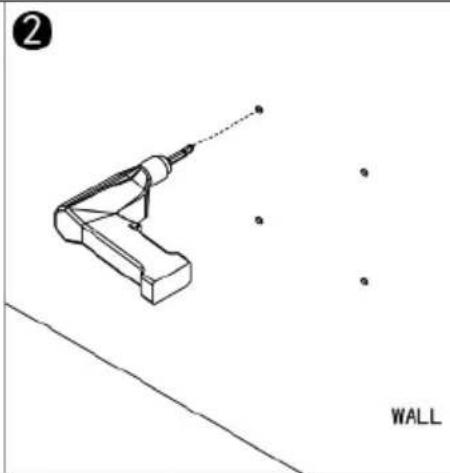
natural_image
Technical line drawing of a tool with a dotted line and scattered dots, labeled 'WALL' (no text or symbols on the diagram itself)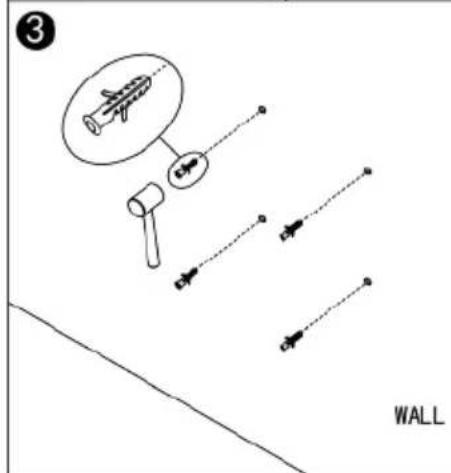
text_image
3 WALL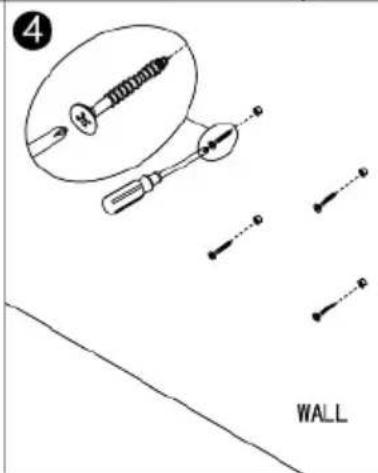
text_image
4 WALL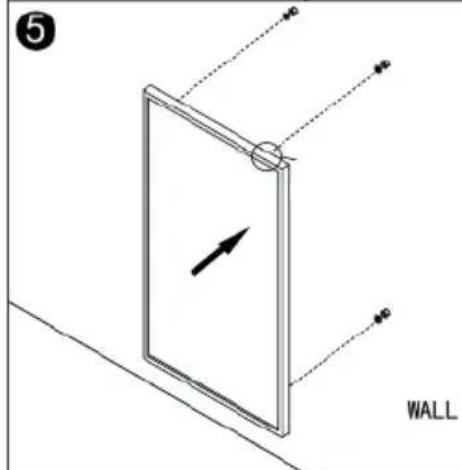
text_image
5 WALL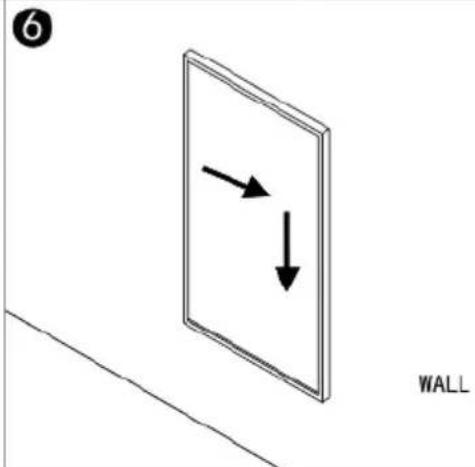
text_image
6 WALL| Step 1: Step 2: | |
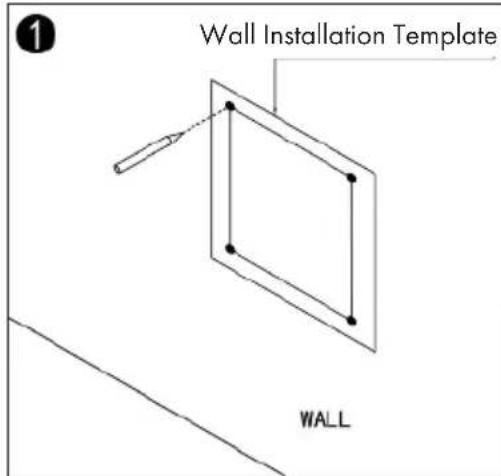
| Use the supplied template to mark the holes on the wall. | Use an 8mm drill bit to drill the holes. |
| Step 3: Step 4: | |
| Insert the dowels into the holes. Screw the supplied screws into the wall. | |
| Step 5: Step 6: | |
| Fasten the panel to the screws. Move the panel first to the left and then down to fix it in place. | |
Note: The mounting kit included in the scope of delivery is intended for vertical mounting on a stable wall. When mounting on other types of wall, you will need appropriate mounting brackets (not included). Make sure that the wall is suitable for mounting. It is strongly recommended that the panel be installed by a qualified electrician or an installer authorized by the manufacturer. The heater must be at least 20 cm away from all objects, walls, etc.; the distance to the floor must be at least 20 cm.
DEVICE OVERVIEW AND FUNCTION KEYS
Control panel and remote control
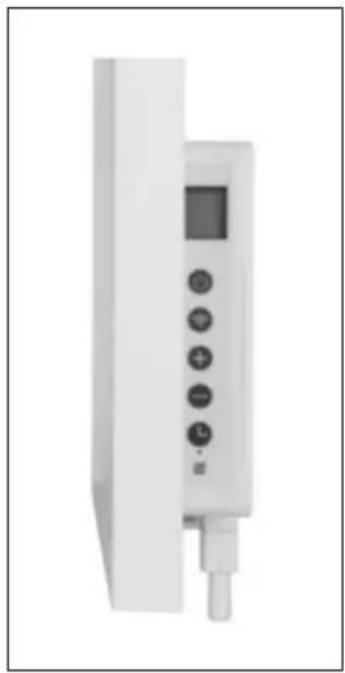
natural_image
White handheld electronic device with control buttons and a display screen (no visible text or symbols)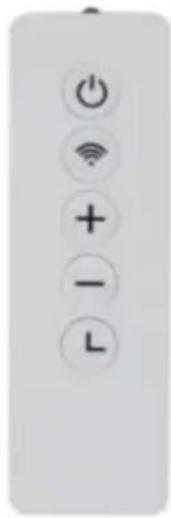
text_image
Vertical control panel with power, Wi-Fi, plus, minus, and L symbols1 On/Off
2 WLAN
3 Raise
4 Lowering
5 Timer
6 Heating status display
Bildschirm
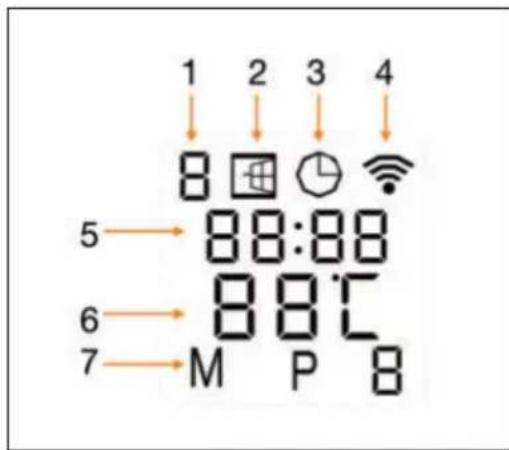
text_image
1 2 3 4 ↓ ↓ ↓ ↓ ↓ 8 8:88 5 → 88℃ 6 → M P B 7 →1 Weekday
2 Open window" symbol
3 Timer symbol
4 WLAN icon
5 Time
6 Temperature
7 Modes:
$$ M = \text { Manual mode } $$
$$ P = \text { Program duration } (P 1 - P 4) $$
$$ H = \text { h o l i d a y m o d e } $$
COMMISSIONING AND OPERATION
The device has an integrated WLAN control unit. This means that no additional thermostat is required to operate the device. As soon as your device is connected to the app, your smartphone communicates with the WLAN control device and you can control the device via smartphone. If your home network is down, it is possible to operate the device manually via the control unit. As soon as the device is connected to the WLAN again, you can control the device via your smartphone again.
The device has the following features:
- Manual mode: easy temperature control and 24-hour timer function
• Intelligent mode: 7 weekday settings, 4 time periods per day - Holiday mode: Set a fixed temperature during your absence and return to normal settings when you return.
• Detection function for open windows
Open window detection
If the unit detects a drastic drop in room temperature within a short time in heating mode, the „open window“ symbol on the screen starts to flash. The heater switches off for 30 minutes and automatically resumes operation with the previous setting after 30 minutes. This function can be activated/deactivated by pressing the - button for at least 5 seconds. The „open window“ symbol is displayed or not on the screen, depending on the setting.
Temperature Calibration
Press the + button for 5 seconds to access temperature calibration. The number can be adjusted by pressing the + and - buttons. The calibration range is -5 to +5 degrees.
Activate/deactivate WLAN function
By pressing the Timer button for 10 seconds, the WLAN function can be activated/deactivated.
MANUAL OPERATION
- Press the On/Off button to switch the unit on.
- The „M“ symbol appears on the screen. The unit is now in manual mode.
- Adjust the temperature by pressing the + and - buttons. 2 seconds later, the current room temperature is displayed on the screen.
- To set a timer, press the Timer button. 00H" is displayed on the screen. Set the desired time until the appliance switches off automatically using the + and - buttons.
Note: Once the timer has been activated, the appliance is automatically in manual mode.
CLEANING AND MAINTENANCE
- Before cleaning, unplug the appliance from the power outlet and let it cool down completely.
- Never immerse the appliance in water or pour water over it.
- Clean the surface of the unit with a soft, damp cloth.
- For glass models, use a soft cloth and glass cleaner.
• Never use a wet cloth for cleaning.
• After cleaning, wipe the product dry with a dry cloth. - Do not use aggressive or abrasive cleaners or sponges to clean the unit, as this could scratch the unit or cause other irreparable damage.
• The unit must be completely dry before reuse.
DEVICE CONTROL BY SMARTPHONE
If you integrate the device into your home WiFi, you can conveniently operate it via the associated Klarstein app. The app not only allows you to remotely control the device via your smartphone, but also gives you access to recipes and additional information.
Follow these steps to connect your smartphone to your Klarstein device:
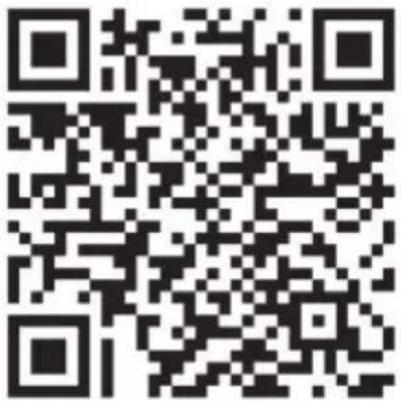
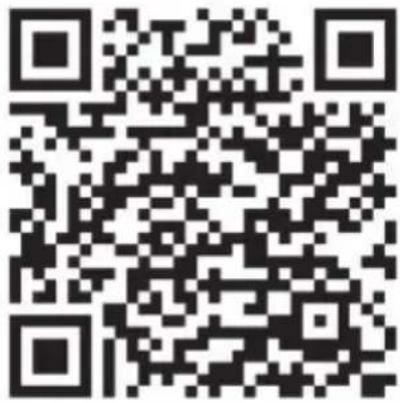
1 Download the Klarstein app first by scanning the QR code with your smartphone (see below), or download it directly from App Store or Google Play.
2 Make sure your smartphone is connected to the same WiFi network that your Klarstein device is to be connected to.
3 Open the Klarstein app.
4 Sign in to your account. If you do not have an account, sign up in the Klarstein app.
5 Follow the instructions from the app.
App Download
Use the scan function of your smartphone to scan the QR code and save the app on your smartphone.
Note: The app provides further information on how to use the app and help on how to connect to your device as soon as you open it for the first time.
| iOS Android | |
 |  |
Troubleshooting connection problems
If your Klarstein device cannot be found in the WLAN, check the following:
• Is the device plugged in?
• Is the WiFi feature of my phone enabled?
- Is the WiFi function of the Klarstein device activated? (Follow the instructions in the app)
- Has the WLAN password been entered correctly?
- Are the router, Klarstein device and smartphone in the immediate vicinity during the connection attempt? (Ideally no more than 5 m apart)
- If you have deactivated the 2.4 GHz band in the settings of your wireless router, activate it in your router settings.
- Please make sure WLAN signal light is flashing rapidly before connecting to APP, if not, long press WLAN button until it's flashing rapidly. If you still fail, please continually long press WLAN button until the signal light is flashing slowly and retry the connection.
Note: For further help, follow the instructions in the app when setting up the connection.
CLEANING AND CARE
Note: Turn off the unit and unplug it from the power outlet. Wait until the unit has completely cooled down before cleaning it.
- Use a vacuum cleaner to clean the ventilation slots and grilles.
- Remove dust on the outside surfaces with a damp (not wet) cloth.
- Do not use strong cleaning agents or abrasives.
- Do not spray the device with liquids or immerse it in water or other liquids.
• Never open the heater housing.
DISPOSAL CONSIDERATIONS
natural_image
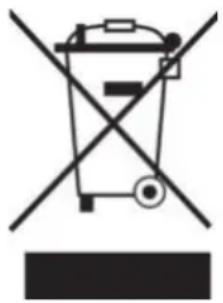
Symbol of a trash bin crossed with a diagonal line, no text or numbers presentIf there is a legal regulation for the disposal of electrical and electronic devices in your country, this symbol on the product or on the packaging indicates that this product must not be disposed of with household waste. Instead, it must be taken to a collection point for the recycling of electrical and electronic equipment. By disposing of it in accordance with the rules, you are protecting the environment and the health of your fellow human beings from negative consequences. For information about the recycling and disposal of this product, please contact your local authority or your household waste disposal service.
DECLARATION OF CONFORMITY

text_image
CE UK CAManufacturer:
Chal-Tec GmbH, Wallstrasse 16, 10179 Berlin, Germany.
Importer for Great Britain:
Berlin Brands Group UK Ltd
PO Box 1145
Oxford, OX1 9UW
United Kingdom
Hereby, Chal-Tec GmbH declares that the radio equipment type Wonderwall Air Art Smart is in compliance with Directive 2014/53/EU. The full text of the EU declaration of conformity is available at the following internet address: use.berlin/10035114
For Great Britain: Hereby, Chal-Tec GmbH declares that the radio equipment type Wonderwall Air Art Smart is in compliance with the relevant statutory requirements. The full text of the declaration of conformity is available at the following internet address: use.berlin/10035114
Estimado cliente:
text_image
QR code image with embedded text 'P105' and 'Q3' in the centerÍNDICE DE CONTENIDOS
Datos técnicos 42
natural_image
Symbol of a trash bin crossed with a diagonal line, no text or numbers presentBerlin Brands Group UK Ltd
PO Box 1145
Oxford, OX1 9UW
United Kingdom
text_image
QR code image containing encoded data, no visible human-readable textSOMMAIRE
Fiche technique 60
Installation murale 67
FICHE DE DONNÉES PRODUIT
natural_image
Symbol of a trash bin crossed with a diagonal line, no text or labels presentDÉCLARATION DE CONFORMITÉ

text_image
CE UK CAFabricant :
Chal-Tec GmbH, Wallstraße 16, 10179 Berlin, Allemagne.
Berlin Brands Group UK Ltd
PO Box 1145
Oxford, OX1 9UW
United Kingdom
text_image
QR code image containing encoded data, no visible human-readable textINDICE
Dati tecnici 78
natural_image
Symbol of a trash bin crossed with a diagonal line, no text or numbers presentBerlin Brands Group UK Ltd
PO Box 1145
Oxford, OX1 9UW
United Kingdom