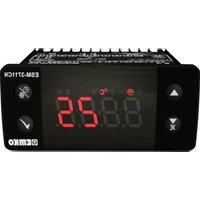
ESM3723 - Temperature Controller Emko - Free user manual and instructions
Find the device manual for free ESM3723 Emko in PDF.



| Product type | Temperature and humidity controller |
| Brand | Emko |
| Model | ESM3723 |
| Housing dimensions | 76 x 34.5 x 71 mm |
| Panel cutout | 71 x 29 mm |
| Weight | Approximately 0.20 kg |
| Front protection | IP65, NEMA 4X |
| Supply voltage | 230 V~ (±15%) 50/60 Hz, 115 V~, 24 V~, 10-30 V--- |
| Consumption | 3.5 VA / 3.5 W |
| Temperature input | NTC, PTC, PT-100, 0/2..10V, 0/4..20mA, ProNem Mini PMI-P |
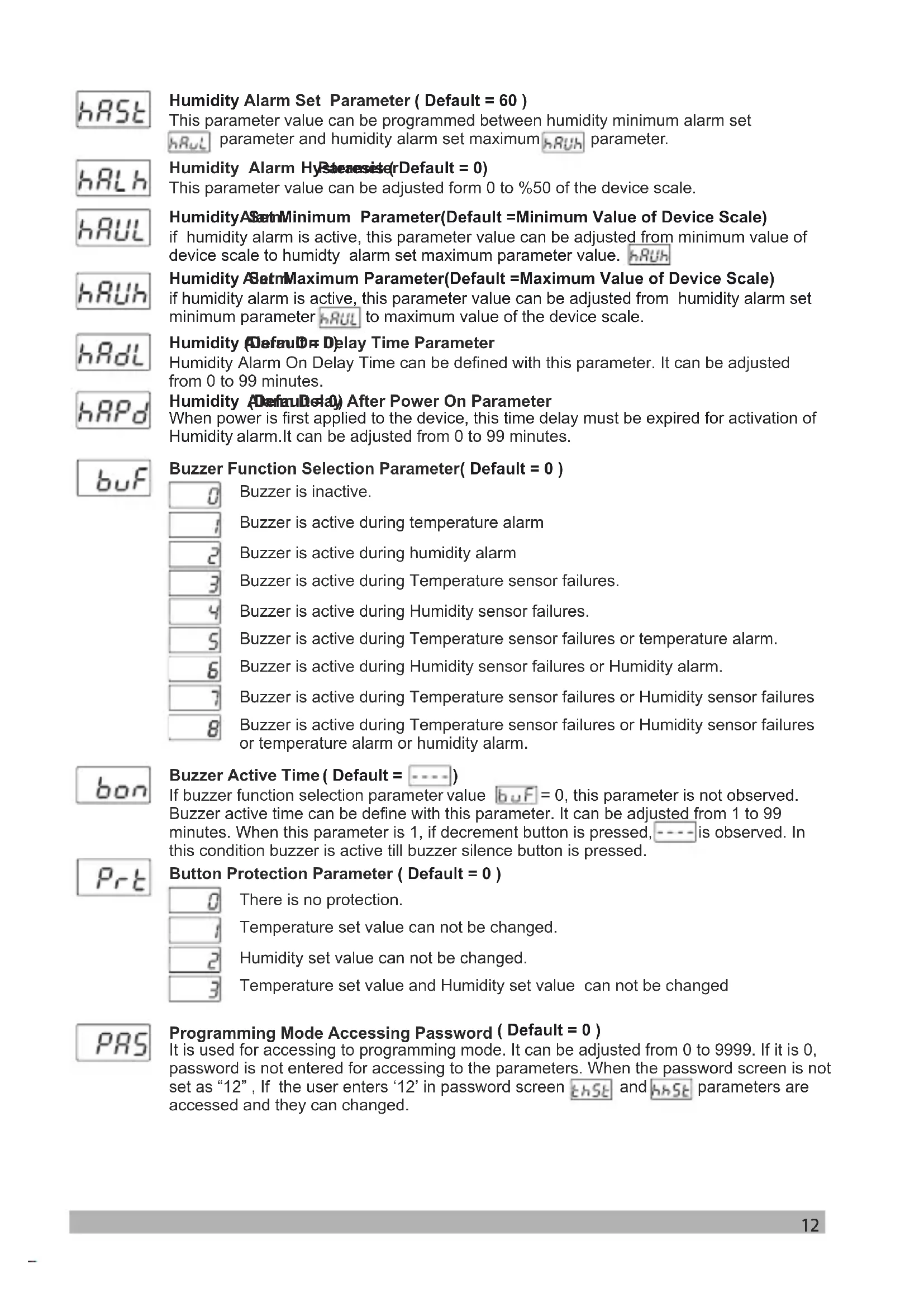
| Humidity input | 0/2..10V, 0/4..20mA, ProNem Mini PMI-P |
| Relay outputs | 4 outputs: Heating (5A), Heating alarm (3A), Humidifier (3A), Humidifier alarm (3A) |
| Control algorithm | PID or ON/OFF with self-tuning |
| Temperature display | Red LED display 4 digits (8 mm) |
| Humidity display | Green LED display 4 digits (8 mm) |
| Internal buzzer | ≥83 dB, adjustable |
| Operating temperature range | -30 to 80 °C |
| Max. operating humidity | 90% RH non-condensing |
| Cleaning | Cloth moistened with ethyl alcohol or water |
| Warranty | 2 years |
| Standards | CE, UKCA, EAC |
Frequently Asked Questions - ESM3723 Emko
User questions about ESM3723 Emko
0 question about this device. Answer the ones you know or ask your own.
Ask a new question about this device
Download the instructions for your Temperature Controller in PDF format for free! Find your manual ESM3723 - Emko and take your electronic device back in hand. On this page are published all the documents necessary for the use of your device. ESM3723 by Emko.
USER MANUAL ESM3723 Emko
text_image
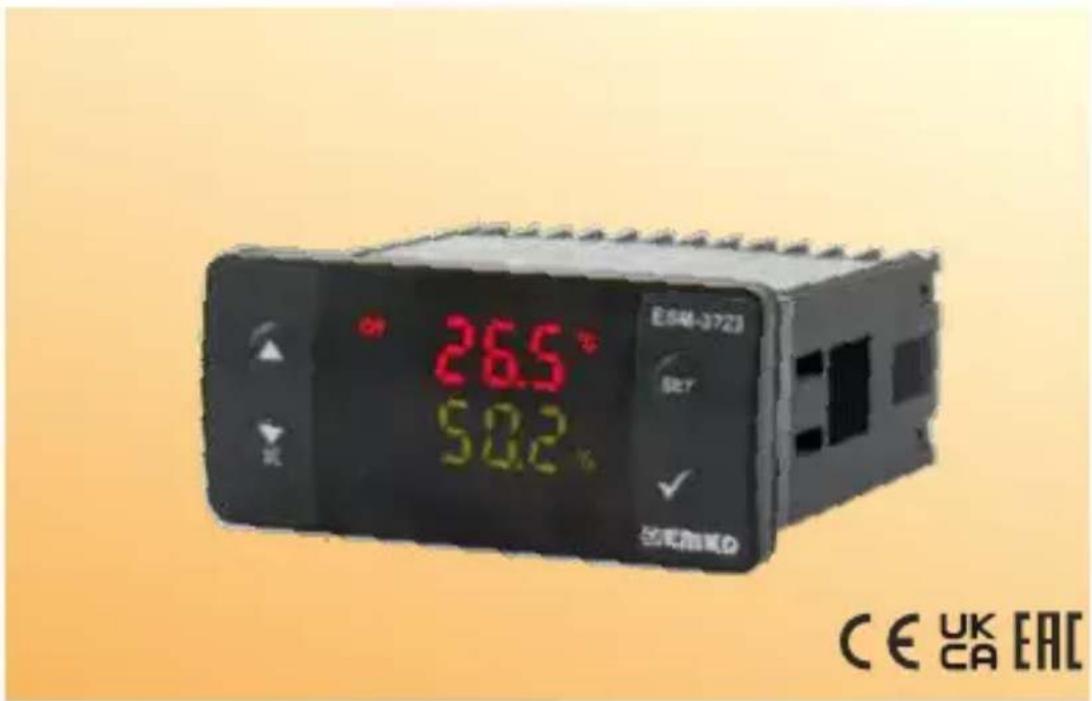
26.5° 50.2° ES46-3723 SET ✓ 已用防风D CE UK EACESM-3723 77 x 35 DIN Size Digital Temperature+Humidity Controller
- 4 Digits for Temperature Display
- 4 Digits for Humidity Display
- Temperature Sensor Input NTC, PTC, PT-100, 0/2..10V, 0/4..20mA or ProNem Mini PMI-P (Must be determined in order.)
- Humidity Sensor Input 0/2..10V, 0/4..20mA or ProNem Mini PMI-P (Must be determined in order.)
- 4 Output Heating Control Output Heating Alarm Output Humidification Control Output Humidification Alarm Output
- Relay or SSR Outputs (Must be determined in order.)
- Selectable Temperature Control ( PID or ON / OFF )
- Auto-Tune PID
- Set value boundaries
- Alarm parametreters
- Adjustable internal buzzer according to the alarm situations
- Password protection for programming mode,
- Having CE mark according to European Norms
1.Preface
ESM-3723 series Temperature + Humidity control devices, are designed for the control of industrial processes. PID or On / Off control form under the control of the process is a device that can respond to your special needs.
1.1 Environmental Ratings

text_image
Warning symbols including thermometer, rainfall, mountain, and warning triangle with exclamation markOperating Temperature : -30 to 80 °C
Max. Operating Humidity : 90% Rh (non-condensing)
Altitude : Up to 2000 m.
Forbidden Conditions
Corrosive atmosphere
Explosive atmosphere
Home applications (The unit is only for industrial applications)
1.2. General Specifications
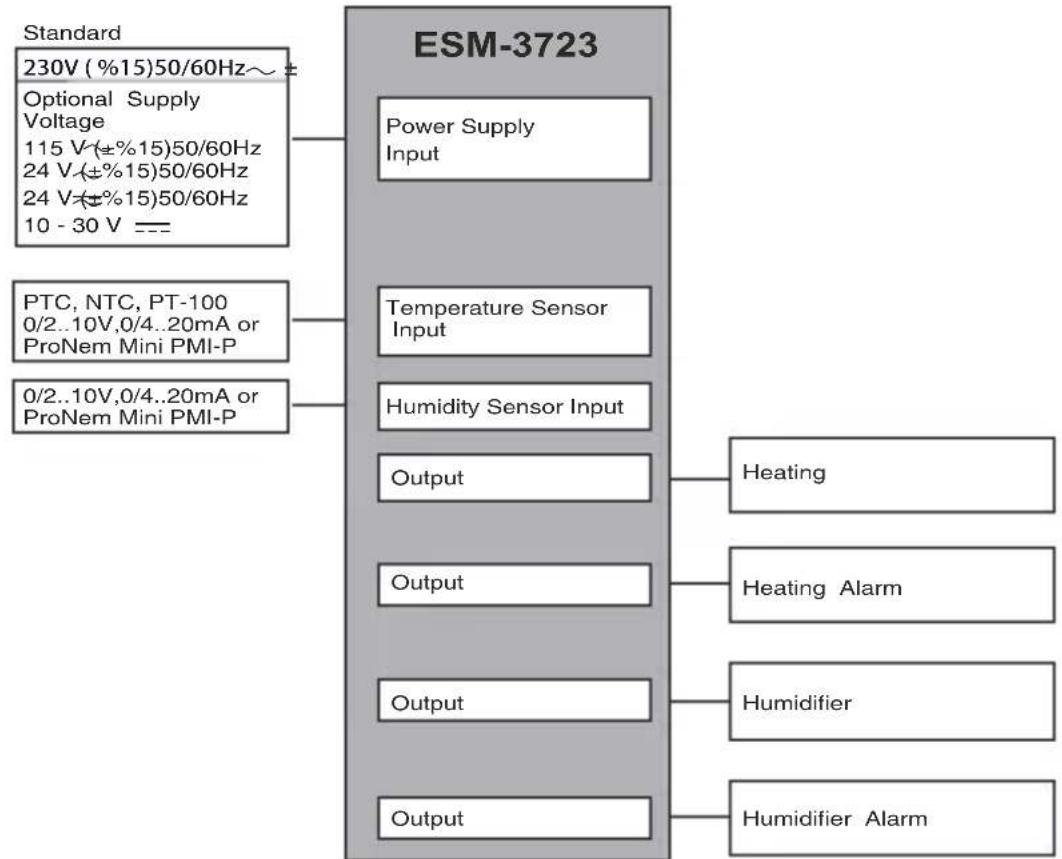
flowchart
graph TD
    A["Standard\n230V (%15)50/60Hz~ ±"] --> B["ESM-3723"]
    C["Optional Supply Voltage\n115 V(±%15)50/60Hz\n24 V(±%15)50/60Hz\n24 V(±%15)50/60Hz\n10 - 30 V ==="] --> B
    D["PTC, NTC, PT-100\n0/2..10V,0/4..20mA or ProNem Mini PMI-P"] --> B
    E["0/2..10V,0/4..20mA or ProNem Mini PMI-P"] --> B
    B --> F["Power Supply Input"]
    B --> G["Temperature Sensor Input"]
    B --> H["Humidity Sensor Input"]
    B --> I["Output"]
    B --> J["Output"]
    B --> K["Output"]
    B --> L["Output"]
    B --> M["Heating"]
    B --> N["Heating Alarm"]
    B --> O["Humidifier"]
    B --> P["Humidifier Alarm"]
1.3 Installation
A visual inspection of this product for possible damage occurred during shipment is recommended before installation.
It is your responsibility to ensure that qualified mechanical and electrical technicians install this product.
If there is danger of serious accident resulting from a failure or defect in this unit, power off the system and separate the electrical connection of the device from the system.
The unit is normally supplied without a power supply switch or a fuse. Use power switch and fuse as required.
Be sure to use the rated power supply voltage to protect the unit against damage and to prevent failure. Keep the power off until all of the wiring is completed so that electric shock and trouble with the unit can be prevented.
Never attempt to disassemble, modify or repair this unit. Tampering with the unit may results in malfunction, electric shock or fire.
Do not use the unit in combustible or explosive gaseous atmospheres.
During putting equipment in hole on the metal panel while mechanical installation some metal burrs can cause injury on hands, you must be careful.
Montage of the product on a system must be done with it's fixing clamps. Do not do the montage of the device with inappropriate fixing clamp. Be sure that device will not fall while doing the montage.
It is your responsibility if this equipment is used in a manner not specified in this instruction manual.
1.4 Warranty
EMKO Elektronik warrants that the equipment delivered is free from defects in material and workmanship. This warranty is provided for a period of two years. The warranty period starts from the delivery date. This warranty is in force if duty and responsibilities which are determined in warranty document and instruction manual performs by the customer completely.
1.5 Maintenance
Repairs should only be performed by trained and specialized personnel. Cut power to the device before accessing internal parts.
Do not clean the case with hydrocarbon-based solvents (Petrol, Trichlorethylene etc.). Use of these solvents can reduce the mechanical reliability of the device. Use a cloth dampened in ethyl alcohol or water to clean the external plastic case.
1.6 Manufacturer Company
Manufacturer Information:
Emko Elektronik Sanayi ve Ticaret A.Ş.
Repair and maintenance service information:
Emko Elektronik Sanayi ve Ticaret A.Ş.
2. General Description
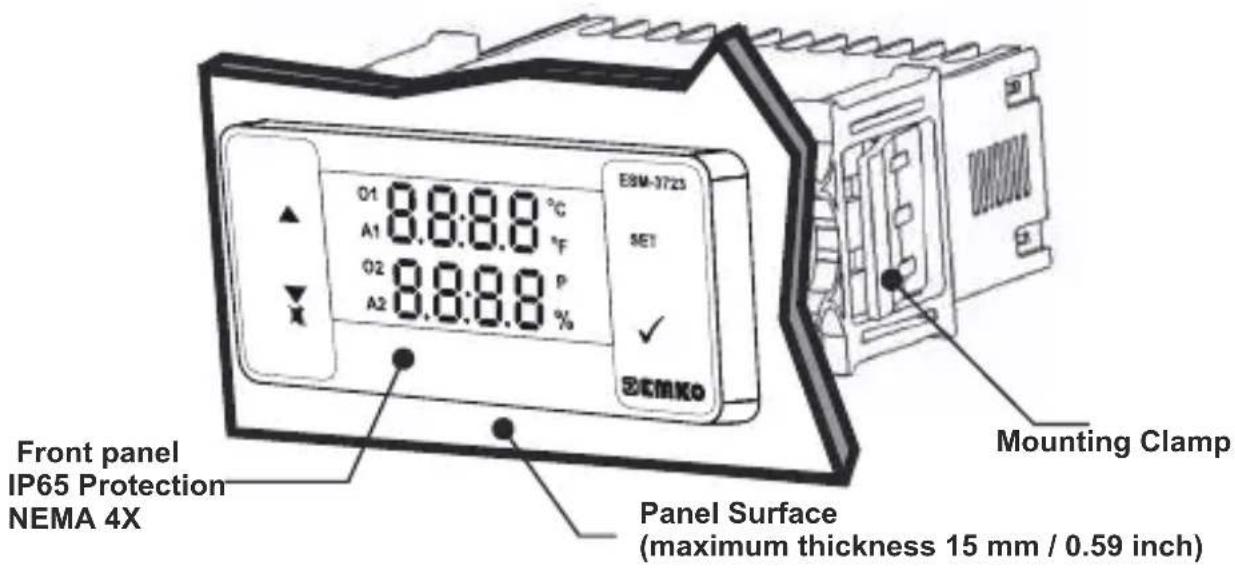
text_image
E5M-3723 SET O1 8.8:8.8 °C A1 8.8:8.8 °F O2 8.8:8.8 P A2 8.8:8.8 % SEMKO Front panel IP65 Protection NEMA 4X Panel Surface (maximum thickness 15 mm / 0.59 inch) Mounting Clamp2.1 Front View and Dimensions of ESM-3723 Temperature Controller
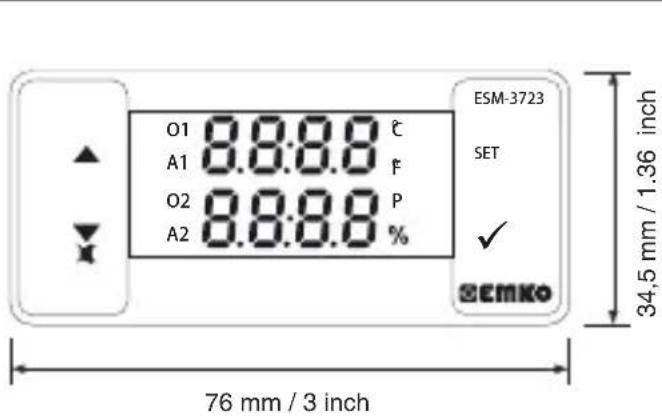
text_image
O1 8.8:8.8 ℃ A1 F O2 8.8:8.8 P A2 % ESM-3723 SET ✓ @EMKO 34,5 mm / 1.36 inch 76 mm / 3 inch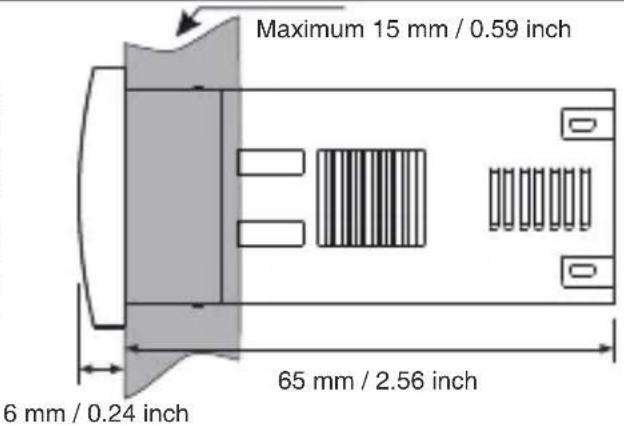
text_image
Maximum 15 mm / 0.59 inch 6 mm / 0.24 inch 65 mm / 2.56 inch2.2 Panel Cut-Out
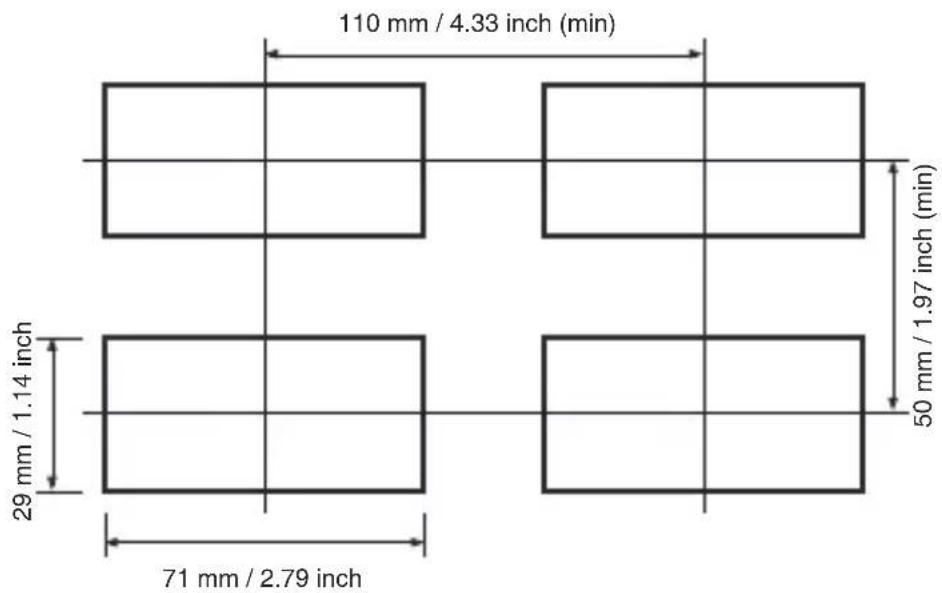
other
| Dimension | Value | | ----------------- | ----------- | | Top Left | 110 mm / 4.33 inch (min) | | Middle Right | 50 mm / 1.97 inch (min) | | Bottom Right | 71 mm / 2.79 inch | | Bottom Left | 29 mm / 1.14 inch |2.3 Panel Mounting and Removing
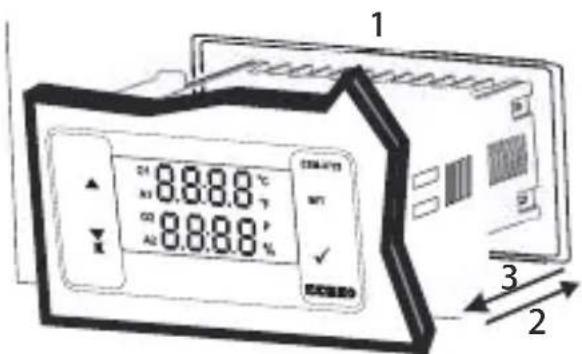
text_image
1 2 31-Before mounting the device in your panel, make sure that the cut-out is of the right size.
2-Insert the device through the cut-out. If the mounting clamps are on the unit, put out them before inserting the unit to the panel.
3- Insert the mounting clamps to the fixing sockets that located left and right sides of device and make the unit completely immobile within the panel
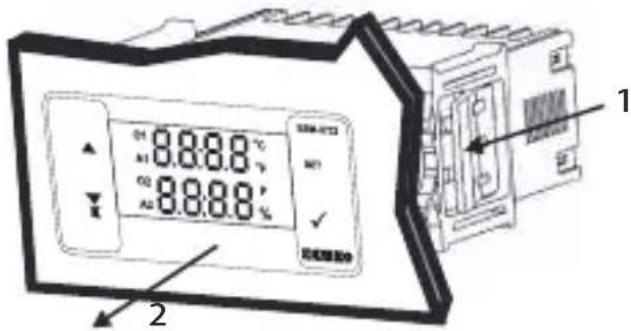
text_image
01 8.8.8.8 °C A1 8.8.8.8 % 02 8.8.8.8 % A3 8.8.8.8 % 2 11-Pull mounting clamps from left and right fixing sockets.
2-Pull the unit through the front side of the panel

Before starting to remove the unit from panel, power off the unit and the related system.
3. Electrical Wiring Diagram
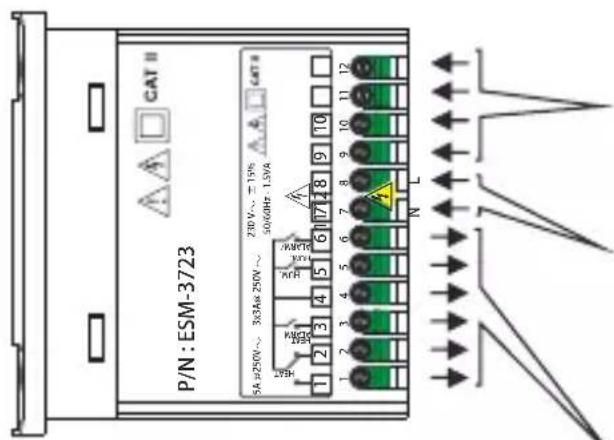
text_image
CAT II P/N: ESM-3723 5A μ250V ~ 3X3Aa 250V ~ 280V ~ =19% 56/60Hz - 1.39A N L K1 K2 K3 K4 K5 K6 K7 K8 K9 K10 K11 K12 K13 K14 K15 K16 K17 K18 K19 K20 K21 K22 K23 K24 K25 K26 K27 K28 K29 K30 K31 K32 K33 K34 K35 K36 K37 K38 K39 K40 K41 K42 K43 K44 K45 K46 K47 K48 K49 K50 K51 K52 K53 K54 K55 K56 K57 K58 K59 K60 K61 K62 K63 K64 K65 K66 K67 K68 K69 K70 K71 K72 K73 K74 K75 K76 K77 K78 K79 K80Temperature Sensor Input
NTC, PTC, PT-100, 0/2..10V, 0/4..20mA
or ProNem Mini PMI-P
Must be determined in order.
Humidity Sensor Input
0/2..10V, 0/4..20mA or
ProNem Mini PMI-P
Must be determined in order.
Power Supply Voltage
230V ( % 15) 50/60Hz,
115V ( % 15) 50/60Hz,
24V (5) 50/60Hz,
24V≈±%15) 50/60Hz,
10...30 V ---
Must be determined in order.
Relay Outputs
3.1 Supply Voltage Input Connection of the Device
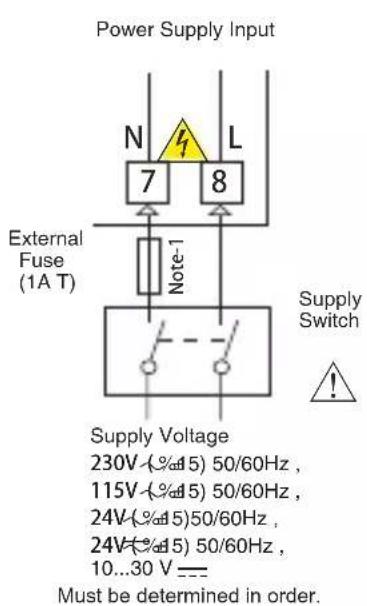
text_image
Power Supply Input N L 7 8 External Fuse (1A T) Note-1 Supply Switch ! Supply Voltage 230V (%%45) 50/60Hz , 115V (%%45) 50/60Hz , 24V (%%45) 50/60Hz , 24V (%%45) 50/60Hz , 10...30 V --- Must be determined in order.
Make sure that the power supply voltage is the same indicated on the instrument.
Switch on the power supply only after that all the electrical connections have been completed.
Supply voltage range must be determined in order. While installing the unit, supply voltage range must be controlled and appropriate supply voltage must be applied to the unit.

There is no power supply switch on the device. So a power supply switch must be added to the supply voltage input.
Power switch must be two poled for separating phase and neutral, On/Off condition of power supply switch is very important in electrical connection.
External fuse that on power supply inputs must be on phase connection.
External fuse that on === power supply inputs must be on (+) connection.
Note-1: External Fuse is recommended
Note-2: Stranded cable cross section: 1,5mm², Solid cable cross-section: 2,5mm² The stripping length is 7 to 9mm.
Note-3: Supply cables must comply with the requirements of IEC 60277 or IEC 60245
3.2 Device Label and Connection Diagram
230V\~CONNECTION DIAGRAM
PTC Temperature and 0/4..20mA Humidity Sensor Input connection
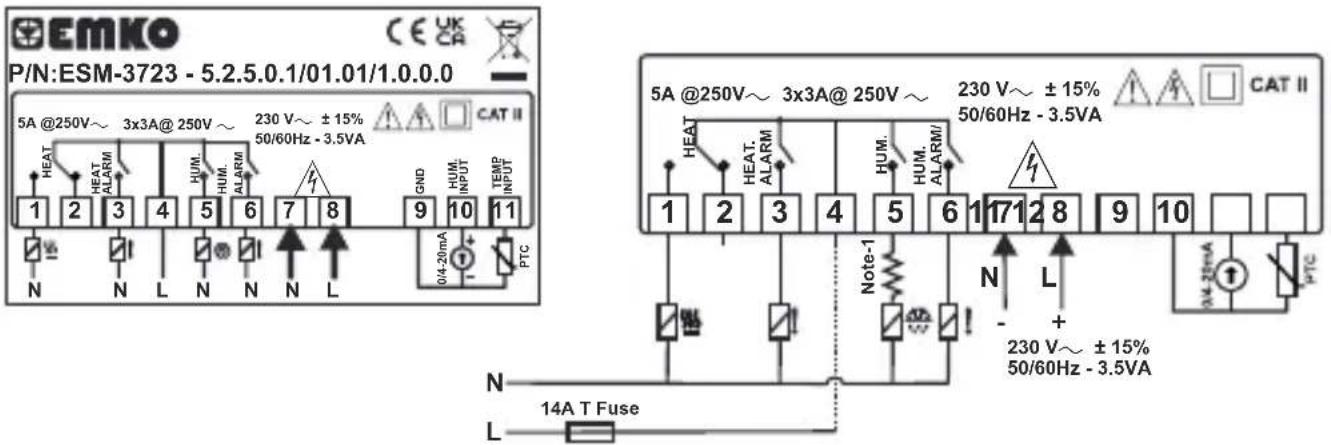
text_image
EMKO P/N:ESM-3723 - 5.2.5.0.1/01.01/1.0.0.0 5A @250V~ 3x3A@ 250V ~ 230 V~ ±15% 50/60Hz - 3.5VA CAT II HEAT HEAT ALARM HUM. HUM. ALARM GND HUM. INPUT TEMP INPUT N L N L PTC 0/4-20mA 1 2 3 4 5 6 7 8 9 10 11 5A @250V~ 3x3A@ 250V ~ 230 V~ ±15% 50/60Hz - 3.5VA CAT II HEAT HEAT ALARM HUM. HUM. ALARM/ Note-1 N L + 230 V~ ±15% 50/60Hz - 3.5VA N L PTC 14A T FuseProNem Mini PMI-P Temperature and Humidity Sensor Input Connection
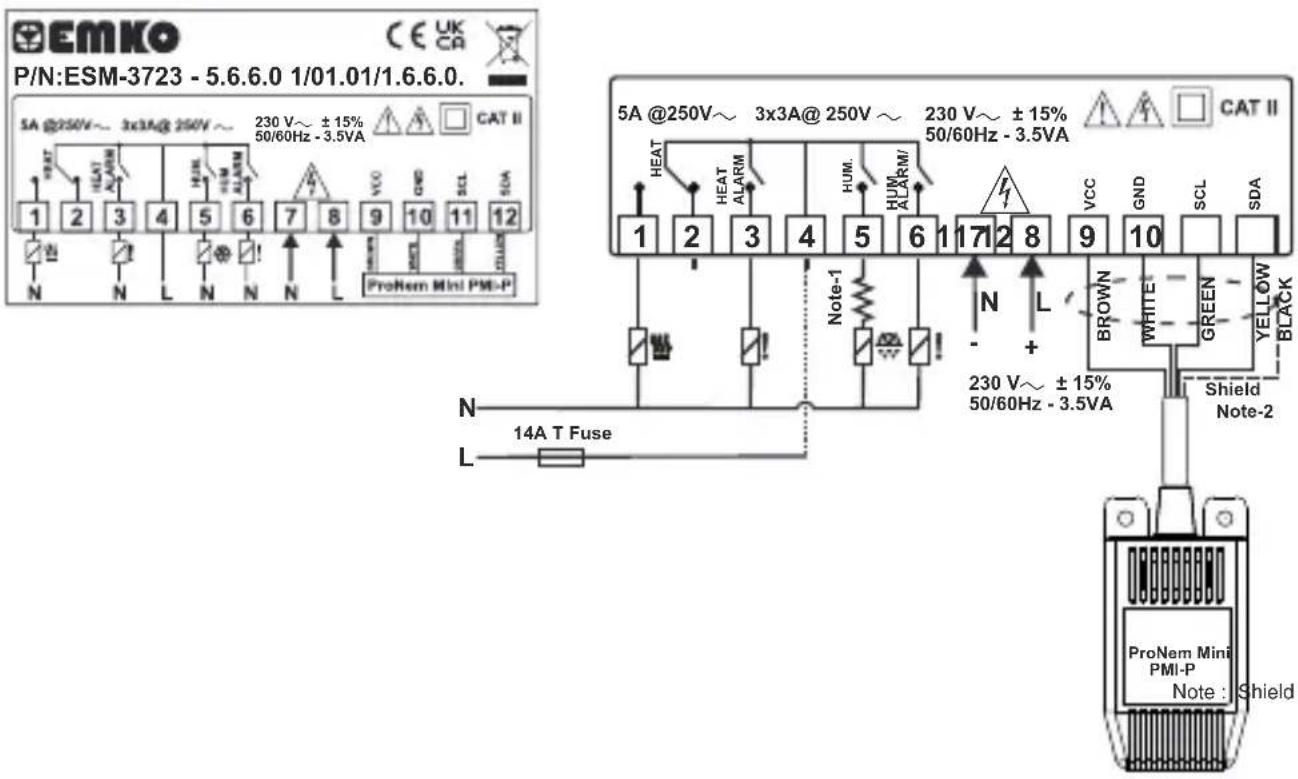
text_image
EMKO P/N:ESM-3723 - 5.6.6.0 1/01.01/1.6.6.0. CE UK CA SA @250V~ 3x3A@ 250V ~ 230 V~ ±15% 50/60Hz - 3.5VA CAT II 1 2 3 4 5 6 7 8 9 10 11 12 N N L N N N L ProNem Mini PMI-P 5A @250V~ 3x3A@ 250V ~ 230 V~ ±15% 50/60Hz - 3.5VA CAT II HEAT HEAT ALARM HUM. HUM ALARM/ Note-1 N L BROWN WHITE GREEN YELLOW BLACK N L 230 V~ ±15% 50/60Hz - 3.5VA Shield Note-2 ProNem Mini PMI-P Note : ShieldNote-1 : User must be connected the resistor which is inside the box serially as shown in connection diagram when use the ultrasonic humidifier(30W...50W power supply) to protect the relay output contact problem.
Note-2 : (Black) pin must be connected to number 10 (GND) of the terminal block.Shield
4.Front Panel Definition and Accessing to the Menus
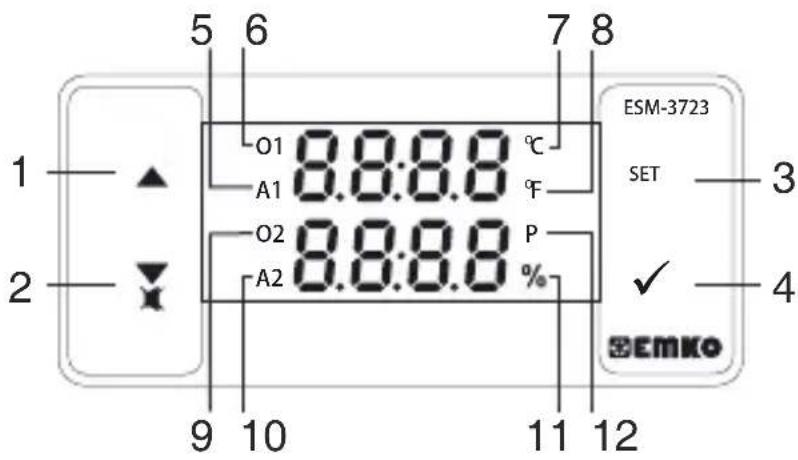
text_image
5 6 7 8 1 O1 8.8:8.8 °C A1 F O2 8.8:8.8 P A2 % 9 10 11 12 ESM-3723 SET 3 ✓ 4 EMKOBUTTON DEFINITIONS
- Increment Button :
** In main operation screen, press this button to change display temperature and humidity sensor value.
** It is used to increase the value in the Temperature and Humidity Set screens and Programming mode.
- Decrement, Silencing Buzzer Button :
** It is used to decrease the value in the Set screen and Programming mode.
** It is used to silence the buzzer.
- Set Button:
** In the main operation screen; if this button pressed for the first time, Temperature set value will be displayed. Value can be changed using increment and decrement buttons. When Enter button is pressed again, value is saved and Humidity set value will be displayed next. Value can be changed using increment and decrement buttons. When Enter button pressed again, value is saved and returns back to main operating screen.
4.Enter Button:
** To access the programming screen; in the main operation screen, press and hold this button for 5 seconds.
** It is used to save value in the Set screens (Temperature or Humidity) and programming screen.
LED DEFINITIONS
5.A1 led :
** It is active when Temperature alarm statuses.
- O1 Led :
** This led indicates that heating output is active.
7.Celcius led :
** Indicates that device is in°C mode.
8.Fahrenheit led :
** Indicates that device is in°F mode.
- O2 Led :
** This led indicates that Homipliftes active.
10.A2 Led
** This led indicates that HAaidifier active.
** Indicates that device is in Humidity Set screen or Humidifier output is active
- Program led :
** Indicates that device is in programming mode .
5. Changing and Saving Temperature and Humidity Set Value
Main Operating Screen

text_image
O1 38.2°C 40.8 ESM-3723 SET ✓ EMMO O1 E SET 374 ESM-3723 SET ✓ EMMOWhen SET button pressed "S" led will be active and temperature set value will be displayed.
Temperature Set Value Screen

text_image
ESM-3723 T SET 38.1 SET ✓ SEMko ESM-3723 T SET 60.0 SET ✓ SEMkoWhen SET button pressed temperature set value can be saved.
Humidity Set Value Screen

text_image
ESM-3723 SET ✓ SEMKO ESM-3723 SET ✓ SEMKOHumidity set value can be changed with increment and decrement buttons.
Main Operating Screen
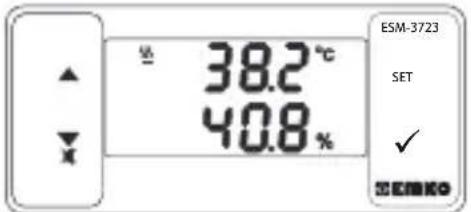
text_image
38.2°C 40.8% ESM-3723 SET ✓ EMIKOGoes back to main operation screen.
Temperature Set Value Screen
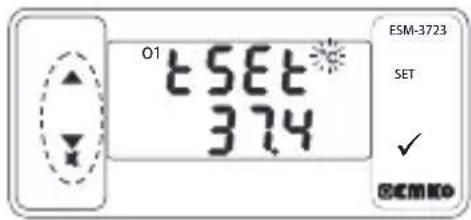
text_image
01 tSET 374 ESM-3723 SET ✓ ©EMKOTemperature set value can be changed with increment and decrement buttons.
Humidity Set Value Screen
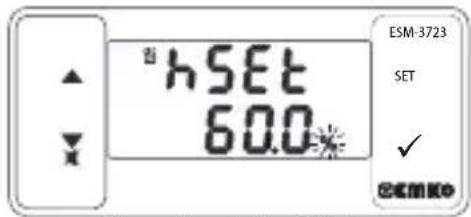
text_image
hSET 60.0% ESM-3723 SET ✓ @EMK0Goes Humidity SET value screen.
Humidity Set Value Screen
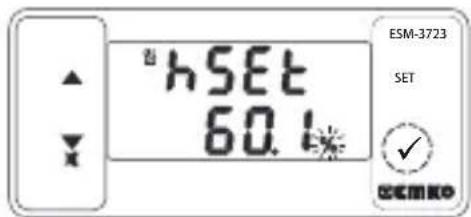
text_image
hSET 60.1 ESM-3723 SET ✓ COMEXOWhen SET button pressed Humidity set value can be saved.
Temperature set value parameter (Default =50) C
Temperature set value, can be programmed between minimum temperature set value and maximum temperature set value .
Nem Set Parametresi (Default = 60%)
Humidity set value, can be programmed between minimum Humidity set value and maximum temperature set value .

If no operation is performed in Humidity set value changing mode and temperature set value changing mode for 20 seconds, device turns to main operation screen automatically.
5.1 Programming Mode Parameter List
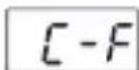
Temperature Unit Selection Parameter (Default = 0)
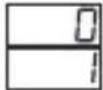
°C selected.
°F selected.
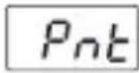
Decimal Seperator Enabling Parameter (Default = 0)
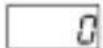
None.
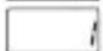
Only Temperature parameters with decimal separator.

Only Humidity parameters with decimal separator.

Only Temperature and Humidity parameters with decimal separator.
Note: When value of C-F or Pnt parameters are changed, the values of ESEt, hSEt, kSUL, kSUN, toFt, tASt, hRt h, hAUL, tRuh, hSEt, hhSt, hSUL, hSUN, hoFt, hASt, hRt h, hAUL and hRuh parameters should be changed accordingly.
Note: 55I , _uPi and 10I parameters are shown, if the Temperature sensor analogue input type (0/2..10V or 0/4..20mA) is selected.
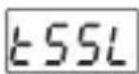
Temperature Sensor Scale Selection Parameter (Default = 0)
Analogue (T input range is determined with this parameter.emperature)

0..10V (1)(2)v_ey_a 0..20mA

2..10V veya 4..20mA (2)(1)
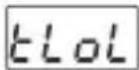
TemperatureSensor Scale Low Limit Parameter : ( Default = 0 )
It can be adjusted from -1999 to ( E_UP_L -1). At this value analogue input becomes;
If KSSL = 0 , according to the device type 0V_---^(1)(2) or 0mA_---
If S L=1 , according to the device type 2V_---^(1)(2) or 4mA_---

TemperatureSensor Scale High Limit Parameter : ( Default = 100 )
It can be adjusted from (ELOI +1) to 9999. At this value analogue input becomes;
According to the device type10V (1)--- or 20mA (2)---
Note: ELOL, EPUI parameters are shown, if the Temperature sensor analogue input type is selected.
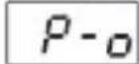
Temperature Control Selection Parameter On/Off or PID (Default = 0)

On - Off selected.
PID selected.
Note: If this parameter is select 0, PID parameters ( _tU_a , , , , ) will be not observed. If this parameter select 1, parameter will be not observed.
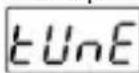
Self Tune Selection Parameter (Default = □)

Device does not do operation.
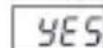
Device does operation.
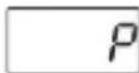
PID - Proportional Control Parameter (Default =1.0)
This parameter value can be adjusted from 0.0 to 100.0
PID - Integral Parameter( Default = 300 )
This parameter value can be adjusted from 0 to 3600.
PID - Derivative Parameter (Default = 60)
This parameter value can be adjusted from 0 to 999.9
PID -Period Time Parameter (Default = 1)
This parameter value can be adjusted from 1 to 50 second.

(1) It is valid, if the device type 0/2...10V = Temperature
(2) It is valid, if the device type 0/4...20mA --- Temperature Sensor Input.
th5t
Hysteresis Parameter for Temperature (Default = 0.1 °C)
From 1 to 10°C for NTC, PTC, PT-100 (0°C, 100°C)
From 1 to 18°F for NTC, PTC, PT-100 (32°F, 212°F)
From 0.1 to 10.0°C for NTC, PTC, PT-100 (0.0°C, 100.0°C)
From 0.1 to 18.0°F for NTC, PTC, PT-100 (32.0°F, 212.0°F)
From 1 to 10^ for ProNem Mini PMI-P (-20°C, 80°C), From 1 to 18^ for ProNem Mini PMI-P (-4°F, 176°F), From 0.1 to 10.0^ for ProNem Mini PMI-P (-20.0°C, 80.0°C)
From 0.1 to 18.0°F for ProNem Mini PMI-P (-4.0°F, 176.0°F).
In ON/OFF control algorithm, temperature value is tried to keep equal to set value by opening or closing the last control element. ON/OFF controlled system, temperature value oscillates continuously. Temperature value's oscillation period or amplitude around set value changes according to controlled system. For reducing oscillation period of temperature value, a threshold zone is formed below or around set value and this zone is named hysteresis.
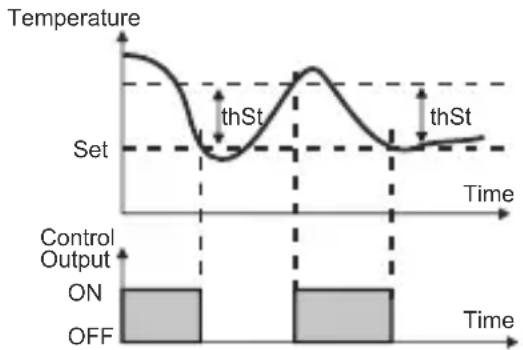
line
| Time | Temperature | |------|-------------| | 0 | High | | Low | Low | | Mid | Peak | | High | Low |tSUL
Minimum Temperature Set Value Parameter ( Minimum Value of Device)
Temperature set value can not be lower than this value. This parameter value can be adjusted from minimum value of device scale to maximum temperature set value parameter _SUB
t5uh
Maximum Temperature Set Value Parameter (Maximum Value of Device)
Temperature set value can not be greater than this value.
This parameter value can be adjusted from minimum temperature set value parameter to maximum value of the device scale.
toft
Temperature Sensor Offset Parameter (Default = 0)
From -10 to 10°C, NTC,PTC, PT-100 (0°C, 100°C)
From -18 to 18°F, NTC,PTC, PT-100 (32°F, 212°F)
From -10.0 to 10.0°C, NTC, PTC, PT-100 (0.0°C, 100.0°C)
From -18.0 to 18.0°F NTC, PTC, PT-100 (32.0°F, 212.0°F)
From -10 to 10°C, ProNem Mini PMI-P (-20°C, 80°C), From -18 to 18°F, ProNem Mini PMI-P (-4°F, 176°F), From -10.0 to 10.0°C, ProNem Mini PMI-P (-20.0°C, 80.0°C), From -18.0 to 18.0°F, ProNem Mini PMI-P (-4.0°F, 176.0°F)
h55L
Humidity Sensor Scale Selection Parameter (Default = 0)
Humidity input range is determined with this parameter.
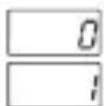
0..10V ^(1)(2) or 0..20mA ===
2..10V== or 4..20mA (2)(1)---
hh5t
Note : ASSL parameter ProNem Mini PMI- P type device are not observed.
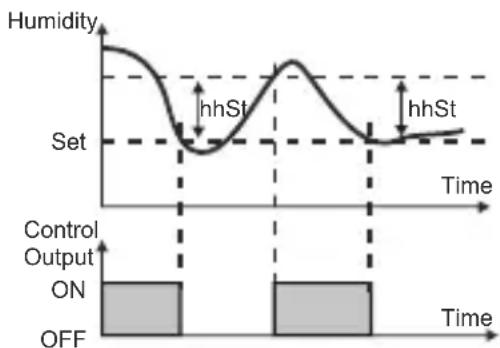
Hysteresis Parameter for Humidity (Default = 1)
From 1 to 10 for Humidity Sensor (0%RH, 100%RH)
From 0.1 to 10.0 for Humidity Sensor (0.0%RH, 100.0%RH)
In ON/OFF control algorithm, Humidity value is tried to keep equal to set value by opening or closing the last control element. ON/OFF controlled system, temperature value oscillates continuously. Temperature value's oscillation period or amplitude around set value changes according to controlled system. For reducing oscillation period of temperature value, a threshold zone is formed below or around set value and this zone is named hysteresis.
line
| Time | Humidity | |------|----------| | 0 | High | | 1 | Low | | 2 | Medium | | 3 | High | | 4 | Low | | 5 | Medium | | 6 | High | | 7 | Low | | 8 | Medium | | 9 | High | | 10 | Low |
(1) It is valid, if the device type 0/2...10V --- Humidity Sensor Input.
(2) It is valid, if the device type 0/4...20mA — Humidity Sensor Input.
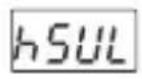
Minimum Humidity Set Value Parameter (Default = Minimum Value of Device Scale) Humidity set value can not be lower than this value. This parameter value can be adjusted from minimum value of device scale to maximum Humidity parameter
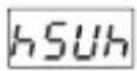
Maximum Humidity Set Value Parameter (Default = Maximum Value of Device Scale) Humidity set value can not be greater than this value. This parameter value can be adjusted from minimum humidity set value parameter hSUL to maximum value of the device scale.
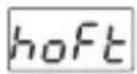
Humidity Sensor Offset Parameter (Default = 0.0)
From -10 to 10%RH for Humidity Sensor (0%RH-100%RH)
From -10.0 to 10.0%RH for Humidity Sensor (0.0%RH-100.0%RH)
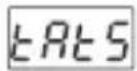
Temperature Alarm Function Selection Parameter (Default = 0)
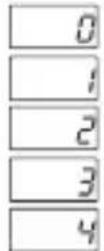
Temperature Alarm is inactive.
Process High alarm selected.
Process Low alarm selected.
Deviation Band alarm selected.
Deviation Range alarm selected.
Note : If this parameter is select 0, Temperature Alarm parameters _t, _Lh, _Ul, _Uh, _dl and _d will be not observed.
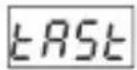
Temperature Alarm Set Parameter (Default = 50.0 °C)
This parameter value can be programmed between temperature minimum alarm set parameter and temperature alarm set maximum parameter.
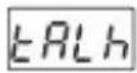
Temperature Alarm HyBaronset(rDefault = 0)
This parameter value can be adjusted from 0 to \%50 of the device scale.
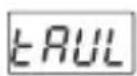
Alarm Set Minimum Parameter (Default = Minimum Value of Device Scale)
if temperature alarm is active, this parameter value can be adjusted from minimum value of device scale to temperature alarm set maximum parameter value.
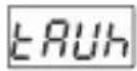
Alarm Set Maximum Parameter (Default = Maximum Value of Device Scale)
if temperature alarm is active, this parameter value can be adjusted from temperature alarm set value parameter EUL to maximum value of the device scale.
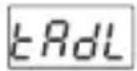
Temperature Alarm On Delay Time Parameter (Default = 0)
Temperature Alarm On Delay Time can be defined with this parameter. It can be adjusted from 0 to 99 minutes.
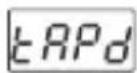
Temperature Alarm Delay After Power On Parameter (Default = 0)
When power is first applied to the device, this time delay must be expired for activation of temperature alarm. It can be adjusted from 0 to 99 minutes.
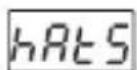
Humidity Alarm Function Selection Parameter (Default = 0)
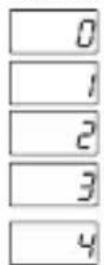
Humidity Alarm is inactive.
Process High alarm selected.
Process Low alarm selected.
Deviation Band alarm selected.
Deviation Range alarm selected.
Note: If this parameter is select 0, Humidity Alarm parameters hRSt , hRt,h , hRtL , hRtH , hRdL and hgPd will be not observed.
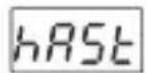
Humidity Alarm Set Parameter (Default = 60)
This parameter value can be programmed between humidity minimum alarm set parameter and humidity alarm set maximum parameter.
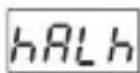
Humidity Alarm HySteaesite(rDefault = 0)
This parameter value can be adjusted from 0 to \%50 of the device scale.
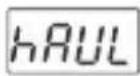
HumidityASetMinimum Parameter(Default = Minimum Value of Device Scale)
if humidity alarm is active, this parameter value can be adjusted from minimum value of device scale to humidity alarm set maximum parameter value.
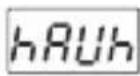
Humidity ASetnMaximum Parameter(Default = Maximum Value of Device Scale)
if humidity alarm is active, this parameter value can be adjusted from humidity alarm set minimum parameter to maximum value of the device scale.
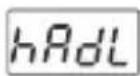
Humidity (Default Delay Time Parameter
Humidity Alarm On Delay Time can be defined with this parameter. It can be adjusted from 0 to 99 minutes.
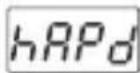
Humidity (Default) After Power On Parameter
When power is first applied to the device, this time delay must be expired for activation of Humidity alarm. It can be adjusted from 0 to 99 minutes.
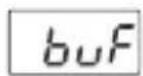
Buzzer Function Selection Parameter( Default = 0 )
text_image
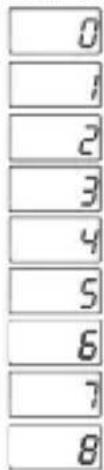
0 1 2 3 4 5 6 7 8Buzzer is inactive.
Buzzer is active during temperature alarm
Buzzer is active during humidity alarm
Buzzer is active during Temperature sensor failures.
Buzzer is active during Humidity sensor failures.
Buzzer is active during Temperature sensor failures or temperature alarm.
Buzzer is active during Humidity sensor failures or Humidity alarm.
Buzzer is active during Temperature sensor failures or Humidity sensor failures
Buzzer is active during Temperature sensor failures or Humidity sensor failures or temperature alarm or humidity alarm.
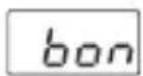
Buzzer Active Time (Default = ....)
If buzzer function selection parameter value _0F=0 , this parameter is not observed. Buzzer active time can be defined with this parameter. It can be adjusted from 1 to 99 minutes. When this parameter is 1, if decrement button is pressed, ---- is observed. In this condition buzzer is active till buzzer silence button is pressed.
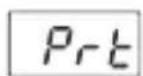
Button Protection Parameter (Default = 0)
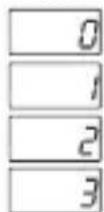
There is no protection.
Temperature set value can not be changed.
Humidity set value can not be changed.
Temperature set value and Humidity set value can not be changed
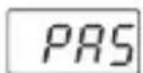
Programming Mode Accessing Password (Default = 0)
It is used for accessing to programming mode. It can be adjusted from 0 to 9999. If it is 0, password is not entered for accessing to the parameters. When the password screen is not set as "12", If the user enters '12' in password screen 5e and 5e parameters are accessed and they can changed.
5.2 Alarm Output Graphics of ESM-3723
Process High Alarm
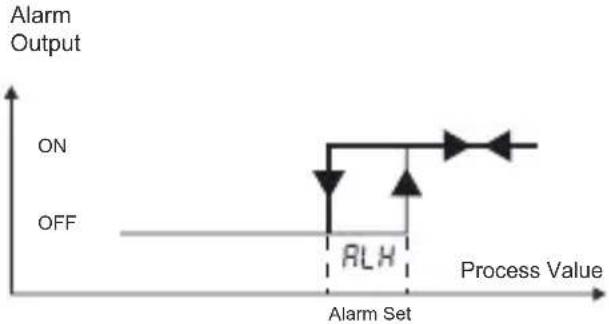
line
| Process Value | Alarm Output | | ------------- | ------------ | | RLH | ON | | | OFF |Process Low Alarm
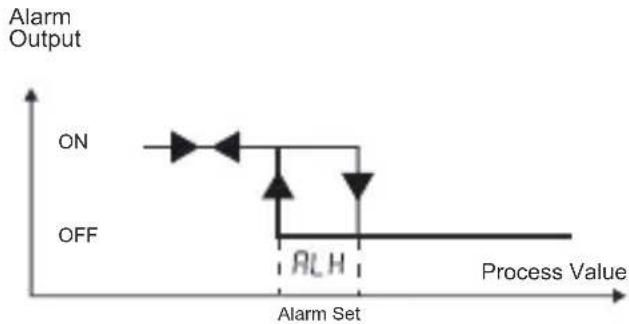
line
| Process Value | Alarm Output | | ------------- | ------------ | | ON | ON | | RL H | Off |Deviation Band Alarm
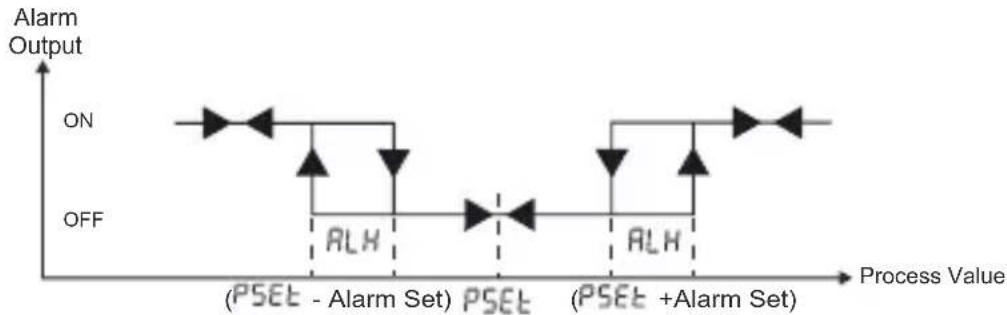
line
| Process Value | Alarm Output | | ------------- | ------------ | | PSET - Alarm Set | ON | | PSET | OFF | | PSET + Alarm Set | ON |Deviation Range Alarm
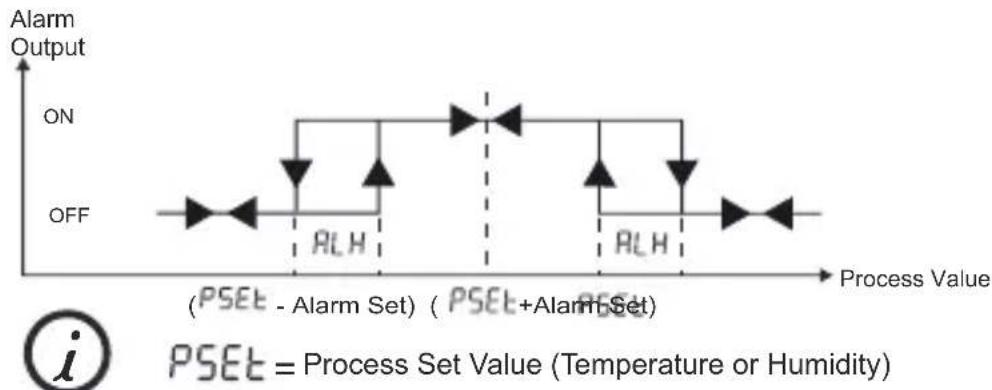
line
| Process Value | Alarm Output | | ------------- | ------------ | | Low | ON | | High | ON | | Low | OFF | | High | ON | | High | OFF |5.3 Failure Messages in ESM 3723
1-5br 1 Screen Blinking Temperature Sensor failure. Sensor connection is wrong or there is no sensor connection. While this message shown on this display, if buzzer function selection buf is 3, 5, 7 or 8 internal buzzer starts to operate.
2-Screen Blinking H Sensor functionality. Sensor connection is wrong or there is no sensor connection. While this message shown on this display, if buzzer function selection buF is 4, 6,7 or 8 internal buzzer starts to operate.
3- In main operating screen if the upper display is blinking, it means that temperature alarm exits and alarm output is active. If buzzer function selection _uF is 1, 5 or 8 internal buzzer starts to operate.
4- In main operating screen if the lower display is blinking, it means that humidity alarm exits and alarm output is active. If buzzer function selection _uF is 2, 6 or 8 internal buzzer starts to operate.
5- Self Tune temperature error. Appears on the main screen.this fault occurs when the temperature read from the sensor is closer to the Process Set value than 5% of the scale(5 °C for the ProNem Mini PMI-P sensor). Self tune operation is not allowed.
5.4 Entering To The Programming Mode, Changing and Saving Parameter
Main Operation Screen

text_image
O1 38.2 °C 40.8 % ESM-3723 SET ✓ SEMKO → O1 Pro6 ESM-3723 SET ✓ SEMKOWhen SET button is pressed for 3 seconds, "P" led turn. If programming mode entering password is different from 0, programming mode entering screen Pr-C will be observed.
Note1: If programming mode accessing password is 0, Temperature Unit screen C-F is observed instead of programming screen Pr-G
Programming Mode Entering Screen
Press SET button for accessing to the password entering
Password Entering Screen

text_image
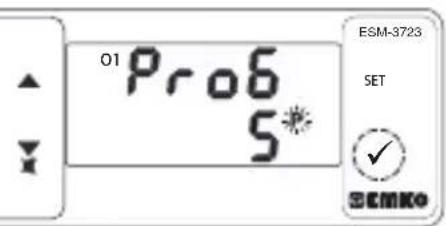
O1 Pro6 0* ESM-3723 SET ✓ @EMKO → O1 Pro6 5* ESM-3723 SET ✓ @EMKOEnter programming mode accessing password with increment and decrement buttons.
Password Entering Screen
text_image
01 Pro6 5* ESM-3723 SET ✓ SEMkoPress SET/OK button for entering the password.
Note2: If programming mode accessing password is 0, only three parameters are accessible, and the parameter values can be changed.
Programming Screen

text_image
01 C-F SET ✓ ESM-3723 → 01 C-F SET ✓ ESM-3723Press SET button for accessing to the parameter value. Press increment button for accessing to the next parameter, press decrement button for accessing to the previous parameter.
Change the value with increment and decrement buttons.
Temperature Unit Selection Parameter Value

text_image
O1 C-F ESM-3723 SET ✓ EMKO → O1 Pnt 0 ESM-3723 SET ✓ EMKOPress set button for saving the parameter.
Press increment button for accessing to the next parameter, press decrement button for accessing to the previous parameter.

If no operation is performed in programming mode for 20 seconds, device turns to main operation screen automatically.
6. Self Tune Metod
Self Tune method is used for determining PID parameters used by the device.
Starting Self Tune (Step Response Tuning) Operation by the user :
- Adjust temperature control on/off or PID parameter ( P_-a=1 )
- Adjust self-tune selection parameter ( = )
- In the main screen “Tune” and Temperature value are should alternately.
If Self Tune operation is finished without any problem, the device saves the new PID coefficients to memory and continue to run. tUnE Parameter is adjusted no automatically.
NOT: The temperature value read from the sensor must be less than 5% of the process set value in order to start the self tune operation ( 5^ C for the ProNem Mini PMI-P sensor).
Cancelling Self Tune(Step Response Tuning) operation :
1 - If sensor breaks;
2 - If auto tune operation can not be completed in 8 hours ;
3 - If user adjusts EUnE parameter no ;
4- During self tune operation if the user changes the temperature control from pid to on/off;
5 - If process set value is changed while self tune operation is being performed;
Self tune is canceled. "Tune" is not displayed. Then, without doing any changes in PID parameters, device continues to run with previous PID parameters.
7. Specifications
| Device Type | : Temperature+Humidity Controller |
| Housing&Mounting | : 76 mm x 34.5 mm x71 mm Plastic housing for panelPanel cut out is 71 x 29 mm. |
| Protection Against | |
| Mechanical Impacts | : 1 Joule (IK06) |
| Protection Clas | : Ip65 at front, Ip20 at rear. |
| Weight | : Approximately 0.2 Kg |
| Environmental Ratings | : Standart, indoor at an altitude of less than 2000 meters withnone condensing humidity. |
| Storage / Operating Temperature | :-30 °C to +80 C / -30 C to +80 C |
| Storage / Operating Humidity | : 90 % max. (None condensing) |
| Installation : Fixed installation | |
| Overvoltage Category : II. | |
| Pollution Degree : II, office or workplace, none conductive pollution | |
| Operating Conditions : Continuous | |
| Supply Voltage and Power : 230V~(%15) 50/60Hz - 3.5VA: 115V~(%15) 50/60Hz - 3.5VA: 24V~(%15) 50/60Hz - 3.5VA: 24V~(%15) 50/60Hz - 3.5VA: 10-30V== 3.5W | |
| Temperature Sensor Input : NTC, PTC, PT-100,0/2..10V=,0/4..20mA= orProNem Mini PMI-P | |
| NTC input type : NTC (10 kΩ @25 °C ) | |
| PTC input type : PTC (1000 Ω @25 °C ) | |
| Termoresistance input type : PT-100 IEC751 (ITS90 ) | |
| Humidity input type : 0/2..10V=,0/4..20mA= or ProNem Mini PMI-P | |
| Accuracy : ± 1 % of full scale | |
| Sensor Break Protection : Upscale | |
| Control Form : PID or ON / OFF | |
7. Specifications
| PTC input type | : PTC (1000 ≈ @25 °C ) |
| Termoresistance input type | : PT-100 IEC751 (ITS90 ) |
| Humidity input type | : 0/2..10V ,0/4..20mA or ProNem Mini PMI-P |
| Accuracy | : ± 1 % of full scale |
| Sensor Break Protection | : Upscale |
| Control Form | : PID or ON / OFF |
| Relay Outputs | : 5 A@250 V at Resistive Load (Heating Output) |
| : 3 A@250 V at Resistive Load ((Heating , (Heating Alarm), (Humidifier ), (Humidifier Alarm )) | |
| Optional SSR Driver Output | : Maximum 30mA, Maximum 15V |
| Temperature Display | : 8 mm Red 4 digit LED Display |
| Humidity Display | : 8 mm Green 4 digit LED Display |
| LED Displays | : P (Green), % (Green),°C (Red),°F(Red), Humidifier Output (Red), Humidifier Alarm Output (Red) Heating Output (Red), Heating Alarm (Red) |
| Internal Buzzer | : ≥83dB |
| Upprovals | : C€, €, € |
8. Other Informations
| ESM-3723 (77x35 DIN Size) | A | B | C | D | E | F | G | HI / | U | V | W | Z/ | ||||||
| 0 | / | / | ||||||||||||||||
| Power Supply VoltageA | ||||||||||||||||||
| 2 | 24V (%15) 50/60Hz - 3.5VA~ ± | |||||||||||||||||
| 3 | 24V (%15) 50/60Hz - 3.5VA~ ± | |||||||||||||||||
| 4 | 115V (%15) 50/60Hz - 3.5VA~ ± | |||||||||||||||||
| 5 | 230V (%15) 50/60Hz - 3.5VA~ ± | |||||||||||||||||
| 8 | 10 - 30 V = 3.5W | |||||||||||||||||
| B | Temperature Sensor Input | Scale(° C/° F) | ||||||||||||||||
| 1 | PT 100, IEC751(ITS90) | 0°C/32°F ; 100°C/212°F | ||||||||||||||||
| 2 | PTC (Not-1) | 0°C/32°F ; 100°C/212°F | ||||||||||||||||
| 3 | NTC (Not-1) | 0°C/32°F ; 100°C/212°F | ||||||||||||||||
| 4 | 0/2 @ 10V~ Voltage Input | User defined | ||||||||||||||||
| 5 | 0/4@ 20mA Current Input | User defined | ||||||||||||||||
| 6 | ProNem Mini PMI-P | -20°C/-4°F ; 80°C/176°F | ||||||||||||||||
| C | Humidity Sensor Input | Scale (%) | ||||||||||||||||
| 4 | 0/2 @ 10V~ Voltage Input | 0% - 100% | ||||||||||||||||
| 5 | 0/4@ 20mA Current Input | 0% - 100% | ||||||||||||||||
| 6 | ProNem Mini PMI-P | 0% - 100% | ||||||||||||||||
| E | Heating Output |
| 1 | Relay Output (5 A@250 V~,at Resistive Load 1NC,1 NO) |
| 2 | SSR Drive Output (Maximum 30mA,Maximum 15V) |
| FG | Humidifier Output |
| 01 | Relay Output (3A@250 V~,at Resistive Load,1 NO) |
| HI | Heating Alarm Output |
| 01 | Relay Output (3A@250 V~,at Resistive Load,1 NO) |
| U | Humidifier Alarm Output |
| 1 | Relay Output (3A@250 V~,at Resistive Load,1 NO) |
| V | Temp.Sensor which is given with ESM-3723 |
| 0 | None |
| 1 | PTC-M6L40.K1.5 (PTC Air Probe 1.5 m silicon cable) |
| 2 | PTCS-M6L30.K1.5.1/8"(PTC Liquid Probe with 1.5 m silicon cable) |
| 3 | NTC-M5L20.K1.5 (NTC Probe thermoplastic moulded with 1.5m cable for cooling application) |
| 4 | NTC-M6L50.K1.5 (NTC Probe stainless steel housing with 1.5m cable for cooling application) |
| 6 | ProNem Mini PMI-P (2.5m cable for Temperature and Humidity application) |
| 9 | Customer |
All order information of ESM-3723 Temperature+Humidity Controller are given on the table at above. User may form appropriate device configuration from information and codes that at the table and convert it to the ordering codes. Firstly, supply voltage then other specifications must be determined. Please fill the order code blanks according to your needs. Please contact us, if your needs are out of the Note-1: If input type is selected PTC or NTC (BC=2, 3), Temperature sensor is given with the device. For this reason, if input type is selected as PTC, sensor type (V=0, 1 or 2) or if input type is selected as NTC, sensor type (V=0, 3 or 4) must be declared in ordering information.
text_image
26.5° 58.2° E34-3723 SET OK CE UK CA EACnatural_image
Four black-and-white warning symbols: thermometer, landslide, mountain slope, and warning triangle with exclamation mark (no text or labels)Betriebstemperatur
:-30 bis 80 °C
text_image
O1 38.2 °C 40.8 ESM-3723 SET ✓ DEEMKOtext_image
O1 tSET 37.4 ESM-3723 SET ✓ OKENKOtext_image
ESM-3723 SET 38.1text_image
hSET 60.0* ESM-3723 SET ✓ EMIKOtext_image
hSET 60.1 ESM-3723 SET ✓ EMKOtext_image
hSET 60.1 ESM-3723 SET OKtext_image
N 38.2 °C 40.8 % ESM-3723 SET ✓ OK/OKMan gelangt zum
line
| Time | Temperature | |------|-------------| | 0 | High | | Peak | thSt | | Low | Low | | High | thSt |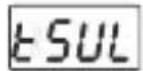
line
| Label | Description | |---|---| | EIN | Upper limit (with bidirectional arrow) | | AUS | Lower limit (with bidirectional arrow) | | ALH | Lower limit (with bidirectional arrow) | | Prozesswert | Horizontal line at bottom of Alarmeinstellung |text_image
O1 38.2°C 40.8% ESM-3723 SET OK/DEMOtext_image
01 ESM-3723 SET ✓ OKtext_image
O1 Pnt 0 ESM-3723 SET ✓ OK6. Self-Tune-Methode
text_image
ESM-3723 26.5° 50.2° CE UK ECACESM-3723 Taille DIN 77x35
natural_image
Warning symbols including thermometer, cloud, rainfall, mountain, and warning triangle (no text or labels)text_image
O1 38.2°C 40.8 ESM-3723 SET ✓ SEMKOtext_image
01 t SET 374 ESM-3723 SET ✓ SEMKOtext_image
tSET 38.1 ESM-3723 SET ✓ SEMKOtext_image
hSET 60.0% ESM-3723 SET ✓ SEMKOtext_image
hSET 60.1% ESM-3723 SET ✓ ESEMtext_image
38.2°C 40.8% ESM-3723 SET OK OKline
| Time Period | Temperature | | ----------- | ----------- | | Start | 0 | | ThSt | 0 | | End | 0 |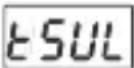
line
| Time Period | Humidity Level | |-------------|----------------| | Start | High | | Peak | Low | | End | High |
text_image
O1 38.2°C 40.8% ESM-3723 SET ✓ EMKO → O1 Pro6 ESM-3723 SET ✓ EMKOtext_image
OT Pro6 0* ESM-3723 SET ✓ SEMKO → O1 Pro6 5* ESM-3723 SET ✓ SEMKOtext_image
01 Pro6 S ESM-3723 SET ✓ SEMKOtext_image
O1 C-F SET ✓ SEMko ESM-3723 O1 C-F SET ✓ SEMkotext_image
O1 C-F ESM-3723 SET ✓ SEMKOtext_image
O1 Pnt 0 ESM-3723 SET ✓ SEMKOother
| Section | Length (mm) | | ------- | ----------- | | Top Left | 110 | | Top Right | 50 | | Bottom Left | 29 | | Bottom Right | 71 |NTC, PTC, PT-100, 0/2..10 V, 0/4..20 mA
o ProNem Mini PMI-P
Nota-3: Supply cables must comply with the requirements of IEC 60277 or IEC 60245
text_image
O1 38.2°C 40.8 ESM-3723 SET ✓ SEMKO O1 tSET 374 ESM-3723 SET ✓ SEMKOtext_image
E5M-3723 SET ✓ BEMKO E5M-3723 SET ✓ BEMKOtext_image
hSET 60.0% ESM-3723 SET ✓ BEMOtext_image
hSET 60.1 ESM-3723 SET ✓ SEMKOtext_image
38.2°C 40.8% ESM-3723 SET ✓ SEMkode -10 to 10°C, NTC, PTC, PT-100 (0°C; 100°C)
de -18 to 18°F, NTC,PTC, PT-100 (32°F; 212°F)
de -10,0 to 10,0°C, NTC, PTC, PT-100 (0,0°C; 100,0°C)
de -18,0 to 18,0°F, NTC, PTC, PT-100 (32,0°F; 212,0°F)
de -10 to 10°C, ProNem Mini PMI-P (-20°C; 80°C);
de -18 to 18°F, ProNem Mini PMI-P (-4°F; 176°F);
de -10,0 to 10,0°C, ProNem Mini PMI-P (-20,0°C; 80,0°C);
de -18,0 to 18,0°F, ProNem Mini PMI-P (-4,0°F; 176,0°F).
toFt
m = 311
La alarma sonora se activa durante la alarma de temperatura.
2
line
| State | Value | |-------|-------| | ON | ON | | RLH | RLH | | Off | Off |line
| State | Value | |-------|-------| | ON | ON | | Off | OFF |line
| State | Value | |---|---| | ON | High | | OFF | Low | | RLH | Lower middle segment | | RLH | Upper middle segment | | +Ajuste de alarma | Lower right end | | (PSEt - Ajuste de alarma) | Medium segment | | PSEt | Low segment | | (PSEt + Ajuste de alarma) | Medium segment |text_image
O1 38.2°C 40.8% ESM-3723 SET ✓ SEMKO → O1 Pro6 ESM-3723 SET ✓ SEMKOtext_image
O1 Pro6 SET ✓ SEMKO ESM-3723 → O1 Pro6 SET ✓ SEMKO ESM-3723text_image
01 Pro6 5* ESM-3723 SET ✓ SEMKOtext_image
O1 C-F 0° ESM-3723 SET ✓ SEMKO → O1 C-F 1° ESM-3723 SET ✓ SEMKOtext_image
O1: C-F SET ✓ OKEMKOtext_image
O1 Pnt 0* ESM-3723 SET ✓ @CMKO| Device Type | : Temperature+Humidity Controller |
| Housing&Mounting | : 76 mm x 34.5 mm x71 mm Plastic housing for panelPanel cut out is 71 x 29 mm. |
| Protection Against | |
| Mechanical Impacts | : 1 Joule (IK06) |
| Protection Clas | : Ip65 at front, Ip20 at rear. |
| Weight | : Approximately 0.2 Kg |
| Environmental Ratings | : Standart, indoor at an altitude of less than 2000 meters withnone condensing humidity. |
| Storage / Operating Temperature | :-30°C to +80 C / -30 C to +80 C |
| Storage / Operating Humidity | : 90 % max. (None condensing) |
| Installation : Fixed installation | |
| Overvoltage Category : II. | |
| Pollution Degree : II, office or workplace, none conductive pollution | |
| Operating Conditions : Continuous | |
| Supply Voltage and Power : 230V~(‰15) 50/60Hz - 3.5VA: 115V~(‰15) 50/60Hz - 3.5VA: 24V~(‰15) 50/60Hz - 3.5VA: 24V~(‰15) 50/60Hz - 3.5VA: 10-30V--- 3.5W | |
| Temperature Sensor Input : NTC, PTC, PT-100,0/2..10V---,0/4..20mA--- orProNem Mini PMI-P | |
| NTC input type : NTC (10 kΩ @25 °C ) | |
| PTC input type : PTC (1000 Ω @25 °C ) | |
| Termoresistance input type : PT-100 IEC751 (ITS90 ) | |
| Humidity input type : 0/2..10V---,0/4..20mA--- or ProNem Mini PMI-P | |
| Accuracy : ± 1 % of full scale | |
| Sensor Break Protection : Upscale | |
| Control Form : PID or ON / OFF | |