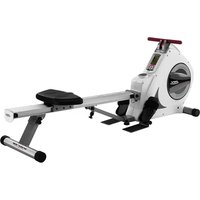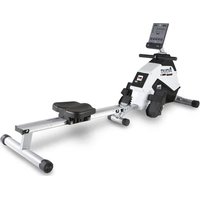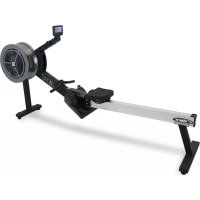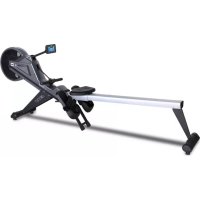
LK500RW - Rowing Machine BH FITNESS - Free user manual and instructions
Find the device manual for free LK500RW BH FITNESS in PDF.


| Product Type | Rowing Machine |
| Brand | BH Fitness |
| Model | LK500RW |
| Maximum User Weight | 135 kg (300 lb) |
| Approximate Dimensions (L × W × H) | 210 × 50 × 120 cm |
| Approximate Weight | 40 kg |
| Power Supply | AC Adapter (included) |
| Resistance | 16 Magnetic Levels |
| Console | LCD with displays: time, distance, calories, heart rate, strokes, SPM, watts |
| Training Programs | Manual, Preset Program, Constant Watt, User, Target HR (HRC), Race |
| Recovery Function | Yes, pulse evaluation (F1 to F6) |
| Heart Rate | Wireless via chest strap (included) |
| Foldability | Yes, vertical storage with lock |
| Transport Wheels | Yes, on front stabilizer |
| Residential Warranty | Lifetime frame, 10-year parts, 2-year labor |
| Maintenance | Clean with a soft dry cloth; check screws regularly |
| Safety | Emergency stop via START/STOP button; do not use if damaged |
| Spare Parts | Complete list available in the manual (exploded view) |
Frequently Asked Questions - LK500RW BH FITNESS
User questions about LK500RW BH FITNESS
0 question about this device. Answer the ones you know or ask your own.
Ask a new question about this device
Download the instructions for your Rowing Machine in PDF format for free! Find your manual LK500RW - BH FITNESS and take your electronic device back in hand. On this page are published all the documents necessary for the use of your device. LK500RW by BH FITNESS.
USER MANUAL LK500RW BH FITNESS
natural_image
Exterior view of a modern stationary leotard machine (no signage or text visible)OWNER'S MANUAL
Important: Read all instructions carefully before using this product. Retain this owner's manual for future reference.
BH North America | 20155 Ellipse, Foothill Ranch, California 92610 | p.949.206.0330 | f.949.206.0013 | www.BHFitnessUSA.com
BH
TABLE OF CONTENTS
| Title | Page | ||
| Introduction | 03 | ||
| Warnings | and | Labels | 04 |
| Safety | Information | 05 | |
| Exercise | Instruction | 06 | |
| Training | Guidelines | 07 | |
| Workout | and | Stretching | 11 |
| Overview | 13 | ||
| Assembly | Instructions | 14 | |
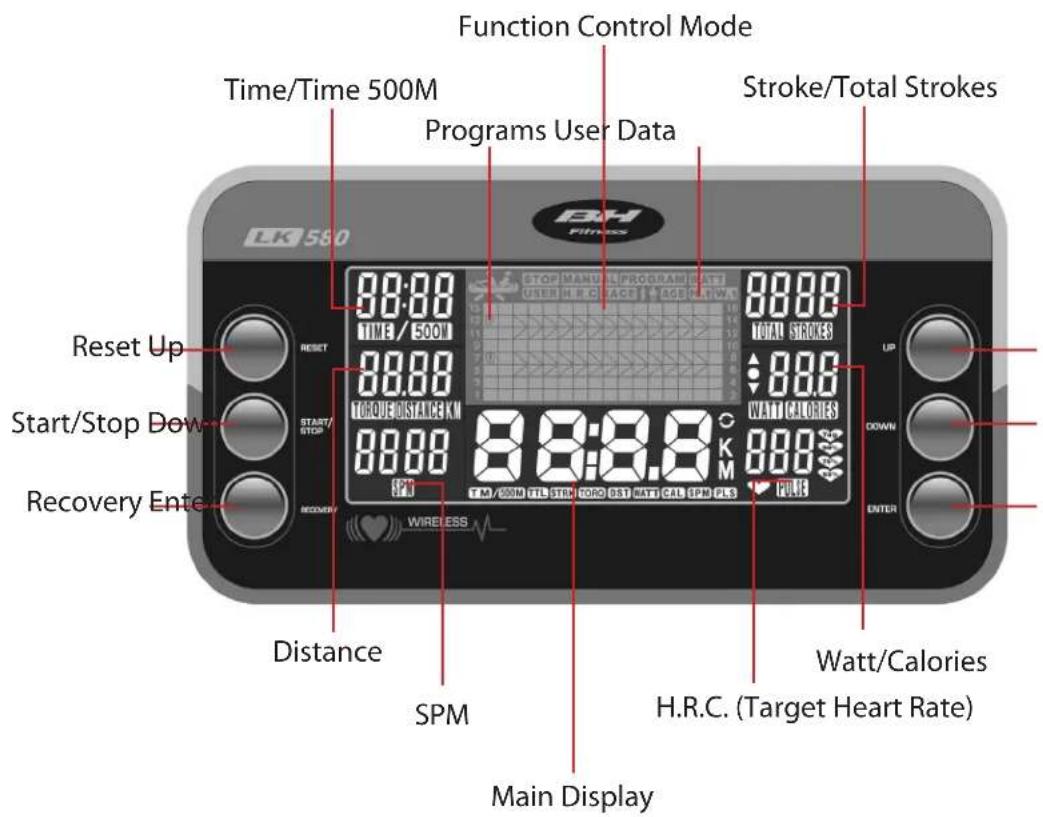
| Console | Overview | 20 | |
| Console | Operations | 21 | |
| Exploded | View | Drawing | 27 |
| Parts | List | 28 | |
| Warranty | 30 | ||
CONGRATULATIONS
Congratulations on your purchase of BH Fitness equipment. We hope you appreciate the style, quality, and value that exercisers around the world have come to expect from BH Fitness.
If you have any questions, concerns or product issues, please call our Customer Service Team at 1-866-325-2339 or email us at CustomerSupport@BHNorthAmerica.com.
Carefully read through the instructions contained in this manual. They provide you with important information about assembly, safety, fitness and use of the machine. Please read ALL the safety information contained in the following pages.
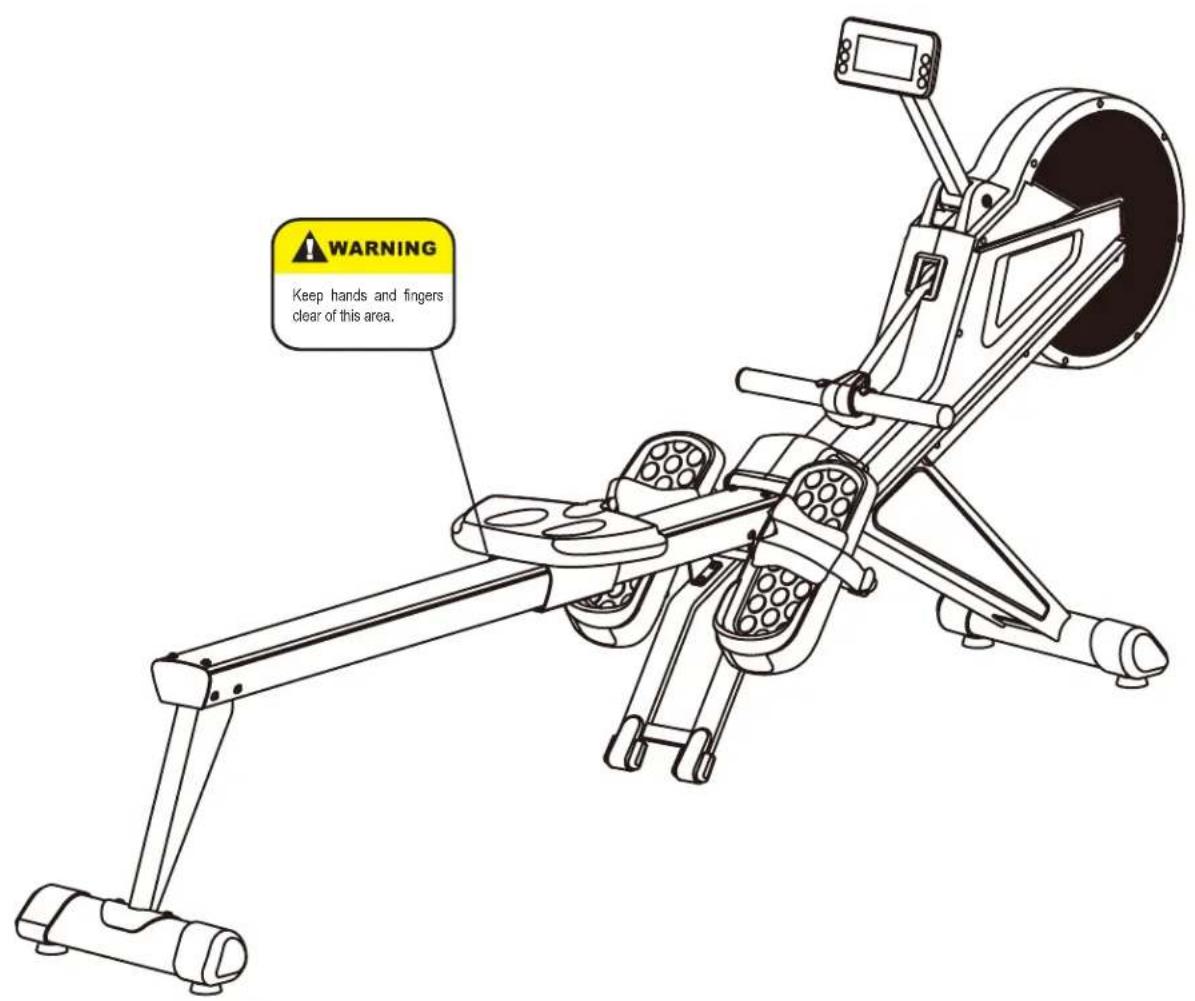
WARNINGS AND LABELS
text_image
WARNING Keep hands and fingers clear of this area.SAFETY INFORMATION
PRECAUTIONS
This rower has been designed and constructed to provide maximum safety. Nevertheless, certain precautions should be taken when using exercise equipment. Read the whole manual before assembling and using the rower. Please observe the following safety precautions:
- Keep children and pets away from this equipment at all times. DO NOT leave them unsupervised in the room where the rower is kept.
- If you experience dizziness, nausea, chest pains or any other symptom while using this rower STOP exercising. SEEK IMMEDIATE MEDICAL ATTENTION!
- Use the rower on a level and solid surface. Adjust the feet for stability.
- Do not place hand or objects in or near any openings.
- Wear clothing suitable for doing exercise. Do not wear baggy clothing. Always wear athletic shoes when using the rower and tie the laces securely.
- This rower must only be used for the purposes described in this manual. DO NOT use accessories that are not recommended by BH Fitness.
- Do not place sharp objects near the rower.
- Do not use the rower if it is not working correctly.
- Before using the rower, thoroughly inspect the equipment for proper assembly.
- Keep a clear perimeter of 3 feet (1 meter) around the rower before operating the equipment.
- Use only authorized and trained technicians if a repair is needed.
- Please follow the advice for correct training, as detailed in the Training Guidelines.
- Use only the tools provided to assemble this rower.
- This rower was designed for a maximum user weight of 300lbs (136 kgs).
- The rower can only be used by one person at a time.
- Do not use this rower outside.
- Do not use the rower if the main electrical cord becomes damaged or worn. Keep the main electrical cord away from hot surfaces.
Caution: Consult your doctor before beginning to use the machine or any exercise program. Read all of the instructions before using any exercise equipment.
KEEP THESE INSTRUCTIONS SAFE FOR FUTURE USE.
EXERCISE INSTRUCTION
Use of the rower offers various benefits; it can improve fitness, muscle tone, flexibility and circulation. When used in conjunction with a calorie controlled diet, it can help you lose weight.
- Consult your doctor before starting any exercise program. It is advisable to undergo a complete physical examination.
- Exercise at recommended level. Do not over exert yourself.
- If you feel any pain or discomfort, stop exercising immediately and consult your doctor.
- Wear appropriate clothing and footwear for the exercise; do not wear baggy clothing; do not wear leather soled shoes or high heels.
- Get on to the equipment slowly and securely.
- Select the program or workout option that is most closely aligned with your workout interests.
TRAINING GUIDELINES
Exercise is one of the most important factors in the overall health of an individual. Listed among its benefits are:
- Increased capacity for physical work (strength endurance)
- Increased cardiovascular (heart and arteries/veins) and respiratory efficiency
• Decreased risk of coronary heart disease
• Changes in body metabolism, e.g. losing weight - Delaying the physiological effects of age
- Reduction in stress, increase in self-confidence, etc.
There are several components of physical fitness and each is defined below.
STRENGTH
The capacity of a muscle to exert a force against resistance. Strength contributes to power and speed.
MUSCULAR ENDURANCE
The capacity to exert a force repeatedly over a period of time, e.g. it is the muscular endurance of your legs to carry you 10 km without stopping.
FLEXIBILITY
The range of motion of your joints. Improving flexibility involves the stretching of muscles and tendons to maintain or increase suppleness, and it provides increased resistance to muscle injury or soreness.
CARDIO-RESPIRATORY ENDURANCE
The most essential component of physical fitness. It is the efficient functioning of the heart and lungs.
AEROBIC FITNESS
Is an exercise of relatively low intensity and long duration, which depends primarily on the aerobic energy system. Aerobic means "with oxygen", and refers to the use of oxygen in the body's metabolic or energy-generating process. Many types of exercise are aerobic, and by definition are performed at moderate levels of intensity for extended periods of time.
ANAEROBIC TRAINING
Is an exercise intense enough to trigger anaerobic metabolism. This means “without oxygen” and is the output of energy when the oxygen supply is insufficient to meet the body’s long term energy demands. (For example, a 100 meter sprint.)
OXYGEN UPTAKE
The effort that you can exert over a prolonged period of time is limited by your ability to deliver oxygen to the working muscles. Regular vigorous exercise produces a training effect that can increase your aerobic capacity by as much as 20 to 30%. An increased VO2 Max indicates an increased ability of the heart to pump blood, of the lungs to ventilate oxygen, and of the muscles to take up oxygen.
THE TRAINING THRESHOLD
This is the minimum level of exercise which is required to produce significant improvements in any physical fitness parameter.
OVERLOAD
This is where you exercise above your comfort level. The intensity, duration and frequency of exercise should be above the training threshold and should be gradually increased as the body adapts to the increasing demands. As your fitness level improves, the training threshold should rise. Working through your program and gradually increasing the overload factor is important.
PROGRESSION
As you become more fit, a higher intensity of exercise is required to create an overload and therefore provide continued improvement.
SPECIFICS
Different forms of exercise produce different results. The type of exercise that is carried out is specific to the muscle groups being used and to the energy source involved. There is little transfer of the effects of exercise, i.e. from strength training to cardiovascular fitness. That is why it is important to have an exercise program tailored to your specific needs.
REVERSIBILITY
If you stop exercising or do not do your program often enough, you will lose the benefits you have gained. Regular workouts are the key to success.
WARM-UP
Every exercise program should start with a warm-up where the body is prepared for the effort to come. It should be gentle and preferably use the muscles group to be involved later. Stretching should be included in both your warm-up and cool down, and should be performed after 3-5 minutes of low intensity aerobic activity or calisthenic type exercise.
This involves a gradual decrease in the intensity of the exercise session. Following exercise, a large supply of blood remains in the working muscles. If it is not returned promptly to the central circulation, pooling of blood may occur in the muscles.
HEART RATE
As you exercise, your heart beat increases. This is often used as a measure of the required intensity of an exercise. You need to exercise hard enough to condition your circulatory system, and increase your pulse rate, but not enough to strain your heart.
Your initial level of fitness is important when developing an exercise program for you. When starting, you can get a good training effect with a heart rate of 110-120 beats per minute (BPM). If you are more fit, you will need a higher threshold of stimulation.
To begin with, you should exercise at a level that elevates your heart rate to about 65 to 70% of your maximum. If you find this is too easy, you may want to increase it, but it is better to lean on the conservative side.
As a rule of thumb, the maximum heart rate is 220 minus your age. As you increase in age, your heart, like other muscles, loses some of its efficiency. Some of its natural loss is won back as fitness improves. The following table is a guide to those who are “starting fitness.”
| Age | Target | Heart | Rate | 25 | 30 | 35 | 40 | 45 | 50 | 55 | 60 | |||
| 10 | Second | Count | 23 | 22 | 22 | 21 | 20 | 19 | 19 | 18 | 18 | |||
| Beats per Minute | 138 | 132 | 132 | 126 | 120 | 114 | 114 | 108 | 108 | |||||
PULSE COUNT
The pulse count (on your wrist or carotid artery in the neck, taken with two index fingers) is done for ten seconds, taken a few seconds after you stop exercising. This is for two reasons: (a) 10 seconds is long enough for accuracy, (b) the pulse count is to approximate your BPM rate at the time you are exercising. Since heart rate slows as you recover, a longer count isn't as accurate.
The target is not a magic number, but a general guide. If you're above average with your fitness, you may work comfortably a little above that suggested for your age group. The following table is a guide.
| Age | Target | Heart | Rate | 25 | 30 | 35 | 40 | 45 | 50 | 55 | 60 | ||
| 10 | Second | Count | 26 | 26 | 25 | 24 | 23 | 22 | 22 | 21 | 20 | ||
| Beats | per | Minute | 156 | 156 | 150 | 144 | 138 | 132 | 132 | 126 | 120 | ||
Don't push yourself too hard to reach the figures on this table. It can be very uncomfortable if you over exercise. Let it happen naturally as you work through your program. Remember, the target is a guide, not a rule, a little above or below is just fine.
Two final comments: (1) don't be concerned with day to day variations in your pulse rate, being under pressure or not enough sleep can affect it; (2) your pulse rate is a guide, don't become a slave to it.
MUSCLE SORENESS
For the first week or so, muscle soreness may be the only indication you have that you are on an exercise program. This, of course, does depend on your overall fitness level. A confirmation that you are on the correct program is a very slight soreness in most major muscle groups. This is quite normal and will disappear in a matter of days.
If you experience major discomfort, you may be on a program that is too advanced, or you have increased your program too rapidly.
If you experience PAIN during or after exercise, your body is telling you something. Stop exercising and consult your doctor.
WHAT TO WEAR
Wear clothing that will not restrict your movement in any way while exercising. Clothes should be light enough to allow the body to cool. Excessive clothing that causes you to perspire more than you normally would give you no advantage. The extra weight you lose is body fluid and will be replaced with the next glass of water you drink. It is advisable to wear a pair athletic shoes.
BREATHING DURING EXERCISE
Do not hold your breath while exercising. Breathe normally as much as possible. Remember, breathing involves the intake and distribution of oxygen, which feeds the working muscles.
REST PERIODS
Once you start your exercise program, you should continue through to the end. Do not break off halfway through and then restart at the same place later on without going through the warm-up stage again. The rest period required between exercises may vary from person to person.
SUGGESTED STRETCHES
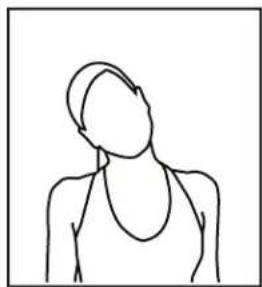
Head Rolls
Rotate your head to the right for one count while feeling the stretch up the left side of your neck. Next, rotate your head back for one count, stretching your chin to the ceiling. Rotate your head to the left for one count, and finally, drop your head to your chest for one count.
Shoulder Lifts
Lift your left shoulder up toward your ear for one count. Then lift your right shoulder up for one count as you lower your left shoulder.
Side Stretches
Open your arms to the side and continue lifting them until they are over your head. Reach your left arm as far upward as you can for one count. Feel the stretch up your left side. Repeat this action with your right arm.
Quadriceps Stretch
With one hand against a wall for balance, reach behind you and pull your left foot up. Bring your heel as close to your buttocks as possible. Hold for 15 counts and repeat with right foot up.
natural_image
Simple line drawing of a human figure with no text or symbols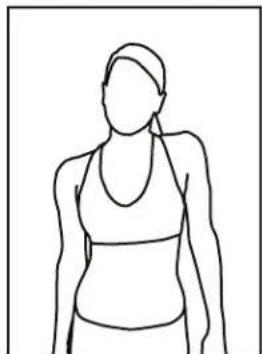
natural_image
Line drawing of a person wearing a high-brimmed top and necklace (no text or symbols)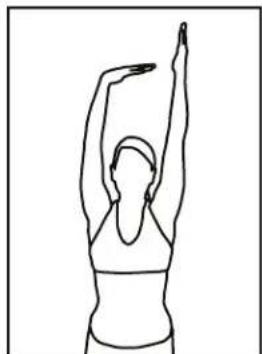
natural_image
Line drawing of a person performing a stretching exercise with one arm raised (no text or symbols)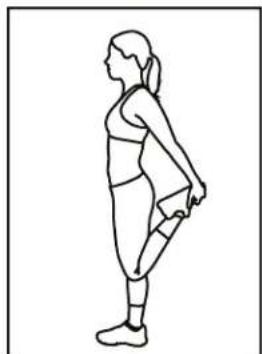
natural_image
Line drawing of a woman in athletic wear performing a standing stretch (no text or symbols)SUGGESTED STRETCHES
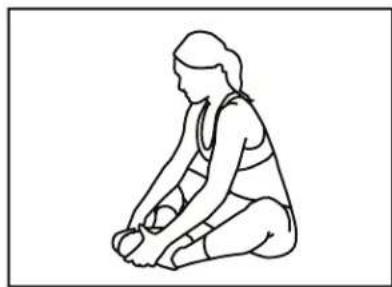
Inner Thigh Stretch
Sit with the soles of your feet together with your knees pointing outward. Pull your feet as close into your groin as possible. Gently push your knees towards the floor. Hold for 15 counts.
natural_image
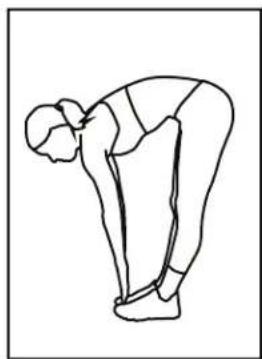
Line drawing of a person in a seated posture, possibly performing a exercise or stretching pose (no text or symbols)Toe Touches
Slowly bend forward from your waist, letting your back and shoulders relax as you stretch toward your toes. Reach down as far as you can and hold for 15 counts.
natural_image
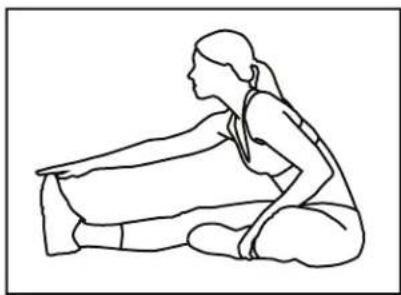
Line drawing of a person in a forward bend yoga pose (no text or symbols)Hamstring Stretches
Sit with your right leg extended. Rest the soles of your left foot against your right inner thigh. Stretch toward your toes as far as possible. Hold for 15 counts. Relax and then repeat with left leg extended.
natural_image
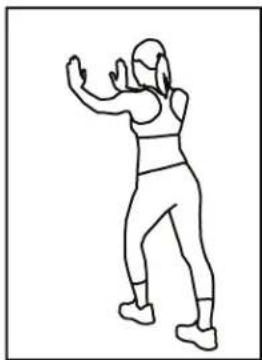
Line drawing of a seated woman in a kneeling pose, viewed from the side (no text or symbols)Calf/Achilles Stretches
Lean against a wall with your right leg in front of the left and your arms forward. Keep your left leg straight and the right foot on the floor; then bend the right leg and lean forward by moving your hip toward the wall. Hold, then repeat on the other side for 15 counts.
natural_image
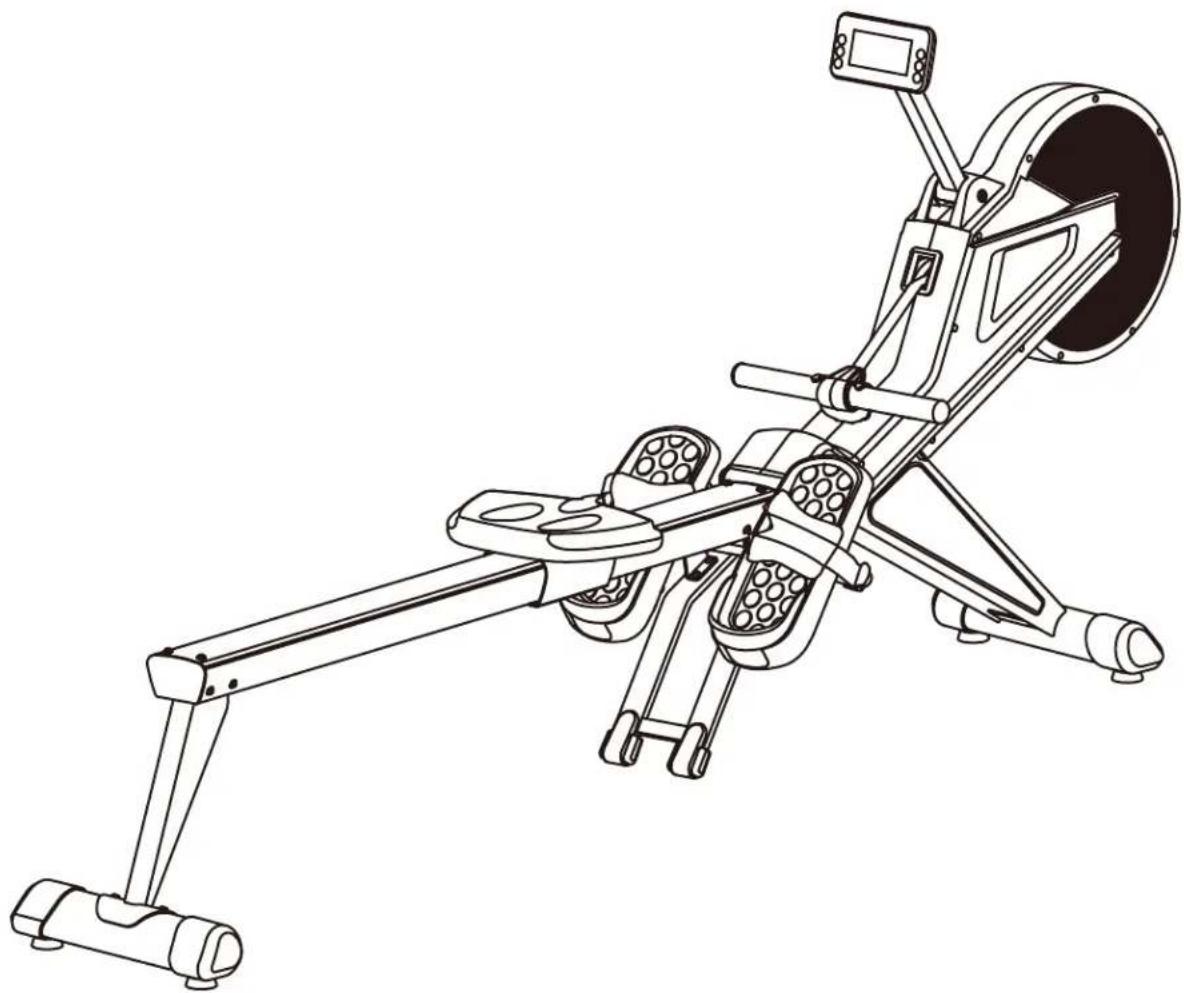
Line drawing of a person in motion, possibly dancing or gesturing (no text or symbols)OVERVIEW
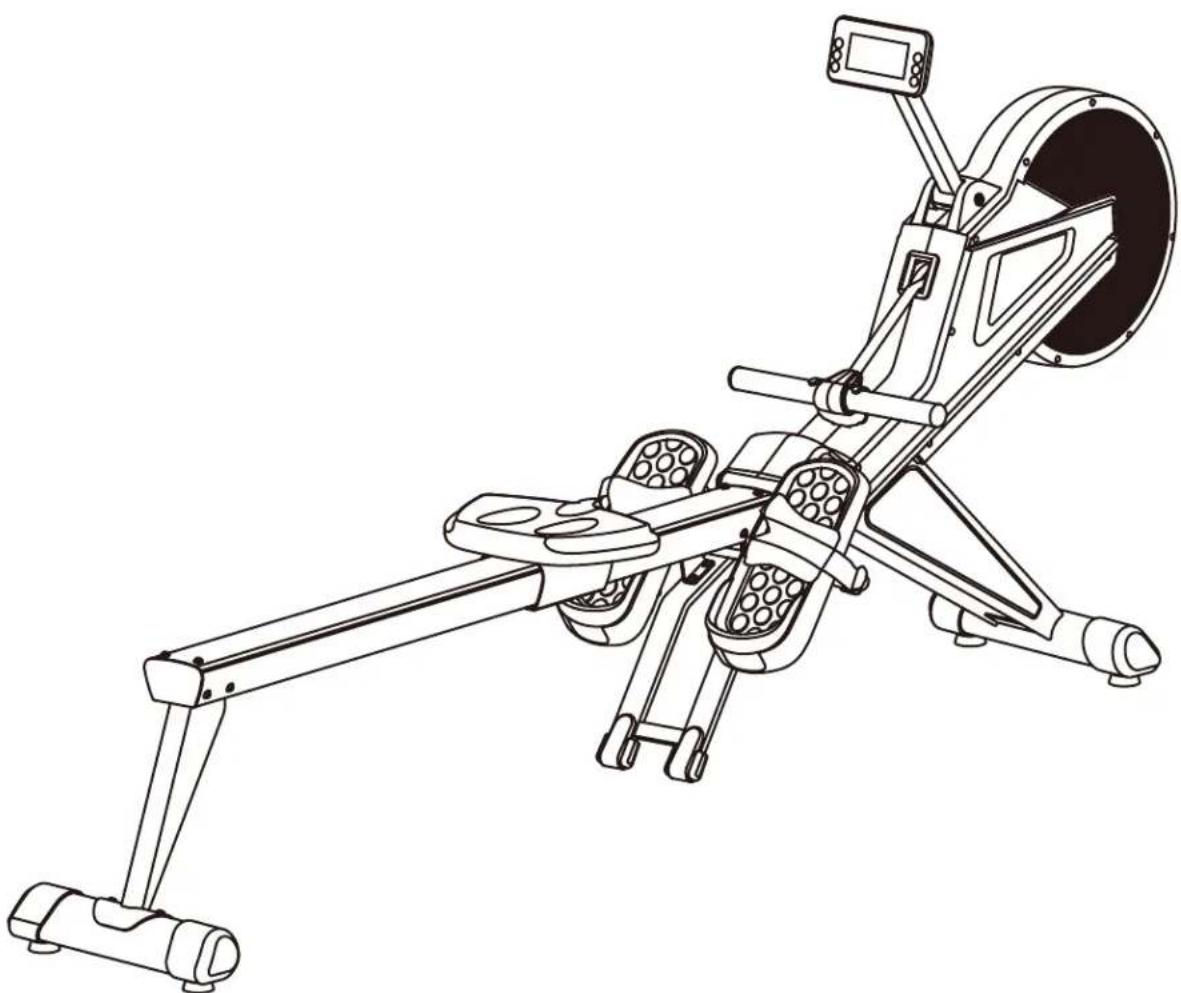
natural_image
Line drawing of a stationary exercise machine with articulated legs and control panel (no text or symbols)ASSEMBLY INSTRUCTIONS
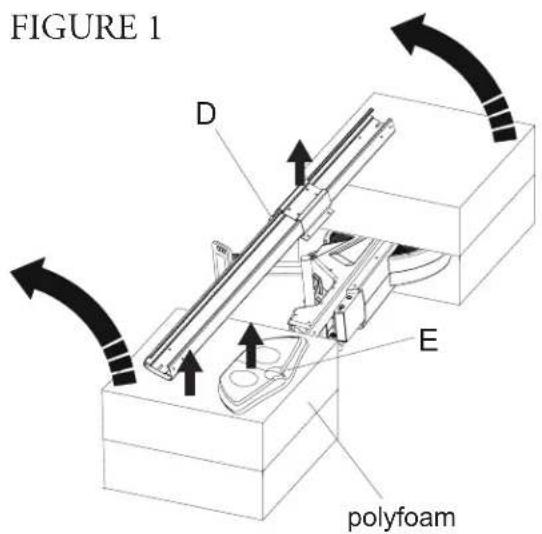
text_image
FIGURE 1 D E polyfoamFIGURE 2
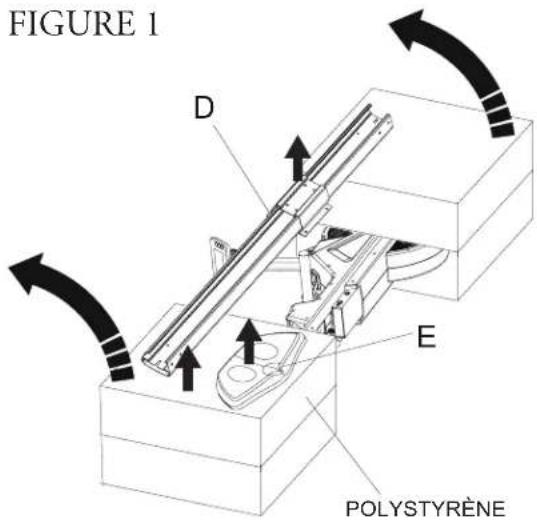
STEP 1: Remove Components
Remove the components. Lay the machine and packaging on the floor as shown in Figure 1. Remove the components D & E from inside the polyfoam as shown and set aside for further assembly. Replace the polyfoam blocks in their original positions. Flip the packaged assembly up 90 degrees as shown in Figure 2.
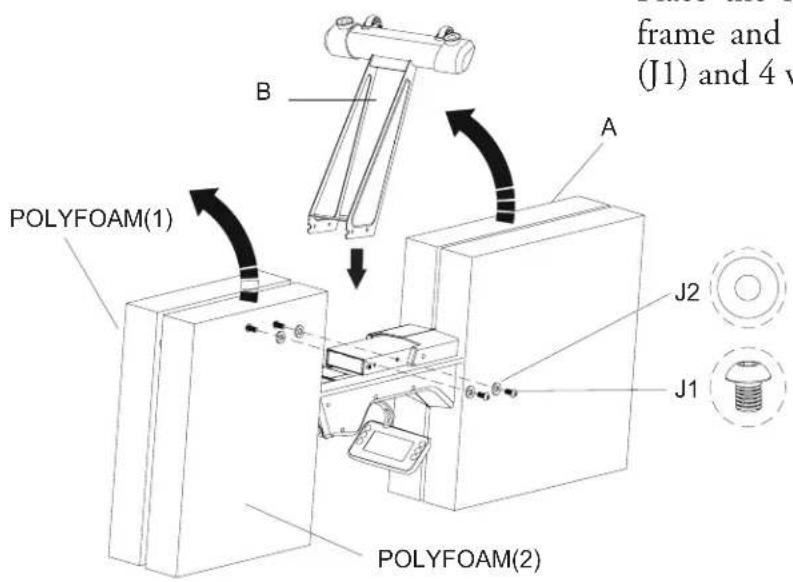
text_image
frame and (J1) and 4 v POLYFOAM(1) POLYFOAM(2) A B J2 J1STEP 2: Front Stabilizer Assembly
Place the front stabilizer (B) onto the main frame and tighten into place using 4 screws (J1) and 4 washers (J2).
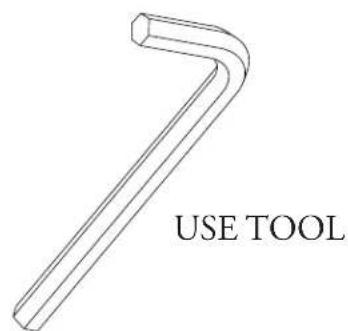
text_image
USE TOOLSTEP 3: Pedal Connection Tube Assembly
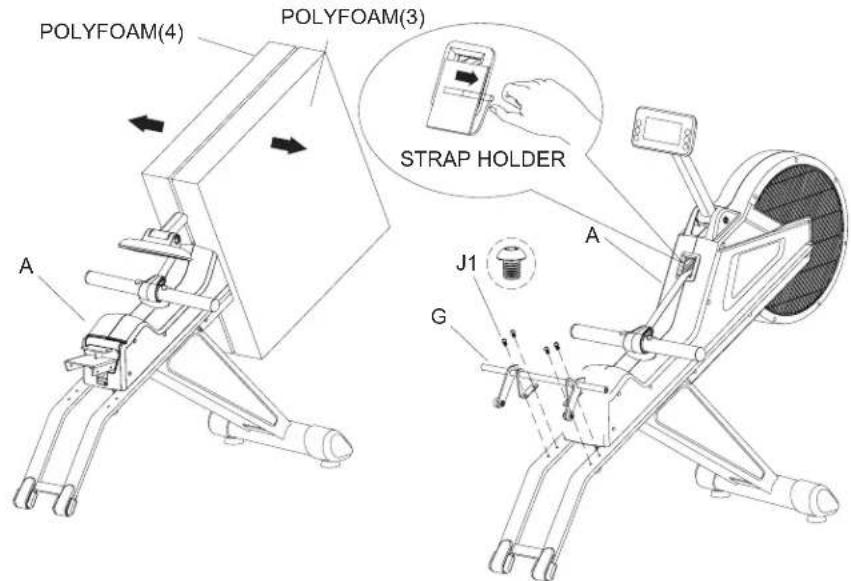
Flip the main frame over so it rests on the stabilizer as shown below. Remove the polyfoam blocks and set aside. Install the Pedal Connection Tube (G) to the main frame (A) using 4 screws (J1)
**Before pulling the rope for exercise, it is necessary to remove the strap holder first (see inset)
FIGURE 3
text_image
POLYFOAM(4) POLYFOAM(3) STRAP HOLDER A J1 G ASTEP 4: Assemble Saddle With Upper Slide Track
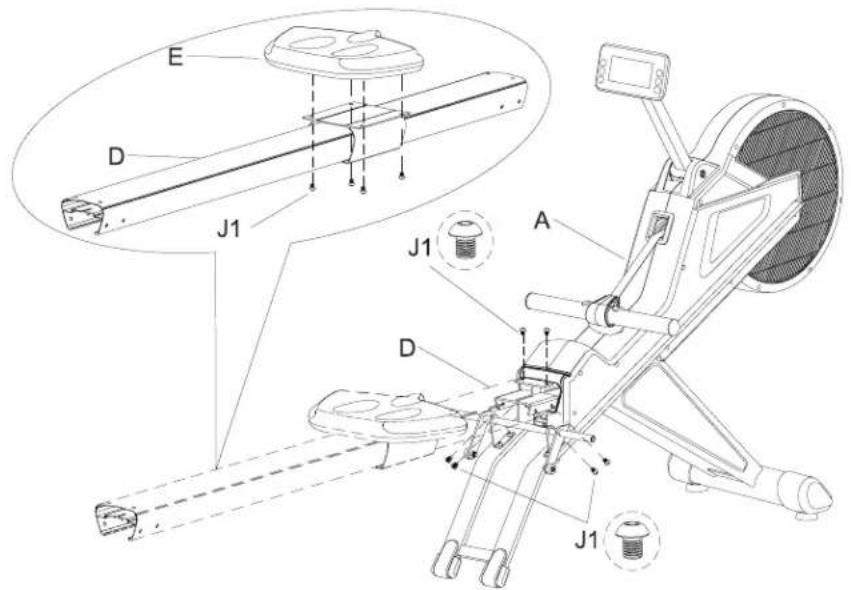
Install the Saddle (E) onto the Upper Slide Track (D) using 4 screws (J1) as shown. Then using 6 screws (J1), attach the Upper Slide Track (D) with the Main Frame (A)
FIGURE 4
text_image
Technical diagram of a stationary exercise machine with labeled components including J1, D, and E partsSTEP 5: Assemble the Rear Stabilizer
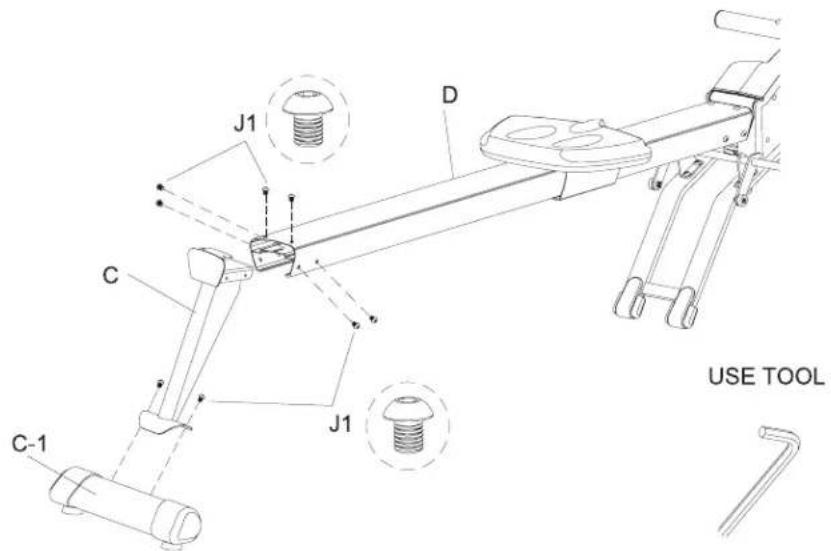
Lift the Upper Slide Track (D) off the ground and fit the Rear Stabilizer (C) into place. Use 6 Screws (J1) to tighten the Rear Stabilizer (C) into place on the Upper Slide Track (D)
FIGURE 5
STEP 6: Pedal Assembly and Adjustment
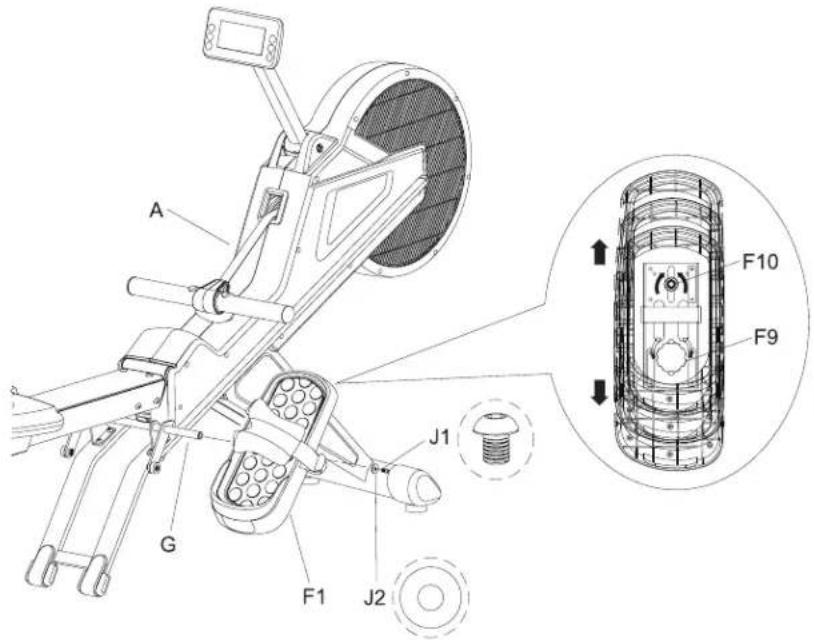
Slide the Right Pedal (F1) onto the Pedal Connection Tube (G). Use 1 screw (J1) and 1 washer (J2) to secure it in place. For Pedal adjustment loosen the nut (F10) and the knob (F9), move pedal to desired position and retighten the nut (F10) and knob (F9). Repeat steps for Left Pedal assembly and Adjustment.
\*\*IMPORTANT\*\*
Be sure to install pedals on the correct side so that the heel cup is at the back of the pedal as shown. Otherwise you will experience slipping and could fall out of the pedals.
FIGURE 6
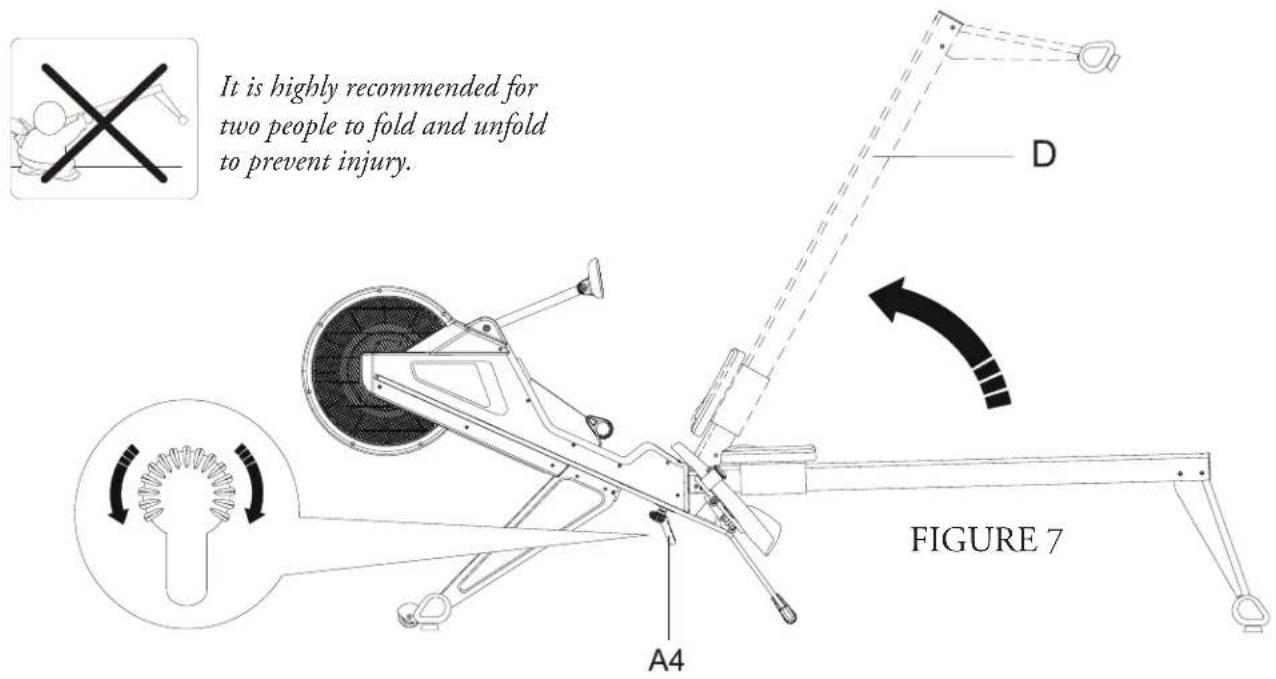
STEP 7: Folding the Machine for Storage
It is advised that two people perform the following steps to prevent injury. Loosen the knob (A4) then pull it down. Fold the Slide Track up as shown, then retighten the knob.
IMPORTANT: Hold the Slide Track in the upright position until it is confirmed that the knob (A4) has been tightened completely. Failure to do so could cause risk of injury.
To unfold for use, simply reverse these steps, using two people for safety.
text_image
It is highly recommended for two people to fold and unfold to prevent injury. A4 D FIGURE 7STEP 8: Power Considerations
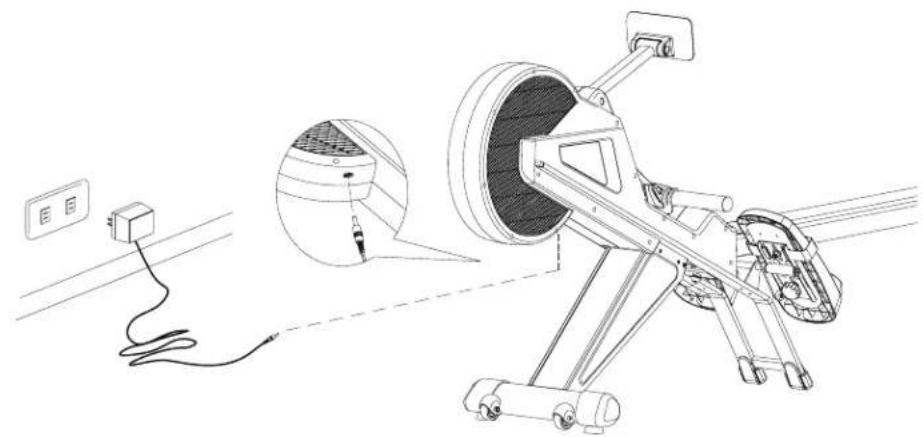
Take consideration to place the machine near a power outlet. Plug the power adapter into the outlet and the adapter cord into the plug on the machine as shown.
FIGURE 8
natural_image
Technical line drawing of a mechanical device with wiring and a close-up inset showing internal components (no text or symbols)STEP 9: How to Move the Machine
The front stabilizer has built-in wheels for convenience. Stand at the front of the machine and lift until the weight of the machine shifts to the transportation wheels. The machine is now ready to be moved to a new location. When moving the rowing machine, please make sure the wheels are moving across a level surface.
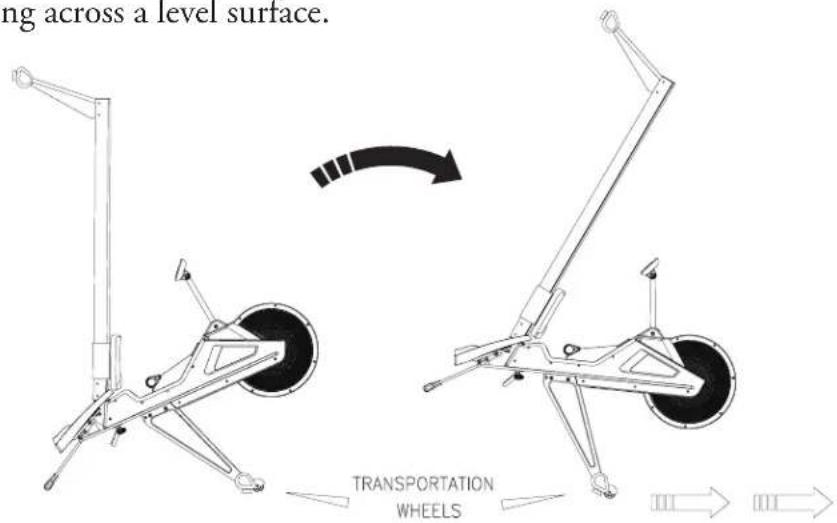
text_image
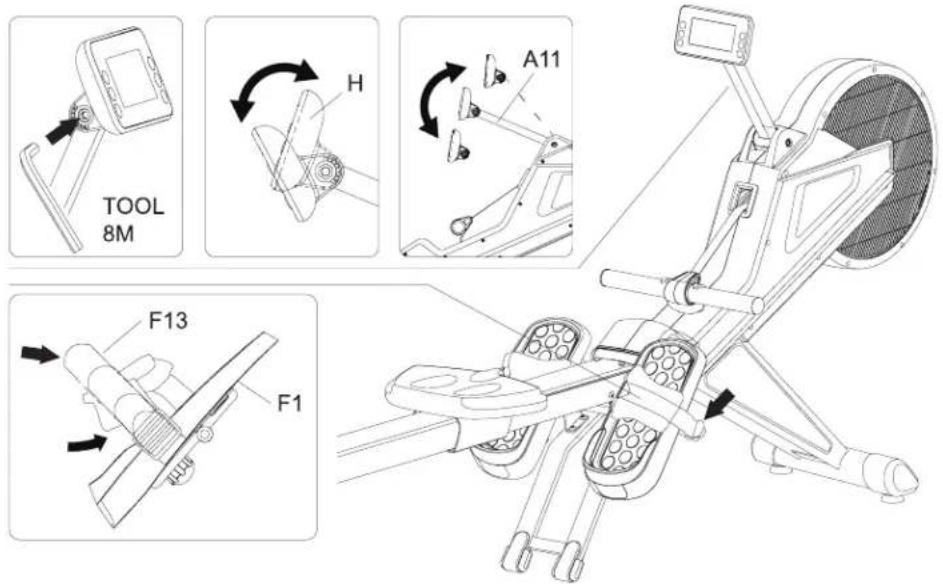
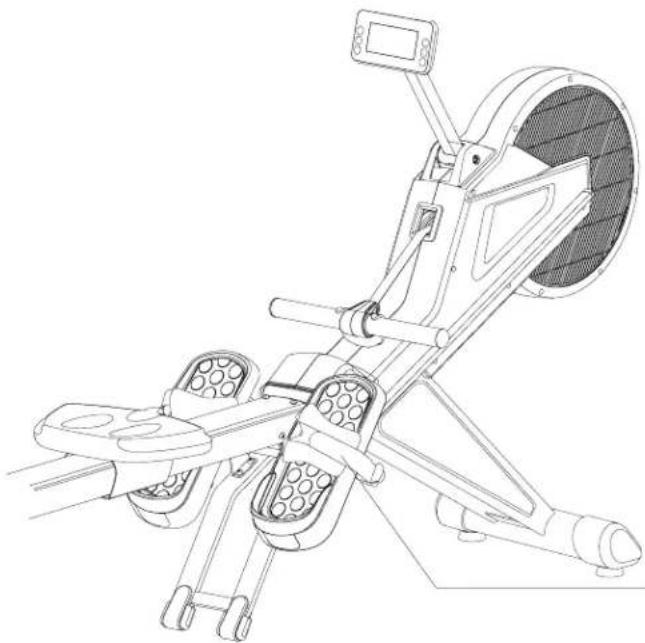
ng across a level surface. TRANSPORTATION WHEELSSTEP 10: Console and Pedal Strap Adjustment
The console angle is adjustable as shown. Retighten once desired position is found using the 8mm tool.
STEP 11: Pedal Strap Adjustment
Put foot into pedal (F1) and tighten the strap (F13) Repeat for the other side pedal strap adjustment.
text_image
TOOL 8M H A11 F13 F1Tighten the Pedal Strap (F13) securely after you have found a position that is just right for you.
natural_image
Technical line drawing of a stationary exercise machine with levers and control panel (no text or symbols)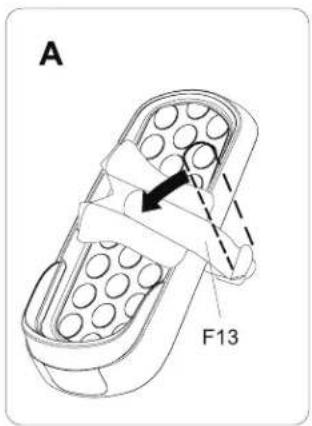
text_image
A F13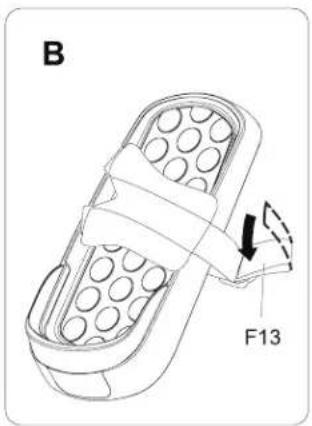
text_image
B F13strap fixing suggestion A . B
STEP 12: Slide Adjustment
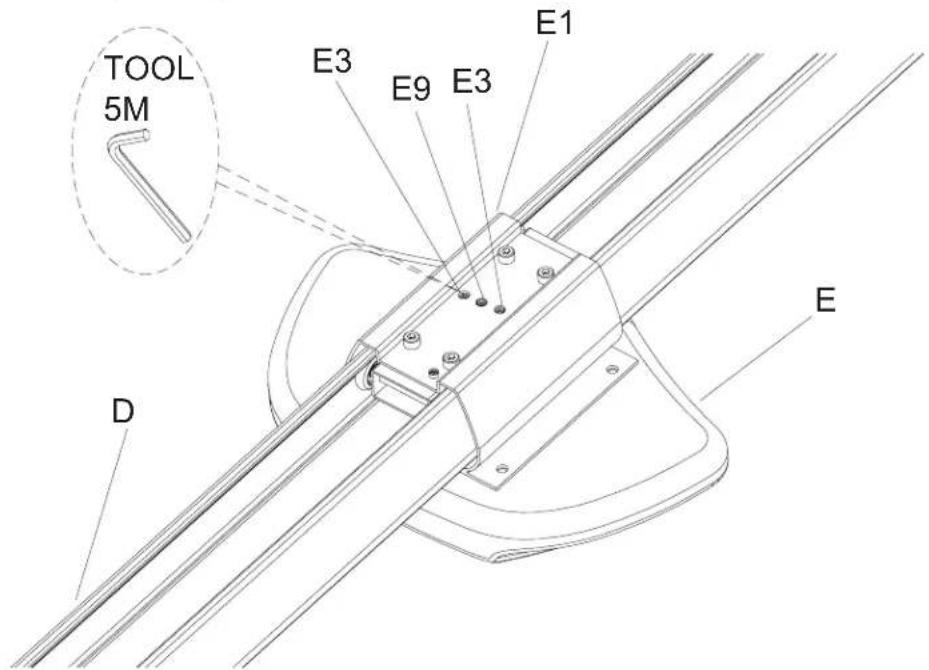
There are 3 screws (E9 x 1 and E3 x 2) under the Saddle as shown below. Loosen the middle screw (E9) then adjust the other 2 screws (E3) to loosen or tighten the sliding action of the saddle based upon personal preference. After you are comfortable with your settings, lock them into place by tightening the middle screw (E9)
text_image
TOOL 5M E3 E9 E3 E1 D ECONSOLE OVERVIEW
text_image
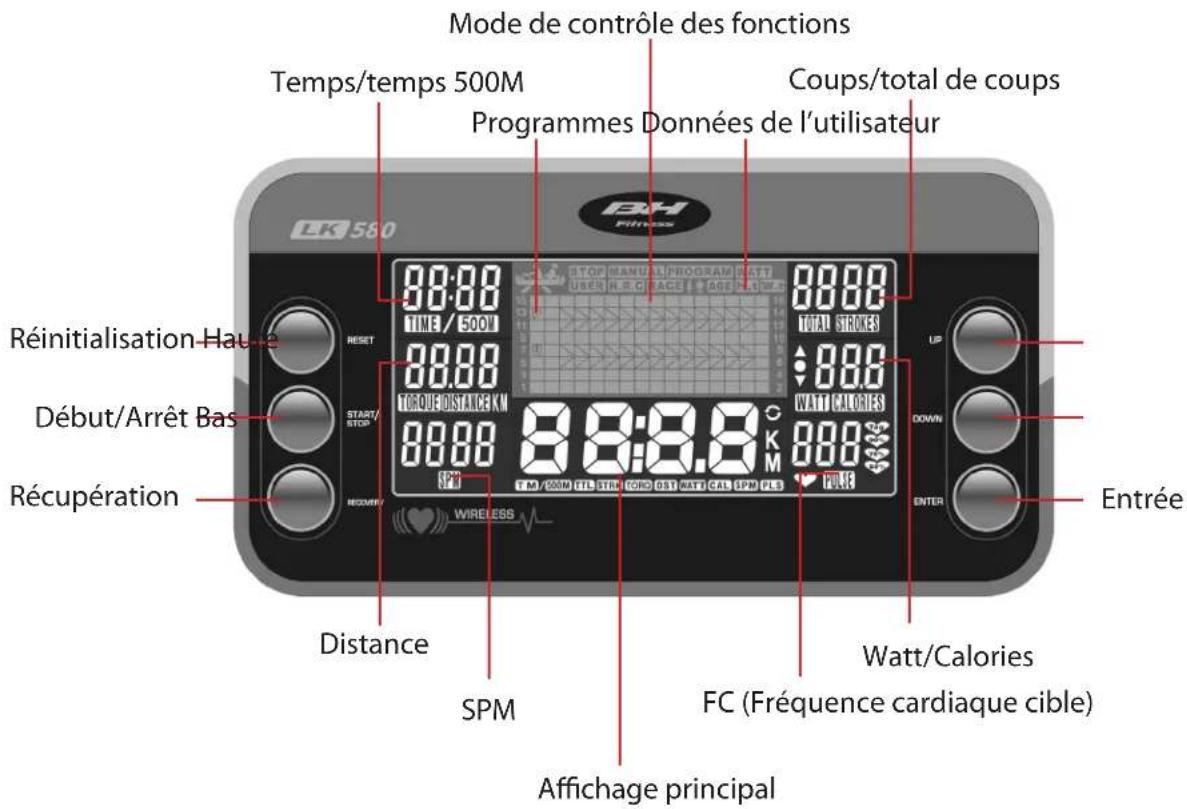
Function Control Mode Time/Time 500M Programs User Data Stroke/Total Strokes LK 560 88:88 TIME / 500M 88.88 TORQUE DISTANCE KM 88:8.8 KM T.M. 200N TIL STEN TORO DST WATT CAL SPR PLS RESET START/STOP Recovery Ente Distance SPM WIRELESS Main Display UP DOWN ENTER H.R.C. (Target Heart Rate)CONSOLE OPERATIONSCONSOLE OPERATIONS
QUICK START
Once the rowing machine has been turned on, press the START/STOP button to begin your workout in MANUAL mode. If you need to reset the rower, press the reset key for 2 seconds.
PROGRAM MODE
After pressing the reset button for 2 seconds to restart the machine, use the UP/DOWN buttons to set up your user data by selecting any option between U0-U4. Please enter your GENDER / AGE / HEIGHT / WEIGHT then press ENTER to confirm. Then select MANUAL / PROGRAMS / WATT / USER / HRC / RACE.
Follow the instruction below in regards to MANUAL / PROGRAMS / WATT / USER / HRC / RACE.
MANUAL
To access Manual Mode, follow the steps in the diagram below.
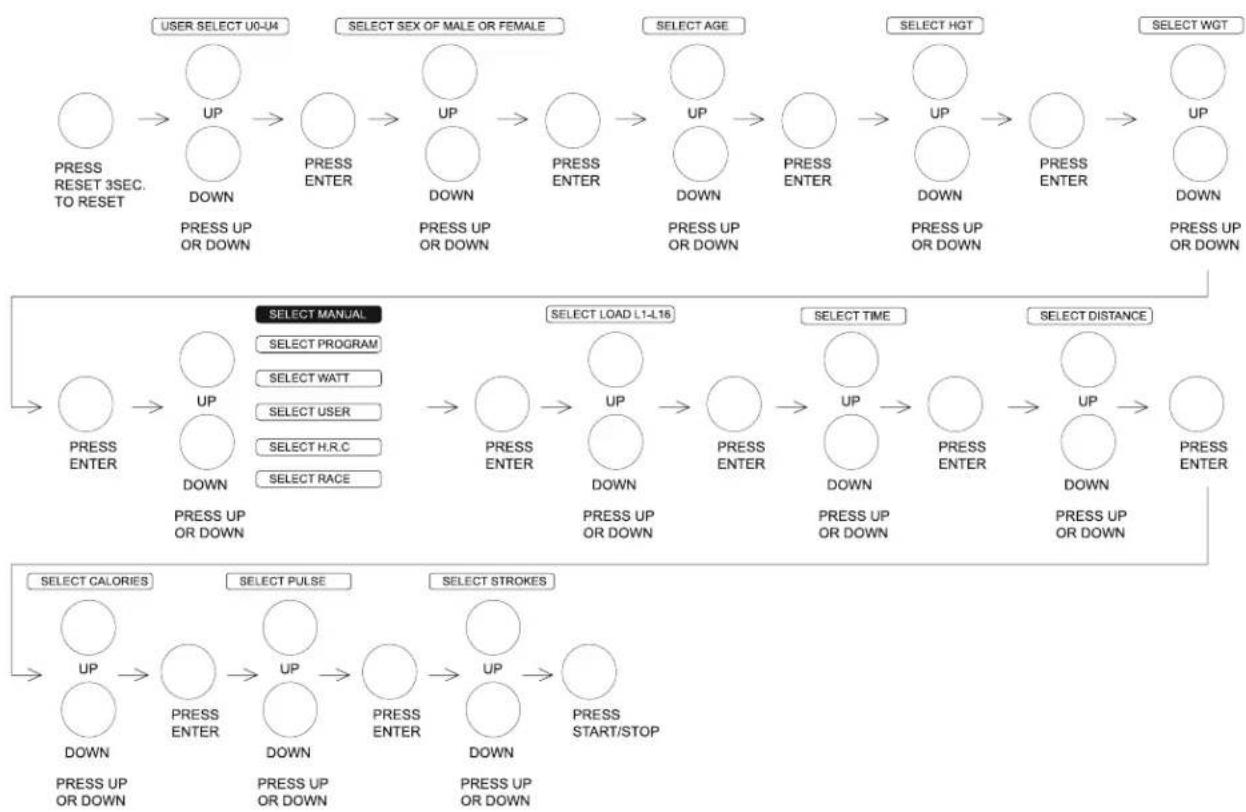
flowchart
graph TD
    A["USER SELECT U0-U4"] --> B["UP DOWN"]
    B --> C["UP PRESS ENTER"]
    C --> D["UP DOWN"]
    D --> E["UP PRESS ENTER"]
    E --> F["UP DOWN"]
    F --> G["UP PRESS ENTER"]
    G --> H["UP DOWN"]
    H --> I["UP PRESS ENTER"]

    J["SELECT MANUAL"] --> K["UP DOWN"]
    K --> L["UP PRESS ENTER"]
    L --> M["UP DOWN"]
    M --> N["UP PRESS ENTER"]
    N --> O["UP DOWN"]
    O --> P["UP PRESS ENTER"]

    Q["SELECT LOAD L1-L16"] --> R["UP DOWN"]
    R --> S["UP PRESS ENTER"]
    S --> T["UP DOWN"]
    T --> U["UP PRESS ENTER"]
    U --> V["UP DOWN"]
    V --> W["UP PRESS ENTER"]

    X["SELECT TIME"] --> Y["UP DOWN"]
    Y --> Z["UP PRESS ENTER"]
    Z --> AA["UP DOWN"]
    AA --> AB["UP PRESS ENTER"]

    AC["SELECT DISTANCE"] --> AD["UP DOWN"]
    AD --> AE["UP PRESS ENTER"]

    AF["SELECT CALORIES"] --> AG["UP DOWN"]
    AG --> AH["UP PRESS ENTER"]
    AH --> AI["UP DOWN"]
    AI --> AJ["UP PRESS ENTER"]
    AJ --> AK["UP DOWN"]
    AK --> AL["UP PRESS START/STOP"]

    AM["SELECT PULSE"] --> AN["UP DOWN"]
    AN --> AO["UP PRESS ENTER"]
    AO --> AP["UP DOWN"]
    AP --> AQ["UP PRESS ENTER"]

    AR["SELECT STROKES"] --> AS["UP DOWN"]
    AS --> AT["UP PRESS ENTER"]
    AT --> AU["UP DOWN"]
    AU --> AV["UP PRESS ENTER"]
PROGRAM
To access Program Mode, follow the steps in the diagram below.
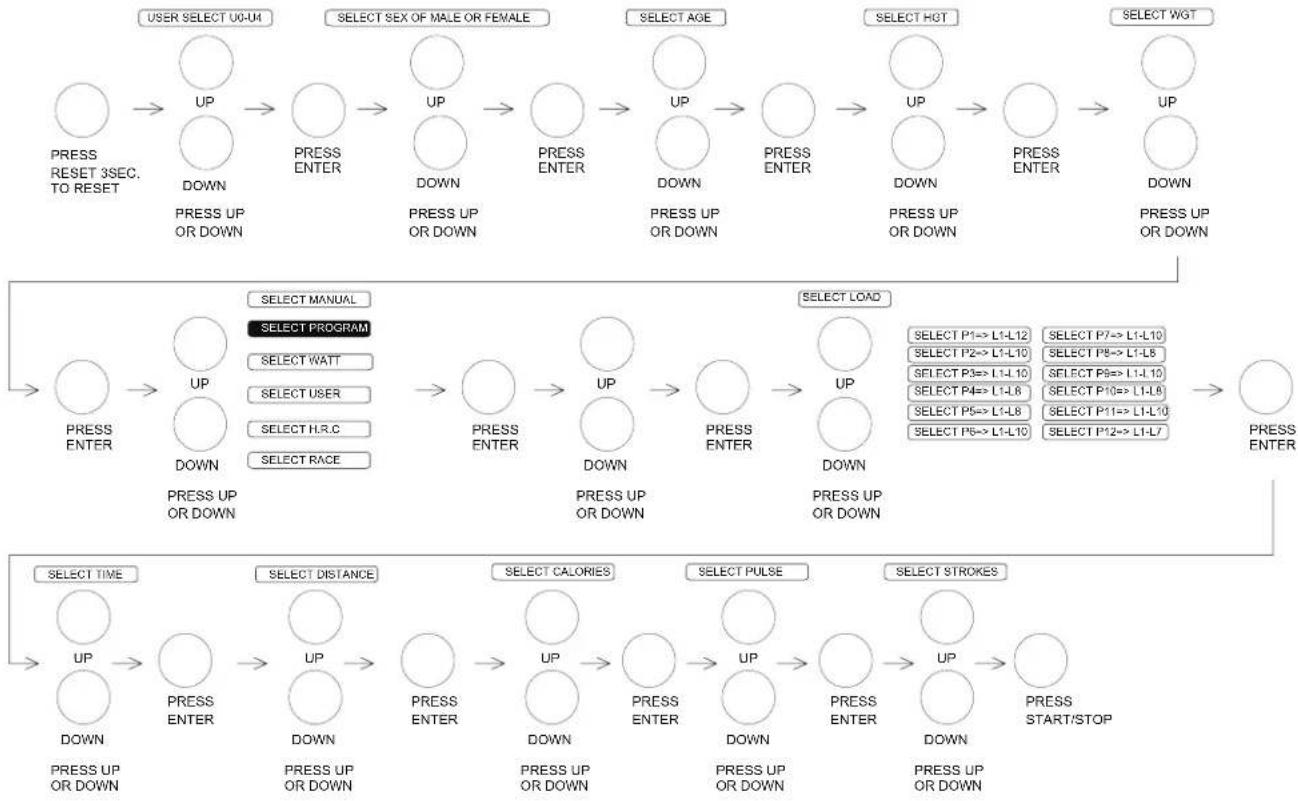
flowchart
graph TD
    A["USER SELECT U0-U4"] --> B["UP"]
    B --> C["UP"]
    C --> D["UP"]
    D --> E["UP"]
    E --> F["UP"]
    F --> G["UP"]
    G --> H["UP"]
    H --> I["UP"]
    I --> J["UP"]
    J --> K["UP"]
    K --> L["UP"]
    L --> M["UP"]
    M --> N["UP"]
    N --> O["UP"]
    O --> P["UP"]
    P --> Q["UP"]

    R["PRESS RESET 3SEC. TO RESET"] --> S["UP DOWN"]
    S --> T["PRESS UP OR DOWN"]

    U["SELECT SEX OF MALE OR FEMALE"] --> V["UP DOWN"]
    V --> W["UP DOWN"]
    W --> X["PRESS UP OR DOWN"]

    Y["SELECT AGE"] --> Z["UP DOWN"]
    Z --> AA["PRESS UP OR DOWN"]

    AB["SELECT HOT"] --> AC["UP DOWN"]
    AC --> AD["PRESS UP OR DOWN"]

    AE["SELECT WGT"] --> AF["UP DOWN"]
    AF --> AG["PRESS UP OR DOWN"]

    AH["SELECT MANUAL"] --> AI["UP DOWN"]
    AI --> AJ["PRESS UP OR DOWN"]

    AK["SELECT PROGRAM"] --> AL["UP DOWN"]
    AL --> AM["PRESS UP OR DOWN"]

    AN["SELECT LOAD"] --> AO["UP DOWN"]
    AO --> AP["PRESS UP OR DOWN"]

    AQ["SELECT TIME"] --> AR["UP DOWN"]
    AR --> AS["PRESS UP OR DOWN"]

    AT["SELECT DISTANCE"] --> AU["UP DOWN"]
    AU --> AV["PRESS UP OR DOWN"]

    AW["SELECT CALORIES"] --> AX["UP DOWN"]
    AX --> AY["PRESS UP OR DOWN"]

    AZ["SELECT PULSE"] --> BA["UP DOWN"]
    BA --> BB["PRESS UP OR DOWN"]

    BC["SELECT STROKES"] --> BD["UP DOWN"]
    BD --> BE["PRESS UP OR DOWN"]

    BF["PRESS ENTER"] --> BG["UP DOWN"]
    BG --> BH["PRESS START/STOP"]
WATTS CONSTANT
To access Watts Mode, follow the steps in the diagram below.
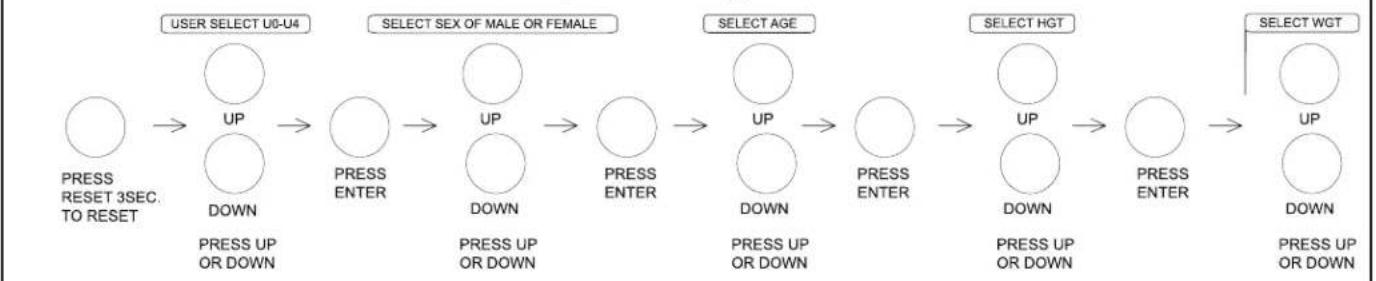
flowchart
graph LR
    A["USER SELECT U0-U4"] --> B["UP"]
    B --> C["DOWN"]
    C --> D["UP"]
    D --> E["DOWN"]
    E --> F["UP"]
    F --> G["DOWN"]
    G --> H["UP"]
    H --> I["DOWN"]
    I --> J["UP"]
    J --> K["DOWN"]

    L["SELECT SEX OF MALE OR FEMALE"] --> M["UP"]
    M --> N["DOWN"]
    N --> O["UP"]
    O --> P["DOWN"]
    P --> Q["UP"]
    Q --> R["DOWN"]

    S["SELECT AGE"] --> T["UP"]
    T --> U["DOWN"]
    U --> V["UP"]
    V --> W["DOWN"]
    W --> X["UP"]
    X --> Y["DOWN"]

    Z["SELECT HGT"] --> AA["UP"]
    AA --> AB["DOWN"]
    AB --> AC["UP"]
    AC --> AD["DOWN"]

    AE["SELECT WGT"] --> AF["UP"]
    AF --> AG["DOWN"]
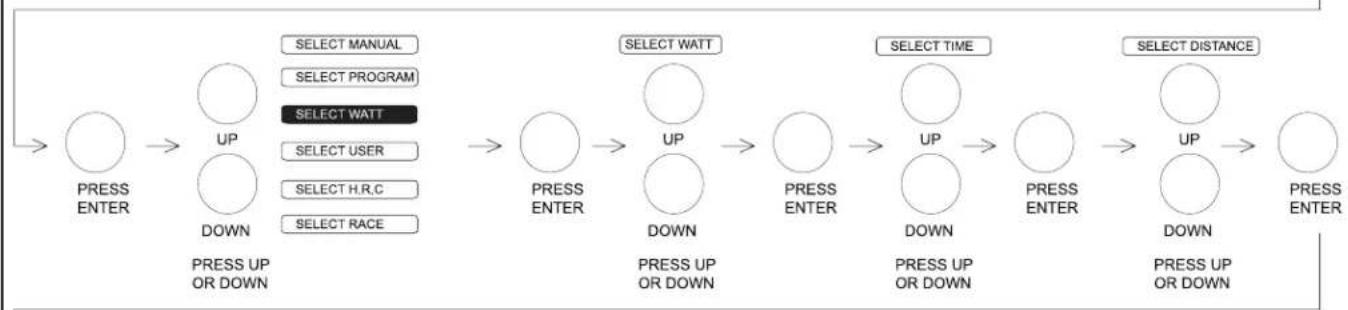
flowchart
graph LR
    A["UP"] --> B["PRESS ENTER"]
    B --> C["UP DOWN"]
    C --> D["PRESS UP OR DOWN"]

    E["SELECT MANUAL"] --> F["SELECT PROGRAM"]
    F --> G["SELECT WATT"]
    G --> H["SELECT USER"]
    H --> I["SELECT H.R.C"]
    I --> J["SELECT RACE"]

    K["UP DOWN"] --> L["PRESS ENTER"]
    L --> M["UP DOWN"]
    M --> N["PRESS UP OR DOWN"]

    O["SELECT TIME"] --> P["UP DOWN"]
    P --> Q["PRESS ENTER"]
    Q --> R["UP DOWN"]
    R --> S["PRESS UP OR DOWN"]

    T["SELECT DISTANCE"] --> U["UP DOWN"]
    U --> V["UP DOWN"]
    V --> W["PRESS ENTER"]
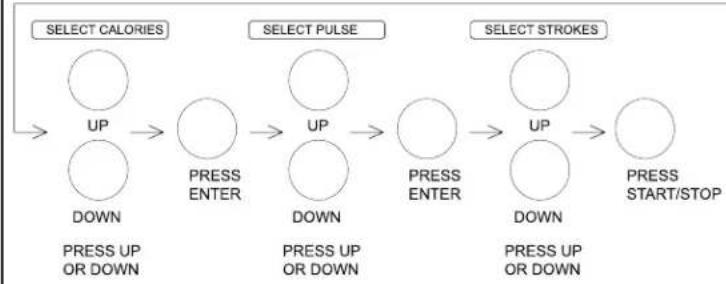
flowchart
graph LR
    A["SELECT CALORIES"] --> B["UP"]
    B --> C["DOWN"]
    C --> D["PRESS UP OR DOWN"]
    D --> E["PRESS ENTER"]
    E --> F["UP"]
    F --> G["DOWN"]
    G --> H["PRESS UP OR DOWN"]
    H --> I["PRESS ENTER"]
    I --> J["UP"]
    J --> K["DOWN"]
    K --> L["PRESS UP OR DOWN"]
    L --> M["PRESS START/STOP"]
    N["SELECT PULSE"] --> O["UP"]
    O --> P["DOWN"]
    P --> Q["PRESS UP OR DOWN"]
    Q --> R["PRESS ENTER"]
    R --> S["UP"]
    S --> T["DOWN"]
    T --> U["PRESS UP OR DOWN"]
    U --> V["PRESS START/STOP"]
    W["SELECT STROKES"] --> X["UP"]
    X --> Y["DOWN"]
    Y --> Z["PRESS UP OR DOWN"]
    Z --> AA["PRESS START/STOP"]
USER
To access User Mode, follow the steps in the diagram below.
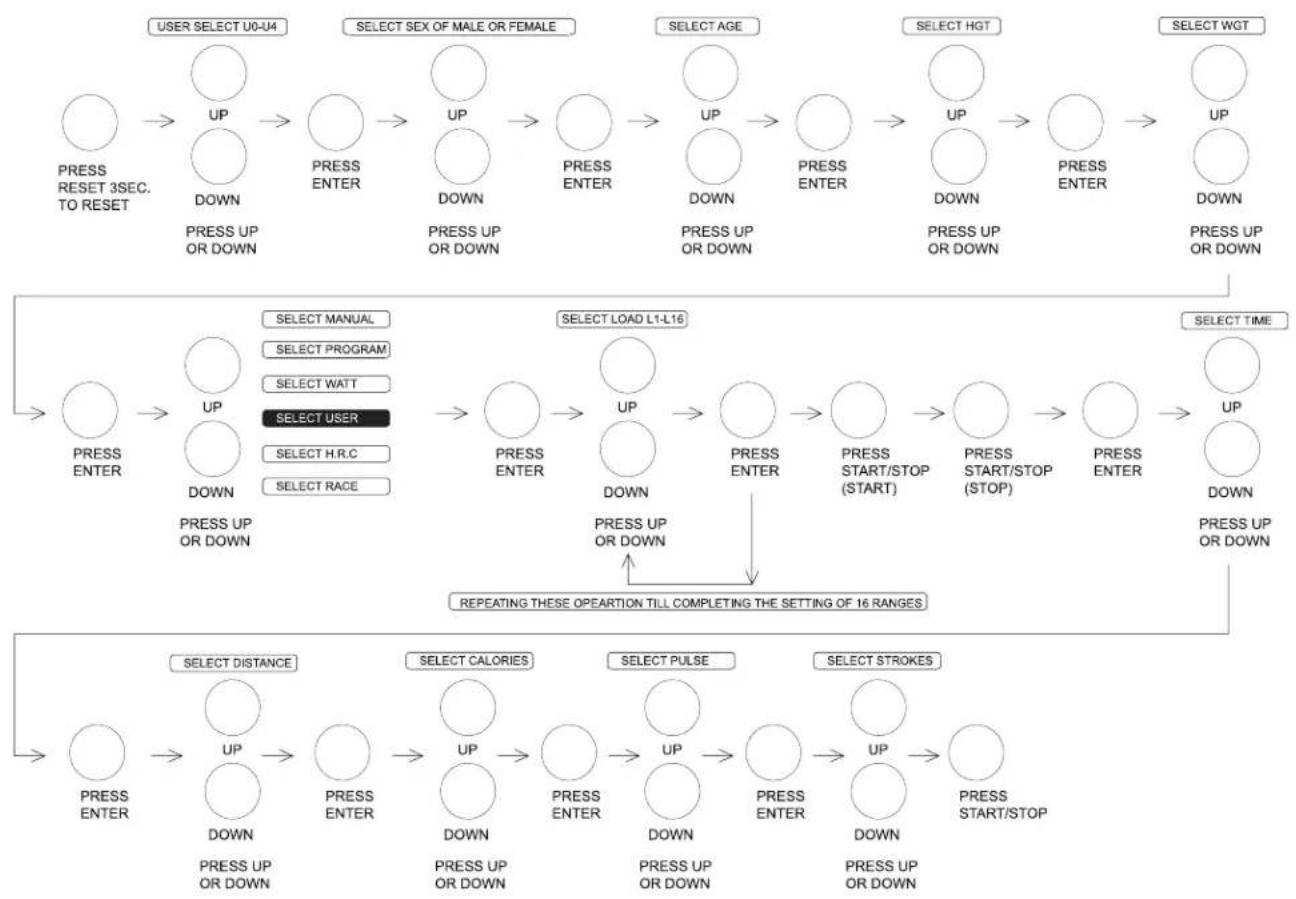
flowchart
graph TD
    A["USER SELECT U0-U4"] --> B["UP DOWN"]
    B --> C["UP DOWN"]
    C --> D["UP DOWN"]
    D --> E["UP DOWN"]
    E --> F["UP DOWN"]
    F --> G["UP DOWN"]
    G --> H["UP DOWN"]
    H --> I["UP DOWN"]

    J["SELECT SEX OF MALE OR FEMALE"] --> K["UP DOWN"]
    K --> L["UP DOWN"]
    L --> M["UP DOWN"]
    M --> N["UP DOWN"]
    N --> O["UP DOWN"]
    O --> P["UP DOWN"]

    Q["SELECT AGE"] --> R["UP DOWN"]
    R --> S["UP DOWN"]
    S --> T["UP DOWN"]
    T --> U["UP DOWN"]
    U --> V["UP DOWN"]

    W["SELECT HGT"] --> X["UP DOWN"]
    X --> Y["UP DOWN"]
    Y --> Z["UP DOWN"]
    Z --> AA["UP DOWN"]

    AB["SELECT WGT"] --> AC["UP DOWN"]
    AC --> AD["UP DOWN"]

    AE["SELECT MANUAL"] --> AF["UP DOWN"]
    AF --> AG["UP DOWN"]

    AH["SELECT LOAD L1-L16"] --> AI["UP DOWN"]
    AI --> AJ["UP DOWN"]
    AJ --> AK["UP DOWN"]

    AL["SELECT TIME"] --> AM["UP DOWN"]
    AM --> AN["UP DOWN"]

    AO["REPEATING THESE OPEARTION TILL COMPLETING THE SETTING OF 16 RANGES"] --> AP["UP DOWN"]

    AQ["SELECT DISTANCE"] --> AR["UP DOWN"]
    AR --> AS["UP DOWN"]

    AT["SELECT CALORIES"] --> AU["UP DOWN"]
    AU --> AV["UP DOWN"]

    AW["SELECT PULSE"] --> AX["UP DOWN"]
    AX --> AY["UP DOWN"]

    AZ["SELECT STROKES"] --> BA["UP DOWN"]
    BA --> BB["UP DOWN"]

    BC["PRESS UP OR DOWN"] --> BD["PRESS UP OR DOWN"]
    BD --> BE["PRESS UP OR DOWN"]

    BF["PRESS RESET 3SEC. TO RESET"] --> BG["PRESS UP OR DOWN"]
H.R.C.
HEART RATE CONTROL - Select your own target Heart Rate by choosing from one of the preset programs: 55%, 75%, or 90%. Please enter you age into the User Data to ensure that your target Heart Rate is set correctly. The words "HEART RATE" will flash when you have reached your target heart rate according to the program that you have chosen.
I. 55% - Diet Program
II. 75% - Health Program
III. 90% - Sports Program
IV. TAG - User Set Target Heart Rate
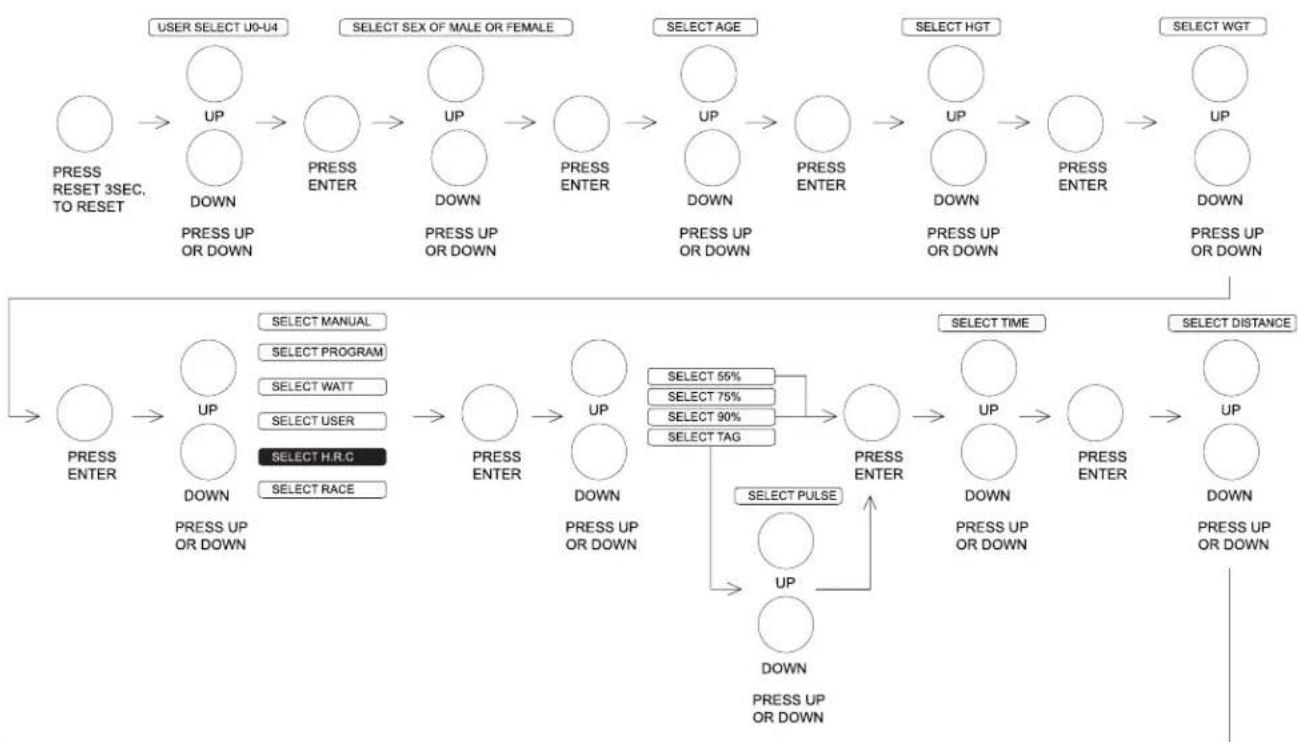
flowchart
graph TD
    A["USER SELECT U0-U4"] --> B["UP"]
    B --> C["DOWN"]
    C --> D["UP"]
    D --> E["PRESS ENTER"]
    E --> F["UP"]
    F --> G["DOWN"]
    G --> H["UP"]
    H --> I["PRESS ENTER"]
    I --> J["UP"]
    J --> K["DOWN"]
    K --> L["UP"]
    L --> M["PRESS ENTER"]
    M --> N["UP"]
    N --> O["PRESS ENTER"]
    O --> P["UP"]
    P --> Q["PRESS ENTER"]
    Q --> R["UP"]
    R --> S["PRESS ENTER"]

    T["SELECT SEX OF MALE OR FEMALE"] --> U["UP"]
    U --> V["DOWN"]
    V --> W["UP"]
    W --> X["DOWN"]
    X --> Y["UP"]
    Y --> Z["PRESS ENTER"]
    Z --> AA["UP"]
    AA --> AB["PRESS ENTER"]
    AB --> AC["UP"]
    AC --> AD["PRESS ENTER"]

    AE["SELECT AGE"] --> AF["UP"]
    AF --> AG["DOWN"]
    AG --> AH["UP"]
    AH --> AI["PRESS ENTER"]
    AI --> AJ["UP"]
    AJ --> AK["PRESS ENTER"]

    AL["SELECT HGT"] --> AM["UP"]
    AM --> AN["DOWN"]
    AN --> AO["UP"]
    AO --> AP["PRESS ENTER"]
    AP --> AQ["UP"]
    AQ --> AR["PRESS ENTER"]

    AS["SELECT WGT"] --> AT["UP"]
    AT --> AU["PRESS UP OR DOWN"]

    AV["UP"] --> AW["DOWN"]
    AW --> AX["PRESS UP OR DOWN"]

    AY["UP"] --> AZ["UP"]
    AZ --> BA["PRESS UP OR DOWN"]

    BB["SELECT MANUAL"] --> BC["UP"]
    BC --> BD["PRESS UP OR DOWN"]

    BE["SELECT PROGRAM"] --> BF["UP"]
    BF --> BG["PRESS UP OR DOWN"]

    BH["SELECT WATT"] --> BI["UP"]
    BI --> BJ["PRESS UP OR DOWN"]

    BK["SELECT USER"] --> BL["UP"]
    BL --> BM["PRESS UP OR DOWN"]

    BN["SELECT H.R.C"] --> BO["UP"]
    BO --> BP["PRESS UP OR DOWN"]

    BQ["SELECT PULSE"] --> BR["UP"]
    BR --> BS["PRESS UP OR DOWN"]

    BT["SELECT TAG"] --> BU["UP"]
    BU --> BV["PRESS UP OR DOWN"]

    BW["SELECT TIME"] --> BX["UP"]
    BX --> BY["PRESS UP OR DOWN"]

    BZ["UP"] --> CA["PRESS UP OR DOWN"]

    CB["UP"] --> CC["PRESS UP OR DOWN"]

    DD["SELECT DISTANCE"] --> DE["UP"]
    DE --> DF["PRESS UP OR DOWN"]
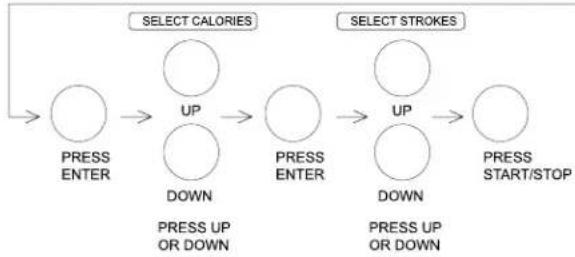
flowchart
graph LR
    A["Press ENTER"] --> B["UP DOWN"]
    B --> C["Press ENTER"]
    D["UP DOWN"] --> E["UP DOWN"]
    E --> F["Press START/STOP"]
RECOVERY
When you have finished your workout, press RECOVERY. For this function to operate properly, you must wear a wireless Heart Rate chest strap. TIME will countdown from 1 minute and then your fitness from F1 to F6 will be displayed.
Note: During recovery no other displays will operate.
| Score | Condition Heart Rate (From test HR minus end HR) |
| F1 Excellent Above 50 | |
| F2 Good 40-49 | |
| F3 Average 30-39 | |
| F4 Fair 20-29 | |
| F5 Poor 10-19 | |
| F6 Very Poor under 10 | |
5.7 - RACE
Press UP/DOWN button to adjust SPM and DISTANCE or PC. Press start to begin the race distance, the result is WIN or USER LOSE.

flowchart
graph LR
    A["USER SELECT U0-U4"] --> B["UP"]
    B --> C["UP"]
    C --> D["UP"]
    D --> E["UP"]
    E --> F["UP"]
    F --> G["UP"]
    G --> H["UP"]
    H --> I["UP"]
    I --> J["UP"]
    J --> K["UP"]

    subgraph Select Sex of Male or Female
        L["PRESS RESET 3SEC. TO RESET"] --> M["UP DOWN"]
        M --> N["PRESS ENTER"]
        N --> O["PRESS ENTER"]
        O --> P["PRESS ENTER"]
        P --> Q["PRESS ENTER"]
        Q --> R["PRESS ENTER"]
        R --> S["PRESS ENTER"]
    end

    subgraph Select Age
        T["PRESS UP OR DOWN"] --> U["PRESS UP OR DOWN"]
        U --> V["PRESS ENTER"]
        V --> W["PRESS ENTER"]
        W --> X["PRESS ENTER"]
        X --> Y["PRESS ENTER"]
        Y --> Z["PRESS ENTER"]
        Z --> AA["PRESS ENTER"]
    end

    subgraph Select HGT
        AB["PRESS UP OR DOWN"] --> AC["PRESS ENTER"]
        AC --> AD["PRESS ENTER"]
        AD --> AE["PRESS ENTER"]
        AE --> AF["PRESS ENTER"]
        AF --> AG["PRESS ENTER"]
        AG --> AH["PRESS ENTER"]
    end

    subgraph Select WGT
        AI["PRESS UP OR DOWN"] --> AJ["PRESS ENTER"]
        AJ --> AK["PRESS ENTER"]
        AK --> AL["PRESS ENTER"]
        AL --> AM["PRESS ENTER"]
        AM --> AN["PRESS ENTER"]
    end
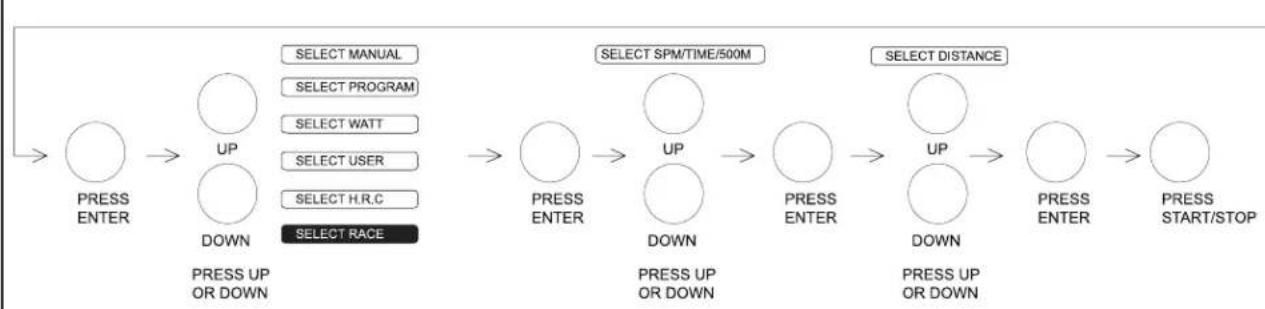
flowchart
graph LR
    A["PRESS ENTER"] --> B["UP DOWN"]
    B --> C["SELECT MANUAL"]
    B --> D["SELECT PROGRAM"]
    B --> E["SELECT WATT"]
    B --> F["SELECT USER"]
    B --> G["SELECT H.R.C"]
    B --> H["SELECT RACE"]
    I["PRESS ENTER"] --> J["UP DOWN"]
    J --> K["SELECT SPM/TIME/500M"]
    K --> L["UP DOWN"]
    L --> M["SELECT DISTANCE"]
    L --> N["UP DOWN"]
    N --> O["PRESS START/STOP"]
EXPLODED VIEW DRAWING
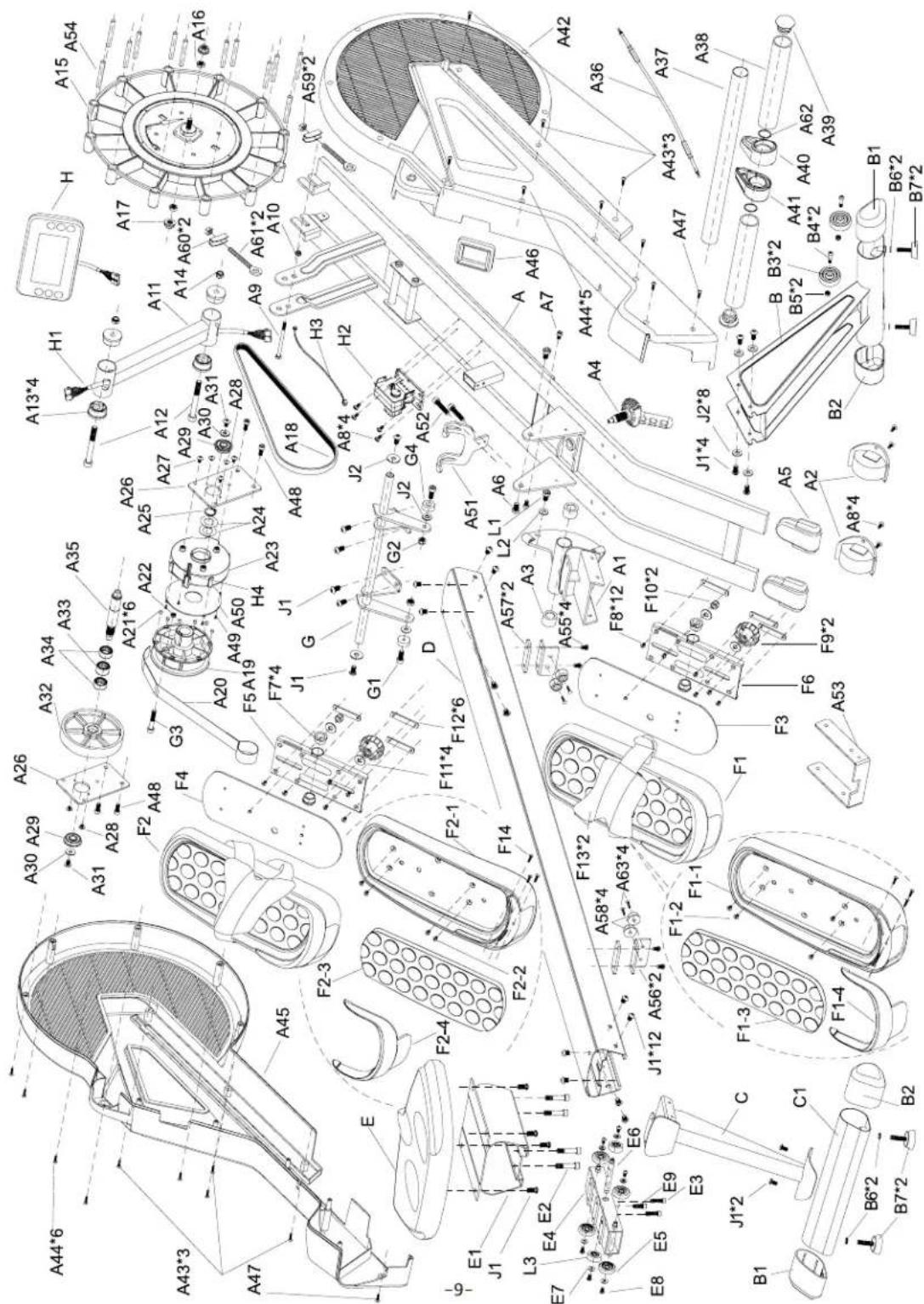
text_image
Exploded view diagram of a mechanical assembly with labeled components such as fans, gears, and parts A1–A69.PARTS LIST
To order replacement parts: provide your customer service representative with the product model number and the part number located on the Parts List below, along with the quantity you require.
| No. | Descriptions | Qty | No. | Descriptions | Qty | |
| LK500RW - A | MAIN FRAME | 1 | LK500RW - A53 | PLATE FRONT STABILIZER | 1 | |
| LK500RW - A1 | SWIVEL AXIS | 1 | LK500RW - A54 | AXLE °12*39 | 12 | |
| LK500RW - A2 | TRANSPORTATION WHEEL | 2 | LK500RW - A55 | SCREW M6*12 | 4 | |
| LK500RW - A3 | BUSH | 2 | LK500RW - A56 | SLIDE TRAIL PLATE | 2 | |
| LK500RW - A4 | KNOB | 1 | LK500RW - A57 | PLATE | 2 | |
| LK500RW - A5 | FEET END CAP | 2 | LK500RW - A58 | BUMPER | 4 | |
| LK500RW - A6 | SCREW M8*16 | 2 | LK500RW - A59 | NUT M6 | 2 | |
| LK500RW - A7 | SCREW M6*10 | 2 | LK500RW - A60 | BRACKET | 2 | |
| LK500RW - A8 | SCREW 5/32"*1/2" | 8 | LK500RW - A61 | SCREW M6*40 | 2 | |
| LK500RW - A9 | SCREW M6*90 | 1 | LK500RW - A62 | RUBBER STINGER | 2 | |
| LK500RW - A10 | NUT M6 | 1 | LK500RW - A63 | BOLT M4*10 | 4 | |
| LK500RW - A11 | CONSOLE TUBE | 1 | LK500RW - B | FRONT STABLILZER | 1 | |
| LK500RW - A12 | SCREW 3/8"*3 3/4"* | 2 | LK500RW - B1 | END CAP | 2 | |
| LK500RW - A13 | BUSHING | 4 | LK500RW - B2 | END CAP | 2 | |
| LK500RW - A14 | NUT 3/8 | 2 | LK500RW - B3 | TRANSPORTATION WHEEL | 2 | |
| LK500RW - A15 | PLASTIC PULLEY | 1 | LK500RW - B4 | BOLT M8*40 | 2 | |
| LK500RW - A16 | NUT 3/8*26(UNF) | 2 | LK500RW - B5 | NUT M8 | 2 | |
| LK500RW - A17 | NUT 3/8*26(UNF) | 2 | LK500RW - B6 | WASHER M10*2 | 4 | |
| LK500RW - A18 | BELT 350J6 | 1 | LK500RW - B7 | ADJUSTABLE FOOT | 4 | |
| LK500RW - A19 | PULLEY | 1 | LK500RW - C | REAR POST | 1 | |
| LK500RW - A20 | TENSION BELT | 1 | LK500RW - C1 | REAR STABLILZER | 1 | |
| LK500RW - A21 | MAGNETIC Φ6*5T | 6 | LK500RW - D | UPPER SLIDE TRACK 1500MM | 1 | |
| LK500RW - A22 | NUT 3/16" | 1 | LK500RW - E | SADDLE LS-E29 | 1 | |
| LK500RW - A23 | SPRING BOX | 1 | LK500RW - E1 | SLIDING TRACK 180MM | 1 | |
| LK500RW - A24 | WASHER | 2 | LK500RW - E2 | SCREW M8*40 | 4 | |
| LK500RW - A25 | C CLIP S20 | 1 | LK500RW - E3 | SCREW M6*25 | 2 | |
| LK500RW - A26 | PULLEY SEAT PLATE | 2 | LK500RW - E4 | PULLEY SEAT | 1 | |
| LK500RW - A27 | SCREW M5*10 | 3 | LK500RW - E5 | WHEEL | 4 | |
| LK500RW - A28 | SCREW M5*6 | 4 | LK500RW - E6 | AXLE | 1 | |
| LK500RW - A29 | BEARING 6201ZZ | 2 | LK500RW - E7 | WASHER "5"*13*1.5 | 6 | |
| LK500RW - A30 | WASHER M6 | 2 | LK500RW - E8 | SCREW M5*10 | 6 | |
| LK500RW - A31 | SCREW M6*12 | 2 | LK500RW - E9 | SCREW M6*20 | 1 | |
| LK500RW - A32 | BELT WHEEL Φ126 | 1 | LK500RW - F1 | PEDAL(R) | 1 | |
| LK500RW - A33 | ONE WAY BEARING(FC2016) | 1 | LK500RW - F1-1 | BOTTOM COVER OF PEDAL(R) | 1 | |
| LK500RW - A34 | BEARING(HK2012) | 2 | LK500RW - F1-2 | SCREW M6*8 | 4 | |
| LK500RW - A35 | AXLE | 1 | LK500RW - F1-3 | CUSHION PAD(R) | 1 | |
| LK500RW - A36 | TENSION CABLE 600MM | 1 | LK500RW - F1-4 | FRONT PEDAL COVER (R) | 1 | |
| LK500RW - A37 | HANDLE | 1 | LK500RW - F2 | PEDAL (L) | 1 | |
| LK500RW - A38 | SPONGE HDR Φ30*3T*215MM | 2 | LK500RW - F2-1 | BOTTOM PEDAL COVER (L) | 1 | |
| LK500RW - A39 | END CAP Φ1 1/4°® | 2 | LK500RW - F2-2 | SCREW M6*8 | 4 | |
| LK500RW - A40 | TENSION BELT COVER (R) | 1 | LK500RW - F2-3 | CUSHION PAD(L) | 1 |
PARTS LIST CONTINUED
| No. | Descriptions | Qty | No. | Descriptions | Qty | |
| LK500RW - A41 | TENSION BELT COVER (L) | 1 | LK500RW - F2-4 | PEDAL FRONT COVER (L) | 1 | |
| LK500RW - A42 | CHAIN COVER(R) | 1 | LK500RW - F3 | PEDAL PLATE (R) | 1 | |
| LK500RW - A43 | SCREW 3/16"*1/2" | 6 | LK500RW - F4 | PEDAL PLATE (L) | 1 | |
| LK500RW - A44 | SCREW 3/16"*5/8" | 11 | LK500RW - F5 | PEDAL BRACKET (L) | 1 | |
| LK500RW - A45 | CHAIN COVER(L) | 1 | LK500RW - F6 | PEDAL BRACKET (R) | 1 | |
| LK500RW - A46 | FRAME OF TENSION BELT | 1 | LK500RW - F7 | BUSH (T021F) | 4 | |
| LK500RW - A47 | SCREW M5*12 | 2 | LK500RW - F8 | SCREW M5*8 | 12 | |
| LK500RW - A48 | SCREW M8*16 | 4 | LK500RW - F9 | KNOB 3/8" | 2 | |
| LK500RW - A49 | SCREW 1/8"*1/2" | 4 | LK500RW - F10 | NUT 3/8 | 2 | |
| LK500RW - A50 | SPRING BOX COVER | 1 | LK500RW - F11 | WASHER Φ3/8"*2T*Φ23 | 4 | |
| LK500RW - A51 | HANDLE FIXED SEAT | 1 | LK500RW - F12 | MESH BELT CLAMP | 6 | |
| LK500RW - A52 | SCREW M5*45 | 2 | LK500RW - F13 | PEDAL COVER | 2 | |
| LK500RW - G | PEDAL TUBE CONNECTION | 1 | LK500RW - F14 | SCREW 5/32*5/8 | 6 | |
| LK500RW - G1 | SCREW M8*20 | 2 | LK500RW - H4 | SENSOR WIRE | 1 | |
| LK500RW - G2 | NUT M8 | 2 | LK500RW - J1 | SCREW M8*16 | 26 | |
| LK500RW - G3 | SCREW 3/16"*1 1/4" | 1 | LK500RW - J2 | WASHER 8 | 8 | |
| LK500RW - G4 | BUMPER | 2 | LK500RW - K | ADAPTOR | 1 | |
| LK500RW - H | CONSOLE | 1 | LK500RW - L | CHEST STRAP | 1 | |
| LK500RW - H1 | SENSOR WIRE | 1 | LK500RW - L1 | SCREW M8*10 | 1 | |
| LK500RW - H2 | MOTOR | 1 | LK500RW - L2 | WASHER 8 | 1 | |
| LK500RW - H3 | DC WIRE | 1 | LK500RW - L3 | WHEEL | 2 |
WARRANTY
COMMERCIAL WARRANTY\*
BH North America will repair or replace, free of charge, at its option, parts that are defective as a result of material or workmanship. Lifetime replacement warranty coverage on frame and five (5) years on other parts. Labor warranty coverage is two (2) years. Warranty covers the original consumer purchaser only.
*Commercial Warranty Disclaimer: For non-dues paying facilities, with less than 8 hours of use per day.
LIMITED RESIDENTIAL WARRANTY
BH North America will repair or replace, free of charge, at its option, parts that are defective as a result of material or workmanship. Lifetime replacement warranty coverage on frame and ten (10) years on other parts. Labor warranty coverage is two (2) years. Warranty covers the original consumer purchaser only.
COSMETICS PARTS DISCLAIMER
For all products and all level of warranty, cosmetic parts shall be warranted for 1 year from date of purchase against manufactures defect. "Cosmetics" includes: External plastics, overlays/decals and covers.
THIS WARRANTY DOES NOT COVER
- Pre-delivery set-up.
- Components that require replacement due to dirt or lack of regular maintenance.
- Repairs necessary because of operator abuse or negligence or the failure to operate and maintain the equipment according to the instructions contained in the Owner's Manual.
Register your product warranty easily online at: www.BHFitnessUSA.com
BH North America Corporation
20155 Ellipse
Foothill Ranch, CA 92610
Phone: 949.206.0330; Toll Free: 866.325.2339; Fax: 949.206.0013
Web: www.BHFitnessUSA.com
Mon - Fri 8am - 5pm PST
LK500RW
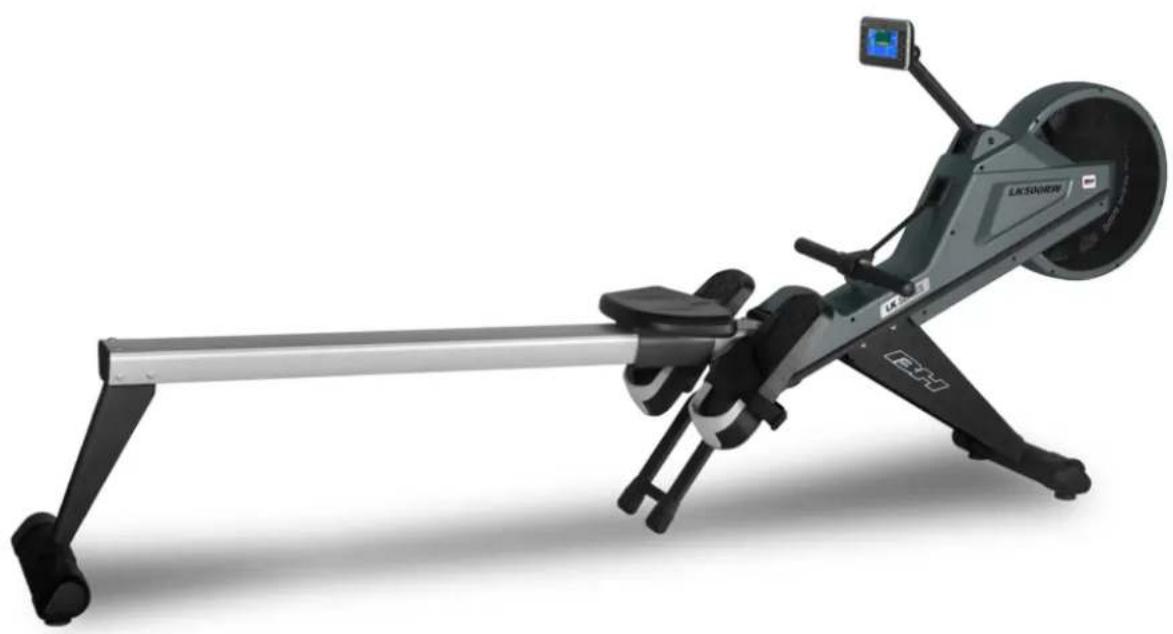
natural_image
Rearch machine with black arm and white head, no visible text or symbols on the device bodyGUIDE D'UTILISATION
Étirements suggérés 41
Aperçu 43
TOUTES NOS FÉLICITATIONS!
text_image
WARNING Keep hands and fingers clear of this area.RENSEIGNEMENTS RELATIFS À LA SÉCURITÉ
PRÉCAUTIONS
natural_image
Simple line drawing of a human figure with no text or symbols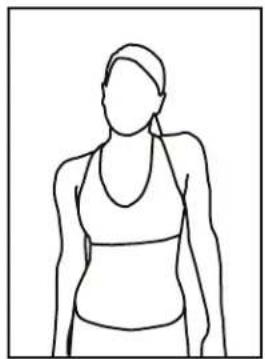
natural_image
Line drawing of a person wearing a high-brimmed top and collared shirt (no text or symbols)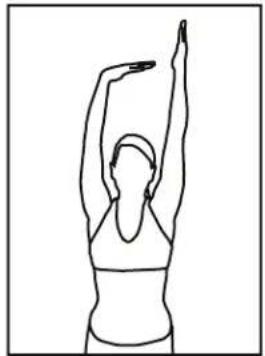
natural_image
Line drawing of a person performing a stretching exercise with arms raised (no text or symbols)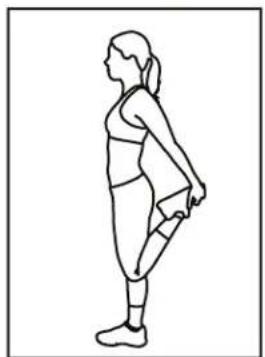
natural_image
Line drawing of a woman in athletic wear performing a standing stretch (no text or symbols)ÉTIREMENTS SUGGÉRÉS
natural_image
Line drawing of a person in a seated posture, no text or symbols presentFlexions avant
natural_image
Line drawing of a person in a forward bend yoga pose (no text or symbols)Étirements des ischio-jambiers
natural_image
Line drawing of a seated woman in a kneeling pose, viewed from the side (no text or symbols)natural_image
Line drawing of a person in motion, possibly dancing or gesturing (no text or symbols)APERÇU
natural_image
Line drawing of a stationary exercise machine with levers and control panel (no text or symbols)INSTRUCTIONS D'ASSEMBLAGE
text_image
FIGURE 1 D E POLYSTYRÈNEFIGURE 2
natural_image
Technical line drawing of a mechanical device with wiring and a close-up inset showing internal components (no text or symbols)STEP 9: Déplacement de la machine
natural_image
Technical line drawing of a stationary exercise machine with levers and wheels (no text or symbols)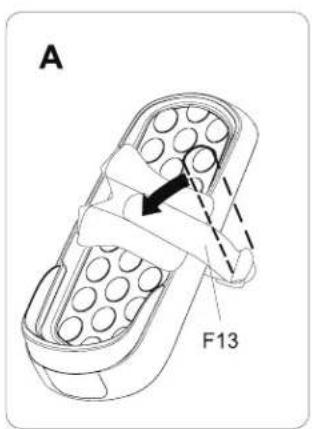
text_image
A F13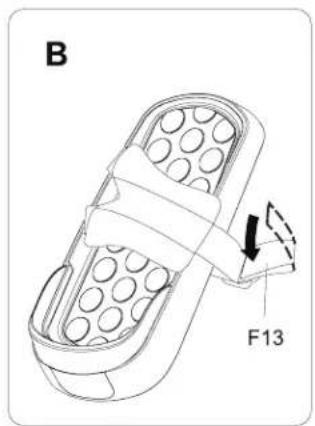
text_image
B F13strap fixing suggestion A. B
ÉTAPE 12: Réglage des glissières
text_image
TOOL 5M E3 E9 E3 E1 D EAPERÇU DE LA CONSOLE
text_image
Exploded view diagram of a mechanical assembly with labeled components such as fans, gears, and parts A1–A68.LISTE DES PIÈCES
BH North America Corporation
20155 Ellipse
Foothill Ranch, CA 92610
Téléphone: 949.206.0330; Sans frais: 866.325.2339; Télécopieur: 949.206.0013
Site Web: www.BHFitnessUSA.com