EasyManual
9550 Sport - Pool POLARIS - Free user manual and instructions
Find the device manual for free 9550 Sport POLARIS in PDF.



User questions about 9550 Sport POLARIS
0 question about this device. Answer the ones you know or ask your own.
Ask a new question about this device
Download the instructions for your Pool in PDF format for free! Find your manual 9550 Sport - POLARIS and take your electronic device back in hand. On this page are published all the documents necessary for the use of your device. 9550 Sport by POLARIS.
USER MANUAL 9550 Sport POLARIS
1) Complete and return the warranty card.
2) Record your purchase information on the spaces provided below.
3) Attach your invoice (or a copy) to this page.
Taking these steps will help ensure prompt warranty service, should it be required. If service is required, please contact your original dealer. If the original dealer does not perform warranty service, please visit www.polarispool.com to locate an independent service company near you. If you are unable to locate a service company, please call our Technical Support department at 1-800-822-7933. RECORD YOUR POLARIS CLEANER DATA HERE: Date of Purchase Purchased From Serial Number: (located on machine head) City State/Province Zip/Postal Code T a b le o f C o nt e nt s S e c t io n 1 . I m p o r t a nt S a f e t y I nst r u c t io ns . . . . . . . . 4
3.3 Connecting the Control Unit to the Caddy .......... 7
4.6 Stopping the Cleaner
and Removing from the Pool ............................ 12
4.7 Operating the Cleaner with the Remote Control
8.4 Control Unit Error Codes
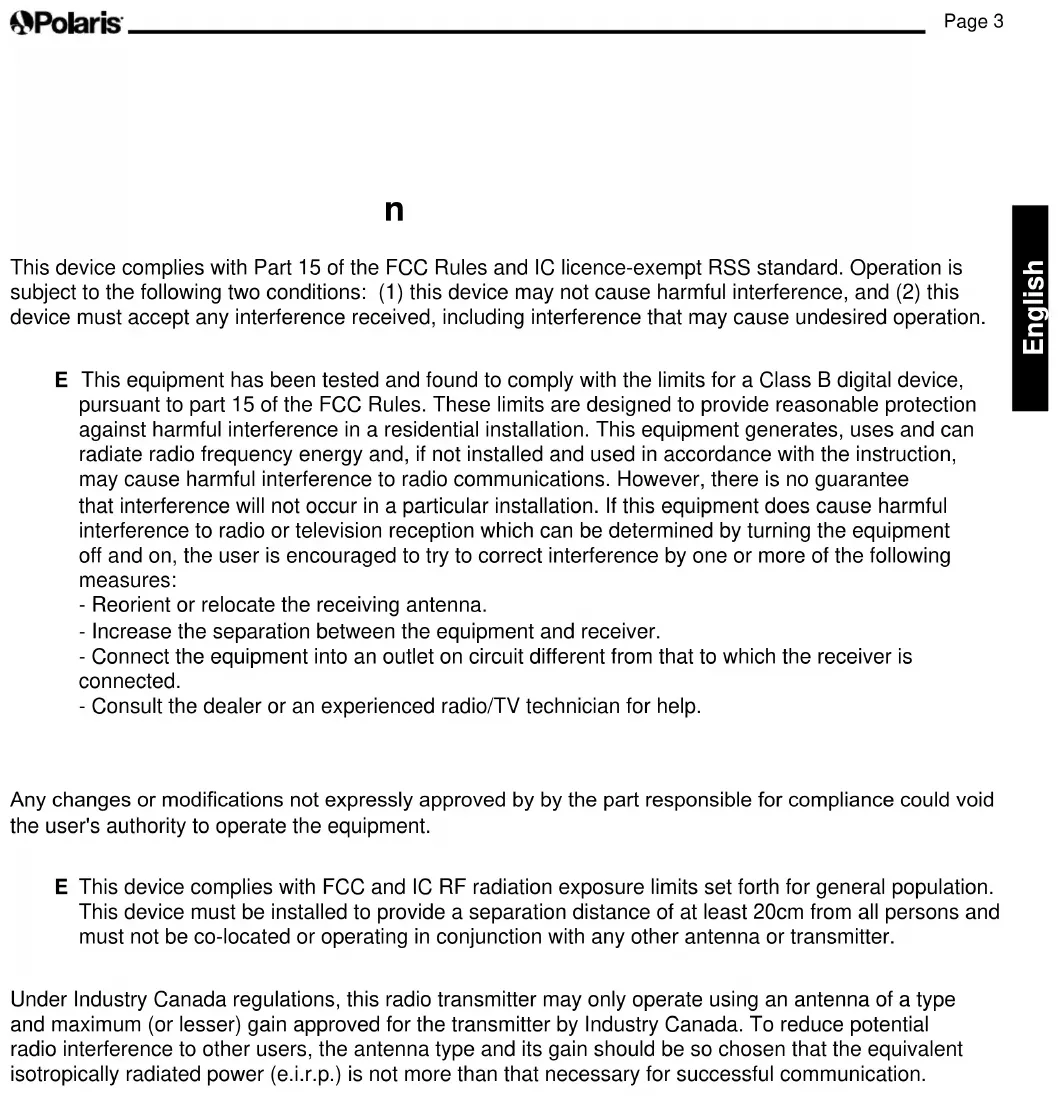
(9450 Sport/P945 and 9550 Sport/P955) ......... 23Page 3 English F C C S t a t e m e nt This device complies with Part 15 of the FCC Rules and IC licence-exempt RSS standard. Operation is subject to the following two conditions: (1) this device may not cause harmful interference, and (2) this device must accept any interference received, including interference that may cause undesired operation. N O T E: This equipment has been tested and found to comply with the limits for a Class B digital device, pursuant to part 15 of the FCC Rules. These limits are designed to provide reasonable protection against harmful interference in a residential installation. This equipment generates, uses and can radiate radio frequency energy and, if not installed and used in accordance with the instruction, may cause harmful interference to radio communications. However, there is no guarantee that interference will not occur in a particular installation. If this equipment does cause harmful interference to radio or television reception which can be determined by turning the equipment off and on, the user is encouraged to try to correct interference by one or more of the following measures: - Reorient or relocate the receiving antenna. - Increase the separation between the equipment and receiver. - Connect the equipment into an outlet on circuit different from that to which the receiver is connected. - Consult the dealer or an experienced radio/TV technician for help. C A U T I O N Any changes or modications not expressly approved by by the part responsible for compliance could void the user's authority to operate the equipment. N O T E: This device complies with FCC and IC RF radiation exposure limits set forth for general population. This device must be installed to provide a separation distance of at least 20cm from all persons and must not be co-located or operating in conjunction with any other antenna or transmitter. Under Industry Canada regulations, this radio transmitter may only operate using an antenna of a type and maximum (or lesser) gain approved for the transmitter by Industry Canada. To reduce potential radio interference to other users, the antenna type and its gain should be so chosen that the equivalent isotropically radiated power (e.i.r.p.) is not more than that necessary for successful communication.Page 4 English W A R N I N G F a ilu r e t o c o m p ly w it h t he f o llo w ing w a r nings c a n r e su lt in p e r m a ne nt inj u r y , e le c t r o c u t io n o r d e a t h. P R EV EN T EL EC T R I C A L S H O C KTo reduce risk of electrical shock:
- Connect unit to receptacle protected by a ground fault circuit interrupter (GFCI). Such a GFCI receptacle should be provided by a qualified installer and should be tested on a routine basis. To test the GFCI, push the test button. The GFCI should interrupt power. Push the reset button. Power should be restored. If the GFCI fails to operate in this manner, the GFCI is defective. If the GFCI interrupts power to the pump without the test button being pushed, a ground current is flowing, indicating the possibility of an electric shock. Do not use this product. Disconnect the cleaner and have the problem corrected by a qualified service representative before using.• Per the United States National Electrical Code (NEC ), keep the control unit at least five (5) feet from the edge of the (pool/spa) water. In Canada, the Canadian Electrical Code (CEC) requires a minimum distance of 3m (10 ft.) to be maintained between the pool edge and the control unit. Never submerge the control unit.• Do not enter pool while the Polaris cleaner is in water.
- Do not bury cord. Locate cord so as to prevent it from being damaged by lawn mowers, hedge trimmers and other equipment.
- To reduce the risk of electrical shock, do not use the Polaris robotic cleaner or control unit if the cord is worn or damaged. Contact Zodiac Pool Systems, Inc. Technical Support immediately for proper servicing and replacement of the damaged cord.
- Double insulation—For continued protection against possible electric shock, use only identical replacement parts when servicing. Do not attempt repair of the Polaris robotic cleaner, control unit, power cord, or floating cable.• NEVER OPEN CONTROL UNIT.
- DO NOT USE AN ExTENSION CORD TO CONNECT THE UNIT TO ELECTRIC SUPPLY; PROVIDE A PROPERLY LOCATED GFCI RECEPTACLE. THE CONTROL UNIT SHOULD BE PLACED NEAR THE GFCI RECEPTACLE BOx. P R EV EN T C H I L D I N J U R Y A N D D R O W N I N G• To reduce the risk of injury, do not permit children to operate this product.
- Do not let anyone, especially small children, sit, step, lean, or climb on any equipment installed as part of your pool’s operational system. S e c t io n 1 . I m p o r t a nt S a f e t y I nst r u c t io ns Congratulations on purchasing the Polaris Robotic Cleaner. Please read through the entire manual before installing your new robotic pool cleaner. Your cleaner must be installed and operated as specified. R EA D A N D F O L L O W A L L I N S T R U C T I O N S C A U T I O N F a ilu r e t o c o m p ly w it h t he f o llo w ing w a r nings c o u ld c a u se d a m a ge t o p o o l e q u ip m e nt o r p e r so na l inj u r y .
- The Polaris cleaner must be installed and operated as specified.
- This product is intended for use with permanently-installed pools. Do not use with storable pools. A permanently-installed pool is constructed in or on the ground or in a building such that it cannot be readily disassembled for storage. A storable pool is constructed so that it is capable of being readily disassembled for storage and reassembled to its original integrity.• Clean the filter canister in the Polaris cleaner after each use.
- Do not use the product in your pool if the water temperature is above 95˚ F (35˚ C) or below 55˚ F (13˚ C). C A U T I O N USE OF THE POLARIS ROBOTIC CLEANER IN A VINYL LINER POOL Certain vinyl liner patterns are particularly susceptible to rapid surface wear of pattern removal caused by objects coming into contact with the vinyl surface, including pool brushes, pool toys, floats, fountains, chlorine dispensers, and automatic pool cleaners. Some vinyl liner patterns can be seriously scratched or abraded simply by rubbing the surface with a pool brush. Ink from the pattern can also rub off during the installation process or when it comes into contact with objects in the pool. Zodiac Pool Systems, Inc., is not responsible for, and the Limited Warranty does not cover, pattern removal, abrasion or markings on vinyl liners. S A V E T H ES E I N S T R U C T I O N SPage 5 English
Section 2. Cleaner Specications
2.1 General Specications
The general specifications for the cleaner are as follows: x 2
- Check to make sure each component is in the box.
- Check cleaner and components for damage during transport.
- If there are any missing parts or damage, contact Zodiac
1. Unscrew the handnut from the base unit
base unit with notch end at the top, then rotate so the bends are away from you. (Figure 3). C o nt r o l b o x su p p ly v o lt a ge 100-125 VAC, 60 Hz S u p p ly v o lt a ge 30 V DC I nst a lle d lo a d 150 W max C a b le le ngt h 9 3 5 0 / P 9 3 5 , 9 4 5 0 / P 9 4 5 : 60 ft (18 m) 9 5 5 0 / P 9 5 5 : 70ft (21m) C le a ne r size ( W x D x H )16.9 x 18.9 x 10.6 in. (43 x 48 x 27 cm) W e ight o f C le a ne r 21 lbs. (9.5 kg) P a c k e d w e ight 42 lbs. (19 kg) F ilt r a t io n All-purpose lter canister C y c le le ngt hs Variable programming The cleaner is a double-insulated product. A double- insulated electrical appliance is one which has been designed in such a way that it does not require a safety connection to ground. The basic requirement for double-insulation is that no single failure can result in dangerous voltage becoming exposed so that it might cause an electric shock and that this is achieved without relying on an earthed (grounded) metal casing. This is achieved by having two (2) layers of insulating material surrounding live parts or by using reinforced insulation. Therefore, devices having double-insulated construction, such as this cleaner, do not utilize a grounded (three-prong) cord/plug. S e c t io n 3 . A sse m b ly 3 . 1 U np a c k ing The packaging should contain the following items:
- Transportandstoragecaddyassemblycomponents (Figure 1) (a) handle frame (b) support blocks (x 2) (c) wheels (x 2) (d) wheel locking clips (x 2) (e) wheel axle / hubcap (x 2) (f) base unit (g) cleaner hook (h) caddy handle (i) remote control & attachment hookPage 6 English
3. Push base unit down (Figure 3) so the metal
handle frame is seated in the recess on the underside of the base. F igu r e 3 . C o nne c t M e t a l F r a m e t o B a se U nit
4. Slide the handnut over the tube and twist to
6. Slide axle and hubcap piece through center of
wheel and attach to base unit. Snap locking clip into place to secure wheel. Repeat to attach both wheels(Figure5). F igu r e 5 . S na p in S u p p o r t B lo c k s a nd A t t a c h W he e ls
1. Align the bottom of the control unit with the
notch at bottom of the control unit hook on the caddy (Figure 10). F igu r e 1 0 . A lign C o nt r o l U nit w it h C a d d y H o o k
2. Press control unit onto the caddy hook until it
snaps and locks into position (Figure 11).
8. Align cleaner hook pins with the top holes in
cable, insert into the control unit, and turn clockwise to tighten. (Figure 13.) N O T E: To avoid damaging the power cable, do not try to twist the entire cable housing (see below). N O T E: To avoid exposing the power cable connector pins to water, be sure the connector is screwed in all the way and there is no gap. (see below). F igu r e 1 1 . A t t a c h t he C o nt r o l U nit o nt o C a d d y 3 . 4 C o nne c t ing t o a P o w e r S o u r c e W A R N I N G Failure to comply with the following warnings can result in permanent injury, electrocution or drowning. P R EV EN T EL EC T R I C A L S H O C K
requirements, keep the control unit at least five (5) ft. (1.5 m) from the edge of the pool. C A N A D A : Per CEC requirements, keep the control unit at least three (3) m (10 ft.) from the edge of the pool.
- Only connect the control unit to a receptacle protected by a ground fault circuit interrupter (GFCI). Contact a certified electrician if you cannot verify that the receptacle is protected by a GFCI.
- Do not use an extension cord to connect the control unit.
- Do not allow anyone to swim while the cleaner is in the pool.
- The control unit is water-resistant, not waterproof. In order to prevent electrocution, never submerge the control unit or leave exposed to inclement weather.
1. Unscrew the protective cap for the power cable
from the side of the control unit by turning counter-clockwise (Figure 12).Page 9 English S e c t io n 4 . O p e r a t io n C A U T I O N To prevent damage to the cleaner, be sure to adhere to the following guidelines:• Remove the cleaner from the pool after the cleaning cycle is completed and store on the caddy out of direct sunlight or inclement weather.• Never lift the cleaner out of the pool by the floating cable. Always use the lift feature to remove cleaner from the pool. • Take additional care when lifting the cleaner out of the pool. It becomes heavier when filled with water.• Always remove the cleaner from pool when super chlorinating or adding acid.• Do not handle cleaner while it is in operation. I M P O R T A N T
- Always make sure the cleaner head is fully submerged before you begin operation.• Clean the filter canister after each cleaning cycle.• Do not leave your cleaner in the pool on a permanent basis.• At the end of each cycle, remove the cleaner from the pool. Start at the cleaner head and untangle any coils in the cable before storing the cleaner.Whenthecontrolunitispoweredonwiththeoatingcable attached, the operating time for the current selected cycle is displayed. The Polaris robotic cleaner includes a safety feature that automatically stops the cleaner if it is powered on but not submerged in water. For pools equipped with a beach area, this safety feature is programmed to drive the cleaner in reverse and back into the pool when the impeller is out of the water. 4 . 1 S u b m e r ging t he C le a ne r
1. Submerge the cleaner in the pool and remove any air trapped inside by keeping the unit vertical(Figure15).
- Freeform D ir t y F ilt e r I nd ic a t o r D ir t y F ilt e r 4 . 4 T he P o la r is 9 5 5 0 S p o r t / P 9 5 5 C le a ne r C o nt r o l U nit 4 . 5 S t a r t ing t he C le a ne r The default cleaning surface setting for the Polaris cleaners is Bottom Surface . To change the current programmed cycle, see Section 5. Programming the Cleaner. S e le c t C le a ning S u r f a c e ( a ll m o d e ls) : Use to change cleaning surface setting. Toggle between: B o t t o m O nly B o t t o m a nd S id e s W a t e r line ( 9 5 5 0 S p o r t / P 9 5 5 ) S e le c t C le a ning I nt e nsit y L e v e l ( 9 5 5 0 S p o r t / P 9 5 5 o nly ) : Use to choose cleaning intensity level. Toggle between: INTENSIVE HIGH INTENSITY S e le c t P o o l S ha p e ( 9 5 5 0 S p o r t / P 9 5 5 o nly ) : Use to choose pool shape. Toggle between: RECTANGULAR FREEFORM B e gin C le a ning: After selecting the cleaning surface and other options as applicable, press to begin operation. The screen displays the time remaining for the selected cycle. For example, 0:44 on the display indicates that cleaning will be completed in 44 minutes. N O T E: The control unit automatically switches to standby power mode after 10 minutes of inactivity and the display screen turns off. Press any key to exit standby mode. Cleaner will continue to function in standby mode if in the middle of a cleaning cycle.Page 12 English 4 . 6 S t o p p ing t he C le a ne r a nd R e m o v ing f r o m t he P o o l The automated Lift System makes removing the cleaner from the pool simple. The Lift System will move the cleaner toward the edge of the pool then drive it to the surface for removal.
1. At the end of the cleaning cycle, or at any time
during a cleaning cycle, press to begin the automated lift procedure. Press and hold the Lift System button to turn cleaner to the left. Cleaner will keep rotating left. Once the cleaner is oriented towards the wall of your choice, release the button. Press and release the Lift System button and the cleaner will drive up the wall and to the water line and wait to be retrieved. The screen displays when the Lift System is in operation. N O T E: To stop the lift procedure at any time, press .
2. When the cleaner is within arm's reach, use the
handle to remove from the water (Figures 18, 19). Never lift the cleaner out of the pool by the oatingcable.
- Toturnontheremotecontrol: Press (see Figure 20) and hold for 3 seconds. The display shows to indicate the cleaner is now operating in remote control mode.
- Topilotthecleaner,pointthedevicetowardthe cleaner in the water and move directionally as shown in Figure 21. B a c k w a r dT u r n L e f tS t o pT u r n R ightF o r w a r d F igu r e 2 1 . R e m o t e C o nt r o l D ir e c t io na l C o m m a nd sPage 13 English
- Toremovethecleanerfromthepoolusingtheremote control, press (see Figure 20). The cleaner rotates left until you release the Lift System button. 4 . 8 S y nc hr o nizi ng t he R e m o t e C o nt r o l Even though the remote control is factory-synchronized to your cleaner's control unit, it may be necessary to synchronize again if you need to replace either the control unit or the remote control.
- Tosynchronizetheremotecontroltothecontrolunit: Press and hold for 3 seconds to turn on remote. Plug the control unit into a power source. When the display shows the operating time, press and simultaneously for six (6) seconds.
- Thedisplayshows followed by the normal operating time display to indicate the cleaner is now synched with the remote and ready to begin operating in remote control mode. 4 . 9 S t o r ing t he C le a ne r The cleaner must be cleaned regularly using slightly soapy clean water. Do not use solvents such as trichlorethylene or its equivalent. Rinse the cleaner generously using clean water. Do not let your cleaner dry in direct sunlight near the pool. The cleaner must be stored on its caddy so that it dries quickly.
1. Place the rear wheels on the caddy side wedges.
2. Place cleaner in vertical position on the caddy
base and clip to hook (Figure 23).
3. Disconnect the cable from the control unit.
Replace the protective cap on the control unit.
4. Starting at the cleaner head. Remove all coils
cleaner and moving toward the connection point at control unit. Store the cable by wrapping it around the hook located on the front of the caddy (Figure 23). F igu r e 2 3 . C le a ne r C o r r e c t ly S t o r e d o n C a d d yPage 14 English S e c t io n 5 . P r o gr a m m ing t he C le a ne r ( 9 4 5 0 S p o r t / P 9 4 5 a nd 9 5 5 0 S p o r t / P 9 5 5 o nly ) You can program up to seven preset cleaning cycles to run thecleaneronaspecicdayandtimewhenyouareaway from the pool. N O T E: You cannot change programming or display current day and time during a cleaning cycle. 5 . 1 D isp la y ing C u r r e nt D a y a nd T im e
- Press to display current day and time in 24-hour clock format. C u r r e nt d a y a nd t im e is d isp la y e d f o r 5 se c o nd s. 5 . 2 C ha nging t he C lo c k D a y a nd T im e
1. Press and hold for three (3) seconds.
All days of the week ash twice.
2. Press or buttons to cycle through
seven (7) days and display desired day.
Current hour setting ashes.
4. Press or buttons to cycle through
24 hours and display desired hour setting. N O T E: Control unit is set to display time in 24-hour clock format. Time setting will cycle through 1-24.
Current minutes setting ashes.
6. Press or buttons to cycle
to set time and exit the menu.
to display current day and time setting and verify the time you set is correct. 5 . 3 C ha nging D e f a u lt C le a ning T im e s Use to change cleaning surface setting. Default cleaning times are: B o t t o m O nly : 1 hour 30 minutes B o t t o m a nd S id e s: 2 hours 30 minutes W a t e r line ( 9 5 5 0 S p o r t / P 9 5 5 ) : Variable cleaning time depending on settings
or buttons to increase or decrease cleaning time in 30-minute increments.
to select.Page 15 English 5 . 4 P r o gr a m m ing C le a ning C y c le s You can program up to seven cleaning cycles. Program cleaning for either seven consecutive cycles or the same cycle repeated over several weeks (e.g., every Wednesday and Saturday for three weeks).
1. Choose pool cleaning settings to program.
A ll m o d e ls: Choose to select either bottom of pool or bottom plus sides of pool. 9 5 5 0 S p o r t / P 9 5 5 :
- Choose to select waterline only in addition to bottom or bottom plus sides options.
- Choose to select intensive or high intensity level cleaning.
- Choose to select pool shape.
to view currrent programmed cleaning cycles. Cycle day and time is displayed for three seconds.
3. When the cleaning cycle you want to change
is displayed, press and hold for3to5 seconds. Thedaysoftheweekashtwice. N O T E: If the display flashes all zeros, the time has not been set (new cleaner). Day and time must be set before you can program cleaning times, see section
5.2 Changing the Clock Day and Time.
4. Press or buttons to cycle through
to select. Hour setting ashes twice.
6. Press or buttons to cycle
to select. Minutes setting ashes zero.
8. Press or buttons to cycle
to select. The next day to program ashes.
11. Press to program an additional cleaning
cycle for a different day O R Press to exit the programming menu Days of the week are lit indicating programs stored in the control unit memory for that day. 5 . 5 C a nc e ling C le a ning C y c le s T o C a nc e l a n I nd iv id u a l P r o gr a m :
andholdfor3to5seconds. Thedaysoftheweekashtwice.
or buttons to cycle through seven (7) days. N O T E: If the day of the week flashes with no time displayed, there is no program set for that day.Page 16 English
3. Press andholdfor3to5secondstodelete programming for the selected day.
Press to exit.T o C a nc e l A ll P r o gr a m s:1. Press to make sure you have exited the Programming Menu.2. Press and hold to delete all programming in the control unit. The display will turn off for one (1) second. When all programs are cancelled, the current day and time is displayed on the screen with no days of the week lit. S e c t io n 6 . C le a ning a nd M a int e na nc e W A R N I N G To avoid electric shock and other hazards which could result in permanent injury or death, disconnect (unplug) the cleaner from the power source before performing any cleaning and maintenance. 6 . 1 C le a ning t he F ilt e r C a nist e r Theltercanistershouldbecleanedattheendofeachcycle.1. Make sure the control unit cable is disconnected fromtheelectricaloutletortheoatingcablehas been disconnected from the control unit.2. Remove the cleaner from the water and let the remaining water drain by maintaining the cleaner in the vertical position.3. Set the unit on its wheels.4. Toremovetheltercanisterassemblyfromthecleaner,followsteps5through8.5. Pushthecoverlock(1)andliftthecover(2)until it is secured in the vertical position. (Figure 24).
F igu r e 2 6 . O p e n F ilt e r C a nist e r A sse m b ly8. Separatetheltercanisterfromtheltersupport (6), as shown in Figure 27. F igu r e 2 7 . R e m o v e F ilt e r C a nist e r9. Emptyalldebrisfromtheltercanister,thenrinsethecanister,theltersupport,andthecleaner under water or using a hose, as shown in Figure 28.F igu r e 2 8 . W a sh F ilt e r C a nist e r 6 . 2 . C o r d T a ngling I M P O R T A N T Cleaner power cable may become tangled if correct procedure is not followed after each cleaning cycle.Tangling of the power cable can occur more frequently when operating the cleaner on the automatic timer 7-DayProgrammedCycle(9450/P945and9550/P955).Do not leave the cleaner unattended for prolonged periods and follow the procedure below to avoid excessive tangling.Page 18 English A f t e r e v e r y c le a ning c y c le :
1. Unplug power to the cleaner at the control unit.
2. Remove the cleaner from the pool and untangle
all kinks and coils in the power cable starting at the cleaner head.
3. Removeltercanisterandrinsewithclean
water. Plug power cord back into control unit and store cleaner for next use. 6 . 3 R e p la c ing t he B r u she s ThecleaneristtedwithPVCbrushes.Thereare ''wear'' indicators on the brushes (Figure 29). To maintain cleaner performance at its best you need to replace the brushes as soon as one of the wear indicators is reached (even if the blade wear is not even). It is recommended that you replace the brushes when the rubber is worn down to the top of the wear indicator(oreverytwoyears,whichevercomesrst). F igu r e 2 9 . W e a r I nd ic a t o r s
1. Lift the cleaner to a vertical position so that the
handle is up (Figure 30).
2. Separate the edges of the brush and undo the
tabs (Figure 31). Remove the worn brushes.Page 19 English
F igu r e 3 1 . U nd o t he T a b s o f t he B r u sh3. To install a new brush, position the new brush on the roller with the spikes facing downwards (Figure 32). F igu r e 3 2 . I nst a ll t he N e w B r u sh4. Thread each tab into the slot provided and gently feed it through until the heel comes out at the other side of the slot (Figure 33). F igu r e 3 3 . P u ll T a b s T hr o u gh Ea c h S lo t5. Useapairofscissorstocutthetabs3/4inchfrom the heel so that they are no higher than the spikes (Figure 34).F igu r e 3 4 . C u t T a b s6. Repeat this procedure to install the second brush.6 . 4 R e p la c ing t he T ir e s1. Pull on the inside of the old tire to remove the tirelipfromthewheel(Figure35). F igu r e 3 5 . P u ll t he O ld T ir e O v e r t he W he e l2. Remove the old tire (Figure 36). F igu r e 3 6 . R e m o v e t he O ld T ir e3. To replace the tire, position the tire on the wheel making sure to orient the tire so that the word INSIDE is toward the body of the cleaner (Figure 37).Page 20EnglishF igu r e 3 7 . T ir e R e p la c e m e nt O r ie nt a t io n
4. Push one side of the tire on to the wheel and
F igu r e 3 8 . S t a r t o n O ne S id e o f t he T ir e
5. Workthetireontothewheelandverifythe
rib of the tire is positioned properly within the groove of the wheel (Figure 39).
F igu r e 3 9 . W o r k t he T ir e O n A r o u nd t he W he e l
Push and position the rib of the inner side of the tire in the groove of the wheel ( Figure 40). If needed, turn the wheel gently to help with installation.
F igu r e 4 0 . P u sh t he T ir e int o P la c e o n t he W he e l S e c t io n 7 . S p a r e P a r t s The complete spare parts list and exploded view is available on the Polaris website at www.polarispool.com. In Canada, parts list and exploded view is available at www.polarispool.caPage 21 English S e c t io n 8 . T r o u b le sho o t ing 8 . 1 U sing t he I nf o r m a t io n L ED f o r T r o u b le sho o t ing ( 9 3 5 0 / P 9 3 5 C le a ne r ) The Information LED on the control unit flashes in a specific sequence to indicate one of three possible cleaner malfunctions. I nf o r m a t io n L ED F la shing S o lu t io n LED ashes once with one second interval.Unplug the oating cable from the control unit and reconnect.If the problem is not resolved through troubleshooting, contact Polaris Technical Support at (USA) 1-800-822-7933.LED ashes twice with one second intervalTurn cleaner wheels to ensure they are not jammed.Check brushes for debris.Start a new cleaning cycle.If the problem persists, contact Polaris Technical Support at (USA) 1-800-822-7933.LED ashes three times with one second intervalCheck the pump axis for debris.Check propellor for debris.Clean the lter.Start a new cleaning cycle.If the problem persists, contact Polaris Technical Support at (USA) 1-800-822-7933. 8 . 2 V ie w ing C le a ne r S t a t u s I nf o r m a t io n f o r T r o u b le sho o t ing ( 9 4 5 0 S p o r t / P 9 4 5 a nd 9 5 5 0 S p o r t / P 9 5 5 ) Information about your cleaner's current status and any relevent error condition is available through a troubleshooting status screen. To view this information:
1. Remove cleaner from the pool and turn power off.
2. Press and atthesametimeandholdforatleastve(5)seconds.
The following cleaner operation messages are displayed consecutively for three (3) seconds: T o t a l ho u r s c le a ne r ha s o p e r a t e d sinc e ne w . L a st e r r o r c o d e ( if c le a ne r ha s ha d a t le a st o ne e r r o r ) . T im e ( in o p e r a t ing ho u r s) t he e r r o r o c c u r r e d . After cycling through each message, control unit returns to current day and time display.Page 22 English P r o b le m C a u se S o lu t io n The ashing indicator lights (9350/P935) or error code on the display (9450/P945, 9550/P955) appear just after start (either pressing Power or Cycle button for less than 20 seconds). N O T E: If the ashing lights are accompanied by an error code on the display, refer to section 8.4 Control Unit Error Codes. Floating cable may not be plugged into the control unit correctly. Unplug oating cable from the control unit and reconnect. Cleaner may not be fully submerged. Remove cleaner from the pool and re-submerge, see Submerging the Cleaner. Cleaner may need to be reset and begin a new cycle. Press power button OFF, then Cycle I or Cycle II to begin a new cycle. Propellor may be jammed and not turning correctly. Contact Polaris Technical Support at (USA) 1-800-822-7933. Wheels may be jammed and not turn- ing correctly. Contact Polaris Technical Support at (USA) 1-800-822-7933. The ashing lights appear during the cleaning cycle. Cleaner may be sucking air (lights will appear after 60 seconds air intake) Remove cleaner from the pool and re-submerge, see Submerging the Cleaner. The cleaner does not stay rmly on the pool bottom. There is air in the appliance casing. Submerge the cleaner following the procedure in Submerging the Cleaner. The lter canister is full or dirty. Clean the lter canister, see Cleaning the Filter Canister. The cleaner does not or no longer climbs the pool sides. The lter canister is full or dirty. Clean the lter canister, see Cleaning the Filter Canister. Sides of pool are slippery or slimy. Although the water seems clear, microscopic algae, invisible to the human eye, are present in the pool. As a result the pool sides become slippery and prevent the cleaner from climbing. Check tires for wear and replace as necessary. Do a shock chlorination treatment and slightly reduce the pH. DO NOT leave the cleaner in the pool during this treatment. On startup the cleaner does not move. Not supplied with electricity. The outlet, the control unit is connected to, is not supplying electrical power. Check that the outlet to which the control unit is connected is receiving electricity. Unit is turned ON. Check that you have started one (1) of the two (2) programs and check that the indicator for the selected program is lit. If the indicator light is not lit, turn the wheels then disconnect the control unit and wait at least 20 seconds before reconnecting. If the problem persists, contact Polaris Technical Support at (USA) 1-800-822-7933. Cable is tangling in the pool Too much cable length in the water. Do not unravel the entire cable length. Place only the required length of cable in the water and place the rest on the side of the pool. Follow the procedure in Cord Tangling to avoid and correct tangled cord. The cleaner is not cleaning effectively. The brushes have become smooth or the "wear" indicator shows. Replace the brushes following the procedure in Replacing the Brushes. Filter canister is full or dirty. Clean the lter canister following the procedure in Cleaning the Filter Canister. Floating cable is excessively coiled or kinked. Make sure the oating cable is spread out over the pool. Ensure the cable is not too tightly wrapped or coiled when storing. If the problem persists, lay the cable straight in the sun to relax it and remove kinks. 8 . 3 G e ne r a l T r o u b le sho o t ing The following table lists some of the more common symptoms, causes and solutions encountered when using the 9450Sport/P945andthe9550Sport/P955cleaner.Page 23 English 8 . 4 C o nt r o l U nit Er r o r C o d e s ( 9 4 5 0 S p o r t / P 9 4 5 a nd 9 5 5 0 S p o r t / P 9 5 5 ) Thecontrolunitwilldisplayoneoftendifferenterrorcodestoindicatespecicproblemswitheitherthecontrolunitor mechanically with the cleaner.
- To remove an error code after troubleshooting, press any key and the control box turns off.
- If an error code is displayed and no key pressed, the screen goes into standby mode after 10 minutes of inactivity. Press any key to turn the screen back on.
- When an error is detected, programming for the control unit is temporarily suspended. The button is turned off. Press and hold the button to clear the error code and reactivate current programming. Er r o r C o d e C a u se • S o lu t io n
- Check for any small debris or cable stopping brushes from turning freely.
- Check the connector pins in the power cable for corrosion or a bent pin.
- Turn each wheel one quarter turn in one direction repeatedly until rotation is smooth and not catching, then repeat turning wheel in the opposite direction until rotation is smooth.
- If problem is not resolved through troubleshooting, contact Polaris Technical Support at (USA) 1-800-822-7933.
Pump motor overconsumption • Check for small debris or hair in the fan.
- Clean the lter canister.
(5) Right side drive motors overconsumption (6) Left side drive motors overconsumption
- Check for any small debris or hair and that the cable is not caught, stopping brushes from turning freely.
- Turn each wheel one quarter turn in one direction repeatedly until rotation is smooth and not catching, then repeat turning wheel in the opposite direction until rotation is smooth.
(7) Cleaner oats on the surface. (8) Cleaner is turned on and running out of water.
- Turn cleaner power off, then submerge cleaner according to correct procedure.
Cleaner and control box communication error.
- Turn cleaner power off then back on to restart the program.
- Check connection of the oating cable on the control box.
- Check the connector pins in the power cable for corrosion or a bent pin.
- If problem is not resolved through troubleshooting, contact Polaris Technical Support at (USA) 1-800-822-7933.Zodiac Pool Systems, Inc. 2620 Commerce Way, Vista, CA 92081
1.800.822.7933 | www.ZodiacPoolSystems.com
Zodiac Pool Systems Canada, Inc. 2115 South Service Road West, Unit 3 Oakville, Ontario • Canada L6L 5W2
is a registered trademark of Zodiac International, S.A.S.U., used under license. All trademarks referenced herein are the property of their respective owners. ZODIAC
(Figure31).Retirerlesbrossesuses.Page 43 F r a nç a is
is a registered trademark of Zodiac International, S.A.S.U., used under license. All trademarks referenced herein are the property of their respective owners. ZODIAC
Zodiac Pool Systems Canada, Inc. 2115 South Service Road West, Unit 3 Oakville, Ontario • Canada L6L 5W2
is a registered trademark of Zodiac International, S.A.S.U., used under license. All trademarks referenced herein are the property of their respective owners. ZODIAC