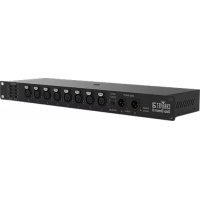
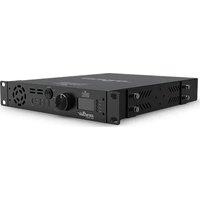
Data Stream 8 - Controller Chauvet - Free user manual and instructions
Find the device manual for free Data Stream 8 Chauvet in PDF.



| Product Type | DMX Controller |
| Brand | Chauvet |
| Model | Data Stream 8 |
| Number of DMX Output Ports | 8 |
| DMX Inputs | 2 (A and B) with selection switch |
| Power Supply | 100-240 V AC, 50/60 Hz (universal power supply) |
| Fuse | Replaceable, same type and amperage |
| Mounting | Overhead (with safety cable) or rack mount |
| Indicators | Power and signal indicators, DMX output port assignment indicator |
| Maximum Ambient Temperature | 40 °C (104 °F) |
| Protection | IP20, indoor use only |
| Maintenance | Unplug before cleaning; do not obstruct ventilation slots |
| Spare parts | Power cord, fuse |
| Documents provided | Reference manual, warranty card |
Frequently Asked Questions - Data Stream 8 Chauvet
User questions about Data Stream 8 Chauvet
0 question about this device. Answer the ones you know or ask your own.
Ask a new question about this device
Download the instructions for your Controller in PDF format for free! Find your manual Data Stream 8 - Chauvet and take your electronic device back in hand. On this page are published all the documents necessary for the use of your device. Data Stream 8 by Chauvet.
USER MANUAL Data Stream 8 Chauvet

CHAVET3
About This Guide
The Data Stream 8 Quick Reference Guide (QRG) has basic product information such as mounting and operation. Download the User Manual from www.chauvetdj.com for more details.
Disclaimer
The information and specifications contained in this QRG are subject to change without notice.
Safety Notes
These Safety Notes include important information about installation, use, and maintenance.

• Always connect the product to a grounded circuit.
- Make sure the power cord is not crimped or damaged.
- Always disconnect the product from the power source before cleaning it or replacing the fuse.
- Never disconnect the product from the power source by pulling or tugging on the cord.
- If mounting the product overhead, make sure there is adequate support for the product's weight and always secure the product using a safety cable.
- Make sure there are no flammable materials close to the product when it is operating.
- The voltage of the outlet to which you are connecting this product must be within the range stated on the decal or rear panel of the product.
- The product is not intended for permanent installation.
- This product is for indoor use only! (IP20) To prevent risk of fire or shock, do not expose this product to rain or moisture.
- Always connect the product to a power source that is within the voltage range stated on the label or rear panel of the product.
- Always mount this product in a location with adequate ventilation, at least 20 in (50 cm) from adjacent surfaces.
- Never connect this product to a dimmer or rheostat.
- Replace the fuse with the same type and rating.
- The maximum ambient temperature is 104°F (40 °C). Do not operate this product at higher temperatures.
- When mounting this product overhead, ALWAYS use a safety cable.
- ONLY carry this product by the hanging/mounting brackets.
- DO NOT open this product. It contains no user-serviceable parts.
• To eliminate unnecessary wear and improve its lifespan, during periods of disuse completely disconnect the product from the power via breaker or by unplugging it.

Contact
Outside the U.S., United Kingdom, Ireland, Benelux, France, Germany, or Mexico, contact your distributor to request support or return a product. Visit www.chauvetdj.com for contact information.
What is Included
- Data Stream 8
-
Power cord
-
Warranty Card
- Quick Reference Guide
To Begin
Carefully unpack the product and check that all the parts are in the package, and are in good condition. If the box, or any of the contents, appear damaged from shipping, or show signs of mishandling, save all packaging and file a claim with the carrier immediately. Do not notify Chauvet. Failure to report damage to the carrier immediately, or failure to have all packaging available for inspection, could invalidate your claim.
For other issues, such as missing components or parts, damage not related to shipping, or concealed damage, file a claim with Chauvet within 7 days of delivery.
Overview


AC Power
This product has an auto-ranging power supply that can work with an input voltage range of 100–240 VAC, 50/60 Hz.

To eliminate wear and improve its lifespan, during periods of disuse completely disconnect the product from power via breaker or by unplugging it.
Fuse Replacement
- Disconnect the product from power.
- Wedge the tip of a flat-head screwdriver into the slot of the fuse holder.
- Pry the safety cap out of the housing.
- Remove the blown fuse from the clip on the front of the safety cap and replace with a fuse of the exact same type and rating.
- Re-insert the fuse holder and reconnect power.
Mounting
Before mounting this product, read the Safety Notes.
Mounting Diagram
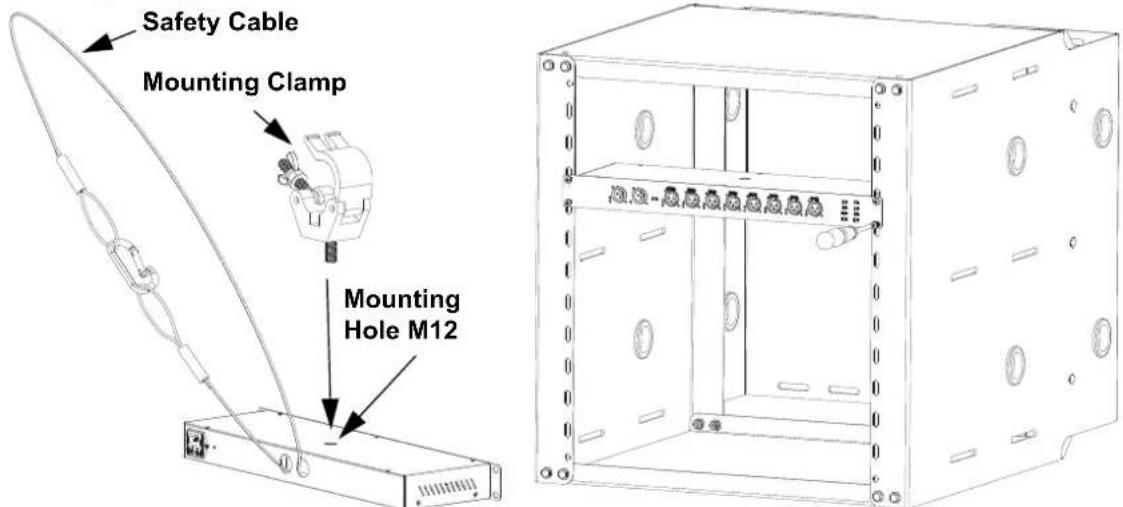
Overhead Mounting Rack Mounting
DMX Linking
The Data Stream 8 can work with DMX controllers. Instructions for connecting and configuring this product for DMX operation are in the User Manual. If you are not familiar with DMX or DIP-switch configuration, download the DMX Primer from www.chauvetdj.com.
Acerca de esta guia
General Information Technical Support
World Headquarters
Address: 5200 NW 108th Ave. Voice: (844) 393-7575
Sunrise, FL 33351 Fax: (954) 756-8015
Voice: (954) 577-4455 Email: chauvetcs@chauvetlighting.com
Fax: (954) 929-5560
Toll Free: (800) 762-1084 Website: www.chauvetdj.com
UK
Address: Unit 1C Email: UKtech@chauvetlighting.eu
Brookhill Road Industrial Estate
Pinxton, Nottingham, UK Website: www.chauvetdj.eu
NG16 6NT
Voice: +44 (0) 1773 511115
Fax: +44 (0) 1773 511110
Benelux
Address: Stokstraat 18 Email: BNLtech@chauvetlighting.eu
9770 Kruishoutem
Belgium Website: www.chauvetdj.eu
Voice: +32 9 388 93 97
France
Address: 3, Rue Ampère Email: FRtech@chauvetlighting.fr
91380 Chilly-Mazarin
France Website: www.chauvetdj.eu
Voice: +33 1 78 85 33 59
Germany
Address: Bruno-Bürgel-Str. 11 Email: DEtech@chauvetlighting.de
28759 Bremen
Germany Website: www.chauvetdj.eu ____
Voice: +49 421 62 60 20
Mexico
(Entrance by Calle 2)
Zona Industrial Lerma Website: www.chauvetdj.mx
Visit the applicable website above to verify our contact information and instructions to request support. Outside the U.S., United Kingdom, Ireland, Mexico or Benelux, contact the dealer of record.
Brand : Chauvet
Model : Data Stream 8
Category : Controller