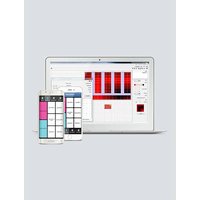
ShowXpress - Controller Chauvet - Free user manual and instructions
Find the device manual for free ShowXpress Chauvet in PDF.


Pick your language and provide your email: we'll send you a specifically translated version.
| Product Type | Lighting Controller (DMX Interface + Software) |
| Brand | Chauvet |
| Model | ShowXpress |
| DMX Input | USB (via ShowXpress Interface) |
| DMX Output | 1 x 3-pin XLR (or 5-pin depending on interface) |
| Number of DMX Channels | Up to 512 (one universe) |
| Software Compatibility | ShowXpress Software (Windows/macOS) |
| Key Features | Fixture library, 3D visualizer, timeline, effects, submaster |
| Power Source | USB bus powered (5V, 500mA max) |
| Dimensions (Interface Unit) | Approx. 2.5 x 1.5 x 0.8 in (63 x 38 x 20 mm) |
| Weight (Interface Unit) | Approx. 0.1 lb (50 g) |
| Construction Material | Plastic casing with metal connectors |
| Operating Temperature | 32°F to 104°F (0°C to 40°C) |
| Storage Temperature | 14°F to 122°F (-10°C to 50°C) |
| Relative Humidity | 5% to 95% (non-condensing) |
| Maintenance | Wipe with dry cloth; avoid liquids and solvents |
| Safety | Do not expose to moisture; use only with computers meeting USB spec |
| Spare Parts / Repairability | No user-serviceable parts; contact Chauvet support for issues |
| Accessories Included | ShowXpress USB interface, software CD (or download), user manual |
| Warranty | 2 years limited warranty |
Frequently Asked Questions - ShowXpress Chauvet
What is ShowXpress?
ShowXpress is a DMX lighting control system from Chauvet that includes a USB interface and software for controlling up to 512 DMX channels.
Do I need to install any software?
Yes, you must install the ShowXpress software on your computer. It is available for download from the Chauvet website or via the included CD.
Which operating systems are supported?
ShowXpress software supports Windows (7/8/10/11) and macOS (10.12 and later).
How do I connect the interface?
Connect the ShowXpress USB interface to a USB port on your computer. The device will be automatically recognized after driver installation (automatic or manual).
Can I control moving heads and LED fixtures?
Yes, ShowXpress includes an extensive fixture library for many Chauvet and third-party lights. You can also create custom profiles.
How do I create a light show?
Use the software interface to add fixtures, assign DMX addresses, and create scenes or sequences. The 3D visualizer helps preview effects.
Why is my DMX output not working?
Check that the interface is properly connected and recognized by the computer. Ensure that the DMX cable is wired correctly (pin 1 = ground, pin 2 = data-, pin 3 = data+). Also verify the fixture addresses match.
Can I use the interface without the software?
No, the interface requires the ShowXpress software to function. It does not work as a standalone DMX controller.
How many fixtures can I control?
You can control up to 512 DMX channels, which typically equals 20-30 fixtures depending on their channel count.
Where can I find the user manual?
The user manual is available for free download on the Chauvet website or at notice-facile.com in PDF format.
User questions about ShowXpress Chauvet
0 question about this device. Answer the ones you know or ask your own.
Ask a new question about this device
No questions yet. Be the first to ask one.
Download the instructions for your Controller in PDF format for free! Find your manual ShowXpress - Chauvet and take your electronic device back in hand. On this page are published all the documents necessary for the use of your device. ShowXpress by Chauvet.
USER MANUAL ShowXpress Chauvet
Manual assistant
Powered by Anthropic
Waiting for your message
Product information
Brand : Chauvet
Model : ShowXpress
Category : Controller