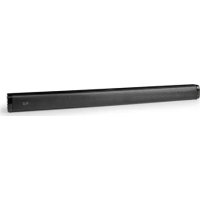
SPSB200BK - Soundbar NEDIS - Free user manual and instructions
Find the device manual for free SPSB200BK NEDIS in PDF.



| Type of product | Soundbar |
| Brand | Nedis |
| Model | SPSB200BK |
| Color | Black |
| Intended use | Playing sound from a TV or multimedia device via Bluetooth, audio cable or USB |
| Input modes | Bluetooth, optical (Toslink), coaxial, HDMI, AUX, USB |
| Power supply | Power adapter (included) |
| Wireless connectivity | Bluetooth |
| Connectors | 1x USB, 1x AUX 3.5 mm, 1x coaxial input, 1x optical input, 1x HDMI input |
| Display | LED (indicates input mode) |
| Remote control | Included (AAA batteries not included) |
| Audio modes | Music mode, Movie mode |
| Bass adjustment | Yes (via remote control) |
| Mute function | Yes (via remote control) |
| Wall mounting | Possible (mounting holes and screws included) |
| Package contents | Soundbar, remote control, power adapter, optical audio cable (Toslink), mounting screws, user manual |
| Maintenance | Clean with a soft dry cloth |
| Safety | Do not expose to water or humidity; unplug if not used for extended period |
Frequently Asked Questions - SPSB200BK NEDIS
User questions about SPSB200BK NEDIS
0 question about this device. Answer the ones you know or ask your own.
Ask a new question about this device
Download the instructions for your Soundbar in PDF format for free! Find your manual SPSB200BK - NEDIS and take your electronic device back in hand. On this page are published all the documents necessary for the use of your device. SPSB200BK by NEDIS.
USER MANUAL SPSB200BK NEDIS
With 40 W peak power sound
SPSB200BK


Quick start guide 6

Kurzanleitung 10

B

C

flowchart
graph TD
    A["Module 1"] --> B["Process Unit"]
    C["Module 2"] --> B
    D["Module 3"] --> B
    E["Module 4"] --> B
    F["Module 5"] --> B
    G["Module 6"] --> B
    H["Module 7"] --> B
    I["Module 8"] --> B
    J["Module 9"] --> B
    K["Module 10"] --> B
    L["Module 11"] --> B
    M["Module 12"] --> B
    N["Module 13"] --> B
    O["Module 14"] --> B
    P["Module 15"] --> B
    Q["Module 16"] --> B
    R["Module 17"] --> B
    S["Module 18"] --> B
    T["Module 19"] --> B
    U["Module 20"] --> B
    V["Module 21"] --> B
    W["Module 22"] --> B
    X["Module 23"] --> B
    Y["Module 24"] --> B
    Z["Module 25"] --> B
    AA["Module 26"] --> B
    AB["Module 27"] --> B
    AC["Module 28"] --> B
    AD["Module 29"] --> B
    AE["Module 30"] --> B
    AF["Module 31"] --> B
    AG["Module 32"] --> B
    AH["Module 33"] --> B
    AI["Module 34"] --> B
    AJ["Module 35"] --> B
    AK["Module 36"] --> B
    AL["Module 37"] --> B
    AM["Module 38"] --> B
    AN["Module 39"] --> B
    AO["Module 40"] --> B
    AP["Module 41"] --> B
    AQ["Module 42"] --> B
    AR["Module 43"] --> B
    AS["Module 44"] --> B
    AT["Module 45"] --> B
    AU["Module 46"] --> B
    AV["Module 47"] --> B
    AW["Module 48"] --> B
    AX["Module 49"] --> B
    AY["Module 50"] --> B

E
flowchart
graph TD
    A["Monitor"] --> B["Audio"]
    A --> C["Video"]
    A --> D["Game Console"]
    B --> E["Port 1"]
    C --> F["Port 2"]
    D --> G["Port 3"]
    E --> H["Port 4"]
    F --> I["Port 5"]
    G --> J["Port 6"]
    H --> K["External Device"]
    I --> L["External Device"]
    J --> M["External Device"]
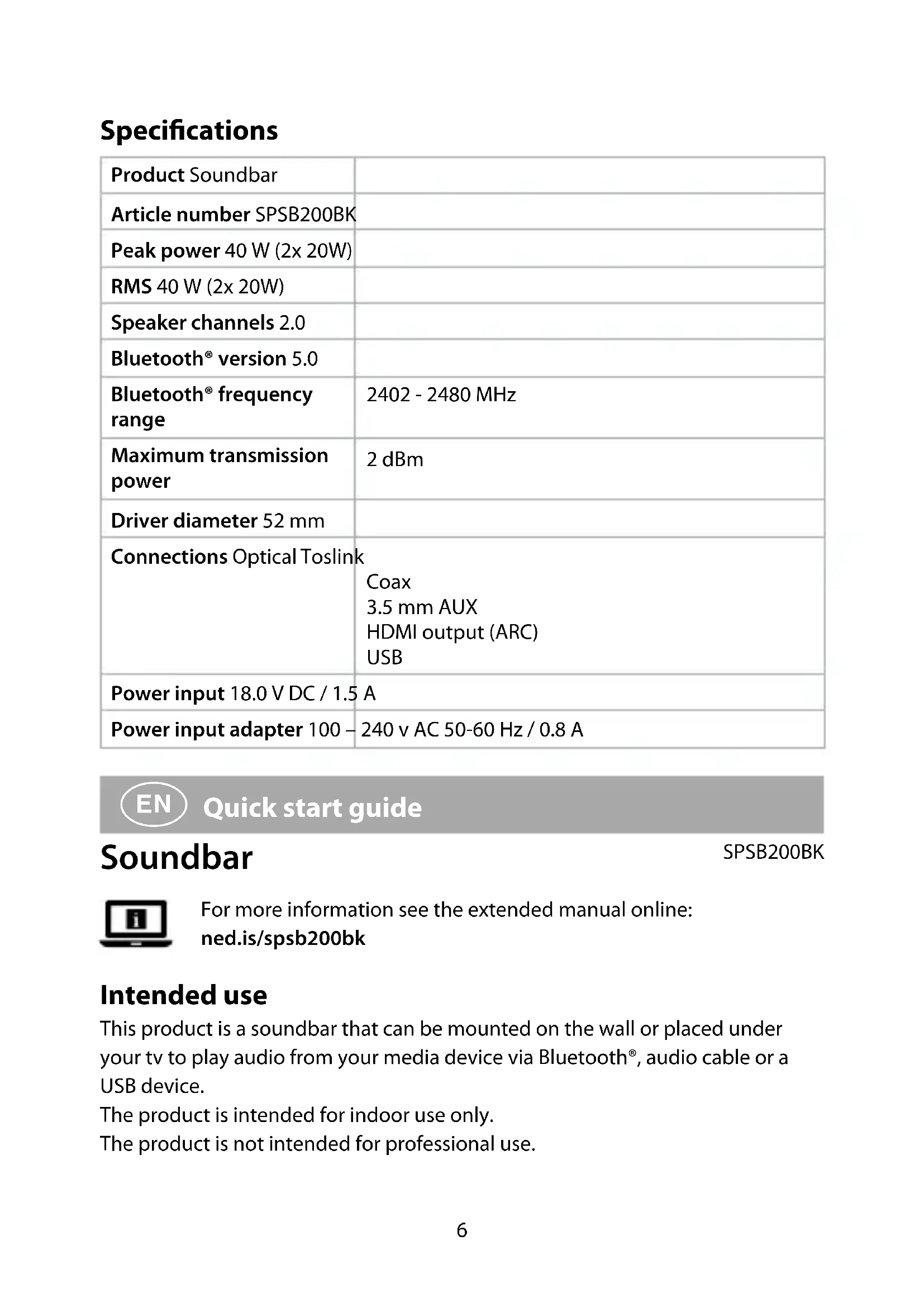
Specifications
| Product Soundbar | |
| Article number SPSB200BK | |
| Peak power 40 W (2x 20W) | |
| RMS 40 W (2x 20W) | |
| Speaker channels 2.0 | |
| Bluetooth® version 5.0 | |
| Bluetooth® frequency range | 2402 - 2480 MHz |
| Maximum transmission power | 2 dBm |
| Driver diameter 52 mm | |
| Connections Optical Toslink | Coax3.5 mm AUXHDMI output (ARC)USB |
| Power input 18.0 V DC / 1.5 A | |
| Power input adapter 100 – | 240 v AC 50-60 Hz / 0.8 A |

Quick start guide
SPSB200BK
Soundbar

For more information see the extended manual online:
ned.is/spsb200bk
Intended use
This product is a soundbar that can be mounted on the wall or placed under your tv to play audio from your media device via Bluetooth ^® , audio cable or a USB device.
The product is intended for indoor use only.
The product is not intended for professional use.
Any modification of the product may have consequences for safety, warranty and proper functioning.
Always store this information with the product for use in the future.
Main parts (image A)
1 USB port
2 AUX input
3 Coax input
4 Optical audio input
5 HDMI input
6 Power input
7 Mounting holes
8 LED display
9 Control panel
10 Mounting screws
11 Power adapter
12 Optical audio cable (Toslink)
Control panel (image B)
1 Power/Mode button
2 Play/pause button
3 Next button/Volume up
4 Previous button/Volume down
Remote control (image C)
1 Power button
2 Volume up button
3 Previous button
4 Volume down button
5 Music mode button
6 Mute button
7 Bass down button
8 Mode button
9 Play/pause button
10 Next button
11 Movie mode button
12 Bass up button
Safety instructions
WARNING
- Ensure you have fully read and understood the instructions in this document before you install or use the product. Keep the packaging and this document for future reference.
- Only use the product as described in this document.
- Do not use the product if a part is damaged or defective. Replace a damaged or defective product immediately.
- Do not drop the product and avoid bumping.
- This product may only be serviced by a qualified technician for maintenance to reduce the risk of electric shock.
- Do not expose the product to water or moisture.
-
Do not block ventilation openings and make sure that there is enough space around the product.
-
Keep the product away from heat sources. Do not place the product on hot surfaces or near open flames.
- Before use, always check that the mains voltage is the same as the voltage on the rating plate of the product.
- Unplug the product if you do not plan on using the product for an extended period of time.
Installation to the wall (image D)
- Drill 2 holes, as indicated in image D. Insert plugs into the holes.
- Insert the screws A 10 into the plugs.
- Mount the product onto the screws A 10 using the mounting holes A 7
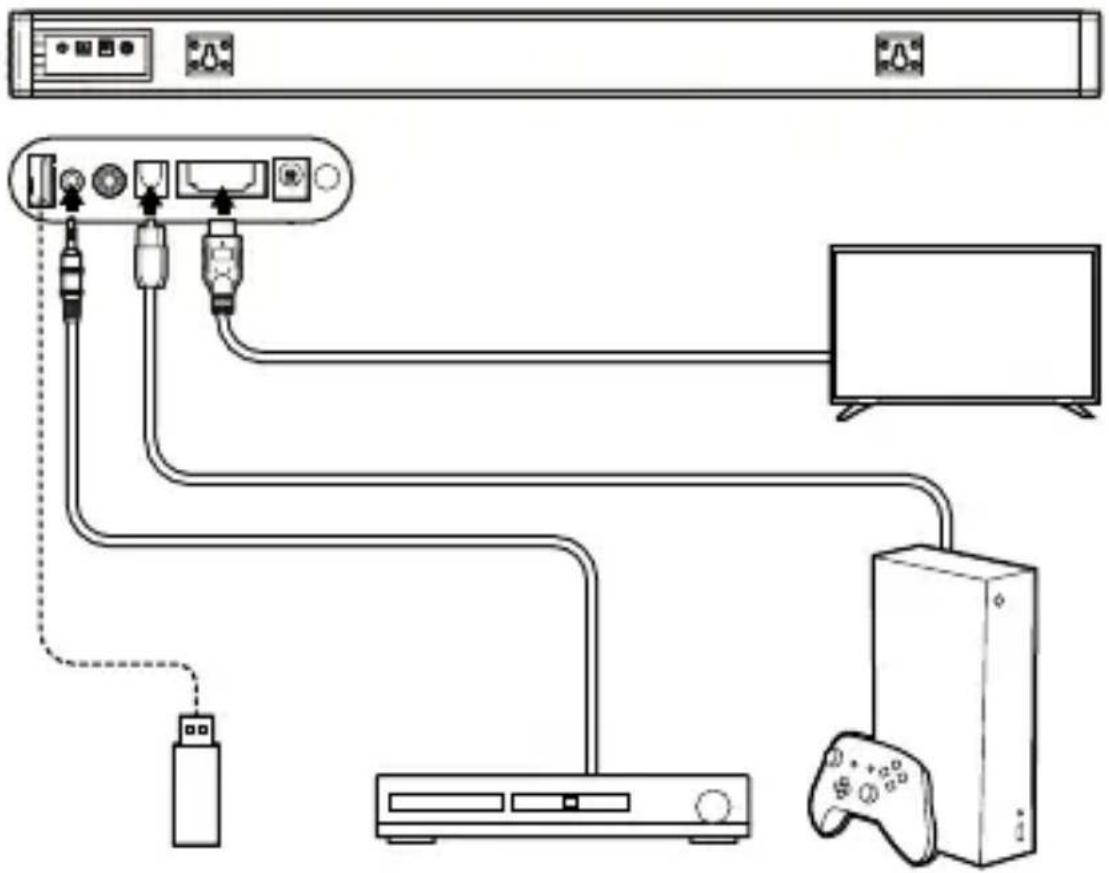
Connecting the product (image E)
Connect the cables to the product as shown in image E.
Placing batteries in the remote control
- Open the battery compartment on the back of the remote.
- Insert the two required AAA batteries (not included) into the battery compartment.
- Close the battery compartment.
Press and hold the Power/Mode button B1 to switch on the product.
Listening modes
To change listening mode:
- Press the music mode button C ⑤ to optimize the audio settings for listening to music.
- Press the movie mode button C 11 to optimize the audio settings for watching movies.
Input modes
To change input mode:
- Press the Power/Mode button B 1 or the mode button C 8.
| Display Input mode | |
| OPT Optical input mode | |
| COA Coaxial input mode | |
| HD HDMI input mode | |
| AUX Aux input mode | |
| BT Bluetooth input mode | |
| USB USB input mode |
Playing music from a digital input source
- Plug the Toslink cable A 12 in the optical audio input A 4.
- Plug the other end of the Toslink cable into your source device.
- Press the Power/Source button B 1 or the mode button C 8 until LED display A 8 shows "OPT".
Playing music from a Bluetooth® audio source
- Press the Power/Mode button B 1 or the mode button C 8 until LED display A 8 shows "bt". Pairing is now active.
- Activate Bluetooth ^® on your audio source and connect with the product (SPSB200BK).
Playing music from an AUX audio source
- Plug the 3.5 mm audio cable (not included) into the AUX input A 2.
- Plug the other end of the 3.5 mm audio cable (not included) into your source device.
- Press the Power/Source button B 1 or the mode button C 9 until LED display A 8 shows "AUX".
Playing music from an USB flash drive
- Plug the USB storage device (not included) in the USB input A 1.
- Press the Power/Source button B 1 or the mode button C 8 until LED display A 8 shows "USB".
Controlling the video/music
-
Press next button C 10 (or next button/Volume up B 3) or the previous button C 4 (or Previous button/volume up B 4) to skip between tracks.
-
Press the increase volume level button C 3 (or next button/Volume up B 3) or decrease volume level button C 4 (or Previous button/volume down B 4) to control the volume.
- Press the pause/play button B 2 or the pause / play button C 9 to play or pause a track.
- Press the increase bass volume button C 12 or the decrease bass volume button C 8 to control the bass volume.
- Press the mute button C 6 to mute or unmute the sound. You can also control music and volume from your audio source.
Declaration of Conformity
We, Nedis B.V. declare as manufacturer that the product SPSB200BK from our brand Nedis ^® , produced in China, has been tested according to all relevant CE standards and regulations and that all tests have been passed successfully. This includes, but is not limited to the RED 2014/53/EU regulation.
The complete Declaration of Conformity (and the safety datasheet if applicable) can be found and downloaded via:
nedis.com/spsb200bk#support

Kurzanleitung
Soundbar
SPSB200BK

Colocar as pilhas no controlo remoto
nedis.sk/spsb200bk#support
Soundbar
SPSB200BK

- With 40 W peak power sound
- SPSB200BK
- Quick start guide
- Soundbar
- Intended use
- Main parts (image A)
- Control panel (image B)
- Remote control (image C)
- Safety instructions
- WARNING
- Installation to the wall (image D)
- Connecting the product (image E)
- Placing batteries in the remote control
- Listening modes
- Input modes
- Playing music from a digital input source
- Playing music from a Bluetooth® audio source
- Playing music from an AUX audio source
- Playing music from an USB flash drive
- Controlling the video/music
- Declaration of Conformity
- Kurzanleitung
- Colocar as pilhas no controlo remoto
Brand : NEDIS
Model : SPSB200BK
Category : Soundbar