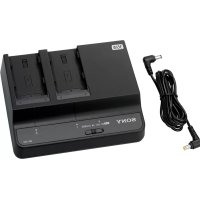
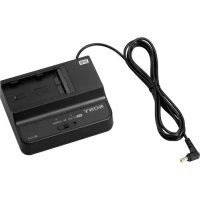
BCU2A - Battery charger SONY - Free user manual and instructions
Find the device manual for free BCU2A SONY in PDF.



| Product type | Battery charger |
| Brand | Sony |
| Model | BCU2A |
| Dimensions (W × H × D) | 177.0 × 53.2 × 137.0 mm |
| Weight | Approx. 620 g (with DC output cable, without power cord) |
| Voltage source | 100 V to 240 V AC, 50/60 Hz |
| Power consumption | 89 W (charging: 165 VA at 100 V, 205 VA at 240 V) |
| Charge output | 16.4 V DC, 2.4 A / 1.5 A |
| DC output | 12 V DC, 3.0 A |
| Operating temperature (charging) | 0 °C to 45 °C |
| Operating temperature (DC output) | -5 °C to +45 °C |
| Storage temperature | -20 °C to +60 °C |
| Number of charging channels | 2 (CHARGE mode) or 1 (DC OUT mode) |
| Indicators | CHARGE (orange/green) and DC OUT (green) |
| Protections | Against overvoltage, overheating, incompatible battery |
| Supplied accessories | DC output cable, installation manual, warranty booklet |
| Compatible batteries | Sony BP-U35, BP-U70, BP-U100 lithium-ion battery packs |
| Charging time (BP-U35) | Approx. 90 minutes |
| Charging time (BP-U70) | Approx. 150 minutes |
| Charging time (BP-U100) | Approx. 210 minutes |
| Safety | Primary circuit fuse, shutoff device, grounding |
| Maintenance | Clean with a dry cloth; periodic inspections recommended |
Frequently Asked Questions - BCU2A SONY
User questions about BCU2A SONY
0 question about this device. Answer the ones you know or ask your own.
Ask a new question about this device
Download the instructions for your Battery charger in PDF format for free! Find your manual BCU2A - SONY and take your electronic device back in hand. On this page are published all the documents necessary for the use of your device. BCU2A by SONY.
USER MANUAL BCU2A SONY
© 2017 Sony Corporation

出版日期:2024年9月
Before operating the unit, please read this manual thoroughly and retain it for future reference.
Important Safety Instructions
- Read these instructions.
- Keep these instructions.
- Heed all warnings.
- Follow all instructions.
- Do not use this apparatus near water.
- Clean only with dry cloth.
- Do not block any ventilation openings. Install in accordance with the manufacturer's instructions.
- Do not install near any heat sources such as radiators, heat registers, stoves, or other apparatus (including amplifiers) that produce heat.
- Do not defeat the safety purpose of the polarized or grounding-type plug. A polarized plug has two blades with one wider than the other. A grounding-type plug has two blades and a third grounding prong. The wide blade or the third prong are provided for your safety. If the provided plug does not fit into your outlet, consult an electrician for replacement of the obsolete outlet.
- Protect the power cord from being walked on or pinched particularly at plugs, convenience receptacles, and the point where they exit from the apparatus.
-
Only use attachments/accessories specified by the manufacturer.
-
Use only with the cart, stand, tripod, bracket, or table specified by the manufacturer, or sold with the apparatus. When a cart is used, use caution when moving the cart/ apparatus combination to avoid injury from tip-over.

- Unplug this apparatus during lightning storms or when unused for long periods of time.
- Refer all servicing to qualified service personnel. Servicing is required when the apparatus has been damaged in any way, such as power-supply cord or plug is damaged, liquid has been spilled or objects have fallen into the apparatus, the apparatus has been exposed to rain or moisture, does not operate normally, or has been dropped.
WARNING
To reduce the risk of fire or electric shock, do not expose this apparatus to rain or moisture. To avoid electrical shock, do not open the cabinet. Refer servicing to qualified personnel only.
WARNING
This unit has no power switch.
When installing the unit, incorporate a readily accessible disconnect device in the fixed wiring, or connect the power plug to an easily accessible socket-outlet near the unit. If a fault should occur during operation of the unit, operate the

disconnect device to switch the power supply off, or disconnect the power plug.
Batteries shall not be exposed to excessive heat such as sunshine, fire or the like.
WARNING: THIS WARNING IS APPLICABLE FOR USA ONLY.
If used in USA, use the UL LISTED power cord specified below.
DO NOT USE ANY OTHER POWER CORD.
Plug Cap Parallel blade
(NEMA
1-15P
Configuration)
Cord Type NISPT-2 or SPT-2, two 16 or 18 AWG wires Length Minimum 1.5 m (4 ft.11 in.), Less than 2.5 m (8 ft.3 in.)
Rating Minimum 7 A, 125 V
Using this unit at a voltage other than 120V may require the use of a different line cord or attachment plug, or both. To reduce the risk of fire or electric shock, refer servicing to qualified service personnel.
WARNING: THIS WARNING IS APPLICABLE FOR OTHER COUNTRIES.
- Use the approved Power Cord (2-core mains lead) / Appliance Connector / Plug that conforms to the safety regulations of each country if applicable.
- Use the Power Cord (2-core mains lead) / Appliance Connector / Plug conforming to the proper ratings (Voltage, Ampere).
If you have questions on the use of the above Power Cord / Appliance Connector / Plug, please consult a qualified service personnel.
WARNING
The apparatus shall not be exposed to dripping or splashing. No objects filled with liquids, such as vases, shall be placed on the apparatus.
Do not install the appliance in a confined space, such as book case or built-in cabinet.
IMPORTANT
The product name and rating are located in the following location on the unit.
—Bottom

CAUTION
RISK OF ELECTRIC SHOCK DO NOT OPEN

ATTENTION
RISQUE DE CHOC ÉLECTRIQUE NE PAS OUVRIR
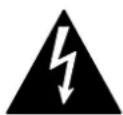
This symbol is intended to alert the user to the presence of uninsulated “dangerous voltage” within the product’s enclosure that may be of sufficient magnitude to constitute a risk of electric shock to persons.
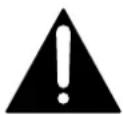
This symbol is intended to alert the user to the presence of important operating and maintenance (servicing) instructions in the literature accompanying the appliance.
For the customers in the U.S.A.
This equipment has been tested and found to comply with the limits for a Class B digital device, pursuant to part 15 of the FCC Rules. These limits are designed to provide reasonable protection against harmful interference in a residential installation. This equipment generates, uses and can radiate radio frequency energy and, if not installed and used in accordance with the instructions, may cause harmful interference to radio communications. However, there is no guarantee that interference will not occur in a particular installation. If this equipment does cause harmful interference to radio or television reception, which can be determined by turning the equipment off and on, the user is encouraged to try to correct the interference by one or more of the following measures:
— Reorient or relocate the receiving antenna.
— Increase the separation between the equipment and receiver.
— Connect the equipment into an outlet on a circuit different from that to which the receiver is connected.
— Consult the dealer or an experienced radio/TV technician for help.
You are cautioned that any changes or modifications not expressly approved in this manual could void your authority to operate this equipment.
This device complies with part 15 of the FCC Rules. Operation is subject to the following two conditions: (1) This device may not cause harmful interference, and (2) this device must accept any interference received, including interference that may cause undesired operation.
For the customers in Canada
CAN ICES-3 (B)/NMB-3(B)
For the customers in Europe
This product is intended for use in the following Electromagnetic Environments: E1 (residential), E2 (commercial and light industrial), E3 (urban outdoors), E4 (controlled EMC environment, ex. TV studio).
CAUTION
RISK OF ELECTRIC SHOCK
The fuse in primary circuit is/could be in the neutral. The mains shall be disconnected to de-energize the phase conductors.
This equipment is not suitable for use in locations where children are likely to be present.
CAUTION
— There is a danger of explosion if a battery other than specified is charged. Do not charge batteries other than the recommended batteries.
— When you dispose of the battery or the product, you must obey the law in the corresponding area or country. Do not dispose of the battery or the product in a fire or a hot oven, or mechanically crush or cut the battery. It may explode or cause a fire. Do not subject the battery to extremely low air pressure that may result in an explosion or the leakage of flammable liquid or gas.
— Do not place the battery in a high temperature place, such as under direct sunlight or near fire. It may ignite, explode, or cause a fire. Do not immerse or wet the battery in water or seawater. This may cause an electric shock.
No naked flame sources, such as lighted candles, should be placed on the apparatus.
CAUTION
When you connect the DC output cable of the unit to peripheral device, use the supplied cable to prevent malfunction due to radiation noise.
For the customers in Australia and New Zealand
For use with Sony Camcorders/Video Cameras, Cameras, Microphones, Memory Card Readers, Batteries, Robots, Control units, Storage units, Drive units, their accessories.
Reduction in the Use of Hazardous Substances in Electrical & Electronic Equipment (Applicable in Republic of India)
This product and its components, consumables, parts or spares comply with the hazardous substances restriction of India's E-Waste (Management) Rules. The maximum allowable concentrations of the restricted substances are 0.1% by weight in homogenous materials for Lead, Mercury, Hexavalent Chromium, Polybrominated Biphenyls (PBB) and Polybrominated Diphenyl Ethers (PBDE), and 0.01% by weight in homogenous materials for Cadmium, except for the exemptions specified in Schedule II of the aforesaid Rules.
For the customers in the U.S.A.
SONY LIMITED WARRANTY - Please visit
www.sony.com/psa/warrantyfor important information and complete terms and conditions of Sony's limited warranty applicable to this product.
For the customers in Canada
SONY LIMITED WARRANTY - Please visit
www.sony.com/psa/warrantyfor important information and complete terms and conditions of Sony's limited warranty applicable to this product.
For the customers in Europe
Sony Europe B.V. - Standard Warranty and Exceptions on Standard Warranty. Please visit https://pro.sony/support-services/primesupport/support-professional-solutions-europe-standard-product-warranty for important information and complete terms and conditions.
For the customers in Korea
SONY LIMITED WARRANTY - Please visit
https://pro.sony/ko_KR/support-services_for important information and complete terms and conditions of Sony's limited warranty applicable to this product.
Table of Contents
Overview ....18
Location and Function of Parts 19
Charging Battery Packs ....20
Specifications 22
Overview
The BC-U2A Battery Charger charges Sony Lithium-ion Battery Packs. It has the following features.
- In CHARGE mode, it can charge two battery packs simultaneously (two batteries of the same model or two batteries of different models).
- In DC OUT mode, it can charge one battery while supplying power to a connected device.
Note
If some trouble occurs when operating this unit, disconnect the AC power cord from the AC power source to shut off power supply.
For details on battery packs that can be charged using the unit and devices that can be connected to the unit, visit the Sony Professional products website.
Sony Professional products website:
U.S.A. http://pro.sony.com
Canada http://www.sonybiz.ca
Latin America http://sonypro-latin.com
Europe http://www.pro.sony.eu/pro
Middle East, Africa
http://sony-psmea.com
Location and Function of Parts
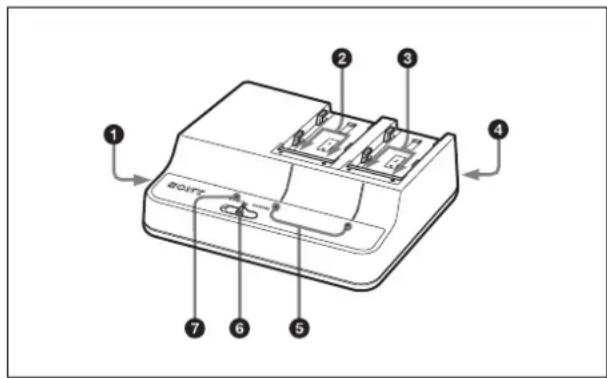
①DC OUT connector
Supplies DC power to a connected device via the supplied DC output cable when the mode select switch is set to DC OUT.
The DC output cable has a plug with black insulation and a plug with yellow insulation. Connect the plug with black insulation to this apparatus and the plug with yellow insulation to the connected device.
Notes
- Do not connect a device with power requirements higher than the specified values.
- Depending on the power consumed by the connected device, the apparatus may become warm. This is not a malfunction. Avoid prolonged contact with the apparatus if it should become warm.
②Channel 1 charge connectors
Supplies power when the mode select switch is set to CHARGE.
③Channel 2 charge connectors
Supplies power regardless of the setting of the mode select switch.
④ AC input connector
Connects to an AC power source via the AC power cord.
⑤CHARGE indicators
Shows the charging status of the attached battery packs during charging of battery packs.
For details, see "Charging Battery Packs" on page 20.
⑥ Mode select switch
CHARGE: Supplies power to the lithium-ion battery pack connected to channel 1.
DC OUT: Supplies DC power from the DC OUT connector, and at the same time supplies power to a lithium-ion battery pack connected to channel 2. (A battery pack connected to channel 1 is not charged.)
⑦DC OUT indicator
Lights in green when the mode select switch is set to DC OUT and DC power is being supplied.
If some trouble is detected, the indicator goes dark.
Charging Battery Packs
Charging time
The time to charge a completely exhausted battery pack to its full capacity is shown below. (When the temperature is 25^ C ( 77^ F). The charging time is not affected by whether one or two battery packs are being charged, or by combinations of different battery models.)
BP-U35: Approx. 90 minutes
BP-U70: Approx. 150 minutes
BP-U100: Approx. 210 minutes
Charging in CHARGE mode
You can charge two battery packs simultaneously.
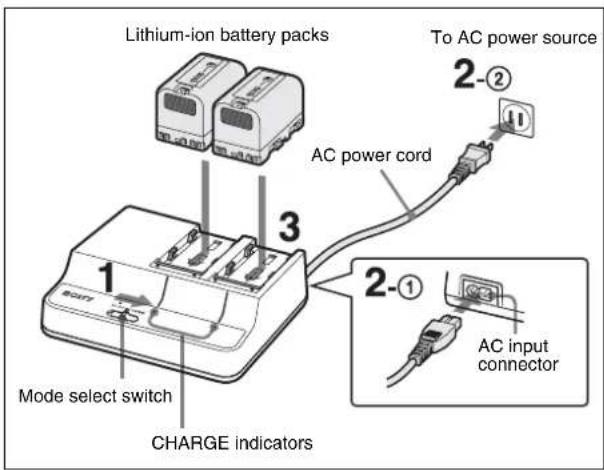
1 Set the mode select switch to CHARGE.
2 Connect the AC power cord ① to the AC input connector and ② to an AC power source.
3 Attach the battery packs.
Place the battery packs with the triangle marks facing the charge connectors and slide them in the direction indicated by the arrows.
Be sure to push the battery packs to engage the charge connectors until they click.
Charging begins, and the CHARGE indicators show the charging status.
Flashing in orange: Charged between 0 to 80%
Flashing in green: Charged over 80%
Lit in green: Fully charged
Flashing in orange, green, and off repeatedly: Charging standby state
This unit has a charging control function controlled by the temperature. If the internal temperature of the battery is 0 °C (32 °F) and lower or 60 °C (140 °F) and higher, the unit is in standby state and charging does not take place. When the temperature is above 0 °C (32 °F) or below 60 °C (140 °F), charging takes place.
Note
The charging current is automatically blocked if a battery pack other than a lithium-ion battery pack is attached. Be sure to charge designated battery packs only.
Charging in DC OUT mode
You can charge a battery pack on channel 2 while supplying power to a connected device.
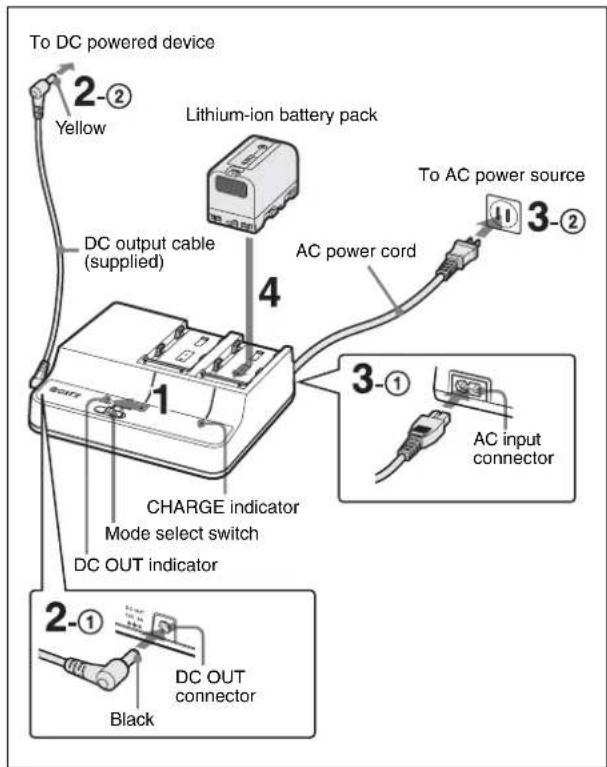
1 Set the mode select switch to DC OUT.
2 Connect the supplied DC output cable ① to the DC OUT connector and ② to the DC powered device.
3 Connect the AC power cord ① to the AC input connector and ② to an AC power source.
DC power is supplied to the device connected in step 2, and the DC OUT indicator lights in green.
4 Attach a battery pack to channel 2.
See step 3 in "Charging in CHARGE mode" for information about how to attach a battery pack.
Detaching a battery pack
Slide the attached battery pack in the opposite direction to that when attaching then pull it up.
When an error is detected
When one of the following conditions is detected during charging, the CHARGE indicator flashes in orange and green alternately:
• After the start of charging, quick charging does not begin.
- Charging does not finish within a specified period.
• The voltage for battery charging has exceeded the specified level.
• The internal voltage has exceeded the specified level.
- The internal voltage has dropped below the specified level.
Action to take if an error is detected
Immediately disconnect the AC power cord from the AC power source, remove the battery packs, and contact the vendor from whom you purchased the apparatus.

Specifications
Voltage source 100 V to 240 V AC, 50/60 Hz
Power consumption 89 W
Current drain Charging: 165 VA (100 V), 205 VA (240 V)
Output Charging: 16.4 V, 2.4 A/1.5 A
DC output: 12 V, 3.0 A
Operating temperature
Charging: 0 °C to 45 °C (32 °F to 113 °F)
DC output: -5^ to +45^ (23°F to 113°F)
Storage temperature -20^ to +60^ ( -4^ to +140^ )
Dimensions (w/h/d) 177.0 × 53.2 × 137.0 mm
(7× 2^1 / 8× 5^1 / 2 inches)
Mass Approx. 620 g (1 lb 6 oz) (including DC
output cable, not including AC power cord)
Supplied accessories
DC output cable (Part number: 1-912-595-11) (1)
Operating Instructions (1)
Warranty Booklet (1)
Design and specifications are subject to change without notice.
Notes
- Always verify that the unit is operating properly before use. SONY WILL NOT BE LIABLE FOR DAMAGES OF ANY KIND INCLUDING, BUT NOT LIMITED TO, COMPENSATION OR REIMBURSEMENT ON ACCOUNT OF THE LOSS OF PRESENT OR PROSPECTIVE PROFITS DUE TO FAILURE OF THIS UNIT, EITHER DURING THE WARRANTY PERIOD OR AFTER EXPIRATION OF THE WARRANTY, OR FOR ANY OTHER REASON WHATSOEVER.
- SONY WILL NOT BE LIABLE FOR CLAIMS OF ANY KIND MADE BY USERS OF THIS UNIT OR MADE BY THIRD PARTIES.
- SONY WILL NOT BE LIABLE FOR THE TERMINATION OR DISCONTINUATION OF ANY SERVICES RELATED TO THIS UNIT THAT MAY RESULT DUE TO CIRCUMSTANCES OF ANY KIND.
If the unit is suddenly taken from a cold to a warm location, or if ambient temperature suddenly rises, moisture may form on the outer surface of the unit and/or inside of the unit. This is known as condensation. If condensation occurs, turn off the unit and wait until the condensation clears before operating the unit. Operating the unit while condensation is present may damage the unit.
The life expectancy of the electrolytic capacitor is about 5 years under normal operating temperatures and normal usage (8 hours per day; 25 days per month). If usage exceeds the above normal usage frequency, the life expectancy may be reduced correspondingly.
- For safety, use only the Sony battery packs.
- The battery terminal of this unit (the connector for battery packs and AC adaptors) is a consumable part. Power may not be supplied to the unit properly if the pins of the battery terminal are bent or deformed by shock or vibrations, or if they become corroded due to prolonged outdoor use. Periodic inspections are recommended to keep the unit working properly and to prolong its usable lifetime. Contact a Sony service or sales representative for more information about inspections.
Français
①Connecteur DC OUT
177,0 × 53,2 × 137,0 mm
①Connettore DC OUT
BP-U35: circa 90 minuti
BP-U70: circa 150 minuti
Dimensioni (l/h/p) 177,0 × 53,2 × 137,0 mm
①DC OUT 커넥터
①Разъем DC OUT
177,0 × 53,2 × 137,0 MM
①DC OUT коннекторы
- Important Safety Instructions
- WARNING
- WARNING: THIS WARNING IS APPLICABLE FOR USA ONLY.
- WARNING: THIS WARNING IS APPLICABLE FOR OTHER COUNTRIES.
- IMPORTANT
- For the customers in the U.S.A.
- For the customers in Canada
- For the customers in Europe
- CAUTION
- RISK OF ELECTRIC SHOCK
- For the customers in Australia and New Zealand
- Reduction in the Use of Hazardous Substances in Electrical & Electronic Equipment (Applicable in Republic of India)
- For the customers in Korea
- Table of Contents
- Overview
- Note
- Location and Function of Parts
- ①DC OUT connector
- Notes
- ②Channel 1 charge connectors
- ③Channel 2 charge connectors
- ④ AC input connector
- ⑤CHARGE indicators
- ⑥ Mode select switch
- ⑦DC OUT indicator
- Charging Battery Packs
- Charging time
- Charging in CHARGE mode
- Charging in DC OUT mode
- Detaching a battery pack
- When an error is detected
- Action to take if an error is detected
- Specifications
- Supplied accessories
- Français
- ①Connecteur DC OUT
- ①Connettore DC OUT
- ①DC OUT 커넥터
- ①Разъем DC OUT
- ①DC OUT коннекторы
Brand : SONY
Model : BCU2A
Category : Battery charger