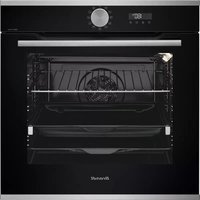
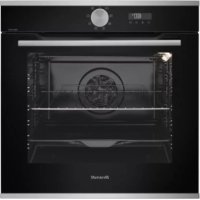
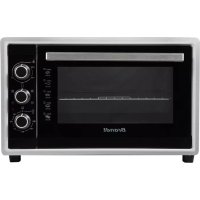
FC422XN1 - Electric oven BRANDT - Free user manual and instructions
Find the device manual for free FC422XN1 BRANDT in PDF.



| Product type | Built-in electric oven |
| Brand | BRANDT |
| Model | FC422XN1 |
| Dimensions (H x W x D) | 59.5 x 59.5 x 56.8 cm |
| Net weight | 32 kg |
| Power supply / Voltage | 230 V / 50 Hz |
| Total power | 3000 W |
| Oven capacity | 70 L |
| Number of cooking functions | 9, including fan-assisted, grill, bottom heat, etc. |
| Cleaning | Catalytic (rear wall) and easy-clean enamel |
| Interior lighting | Yes, with halogen bulb |
| Door | Removable glass for cleaning, assisted opening system |
| Timer | Electronic, with automatic shutdown |
| Child safety | Control lock |
| Energy class | A+ |
| Energy consumption (conventional cycle) | 0.99 kWh |
| Energy consumption (fan-assisted cycle) | 0.79 kWh |
| Repairability index | 8.2 / 10 |
| Spare parts available | Yes, through Brandt approved service |
| Warranty | 2 years parts and labor |
Frequently Asked Questions - FC422XN1 BRANDT
User questions about FC422XN1 BRANDT
0 question about this device. Answer the ones you know or ask your own.
Ask a new question about this device
Download the instructions for your Electric oven in PDF format for free! Find your manual FC422XN1 - BRANDT and take your electronic device back in hand. On this page are published all the documents necessary for the use of your device. FC422XN1 by BRANDT.
USER MANUAL FC422XN1 BRANDT
What does your oven look like?
Description of the appliance P.22
Accessories P.23
Safety Recommendations P.24
Child safety device P.24
How do you install your oven?
Electrical connection P.25
Useful dimensions for installing your oven P.27
How do you change the bulb? P.28
How does your oven work?
Close-up view of your analog programmer P.29
How do you set the clock on the oven? P.30
How do you program for immediate cooking? P.31
How do you set a cooking programme? P.32
How do you use the timer? P.33
Oven cooking modes P.34-35
How do you care for your oven? P.36
What do you do in case of operating malfunctions? P.37
Throughout the manual,

indicates safety recommendations,
indicates advice and tips
Introduction
Dear Customer,
You have just acquired a BRANDT oven and we would like to thank you.
Our research teams have designed for you a new generation of appliances so that you can cook with enjoyment each day.
With pure lines and modern aesthetics, your new Brandt oven blends harmoniously into your kitchen and perfectly combines ease of use with cooking performance.
In the line of Brandt products, you will also find a wide range of hobs, ventilation hoods, dishwashers and refrigerators, all of which can be built in and all of which can be coordinated with your new Brandt oven.
At the cutting edge of innovation, Brandt helps to improve the quality of everyday life by bringing you products that are ever more effective, easy to use, environmentally friendly, attractive and reliable.
The BRANDT brand.
What does your oven look like?
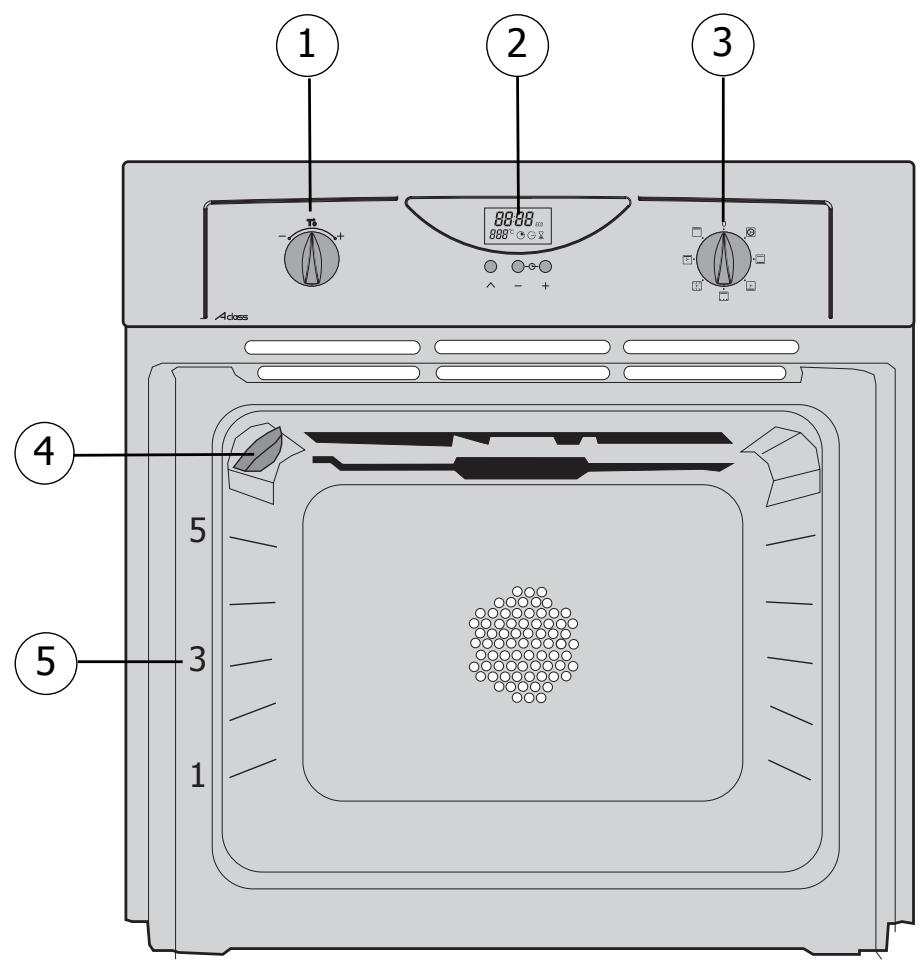
DESCRIPTION OF THE APPLIANCE
1 Temperature setting
2 Analog programmer
3 Function selector
4 Light
5 Shelf support indicator
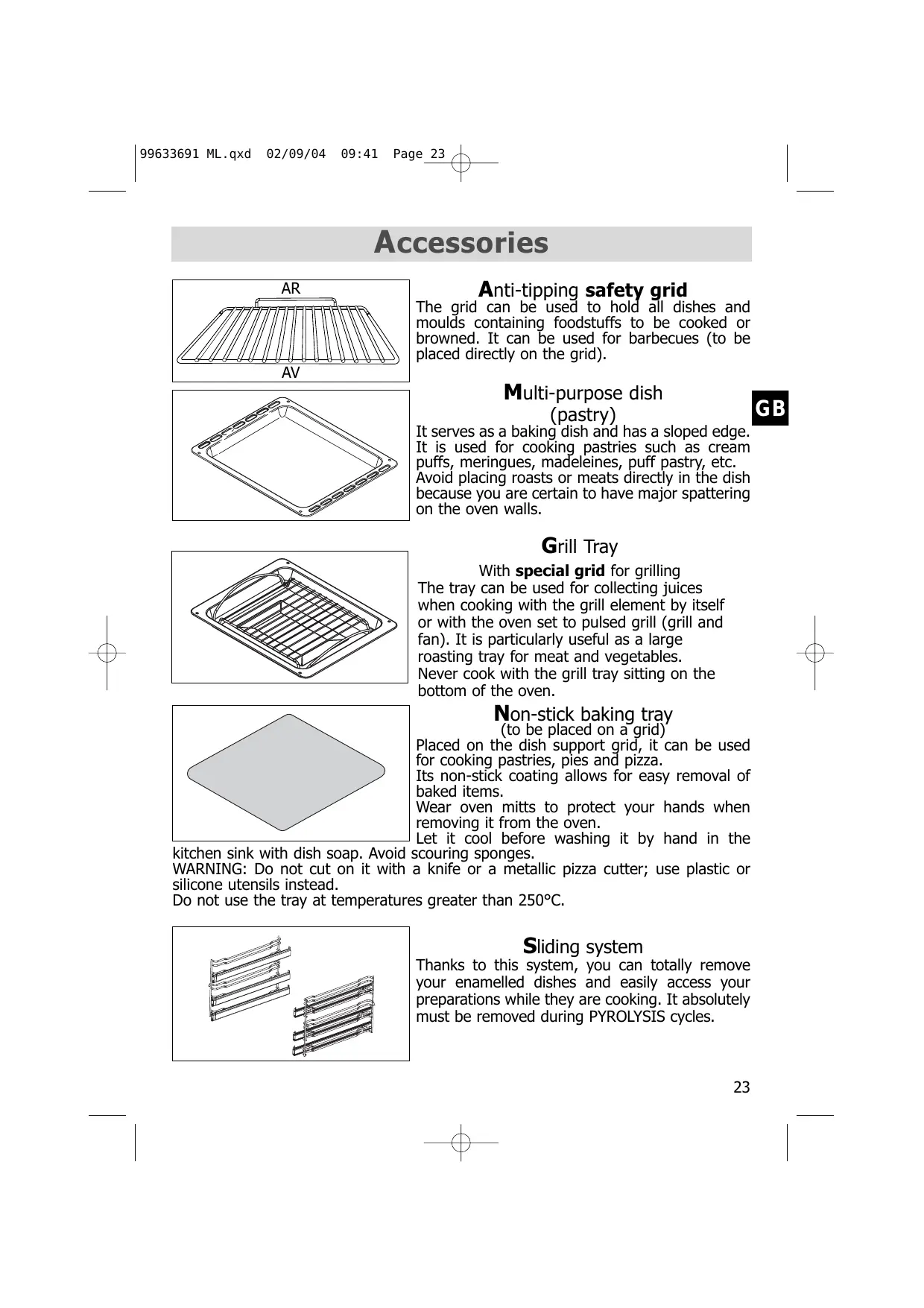
Accessories
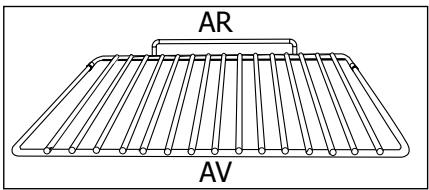
Anti-tipping safety grid
The grid can be used to hold all dishes and moulds containing foodstuffs to be cooked or browned. It can be used for barbecues (to be placed directly on the grid).
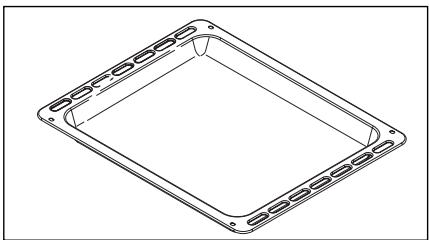
Multi-purpose dish (pastry)
GB
It serves as a baking dish and has a sloped edge. It is used for cooking pastries such as cream puffs, meringues, madeleines, puff pastry, etc. Avoid placing roasts or meats directly in the dish because you are certain to have major spattering on the oven walls.
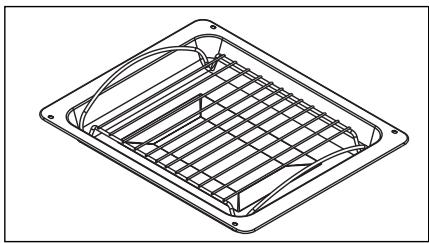
Grill Tray
With special grid for grilling
The tray can be used for collecting juices when cooking with the grill element by itself or with the oven set to pulsed grill (grill and fan). It is particularly useful as a large roasting tray for meat and vegetables. Never cook with the grill tray sitting on the bottom of the oven.
Non-stick baking tray (to be placed on a grid)
Placed on the dish support grid, it can be used for cooking pastries, pies and pizza.
Its non-stick coating allows for easy removal of baked items.
Wear oven mitts to protect your hands when removing it from the oven.
Let it cool before washing it by hand in the scouring sponges.
a knife or a metallic pizza cutter; use plastic or
kitchen sink with dish soap. Avoid WARNING: Do not cut on it with silicone utensils instead.
Do not use the tray at temperatures greater than 250^ .
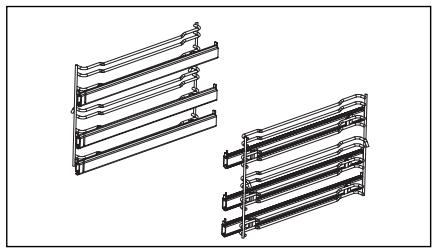
Sliding system
Thanks to this system, you can totally remove your enamelled dishes and easily access your preparations while they are cooking. It absolutely must be removed during PYROLYSIS cycles.

Safety Recommendations
Please become familiar with these recommendations before installing and using your oven. This oven was designed for household use only. It is intended solely for cooking foodstuffs. This oven does not contain any asbestos-based components.
FIRST USE:
Before using your oven for the first time, heat it up while empty with the door closed for approximately 15 minutes using the maximum setting in order to "cure" the appliance. The rock wool that surrounds the oven cavity may initially release a particular odour caused by its composition. Similarly, you may notice the release of some smoke. All of this is normal.
SUBSEQUENT USES:
- Ensure that the door of your oven is completely closed so that the seal can properly do its job.
- Do not let anyone lean against or sit on the oven door when it is open.
- When using the grill with the door semi-open, exposed parts and surfaces may become hot. Keep small children away.
- When in use, the appliance becomes hot. Be careful not to touch the heating elements located inside the oven.
- After cooking, do not use bare hands to touch the dishes or accessories (grid, turnspit, drip tray, turnspit support, etc.); use a potholder or heat-resistant material.
- Do not line your oven with sheets of aluminium. Otherwise, the result could be an accumulation of heat that could have an undesirable effect on cooking and roasting results and could damage the enamel.
- Do not use a steam cleaner or high-pressure cleaner.
- During cleaning, the exposed surfaces may become hotter than during normal use; small children should be kept away from the oven.
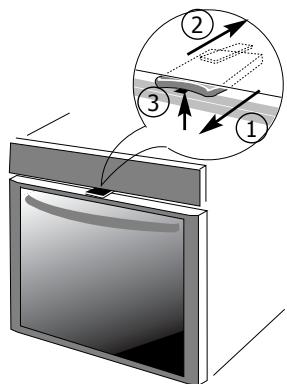
Child safety device
ACTIVATION
① Activating the child safety device:
Pull the stop towards you to activate the device.
② Releasing the child safety device:
Push the stop away from you.
USE
③ If you have opted to use the child safety device:
Open the door by simultaneously lifting the stop.
If you chose not to use the child safety device:
Open the door normally.
How do you install your oven?
Electrical connection
GB
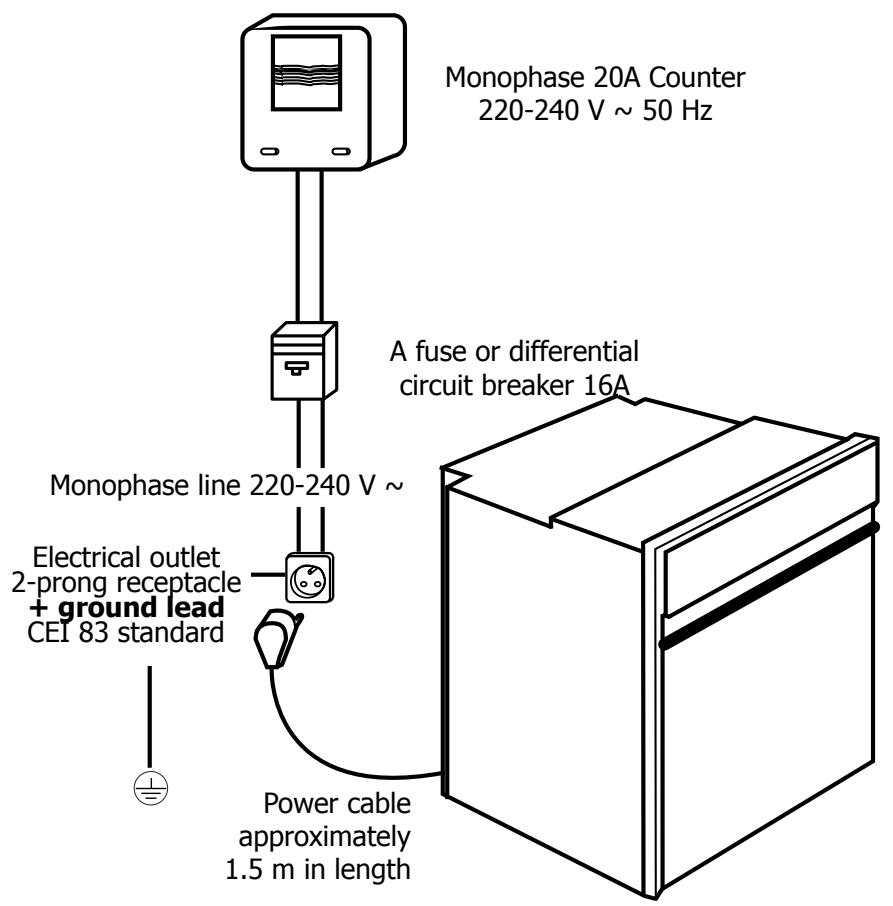
- Before making the connection, ensure that the wires in your electrical set-up have enough cross-sectional area to properly supply electricity to the appliance (cross-sectional area must be at least equal to that of the power cable). The fuse in your setup must be 16 amperes.
How do you in
The electrical connection should be performed before the appliance is installed in the cabinet.
- The oven must be connected with a power cable (standardized) with three 1.5 ~mm^2 conductors ( 1 ph + 1 ~N + ground 1± ) that must be connected to a monophase 220 - 240 ~V network via a CEI 83 standardized receptacle ( 1 ph + 1 ~N + ground lead 1± ) or in accordance with installation rules. The safety wire (green-yellow) is connected to the appliance's terminal 1± and must be connected to the ground lead of the electrical set-up.
- In the case of connections with an electric receptacle, it must remain accessible after installation of the appliance.
- The oven's neutral conductor (blue wire) must be connected to the network's neutral conductor.
Installation and/or replacement of power cable
- The power cable (H05 RR-F, H05 RN-F or H05 VV-F) must be of sufficient length to be connected to the build-in oven while it sits on the floor in front of the cabinet. To do this the appliance must be disconnected from the electrical network :
- Open the inspection flap located at the lower right of the back cover by unscrewing the two screws, then pivot the inspection flap.
- Strip 12 mm along each wire of the new power cable.
- Carefully twist together the strands.
- Loosen the screws from the terminal board and remove the power cord to be replaced.
- Introduce the power cable through the side of the cover in the cable clip located to the right of the terminal board
- Connect the power cord wires in accordance with the written markings on the terminal board.
- All the strands of the electricity wires must be captured under the screws.
The phase wire on the L terminal. - The green-yellow coloured ground wire should be connected to the terminal 12 .
- The neutral conductor (blue) on the N terminal.
- Screw down tightly the screws on the terminal board and check the connection by pulling on each wire.
- Attach the cable with the cable clip located to the right of the terminal board.
- Close the inspection flap using the two screws.

We cannot be held responsible for any accident resulting from an inexistent, defective or incorrect ground lead.
t a l l y o u r o v e n?
Useful dimensions for installing your oven
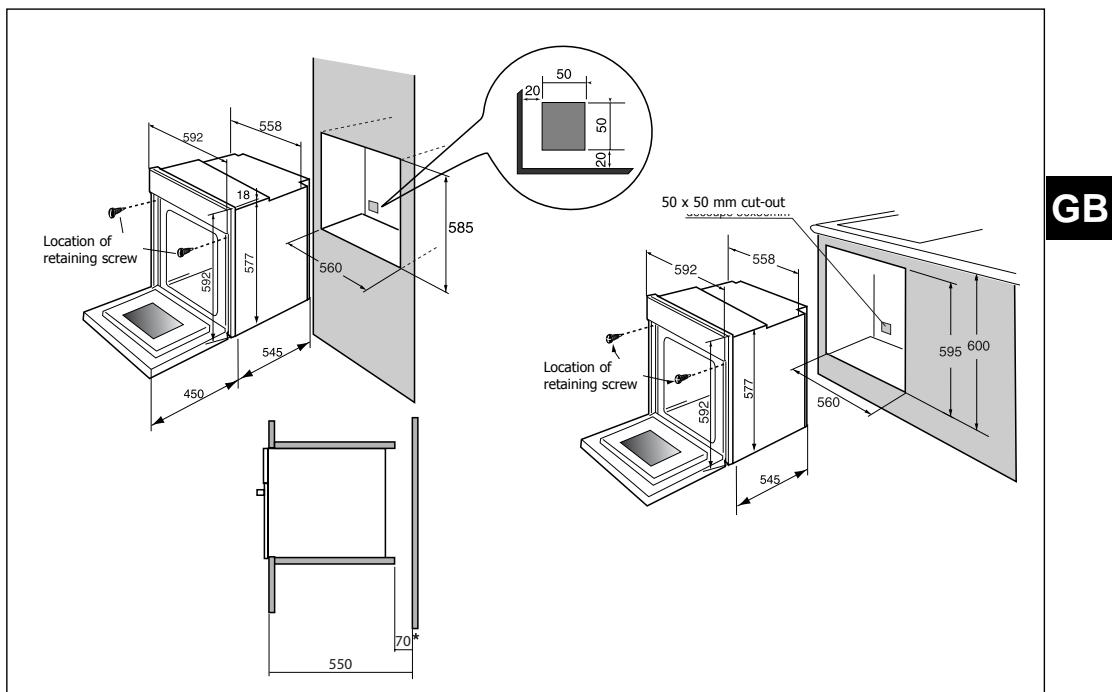
The oven can be installed under a worktop or in a column of cabinetry (open* or closed) having the appropriate dimensions for built-in installation (see adjacent diagram).
Your oven has optimised air circulation that allows it to achieve remarkable cooking and cleaning results if the following guidelines are respected:
-
Centre the oven in the cabinet so as to guarantee a minimum distance of 5mm between the appliance and the neighbouring cabinet.
-
The material of the built-in cabinetry must be heat resistant (or be covered with such a material).
- For greater stability, attach the oven in the cabinet with two screws through the holes provided for this purpose on either side of the front inner panel (see diagram). To do this:
1) Remove the rubber screw covers to access the mounting holes.
2) Drill a 0.3mm hole in the cabinet panel to avoid splitting the wood.
3) Attach the oven with the two screws.
4) Replace the rubber screw covers (they also serve to absorb the shock caused by closing the oven door).
(*) If the cabinet is open, its opening must be 70 mm (maximum).

To be certain that you have properly installed your appliance, do not hesitate to call on a household appliance specialist.
How do you change the bulb?
- The bulb is located on the ceiling of your oven's cavity.

Disconnect your oven before performing any task on the bulb to avoid the risk of electric shock and, if necessary, let the appliance cool down.
a) Unscrew the view port (see adjacent diagram).
b) Unscrew the light bulb in the same direction.
Bulb specifications:
-15W
- 220-240 V
- 300^
- E 14 cap
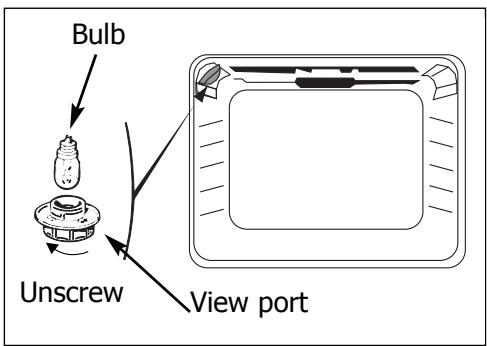
c) Replace the bulb then reposition the view port and reconnect your oven.

To unscrew the view port and the light, use a rubber glove, which will make disassembly easier.
How does your oven work?
1. Close-up of your analog programmer
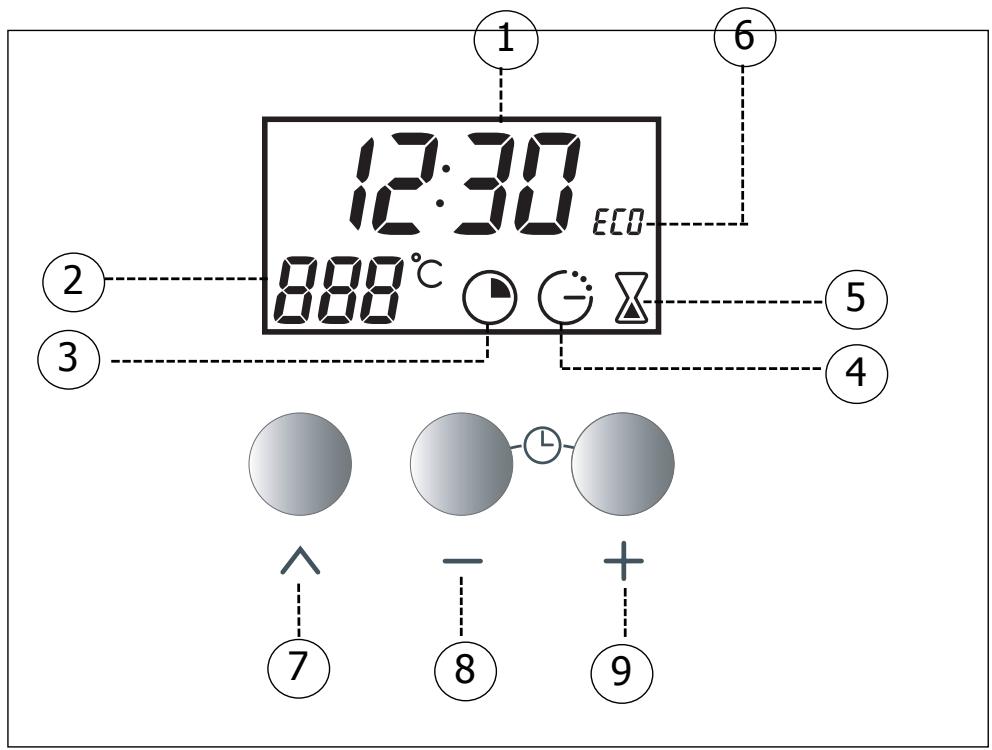
① Display area for clock and cooking times
(2) Digital temperature display
③ Cooking time indicator
(4) End of cooking indicator
⑤ Timer indicator
ECO cooking indicator
Touch controls for accessing various time setting programmes
Touch controls for setting time
How does you
2. How do you set the clock on the oven?
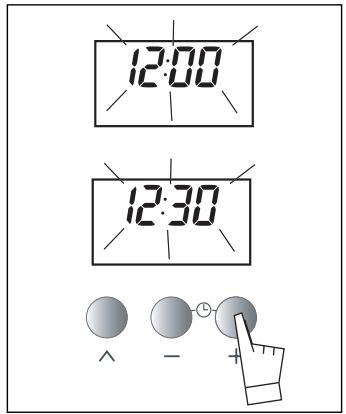
a) When supplied with electricity
- The displays flashes 12:00.
- Set the time by pressing the + or - touch controls (holding your finger on the touch control allows for rapid number advancement)
Example: 12:30.
The set time is recorded automatically after a few seconds.
-
The display is no longer flashing
b) Resetting the clock time
- Simultaneously press the + and - touch controls for a few seconds until the display is flashing.
The time display flashes, indicating that it is now possible to adjust the time.
To set the time, press the + or - touch controls to advance or turn back the displayed time.
- Press the touch control to enter.
The time cannot be set if the oven has been programmed for delayed cooking.
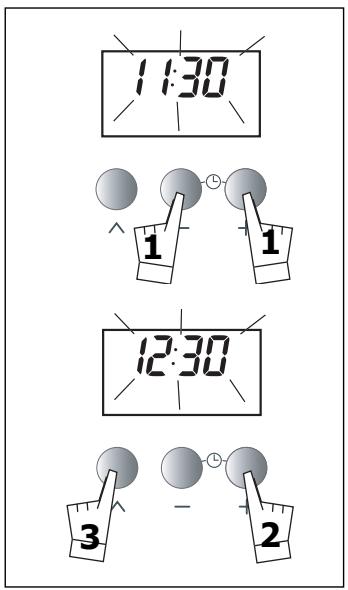
If the touch control is not pressed, the adjustment will be automatically recorded after a few seconds.
rovenwork?
3. How do you program for immediate cooking?
The analog programmer should display only the time; it should not be flashing.
- Choose the cooking mode:
Turn the function selector to the position of your choice.
Example: " " position -> the oven turns on.
Your oven recommends the most commonly used temperature.
Place your dish in the oven based on the recommendations provided by the cookbook.
It is, however, possible to adjust the temperature by turning the "T°C" knob toward + or -.
Example " " set to 210^
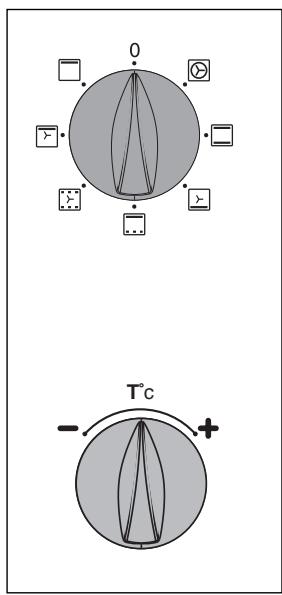
After these steps, the oven heats up and the temperature display (210^) flashes. A series of beeps will be emitted when the oven reaches the selected temperature. The temperature stops flashing.
After a cooking cycle, the circulating fan continues to function for a period in order to cool the oven.
How do you
4. How do you set a cooking programme?
a) With immediate start
- Set the desired cooking mode and adjust the temperature if necessary.
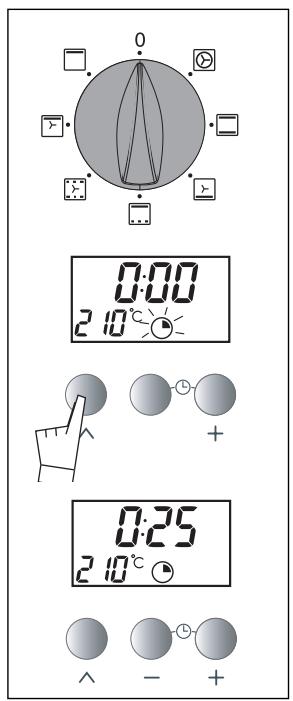
Example: " " position for a temperature of 210^ . - Press the " ^ " touch control until the " " symbol (cooking time) begins flashing.
The display flashes 0:00 to indicate that you can now adjust the setting.
- Press the + or - touch controls to set the desired time.
Example: 25 min cooking time.
The set time is recorded automatically after a few seconds the display stops flashing.
The countdown of the length of time begins immediately after it has been set.
After these three steps, the oven heats up:
A series of beeps will be emitted when the oven reaches the selected temperature and when the cooking time is over.
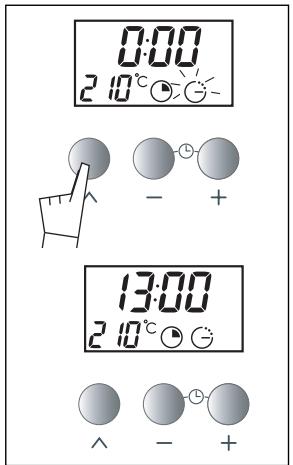
b) How do you set a delayed cooking programme?
(programming the time at which cooking is complete)
Proceed as with programmed cooking.
After setting the cooking time,
Press the " ^ " touch control until the
symbol " 念 " (cooking time) begins flashing).
The display flashes 0:00 to indicate that you can now adjust the setting.
Press the + or - touch control to set the desired end time.
Example: End of cooking at 13:00.
After these steps, the oven heating is delayed so that cooking ends at 13:00.
When the cooking is completed, return the cooking selector to "0".
In the case of pre-programmed cooking the oven cavity is lit until cooking begins and once cooking is finished.
In the case of pre-programmed, fan-assisted cooking, if the
function selector is not reset to 0, the fan continues to operate in order to even out the temperature in the oven.
rovenwork?
5. How do you use the tier?
Your oven is equipped with an electronic timer that is independent of the oven functions, making it possible to measure times.
In this case, the timer display takes priority over the time of day display. Press the " ^ " touch control until the 空 symbol (timer) begins flashing) -> the display and a small hourglass begin flashing.
Press the (+ or -) touch control until the desired length of time is displayed (60 minute maximum)
The display stops flashing after a few seconds and the timer starts working, counting down the time in seconds. Once the time has expired, the timer emits a series of beeps to notify you.
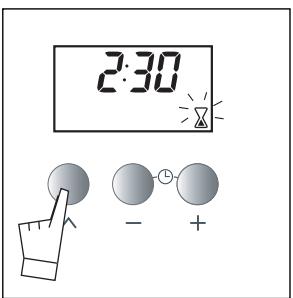

It is possible to change or cancel the timer programme at any time.
6. Oven cooking modes
Symbol Name of cooking mode Description of cooking

Circular heating
Cooking controlled by the heating element located at the back of the oven and by the fan.
cooking dishes that require very short cooking times (e.g. biscuits on several levels).

Traditional
Cooking controlled by the upper and lower heating elements with no fan.
Requires preheating before the dish is placed in the oven.

Bottom element, fan-assisted
Cooking controlled by the bottom element and the fan.
Cooking heat from the bottom.
Place the grid on the lower shelf supp
*

"POULTRY special"
Cooking controlled by the upper element combined with some heat from the bottom element with no fan.
This position allows for energy saving while preserving the quality of poultry cooking.

Hold warm function
Heat regulated by the upper element with use of fan.
Low temperature stabilisation.

Grill, fan-assisted
Cooking controlled, alternately, by the upper element and by the fan.
No need for preheating.
Roasts and poultry that are juicy and crispy all over.

Grill
Cooking controlled by the upper element without the fan.
Preheat the oven for five minutes.
▶ Slide the drip tray onto the bottom shap support.
- Programme(s) used to obtain the results indicated on the energy label in compliance wi
Oven cooking modes
| mode | Recommendations | Recomm. | ||
| en t al | Recommended for preserving tenderness in meats, vegetables and fish and for multiple cooking on up to three levels. | Min. | Recomm. | Max. |
| 35 | 180 | 235 | ||
| s | Recommended for slow, gentle cooking: tender game meat, etc. To sear roasts of red meat To simmer in a covered stew pan dishes that were begun on the hob (coq au vin, stew, etc.). | Min. | Recomm. | Max. |
| 35 | 225 | 275 | ||
| port. | Recommended for moist dishes (quiches, juicy fruit tarts, etc). The crust will be thoroughly cooked on the bottom. Recommended for dishes that rise (cake, buns, bread, etc.) and for soufflés that will not be stuck by a crust formed on the top. | Min. | Recomm. | Max. |
| 35 | 205 | 275 | ||
| s y | Place the poultry on the grid in the first shelf support, preferably in a terra cotta dish. There is no need to preheat the oven. You can turn the poultry halfway through cooking if you wish. | Min. | Recomm. | Max. |
| 35 | 200 | 275 | ||
| Recommended for rising doughs for bread, buns, cakes, etc. without exceeding 40°C (plate warming, defrosting). | Min. | Recomm. | Max. | |
| 35 | 80 | 100 | ||
| Recommended for all poultry or roast. To seal and thoroughly cook leg of lamb, rib roasts. To preserve the texture of fish steaks that melt in your mouth. | Min. | Recomm. | Max. | |
| 180 | 200 | 230 | ||
| elf | Recommended for grilling chops, sausages, toast or prawns placed on the grid. | Min. | Recomm. | Max. |
| 180 | 275 | 275 | ||
ith European standard EN 50304 and in accordance with European Directive 2002/40/CE.
How do you care for your oven?
How do you change the catalytic panels?
Before disassembling the appliance, let it cool off and check that the cooking selector is at the OFF position.
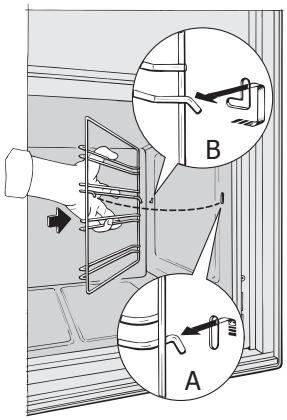
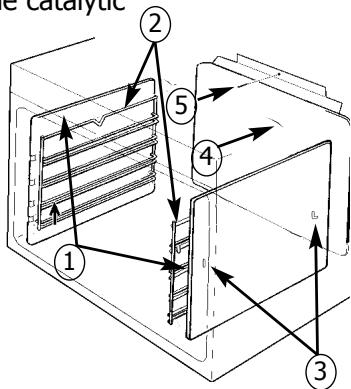
Side panels (1)
Unhook the wire shelf support (2) in front by lifting it (diagram A). Pull the entire shelf support toward you, lift it in order to unhook the rear fastener (diagram B). Remove it from the two holes (3) in the catalytic panels and from the oven cavity. Then remove the catalytic
panel (1). Position the new items (panels and/or cavity) by reversing these steps.
Back panels (4)
Completely unscrew the screw (5) located at the top of the back panel. Tilt the panel toward the front to remove it
from the oven cavity. Position the new panel by reversing these steps.

The oven must be turned off before any attempt to clean the cavity.
Cleaning the cavity
The continuous cleaning oven, is comprised of a cavity equipped with removable panels covered with a special microporous enamel (catalytic surface) that gives it self-degreasing properties. As soon as they appear, soil marks spread out and are widely distributed throughout the micropores. They become oxidized on both sides and gradually disappear. The self-degreasing enamel is first and foremost adapted to fats, but not to sugars. This is why the bottom heating element, which is more subject to sugar spills, is not coated with this enamel.
We strongly recommend that:
-You do not scrub with a metallic brush or sharp or cutting instruments.
- You do not try to clean with commercial scouring products.
- When cooking barbecues, major grease splatters will be projected onto the walls, whose temperature is not always sufficient for them to be completely eliminated during cooking.
In this case, after cooking, continue to heat the oven for 20 to 30 minutes at the maximum temperature setting for the chosen programme.
If there are still spots, they will be eliminated during subsequent cooking programmes.
Drop-down grill
-
To facilitate cleaning of the top of your oven's cavity, the grill can be dropped down.
-
Pull gently toward you to unhook the two clips (on the left and right)
- Lower the grill
After cleaning, return the grill to its position, ensuring that the two clips are fitted into the notches.

Be careful not to damage the temperature probe (metallic rod located on the right).
GB
What to do in case of operating malfunctions?
If you have a doubt about the functioning of your oven, this does not necessarily mean that there is a malfunction. In any event, check the following items:
You observe that...
Possible causes
What should you do?
The oven is not heating.
- The oven is not connected.
- The fuse in your electrical set-up is not working.
The selected temperature -
The thermostat is defective.
-
Connect the oven.
- Replace the fuse in your electrical set-up and check its capacity (16A).
- Increase the selected temperature.
- Call the Post-Sales Service Department.
The temperature indicator stays permanently lit.
Defective sensor.
- Call the Post-Sales Service Department.
The oven light is not working.
The light is out of order.
- The oven is not connected or the fuse is not working.
- Replace the light.
- Connect the oven or replace the fuse.
The cooling fan continues to operate after the oven stops.
- The fan should work for a maximum of one hour after cooking
-
If it does not stop after one hour.
-
Open the oven door to accelerate cooling of the oven.
- Call the Post-Sales Service Department.