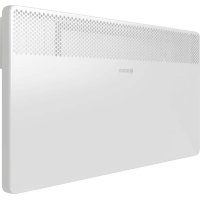
HC400025 - Heating BOSCH - Free user manual and instructions
Find the device manual for free HC400025 BOSCH in PDF.



User questions about HC400025 BOSCH
0 question about this device. Answer the ones you know or ask your own.
Ask a new question about this device
Download the instructions for your Heating in PDF format for free! Find your manual HC400025 - BOSCH and take your electronic device back in hand. On this page are published all the documents necessary for the use of your device. HC400025 by BOSCH.
USER MANUAL HC400025 BOSCH
natural_image
White rectangular panel with a grid of black dots on the left side, no text or symbols visible.[de] 3
[bg] 16
[cs] 29
[el] 42
[en] 55
[es] 68
[fr] 81
[hr-HR, hr-BA] 94
[hu] 107
[it] 120
[nl] 133
[ro] 146
[sl] 159
[sq] 172
[sr-RS, cnr-ME] 184
[tr] 196
Inhaltsverzeichnis
- Heat Convector 4000
- Heat Convector 4000
1 Explanation of symbols and safety instructions. . . .56
1.1 Explanation of symbols....56
1.2 General safety instructions....56
2 Product Information ....58
2.1 Declaration of conformity....58
2.2 Scope of delivery....58
2.3 Definition....58
2.4 Intended use....58
2.5 Product description....59
3 Commissioning....59
4 Operation....59
4.1 Switching the convector on/off ....59
4.2 Operation of the control unit ....59
4.2.1 Switching on the control unit ....59
4.3 Parameter settings and settings....59
4.3.1 Calling up the Parameter settings menu .....59
4.3.2 Calling up the Settings menus ....60
4.3.3 Exiting the Parameter settings menu....60
4.4 Setting the day and time....60
4.5 Operating modes and displays on the control unit....60
4.5.1 Calling up and setting operating modes .... .61
4.5.2 Heating mode operation mode ....61
4.5.3 Operating mode ECO ....61
4.5.4 PROG operating mode....62
4.5.5 Setting (individual) day program P6 ..... 63
4.5.6 Setting 7d week program (individual)....63
4.5.7 TIMER operating mode....64
4.5.8 Frost protection ....64
4.6 Setting the window open function ....64
4.7 Key lock function ....64
4.8 Calibrating the appliance ....65
5 Cleaning and maintenance ....65
6 Environmental protection and disposal....65
7 Data Protection Notice....66
8 Troubleshooting ....66
9 Data....67
9.1 Technical Data....67
9.2 Product data for energy consumption ..... 67
10 Service addresses....67
11 Appendix .....211
1 Explanation of symbols and safety instructions
1.1 Explanation of symbols
Warnings
In warnings, signal words at the beginning of a warning are used to indicate the type and seriousness of the ensuing risk if measures for minimizing danger are not taken.
The following signal words are defined and can be used in this document:

DANGER:
DANGER indicates that severe or life-threatening personal injury will occur.

WARNING:
WARNING indicates that severe to life-threatening personal injury may occur.

CAUTION:
CAUTION indicates that minor to medium personal injury may occur.
NOTICE:
NOTICE indicates that material damage may occur.
Important information

The info symbol indicates important information where there is no risk to people or property.
Additional symbols
| Symbol | Meaning |
| ▶ a step in an action sequence | |
| → a reference to a related part in the document | |
| • a l i s t e | |
| – a list entry (second level) | |
Table 53
1.2 General safety instructions
⚠️ Notices for the target group
These operating instructions are intended for the operator of the product. All instructions must be observed. Non-observance can result in serious personal injury with potentially fatal consequences as well as damage to property and the environment.
▶ Read and retain the operating instructions (heating controller, etc.) prior to operation.
▶ Observe the safety instructions and warnings.
- Carry out cleaning and maintenance at least once a year at the specified intervals. Also check when you do so that the entire system is in proper working order.
▶ Immediately remedy any defects identified.
n t r y
⚠ Safety of electrical appliances for domestic use and similar purposes
The following guidelines apply in accordance with EN 60335-1 and EN 60335-2-30 in order to prevent hazards when using electrical space heaters:
"Children younger than 3 years of age must be kept away from the appliance, unless continuously supervised.
Children between 3 and 8 years of age must only switch the appliance on and off if they are supervised or have been shown how to use the appliance safely and have understood the associated dangers, provided that the appliance is positioned or installed in its normal place of use. Children between 3 and 8 years of age must not insert the plug into the socket, adjust the appliance, clean the appliance and/or not carry out the maintenance by the user.”
"If the power cable is damaged, in order to avoid hazards it must be replaced by the manufacturer or its customer service department or a similarly qualified person."
⚠ Safety of electrical devices for domestic use and similar purposes
The following requirements apply in accordance with EN 60335-1 in order to prevent hazards from occurring when using electrical appliances:
"This appliance can be used by children of 8 years and older, as well as by people with reduced physical, sensory or mental capabilities or lacking in experience and knowledge, if they are supervised and have been given instruction in the safe use of the appliance and understand the resulting dangers. Children shall not play with the appliance. Cleaning and user maintenance must not be performed by children without supervision."
"If the power cable is damaged, it must be replaced by the manufacturer, its customer service department or a similarly qualified person, so that risks are avoided."
⚠️ Installation and use
▶ Do not install the device below a socket or near curtains or other combustible materials.
▶ Do not use the heating near a bathtub, shower or swimming pool.
▶ Do not use the product in small rooms if these are used by persons who are not able leave the room by themselves, unless the room is continuously monitored.
Hot surface
Some parts of this product can become very hot and inflict burns when they come into contact with the skin. Proceed with extreme caution if children and vulnerable adults are present.
⚠️ Risk of overheating, risk of fire
To reduce the risk of fire:
- Maintain a clearance of at least 1 m between the air outlet and textiles, curtains or other combustible materials.
▶ Do not place anything on the convector. Do not cover the convector or climb onto it.
▶ Ensure that the heat transfer from the convector is unhindered.
▶ Only use the product on a horizontal stable surface or fasten it to the wall.
⚠️ Danger to life from electric shock!
Touching a defective product or connecting lead may result in electric shock.
▶ Do not use the product if it has been dropped.
▶ Do not use the product if there are visible signs of damage.
▶ Do not open the product.
▶ Avoid carrying out any interventions.
▶ Stop using the product and disconnect it from the mains power supply.
▶ Please contact Service.
You can find the service addresses in chapter 10, page 67.
-or-
▶ Dispose of the product properly.
2 P r o d u c t l n
These instructions contain important information for the system user regarding safe operation of the Heat Convector 4000.
The convector must only be set up or mounted outside the safety zone (shown in grey → Fig. 3, page 211).
For this:
▶ observe the installation instructions.
2.1 Declaration of conformity
The design and operating characteristics of this product comply with the European and national requirements.
CE The CE marking declares that the product complies with all the applicable EU legislation, which is stipulated by attaching this marking.
The complete text of the Declaration of Conformity is available on the Internet: www.bosch-thermotechnology.com.
2.2 Scope of delivery
▶ Check packaging upon receipt of delivery for damage.
▶ Check the scope of delivery for completeness.
- Heat Convector 4000
- Technical documentation
2.3 Definition
The Heat Convector 4000 is subsequently referred to in this document as "product", "convector" or "appliance".
2.4 Intended use
The convector is intended for heating of living spaces.
▶ Comply with the connection conditions in accordance with the specifications, standards and regulations of the relevant country.
▶ The convector must only be set up or mounted outside the safety zone (shown in grey → Fig. 3, page 211).
Any other purpose is considered improper use. Any damage that results from such use is excluded from liability.
2.5 Product description
The Heat Convector 4000 is a wall mounted or floor standing electric plate space heating convector ( Fig. 1, page 211).
Legend for figure 1, page 211:
[1] Convector
[2] Display
[3] On/Off switch
3 Commissioning
If the appliance is installed or set up in or was previously stored in a much colder environment, it must be allowed to adjust to the room temperature.
▶ Wait half an hour before switching on the appliance.

When the appliance is heating for the first time, it may emit a slightly unpleasant odour (for 2 hours at the most) which is caused by the product residues drying out.
4 O p e r a t i o
▶ Observe safety instructions ( Chapter 1.2, page 56).
4.1 Switching the convector on/off
The convector is switched on and off at the ON/OFF switch ( Fig. 1, [3], page 211).
To switch on the convector:
▶ Set the switch to I.
To switch off the convector:
▶ Set the switch to 0.

Only switch off the convector via the ON/OFF switch if you will not be needing it for a while, e.g. at the end of the heating period.
4.2 Operation of the control unit
The control elements of the control unit are shown in Chapter 4.5, page 60.

The control unit has no date memory. The date and time will be lost if the convector is disconnected from the mains power supply for longer than 5 seconds (by pulling out the plug). The heating programs are retained.
4.2.1 Switching on the control unit
On/Off key
Press the > key (→ Fig. 2, [7], page 211) to switch the control unit on and off with the display.
To switch the control unit on:
▶ Press> button.
To switch the control unit off:
▶ Press the key for longer than 5 seconds.
When the control unit is switched on, the last operation mode used appears in the display with the current settings.
When the display is switched on for the first time, the heating mode operation mode is set. The default setting for the temperature in the heating mode operation mode is 19 °C.

If the display is no longer touched, it goes dark after 5 minutes.
4.3 Parameter settings and settings
4.3.1 Calling up the Parameter settings menu
The appliance settings can be made in the Parameter settings menu.
To call up the Parameter settings menu:
▶ Press the key repeatedly until the indicator light above the pictogram lights up.
no flashes.
▶ Press the or key until go appears.
▶ Press the key to confirm go.
The Parameter settings menu appears on the display.
4.3.2 Calling up the Settings menus
The following settings menus can be called up:
• Day of the week and time (d/HH/MM)
• Day program (P 6)
• W e e k p r o g r a m (7 d)
- Window open function ( ) [ )
To call up the Settings menu:
▶ Call up the Parameter settings menu.
▶ Press the key repeatedly until the indicator light of the required menu lights up.
4.3.3 Exiting the Parameter settings menu
To exit the Parameter settings menu:
▶ Press the key repeatedly until the indicator light above the pictogram lights up. no flashes.
▶ Press the key to confirm no. The appliance is in the heating mode operating mode.
4.5 Operating modes and displays on the control unit

The control unit exits the menu automatically if there has been no activity for 60 seconds in one of the settings menus. The appliance then reverts to the heating mode operating mode.
4.4 Setting the day and time

The day of the week and time must be set before the day program and week program can be set.
To set the day of the week and the time:
▶ Call up the Parameter settings menu (→ Chapter 4.3.1, page 59). The Day of the week and time menu appears on the display. d/1 flashes on the display and the day of the week can be
| Position Operation | mode | Description | ||
| 1 Heating |  | mode | Setting the temperature for the heating mode operating mode. | → Chapter 4.5.2, page 61 |
2 ECO Energ  | ng operating mode. The temperature default setting is 3 °C below the temperature of the heating mode operating mode. | → Chapter 4.5.3, page 61 | ||
3 PROG Char  | er automatically between the heating mode operating mode and ECO operating mode. | → Chapter 4.5.4, page 62→ Chapter 4.5.5, page 63→ Chapter 4.5.6, page 63 | ||
| 4 |  | TIMER | Timer for the time program for switching the appliance on/off. | → Chapter 4.5.7, page 64 |
Table 54 Operating modes at the control unit ( →Fig. 2, page 211)
| Position Symbol Explanation | ||
15 Setting the day and time | The LED above this symbol flashes if the day and time are being set (→ Chapter 4.4, page 60). | |
| 16 7d week program[S75A] | The LED above this symbol flashes if the 7d week program is being set (→ Chapter 4.5.6, page 63). | |
14 Day prog  | The LED above this symbol flashes if the day program P6 is being set (→ Chapter 4.5.5, page 63). | |
5 Open-wind  | This function detects when a window in the room is open due an accompanying sudden drop in temperature. | |
| 6 Adjust |  | Settings can be made via this symbol. |
| 12 Heating |  | The appliance is heating when the LED next to this symbol lights up. |
7/8 Operating mode/Confirm/On  | Press this key to select the operating mode or confirm a setting. Press this key to switch the appliance on when the appliance is switched off. | |
11/10/9 Up/Down/Keylock  | Press these keys to reduce or increase a value (e.g. the temperature). The keylock can be activated via both keys to prevent the settings being changed accidentally. | |
13 Display  | ||
Table 55 Displays ( → Fig. 2, page 211)
4.5.1 Calling up and setting operating modes
To call up one of the operating modes:
▶ Press the key repeatedly until the indicator light below the pictogram of the required operating mode lights up. The last temperature set in this operating mode appears on the display.
To change the temperature of the operating mode:
▶ Press the on key until the required temperature is set. The set temperature is saved automatically if the key is not pressed for 5 seconds. The room temperature appears on the display.
4.5.2 Heating mode operation mode
The control unit keeps the convector at the set temperature.
The temperature can be set from 7^ C and 12^ C up to 28^ C.
The default setting is 19°C.
To call up and set the heating mode operating mode:
▶ Proceed as described in Chapter 4.5.1, page 61.

If the temperature for the heating mode operating mode is lower than the ECO operating mode temperature, the temperature setting for the ECO operating mode is automatically reduced to 1 °C below the temperature of the heating mode operating mode.
4.5.3 Operating mode ECO
The temperature default setting for the ECO operating mode is 3 °C below the temperature of the heating mode operating mode.
The temperature can be set from 6 °C to 1 °C below the temperature of the current operating mode.
To call up and set the ECO operating mode:
▶ Proceed as described in Chapter 4.5.1, page 61.

We recommend setting the ECO operating mode during the night or if the room is not going to be used for more than 2 hours.
4.5.4 PROG operating mode
To call up and set the PROG operating mode:
▶ Proceed as described in Chapter 4.5.1, page 61.

The temperatures set under 4.5.2 and 4.5.3 apply for the PROG operating mode. The day and week program controls which operating mode is active and when.
There are 5 predefined day programs (P1...P5). One other day program (P6) can be adjusted individually ( Chapter 4.5.5, page 63). The week program (7d) is comprised of these programs. The week program can be adjusted individually ( Chapter 4.5.6, page 63).
Predefined day programs P1 up to P5
The heating phases of the predefined programs are shown in the following tables.
The programs (P1...P5) cannot be changed.

In the following tables, a black square represents the heating mode operation mode and an empty cell represents the ECO operating mode.
| Duration | 00 | 01 | 02 | 03 | 04 | 05 | 06 | 07 | 08 | 09 | 10 | 11 | 12 | 13 | 14 | 15 | 16 | 17 | 18 | 19 | 20 | 21 | 22 | 23 |
| Operation mode | ■ | ■ | ■ | ■ | ■ | ■ |
Table 56 Program P1
P1 is the recommended predefined program for daytime absence (operating mode ECO:22:00...06:00 Clock and
08:00...18:00 Clock; heating mode operating mode: 06:00...08:00 Clock and 18:00...22:00 o'clock).
| Duration 00 | 01 | 02 | 03 | 04 | 05 | 06 | 07 | 08 | 09 | 10 | 11 | 12 | 13 | 14 | 15 | 16 | 17 | 18 | 19 | 20 | 21 | 22 | 23 | ||||||||
| Operation mode | ■ | ■ | ■ | ■ | ■ | ■ | ■ | ■ |
Table 57 Program P2
P2 is the recommended predefined program for midday absence during the day (operating mode ECO:22:00...06:00 o'clock, 08:00...12:00 Clock and 14:00...18:00; heating mode operating mode:
06:00...08:00 o'clock, 12:00...14:00 Clock and 18:00...22:00 o'clock).
| Duration | 00 | 01 | 02 | 03 | 04 | 05 | 06 | 07 | 08 | 09 | 10 | 11 | 12 | 13 | 14 | 15 | 16 | 17 | 18 | 19 | 20 | 21 | 22 | 23 |
| Operation mode | ■ | ■ | ■ | ■ | ■ | ■ | ■ | ■ | ■ | ■ | ■ | ■ | ■ | ■ |
Table 58 Program P3
P3 is the predefined program which is recommended for continuous absence, on Saturday or Sunday for example
(operating mode ECO:22:00...08:00 Clock; heating mode operating mode: 08:00...22:00 o'clock).
| Duration 00 | 01 | 02 | 03 | 04 | 05 | 06 | 07 | 08 | 09 | 10 | 11 | 12 | 13 | 14 | 15 | 16 | 17 | 18 | 19 | 20 | 21 | 22 | 23 | |||||||||
| Operation mode |
Table 59 Program P4
P4 is the recommended predefined program for continuous operation in the heating mode operating mode.
Operation
mode
Table 60 Program P5
P5 is the recommended predefined program for continuous operation in the ECO operating mode.
4.5.5 Setting (individual) day program P6
If the week day and time were previously set, the day program P6 has already been selected and the first two action steps can be omitted.
To set the day program P6:
▶ Call up the parameter settings menu ( Chapter 4.3.1, page 59).
▶ Call up the day program settings menu (P6)
(→ Chapter 4.3.2, page 60).
P6/no flashes on the display.
▶ Press the or key until P6/go appears.
▶ Press the key to confirm P6/go.
00/Ec flashes on the display.
00 stands for the hours and Ec stands for the operating mode ECO.
Operation
mode
Table 61 Program P6 (can be adjusted individually)
P6 has the predefined settings of program P1 (operating mode ECO:22:00...06:00 Clock and 08:00...18:00 Clock; heating mode operating mode: 06:00...08:00 Clock and 18:00...22:00 o'clock).
4.5.6 Setting 7d week program (individual)
If the day program P6 was previously set, the 7d week program is already selected and the first two action steps can be omitted.
To set the 7d week program:
▶ Call up the parameter settings menu ( Chapter 4.3, page 59).
▶ Call up the settings menu for the 7d week program ( Chapter 4.3.2, page 60).
7d/no flashes on the display.
▶ Press the or key until 7d/go appears.
▶ Press the key to confirm 7d/go.
d1/P1 flashes on the display.
d1 stands for the day of the week and P1 stands for the program that has been preset for this day.
▶ Press the or key to change the program from P1 to P6.
▶ Press the or key to change the Ec (ECO) operating mode to Co (heating mode).
▶ Press the key to confirm the set operating mode for the hour displayed.
01/Ec flashes on the display.
▶ Repeat the operation for every hour from 0 to 23.
After the last hour has been set (23), P6/no flashes on the display.
▶ Press the key to confirm the day program P6. The week program (7d) appears on the display.
The table shows the predefined settings of the day program P6.
▶ Press the key to confirm the program that has been set for the day of the week shown.
d2/P1 flashes on the display.
▶ Repeat procedure for every day of the week from d1 to d7. After the last day has been set (d7), 7d/no flashes on the display.
▶ Press the key to confirm the 7d week program. The Window open function appears on the display.
The table shows the predefined settings of the 7d week program. A day program (P1 to P6) can be assigned to each day of the week.
P r o g r a m P 1 P 1 P
Table 62 7d week program (can be adjusted individually)
4.5.7 TIMER operating mode
The set program can be changed (overwritten) for up to 8 hours in the Timer operating mode. Once the timer time has expired, the convector reverts to the set program.
The default setting is 1 hour.
The timer can be changed within a range of 1 to 8 hours (in 1-hour increments).
To call up the TIMER operating mode:
▶ Press the key repeatedly until the indicator light below the pictogram lights up. The time that is currently set after which the appliance is switched off appears on the display.
To change the time setting in the TIMER operating mode:
▶ Press the on key until the required time is set (range of 1...8 hours). The set temperature is saved automatically if the key is not pressed for 5 seconds. The room temperature appears on the display.
To exist the TIMER operating mode:
- Press> button. Timer is stopped. The Parameter settings menu appears on the display. - Please note: if the PROG operating mode is selected, the temperature is up to 6 °C lower (default setting 3 °C). This applies at the times where the ECO operating mode is active (→Chapter 4.5.3, page 61).
4.5.8 Frost protection
The frost protection operating mode can also be set via the heating mode operating mode.
To set the frost protection:
▶ Set the temperature of the heating mode operating mode to 7 °C. The convector is activated if the room temperature falls below 7 °C. If the set program changes to the operating mode ECO, the set frost threshold temperature falls to 6 °C.
Please note:
if the PROG operating mode is selected, the temperature falls at the times in which the ECO operating mode is active by up to 6 °C (default setting 3 °C) (→ Chapter 4.5.3, page 61).

We recommend setting this operating mode if the room is not going to be used for several days.
4.6 Setting the window open function
If the 7d week program was previously set, the window open function is already selected and the first two action steps can be omitted.
To activate the window open function:
- Call up the parameter settings menu (→ Chapter 4.3.1, page 59). - Call up the settings menu for the 7d week program (→ Chapter 4.3.2, page 60). [ /oF flashes on the display.
▶ Press the or key until [/on appears.
▶ Press the key to confirm ][/on. The window open function is activated. The Parameter settings menu appears on the display.
If the appliance detects an open window in the room in which it is installed, the appliance stops the heating mode and ][flashes on the display.
To continue the heating mode:
- Press the or key until [/go appears. - Press the key to confirm [/go. The appliance reverts to heating mode. The room temperature appears on the display.

The appliance cannot detect an open window in some cases (e.g. if the appliance is in an isolated draught-free part of the room, if it is near a heat source or if the temperature fluctuation in the room is insufficient).
4.7 Key lock function
To avoid accidental changes to the settings, the control unit can be locked.
To lock the control unit:
▶ Hold the and keys pressed for longer than 5 seconds. The keylock is activated. Only the room temperature appears on the display.
To unlock the control unit:
▶ Hold the and keys pressed for longer than 5 seconds. The control unit is unlocked.
4.8 Calibrating the appliance
The appliance can be calibrated in order to adapt the temperature shown on the display to the actual room temperature.
To calibrate the appliance:
▶ Measure the room temperature and compare it to the temperature displayed at the control unit.
▶ Press and hold the , and keys at the same time.
The actual correction value appears on the display (default setting 0.0 °C).
▶ Press the or key to adjust the displayed temperature with the correction value of -3^ to +3^ .
To end the calibration:
▶ Press and hold the , and keys at the same time. The appliance reverts to the current operating mode.

If a key is not pressed for 5 seconds or more, the appliance automatically exits calibration mode.
5 Cleaning and maintenance
No intervention whatsoever is permitted in the product.
▶ Do not use abrasive or caustic cleaning agents.
▶ Before cleaning the appliance, disconnect it from the power supply and allow it to dry before reconnecting.
▶ Do not place the connecting lead on the heated convector.
▶ Prevent ingress of water into the electrical components.
▶ Clean the air inlet and outlet grille every six months with a vacuum cleaner or a brush to remove dust and dirt.
6 Environmental protection and disposal
Environmental protection is a fundamental corporate strategy of the Bosch Group.
The quality of our products, their economy and environmental safety are all of equal importance to us and all environmental protection legislation and regulations are strictly observed.
We use the best possible technology and materials for protecting the environment taking account of economic considerations.
Packaging
Where packaging is concerned, we participate in country-specific recycling processes that ensure optimum recycling. All of our packaging materials are environmentally compatible and can be recycled.
Old electrical and electronic appliances
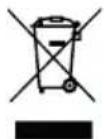
This symbol means that the product must not be disposed of with other waste, and instead must be taken to the waste collection points for treatment, collection, recycling and disposal.
The symbol is valid in countries where waste electrical and electronic equipment regulations apply, e.g. "European Directive 2012/19/EC on old electronic and electrical appliances". These regulations define the framework for the return and recycling of old electronic appliances that apply in each country.
As electronic devices may contain hazardous substances, it needs to be recycled responsibly in order to minimize any potential harm to the environment and human health. Furthermore, recycling of electronic scrap helps preserve natural resources.
For additional information on the environmentally compatible disposal of old electrical and electronic appliances, please contact the relevant local authorities, your household waste disposal service or the retailer where you purchased the product.
You can find more information here: www.weee.bosch-thermotechnology.com/
7 Data Protection Notice

We, Bosch Thermotechnology Ltd., Cotswold Way, Warndon, Worcester WR4 9SW, United Kingdom process product and installation information, technical and connection data, communication data,
product registration and client history data to provide product functionality (art. 6 (1) sentence 1 (b) GDPR), to fulfil our duty of product surveillance and for product safety and security reasons (art. 6 (1) sentence 1 (f) GDPR), to safeguard our rights in connection with warranty and product registration questions (art. 6 (1) sentence 1 (f) GDPR) and to analyze the distribution of our products and to provide individualized information and offers related to the product (art. 6 (1) sentence 1 (f) GDPR). To provide services such as sales and marketing services, contract management, payment handling, programming, data hosting and hotline services we can commission and transfer data to external service providers
and/or Bosch affiliated enterprises. In some cases, but only if appropriate data protection is ensured, personal data might be transferred to recipients located outside of the European Economic Area. Further information are provided on request. You can contact our Data Protection Officer under: Data Protection Officer, Information Security and Privacy (C/ISP), Robert Bosch GmbH, Postfach 30 02 20, 70442 Stuttgart, GERMANY.
You have the right to object, on grounds relating to your particular situation or where personal data are processed for direct marketing purposes, at any time to processing of your personal data which is based on art. 6 (1) sentence 1 (f) GDPR. To exercise your rights, please contact us via privacy.ttgb@bosch.com To find further information, please follow the QR-Code.
8 T r o u b l e s h o o t i n g
| Error Causes Remedy | ||
| The appliance heats continuously. | The appliance is continuously exposed to draughts. | ▸ Close doors and windows. |
| The selected appliance output does not match the size of the room. The convector is sized too small. | ▸ Check whether the selected output is suitable for the size of the room ( 50 W/ m^3 ). | |
| The surface of the convector is very hot. | The selected appliance output does not match the size of the room. | ▸ Check whether the selected output is suitable for the size of the room ( 50 W/ m^3 ). |
Table 63 Faults, possible causes and remedies
9 D a t a
9.1 Technical Data
| Unit Heat ConvectorHC4000-5...-25 | ||
| Operating voltage V 230 V AC | ±10%50Hz | |
| Rated output of the convector(→Fig. 1, [1], page 211) | W 500, 1000, 1500,2000, 2500 | |
| IP rating/protection class IP 24/II | ||
| Connection cable – 1.3 m, plug version: | CEE7/17 | |
| Temperature setting range | °C 7; 12...28 | |
| Installation position | – | Horizontal on the wall. With mounted feet standing vertically on the floor. |
Table 64 Specifications for HC4000-5...-25
9.2 Product data for energy consumption
The following product data satisfy the requirements of the EU Regulation No. 2015/1188 supplementing Directive 2014/30/EU.
| Product data | Symbol | Unit | Heat Convector HC4000-5...-25 |
| Heat output | |||
| Specified heat output | P_rated | kW 0.5; 1.0; 1.5; 2.0; 2.5 | |
| Minimum heat output (indicative) | P_min | KW | 0.0 |
| Maximum continuous output | P_max, c | KW | 2.5 |
| Product data | Symbol | Unit | Heat Convector HC4000-5...-25 |
| Auxiliary electricity consumption | |||
| For rated heat output | e_lmax | KW | 0.000 |
| At minimum heat output el | min | KW | 0.000 |
| In standby mode | e_sb | kW | 0.000 |
| Type of heat transfer/room temperature-dependent control | |||
| Electronic room temperature-dependent control with week timer | - | -Yes | |
| Other control options | |||
| Room temperature-dependent control with presence detection | - | - | No |
| Room temperature-dependent control with open-window detection function | - | - | Yes |
| Room temperature-dependent control with remote control option | - | - | No |
| Room temperature-dependent control with adaptive control of heating start | - | - | Yes |
| Room temperature-dependent control with operating time limit | - | - | Yes (timer) |
| Room temperature-dependent control with black ball sensor | - | - | No |
Table 65 Product data for energy consumption
10 Service addresses
You can find the service address for this product by scanning the QR code below.

Índice
[1] Convector
[2] Pantalla
[3] Interruptor ON/OFF
Para conectar el convector:
▶ Colocar el interruptor en I.
Para desconectar el convector:
▶ Colocar el interruptor en 0.

- Heat Convector 4000
- M ü sz a k i d o k u m e n t á c i
▶ Vermijd elke ingreep.
- Heat Convector 4000
- Weekprogramma (7d)
- Heat Convector 4000
- Heat Convector 4000
• Program iditor (P 6
• Program mijavor (7 d
- Funksioni i dritares së hapur ( ) [ )
D-73249 Wernau / Germany