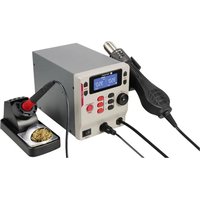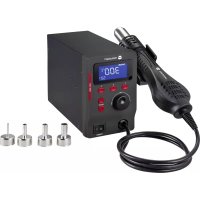
LSH880 - Welding machine Toolcraft - Free user manual and instructions
Find the device manual for free LSH880 Toolcraft in PDF.
Questions des utilisateurs sur LSH880 Toolcraft
0 question sur cet appareil. Repondez a celles que vous connaissez ou posez la votre.
Poser une nouvelle question sur cet appareil
Download the instructions for your Welding machine in PDF format for free! Find your manual LSH880 - Toolcraft and take your electronic device back in hand. On this page are published all the documents necessary for the use of your device. LSH880 by Toolcraft.
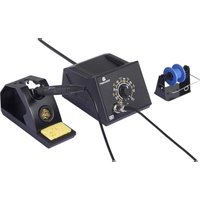
USER MANUAL LSH880 Toolcraft
Dear customer, Thank you for purchasing this product. This product complies with the statutory national and European requirements. To maintain this status and to ensure safe operation, you as the user must observe these operating instructions! These operating instructions are part of this product. They contain important notes on commissioning and handling. Also consider this if you pass on the product to any third party. Therefore, retain these operating instructions for reference! If there are any technical questions, please contact: www.conrad.com/contact
2. Explanation of symbols
The symbol with the lightning in the triangle is used if there is a risk to your health, e.g. due to an electric shock. The symbol with the exclamation mark in the triangle is used to indicate important information in these operating instructions. Always read this information carefully. The product must only be used in dry, indoor locations. It must not become damp or wet as this may cause a fatal electric shock! The arrow symbol indicates special information and advice on operation.23
This product is intended to be used as a hot air gun for desoldering surface-mounted electronic components. It is intended for indoor use only. Do not use it outdoors. Contact with moisture, e.g. in bathrooms, must be avoided under all circumstances. For safety and approval purposes, you must not rebuild and/or modify this product. If you use the product for purposes other than those described above, the product may be damaged. In addition, improper use can result in short circuits, res,electricshocksorotherhazards.Readtheinstructionscarefullyandstoretheminasafeplace.Makethisprod- uct available to third parties only together with its operating instructions. All company names and product names are trademarks of their respective owners. All rights reserved.
- Hot air gun holder - Mounting plate - 4x holder mounting screws - 2x station mounting screws
- Operating instructions
5. Up-to-date operating instructions
Download the latest operating instructions at www.conrad.com/downloadsorscantheQRcodeshown.Followthe instructions on the website.
6. Features and functions
- 4 nozzles in different sizes
Read the operating instructions carefully and especially observe the safety information. If you do not follow the safety instructions and information on proper handling in this manual, we assume no liability for any resulting personal injury or damage to property. Such cases will invalidate the warranty/guarantee.
- The appliance can be used by children aged from 8 years and above and persons with impaired physical, sensory or mental capabilities or lack of experience and/or lack of knowledge if they are under super- vision or have been given instruction concerning the use if the appli- ance in a safe way, and understand the hazards involved.
- Do not allow children or unauthorized persons to stay in the work area.
- Do not allow other people to touch the device or hot parts.
- Cleaning and user maintenance shall not be made by children without supervision.
- The hot air gun must be placed in the designated holder when not in use.
- As power supply, only use the supplied mains cable.
- Aremayresultiftheapplianceisnotusedwithcare,therefore: -do not apply heat to the same place for a long time. -do not use the workstation in conditions where combustible materials suchasammablegases,vapours,ordustareormaybepresent! This may cause an explosion! -heat may be conducted to combustible materials which are out of sight. -place in respective stand when not in use and allow to cool before storage. -do not leave the appliance unattended when not in use. a) Personal safety
- Wear suitable protective clothing and safety goggles. Splashing “spitting” melted parts may cause seri- ous burns or eye damage.
- The device is not a toy. Keep it out of the reach of children and pets.
- Do not leave packaging material lying around carelessly. This may become dangerous playing material for children.
- Protect the appliance from extreme temperatures, direct sunlight, strong jolts, high humidity, moisture, ammablegases,steamandsolvents.
- Do not place the product under any mechanical stress.
- If it is no longer possible to operate the product safely, take it out of operation and protect it from any accidental use. Safe operation can no longer be guaranteed if the product: - is visibly damaged, - is no longer working properly, - has been stored for extended periods in poor ambient conditions or - has been subjected to any serious transport-related stresses.
- Please handle the product carefully. Jolts, impacts or a fall even from a low height can damage the product.
- Consult an expert when in doubt about the operation, safety or connection of the appliance.
- Maintenance,modicationsandrepairsmustonlybecompletedbyatechnicianoranauthorisedrepair centre.
- If you have questions which remain unanswered by these operating instructions, contact our technical support service or other technical personnel.
- In schools, educational facilities, hobby and DIY workshops, the product must be operated under the supervisionofqualiedpersonnel.Alwayscomplywiththeaccidentpreventionregulationsforelectrical equipment when using the product in commercial facilities. c) Location
- Do not place the workstation on valuable furniture without using suitable protection, as this may result in scratch marks, pressure points, discolouration or burn marks.
- Donotusetheproductintheimmediatevicinityofstrongmagnetic/electromagneticelds,transmitter aerials or HF generators. These may affect the electronic control system.
- Make sure that there is enough space in the direction from which the hot air nozzle discharges hot air. Thehotairmaycauseareifthereisnotenoughspace!
- Ensurethatthereissufcientlighting.
- Keep your work area clean and tidy.26 d) Electrical safety
- The product is built according to protection class I. It must be powered by a standard earthed mains socket.
- The mains socket that you use to connect the power cable must be easily accessible.
- Beforeconnectingtheproduct,makesurethatthemainsvoltageinyourregionmeetsthespecications on the name plate. Only connect the product to the mains socket when it is switched off.
- Do not pull the mains plug from the mains socket by pulling on the cable.
- Do not touch the mains cable or the workstation if there are any signs of damage, as this may cause a fatal electric shock!
- Ifthemainscableisdamaged,itmustbereplacedbyanewmainscablewiththesamespecications. Stop using the damaged mains cable and dispose of it in an environmentally friendly manner. Do not attempt to repair the damaged mains cable.
- Never use the product immediately after it has been brought from a cold room into a warm one. This may generate condensation, which can cause the product to malfunction or damage the interior components. Moisture on the workstation, mains cable may also cause a fatal electric shock!
- Never work on live electrical components or parts. Always disconnect these components from the power supply beforehand.
- CAUTION! If liquid does enter the workstation, switch off the mains voltage to the socket containing the mains plug (switchoffatthecorrespondingcircuitbreakerorremovethesafetyfuseandthenswitchoffatthecor- respondingRCDprotectiveswitch).Youcanthenunplugthepowercablefromthemainssocket. Discontinue use immediately and take the product to a specialist repair shop, or dispose of it in an envi- ronmentally friendly manner. e) Connected devices
- Make sure any tips connected to the air gun are correctly attached and cannot become loose during use. f) Risk of burns
- Never use the workstation to heat up liquids or gases.
- Do not attempt to remove a tip from the airgun when it is hot. g) Fuse
a) Workstation and air gun
A LockedB Set valueC REAL: actual temperature D SET: SettingsE Actual temperature valueF Heating power G Temperature unitH Airowpercentage
9. Connection and setup
a) Assemble the hot air gun holder The hot air gun holder must be attached to the main unit before use.Left side Right side• The holder can be mounted to the left or right side of the main unit:
- Use4xscrews(included)toattachthemountingplatetothehotairgunholderasshown.
- Use2xscrews(included)toattachthemountingplatetotheleftorrightsideofthemainunit.
- Before connecting to the power supply, check the attachment is secure by placing the hot air gun into the holder. b) Power supply The power switch must be in the OFF position, and the mains cable should not be connected to the power supply.
- Make sure the main power switch is in the O(OFF) position.
- Connect one end of the power cable into the power socket on the rear of the main unit and the other end to a mains power supply.29
Touchingorsolderingcapacitors(orsimilarcomponents)orleads/cablesthatareconnectedtocapacitors may cause a fatal electric shock! Capacitors may stay charged for several hours after you switch off the power supply! Note
- The hot air gun is equipped with a magnetic safety switch and will not operate when placed in the holder. Removeitfromtheholdertobeginuse.
- If the workstation does not function correctly, try placing the handle back onto the holder then removing it again.
- Ifthehotairgunisplacedintheholderafteruse,non-heatedairwillowthroughuntilithasbeencooledto <100 °C. Allow this cooling to take place before switching the main power off. a) Main power ON/OFF Usethemainpowerswitchtoswitchthepower(I: ON / O: OFF). b) Temperature quick adjust Press the TEMP▲/▼buttonstoadjustthetemperature. Press and hold to quick adjust. c) Airow rate adjust Adjust the AIR - / + dial to adjust the airflow rate. d) Attach / remove nozzle tips Riskofburns!Allowthehotairguntocompletelycoolbeforeattemptingtoattachorremoveanytipsfrom the nozzle!
- Insert the selected tip over the hot air gun nozzle, making sure it is securely attached.
- Removethetipbypullingitawayfromthenozzle. Tighten or loosen the bolt on the tip if needed.30 e) Temperature / airow short cut1Default shortcutsShortcut key Setting DescriptionMemory 1 Unheated air / 50 % Coolair“CL”/airowpercentageMemory 2 300 °C / 50 % Temperature/airowpercentageMemory 3 400 °C / 50 % Temperature/airowpercentage2Recall shortcuts: Press a shortcut button 1, 2, or 3, for quick access to settings. 3Saving shortcuts:• Adjust the temperature by pressing the TEMP▲/▼buttons.
- Adjust the airflow rate using the AIR - / + dial.
- Press and hold a shortcut button 1, 2, or, 3 for more than 2 seconds. The display will blink to indicate the shortcut has been saved. f) Display screen statusThe following are examples of various display screens you may encounter while using the product.Display Description
Normal working• The set temperature is 300 °C.• The temperature is locked• Airowrateis50% C - L
- C - L shows when the temperature is set <100 °C.31 Display Description
REAL Timer function• In this example a timer has been set for 20 seconds.• The air gun will stop heating after 20 seconds then blow non-heated air until it has been cooled to <100 °C.Standby• In this state you can adjust settings without activating the air gun.• The air gun will enter standby when the temperature drops <100 °C.• The air gun will start working after removing the handle from the holder. o f f Auto-sleep• The workstation will enter sleep mode after 30 minutes in standby mode.• Press any button to resume use.
11. Adjusting settings
a) Navigating the settings menuButton Description1 Up 2 Save value and exit settings menu3 Down▲ Increase value▼ Decrease valueTo enter the settings menu:
1. Press and hold buttons 1 and 3 at the same time for more than 3 seconds.
Ifapasscodehasbeenset,“PSd”willshowonthedisplay.Youmustrstenterthepasscodetoaccessthe settings menu. For further information, see section “g) Setting a passcode “PSd”” on page 33.2. Press shortcut key 1 or 3 to navigate the settings menu.3. Press TEMP▲or▼toadjustvalues.4. Press shortcut key 2 to save settings and exit the settings menu.32 b) Set a shut off timer “Ht” Note
- If the set time is too low, heating will stop as soon as the timer reaches working temperature. Experiment with different values to get the best results.
- Theairgunwillstopheatingafterthesettime.Non-heatedairwillowthroughuntilithasbeencooledto <100 °C.
- Put the handle on the holder and then remove it again to resume use after the timer has run down.
1. Enter the settings menu and navigate to “Ht”.
2. Choose a timer setting: “OFF”, 10 - 900 seconds.
3. Save the setting and exit.
2. Enter the settings menu and navigate to “Loc”.
3. Choose a setting of “on” or “off”.
4. Save the setting and exit. A lock icon willshowtoindicatethetemperature/airowison.
d) Setting the temperature unit “C-F”
1. Enter the settings menu and navigate to “C - F”.
2. Select a unit of temperature °C or °F.
3. Save the setting and exit.33
e) Calibrating the temperature “CAL” For maximum temperature accuracy, you should perform a calibration. This offsets the displayed temperature to match the actual temperature.
1. Set a working temperature on the workstation.
2. Aftertheairowhasreachedthesettemperature,useasuitablethermometertorecordtheactualtemperature.
3. Note any difference between the actual temperature and the temperature shown on the workstation.
4. Enter the settings menu and navigate to “CAL”.
5. Selectanincrement[-50to+50°C(-90to+90°F)]tooffsetthetemperature
by. For example. If the hot air is 305 °C and the workstation shows 300 °C, you should set a value of -05 °C.
6. Save the setting and exit.
f) Enabling and disabling system sounds “bL”
1. Enter the settings menu and navigate to “bL”.
2. Choose a setting of “on” or “off”.
3. Save the setting and exit.
g) Setting a passcode “PSd” Note
- A passcode only resticts access to the settings menu, all other functions will operate as usual.
- If you forget the passcode, enter the recovery code “906” and then set a new passcode. To set a passcode:
1. Enter the settings menu and navigate to “Psd”.
2. Press TEMP▲or▼toadjustvalues.
- Chose a number between 001 and 999. - Disable the passcode by setting the value to “- - -”.
3. Save the setting and exit.34
h) Restore factory default settings “FAC” To restore all settings to factory defaults:
1. Enter the settings menu and navigate to “FAC.
2. Choose the “on” setting.
3. Save the setting and exit.
Error Possible cause Suggestion There is no temperature reading. Please contact technical support service or other technical personnel. The maximum temperature was exceeded.
- Reducethetemperaturesetting.
- Switch the main power OFF, wait 20 min- utes then turn back ON.
- If still receive the error code, please contact technical support service or other technical personnel. No power to the worksta- tion. Power cable is not connected Make sure it is plugged in correctly. The fuse has blown Checkthefuse.See“13.Replacingthefuse” on page 35.35
13. Replacing the fuse
Allow the hot air gun and soldering iron to cool down completely, then switch the main power switch OFF and disconnect the power cord from the socket.
1. Removethecoveroverthefuseholderlocatedatthebackofthemainunit.
2. Useabluntobjectsuchasaatheadscrewdrivertogentlyprythefuseout.
3. Performacontinuitytestonthefuse,e.g.withanappropriatemeter(digitalmultimeter).
4. If the fuse is defective, replace it with a new fuse of the same type. See section “Technical data” for information
about the fuse type. Neveruseafusewithotherspecications.Neverbridgeadefectivefuse!Thismaycauseareorafatal electric shock!
5. Insert a replacement fuse until it clicks into place, then replace the protective cover.
6. Connect the workstation to the mains and switch it back on.
If the fuse blows again, disconnect the workstation from the mains and ask a technician to conduct a thor- ough inspection.
14. Care and cleaning
Do not use any aggressive cleaning agents, rubbing alcohol or other chemical solutions as they can cause damage to the housing and malfunctioning.
- The main unit and hot air gun are generally maintenance free. Disconnect the product from the mains, and allow all parts to cool down completely before each cleaning.
This symbol must appear on any electrical and electronic equipment placed on the EU market. This symbol indicates that this device should not be disposed of as unsorted municipal waste at the end of its service life. Owners of WEEE shall dispose of it separately from unsorted municipal waste. Spent batteries and ac- cumulators, which are not enclosed by the WEEE, as well as lamps that can be removed from the WEEE in a non-destructive manner, must be removed by end users from the WEEE in a non-destructive manner before it is handed over to a collection point. Distributors of electrical and electronic equipment are legally obliged to provide free takeback of waste. Conrad pro- vides the following return options free of charge(moredetailsonourwebsite):
- at the Conrad collection points
- at the collection points of public waste management authorities or the collection points set up by manufacturers or distributors within the meaning of the ElektroG End users are responsible for deleting personal data from the WEEE to be disposed of. It should be noted that differ- ent obligations about the return or recycling of WEEE may apply
EasyManual