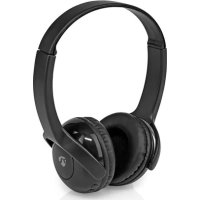
HPBT4000BK - Headphones NEDIS - Free user manual and instructions
Find the device manual for free HPBT4000BK NEDIS in PDF.


| Product type | Over-ear headphones for children |
| Brand | Nedis |
| Model | HPBT4000BK |
| Connectivity | Bluetooth |
| Bluetooth version | 5.0 |
| Charging port | USB Type-C |
| Wired audio input | 3.5 mm jack |
| Microphone | Built-in |
| Limited volume | Yes (designed for children) |
| Voice assistant | Siri / Google Assistant |
| Music control | Volume buttons, next/previous track |
| Call management | Answer, reject, hang up |
| Battery type | Built-in rechargeable lithium-ion |
| Battery life | Approximately 15 hours (estimated) |
| Charging time | Approximately 2 hours (estimated) |
| Weight | Approximately 150 g |
| Dimensions | Approximately 17 x 15 x 5 cm |
| Color | Black |
| Intended use | Indoors only |
| Recommended age | From 3 years old |
| Safety | Avoid prolonged high volume; do not use in traffic |
| Maintenance | Clean with a soft, dry cloth |
| Package contents | Headphone, USB-C cable, quick start guide |
| Repairability | Non-removable battery, repair by qualified technician |
Frequently Asked Questions - HPBT4000BK NEDIS
User questions about HPBT4000BK NEDIS
0 question about this device. Answer the ones you know or ask your own.
Ask a new question about this device
Download the instructions for your Headphones in PDF format for free! Find your manual HPBT4000BK - NEDIS and take your electronic device back in hand. On this page are published all the documents necessary for the use of your device. HPBT4000BK by NEDIS.
USER MANUAL HPBT4000BK NEDIS
On-ear Children Headphones with limited volume
HPBT4000BK
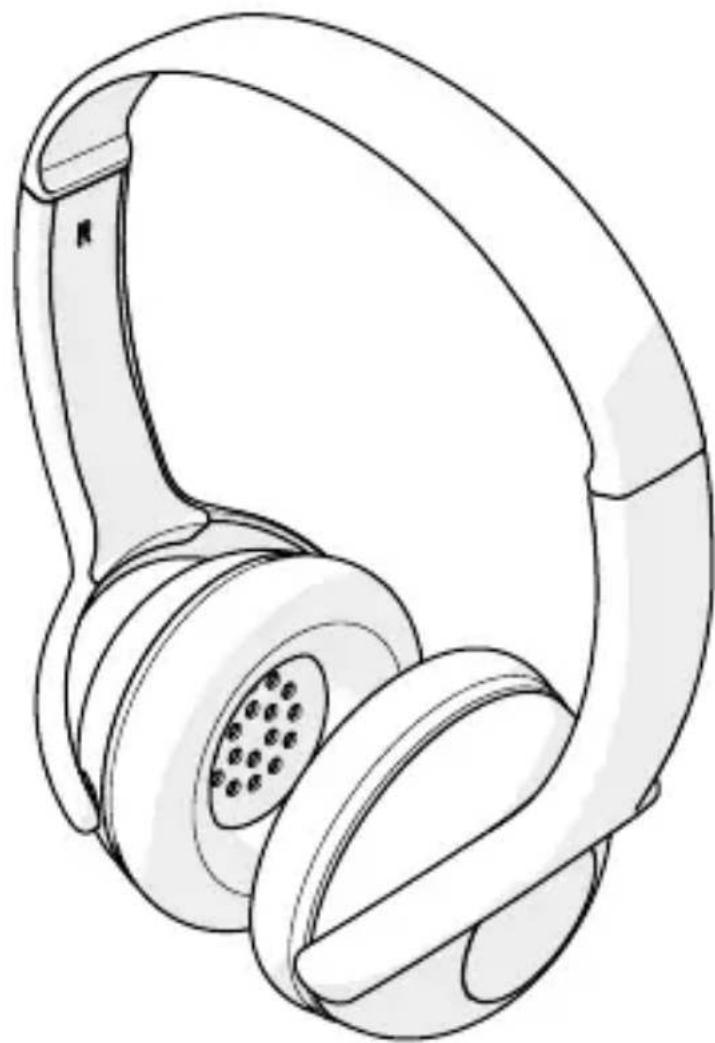
natural_image
Line drawing of a pair of white headphones with earbuds and black plastic caps (no text or symbols)EN
Quick start guide 5
DE
Kurzanleitung 8
FR
Specifications
| Product On-ear Children Headphones | |
| Article number HPBT4000BK | |
| Maximum battery play time (at 50% volume) | Up to 8 hours |
| Sensitivity 82 ± 3 dB | |
| Voice control Siri, Google Assistant | |
| Charging time Up to 2 hours | |
| Bluetooth® version 5.0 | |
| Bluetooth® frequency range 2402 - 2480 MHz | |
| Maximum transmission power 4 dBm | |
| Frequency response 20 Hz - 20 KHz | |
| Driver diameter 30 mm | |
| Impedance 32 Ω | |
| Battery capacity 180 mAh | |
| Connections USB Type-CTM | 3.5 mm |
| Power input 5.0 VDC; 0.5 A |
On-ear Children Headphones
HPBT4000BK

For more information see the extended manual online: ned.is/hpbt4000bk
Intended use
The Nedis HPBT4000BK are wireless on-ear headphones with limited volume. The product can be paired with any Bluetooth® enabled audio/video device.
The headphones can be used to make phone calls if they are connected to a phone.
The product is intended for indoor use only.
Any modification of the product may have consequences for safety, warranty and proper functioning.
Main parts (image A)
1 Headphones
2 USB Type-C™ cable
3 Volume up / next track button
4 Volume down / previous track button
5 USB Type-C™ charging port
6 Indicator LED
7 Multi-function button
8 3.5 mm input
9 Microphone
Safety instructions
To prevent possible hearing damage, do not listen at high volume levels for long periods.
WARNING
- Ensure you have fully read and understood the instructions in this document before you install or use the product. Keep the packaging and this document for future reference.
- Only use the product as described in this document.
- Not suitable for children aged 3 and under.
-
Do not use the product if a part is damaged or defective. Replace a damaged or defective product immediately.
-
Do not drop the product and avoid bumping.
- This product may only be serviced by a qualified technician for maintenance to reduce the risk of electric shock.
- Do not expose the product to water or moisture.
- Using headphones with both ears covered while participating in traffic is discouraged and may be illegal in some areas.
- The product is delivered with a partially charged battery. For optimal battery life, fully charge the battery before first use.
- Some wireless products may interfere with implantable medical devices and other medical equipment, such as pacemakers, cochlear implants and hearing aids. Consult the manufacturer of your medical equipment for more information.
- Do not use the product at locations where the use of wireless devices is prohibited due to potential interference with other electronic devices, which may cause safety hazards.
- Only use the provided USB charging cable.
- Do not leave the product on prolonged charge when not in use.
- This product is equipped with a non-removable internal battery. Do not attempt to replace the battery yourself.
- During charging, the battery must be placed in a well-ventilated area.
- The charger must only be plugged into an earthed socket-outlet.
- Only power the product with the voltage corresponding to the markings on the product.
Charging the product
-
Plug the USB-C cable A ② into the USB-C port A ⑤.
-
Plug the other end of the USB-C cable A ② into a computer or power adapter.
The indicator LED A⑥ lights up red when the battery is charging.
The indicator LED A6 switches off when the battery is fully charged.
Switching on the product
Press and hold the Multi-function button A ⑦ for 3 seconds to switch on the product.
Pairing the headphones to a Bluetooth® audio source
- Switch on the product to activate pairing mode.
Press and hold the Multi-function button A7 for 3 seconds to manually activate pairing mode.
The indicator LED A6 flashes quickly to indicate pairing mode is active.
- Activate Bluetooth ® on your audio source and connect with the product (HPBT4000BK).
The indicator LED A6 lights up continuously to indicate pairing is successful.
- Play music from a Bluetooth® connected audio source.
Controlling the volume
- Press the volume up / next track button A ③ to increase the volume.
- Press the volume down / previous track button A 4 to decrease the volume.
Controlling the music
- Press and hold the volume up / next track button A 3 for 2 seconds to skip to the next track.
- Press and hold the volume down / previous track button A 4 for 2 seconds to replay the previous track.
Making phone calls
The headphones can be used to make phone calls if they are connected to a phone.
- Press the Multi-function button A 7 to answer a call.
- Press and hold the Multi-function button A ⑦ for 2 seconds to reject a call.
- Press the Multi-function button A ⑦ during a call to hang up.
Using voice assistant
- Press the Multi-function button A ⑦ for 1 second to launch Siri/Google Assistant.
Switching off the product
- Press and hold the Multi-function button A ⑦ for 3 seconds to switch off the product.
Declaration of Conformity
We, Nedis B.V. declare as manufacturer that the product HPBT4000BK from our brand Nedis ® , produced in China, has been tested according to all relevant CE
standards and regulations and that all tests have been passed successfully. This includes, but is not limited to the RED 2014/53/EU regulation.
The complete Declaration of Conformity (and the safety datasheet if applicable) can be found and downloaded via:
nedis.com/HPBT4000BK#support

Kurzanleitung


- On-ear Children Headphones with limited volume
- EN
- DE
- FR
- On-ear Children Headphones
- Intended use
- Main parts (image A)
- Safety instructions
- WARNING
- Charging the product
- Switching on the product
- Pairing the headphones to a Bluetooth® audio source
- Controlling the volume
- Controlling the music
- Making phone calls
- Using voice assistant
- Switching off the product
- Declaration of Conformity
- Kurzanleitung
Brand : NEDIS
Model : HPBT4000BK
Category : Headphones