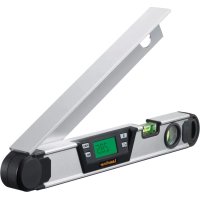
ArcoMaster - Laser level Laserliner - Free user manual and instructions
Find the device manual for free ArcoMaster Laserliner in PDF.


| Brand | Laserliner |
| Model | ArcoMaster 40 / ArcoMaster 60 |
| Product type | Digital electronic protractor (laser level) |
| Dimensions (40 cm model) | 420 x 57 x 40 mm |
| Dimensions (60 cm model) | 600 x 57 x 40 mm |
| Weight (40 cm model) | 0.8 kg |
| Weight (60 cm model) | 1.05 kg |
| Power supply | 2 AA/LR06 batteries (1.5 V) |
| Bubble accuracy | ±0.25 mm/m |
| Angular accuracy | ±0.2° |
| Measuring range | 0° to 220° |
| Display | Bilateral LCD with rotating flip |
| Main functions | Continuous measurement, freeze measurement (HOLD), angle reference value (REF), bisector, flip display |
| Auto power off | After 3 minutes of inactivity |
| Arm length | 40 cm or 60 cm depending on model |
| Maintenance | Clean with a dry cloth; avoid moisture |
| Safety | Follow the safety instructions in the manual; disposal according to WEEE directive |
| Spare parts and repairability | Standard AA batteries easily replaceable; other parts not specified |
| General information | Compliant with EU standards; subject to technical modifications |
Frequently Asked Questions - ArcoMaster Laserliner
User questions about ArcoMaster Laserliner
0 question about this device. Answer the ones you know or ask your own.
Ask a new question about this device
Download the instructions for your Laser level in PDF format for free! Find your manual ArcoMaster - Laserliner and take your electronic device back in hand. On this page are published all the documents necessary for the use of your device. ArcoMaster by Laserliner.
USER MANUAL ArcoMaster Laserliner
Read the operating instructions and the enclosed brochure "Guarantee and additional notices" completely. Follow the instructions they contain. This document must be kept in a safe place and passed on together with the device.
Digital electronic angle gauge with inside or outside angle display from 0^ to 220^ . The folding measuring arm can be pulled out on either side and can also be extended. Additional vertical and horizontal vial and two illuminated flip displays that can be rotated 180^ .
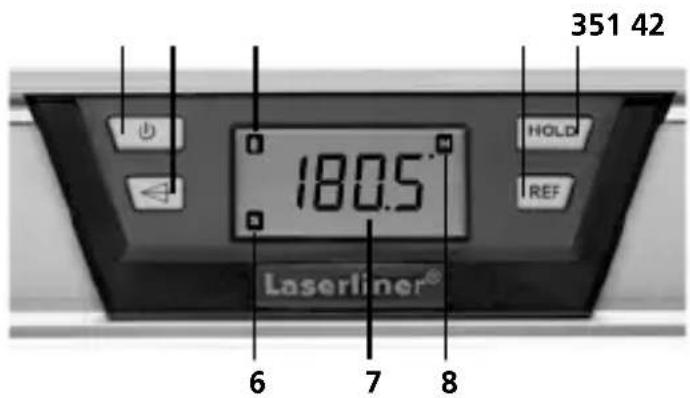
Keypad
- ON/OFF-Activates the 180^ flip display
- Angle bisector
- Hold measured value
- Set reference angle
Display
- Battery indicator: empty
- Symbol for REF mode
- Value of measured angle
- HOLD indicator
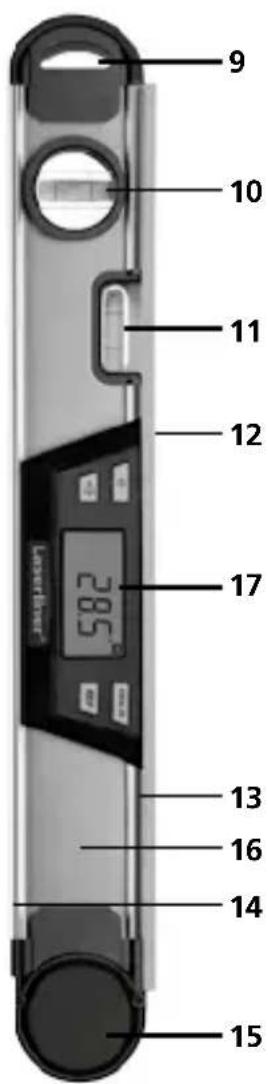
ArcoMaster 40/60
- Suspension eye
- Vertical vial
- Horizontal vial
- Folding measuring arm can be pulled out on either side
- Lay edge
- Base / measuring surface
- Pivot joint
Rear
- Battery compartment
- LCD on both sides
Laserliner
Inserting batteries:
Open the battery compartment (16) on the rear of the device and insert two new batteries (AA/LR6) as per the installation symbols. Correct polarity must be observed.
- As soon as the battery symbol (5) lights up, replace the batteries.
Switching on and measuring:
The ArcoMaster can measure angles continuously from 0^ to 220^ .
- Press button (1) to switch the device on.
- All display symbols appear for a couple of seconds.
- Place the measuring arm at the required position; the value of the measured angle (opening angle between the base arm and the folding measuring arm) appears on the display (7).
- The measured value can be read from both displays.
NOTE: The barely audible noise emitted by the pivot joint is due to a precise sensor and is part of the design.
Holding an angle (HOLD)
- Button (3) can be used to hold the measurement results; once they have been transmitted, pressing button (3) again will reset them.
Flip display can be rotated 180^
- If angles are to be measured overhead, press button (1) briefly and repeatedly to rotate the display by 180^ .
Changing the reference angle:
- Angular differences can be transmitted using button (4): Set the required angle and press button (4). The display then changes to "0.0" and (S) also appears. The required reference angle is now set and can be transmitted to other objects. This function can also be used to measure an angular difference.
IMPORTANT: Once all angles have been transmitted, the new reference angle must be cleared; to do this, press the REF button repeatedly. Switching the device off/on will also delete the REF value.
Function of the spirit levels:
- The vertical and horizontal vials (10, 11) indicate the alignment to the measuring surface (14).
Switching off / auto shut off:
- To switch the device off, press button (1) and hold it down for at least 3 seconds. The device will switch off automatically if left in an idle state.
Technical data:
| Vial precision ± 0.25 mm / m |
| Accuracy ± 0.2° |
| Measurement range: 0 – 220° |
| AutoShut Off 3 min |
| Arm length 40 / 60 40 / 60 cm |
| Power supply 2 x 1.5V batteries (AA/LR06) |
| Dimensions 40 420 x 57 x 40 mm (W x H x D) |
| Dimensions 60 600 x 57 x 40 mm (W x H x D) |
| Weight 40 0.8 kg |
| Weight 60 1.05 kg |
| Technical revisions reserved 01.17 |
EU directives and disposal
This device complies with all necessary standards for the free movement of goods within the EU.
This product is an electric device and must be collected separately for disposal according to the European Directive on waste electrical and electronic equipment.
Further safety and supplementary notices at: www.laserliner.com/info

Laserliner

Uitschakelen / AutoShut Off:
Spegnimento / AutoShut Off:
- Keypad
- Display
- ArcoMaster 40/60
- Rear
- Laserliner
- Inserting batteries:
- Switching on and measuring:
- Holding an angle (HOLD)
- Flip display can be rotated 180°
- Changing the reference angle:
- Function of the spirit levels:
- Switching off / auto shut off:
- Technical data:
- EU directives and disposal
- Uitschakelen / AutoShut Off:
- Spegnimento / AutoShut Off:
Brand : Laserliner
Model : ArcoMaster
Category : Laser level