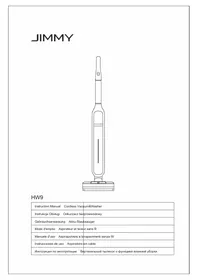
HW9 - Vacuum Cleaner JIMMY - Free user manual and instructions
Find the device manual for free HW9 JIMMY in PDF.



| Product type | Wet-dry stick vacuum |
| Brand | JIMMY |
| Model | HW9 |
| Rated voltage | 28.8 V |
| Rated power | 300 W |
| Battery capacity | 3000 mAh |
| Battery type | Lithium-ion |
| Operating modes | Auto, Eco, Max |
| Display | LED screen with indicators (battery level, modes, tanks) |
| Self-cleaning function | Yes, activated by long press on the mode button |
| Brush drying function | Yes, automatic after self-cleaning |
| Clean water tank | Removable, with cap (capacity not specified) |
| Dirty water tank | Removable, with MAX level indicator |
| Filter | Replaceable filter (service life 30-50 hours of use) |
| Power adapter | Input: 100-240 V~ 50-60 Hz 0.8 A, Output: 34.2 V 0.6 A |
| Included accessories | Charging base, stand, cleaning brush, carpet brush roller, cleaning solution, user manual |
| Safety | Automatic shut-off when tank full, overheat protection, use specified battery |
| Maintenance | Regularly clean the dirty water tank, brush and filter |
| Warranty | 2 years |
Frequently Asked Questions - HW9 JIMMY
User questions about HW9 JIMMY
0 question about this device. Answer the ones you know or ask your own.
Ask a new question about this device
Download the instructions for your Vacuum Cleaner in PDF format for free! Find your manual HW9 - JIMMY and take your electronic device back in hand. On this page are published all the documents necessary for the use of your device. HW9 by JIMMY.
USER MANUAL HW9 JIMMY
natural_image
Line drawing of a vacuum cleaner with handle and base (no text or symbols)HW9
| Instruction Manual Cordless Vacuum&Washer |
| Instrukcja Obsługi Odkurzacz bezprzewodowy |
| Gebrauchsanweisung Akku-Staubsauger |
| Mode d'emploi Aspirateur et laveur sans fil |
| Manuale d'uso Aspirapolvere e lavapavimenti senza fili |
| Instrucciones de uso Aspiradora sin cable |
| Инструкция по эксплуатации Вертикальный пылесос с функцией влажной уборки |

Contents
English 2
Polski 13
24Deutsd
Français 37
Italiano 49
Español 61
русский язык 73
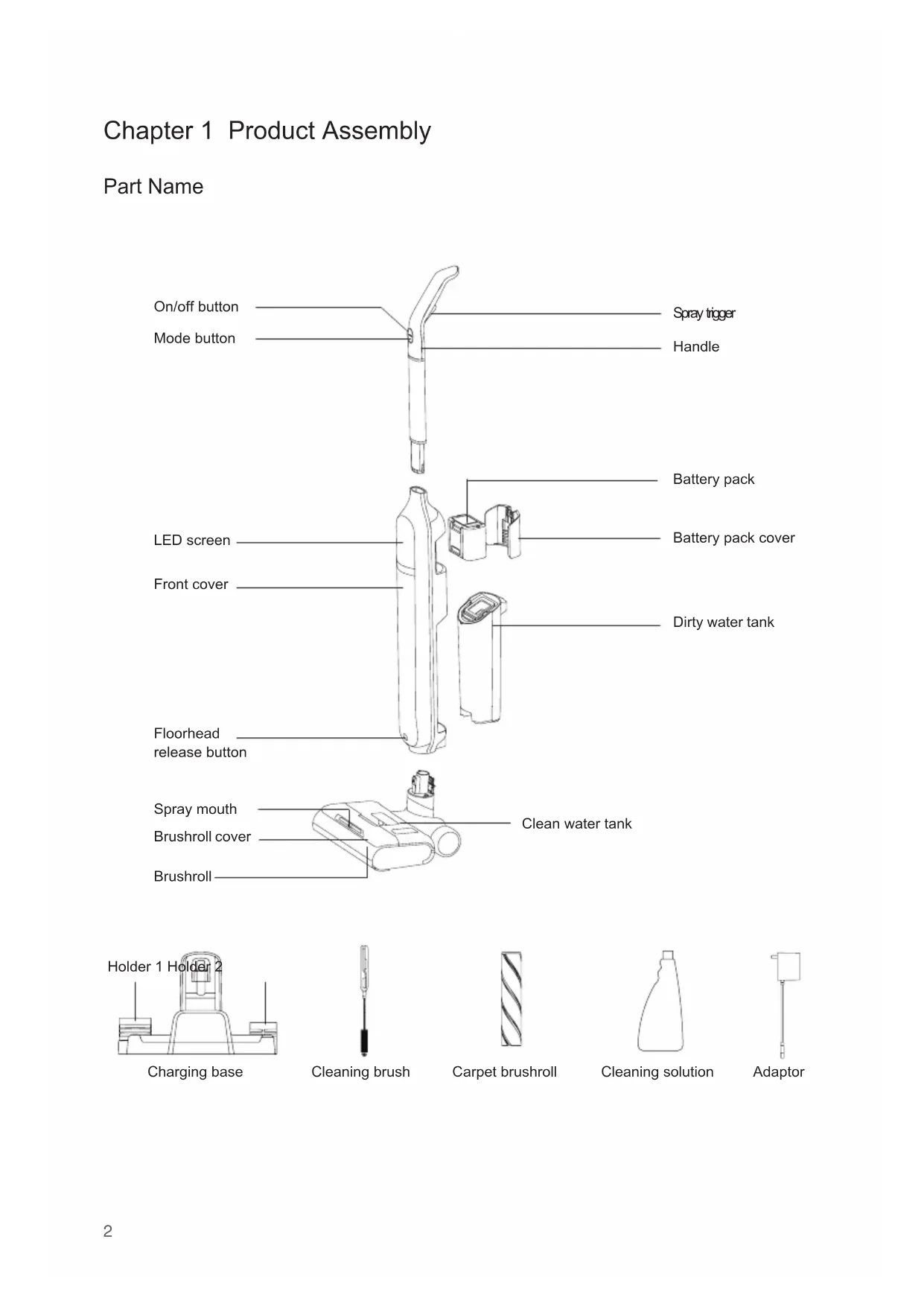
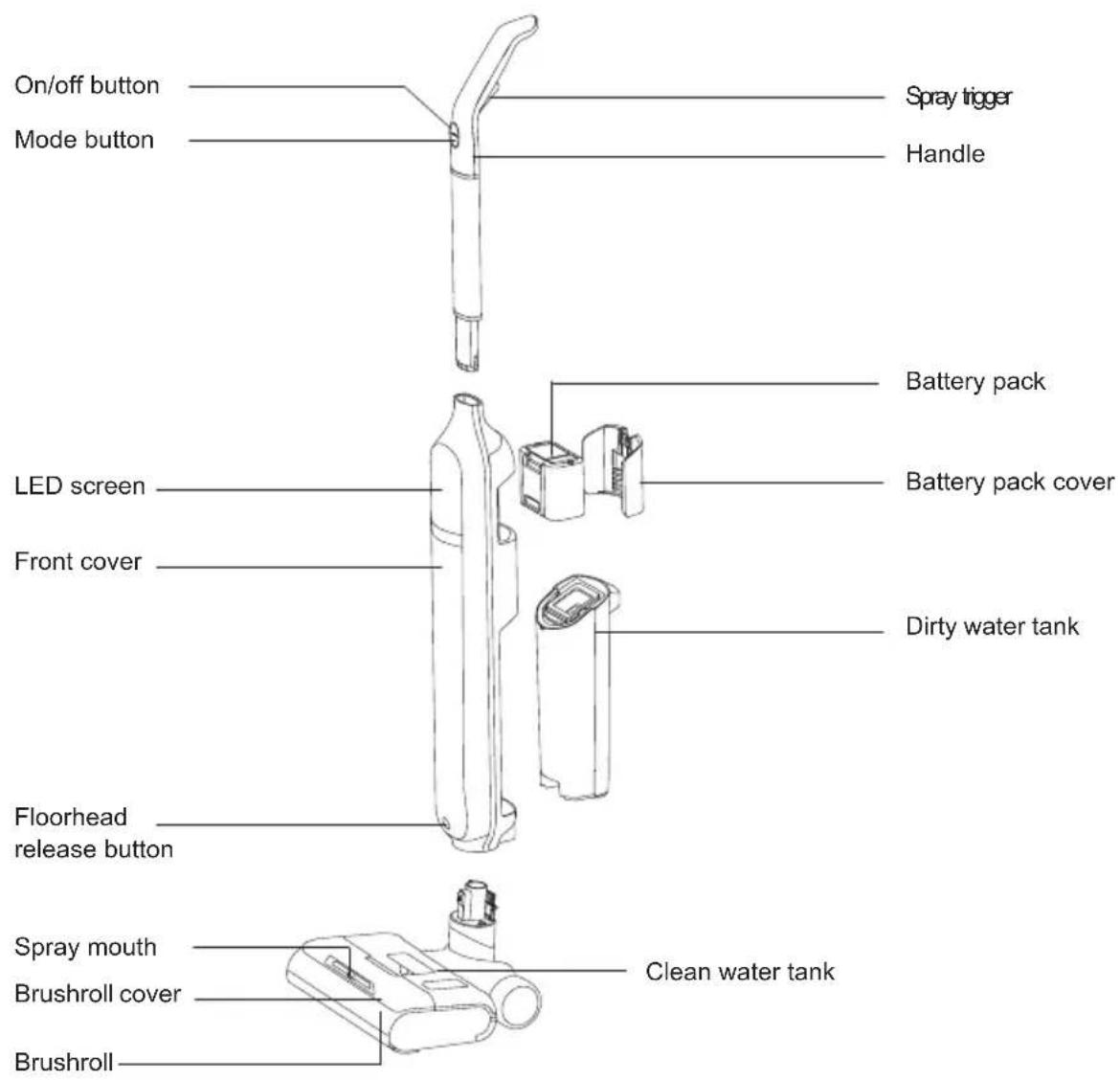
Chapter 1 Product Assembly
Part Name
Charging base
natural_image
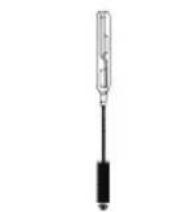
Simple line drawing of a screwdriver with a black handle (no text or symbols)Cleaning brush
Packing list
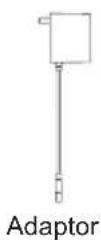
| Part Name | Mainbody Handle | Floorhead Assembly | Battery pack | Charging base | Adaptor | |
| Quantity 1 | 1 1 1 1 | |||||
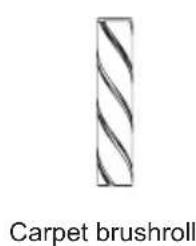
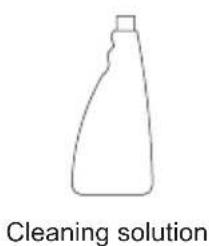
| Part Name | Cleaning Solution | Cleaning brush | Holder 1 Holder 2 | Carpet brushroll | Instruction manual | |
| Quantity 1 | 1 1 1 1 | |||||
Product assembly
Noted: Cut off electricity before product assembly and disassembly.
Handle assembly and disassembly
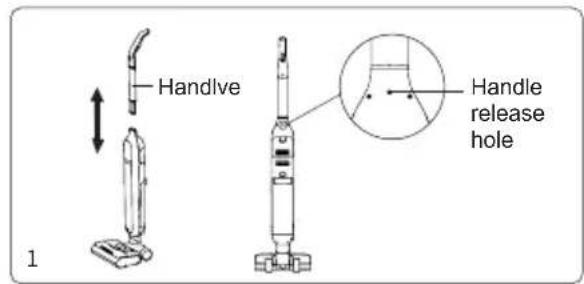
Insert the handle into the mainbody vertically until a "click" sound is heard. Make sure handle is firmly locked. To disassemble the handle, use a hard tool to insert into the handle release hole and meanwhile pull out the handle upward.(Fig 1)
Floorhead assembly and disassembly
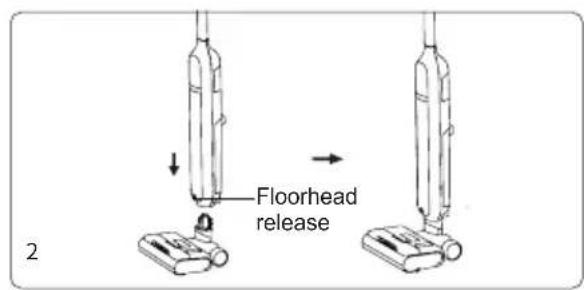
Insert the floorhead into the mainbody vertically until a "click" sound is heard. Make sure floorhead is firmly locked. To disassemble the floorhead, press down the floorhead release button, then hold the floorhead and pull the floorhead down.(Fig 2)
Assemble battery pack
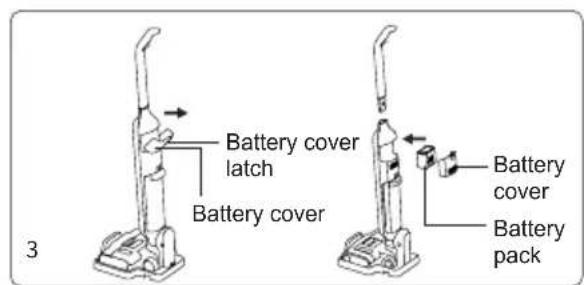
Press and hold the battery cover latch and remove the battery cover. Then, slide battery pack along the slot into mainbody until to the bottom, and then install the battery pack cover into the body until the clear "click" sound is heard. To remove battery pack, it can be disassembled according to the opposite direction of installation. (Fig 3)
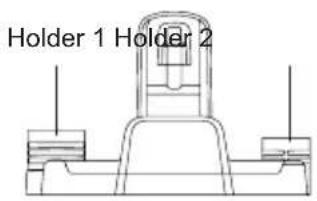
Assemble the charging base holder
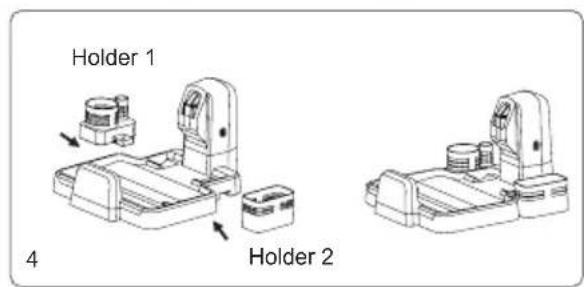
Press the holder 1 and holder 2 into the charging base, aiming at the slot until a "click" sound is heard. Make sure the holders are firmly locked.(Fig 4)
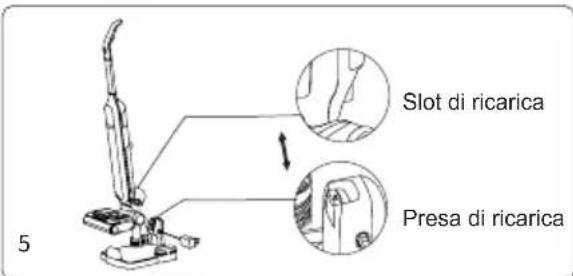
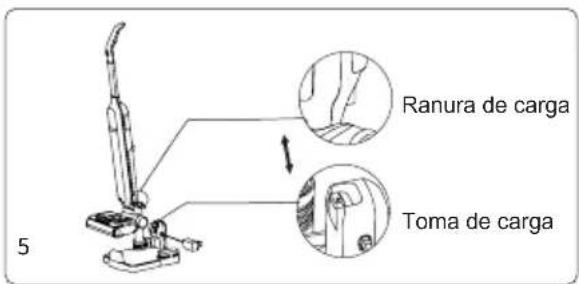
Place machine to charging base
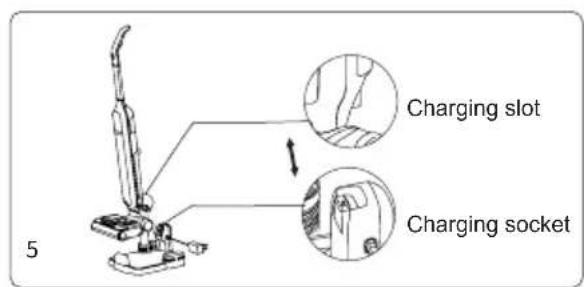
To put machine back to charging base, hold machine handle to lift the machine, aim charging slot on bottom of machine to the charging socket on charging base and put the machine into charging base. To use the machine, hold machine handle and lift out machine from charging base. (Fig 5)
Disassemble and assemble dirty water tank
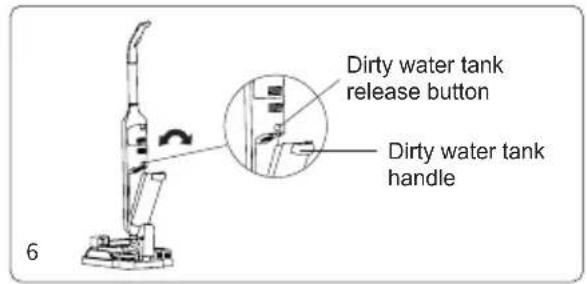
To take off dirty water tank, hold machine with one hand and hold the dirty water tank with another hand, press dirty water tank release button to remove dirty water tank. To assemble dirty water tank, place dirty water tank bottom into mainbody, push dirty water tank towards mainbody until a "click" sound is heard.(Fig 6)
Disassemble and assemble clean water tank
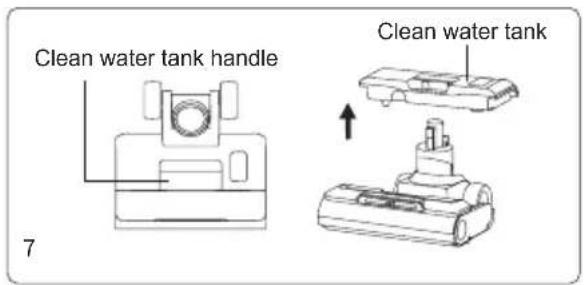
To take off clean water tank, hold the clean water tank handle and pull out the clean water tank. To assemble clean water tank, put the clean water tank back to nozzle, align with the brushroll window. (Fig 7)
Disassemble and assemble brushroll cover and brushroll
-
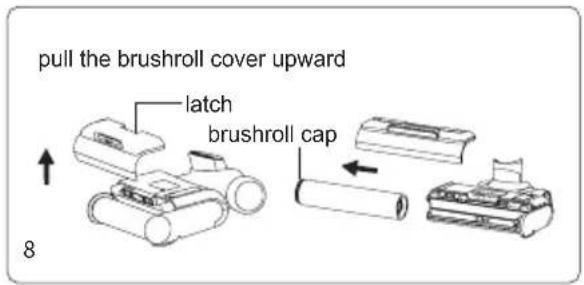
To take off brushroll cover hold brushroll cover latch and pull upward to remove brushroll cover. To assemble brushroll cover, align the clips on two sides of brushroll cover with the slots on two sides of floorhead. Press brushroll cover down until a "click" sound is heard. (Fig 8)
-
To disassemble the brushroll, pull the brushroll cap outward to take out brushrol. To assemble the brushroll, hold brushroll cap, slide brushroll over the cylinder until brushroll reaches the end. (Fig 8)
Chapter 2 Use of the Product
Note: When using it for the first time, please fully charge the machine before using it.
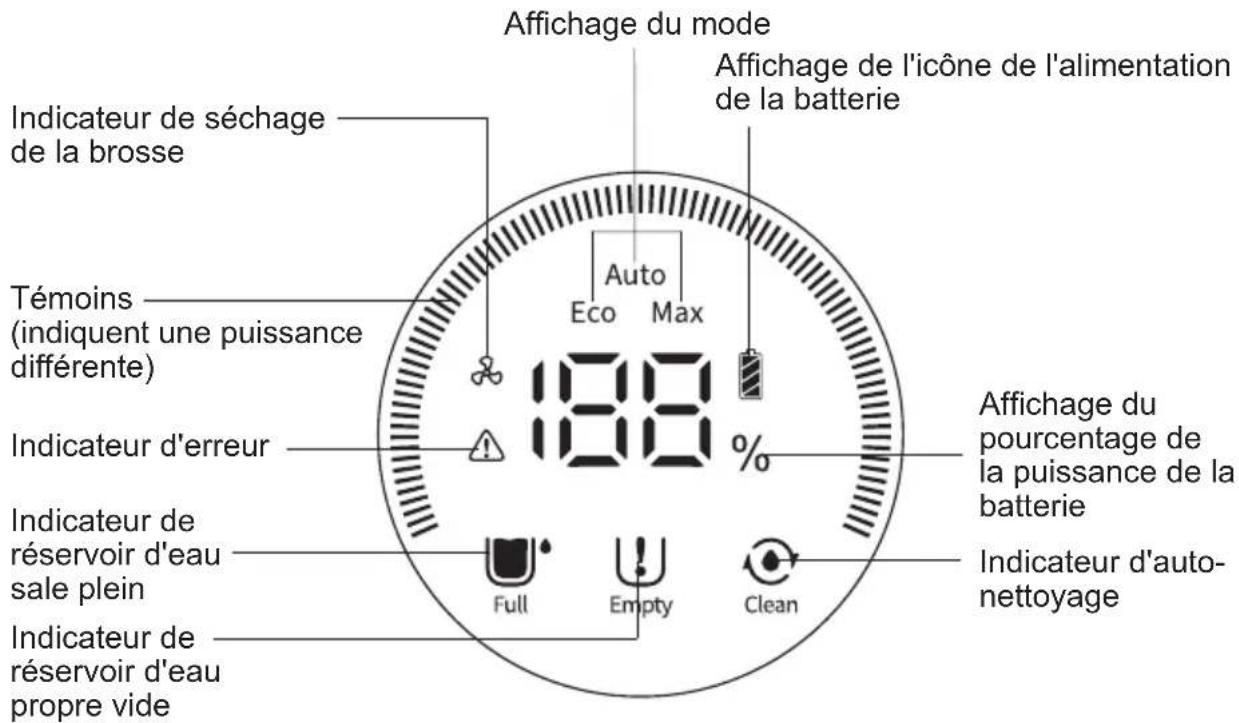
LED screen and instructions
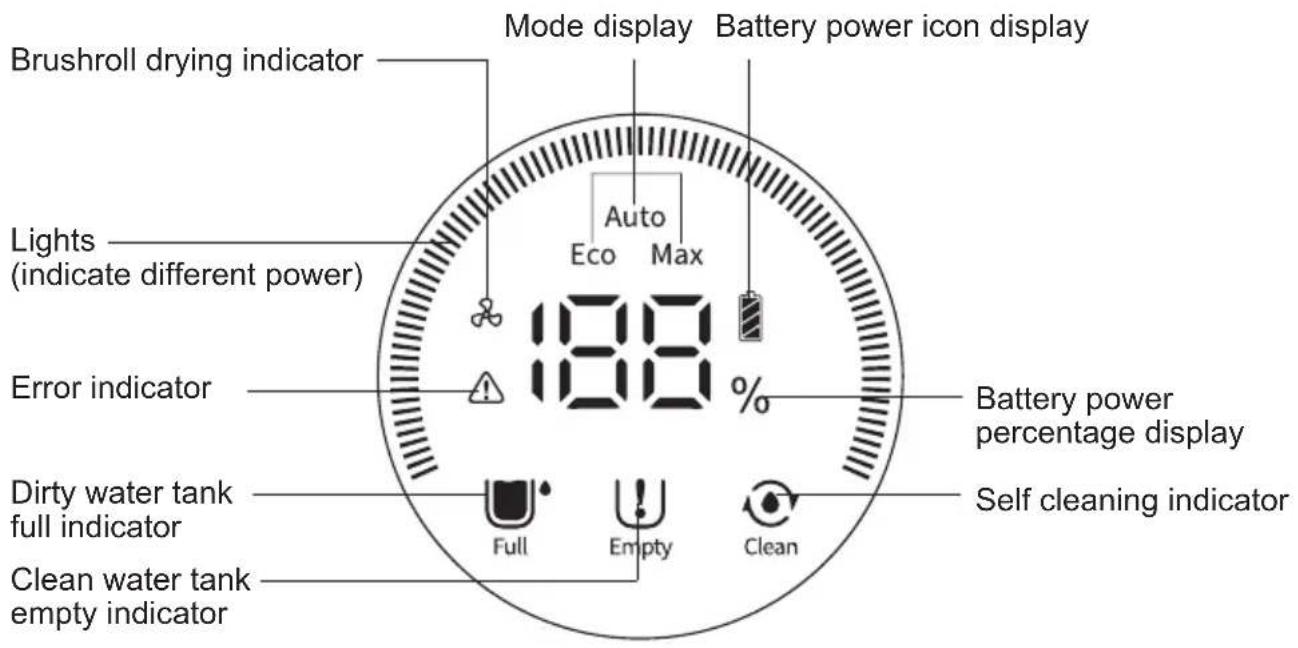
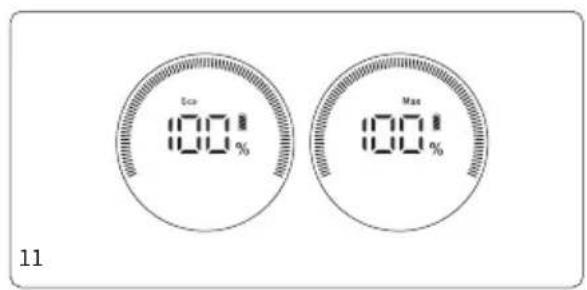
- Lights: When charging, the lights turn blue and rotate. The lights will be fully bright when the machine is full charged and no longer rotate. After 1 minute, the lights' brightness will be halved, and turn blue while working. In Max mode, the lights show bright red and the screen displays Max mode; in Auto and Eco mode, the lights show blue and the screen displays Auto or Eco mode (The machine will automatically switch to Eco mode when the power is lower than 20% ).
- Mode display: Displays current machine working mode.
- Battery power percentage display: Displays battery power left currently.
- Battery power icon display: Battery power warning(Battery power icon turns red to remind charging when battery power is lower than 20%, alternatively lights are white).
- Dirty water tank full indicator: When water in tank reaches MAX line, the indicator will blink to remind user to drain dirty water tank.
- Clean water tank empty indicator: When water tank is empty, the indicator will blink to remind user to add clean water.
- Self cleaning indicator: When machine is in self cleaning mode, the indicator will blink and display the countdown to remind user that the machine is under self cleaning.
- Brushroll drying indicator: After the self-cleaning is completed, the device enters brushroll air-drying mode automatically. Brushroll drying indicator lights up to remind user that brushroll is under drying.
Fill up clean water tank
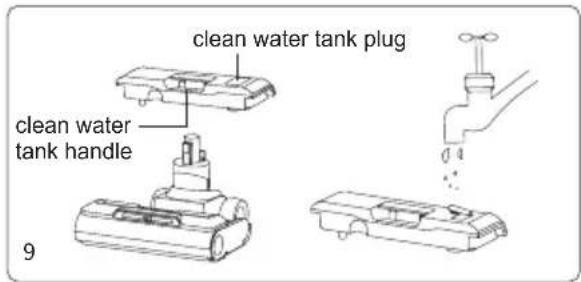
- Grasp the handle of the clean water tank to take off clean water tank.
- Pull out the clean water tank plug, open the injection plug of the clean water tank, turn it to the side (about 90 degrees), expose the water injection hole, and fill in clean water and cleaning solution inside.
- Tighten clean water tank plug and make sure it is tight.
- Assemble clean water tank into floorhead until a "click" sound is heard.(Fig 9)
Note: You can add the cleaning solution while filling in clean water, the ratio is 1 bottle cap of cleaning solution to one full tank of clean water.
Operation of machine
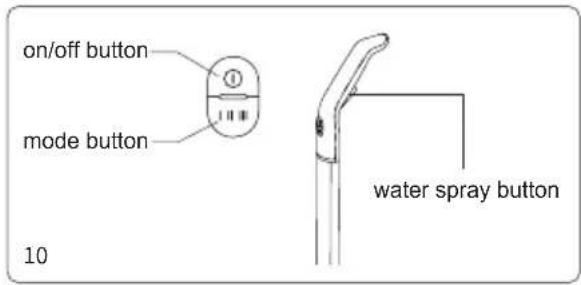
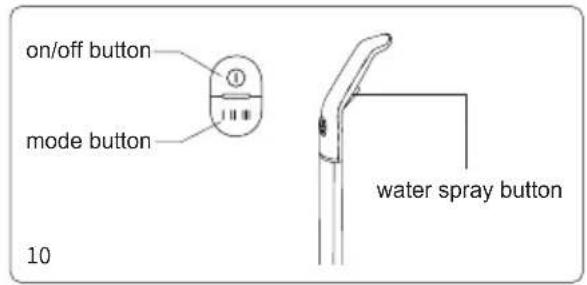
- The on/off button of the machine is located on top of handle, press on/off button to start working and the Auto mode is enabled by default. The machine can switch among Auto, Eco and Max mode by pressing mode button. Press on/off button to stop working.
- Press on/off button to start working and press the water spray trigger to spray fan shape water flow from front of floorhead, release the water spray trigger and water will stop spray.(Fig 10)
Notes:
- The water spray button cannot be used together with the on/off button or the mode button.
- When dirty water tank is full, the dirty water tank full indicator on LED screen will blink, and machine will have voice reminding. Vacuum motor and brushroll motor will stop working immediately.
- When the clean water tank is empty, press water spray button, there is no water spray out, clean water tank empty indicator blinks and machine will have voice to remind user to add water.
- When dirty water tank is taken out while the machine is working, the dirty water tank full indicator on LED screen will blink and and machine will have voice reminding. Vacuum motor and brushroll motor will stop working immediately.
- After the machine finishes using, put it vertically on the charging base to ensure sufficient power for next usage.
- Please use the cleaning solution we provide to clean the product. Do not put high foam solution into the cleaning tank, otherwise too much foam will be generated during using, which may penetrate into the machine and cause danger.
Machine charging
- Connect one end of the adapter to the charging stand, and the other end to the power socket;
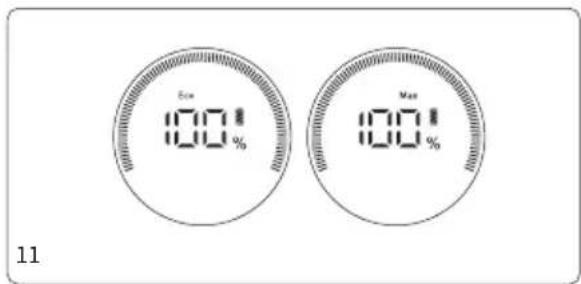
- Put the machine into the charging stand to enter the charging mode. The display screen shows the percentage of battery power while charging. The display screen shows 100% power when the charging is completed.(Fig 11)
Notes:
- If the product is long idled after purchase, please use the adapter to charge the battery about every 3 months.
- Do not leave the charger on power socket all the time to prevent children from touching it by mistake.
- Keep the charger plug and your hands dry before inserting the charger into the charging stand,
- Before the first use, please fully charge the battery pack, and before the second charge, please empty the battery to ensure the life of the battery pack.
Self cleaning and brushroll drying
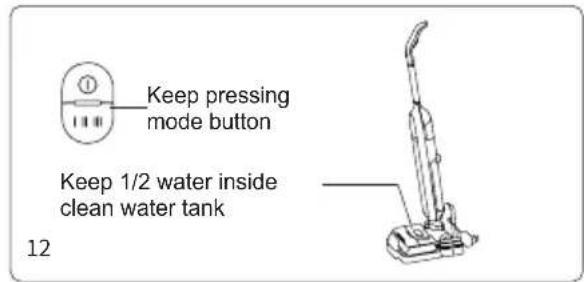
Before self-cleaning, Drain the dirty water tank, place the machine on the charging base, insert the charger into the socket, keep at least 1/2 of the water in the clean water tan.
Press the mode button for 5 seconds, the machine will enter self-cleaning mode, the self-cleaning indicator on the LED display will blink. During self-cleaning process, to end self-cleaning mode in advance, press on/off button and machine will stop self cleaning and return to charging mode. (Fig 12)
After self-cleaning is completed, the machine enters brushroll drying mode automatically, the brushroll drying indicator on the LED display will light up and device also starts charging; during the brushroll drying process, to end the brushroll drying in advance, press on/off button and machine will stop brushroll drying and remain in charging mode.
Note:
-
Drain the dirty water tank before and after self-cleaning to avoid odor.
-
When the power is lower than 10%, the machine cannot enter the self cleaning mode.
Chapter 3 Cleaning and Maintenance
Clean dirty water tank
-
When dirty water tank is full, the dirty water tank full indicator on LED screen will blink. The machine will stop working immediately and has voice reminding.
-
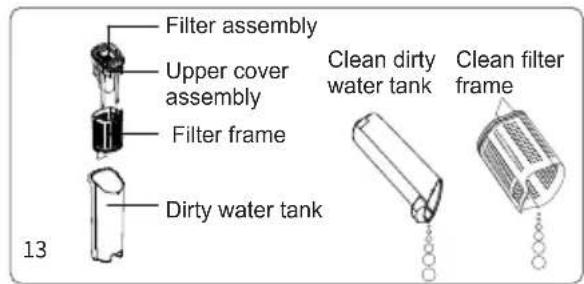
After stopping work, take out dirty water tank and
remove upper cover from dirty water tank, pour out the garbage from filter frame an and dirty water from dirty water tank, wash the dirty water tank and the filter frame with clean water.
-
If there is stubborn stains on the inside of the dirty water tank, clean them directly with cleaning brush.
-
Dry the dirty water tank parts after washing, then put them back into the dirty water tank, and then assemble the dirty water tank into the machine until a "click" sound is heard. (Fig 13)
Brushroll cleaning
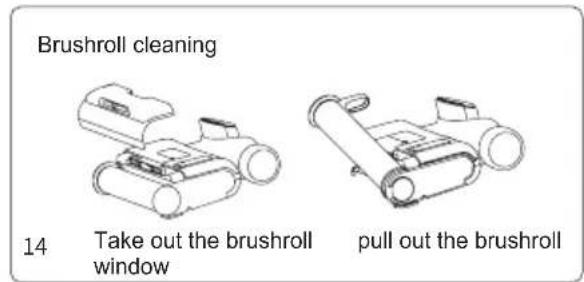
Take out the brushroll window and pull out the brushroll. Use dry cloth to wipe brushroll housing and remove the hair tangled around brushroll by the mini brush. Wash the brushroll window and brushroll in clean water.
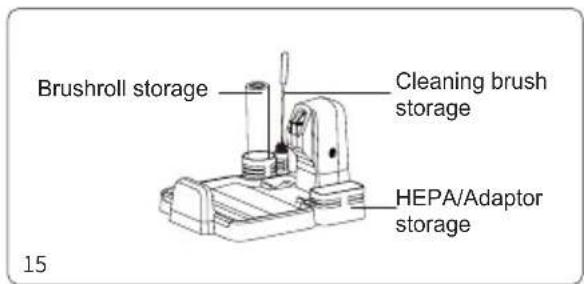
After cleaning, assemble brushroll and brushroll window back to machine. (Fig 14) The brushroll can also be put into the accessories holder for drying.(Fig 15)
Note:
-
Do not wash the whole floorhead in water. Do not wash the floorhead with water or immerse it in water after pulling out the brushroll, so as not to damage the components and affect the use.
-
If the cleaner will not be used soon after cleaning, completely dry the dirty water tank, dirty water tank cover, filter, filter frame, brushroll, brushroll window, machine and then assemble the machine for storage, in order to prevent the bacteria from breeding in the humid environment and producing odor.
Maintenance and Storage
- Please stop the machine before the cleaning.
- Wipe the machine body with clean water or neutral detergent. Before wiping, be sure to wring out the cleaning cloth to prevent water from flowing into the electrical parts of the machine.
- It is recommended to clean the dirty water tank, filter, brushroll and brushroll window after each use.
- The machine will stop working if the dirty water reaches MAX line. Please drain the dirty water tank immediately.
- After the accumulated use time of the filter reaches 30-50 hours (various basing on filter status), replace the filter to avoid affecting machine performance. Filter can be bought from local distributor.
- When the machine is long idled, place it in a cool and dry place, avoid direct sunlight or wet environment.
Chapter 4 Important Safety Instructions
- Read all instructions and warnings before using this appliance. Failure to follow the warnings and instructions may result in electric shock, fire or serious injury.
- When using appliances, basic precautions should always be followed to reduce the risk of fire, electric shock and injury.
Warning
- The appliance is only for household use.
- Before use the product, check whether the local voltage is consistent with the voltage marked on the power adaptor.
- Inspect the product before use, stop use if the product or adaptor is damaged.
- Use only as described in this manual.
- This appliance cannot be used by children and persons with reduced physical, sensory or mental capabilities or lack of experience and knowledge unless they have been given supervision or instruction concerning use of the appliance in a safe way and understand the hazards involved.
6.Do not use this product as a toy. Keep this product away from the reach of children. Take care of children and make sure they will not regard this product as a toy.
7.Do not touch plug with wet hand.
-
Use extra care when cleaning on stairs to prevent falling.
-
Do not use or disassemble or replace any component if there is damage on power cord, plug, battery or conductive parts. Disassembly or replacement of the components by yourself may cause electric shock or fire. JIMMY will not take responsibility. Once damaged, the product need to be repaired or replaced by JIMMY, JIMMY's distributor or qualified person designated by JIMMY to avoid injury.
-
Recharge only with the adaptor specified by JIMMY.
-
Only to use the battery pack specified by JIMMY. Use of any other battery pack may cause explosion, injury and or product damage.
-
If the product does not operate in accordance with the instructions, is seriously impacted, falls from a height, is damaged, or falls into the water, do not use it and contact JIMMY or JIMMY distributor.
-
Only use JIMMY specified replacement parts or attachments.
-
Do not pull or press the cable. Keep cable away from heated surfaces. Do not place the cable in a closed door or pull it through a sharp edge or corner. Keep the cable away from walking area. Do not operate product across the cable.
-
Unplug the product when it is not used or before repairing.
-
Do not drag the cord or carry cord to move the product, or use cord as handle.
-
The product is a rechargeable electric appliance. Do not leave the machine to run unattended
-
Remove battery pack when the product is cleaned, repaired or long idled.
-
Do not get close to heating appliance or expose under sunshine longtime, to prevent over heating causing housing deformation.
-
Keep objects that may obstruct air path from air inlet and outlet to prevent machine overheating.
-
Product mainbody and floorhead have electric components, cannot be washed under water.
-
Do not clean or disassemble brushroll cover or brushroll when the machine is power on or under working to prevent injury.
-
Do not use the product to pick up flaming objects like burning charcoal or cigarette etc.
24.Do not use the product to pick up sharp objects like broken glass.
- Do not use the product to pick up lime, cement, toner, gypsum powder, flour and other ultra-fine substances.
26.Do not use the product to pick up acid-base cleaning liquid, washing powder and other corrosive liquids.
-
Do not use the product to pick up inflammable and explosive objects like gasoline, alcohol, perfume, paint, etc.
-
Do not disassemble the closed machine, and do not try to change the performance of the machine.
Only get help from the professional personnel of the manufacturer, its maintenance department or similar departments, otherwise it will cause danger.
-
Turn off power and unplug charger if the products is long idled.
-
Product technical specification of this manual are based on results from lab tests of JIMMY or designated third parties. The company reserves all rights for final explanations.
About use of the product
-
This product is suitable for hard floor in indoor environment, including waxed floor, rubber floor, tile floor and sealed wood floor, solid wood floor and other flat surface, use of the product on unflat ground may not achieve the best effect.
-
Do not turn on the machine before dirty water tank and clean water tank are assembled in place according to instruction.
-
Do not shake the product up and down or collide violently to prevent dirty water from flowing into the motor; when the product is turned on, do not lift or carry the machine up and down, and do not tilt the product to one side or lay it flat on the floor to prevent dirty water from flowing into the motor.
-
Do not run the product for a long time with the float blocking the air inlet to avoid damage.
-
After using the product, clean the dirty water tank, suction nozzle, air path and store it in ventilated and dry place. Wet place will affect the insulation and life of electrical appliances.
About Cleaning Solution
-
A large amount of cleaning solution entering into the motor may cause damage to the appliance.
-
Mix the solution with clean water according to the instructions (the ratio of solution to clean water is 1:50). It is recommended to use provided cleaning solution. Do not use cleaning solution contains acid, alkali, alcoholic solution or substances harmful to the environment.
-
Keep cleaning solution out of reach of children. If any solution gets into the eyes, immediately flush them with clean water. If any solution is swallowed by accident, see medical care immediately.
-
Dirty water and solution disposal should comply with local environmental regulations.
About disposal of battery
-
The battery in the product contains materials harmful to the environment. Take out the battery pack from the product before disposal.
-
Turn off the product and unplug adaptor before taking out battery pack.
-
Handle the waste battery pack safely and properly. Do not put it into fire, water or soil.
-
If the disposed battery leakage causes pollution to skin or clothes, Wash with clean water and see medical care immediately.
Chapter 5 Troubleshooting
Please check the following points before contacting the after sale service.
| Problem Possible cause | Solution | |
| Machine does not work Weak suction | Low battery power Recharge battery | |
| On/off button is not pressed down Press | down on/off button | |
| Brushroll is entangled Clean brushroll | ||
| Water in dirty water tank achieves MAX line | Clean dirty water tank | |
| On/off button or mode button is pressed at the same time with water spray button | Release water spray button, press on/off button or mode button separately | |
| Brushroll not assembled Reassemble brushroll | ||
| Dirty water tank not assembled Reassemble dirty water tank | ||
| Weak suction | Water in dirty water tank achieves MAX line | Clean dirty water tank |
| Brushroll window and dirty water tank not assembled properly | Reassemble brushroll window and dirty water tank | |
| Brushroll entangled Clean brushroll | ||
| Filter gets dirty Clean or replace filter | ||
| Lower battery power Recharge battery | ||
| Abnormal noise | Suction inlet blocked Clean suction inlet | |
| Water in dirty water tank achieves MAX line | Clean dirty water tank | |
| Floorhead does not spray water | Clean water tank empty Fill clean water tank | |
| Water spray button not pressed Press | water spray button | |
| Clean water tank not assembled properly | Reassemble clean water tank | |
| Clean water tank is filled with dirty water and blocked water path. | Do not fill clean water tank with dirty water | |
| Excessive foaming of cleaning solution | Add the cleaning solution in the correct proportion | |
| Water spray out from air exhaust | Water in dirty water tank achieves MAX line | Take out the dirty water tank and pour out the dirty water |
| The product was heavily shaken or hits the wall with big force | Take out the dirty water tank and pour out the dirty water | |
| Filter is not assembled | Assemble filter | |
| Filter is put to use without fully dry | Dry the filter after washing before use |
Note: If the above troubleshooting guide fails to provide a solution, due to the need to use special tools, please go to the designated maintenance station for repair and replacement or contact after service of local distributor for support.
Chapter 6 Product Specification
Technical specification
| Model No HW9 | |
| Adaptor Input 100-240V | ~50-60Hz 0.8A |
| Adaptor Output 34.2V 0.6A | == |
| Rated Voltage 28.8V | == |
| Rated Power 300W | |
| Battery Capacity 3000mAh |
Circuit Diagram
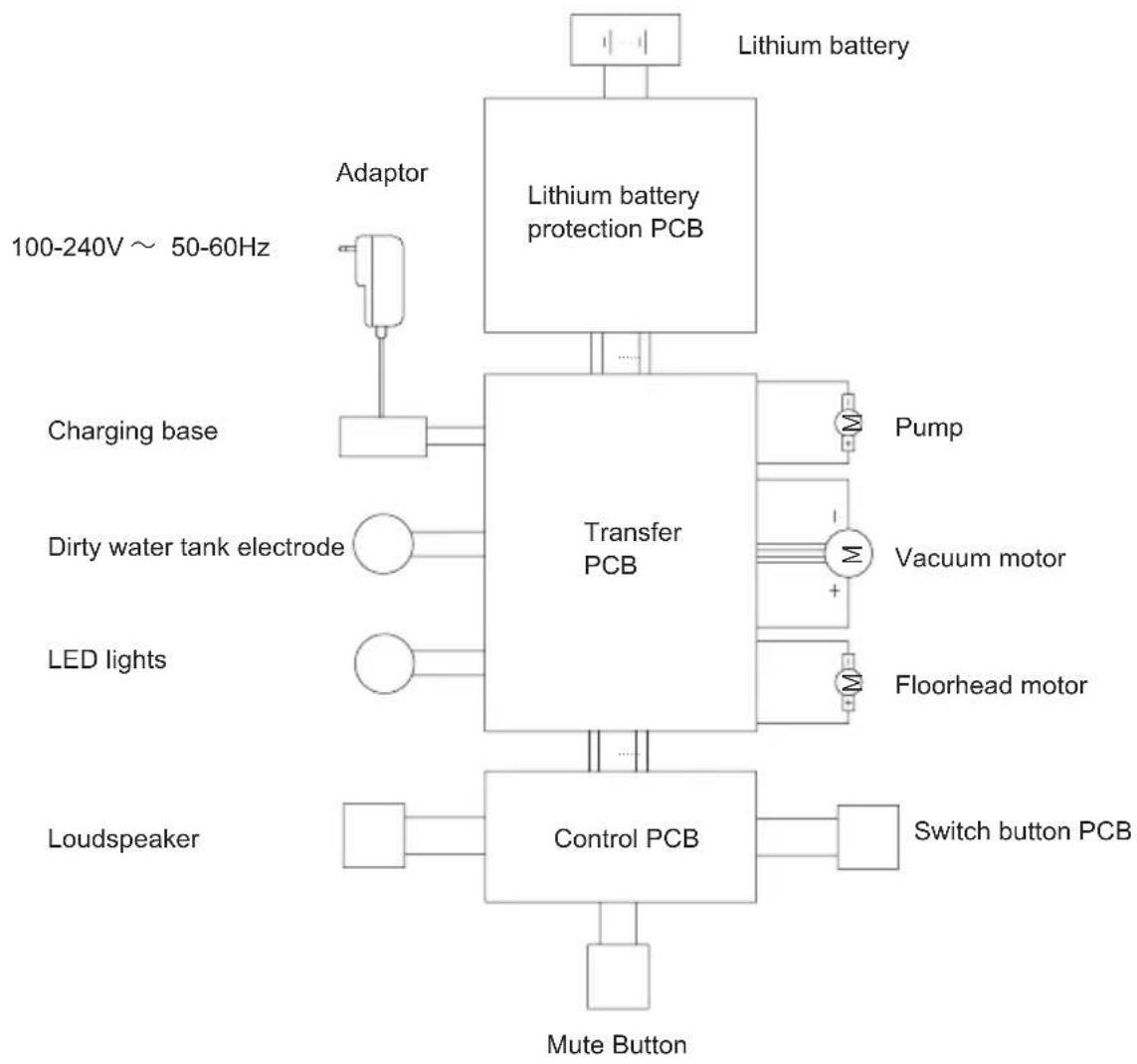
flowchart
graph TD
    A["Lithium battery"] --> B["Lithium battery protection PCB"]
    B --> C["Transfer PCB"]
    C --> D["Pump"]
    C --> E["Vacuum motor"]
    C --> F["Floorhead motor"]
    C --> G["Switch button PCB"]
    C --> H["Control PCB"]
    H --> I["Mute Button"]
    J["Adaptor"] --> K["Charging base"]
    L["100-240V ~ 50-60Hz"] --> M["Charging base"]
    N["Dirty water tank electrode"] --> O["LED lights"]
    P["Loudspeaker"] --> Q["Control PCB"]
    R["Adaptor"] --> S["Charging base"]
    T["Adaptor"] --> U["Charging base"]
    V["Lithium battery"] --> W["Adaptor"]
    X["Adaptor"] --> Y["Charging base"]
Manufacturer Information
| Manufacturer | Kingclean Electric Co., Ltd |
| Address | No.1 Xiangyang Road, Suzhou New District, Jiangsu Province 215009, China |
CE
Disposal
The machine, accessories and packaging should be sorted for environmental-friendly recycling.
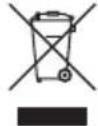
Do not dispose of the machine into household waste!
Only for EC countries:
According to the European Guideline 2012/19/EU, machine that are no longer usable, and according to the European Guideline 2006/66/EC, defective or used battery packs/batteries, must be collected separately and disposed of in an environmentally correct manner.
Battery packs/batteries:
Integrated batteries may only be removed for disposal by qualified personnel. Opening the housing shell can damage or destroy the machine.
Do not dispose of battery packs/batteries into household waste, fire or water. Battery packs/batteries should, if possible, be discharged, collected, recycled or disposed of in an environmental-friendly manner.
Subject to change without notice.
Warranty Information
This product enjoys two years warranty from the date of purchase.
Excluded from the guarantee is normal wear, commercial use, alterations to the appliance as purchased, cleaning activities, consequences of improper use or damage by the purchaser or a third person, damage, that can be attributed to external circumstances or caused by the batteries.
natural_image
Technical line drawing of a mechanical component with no visible text or symbolsLadestation

Rohrbürste
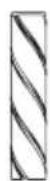
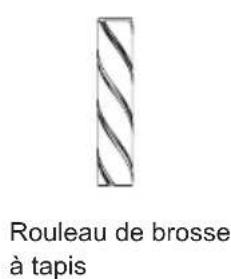
Teppichrollbürste
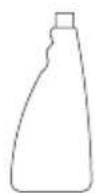
Waschmittel
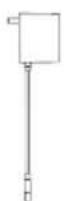
Adapter
Packliste
Base de chargement
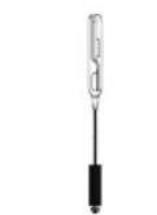
Brosse de
nettoyage
natural_image
Simple line drawing of a spray bottle (no text or symbols)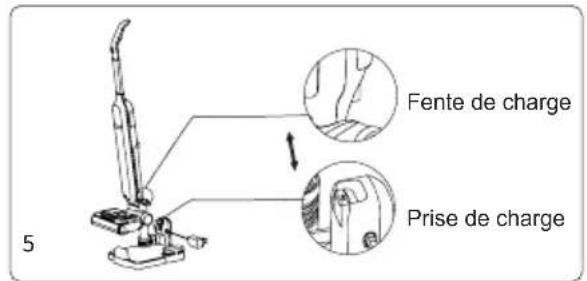
Placez la machine sur la base de chargement
LED screen and instructions
Remarque :
Do not dispose of the machine into household waste!

- Contents
- Chapter 1 Product Assembly
- Part Name
- Packing list
- Product assembly
- Handle assembly and disassembly
- Floorhead assembly and disassembly
- Assemble battery pack
- Assemble the charging base holder
- Place machine to charging base
- Disassemble and assemble dirty water tank
- Disassemble and assemble clean water tank
- Disassemble and assemble brushroll cover and brushroll
- Chapter 2 Use of the Product
- LED screen and instructions
- Fill up clean water tank
- Operation of machine
- Notes:
- Machine charging
- Self cleaning and brushroll drying
- Note:
- Chapter 3 Cleaning and Maintenance
- Clean dirty water tank
- Brushroll cleaning
- Maintenance and Storage
- Chapter 4 Important Safety Instructions
- Warning
- About use of the product
- About Cleaning Solution
- About disposal of battery
- Chapter 5 Troubleshooting
- Chapter 6 Product Specification
- Manufacturer Information
- CE
- Disposal
- Only for EC countries:
- Battery packs/batteries:
- Warranty Information
- Packliste
- Placez la machine sur la base de chargement
- Remarque :
Brand : JIMMY
Model : HW9
Category : Vacuum Cleaner