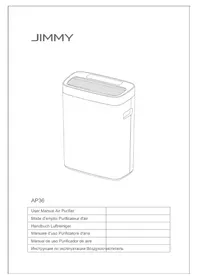
AP36 - Air purifier JIMMY - Free user manual and instructions
Find the device manual for free AP36 JIMMY in PDF.



| Product type | Air purifier |
| Brand | JIMMY |
| Model | AP36 |
| Rated voltage | 230 V~ |
| Rated frequency | 50 Hz |
| Rated power | 50 W |
| Particle CADR | 300 m³/h |
| Formaldehyde CADR | 40 m³/h |
| Maximum noise | 61 dB(A) |
| Recommended room area | 24 to 36 m² |
| Operating modes | Smart, Silent, Smoke |
| Number of speeds | 5 (including special modes) |
| Timer | 1 h, 4 h, 8 h |
| Light sensor | Yes, automatically adjusts brightness |
| Air quality display | LED with colors: blue, yellow, red |
| Filter type | Multifunctional composite filter (not washable with water) |
| Dust sensor | Infrared, cleanable |
| Power supply | Power cord, standard plug |
| Warranty | 2 years from date of purchase |
| Filter maintenance | Vacuum every 2 weeks; replace when indicator lights up |
| Sensor cleaning | Every 3 months with a damp cotton swab |
Frequently Asked Questions - AP36 JIMMY
User questions about AP36 JIMMY
0 question about this device. Answer the ones you know or ask your own.
Ask a new question about this device
Download the instructions for your Air purifier in PDF format for free! Find your manual AP36 - JIMMY and take your electronic device back in hand. On this page are published all the documents necessary for the use of your device. AP36 by JIMMY.
USER MANUAL AP36 JIMMY
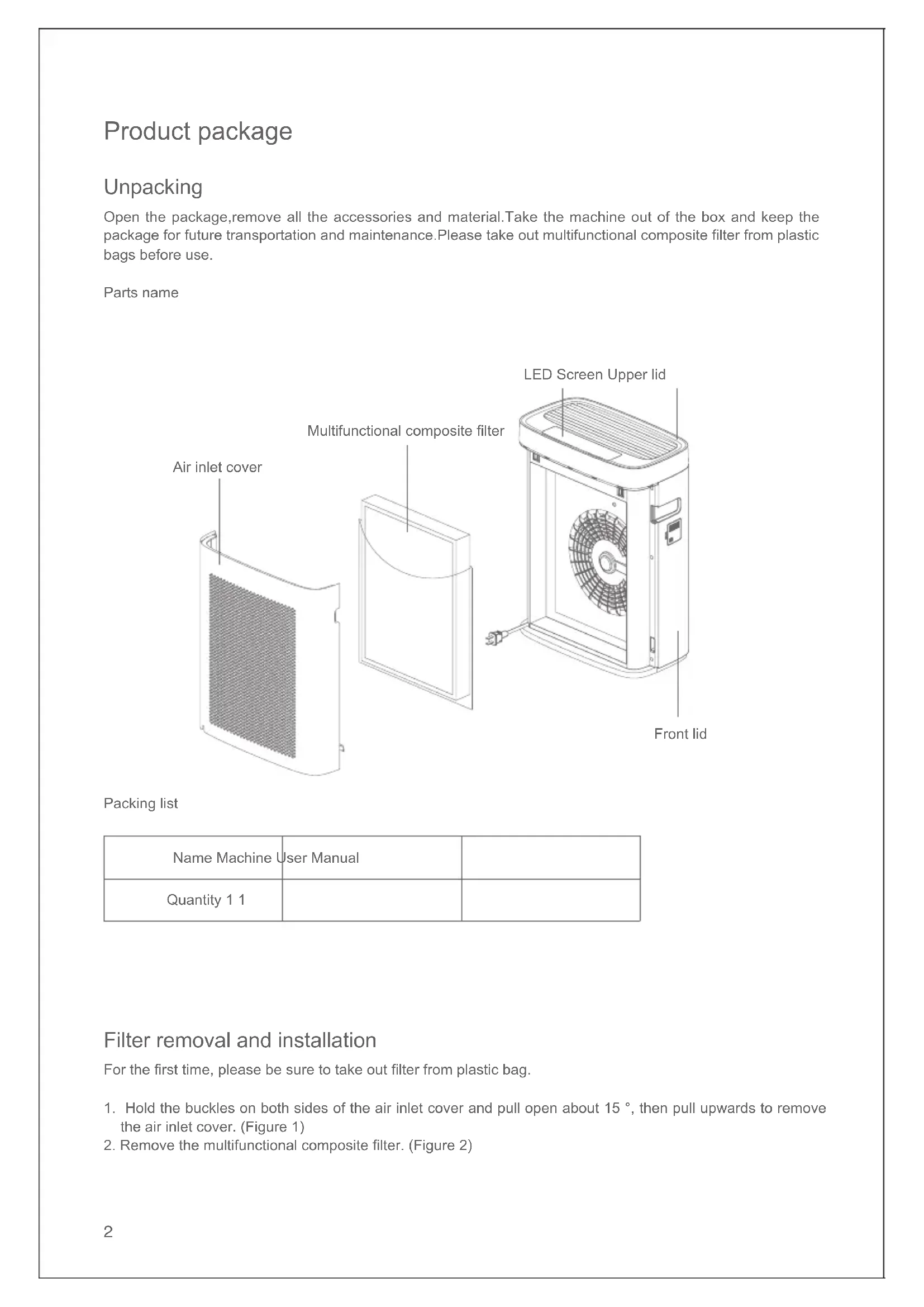
Open the package, remove all the accessories and material. Take the machine out of the box and keep the package for future transportation and maintenance. Please take out multifunctional composite filter from plastic bags before use.
Parts name
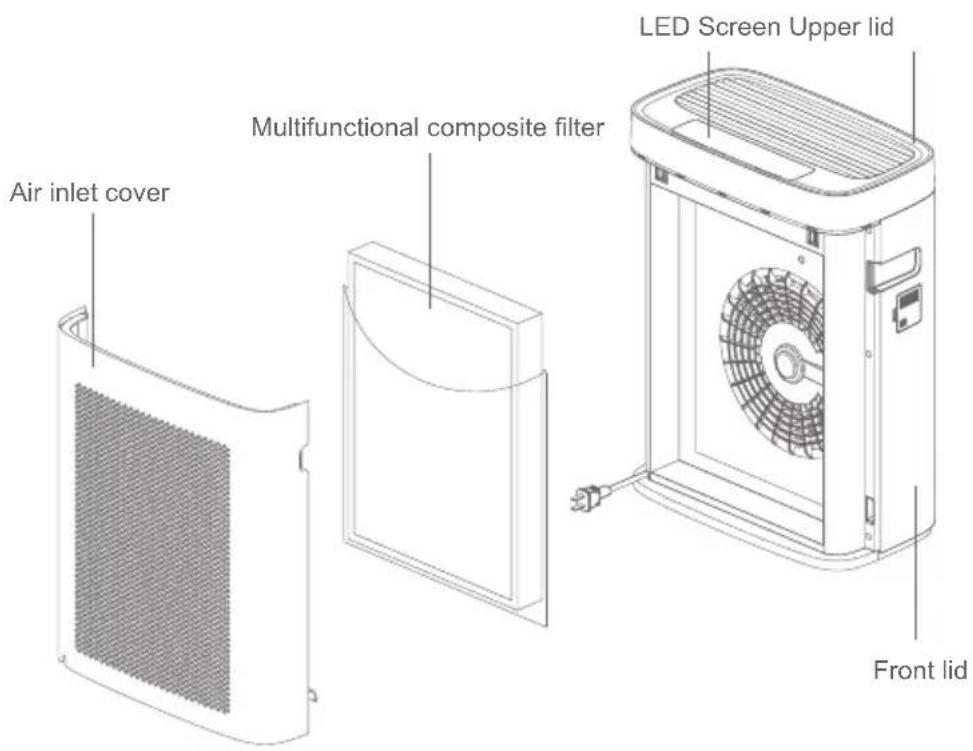
Packing list
| Name Machine | User Manual | |
| Quantity 1 1 |
Filter removal and installation
For the first time, please be sure to take out filter from plastic bag.
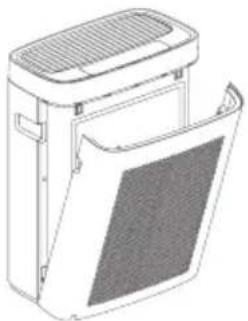
- Hold the buckles on both sides of the air inlet cover and pull open about 15^ , then pull upwards to remove the air inlet cover. (Figure 1)
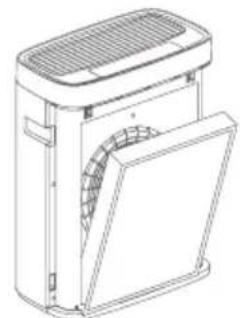
- Remove the multifunctional composite filter. (Figure 2)
1
2
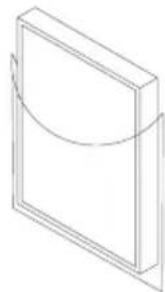
3.Remove the multifunctional composite filter package.(Figure 3)
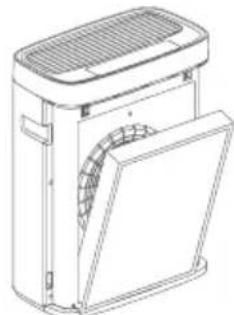
4.Install the multifunctional composite filter.(Figure 4)
3
4
5.Snap the two clips under air inlet cover into both sides slot, then close the upper side.(Figure 5,Figure 6)
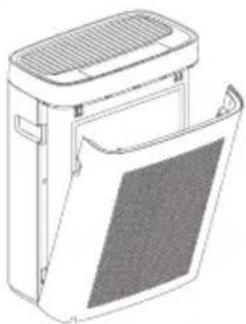
5
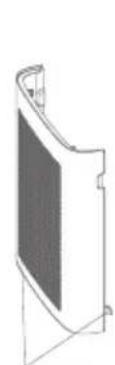
6
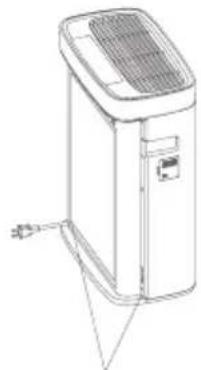
Clip Slot
Placement
The machine is best placed upright on the floor and at a distance of more than 30cm from the wall for the best purification effect.(Figure 7)
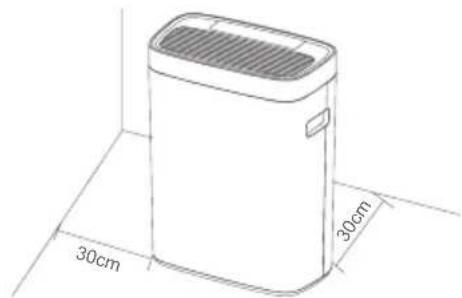
7
Connect power
Before insert the power cord plug into the socket, please confirm the input voltage is 230V , and ensure the power plug and hands are dry.
Note:If the power cord is damaged, please ask for professional help of the manufacturer and other professionals for safety reasons.
Use of the product
Operation panel and display
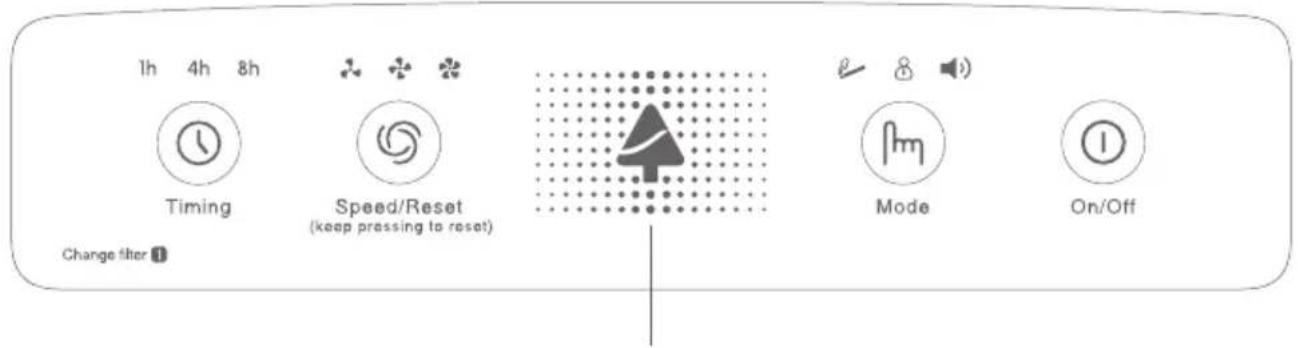
Air quality display: The color change on the display represents the pollution degree of particles. There are 3 colors, the darker the color, the more serious the pollution of particals. For example, when the color display is blue, indicating that the air quality is excellent. From good to poor, they are blue, yellow and red. Red stands for the worst air quality.
Button description
On/Off
The machine is accompanied by a sound and the indicator light on the operation panel flashes once when the machine is connected to the main power supply. The machine enters standby state.
Press On/Off button, the buzzer sounds once, the machine enters the smart mode by default. Press On/Off button again, the machine turns off.
Mode
The machine provides following 3 modes:
Smoke mode: In very dirty or heavily polluted rooms, it is recommended that you use this mode.
Silent mode: In this mode, the environment is quieter. When you need quiet you can choose silent mode.
Smart mode: In this mode, the machine can automatically adjust the operation according to air quality detected by dust sensor.
Particle concentration and air quality can be displayed on the LED screen,
The color change on the display represents the pollution degree of particles. There are 3 colors, the darker the color, the more serious the pollution of particals. For example, when the color display is blue, indicating that the air quality is excellent. From good to poor, they are blue, yellow and red. Red stands for the worst air quality.
The machine has light sensor. In any modes, all indicators and display on the machine automatically change brightness according to the environment brightness.
e.g. In order to not disturb user's sleep, when the machine is in a dark environment, all the indicator lights off and the machine automatically enter into sleep mode. When in a bright environment, all the indicator lights up and the machine runs normally.
Speed/Reset
Speed function
Low, Mid, High speed button for your manual selection.
Note: There are total 5 air speeds for user's personal needs: Air speed in Smoke mode, High air speed, Mid air speed, Low air speed, Air speed in Silent mode.
Reset
When replace filter indicator lights up, it reminds the filter needs to be replaced. To avoid secondary pollution
caused by filter replacement not in time. After replacing the filter, please keep pressing "Speed/Reset" button for 5 seconds until the indicator lights off. Otherwise, the indicator light will be on all the time.
Timing
This machine provides three timing times(1h,4h,8h). Press the timing button once to set the time to 1 hour, press timing button twice for 4 hours, press timing button three times for 8 hours. Press again to cancel and so on. This button is a loop button. When time is up, the whole machine stops running.
Cleaning and maintenance
Filter cleaning and replacement
Note: Do not wash the multifunctional composite filter in water!
- Proper care and cleaning of filter is critical to air purifier performance.
- Follow the method in "Filter Removal and Installation".
- Proper cleaning of multifunctional composite filter to increase filter life: Once every two weeks; Do not wash with water; Clean with a vacuum cleaner brush or crevice tool on a newspaper or protective article; Do not press the multifunctional composite filter hard when cleaning to avoid deformation!
- Replace multifunctional composite filter: When the indicator lights up, the user should replace the filter within two weeks. According to the pollution degree and the use environment, the filter life is also different.
Machine cleaning and maintenance
- Unplug before cleaning.
- Increase cleaning frequency when use in dirty places.
- Please wipe stains with soft cloth.
- Please wipe indelible stains with a soft cloth with diluted neutral household cleaner and make sure the machine is completely dry before reuse.
Infrared dust sensor cleaning
- Clean infrared dust sensor regularly: suggest clean once every three months.
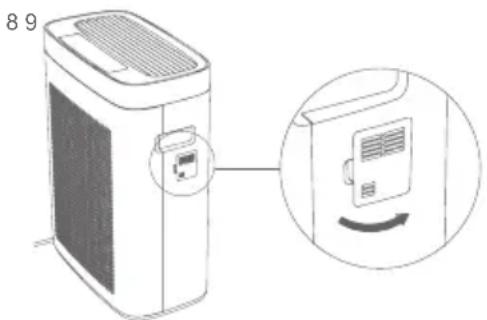
- Open Infrared dust sensor cover;(Figure 8)
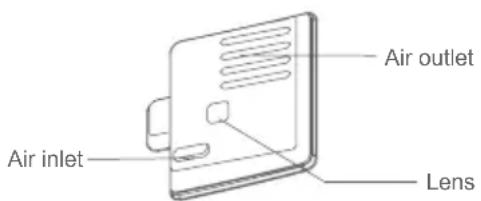
- Clean infrared dust sensor: please use wet Q-tip to clean the lens, air inlet and air outlet, then use dry Q-tips to remove the remaining water stains on the sensor; (Figure 9)
4.Install the infrared dust sensor cover in place.
Machine storage
Please unplug the power, clean and dry the machine, cover with a plastic bag and store in a dry place if the machine is to be idled.
Note: Do not drag the power cord by hand. Please unplug the power cord hold by hand in case of cord damage.
Cautions
- Please read this instruction manual carefully before use and keep it properly for future use.
- Do not self-disassemble, repair or modify the machine .Otherwise it may cause product damage or fire.
- Keep this product beyond the reach of special individual such as children without adult supervision.
- Do not place the machine in the following locations:
a. Damp rooms (such as bathrooms) or other obviously damp places in case of electric shock or damage the machine.
b. Outdoors or in direct sunlight in case of fading the machine casing.
c. Near heat sources (such as heaters),other heat will discolor or deform the machine casing.
d. Smoke and ventilation in kitchen operation will shorten the filter life and damage the machine.
e. A place full of oil, such as engine oil in case of machine damage, electric shock or burning.
f. Within 2 meters away from equipment that emits weak electromagnetic waves, such as TV, radio, audio, quartz clock, wired antenna, cordless telephone, wireless microphone, etc in case of receiving noise. EMI may affect image quality and sound effect.(However, due to the different wavelengths of electromagnetic waves, sometimes electromagnetic interference may occur even if the air purifier is placed more than 2 meters away. When using an indoor antenna, it will particularly hinder reception, so please place the machine as far as possible place in case of receiving noise).
- The machine is best placed on the floor and at a distance of more than 30cm from the wall for the best purification effect. Change the position frequently, otherwise it may stain the wall or floor around the machine
- The input voltage should not exceed the rated value in case of machine damage or fire.
- Do not damage the power cord. Do not install objects on the power cord. Do not bend, drag or twist the power cord. Do not stack heavy objects on the power cord, or sandwich the power cord between objects. The power cord damage may cause fire and electric shock.
- Do not use damaged power cords and unusable power plugs in case of short circuit, electric shock or fire.
- Do not operate the machine with wet hands. Do not put fingers or something into the air outlet to avoid the risk of electric shock and damage.
- Do not put any water containers, such as fish tanks or vases, near the machine in case of water enters the machine to cause electric shock or malfunction.
- Do not push the air purifier quickly to avoid it fall over.
- Do not use the machine with the machine lying or tilted. Do not sit or stand on the machine, do not shake the machine in case of personal injury and product damage.
- Do not block the air inlet and outlet in case of reducing the machine clean efficiency and causing machine damage.
- Do not use the machine to remove some toxic substances.
- For safety reasons, please do not use in places with large amount of smoke and dust (such as kitchen) or combustible gas, corrosive gas and metal dust particles. otherwise it may cause product damage or fire
- Pay attention when using with humidifier, to prevent excessive water vapor enter into the machine. The water vapor may cause electric shock and damage the machine.
- When using pesticides, please stop using the machine to prevent chemical substances from being sucked into the machine for personal health.
- Please turn off the power and unplug the power plug before changing the filter, cleaning or moving the machine in case of machine damage or electric shock.
- Do not use solvents such as benzene, alcohol or thinner to clean the air purifier. Also, avoid the spray insecticides in case of the machine shell to rupture or even short circuit, electric shock or fire.
- Please unplug the power cord if the machine is to be idled.
- Do not drag the power cord by hand. Please unplug the power cord hold by hand in case of cord damage.
- If the power cord is damaged, please ask for professional help of the manufacturer and other professionals for safety reasons.
Trouble shooting
Please check the following trouble points before go to the maintenance department.
| Problems Possible Reasons | Solution | |
| Power Failure | No power on socket Check power | |
| Power cord plug is not firmly inserted Inset the power cord plug | ||
| No air blows out | Something are blocking the air inlet or air outlet | Move machine or remove foreign objects or check plastic bag of filter whether is removed |
| Motor not working Contact with local distributor | ||
| Bad smell from the air outlet | Temporarily generates a lot of odor(Many people smoke etc) | The odor gradually disappears after turn on machine for a while |
| Long time no replacing the filter(Different use environment cause different filter life, filter may need to be dried or replaced within a few months or even weeks) | Place the filter in a sunny or well-ventilated place for about 2-3 hours to evaporate water.(Do not put it in the sun to expose in case of deform the filter to affect the performance of the machine) | |
| Replace the filter | ||
| All indicator lights are off, machine automatically enter sleep mode when there is a light in the room | The surrounding light is weak, which may affect the light sensor and cause the machine to enter sleep mode | Moving the machine to a brighter place |
| Machine cannot enter sleep mode when the light is turned off | Obvious light source outdoors shooting into the room through doors and windows prevents the machine entering sleep mode | Prevent light sources entering, such as closing doors and windows, drawing curtains, etc. |
| Air quality display always shows red does not change colour | Infrared dust sensor air outlet and lens are dirty | Clean the upper and lower air outlets and lens with cotton swabs |
| Poor cleaning effect | In an unventilated place, or there are obstacles near the machine | Place the machine in a ventilated position and remove obstacles |
| Multifunctional composite filter has not been replaced for a long time | Replace multifunctional composite filter |
Note: If fault remains after adopting the following solutions, contact after sale service or local distributor immediately.
Product specification
Parameter
| Mode AP36 | |
| Rated Voltage 230V~ | |
| Rated Frequency 50Hz | |
| Rated power 50W | |
| Particle CADR 300m³/h | |
| Formaldehyde CADR 40m³/h | |
| Noise 61dB(A) | |
| Suitable Working Area 24m²-36 m² |
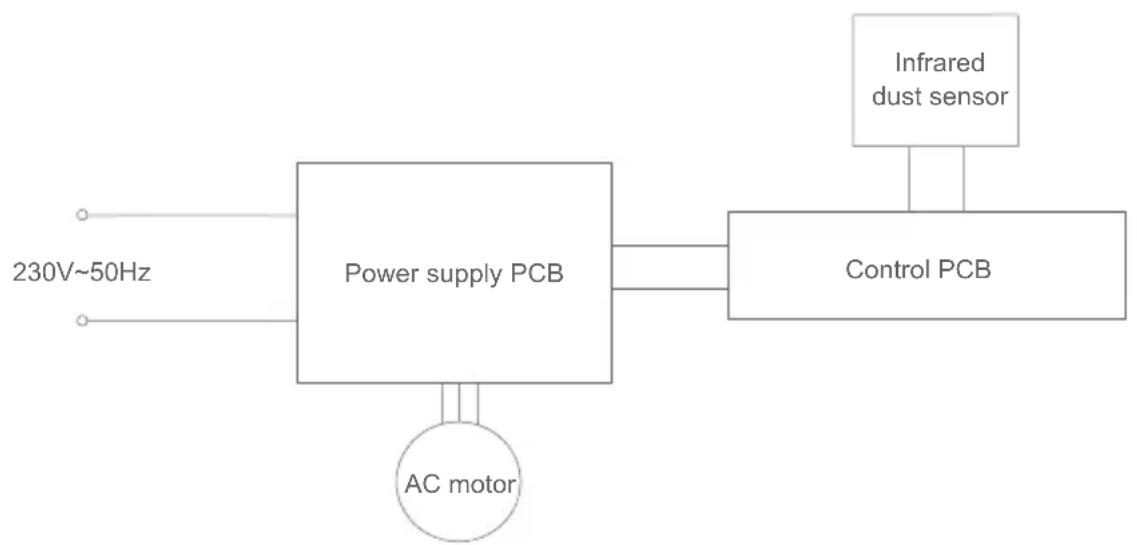
Circuit diagram
Manufacturer Information
| Manufacturer King | clean Electric Co., Ltd |
| Address No.1 Xiangyang road, Suzhou New District,Jiangsu province, 215009, China | |

Disposal
The machine, accessories and packaging should be sorted for environmental-friendly recycling.

Do not dispose of the machine into household waste!
Subject to change without notice.
Warranty Information
This product enjoys two year warranty from the date of purchase.
Excluded from the guarantee is normal wear, commercial use, alterations to the appliance as purchased, cleaning activities, consequences of improper use or damage by the purchaser or a third person, damage that can be attributed to external circumstances or caused by the batteries.
Paquet du produit
Ouverture du paquet
Please check the following trouble points before go to the maintenance department.
YcTpaHHe HeNCnPaBHOCTeI
PoxkanyuCTa npOBepbTe cneDyUoIue BOpocbI nepeD cdaueN npOdyKcHn Ha peMOHT:
| Hénciprabhoctb Bo3mox | HbIe pRnHbI PeSeHnIa | |
| He moJxHo 3aIyctntb | Pozetka cena П探测пь питанhoe | |
| BvIIka podKIIquHeHa He pIoTHo BCTaBIVb VILKy | ||
| He bIyDyBaETcB Bo3dUx | Bxod nIIy BixO Bo3dUxha 3acopEnNoCTOPOHIMn PrpeMTeAmn | Переметиь машину, удадиьпосторонne рpedmétы nIIlnп探测пь, сггл пл actokobii naket cФИьТрOBaHbON CETKN |
| ЗлЕкtrpoДВИrATeIb He paBoTaE T OБрацяСКДСТРИБЛТОРу | ||
| HepriyaTbI 3aIaxN3daetcIb 3b BixOda Bo3dUxa | ВретенhoиЗдЯETcб 6oJIbшоeKoIuYeCTBO 3aIaxa (MHOrO IIODei KypaI r T.D.) | Череше Нжотороe ВретяЗдaxпостеленho ИсчezаET |
| ФИьТрOBaHbNar cETKa He 3aMeHenaB TeueHne ДЛITeHbO RрeMehn (paznuchы yCNoBnY IcNoIbZoBAnHn PrinBODaR K p3HbIM cspokam cnykSbI,ФИьТрOBaHbHy O cETKу HuxHo BlyCy uINb NII MeHЯТ b IocNe HeCKOLbKO Mecra, Дajke HeCKOLbKO HeDElb) | Пометиь ФИьТрOBaHbHy O cETKу B coNHeuHoe nII BeHTnIInpyeMoE MeTo primeperno Ha 2-3 Yac,чTOбиИспаряв Bodу n3 ФИьТрOBaHbON CETKN (He PodBepraiTe eE BO3deIcTBINO CnIbHbIX COnHeuHbIX NuyeB, B npOTnBHom cNcyae 3TO prinbeDet K deΦoRmaHnФИьТрOBaHbON CETKN IyUxDshENHO prOIN3BODaNTbHOCHTMaShnHbI). | |
| Замени不起хлТрOBaHbHy O cETKу | ||
| Почemу MaшинabTOMATNUcheckNi peReklIQUaTeTcB PexKIM cHa (Bce INdNKaTOpHbIe Лamblb ByIKLIOUeHbI)При BKLIQUeHOM OCBeSeHnI (nIIb BnomeUeHnIC NCTOUnHkOM CBeta) | OkryjkaIoUsn CBet cIa6bI,чTo Mochet NOBnIaTb Ha CBetoYCbCTBnTEbHbI DaTChk,В rezylbTaTe Yero MaSHnA nepeKlIQUaETcB PexKIM cHa | Есни He hUxHNo nepeKlIQUaTb B PexKIM cHa, preremecTtB MaShnHy B 6OJIee CBetNoe MeTo |
| Почemу Maшинa He moJet peReklIQUaTbcB B PexKIM cHa prn BlyKlIOUeHOM OCBeSeHnI | BvIdMbIи StOchNik CBet BaXodnB KOMHaTy C yUInCbI chpe3 DBePern OkHa,ТakчTO MaShnHa He MochetpeReklIQUaTbcB PexKIM cHa. | Н徝юскaite РожданныngИStOчнka CBet a BNYtpb, habIpimep,ЗakpbIb DBePern IOKHa,ЗадергИВaTb WToRbI N.T.D. |
| ПочTownHIO rOpiK kpaSna INdNKaTOpHaNЯ lamPna KaueCTBa BO3dUxa | Bxod n BixOd Bo3dUxa, LIn3aInHφpakpachoro DaTChka PbIIN 3aRpa3Hnebl | Очирсты Bxod n BixOd Bo3dUxa, LIn3y BaTHO nIapOkoI |
| ПлoxойAzΦΦeK T OCHSTkn | Maшинa haxOitcR B HeBentnIInpyeMOM MeTe, nII pyIdomC mAsHHoIe cTb PpeIaTCTBnI | Пометиь Maшину B BeHTnIInpyeMoe MeTo, yCTpaHnITb PpeIaTCTBnI |
| MhorOfoYHKUioHaJIbHa KOMNo3IITHaФИьТрOBaHbN a cTcKa He 3aMeHenaB TteHneДIITeHbHOr BpeMeHnI |
Приимechаиме:Есни Heисправноctь He yctpaheha nocne npinяТЯ Вышeyka3aHHbIX peшени, HeMeДлeнHO obpaauTeCb KДиСТрпБHTOpу. He pa3bupaIte, pemOHtUpyIte mOHTupyIte camOCTOЯTeJIbHO.
Cneunfkaucn npoduknn
TexHnueckne npaMeTpbl
Otpa6oTaHHbIe npi6opbl He dONXHbI Bbl6paCbIBaTbcra COBmecTHO C 6bITOBbIMN OTXdAMn!
Bo3MOxHbI n3MeHHe 6e3 npEdbapntelbHorO yBeDOMTeHn.
Yka3aHne no NObOdy rapaHTn
3TOT npOdyKT IMeET DBa rOda rapaHTN C MOMeHTa NOKyIKN.
IapaHTnHe npedocTbJIeTcB Cnyuae eCTeCTBeHHoro n3HOca, IcNoJIb3OBaHnB B KOMMepuecknx ceJIx, n3MeHnI nepBOHaaybHorO coCToHnI np6Opa, pa60T no OChCTke, pRn PocJeDCTBnX HeHaJNeXaUero 6paSeHnI nnIOBpeXdHnN NOKyNaTeJIem nn TpeTbIMN JInCaMn, NOBpeXdHnN, BbI3BaHHom BHeJHmN 6ObToTaeTbCTBaMn, nn nn-3a akKymyIaTOpHbIX 6aTapei.
NOTES
NOTES

1J-01


Contact us -we'll get back within 1 business day.

Web:www.jimmyglobal.com Email:support@jimmyglobal.com