AVO410 - Multimeter Megger - Free user manual and instructions
Find the device manual for free AVO410 Megger in PDF.



| Product Type | Digital Multimeter |
| Brand | Megger |
| Model | AVO410 |
| Safety Category | CAT IV 600 V, CAT III 1000 V |
| Display | LCD 6000 counts, 1.5 updates/s |
| Dimensions (without holster) | 76 mm x 158 mm x 38 mm |
| Dimensions (with holster) | 82 mm x 164 mm x 44 mm |
| Weight | 522 g |
| Power Supply | 9V battery (NEDA 1604, IEC6F22, JIS006P) |
| Battery Life | 300 hours (alkaline) |
| Auto Power Off | Yes, after 10 minutes of inactivity |
| Measurement Functions | AC/DC voltage, AC/DC current, resistance, capacitance, frequency, diode/continuity test |
| AC Measurement Type | True RMS (TRMS) |
| Input Impedance (voltage) | 110 MΩ // < 100 pF |
| Overload Protection | A input: 10A 500V fuse; μA input: 600Vrms; V/Ω input: 1000VDC/750VAC |
| Continuity Test | Threshold < 500 Ω, audible tone |
| Measurement Ranges | See manual for details (600 mV to 1000 V, 600 μA to 10 A, 600 Ω to 60 MΩ, etc.) |
| Maintenance | Clean with a damp cloth and mild detergent; do not immerse |
| Battery Replacement | Yes, by user; remove test leads before |
| Replacement Fuse | 10 A 500 V, 32 mm (use only recommended type) |
| Repairability | Repair by qualified personnel; warranty void if unauthorized repair |
| Customer Service Contact | Megger Ltd (UK) or Megger SARL (France) - see manual |
Frequently Asked Questions - AVO410 Megger
User questions about AVO410 Megger
0 question about this device. Answer the ones you know or ask your own.
Ask a new question about this device
Download the instructions for your Multimeter in PDF format for free! Find your manual AVO410 - Megger and take your electronic device back in hand. On this page are published all the documents necessary for the use of your device. AVO410 by Megger.
USER MANUAL AVO410 Megger
text_image
Megger AVO 410 MULTIMETER 1.167 V MIN MAX RS232 RANGE HOLD Ω Ω μA ± Hz OFF A COM +Hz 10 A YΩ μA FUSED BIR V CAT IV TUB V CAT IIAV0410
Digital multimeter
Digitale Multimeter
Safety warnings must be read and understood before instrument is used. The following safety information must be observed to insure maximum personal safety during the operation of this meter:
■ Do not use in wet environments.
■ Measurements beyond the maximum selected range must not be attempted.
■ Extreme care must be taken when measuring above 50 V, especially on live bus-bars.
■ To measure voltage, the instrument must not be switched to a current or resistance range, or to the diode check or buzzer position.
■ Circuits must be de-energised and isolated before carrying out resistance tests.
■ The rotary selector switch must only be turned after removing test connections.
■ To avoid false readings that could lead to electric shock and injury, replace the battery as soon as the low battery indicator (☐) appears.
■ All external voltages must be disconnected from the instrument before removing the battery.
■ Test leads and prods must be in good order, clean, and with no broken or cracked insulation.
■ UK Safety Authorities recommend the use of fused test leads when measuring voltage on high energy systems.
■ Replacement fuses must be of the correct type and rating.
■ The instrument must not be used if any part of it is damaged.
■ Check for correct instrument operation by testing a known voltage before and after use. Do not use if misleading results are obtained.
■ Warnings and precautions must be read and understood before an instrument is used. They must be observed during the operation of this instrument.
CAT IV - Measurement category IV: Equipment connected between the origin of the low-voltage mains supply and the distribution panel.
CAT III - Measurement category III: Equipment connected between the distribution panel and the electrical outlets.
CAT II - Measurement category II: Equipment connected between the electrical outlet and the user's equipment.
Note This instrument must only be used by suitably trained and competent persons
Contents
Safety warnings 2
Symbols used on instrument 3
Introduction......4
Operation 5
Specifications....10
Symbols used on the instrument are:
Caution: risk of electric shock
Caution: refer to accompanying notes
☐ Equipment protected throughout by Double Insulation (Class II)
CE Equipment complies with current EU directives.
End of life disposal

The crossed out wheeled bin placed on the Megger products is a reminder not to dispose of the product at the end of its product life with general waste.
Megger is registered in the UK as a Producer of Electrical and Electronic Equipment. The Registration number is WEE/HE0146QT.
Batteries
Should the display fail to illuminate then change the battery. For the purpose of end of life disposal and battery replacement, removing the two screws on the base of the unit accesses the battery.
The crossed out wheeled bin placed on the battery is a reminder not to dispose of it with general waste at the end of its life.
This product contains 1 x PP3 / 6F22 alkaline battery.
Do not use rechargeable batteries.
The battery fitted in this instrument is classified as a Portable Battery and should be disposed of in the UK in accordance with Local Authority requirements.
For disposal of batteries in other parts of the EU contact your local distributor. Megger is registered in the UK as a Producer of Batteries. The registration number is BPRN00142.
Introduction
Thank you for purchasing the Megger AVO410 Digital Multimeter.
For your own safety and to get the maximum benefit from your instrument, please ensure that you read and understand the safety warnings and instructions before attempting to use the instrument.
The AVO410 is aimed at providing electricians with a rugged, easy to use multimeter for field use. Functions include voltage, current and resistance; in addition, there are extra functions that may also appeal to electrical and photovoltaic engineers. The instrument features automatic or manual selection of ranges, True RMS readings and a CAT IV 600 V safety rating.
Unpacking and inspection
Upon removing your new digital multimeter from its packing, you should have the following items.
- Digital multimeter.
- Test lead set (one black, on red)
- User manual.
- Protective holster.
Symbols and annunciators

Continuity

Low battery

Diode test
HOLD
Data hold
AUTO
Auto-ranging
AC Alternating current or voltage
DC Direct current or voltage
MAX/MIN
Stores the highest or lowest measurement

Backlight
V Volts
A, mA, uA
Current range
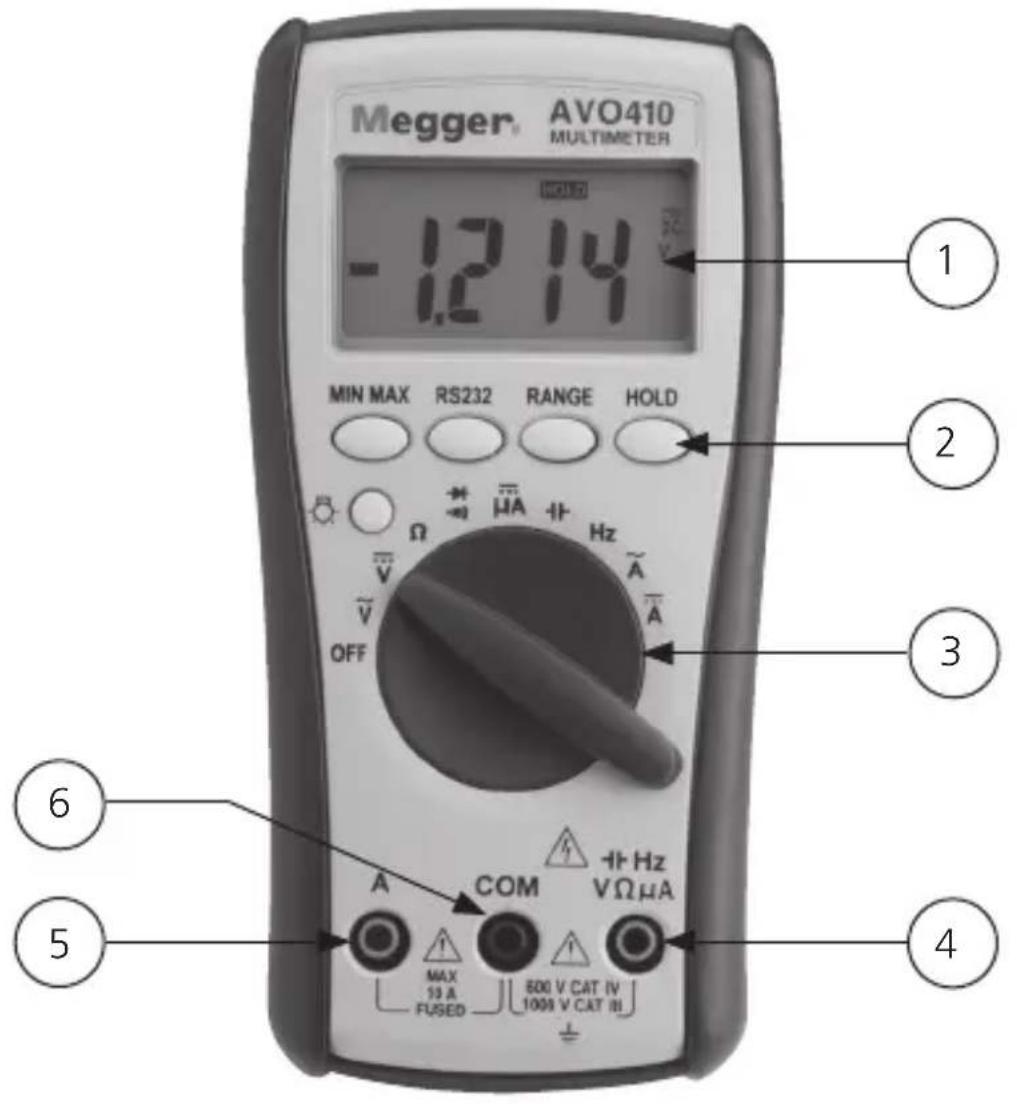
Meter description
- 6000 counts LCD display.
- Push buttons for features
- Selection switch
- Input terminal for all other functions (Red)
- Input terminal for A current selection (Red)
- COM (Black) common or ground reference input terminal for all functions.
FEATURES
text_image
Megger® AVO410 MULTIMETER -12 14 V MIN MAX RS232 RANGE HOLD Ω μA Hz OFF COM +Hz VΩμA MAX 10 A FUSED 500 V CAT IV 1000 V CAT III ① ② ③ ④ ⑤ ⑥OPERATION
AC VOLTAGE MEASUREMENTS
- Set the function switch to the V AC position (AUTO, T-RMS and AC volts will appear on the display).
- Insert the black test lead in the COM jack and the red test lead into the V jack.
- Connect the test probe tips to the circuit under test.
- Read the voltage on the display.
DC VOLTAGE MEASUREMENTS
- Set the function switch to the V DC position (AUTO and DC volts will be appear on the display).
- Insert the black test lead into the COM jack and the red test lead into the V jack.
- Connect the test probe tips to the circuit under test. Be sure to observe the correct polarity (red lead to positive, black lead to negative)
- Read the voltage on the display. If the polarity is reversed, the display will show (-) minus before the reading.
RESISTANCE (Ω) MEASUREMENTS
- Set the function switch to the position (AUTO and M will appear on the display).
- In addition, O.L will be displayed indicating an open circuit.
- Insert the black test lead into the COM jack and the red test lead into the Ω jack.
- Connect the test probe tips to the circuit under test.
- According to measured value the reading will be in Ω, kΩ or MΩ.
Note: The AVO410 provides an open circuit voltage <-1.5 V to the circuit under test which will cause transistor junctions to conduct so it is advisable to disconnect the item to be tested from the circuit to obtain an accurate reading.
DIODE / CONTINUITY TESTS
WARNING: To avoid electric shock never test a diode or conduct a continuity test on an energized circuit.
-
Set the function switch to the diode/continuity position. (The diode and V symbols will appear).
-
In addition, .OL will be displayed indicating an open circuit.
-
Insert the black test lead into the COM jack and the red test lead into the jack.
-
For continuity connect the test probes to the cable or circuit to be tested. (Polarity is not important).
-
The AVO410 will emit a tone if continuity is below 500 Ω / .OL with no tone will indicate either open circuit or continuity above 500 Ω.
-
For diode testing connect the test probe tips to the diode or semiconductor junction and note the reading.
-
Reverse the probe polarity by switching probe position and note this reading.
-
The diode or junction can be evaluated as follows:
a. If one reading shows a value and the other reading shows .OL, the diode is good.
b. If both readings show .OL, the device is open circuit.
c. If both readings are very small or zero, the device is shorted.
DCμA MEASUREMENTS (6000 μA max.)
- Set the function switch to the DCμA position. (AUTO and DCμA will be displayed).
- Insert the black test lead into the COM jack and the red test lead into the A jack.
- Remove power from circuit under test, then open circuit at a convenient point where current is to be measured.
- Connect the black test probe to the negative side of the circuit. Connect the red test probe to the positive side of the circuit.
- Carefully apply the power
- Read the measured on the display.
- Remove supply before removing test leads and reconnecting circuit.
Note: The DCμA input terminal is protected by 3.6 kΩ PTC (600 V rated) thermistors.
The loading effect of these devices may cause measurement errors on low impedance circuits (<100 kΩ).
CAPACITANCE MEASUREMENTS
WARNING: To avoid damage to the instrument. Before testing, discharge the capacitor/s to be tested.
- Set the function switch to the capacitor position (AUTO and nF will be appear on the display).
- Insert the black test lead into the COM jack and the red test lead into the capacitance jack.
-
Connect the test probe tips to the capacitor under test. Be sure to observe the correct polarity if the capacitor is an electrolytic / polarised type. Red to positive and black to negative.
-
Read the value on the display.
FREQUENCY MEASUREMENTS
- Set the function switch to the Hz position (AUTO and Hz will appear on the display).
- Insert the black test lead in the COM jack and the red test lead into the Hz jack.
- Connect the test probe tips to the circuit under test.
- Read the frequency on the display.
AC CURRENT MEASUREMENTS
- Set the function switch to the AC A position. (AUTO, T-RMS and AC A will appear on the display).
- Insert the black test lead into the COM jack and the red test lead into the A jack.
- Remove power from circuit under test, then open circuit at a convenient point where current is to be measured.
- Connect the black test probe to the negative side of the circuit. Connect the red test probe to the positive side of the circuit.
- Carefully apply the power
- Read the measured on the display.
- Remove supply before removing test leads and reconnecting circuit.
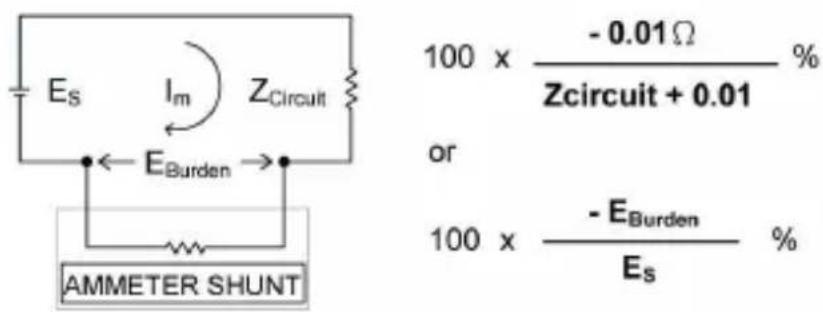
Note: When measuring current on the A current terminal the instrument has an internal impedance of 0.01 Ω at AC/DC A in series with circuit under test.
The loading effect may cause measurement errors on low impedance circuits.
For example: Measuring a 1 Ω impedance circuit will cause a -1 % measuring error. The error percentage of the loading effect of the meter can be expressed as the following:
text_image
Es Im Z Circuit EBurden 100 x - 0.01 Ω % Zcircuit + 0.01 % or 100 x - EBurden % Es AMMETER SHUNTDC CURRENT MEASUREMENTS
- Set the function switch to the DC A position. (AUTO and DC A will appear on the display).
- Insert the black test lead into the COM jack and the red test lead into the A jack.
- Remove power from circuit under test, then open circuit at a convenient point where current is to be measured.
- Connect the black test probe to the negative side of the circuit. Connect the red test probe to the positive side of the circuit.
- Carefully apply the power
- Read the measured on the display.
- Remove supply before removing test leads and reconnecting circuit.
FEATURE BUTTONS
BACKLIGHT
The AVO410 has a backlit display for all the different functions which has an auto off in 60 seconds.
MIN MAX
The MIN MAX function enables the user to display both a minimum and a maximum measured reading. To activate, first select a function and make a measurement. Press the MIN MAX button to store the maximum reading. Should the value increase then the new value will be stored. Pressing the MIN MAX button once more will switch the instrument display to minimum reading.
Pressing the HOLD button while in MIN MAX mode will stop the AVO410 updating the maximum and minimum displayed reading. Holding down the MIN MAX button for >1 sec. will switch the function off.
HOLD
Press the HOLD button to freeze the reading on the display. The MIN MAX function is unavailable when the Hold is active.
RS-232
The RS232 feature on the meter has been disabled.
RANGE
When any of the individual functions are first selected the unit will be in the auto ranging mode.
Each successive press of the range button will enable the operator to manually choose a required range.
AUTO POWER OFF / DISABLE
If the meter is idle for more than 10 minutes, the meter automatically turns the display off. During this off time the last reading on the meter is stored. The AVO410 can be restored by pressing any button.
To disable the power off function simultaneously hold down the MIN MAX, RS232 and Range buttons and switch instrument to required function.
MAINTENANCE
To clean the instrument, do not immerse in water, periodically wipe the case with a damp cloth and mild detergent. Dirt in the terminals may affect readings. Remove the battery if the AVO410 is not to be used for a long period of time.
When the low battery symbol 📄 appears on the display, replace the battery. to avoid false or inaccurate measurements. To replace battery remove instrument from black boot and unscrew two screws on battery cover to reveal battery.
An internal user replaceable fuse can be accessed for replacement by unscrewing the four deep recess screws. Carefully separate the two halves of the tester taking care of battery lead. Use only the recommended replacement fuse (10 A 500 V 32 mm).
SPECIFICATIONS
General Specifications
Display: 6000 counts updates 1.5/sec.
Polarity indication: Automatic, positive implied, negative indicated
Overrange indication: "OL" or "-OL"
Low battery indication: Displayed when the battery voltage drops below operating voltage
Auto power off: Approx 10 minutes
Operating ambient:
Non-condensing ≤10 °C, 11 °C \~ 30 °C (≤80% R.H)
31^ 40^ ( ≤ 75% R.H),
41 °C \~ 50 °C (≤45% R.H)
Storage temperature: -20 °C to 60 °C, 0 to 80% R.H. when battery removed from meter
Temperature coefficient: 0.15 x (Spec.Acc'y) / °C, <18 °C or >28 °C
Power requirements: Standard 9V battery NEDA 1604, IEC6F22, JIS006P
Battery life: Alkaline 300 hours
Dimensions (W x H x D): 76 mm x 158 mm x 38 mm without holster
82 mm x 164 mm x 44 mm with holster
Weight: 522 g
Electrical Specifications
Accuracy is ± (% reading + number of digits) at 23 °C ±5 °C, less than 80% R.H
DC/AC volts
| Range DC accuracy | AC accuracy | |
| 600.0 mV *1 | ± (0.5% + 2 digits) | 50 Hz/60 Hz sine wave only for 600.0 mV range, ± (0.9% + 5 digits) 50 Hz ~ 500 Hz |
| 6.000 | ||
| 60.00 V | ||
| 600.0 V |
DC 1000 V/AC 750 V
Over voltage protection: DC 1000 V or AC
Input impedance: 10 MΩ // less than 100 pF
CMRR/NMRR
(Common mode rejection ration/normal mode rejection ratio)
V_AC : CMRR >60 dB at DC, 50 Hz/60 Hz
V_DC : CMRR >100 dB at DC, 50 Hz/60 Hz
NMRR >50 dB at DC, 50 Hz/60 Hz
AC conversion type:
AC conversions are AC coupled True RMS responding, calibrated to the sine wave input.
*1
The basic accuracy is specified for a sine wave below 4000 counts. Over 4000 counts, add 0.6% to the accuracy. For non-sine waves below 2000 counts, refer to the following for accuracy:
±1.5% addition error for C.F from 1.4 to 3
Crest factor: C.F. = Peak/rms
DC/AC current
| Range DC accuracy | AC accuracy Voltage | burden |
| 600.0 μA | ± (1.0% + 2 digits) | N/A <4 mV/μA |
| 6000 μA | ||
| 6.000 A ±(1.5% +6 dgt) | 50 Hz ~ 500 Hz *1 | |
| 10.00 A |
Overload protection
A input: 10 A (500 V) fast blow fuse
μA input: 600 V rms
*1
AC conversion type:
Conversion type and additional specification are the same as DC/AC voltage
Resistance
| Range Accuracy Overload protection | ||
| 600.0 Ω *2 ± (0.7% | + 2 digits) 600 V rms | |
| 6.000 KΩ | ||
| 60.00 KΩ | ||
| 600.0 KΩ | ||
| 6.000 MΩ ± (1.0% | + 2 digits) | |
| 60.00 MΩ *1 ± (1.5% | % + 2 digits) | |
Open circuit voltage: -1.3 V approx.
*1 <100 digit rolling
*2 <10 digit rolling
Diode check and continuity
| Range Resolution Accuracy | |
| →+ | 10 mV ± (1.5% + digits*) |
* For 0.4 V \~ 0.8 V
Max. test current: 1.5 mA
Max. open circuit voltage: 3 V
Overload protection: 600 V rms
Continuity: Built-in buzzer will sound when the
resistance is less than 500 Ω approx.
Response time is 100 ms approx.
Frequency
| Range **Sensitivity | Overload protection | |
| 6000 Hz | 100 mV rms* | Frequency:0.1% ±1 digit |
| 60.00 KHz | ||
| 600.0 KHz | ||
| 6.000 MHz | 250 mV rms | |
| 60.00 MHz | 1 V rms | |
Overload protection: 600 V rms
* Less than 20 Hz, the sensitivity is 1.5 V rms
** Max. sensitivity: <5 V ac rms
Capacitance
| Range Accuracy | |
| 6.000 nF ± (1.9%) +8 digits) | |
| 60.00 nF | |
| 600.0 nF | |
| 6.000 μF | |
| 60.00 μF | |
| 600.0 μF | |
| 6.00 mF* | |
Overload protection: 600 V rms
* <100 digit of reading rolling
Auto power off (APO): If idle for more than 10 minutes
Accessories
Battery (installed)
Test leads
User manual
Repair And Warranty
The instrument contains static sensitive devices, and care must be taken in handling the printed circuit board. If an instrument's protection has been impaired it should not be used, but sent for repair by suitably trained and qualified personnel. The protection is likely to be impaired if for example; it shows visible damage; fails to perform the intended measurements; has been subjected to prolonged storage under unfavourable conditions, or has been subjected to severe transport stresses.
Note: Any unauthorised prior repair or adjustment will automatically invalidate the warranty.
Instrument Repair And Spare Parts
For service requirements for Megger instruments contact:
Megger Limited or Megger
Archcliffe Road Valley Forge Corporate Centre
Dover 2621 Van Buren Avenue
Kent CT17 9EN Norristown PA 19403 England. U.S.A.
Tel: +44 (0) 1304 502 243 Tel: +1 610 676 8579
Fax: +44 (0) 1304 207 342 Fax: +1 610 676 8625
or an approved repair company.
Returning and Instrument for Repair
If it is necessary to return an instrument for repair, a Returns Authorisation number must first be obtained by contacting one of the addresses shown. You will be asked to provide key information, such as the instrument serial number and fault reported when the number is issued. This will enable the Service Department to prepare in advance for the receipt of your instrument, and to provide the best possible service to you.
The Returns Authorisation number should be clearly marked on the outside of the product packaging, and on any related correspondence. The instrument should be sent, freight paid to the appropriate address. If appropriate a copies of the original purchase invoice and of the packing note, should be sent simultaneously by airmail to expedite clearance through customs.
For instruments requiring repair outside the warranty period a repair estimate will be submitted to the sender, if required, before work on the instrument commences.
Approved Repair Companies
A number of independent instrument repair companies have been authorised for repair work on most Megger instruments, using genuine Megger spare parts. A list of approved companies is available from the UK address shown.
Deceleration of Conformity
Hereby, Megger Instruments Limited declares that radio equipment manufactured by Megger Instruments Limited described in this user guide is in compliance with Directive 2014/53/EU. Other equipment manufactured by Megger Instruments Limited described in this user guide is in compliance with Directives 2014/30/EU and 2014/35/EU where they apply.
The full text of Megger Instruments EU declarations of conformity are available at the following internet address: megger.com/eu-dofc

AVERTISSEMENTS DE SECURITE
Symbols and annunciators

Continuité

Batterie faible
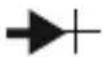
Test pour diode
Mesure De Resistance (Ω)
Backlight (Retro-Eclairage)
TRMC/TRMN (CMRR/NMRR)
Archcliffe Road Valley Forge Corporate Centre
Dover 2621 Van Buren Avenue
Kent CT17 9EN Norristown PA 19403
England.
U.S.A
Tel: +44 (0) 1304 502 243 Tel: +1 610 676 8579
Fax: +44 (0) 1304 207 342 Fax: +1 610 676 8625
NMRR >50 dB a DC, 50 Hz/60 Hz
Archcliffe Road Valley Forge Corporate Centre
Dover 2621 Van Buren Avenue
Kent CT17 9EN Norristown PA 19403 England. U.S.A.
Tel: +44 (0) 1304 502 243 Tel: +1 610 676 8579
Fax: +44 (0) 1304 207 342 Fax: +1 610 676 8625
AC Wisselstroom of wisselspanning
Overbelastingbeveiliging: DC of AC 1000 V
Ingangsimpedantie: 10 M Ω // minder dan 100 pF
CMRR/NMRR
(Common mode rejection ration/normal mode rejection ratio)
REPARATIE EN GARANTIE
Valley Forge Corporate
Center
2621 Van Buren Avenue
Norristown
Pennsylvania, 19403
USA
T.+1 610 676 8500
F. +1 610 676 8610
Megger USA - Dallas
4545 West Davis Street
Dallas TX 75237
USA
T. 800 723 2861 (USA only)
T.+1 214 333 3201
F. +1 214 331 7399
E. USsales@megger.com
Megger AB
The company reserves the right to change the specification or design without prior notice.
Megger is a registered trademark