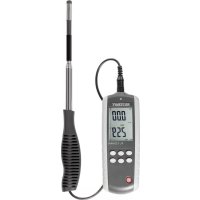
PL135 HAN - Anemometer VOLTCRAFT - Free user manual and instructions
Find the device manual for free PL135 HAN VOLTCRAFT in PDF.



| Product Type | Hot wire anemometer with thermistor |
| Brand | Voltcraft |
| Model | PL135 HAN |
| Total weight | 280 g (sensor and cable included) |
| Sensor and cable weight | 142 g |
| Power supply | Integrated LiPo battery 3.7 V / 1000 mAh, recharge via USB (5 V DC, max. 1 A) |
| Speed measurement units | m/s, ft/min, km/h, MPH, knots |
| Temperature units | °C, °F |
| Volume flow units | CFM, CMM |
| Main functions | Air speed, volume flow, temperature measurement; MAX/MIN functions, average (by count or by time), data hold (HOLD), zero adjustment, backlight, adjustable auto power off (20 min) |
| Display | LCD screen 41 x 60 mm |
| Sensor | Telescopic hot wire sensor, length: 32 – 115 cm, cable 1.75 m |
| Resolution | Speed: 0.01 m/s, 0.1 km/h, 1 ft/min, 0.1 MPH, 0.1 knots; Temperature: 0.1 °C/°F |
| Speed accuracy | ±(5% + 1 digit) of reading for m/s, km/h, ft/min; ±(1% + 1 digit) of full scale for MPH, knots |
| Temperature accuracy | ±1 °C (0 to +50 °C), ±1.8 °F (+32 to +122 °F) |
| Measurement range (speed) | 0.1 – 25 m/s; 0.3 – 90.0 km/h; 20 – 4925 ft/min; 0.2 – 55.8 MPH; 0.2 – 48.5 knots |
| Measurement range (temperature) | 0 to +50 °C / +32 to +122 °F |
| Measurement range (volume flow) | 0 – 99999 (CFM or CMM) |
| Measurement interval | Approx. 0.8 s |
| Operating conditions | 0 to +50 °C, relative humidity < 80% |
| Storage conditions | -10 to +60 °C, relative humidity < 80% |
| Maintenance and cleaning | Clean with a dry, soft cloth; do not use harsh chemicals; do not immerse in water |
| Safety | Indoor use only; do not expose to moisture; built-in battery non-replaceable; do not open the device |
| Spare parts and repairability | No user-replaceable parts; repair by specialist only |
| General information | Compliant with CE standards; supplied with USB power adapter, USB cable, software CD, carrying case, instruction manual |
Frequently Asked Questions - PL135 HAN VOLTCRAFT
User questions about PL135 HAN VOLTCRAFT
0 question about this device. Answer the ones you know or ask your own.
Ask a new question about this device
Download the instructions for your Anemometer in PDF format for free! Find your manual PL135 HAN - VOLTCRAFT and take your electronic device back in hand. On this page are published all the documents necessary for the use of your device. PL135 HAN by VOLTCRAFT.
USER MANUAL PL135 HAN VOLTCRAFT
These Operating Instructions accompany this product. They contain important information on setting up and using the device. You should refer to these instructions, even if you are buying this product for someone else.
Please retain these Operating Instructions for future use! A list of the contents can be found in the Table of contents, with the corresponding page number, on page 21.
- Introduction......22
- Intended use....23
- Operating elements....24
- Display elements....25
- Safety instructions....26
- Delivery content ......29
- Charging the rechargeable battery....29
- Operation....29
- Settings 32
- Software 34
- Maintenance and cleaning ....35
- Disposal....36
- Technical data .... 37
1. INTRODUCTION
Dear Customer,
In purchasing this Voltcraft® product, you have made a very good decision for which we would like to thank you.
Voltcraft® - In the field of measuring, charging and network technology, this name stands for high-quality products which perform superbly and which are created by experts whose concern is continuous innovation.
From the ambitious hobby electronics enthusiast to the professional user, products from the Voltcraft® brand family provide the optimum solution even for the most demanding tasks. And the remarkable feature is: we offer you the mature technology and reliable quality of our Voltcraft® products at an almost unbeatable price-performance ratio. In this way, we aim to establish a long, fruitful and successful co-operation with our customers.
We wish you a great deal of enjoyment with your new Voltcraft® product!
All company names and product names are trademarks of their respective owners. All rights reserved.
2. INTENDED USE
Use this product to measure air temperature, airflow velocity and volume flow rate via an external, tethered telescopic hot-wire sensor with thermistor. The product is suited for all kinds of applications related to heating, air-conditioning and ventilation. The readings are shown on the LC display. When the product is connected to a computer, the readings can be displayed as a graph and exported as a text document using the included software. Power is supplied via an integrated LiPo rechargeable battery.
It is intended for indoor use only. Do not use it outdoors. Contact with moisture, e.g. in bathrooms, must be avoided under all circumstances.
For safety and approval purposes (CE), you must not rebuild and/or modify this product. If you use the product for purposes other than those described above, the product may be damaged. In addition, improper use can cause hazards such as short circuiting, fire, electric shock etc. Read the instructions carefully and keep them. Make this product available to third parties only together with its operating instructions.
This product complies with the statutory national and European requirements.

Observe all safety instructions and information within this operating manual.
3. OPERATING ELEMENTS

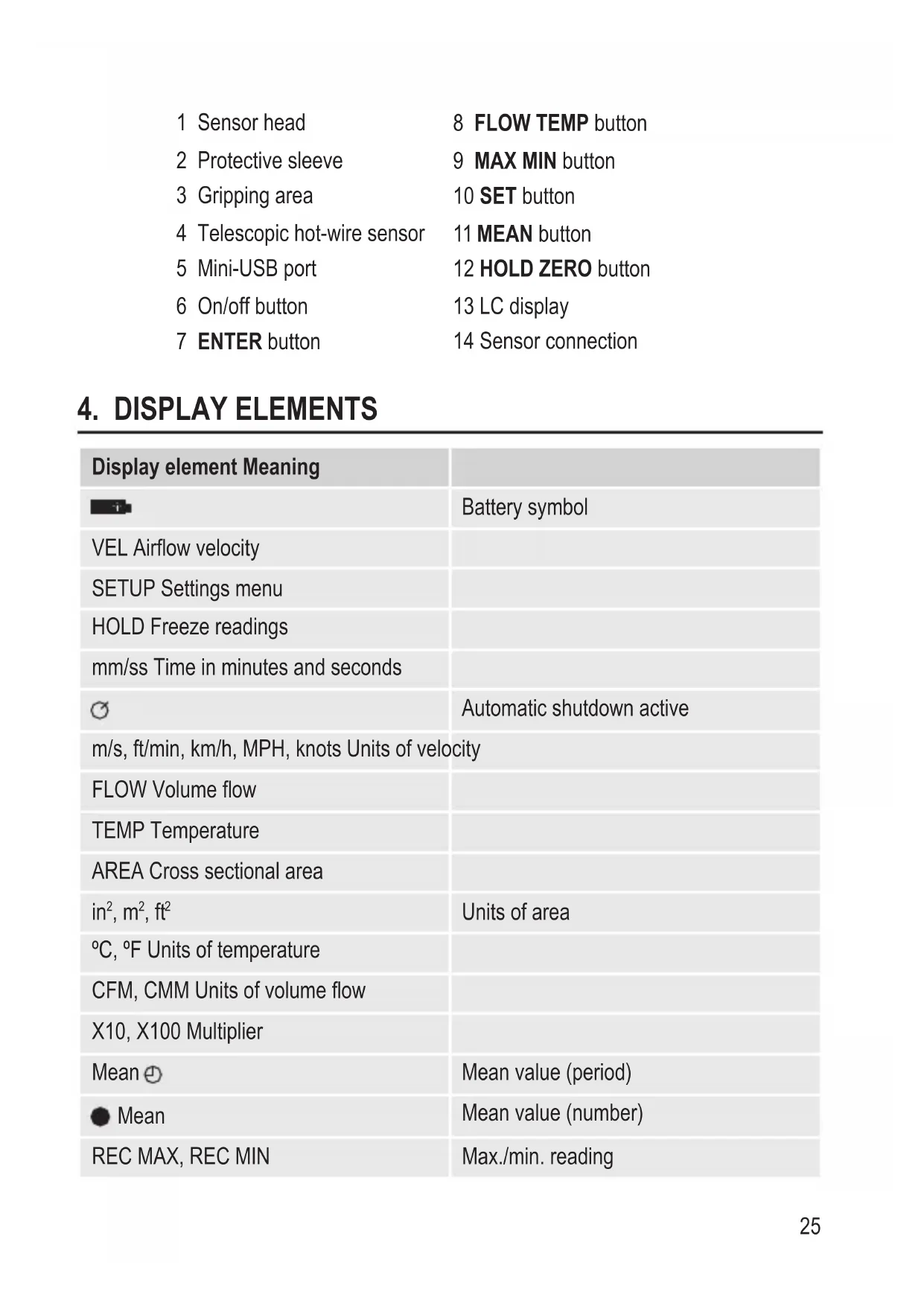
text_image
14 -88.88 2000 m/s (Hz) max/Hz MPB max PLAY VEL TWP AMR M/s -88.88 2000 200 MAX 500 O Max 12 13 11 10 9 8 7 6 5 1 2 3 41 Sensor head 8 FLOW TEMP button
2 Protective sleeve 9 MAX MIN button
3 Gripping area 10 SET button
4 Telescopic hot-wire sensor 11 MEAN button
5 Mini-USB port 12 HOLD ZERO button
6 On/off button 13 LC display
7 ENTER button 14 Sensor connection
- DISPLAY ELEMENTS
| Display element Meaning | |
| Battery symbol | |
| VEL Airflow velocity | |
| SETUP Settings menu | |
| HOLD Freeze readings | |
| mm/ss Time in minutes and seconds | |
| Automatic shutdown active | |
| m/s, ft/min, km/h, MPH, knots Units of velocity | |
| FLOW Volume flow | |
| TEMP Temperature | |
| AREA Cross sectional area | |
| in^2 , m^2 , ft^2 | Units of area |
| °C, °F Units of temperature | |
| CFM, CMM Units of volume flow | |
| X10, X100 Multiplier | |
| Mean | Mean value (period) |
| ● Mean | Mean value (number) |
| REC MAX, REC MIN | Max./min. reading |
5. SYMBOL EXPLANATION

An exclamation mark in a triangle indicates important notes in these operating instructions that must be strictly observed.

The triangle containing a lightning symbol warns against danger of electric shock or impairment of the electrical safety of the device.

The arrow symbol alerts the user to the presence of important tips and notes on using the device.

This device is CE compliant and fulfills all applicable European guidelines.
6. SAFETY INSTRUCTIONS

Read the operating instructions carefully and especially observe the safety information. If you do not follow the safety instructions and information on proper handling in this manual, we assume no liability for any resulting personal injury or damage to property. Such cases will invalidate the warranty/guarantee.

a) Persons / Product
- The device is not a toy. Keep it out of the reach of children and pets.
- Do not leave packaging material lying around carelessly. These may become dangerous playing material for children.
- Protect the product from extreme temperatures, direct sunlight, strong jolts, high humidity, moisture, flammable gases, vapours and solvents.
- Do not place the product under any mechanical stress. If it is no longer possible to operate the product safely, take it out of operation and protect it from any accidental use. Safe operation can no longer be guaranteed if the product:
- is visibly damaged,
- is no longer working properly,
- has been stored for extended periods in poor ambient conditions or
-
has been subjected to any serious transport-related stresses.
-
Please handle the product carefully. Jolts, impacts or a fall even from a low height can damage the product.
- Also observe the safety and operating instructions of any other devices which are connected to the product.
- Make sure the cables do not get crimped, bent or damaged by sharp edges.
- Never use the product immediately after it has been brought from a cold room into a warm one. The condensation generated could destroy the product. Allow the device to reach room temperature before connecting and using it. This may take several hours.
- In schools, educational establishments, hobby and self-help workshops, the operation of this product must be monitored by trained personnel.
- For installations in industrial facilities, follow the accident prevention regulations for electrical systems and equipment of the government safety organization or the corresponding authority for your country.
- Connect the appliance to a wall socket that can be accessed easily.
- Only connect the power adaptor to a normal mains socket connected to the public supply. Before plugging in the power adaptor, check whether the voltage stated on the power adaptor complies with the voltage of your electricity supplier.
- Never connect or disconnect power adaptors if your hands are wet.
- Never unplug the power adaptor from the mains socket by pulling on the cable; always use the grips on the plug.
• Always lay the cables so that nobody can trip over or become entangled in them. This poses a risk of injury. - For safety reasons, disconnect the power adaptor from the mains socket during storms.
b) Rechargeable batteries
- The rechargeable battery is permanently built into the product and cannot be replaced.
- Never damage the rechargeable battery. Damaging the casing of the rechargeable battery might cause an explosion or a fire! Unlike conventional batteries/rechargeable batteries (e.g. AA or AAA type), the casing of the LiPo rechargeable battery does not consist of a thin sheet but rather a sensitive plastic film only.
- Never short-circuit the contacts of the rechargeable battery. Do not throw the battery or the product into fire. There is a danger of fire and explosion!
- Charge the rechargeable battery regularly, even if you do are not using the product. Due to the rechargeable battery technology being used, you do not need to discharge the rechargeable battery first.
- Never charge the rechargeable battery of the product unattended.
- When charging, place the product on a surface that is not heat-sensitive. It is normal that a certain amount of heat is generated during charging.
c) Miscellaneous
- Consult an expert when in doubt about operation, safety or connection of the device.
- Maintenance, modifications and repairs are to be performed exclusively by an expert or at a qualified shop.
Should you have questions concerning correct product connection or operation, or should other questions arise that this user manual does not address, please do not hesitate to contact our technical support or a third-party professional.
7. DELIVERY CONTENT
- Meter
- USB power adapter
- Telescopic hot-wire sensor
- USB cable
- Software CD
- Case
- Operating instructions
8. CHARGING THE RECHARGEABLE BATTERY
- Connect the USB cable's Mini-USB plug to the Mini-USB port (5) on the meter.
- Connect the USB cable's USB A plug to a USB port of a USB power source (i.e. computer, USB power adaptor, etc.).
- The battery symbol blinks in the upper left of the display (13) to signalize that the rechargeable battery is charging.
- When the battery symbol remains lit, charging is complete. Disconnect the USB cable from the meter and the power source.
→ Charging takes approx. 4 – 5 hours.
Charge the rechargeable battery as soon as the battery symbol appears on the display during use.
9. OPERATION
a) Basic function
- Connect the telescopic hot-wire sensor's (4) plug to the meter's sensor connection (14). The plug can only be plugged in one way. Do not exert any force. The arrow on the plug must point to the arrow above the display (13).
- Push down the metallic protective sleeve (2) on the sensor head (1) to expose the hot-wire sensor and the thermistor.
-
Pull the telescopic rod apart to the required length. Hold the rod by the black gripping area (3).
-
Push the on/off button (6) to turn on the product. All display elements will light up briefly. An eight second countdown follows, after which the device is operational.
- Hold the sensor head (1) into the area you wish to measure. The real-time measurement readings appear on the display (13):
- Upper half of display: airflow velocity (VEL)
- Lower half of display: volume flow (FLOW) or temperature (TEMP)
→ Two arrows are imprinted on the sensor head at the level of the hot-wire sensor. During measurement, hold the sensor head so that the arrows point in the direction of airflow.
6. Push the FLOW TEMP button (8) to switch between displaying volume flow and temperature in the lower half of the display.
→ The airflow's cross sectional area must be entered in order for the meter to correctly calculate volume flow. Refer to the chapter "Settings".
Should one of the multipliers (X10 or X100) appear beneath the reading, multiply the reading by this multiplier to receive the correct measurement value.
- After use, push the metallic protective sleeve (2) back over the sensor head to protect the hot-wire sensor and the thermistor.
- Turn off the meter, disconnect the telescopic hot-wire sensor (4) from the meter and collapse the telescopic rod.
b) MAX/MIN function
- Repeatedly push the MAX/MIN button (9) during measuring to switch between displaying the maximum and minimum measured values. The corresponding indicator (REC MAX or REC MIN) is shown at the bottom of the display (13).
- Push and hold the MAX/MIN button for approx. one second to return to displaying the real-time measured value.
c) MEAN function (average value)
You can determine the average value using the number of readings or the measuring period.
Number of readings
- During measuring, push the MEAN button (11). The indicator ● Mean appears at the bottom of the display (13).
- The real-time measured value appears in the lower half of the display. Repeatedly push the FLOW TEMP button (8) to switch between displaying the temperature, airflow velocity and volume flow.
- Push the ENTER button (7) to register the reading. This registered reading will appear in the upper half of the display. Repeat this process until you have registered the desired number of readings.
- Push the MEAN button. The indicator ● Mean flashes and the calculated average value of the registered readings is shown in the lower half of the display.
- Push the MEAN button to return to normal measurement mode.
Measuring period
- During measuring, push and hold the MEAN button (11) for approx. one second. The indicator Mean ⊕ appears at the bottom of the display (13). The indicator mm/ss and four horizontal lines appear in the upper half of the display.
- The real-time measured value appears in the lower half of the display. Repeatedly push the FLOW TEMP button (8) to switch between displaying the temperature, airflow velocity and volume flow.
- Push the ENTER button (7) to begin calculating the average value based on the measuring period. The time lapsed appears in the upper half of the display.
- If necessary, push the ENTER button to interrupt/continue time measurement.
- Push the MEAN button. The indicator Mean ● flashes and the calculated average value of the measuring period is shown in the lower half of the display.
- Push the MEAN button to return to normal measurement mode.
d) HOLD function
- During measuring, push the HOLD ZERO button (12) to freeze the current readings on the display (13). The indicator HOLD appears at the top of the display.
- Push the HOLD ZERO button again to return to displaying the real-time readings. The HOLD indicator vanishes.
e) ZERO function (zero setting)
During measuring, push and hold the HOLD ZERO button (12) for approx. one second. The airflow reading will be set to the value zero.
f) Backlight
Push the SET button (10) to activate/deactivate the backlight.

The backlight will not turn off automatically after a time, it must be manually deactivated.
10. SETTINGS
a) General
- While in normal measurement mode, push and hold the SET button (10) for approx. one second to enter the settings menu. The display (13) shows the indicators SETUP, unit and TEMP.
- Use the MEAN (11) and FLOW TEMP (8) buttons to navigate through the menu.
- Push the ENTER button (7) to select the desired menu item.
- Make your selection using the MEAN and FLOW TEMP buttons and confirm using the ENTER button.
- Push and hold the SET button for approx. one second to exit the settings menu.
| Menu item Options | |
| unit TEMP(unit of temperature) | °C (degree Celsius)°F (degree Fahrenheit) |
| unit VEL(unit of airflow velocity) | m/s (meters per second)ft/min (feet per minute)km/h (kilometers per hour)MPH (miles per hour)knots |
| unit FLOW(unit of volume flow) | CFM (cubic feet per minute)CMM (cubic meter per minute) |
| unit AREA(unit of airflow cross sectional area) | in2 (square inches)m2 (square meters)ft2 (square feet) |
| AREA(airflow cross sectional area) | see "b) Airflow cross sectional area" |
| SLP(automatic shutdown) | ON (activated)OFF (deactivated) |

When the automatic shutdown function is activated, the meter will turn off automatically after 20 minutes of inactivity.
b) Airflow cross sectional area
- Navigate to the menu item AREA and push the ENTER button (7). The four digits in the lower half of the display (13) begin to flash.
- Repeatedly push the MAX MIN button (9) to set the number of decimal places.
- Confirm your selection with the ENTER button. The last digit flashes.
- Change the value with the MEAN (11) and FLOW TEMP (8) buttons.
- Confirm your selection with the MAX MIN button. The second last digit flashes.
- Set the airflow cross sectional area value as described above and confirm the selection with the ENTER button.
→ The value remains set even after shutdown.
11. SOFTWARE
a) Installation
- Insert the CD into the corresponding drive of a computer.
- Should the installation program not open automatically, open the file INSTALLER.exe from the CD.
- Follow the instructions on your screen.
→ Click the button Software to install the software.
Find out whether your operating system is 32 or 64 Bit. Then click either Driver 32 or Driver 64 accordingly to install the USB driver.
b) Connecting the meter to a PC
- Connect the USB cable's Mini-USB plug to the meter's Mini-USB port (5).
- Connect the USB cable's USB A plug to a free USB port on the computer.
- Push the on/off button (6) to turn on the product.
- Open the software.
- You can find more information on the software and its functions in the instructions for use, which you can access via the software help menu.
12. MAINTENANCE AND CLEANING

Do not use any aggressive cleaning agents, rubbing alcohol or other chemical solutions as they can cause damage to the housing and malfunctioning.
- Before cleaning, disconnect the USB cable from the product and push the metallic protective sleeve (2) over the sensor head (1).
- Never submerge the product in water.
- There are no components located inside the product you need to maintain. Never open/dismantle the product.
- To clean the product, a dry, soft and clean cloth is sufficient. Do not apply too much pressure to the housing to prevent scratching.
- Use a longhaired, soft and clean brush and a vacuum cleaner to easily remove dust.
a) Product

Electronic devices are recyclable waste and must not be disposed of in the household waste.
At the end of its service life, dispose of the product according to the relevant statutory regulations.
The built-in battery must be disposed of by a specialist.
b) (Rechargeable) batteries
You as the end user are required by law (Battery Ordinance) to return all used batteries/rechargeable batteries. Disposing of them in the household waste is prohibited.
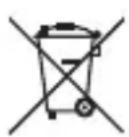
Contaminated (rechargeable) batteries are labelled with this symbol to indicate that disposal in the domestic waste is forbidden. The designations for the heavy metals involved are: Cd = Cadmium, Hg = Mercury, Pb = Lead (name on (rechargeable) batteries, e.g. below the trash icon on the left).
Used (rechargeable) batteries can be returned to collection points in your municipality, our stores or wherever (rechargeable) batteries are sold.
You thus fulfil your statutory obligations and contribute to the protection of the environment.
a) General
Internal battery.....LiPo / 3.7 V / 1000 mAh
Current consumption ....approx. 60 – 120 mA (operation)
Measuring interval ....approx. 0.8 s
Operating conditions....0 to +50 °C, <80 % RH
Storage conditions....-10 to +60 °C, <80 % RH
Telescope length....32 – 115 cm
Cable length 1.75 m
Display dimensions (W x H) .....41 x 60 mm
Dimensions (W x H x D) ......62 x 160 x 21 mm
Weight ......280 g (incl. telescopic hot-wire sensor + cable)
142 g (telescopic hot-wire sensor + cable)
b) USB power adapter
Input voltage....100 – 240 V/AC, 50/60 Hz, max. 0.13 A
Output voltage / current.....5 V/DC, max. 1 A
c) Airflow velocity
| Unit Measurement range Resolution Accuracy | ||
| m/s 0.1 – 25 0.01 | ±(5 % + 1 d) of the displayed value or ±(1 % + 1 d) of the entire measuring range | |
| km/h 0.3 – 90.0 0.1 | ||
| ft/min 20 – 4925 1 | ||
| MPH 0.2 – 55.8 0.1 | ||
| knots 0.2 – 48.5 0.1 | ||

m/s = meters per second
km/h = kilometers per hour
ft/min = feet per minute
MPH = miles per hour
d) Temperature
| Unit Measurement range Resolution Accuracy | ||
| °C 0 to +50 | ±1 | |
| °F +32 to +122 ±1.8 | 0.1 | |
e) Volume flow
| Unit Measurement range Resolution | |
| CFM | 0 – 99999 0.001 – 100 |
| CMM | |

Calculation of volume flow:
CFM = Airflow velocity (ft/min) x airflow cross sectional area (ft ^2 )
CMM = Airflow velocity (m/s) x airflow cross sectional area (m²) x 60
TABLE DES MATIERES
Page
Dimensions (L x H x P)....62 x 160 x 21 mm
© Copyright 2014 by Conrad Electronic SE.
GB Legal notice
This is a publication by Conrad Electronic SE, Klaus-Conrad-Str. 1, D-92240 Hirschau (www.conrad.com).
All rights including translation reserved. Reproduction by any method, e.g. photocopy, microfilming, or the capture in electronic data processing systems require the prior written approval by the editor. Reprinting, also in part, is prohibited. This publication represents the technical status at the time of printing.
© Copyright 2014 by Conrad Electronic SE.
© Copyright 2014 by Conrad Electronic SE.