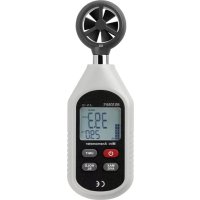
AN10 - Anemometer VOLTCRAFT - Free user manual and instructions
Find the device manual for free AN10 VOLTCRAFT in PDF.


User questions about AN10 VOLTCRAFT
0 question about this device. Answer the ones you know or ask your own.
Ask a new question about this device
Download the instructions for your Anemometer in PDF format for free! Find your manual AN10 - VOLTCRAFT and take your electronic device back in hand. On this page are published all the documents necessary for the use of your device. AN10 by VOLTCRAFT.
USER MANUAL AN10 VOLTCRAFT
natural_image
Three-step diagram showing a handheld device with a scroll wheel, showing internal components and rotation arrows (no text or symbols)GB Operating instructions
AN-10 Anemometer
Item no. 1662854
Intended use
This product is used to measure the flow velocity of the air in wind, the temperature in degrees Celsius ( ^ C) or Fahrenheit ( ^ F) and shows a notification of the perceived temperature under the prevailing conditions (wind chill factor). The flow velocity is shown on the display in five different units of measure and using the Beaufort scale. Average and maximum values can be shown on the display. It has a deactivatable automatic shut-off function. Measurement values can for be frozen for extended viewing with the "Hold" function. The voltage is supplied via 3x 1.5 V AAA batteries. The product is not intended for medical or commercial use.
For safety and approval purposes, you must not rebuild and/or modify this product. Using the product for purposes other than those described above may damage the product. In addition, improper use can cause hazards such as a short circuit or fire. Read the operating instructions carefully and store them in a safe place. Only make this product available to third parties together with its operating instructions.
This product complies with statutory, national and European regulations. All company and product names are trademarks of their respective owners. All rights reserved.
Delivery content
Anemometer AN-10
3x AAA batteries
Operating instructions

Up-to-date operating instructions
Download the latest operating instructions at www.conrad.com/downloads or scan the QR code shown. Follow the instructions on the website.
Explanation of symbols

The symbol with an exclamation mark in a triangle is used to highlight important information in these operating instructions. Always read this information carefully.

The arrow symbol indicates special information and advice on how to use the product.
Safety information

Read the operating instructions and safety information carefully. If you do not follow the safety information and information on proper handling in these operating instructions, we will assume no liability for any resulting personal injury or damage to property. Such cases will invalidate the warranty/guarantee.
a) General information
• The device is not a toy. Keep it out of the reach of children and pets.
- Do not leave packaging material lying around carelessly. It may become a dangerous toy for children.
- Protect the product from extreme temperatures, direct sunlight, strong jolts, high humidity, moisture, flammable gases, vapours and solvents.
- Do not place the product under any mechanical stress.
- If it is no longer possible to operate the product safely, take it out of operation and protect it from any accidental use. Safe operation can no longer be guaranteed if the product:
- is visibly damaged,
- is no longer working properly,
- has been stored for extended periods in poor ambient conditions or
-
has been subjected to any serious transport-related stresses.
-
Please handle the product carefully. Jolts, impacts or a fall even from a low height may damage the product.
- Consult a technician if you are not sure how to use or connect the product, or if you have concerns about safety.
- Maintenance, modifications and repairs must be carried out by a technician or a specialist repair centre.
- If you have questions which remain unanswered by these operating instructions, contact our technical support service or other technical personnel.
b) Batteries
- Check that the batteries are inserted with the correct polarity.
• To prevent battery leakage, remove the batteries when you do not plan to use the product for an extended period. Leaking or damaged batteries may cause acid burns if they come into contact with your skin. Always use suitable protective gloves when handling damaged batteries.

- Batteries must be kept out of the reach of children. Do not leave batteries lying around, as there is a risk that children or pets may swallow them.
- All batteries must be replaced at the same time. Mixing old and new batteries can cause the batteries to leak and damage the product.
- Batteries must not be dismantled, short-circuited or thrown into flames. Never recharge non-rechargeable batteries. Danger of explosion!
c) Persons and product
- Do not cover the air inlet or insert objects when the rotor is turning.
- Trained personnel must supervise the use of electrical appliances in schools, training facilities and DIY workshops.
- On commercial premises, the relevant accident prevention regulations for electrical equipment must be complied with.
- Do not place the product directly next to devices with strong electrical or magnetic fields (e.g. transformers, motors, cordless telephones, wireless devices and radios), as these can prevent the product from working properly.
- Never use the product immediately after it has been brought from a cold room into a warm one. The condensation generated could destroy the product. Allow the product to reach room temperature before connecting it and putting it to use. This may take several hours.
Product overview
Anemometer

text_image
5 4 3 2 1 6 7 81 MAX AVG button
2 On/Off button
3 LC display
4 Housing
5 Air inlet (with flow divider and rotor)
6 Battery compartment (on rear)
7 UNIT button
8 HOLD BL button
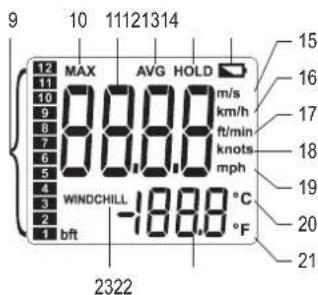
Indicators on LC display
text_image
9 10 11121314 MAX AVG HOLD 888.8 m/s km/h ft/min knots mph WINDCHILL -188.8 °C bft °F 2322 15 16 17 18 19 20 219 Beaufort scale
10 "MAX" symbol
11 Wind speed
12 "AVG" symbol
13 "HOLD" data storage symbol
14 Low battery indicator
15 Unit of wind speed m/s
16 Unit of wind speed km/h
17 Unit of wind speed ft/min
18 Unit of wind speed knots
19 Unit of wind speed mph
20 Temperature unit °C
21 Temperature unit °F
22 Temperature display
23 Wind chill warning symbol
Setup
a) Inserting and replacing the batteries
The measuring device is powered via three AAA batteries. The batteries are included in the delivery content and must be inserted into the measuring device. To insert the batteries, proceed as follows:

text_image
Diagram showing three steps of a digital thermometer device with labeled components and directional arrows indicating process flow.- Remove the battery compartment cover from the rear of the measuring device. To do this, press the locking lever back with the finger and fold the battery compartment cover up/open.
- Remove any batteries that may already be in the battery compartment (6). This step is not necessary the first time.
- Insert three AAA batteries into the battery compartment (6), paying attention to the correct polarity.
-
Replace the battery compartment cover.
-
Replace the batteries if the low battery indicator (14) on the LC display (3) lights up.
→ Ensure that the measuring device is switched off before replacing the batteries. - To replace the batteries, proceed as outlined above. Remove the used batteries from the battery compartment before inserting new batteries.
Operation
a) Switching on and off
- Briefly press the On/Off button (12) to switch the device on.
- Briefly press the On/Off button (12) to switch the device off manually.
b) Automatic shut-off
The device has a deactivatable automatic shut-off function. The automatic shut-off ensures that the measuring device is automatically switched off after 5 minutes when not in use, to save battery power. The automatic shut-off function is pre-set ex works. You can deactivate and activate automatic shut-off as you prefer. Proceed as follows:
- To deactivate automatic shut-off, press and hold the HOLD BL button (8) at the same time as the On/Off button (2). "APO OFF" appears on the LC display (3) to indicate the status of the automatic shut-off. The status is now switched off. The measuring device will remain on even after 5 minutes of inactivity. The measuring device must then be switched off manually.
- Automatic switch-off is reactivated every time the device is restarted, and can be deactivated again as outlined above.
c) Positioning the measuring device
- Keep the measuring device at a right angle to the direction of flow in the air flow or wind being measured. The air flow being measured should have direct and unhindered access to the air inlet (5), without obstacles being able to distort the air flow measured value.
d) Flow velocity and temperature display
- The flow velocity is displayed together with the current temperature. The measuring device measures the flow velocity at a measuring interval of 0.5 seconds.
- The flow velocity measurement range is between 0 m/s and 30 m/s as standard.
- If the flow velocity of the air in the air inlet is in excess of 45 m/s, "OL" is displayed instead of the flow velocity.
- If the measured temperature is outside of the measurement range (below -10 °C or in excess of +50 °C), "OL" is displayed instead of the temperature.
- If the measured ambient temperature is below 0 °C and the flow velocity is in excess of 5 m/s, "Wind Chill" appears on the LC display (3).
e) Switching the flow velocity display between MAX and AVG
- Press the MAX AVG button (1) to switch between the maximum wind strength together with the "MAX symbol" (10), the average wind strength with the "AVG" symbol (12) and the normal/current wind strength displays.
- The "MAX" symbol (10) indicates that the displayed flow velocity value is the maximum measured; if the "AVG" symbol (12) is displayed, the value is the flow velocity calculated using the last five values; the current wind strength is displayed when there is no additional symbol on the LC display (3).
- The "MAX" symbol (10) as well as the "AVG" symbol (12) are displayed together with the numerical values and the bar graph of the Beaufort scale (9).
- To freeze the measured value for longer comparison, press the HOLD BL button (8) briefly to hold the value on the LC display (3). In release the frozen value again, press the HOLD BL button (B) briefly again.
f) Switching between units of measure
- Press the UNIT button (7) to cycle through the different flow velocity units of measure. Press once briefly to move one step forward in the display unit setting cycle; order: m/s > km/h > ft/min > knots > mph. The current unit is displayed.
- Press and hold the UNIT button (7) for a few seconds to switch between temperature units °C and °F. The current temperature unit is indicated on the LC display (3).
g) Backlight
- If the backlight is not switched on, press and hold the HOLD BL button (8) for a few moments to switch the backlight on. The LC display (3) is no longer illuminated.
- If the backlight is switched on, press and hold the BL button (8) for a few seconds to switch the backlight off. The LC display (3) is no longer illuminated.
h) Wind chill temperature
- The perceived temperature or wind chill temperature indicates the perceived ambient temperature, which may differ from the actual temperature due to strong winds. The perceived temperature is only calculated below 0^ with a wind speed in excess of 5.0 km/h. If the temperature is in excess of 0^ , the wind chill temperature is the same as the measured temperature.
- If the temperature is below 0 °C and the wind speed is in excess of 5 m/s, the measuring device will indicate "Wind Chill" (23). "Wind Chill" is indicated in the lower left corner of the LC display (3). The corresponding numerical value is displayed in place of the actual temperature and represents the perceived temperature at the current wind speed.
The Beaufort scale
- The Beaufort scale is an empirical scale for estimating the wind speed without using measuring instruments. It works by relating wind speed to observed conditions on sea or land, such as the movement of trees or waves on the surface of the ocean. It is named after Sir Francis Beaufort. The wind speed on land and sea is calculated in different ways. The anemometer displays measurements on the Beaufort scale from 0-12 using a bar graph. The table below provides an approximate conversion of Beaufort measurements into different units.
Beaufort scale
| Meaning m/s | kts mph | km/h ft/min | ||||
| 0 No wind, calm | 0 - 0.2 | 0 - 1 | 0 - 1 | 0 - 58 | ||
| 1 Light air | 0.3 - 1.5 | 1 - 3 | 1 - 3 | 1 - 5 | 59 - 314 | |
| 2 | Light breeze | 1.6 - 3.3 | 4 - 6 | 4 - 7 | 6 - 11 | 315 - 668 |
| 3 Gentle breeze | 3.4 - 5.4 | 7 - 10 | 8 - 12 | 12 - 19 | 669 - 1082 | |
| 4 Moderate breeze | 5.5 - 7.9 | 11 - 16 | 13 - 18 | 20 - 28 | 1083 - 1574 | |
| 5 | Fresh breeze | 8.0 - 10.7 | 17 - 21 | 19 - 24 | 29 - 38 | 1575 - 2125 |
| 6 Strong breeze | 10.8 - 13.8 | 22 - 27 | 25 - 31 | 39 - 49 | 2126 - 2735 | |
| 7 | Near gale | 13.9 - 17.1 | 28 - 33 | 32 - 38 | 50 - 61 | 2736 - 3385 |
| 8 | Fresh gale | 17.2 - 20.7 | 34 - 40 | 39 - 46 | 62 - 74 | 3386 - 4093 |
| 9 | Severe gale | 20.8 - 24.4 | 41 - 47 | 47 - 54 | 75 - 88 | 4094 - 4822 |
| 10 | Storm | 24.5 - 28.4 | 48 - 55 | 55 - 63 | 89 - 102 | 4823 - 5609 |
| 11 | Violent storm | 28.5 - 32.6 | 56 - 63 | 64 - 72 | 103 - 117 | 5610 - 6417 |
| 12 | Hurricane | 32.6 | >63 | >72 | >117 | >6417 |
Care and cleaning
- Always disconnect the product from the power supply before cleaning it. To do this, remove the batteries.
- Never use aggressive detergents, rubbing alcohol or other chemical solutions, as these could damage the housing or stop the product from functioning properly.
- Use a dry, lint-free cloth to clean the product.
Disposal
a) Product

Electronic devices are recyclable waste and must not be disposed of in the household waste. At the end of its service life, dispose of the product according to the relevant statutory regulations.
Remove any inserted batteries and dispose of them separately from the product.
b) Batteries

You are required by law to return all used batteries (Battery Directive). Batteries must not be placed in household waste.
Batteries containing hazardous substances are labelled with this symbol to indicate that disposal in household waste is forbidden. The abbreviations for heavy metals in batteries are: Cd = Cadmium, Hg = Mercury, Pb = Lead (indicated on the battery, e.g. below the waste bin icon on the left).
Used batteries can be returned to local collection points, our stores or battery retailers.
You thus fulfil your statutory obligations and contribute to protection of the environment.
Technical data
Power supply 3x 1.5 V AAA batteries
Low-voltage display......At 3 to 3.5 V
Battery life....approx. 16 hours (alkaline batteries)
Power consumption ....≤25 mA (normal)
≤10 μA (when switched off)
Wind speed accuracy.... 0 - 30 m/s (as standard) || 0.1 m/s || ± (5 % rdg + 0.5)
1.4 to 108 km/h (for comparison only) || ± (5 % rdg + 15 digits)
0.7 to 58 kt (for comparison only) || ± (5 % rdg + 10 digits)
0.8 to 67 mph (for comparison only) || ± (5 % rdg + 10 digits)
78 to 5905 ft/min (for comparison only) ||
± (5 % rdg + 180 digits)
Temperature accuracy....-10 to 50 °C || 0.1 °C || ±2.0 °C
14 to 122 °F || 0.2 °F || ±4.0 °F
Beaufort scale....0 to 12 || 1 || ±1 (for comparison only)
Wind chill....Display at 5 m/s and temperature below 0 °C
Sample rate 0.5 s
Units displayed (wind) ..... m/s, km/h, kt, mph, ft/min (selectable)
Units (temperature).....°C/°F
Automatic shut-off.....After approx. 5 minutes
LC display......With four digits
Operating altitude .... 0 to 2000 m/s (geographical)
Operating conditions.... 0 to +40 °C, <80 % relative humidity (non-condensing)
+40 to +50 °C, <45 %
relative humidity (non-condensing)
Storage conditions.... -20 to +60 °C, <75 %
relative humidity (non-condensing)
Dimensions (H x W x D) 160 x 50 x 28 mm
Weight 118 g
F Mode d'emploi
AN-10 Anémomètre
text_image
Diagram showing three steps of a digital thermometer device with labeled parts and directional arrows indicating rotation or adjustment.Dimensions (H x I x P)....160 x 50 x 28 mm
Poids....118 g