DT 8820 - Thermometer VOLTCRAFT - Free user manual and instructions
Find the device manual for free DT 8820 VOLTCRAFT in PDF.
Download the instructions for your Thermometer in PDF format for free! Find your manual DT 8820 - VOLTCRAFT and take your electronic device back in hand. On this page are published all the documents necessary for the use of your device. DT 8820 by VOLTCRAFT.
USER MANUAL DT 8820 VOLTCRAFT
The present operating manual forms part of this product. It con- tains important information on how to put the product into operation and install it. Please note it duly even if you pass it on to third people. So keep this operating manual for your future reference!
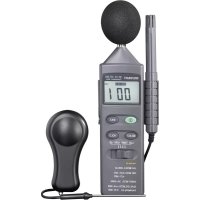
Introduction This product satisfies the standards of the established European and national guide- lines. CE-conformity has been proven; the relevant documents are in the manufactu- rer’s possession. We kindly request the user to respect this operating manual to preserve this conditi- on and to ensure safe operation. For a fast response of your technical enquiries please contact or consult our Technical Advisory Service: Germany: Tel. + 49 9604 / 40 88 80 Fax + 49 9604 / 40 88 48 E-mail: tkb@conrad.de Mon to Thurs 8.00am to 4.30pm Fri 8.00am to 2.00pm Prescribed Use This product is a multifunctional environment measuring instrument which combines the most frequent measuring procedures for everyday use. The different measuring ranges such as illuminance, air humidity, sound level and temperature are compara- tive measurements and serve as reference for the private use. The following measurements can be performed: - Measuring the illuminance up to 20,000 lux (indication with factor x10). - Measuring the temperature in the range of –20°C up to 750°C. - Measuring the relative air humidity in the range of 25% up to 95%. - Measuring the sound level in the range of 35dB up to 130dB (according to A + C characteristics).17 The measuring instrument must not be operated if the device or the battery com- partment are open or if the battery compartment cover is missing. Do not perform measurements in humid rooms (does not concern the probe) or under unfavourable ambient conditions. Unfavourable ambient conditions are: - dampness or high air humidity, - dust and inflammable gases, fumes or solvents, - strong vibrations, - strong magnetic fields e.g. near machines and speakers, - thunderstorms or thunderstorm conditions such as strong electrostatic fields etc. Any use other than the one described above damages the product. Moreover, this involves dangers such as e.g. short-circuit, burns, electric shock, etc. No part of the product may be modified or rebuilt. Always observe the safety instructions and tech- nical data. Description of Individual Parts (for figure see fold-out page) 1 Microphone with detachable windbreaker. 2 Air humidity probe (permanently connected). 3 Support for air humidity probe with tripod thread an the back (detachable) 4 Operating keys for On/Off, MAX-Hold, Data-HOLD, functional selection (SELECT) 5 Measuring range selector switch. 6 Battery compartment on the back. 7 Connecting jack for K-type thermoelectric probe (13). 8 Connecting jack for the light sensor (10). 9 LC display (3.5-digit, highest indicating value: 1999; functional symbols such as decimal points, polarity (-), battery symbol, "%, °C, dB, lux" and overflow are indicated as well). 10 Light sensor with protective cover in black. 11 Jack plug for connecting jack (8) 12 Temperature probe (K-type) 13 K-type connector for connecting jack (7).18 Safety and Danger Instructions Any claims for guarantee will become invalid in the event of dama- ge that results from the non-observance of the operating manual. We do not accept responsibility for such damage. Nor do we accept responsibility for damage to property or for personal inju- ries caused by improper use or non-observance of safety instruc- tions. Guarantees will not be accepted in any such case. This product left the manufacturer in technically reliable condition. We kindly request the user to respect the safety instructions and warnings contained in this operating manual ("Attention!” and "Warning!”) to preserve this condition and to ensure safe operation. Please observe the following symbols: Attention! Please refer to the operating manual! Measuring instruments and accessories are no toy. Keep them out of reach of children! Observe the safety regulations laid down by the professional trade association for electrical equipment and installations in industrial and commercial facilities. Measuring devices and accessories used at schools, training facilities, do-it-yourself and hobby workshops should not be handled unless supervised by well-instructed trained personnel. Check your measuring device and the measuring cables for damages before each measurement. Never perform measurements if the protecting insulation is damaged or torn away. Never perform temperature measurements on live parts. The measuring input is pro- tected up to 60 VDC and 24 VAC. If there is room to believe that safe operation has become impossible, put the pro- duct out of operation and secure it against any unintended operation. Safe operation must be presumed to be no longer possible, if: - the product exhibits visible damage, - the product does not operate any longer, - the product was stored under unfavourable conditions for a long period of time
- the product was exposed to extraordinary stress caused by transport.19 Never turn on the device immediately after it has been brought from a cold into a warm room. Condensation water that forms might destroy your device. Leave the device switched off and wait until it has reached room temperature. Do not leave packaging material lying around. Plastic film and bags, polystyrene parts etc. might become a dangerous toy for children. Please observe the safety instructions in the individual chapters of this operating manual. Functional Description The Multifunctional Environment Measuring Instrument 4 in 1 combines the four most frequent environmental measuring procedures for hobby and domestic use. The measuring instrument allows comparative measurements of illuminance in lux, relative air humidity in %, sound level in dB and temperature in °C. The measuring instrument is equipped with an automatic switch-off (Auto-Power- Off) which switches the device off after approx. 10 minutes in order to treat the bat- tery with care. A low-bat indication on the display (BAT) indicates that the battery soon has to be replaced. If the measuring range is exceeded, the display shows "I . " as overflow indication. Please switch to the next measuring range. Functional keys: Switches the device on/off. MAX holds the maximum measuring value on the display (MAX HOLD). HOLD holds the current measuring value on the display (DATA HOLD). SELECT Measuring ranges and measuring functions can be switched over (only active with "LUX, TEMP, and dB"). The air humidity sensor (2) is permanently connected with the measuring instrument. To fix the sensor onto the measuring instrument, it is equipped with a detachable probe support (3) into which the air humidity probe (2) can be latched. Into this sup- port, a tripod thread is integrated as well. The voltage supply is ensured by an alkaline 9V block battery, e.g. type 6LR61 or MN1604 or 6F22 or 006P.20 Scope of Delivery Multifunctional Environment Measuring Instrument 4 in 1 with detachable microphone windbreaker Illuminance sensor (attachable) K-type temperature sensor (immersion probe) Block battery 9V Nylon carrying case Operating manual Inserting/Replacing the Battery To ensure proper operation of the measuring instrument, the device has to be equip- ped with an alkaline 9V block battery (type 6LR61 or MN1604 or 6F22 or 006P). If the battery replacement symbol BAT appears on the display (bottom left), the battery has to be replaced. Proceed as follows: - Switch off the measuring instrument (press green key). - Move the battery compartment cover on the back in direction of the arrow. - Replace the battery by a new one of the same type. Please observe correct polarity (+ and -). - Put the battery compartment cover back onto the housing. - Please make sure not to pinch the cables of the connecting clip (red and black) when closing the housing. Attention! Leaky or damaged batteries might cause cauterization when in contact with the skin. Therefore, use suitable protective gloves. Do not short-circuit batteries. Never try to charge batteries. Do not throw them into fire because they might explode! Do not leave used batteries in the battery compartment because even leakage-pro- tected batteries might corrode and thus set free chemicals that might be bad for your health or destroy the battery compartment. Also remove the batteries from the battery compartment if not using the measuring instrument for a longer period of time. Environmental note! The user is legally obliged (old battery regulation) to return all used batteries (from round cells to lead storage batteries) to a specialist dealer’s shop where there are special facilities (collec- ting boxes). It is forbidden to dispose of batteries in the garbage bin or litter.21 You can return your used batteries and storage batteries free of charge either to our subsidiaries or to our central office in Hir- schau or reusable-waste facilities which are obliged to take back old batteries. Make your contribution to environmental protection! Commissioning Power switch (green rubber key) (4) By means of this key, the device can be switched on/off. Measuring range selector switch (5) By sliding the measuring range selector switch (5) you can select the individual mea- suring functions. Measuring the Sound Level The sound level measurement is intended for comparative measurements for the domestic use and is not appropriate for the professional use. The measurement can be performed according to valuation curve A (adapted to the human hearing) or C (linear). Outdoors, the windbreaker should be attached to the microphone in order not to fal- sify the measurement by the sound of the wind. Indoors, the windbreaker should be detached. Attention! Be careful with ambient noise. Your hearing might be damaged. Always use hearing protection in noisy envi- ronment! For this measurement, please proceed as follows: - Switch the device on by pressing the green key. - Switch the measuring range selector switch (5) to position "dB". - Turn the measuring instrument with the microphone (1) in direction of the sound source to be measured. TIP: You can obtain the best measuring results if you put the mea- suring instrument on a fix surface and if you are at a distance of approx. 1 m. Thus, the course of the acoustic waves is not influen- ced. The distance between the measuring instrument and the sound source should be 1 m and more.22 - The display shows the measured sound level in dB(A) (according to valuation curve A). If the display shows "OVER", the value is higher or lower than the selected measu- ring range. By pressing the "SELECT" key you can switch to the next higher measuring range ("HI"). By pressing once again you can change the valuation curve (LO A -> HI A -> LO C -> HI C -> LO A etc.) LO = 35 dB up to 100 dB HI = 65 dB up to 130 dB - After the measurement switch off the device by pressing the green key. Measuring the Air Humidity The air humidity measurement is intended for comparative measurements for the domestic use and is not appropriate for the professional use. Only perform the measurement in a range of 25% up to 95% (not condensing). Proceed as follows: - Switch the measuring range selector switch (5) to position "%RH". - Now position the air humidity probe (2) in the area to be mea- sured (please observe the operating data of the measuring instrument). You can obtain the best measuring results, if you leave the probe in the area to be measured for approx. 6 min. - The display shows the measured relative air humidity in %. - After the measurement switch off the device by pressing the green key. Measuring the Temperature The temperature measurement is intended for comparative measurements for the domestic use and is not appropriate for the professional use. By means of the enclosed K-type temperature sensor you can measure directly tem- peratures in the range of –20°C up to +750°C in 2 measuring ranges. The temperatu- re to be measured must only be applied to the tip of the metal probe.23 Proceed as follows: - Connect the connector (13) of the temperature probe with the jack (7) of the measuring instrument. Attention! Ensure correct polarity - Switch the measuring range selector switch (5) to position "TEMP" and select an appropriate measuring range. With the "SELECT" key you can select two different measuring ranges and the measuring units °Celsius or °Fahrenheit. Pressing the key once switches from one range to the other. - Take the handle of the temperature probe and put the metal probe tip into a voltage-less (!) heat source (e.g. a non-caustic liquid or solid objects etc.). - The display shows the measured temperature in °C (degrees Celsius) or °F (degrees Fahrenheit). - After the measurement switch off the device by pressing the green key. If no temperature probe is connected to the K-type jack, the integrated probe inside the measuring device is activated and shows the ambient temperature. By this probe, the temperature can be measured in the range of 0°C up to +50°C. Its up-date time is approx. 15 min. (because of the housing) Be careful when measuring high temperatures. Take the probe by its black handle (gripping surface). Only the metal part of the pro- be must be in contact with the heat source! Please observe the ambient temperatures of the measuring instrument (see Technical Data "Temperature for guaranteed accuracy”) in order to avoid falsified measurements. Never perform measurements on live parts! Never exceed the maximum input quantities, because damaging of the product involves lethal danger! Measuring the Illuminance The illuminance measurement is intended for comparative measurements for the domestic use and is not appropriate for the professional use. The illuminance is measured via a silicon photodiode with filter. Light in the range of 400 nm up to 700 nm passes through this filter (for filter spectrum see table). This is the range visible for the human eye.24 Proceed as follows: - Connect the connector (11) of the light sensor with the jack (8) of the measuring instrument. - Switch the measuring range selector switch (5) to position "lux". - Remove the black protective cap from the light sensor and position the light sensor in the area to be measured. The best measurement results can be obtained, if you position the light sensor directly to the light source. - The display indicates the measured illuminance in "lux". - If the display shows "OVER", the value is higher or lower than the selected measuring range. In this case, press the "SELECT" key to switch to the next measuring range. Ensure sufficient safety distance with hot light sources (e.g. halo- gen lamps). The radiated heat might involve measuring errors (see Technical Data "Temperature for guaranteed accuracy”). Maintenance Except from a battery replacement and occasional cleaning, the measuring instru- ment is maintenance-free. In case of unauthorized conversion, modification or repair works of the measuring instrument, all guarantees become invalid. To clean the device or the display window, please take a clean, lint-free, anti-static and dry cleaning cloth. Note! Do not use carbon-containing cleansing agents, benzenes, alcohols or the like as they attack the surface. Furthermore, fumes produced are detrimental to health and are explosive. Do not use sharp tools, screwdrivers, metallic brushes, etc. for cleaning. Repair works must be carried out by an expert familiar with the involved dangers and the relevant statutory requirements.25 Disposal If, despite correct supply by the 9V block battery, the measuring instrument does not work or if it cannot be repaired, please dispose of the unserviceable device accor- ding to the relevant statutory requirements. Troubleshooting With the Multifunctional Environment Measuring Instrument 4 in 1 you acquired a state-of-the-art and fail-safe product. However, failures or problems might arise. Therefore, we would like to describe how to easily correct malfunctions yourself: The safety instructions must be adhered to! Error Possible reason The measuring instrument does not work. Is the battery empty? Check the battery condition. No value indicated at Is the probe connected correctly? Illuminance measurement Did you remove the black protective cap of the sensor? Any repair works other than the ones described above must be carried out by a qualified expert.26 Technical Data Display (indication) 3
-digit LC display up to 1999 (LCD = liquid crystal display) Max. measuring rate 1.5 measurements per second Operating temperature 0°C up to 50°C (32°F up to 122°F) Temperature for guaranteed +23°C +/- 5°C accuracy Storage temperature -10°C up to 60°C (14°F up to 140°F) <80% Rel. air humidity Rel. Air humidity <70% not condensing (with multi-meter) Voltage supply 9V DC Alkaline Block battery type 006P or 6F22 or 6LR61 Current consumption approx. 6 mA Dimensions (LxWxD) 251 x 85 x 40 (mm) incl. sensor support Weight with battery approx. 360 g without external sensors Measuring Tolerances Indication of the accuracy in ± (% of the reading ( = rdg) + indication errors in digits (= dgt = number of the smallest digits)). The accuracy is valid for one (1) year at a temperature of +23°C ± 5°C, at a relative air humidity of less than 70 %, not conden- sing (with the multimeter part). Function Measuring data Measuring range A/C LO 35 up to 100 dB A/C HI 65 up to 130 dB Resolution 0.1 dB DB Frequency range 30 Hz up to 10 kHz Valuation curve A (hearing), C (linear) Accuracy ± 3.5 dB at 94 dB, 1 kHz Mikrophone capacitor microphone Measuring range 25% up to 95% rel. Air humidity %RH Resolution 0.1% Accuracy ± 5% (25°C, 35%~95% RH) Measuring time approx. 6 min.27 Function Measuring data Measuring range 0°C ~50°C (without probe) K-type probe -20°C ~ 200°C (0,1° resolution)
200°C ~ 750°C (1° resolution) Accuracy ± (3% rdg + 2°C); at "0,1°C resolution ± (3.5% rdg + 2°C); at "1°C resolution" Input protection (!) max. 60 VDC/ 24 V AC Measuring range 20, 200, 2000 lux, 20 000 lux (value x10) Resolution 1 lux / 10 lux Lux Accuracy ± (5% rdg + 10dgt) related to a light bulb with a colour temperature of 2856 K Repeating accuracy +/- 2% Temperature deviation ± 0.1% / °C Light sensor silicon photodiode with filter Do not exceed the maximum admissible input quantities. Do not touch circuits or circuit parts if voltages higher than 25 V Acrms or 35 V DC might be applied to them! Lethal danger!28
EasyManual