IR1600 CAM - Thermometer VOLTCRAFT - Free user manual and instructions
Find the device manual for free IR1600 CAM VOLTCRAFT in PDF.



User questions about IR1600 CAM VOLTCRAFT
0 question about this device. Answer the ones you know or ask your own.
Ask a new question about this device
Download the instructions for your Thermometer in PDF format for free! Find your manual IR1600 CAM - VOLTCRAFT and take your electronic device back in hand. On this page are published all the documents necessary for the use of your device. IR1600 CAM by VOLTCRAFT.
USER MANUAL IR1600 CAM VOLTCRAFT
GB Operating Instructions
Infrared thermometer IR-1600 CAM
Item No. 1274960 Page 28 - 52
F Mode d'emploi
text_image
1 2 3 4 5 6 VOLTCAFT. 8 9 10 7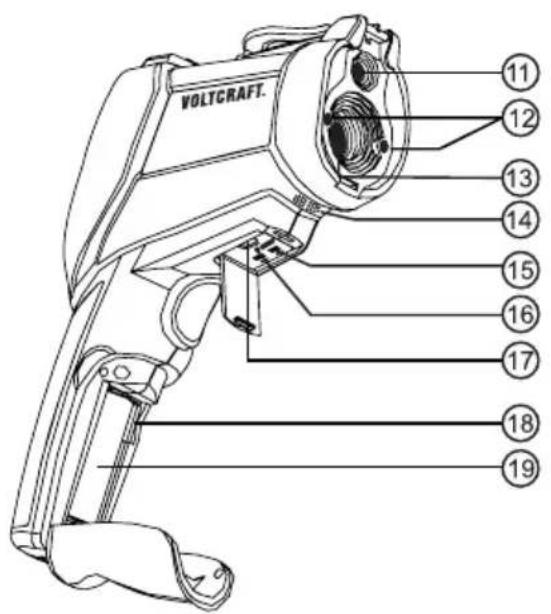
text_image
VOLTCAFT. 11 12 13 14 15 16 17 18 19natural_image
Two circular diagrams with internal dotted and solid lines, no text or symbols present- Introduction......29
- Explanation of symbols....29
- Intended use....30
- Delivery content......31
- Safety instructions ....32
a) General information....32
b) Laser....33
c) Li-ion battery....33
-
Operating elements ...... 34
-
Product description 35
a) Function....35
b) IR-measuring optics - D:S ratio 35
c) Target laser....36
- Commissioning 36
a) Inserting/replacing the rechargeable battery 36
b) Inserting microSD card (optional)....37
c) Charging the rechargeable battery....37
d) Switching the device on/off....37
e) System settings 38
- Measuring 40
a) Display symbols and values 40
b) Measurement settings 40
c) IR Measurement with camera image....43
d) IR Measure 44
e) Contact measurement 44
f) Dew point....45
g) Data logger 45
h) Data view "Gallery" 46
- Care and cleaning....47
a) General information....47
b) Cleaning the lens....47
c) Cleaning the housing....47
- Troubleshooting 48
- Disposal 48
a) Product 48
b) (Rechargeable) batteries 48
- Technical data....49
a) Measuring tolerances....50
b) Degree of emission of different surfaces....51
1. Introduction
Dear customer,
Thank you for purchasing this product.
This product complies with the statutory national and European requirements.
To maintain this status and to ensure safe operation, you as the user must observe these operating instructions!

These operating instructions are part of this product. They contain important notes on commissioning and handling. Also consider this if you pass on the product to any third party. Therefore, retain these operating instructions for reference!
If there are any technical questions, please contact: www.conrad.com/contact
2. Explanation of symbols

The symbol with the exclamation mark in the triangle is used to indicate important information in these operating instructions. Always read this information carefully.

The arrow symbol indicates special information and advice on operation.

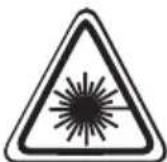
Laser radiation. Never look into the laser beam and never point it at people or animals.
3. Intended use
The infrared thermometer enables contract-free measurement of surface-temperatures. It determines temperature according to the radiated infrared energy that is emitted by every object. Contact-free measurement makes it ideal for dangerous, difficult to access, moving or live objects. It cannot measure through transparent media such as glass, plastics, water, etc. Instead, the surface temperature is measured at all times. The temperature measuring range is from -50 to +1600 °C. A double laser target device facilitates determination of the measuring range.
Additionally, a contact measurement with a thermal element sensor type K is possible in the measuring range from -50 to +1370 °C, depending on the sensor used. This contact sensor must only be used on voltage-free media.
The installed sensors can be used to measure ambient temperature and relative humidity. These measured values can be used to calculate and display the dew point and the evaporation temperature (wet bulb). There is a mould warning display.
An integrated camera permits recording images and videos with the measured data displayed there. The data can be recorded in the integrated storage or on an optional microSD memory card. A data logger with curve memory is present.
The IR-thermometer as such must not come directly into contact with the measured contact and surface temperature. A sufficient safety distance and the admissible ambience conditions must be complied with under all circumstances.
Diagnostic application in the medical area is not admissible.
The degree of emissions can be adjusted to the present surface property of the measured object. A table of common materials is integrated.
The installed USB interface serves only as a charging interface. Data transmission is not possible.
A 3.7 V Li-ion battery of type 18500 with a connection plug is used for voltage supply. No energy supply other than the one indicated can be used. Charging is performed via the integrated USB charging interface.
The enclosed USB plug-in mains adapter is designed in protection class 2 and must only be used in dry inner rooms.
For safety and approval purposes, you must not rebuild and/or modify this product. If you use the product for purposes other than those described above, the product may be damaged. In addition, improper use can result in short circuits, fires, electric shocks or other hazards. Read the instructions carefully and store them in a safe place. Make this product available to third parties only together with its operating instructions.
All company names and product names are trademarks of their respective owners. All rights reserved.
4. Delivery content
• IR-Thermometer IR-1600 CAM
- Li-ion battery (type 18500)
• Temperature sensor thermocouple type K (measurement range -20 to +250 °C)
- Table stand
• USB cable (Mini-USB to USB)
- USB power adapter
- Transport case
- Operating instructions
Up-to-date operating instructions
Download the latest operating instructions at www.conrad.com/downloads or scan the QR code shown. Follow the instructions on the website.
5. Safety instructions

Read the operating instructions carefully and especially observe the safety information. If you do not follow the safety instructions and information on proper handling in this manual, we assume no liability for any resulting personal injury or damage to property. Such cases will invalidate the warranty/guarantee.
a) General information
- The device is not a toy. Keep it out of the reach of children and pets.
- Do not leave packaging material lying around carelessly. This may become dangerous playing material for children.
- Meters and accessories have no place in the hands of children. Therefore, be particularly careful when children are present.
- Protect the appliance from extreme temperatures, direct sunlight, strong jolts, high humidity, moisture, flammable gases, steam and solvents.
- Do not operate the meter in rooms or under unfavourable conditions where combustible gases, vapours or dusts are or may be present.
- Avoid operation in direct proximity of strong magnetic or electromagnetic fields or transmission aerials. This could affect the measurement.
- Steam, dust, smoke and/or vapours may impair looks and lead to an incorrect measuring result!
- Do not place the product under any mechanical stress.
- If it is no longer possible to operate the product safely, take it out of operation and protect it from any accidental use. Safe operation can no longer be guaranteed if the product:
- is visibly damaged,
- is no longer working properly,
- has been stored for extended periods in poor ambient conditions or
- has been subjected to any serious transport-related stresses.
- Please handle the product carefully. Jolts, impacts or a fall even from a low height can damage the product.
- Consult an expert when in doubt about the operation, safety or connection of the appliance.
- Maintenance, modifications and repairs must only be completed by a technician or an authorised repair centre.
- If you have questions which remain unanswered by these operating instructions, contact our technical support service or other technical personnel.

b) Laser
- When operating the laser equipment, always make sure that the laser beam is directed so that no one is in the projection area and that unintentionally reflected beams (e.g., from reflective objects) cannot be directed into areas where people are present.
- Laser radiation can be dangerous, if the laser beam or its reflection enters unprotected eyes. Therefore, before using the laser equipment, familiarise yourself with the statutory regulations and instructions for operating such a laser device.
- Never look into the laser beam and never point it at people or animals. Laser radiation can seriously damage your eyes.
- If laser radiation enters your eyes, close your eyes immediately and move your head away from the beam.
- If your eyes have been irritated by laser radiation, do not continue to carry out tasks with safety implications, such as working with machines, working from great heights or close to high voltage. Also, do not operate any vehicles until the irritation has completely subsided.
- Do not point the laser beam at mirrors or other reflective surfaces. The uncontrolled, reflected beam may strike people or animals.
- Never open the device. Setting or maintenance tasks must only be executed by a trained specialist familiar with potential hazards. Improperly executed adjustments might result in dangerous laser radiation.
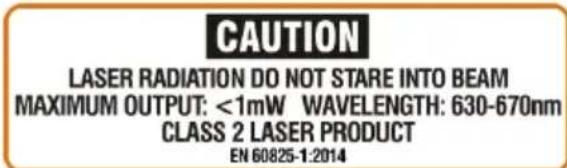
- The product is equipped with a class 2 laser. Laser signs in different languages are included in the package. If the sign on the laser is not written in the language of your country, please affix the appropriate sign onto the laser.
text_image
CAUTION LASER RADIATION DO NOT STARE INTO BEAM MAXIMUM OUTPUT: <1mW WAVELENGTH: 630-670nm CLASS 2 LASER PRODUCT EN 60825-1:2014- Caution: if operation settings or procedures other than those described in these instructions are used, it could lead to exposure to dangerous radiation.
c) Li-ion battery
- The rechargeable battery is permanently built into the product and cannot be replaced.
- Never damage the rechargeable battery. Damaging the casing of the rechargeable battery might cause an explosion or a fire!
- Never short-circuit the contacts of the rechargeable battery. Do not throw the battery or the product into fire. There is a danger of fire and explosion!
- Charge the rechargeable battery regularly, even if you do are not using the product. Due to the rechargeable battery technology being used, you do not need to discharge the rechargeable battery first.
- When charging, place the product on a surface that is not heat-sensitive. It is normal that a certain amount of heat is generated during charging.
6. Operating elements
text_image
VOLTCAFT. ① ② ③ ④ ⑤ ⑥ ⑦ ⑧ ⑨ ⑩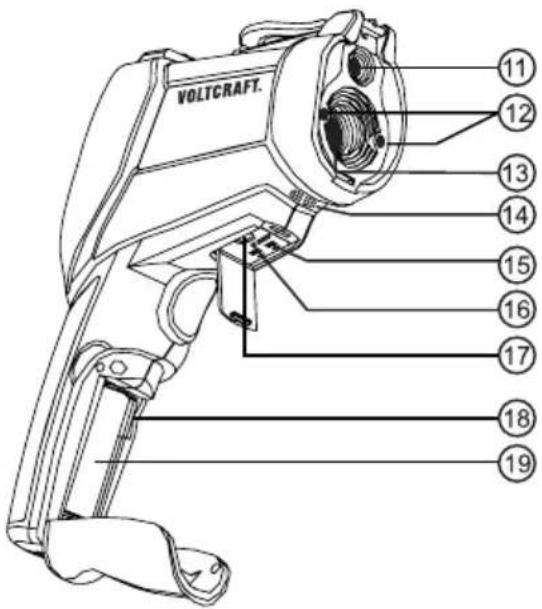
text_image
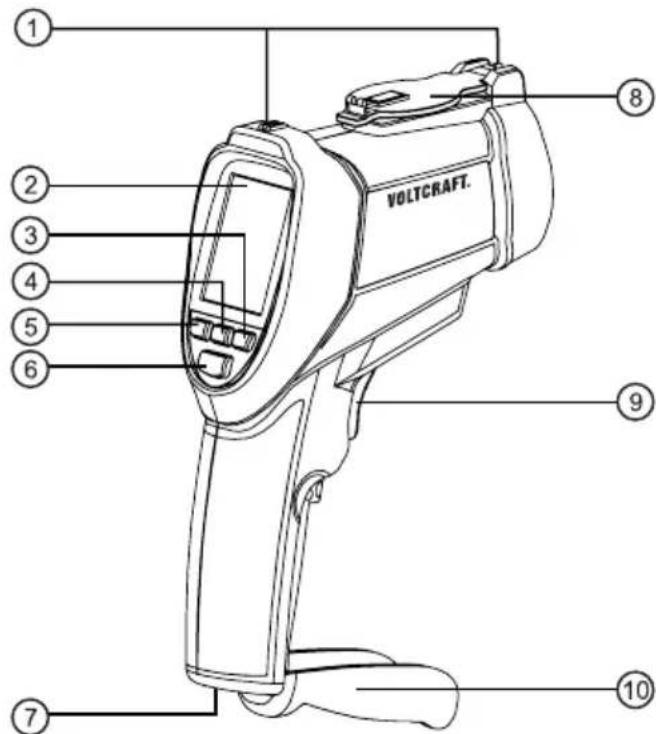
VOLTCAFT. 11 12 13 14 15 16 17 18 191 Visual targeting device (rear/fore sight)
2 Colour display
3 Button "Down" and "Video recording"
4 Button "On/off" and "ESC" (Cancel/Exit)
5 Button "Up" and "Image recording"
6 Button "Enter" for input confirmation
7 Stand connection socket
8 Lens protective cover
9 Measuring button
10 Folding lid for battery compartment and microSD chute
11 Camera lens
12 Exit openings for double target laser
13 IR measuring lens
14 Integrated sensors for ambient temperature and rel. humidity
15 Connection socket for type K thermocouple sensor
16 RESET button for system reset
17 Mini USB charging socket
18 Chute for microSD memory card
19 Battery compartment
7. Product description
a) Function
Infrared thermometers (IR-thermometers) measure the surface temperature of an object. The product sensor records the emitted, reflected and passed-through heat radiation of the object and converts this information into a temperature value.
The degree of emission is a value used to describe the energy emission characteristic of a material. The higher this value, the higher the material's ability to emit radiation. Many organic materials and surfaces have an emission degree of approx. 0.95. Metal surfaces or glossy materials have a lower emission degree. This will cause an inaccurate measurement. For this reason, a matte-black coat of paint or matte adhesive tape should be applied or the emission degree pre-set accordingly.
b) IR-measuring optics - D:S ratio
(D:S = measuring distance:measuring area)
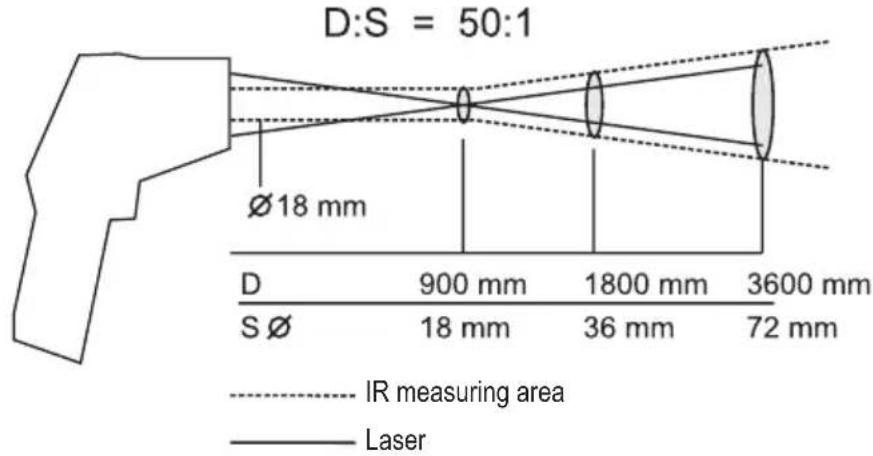
To achieve precise measuring results, the measured object must be larger than the IR measuring spot of the infrared thermometer. The determined temperature is the average temperature of the measured surface. The smaller the measured object, the shorter the distance to the infrared thermometer has to be. The precise measuring spot size can be taken from the following chart. It is also printed on the device. For precise measurements, the measuring object should be at least twice as large as the measuring spot.
The meter has a lens of 50:1. The smallest measuring diameter is reached before the measuring opening at a distance of up to 90 cm. It is 18 mm in diameter. Keep sufficient distance to avoid incorrect measurement due to heating of the IR thermometer. Then the measuring cone expands as shown in the sketch.
Example: The measuring diameter at a distance of 1.8 m is 36 mm.
text_image
D:S = 50:1 Ø18 mm D 900 mm 1800 mm 3600 mm S Ø 18 mm 36 mm 72 mm IR measuring area Laserc) Target laser
The target laser is active during measurement depending on the pre-setting. A warning icon appears in the display with the laser active. Never look into the laser aperture (12) during measurement.
natural_image
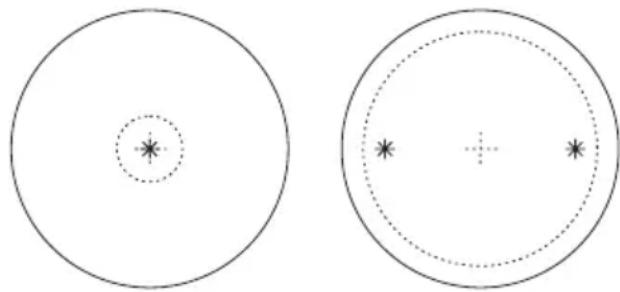
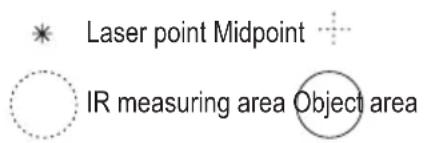
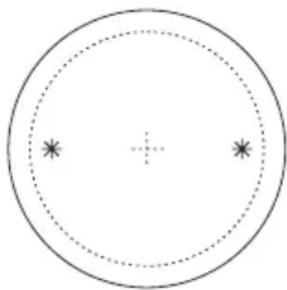
Two circular diagrams with internal dotted and solid lines, no text or symbols presentThe target laser is designed as a twin device and marks the inner, approximate edge area of the measured area (approx. 90%).
When both laser points meet, the smallest measuring area has been reached. It is 18 mm in diameter.
For large distances, the two laser points move apart according to the measuring area.
text_image
* Laser point Midpoint ○ IR measuring area Object area8. Commissioning
- Before working with the meter, you have to insert the enclosed Li-ion rechargeable battery.
- Insert the rechargeable battery as described in this chapter and charge it.
- The IR-thermometer permits individual system settings for measuring that you should perform after initial commissioning.
a) Inserting/replacing the rechargeable battery
- The enclosed Li-ion battery must be inserted first at initial commissioning. To open the battery compartment, pull the battery compartment lid (10) away forwards. The battery compartment lid is unlocked. Fold open the battery compartment lid (10) forwards. Connect the plug of the rechargeable battery to the pug-in socket in the battery compartment in the correct polarity. The pug is designed so that the rechargeable battery can only be connected in the proper polarity. Do not apply any force when plugging in the rechargeable battery.
- Close the battery compartment again by folding shut the battery compartment lid (10). Observe that the cables are not caught and the lock latches.
- Do not leave the rechargeable battery in the meter during longer measuring breaks (approx. >2 weeks), since even leak-protected rechargeable batteries may corrode and release chemicals that may harm your health or destroy the device.
→ A matching Li-ion spare battery of type 18500 is available under the order number: Item no. 1233684 (please order 1x).

Other rechargeable battery types or non-rechargeable batteries must NOT be used.
b) Inserting microSD card (optional)
- An optional microSD card can be inserted in the meter for storage expansion and for data transmission to a computer.

Before inserting or removing the card, always switch off the meter to avoid damage to the card or files.
- Open the battery compartment (10) to insert the memory card.
- Insert the microSD card into the lateral microSD card chute (18) with the contacts down and outward.
- Carefully push the card into the chute until it latches.
- Close the battery compartment.
After activating of the meter, the inserted microSD card is displayed as a small icon at the upper right screen edge.
To remove the microSD card, briefly push the card until it is unlocked. The card is pushed up by the latching mechanism and can be taken out.
c) Charging the rechargeable battery
The enclosed Li-ion battery must be fully charged first at initial commissioning.
It can be charged at any USB interface or the enclosed USB mains unit.
Charge the rechargeable battery no later than when the battery symbol shows no fill bars in the display anymore.

text_image
Charged FProceed accordingly to charge.
- Open the rubber cover at the bottom of the meter and connect the enclosed USB charging cable to the mini USB charge socket (17) at the meter. The plug will only fit into the charge socket in the correct orientation.
- Plug the USB plug of the charging cable into an active USB socket at a computer or connect the plug to the enclosed USB mains unit. Charging commences as soon as the mains unit is plugged into a mains socket.
- The display shows charging by the filling (pulsating) battery symbol. If the fill bar is continually visible, charging is completed. The device can be disconnected from the charge cable.
- Pull the USB mains unit from the socket when it is not needed for charging.
d) Switching the device on/off
- Switch on the meter. For this, hold down the button "ESC" (4) for approx. 3 seconds until a beep sounds. Release the button and the meter will switch on after a brief time. Open the lens protection cover (8).
- After switching on, you are in the main menu "MENU", from where you can select all functions.
- To switch off, press the button "ESC" again.
e) System settings
To enter the setting mode, push the button "Up" (5) or "Down" (3) in the main menu "MENU" until the field "SETTINGS" has a blue background. Then push the button "Enter" (6). Use the buttons "Up" (5) or "Down" (3) to select the respective function or change the value. Press the button "ESC" (4) to return to the previous menu. The function with a blue background is saved.
The setting menu can be terminated at any time by pushing the button "ESC" (4). The function with a blue background is saved.
The following menu items can be selected in sequence:
Language
Select the menu language here.
Options: English, German, French, Dutch, Italian
Date/Format
Select the date format and the displayed date here.
“Enter” takes you to the sub menu and switches the setting area. The active setting area is outlined in blue and can be changed with the buttons “Up” (5) and “Down” (3). DD = day, MM = month, YYYY = year.
Options: DD/MM/YYYY, MM/DD/YYYY, YYYY/MM/DD
Submenu with number input: xx/xx/xxxx, xx/xx/xxxx, xxxx/xx/xx
Time/Format
Select the time format and the displayed time here.
“Enter” takes you to the sub menu and switches the setting area. The active setting area is outlined in blue and can be changed with the buttons “Up” (5) and “Down” (3). HH = hour, MM = minute.
Options:
12 HR-HH:MM AM/PM
24 HR-HH:MM
Submenu with number input: xx/xx, xx/xx
Unit
Select the temperature unit here.
Options:
°C = Degrees Celsius
°F = Degrees Fahrenheit
Memory
Select the storage location here. The storage data (image, video and data logger) are stored accordingly. A transmission of internal storage data to the microSD storage source is not possible.
Options:
Internal = internal non-volatile device memory on the meter
SD card = optional use of a MicroSD card
After selecting this storage medium and confirming with "Enter", a new query menu will appear.
Select: assumes the choice made
Format: deletes the entire memory and reformats the device memory. For safety, the formatting step must be confirmed again with "Yes" or can be cancelled with "No".
The data of the memory slot are displayed in the submenu:
Memory size = total memory size
Device memory used = Memory space used
Free device memory = Freely available memory space
Buzzer
Select the acoustic button confirmation and alarm when the pre-set alarm levels are exceeded.
Options:
Off = no beep
On = beep at push of a button and exceeding of the alarm values
Switching off the screen
Here, you can choose the time after which the screen is to be switched off if no button has been pushed (battery saving mode).
→ After switching off, the device may be reactivated by pushing any button. Deactivation is not enabled in permanent measuring mode.
Options:
Close = Deactivation is disabled
20 seconds = Deactivation takes place after 20 seconds
1 minute = Deactivation takes place after 1 minute
3 minutes = Deactivation takes place after 3 minutes
Switching Off
Here, you can choose the time after which the meter is to be switched off automatically if no button has been pushed.
→ After switching off, the device may be reactivated by pushing any button. Deactivation is not enabled in permanent measuring mode.
Options:
Close = Automatic deactivation is disabled
3 minutes = Deactivation takes place after 3 minutes
15 minute = Deactivation takes place after 15 minute
60 minutes = Deactivation takes place after 60 minutes
Reset default
This resets the device settings to the factory condition. All pre-settings are reset. The saved data are, however, retained.
Options:
Yes = The device is reset to factory conditions
No = The device is not reset to factory conditions
System update
Here, new firmware can be read in, if present. The update is done via an optional MicroSD card. "SD CARD" must be chosen as source for the system file in the menu.
9. Measuring
To receive precise measured values, the infrared thermometer must be adjusted to the ambience temperature. Let the device adjust to the new ambience temperature after a site change.
Longer IR measurements of high temperatures at low measuring distances lead to heating of the meters and thus to wrong measurements. For precise measured values: The higher the temperature, the larger should the measuring distance and the shorter the measuring duration be.
Glossy surfaces will falsify the measuring result in the IR measurement. To compensate, the surface of glossy parts can be covered with adhesive tape or matte-black paint. The devices cannot measure through transparent surfaces, such as glass. Instead, it will measure the surface temperature of the glass.
a) Display symbols and values
In measuring operation, various parameters and symbols are displayed on the screen. The following list explains their meaning:
 | IR measuring function without camera image |  | Dew point measuring function |
 | IR measuring function with camera image |  | Video recording running |
 | Start symbolMeasurement is triggered by pushing the measuring button |  | Pause iconMeasurement is interrupted by releasing the measuring button |
 | Lower alarm level activated (Low) Lower alarm |  has been undercut has been undercut | |
 | Upper alarm level activated (High) Upper alarm |  has been exceeded has been exceeded | |
 | Target laser is activated Marks the picture center |  mera mode mera mode | |
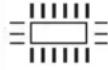 | Symbol for internal memory Symbol for SD car |  | |
| ε | Pre-set degree of emission TK Temperature thermocouple type K | ||
| AT Ambient temperature RH% Relative humidity | |||
| DP Dew point WB Evaporation temperature (WetBulb) | |||
| DIF | Temperature difference between min and max. | AVG | Average temperature of the current measurement |
| MIN | Minimum temperature of the current measurement | MIN | Maximum temperature of the current measurement |
b) Measurement settings
Further settings can be made in the individual measuring functions and the values to be displayed can be enabled or disabled there.
To get to the setting menu, push the button "Enter" in a measuring function. The menu "MEASURE SET" is opened. Select by pushing the button "Enter" again. You can use the arrows to change the function/set value. To terminate, push the button "ESC".
The following functions can be selected and set:
Emission
The emission degree can be set individually in this menu from 0.10 to 1.00 or selected with pre-set material values.
Possible set values are:
| ε = x.xx set value 0.10 - 1.00 | ||
| Cement (0.94) Ice/Water (0.96) | ||
| Glass (0.92) Plastic (0.90) | ||
| Human Skin (0.98) Wood (0.87) | ||
Alarm High
Here, the upper alarm level (High) of the temperature can be set. You can enable or disable the function via the selection field.
Possible set values are:
| Time value = xx.x set value -50 to +1650 °C | ||
| Disable = Function is disabled Enable = Function is enabled | ||
Alarm Low
Here, the lower alarm level (Low) of the temperature can be set. You can enable or disable the function via the selection field.
Possible set values are:
| Time value = xx.x set value -50 to +1650 °C | ||
| Disable = Function is disabled Enable = Function is enabled | ||
Laser
Here, the target laser during IR measuring can be switched on or off. Pushing the button "Enter" actuates the slider in the display.
I = enabled, o = disabled
Auto Mode
Here, permanent measuring can be switched on or off. Pushing the button "Enter" actuates the slider in the display.
I = enabled, o = disabled

The automatic deactivation functions are disabled in permanent measuring mode. Ensure that you switch off the meter after the measurement is completed.
Max/Min
Here, the automatic display of the min and max measured values during measurement can be switched on or off. Pushing the button "Enter" actuates the slider in the display.
I = enabled, o = disabled
Average/Dif
Here, the automatic display of the average and difference from min and max measured values during measurement can be switched on or off. Pushing the button "Enter" actuates the slider in the display.
I = enabled, o = disabled
Ambient Temp/RH
Here, the automatic display of the ambient temperature and relative humidity can be switched on or off. Pushing the button "Enter" actuates the slider in the display.
I = enabled, o = disabled

The sensors for ambient temperature and relative humidity are installed in the meter (14). Observe the delayed measurement by the constructional placement of the sensors. Give the meter enough time to adjust to the ambient conditions (approx. 30 minutes for a stable measured value).
Dew point/Wetbulb
Here, the automatic display of the dew point and the evaporation temperature (WetBulb) can be switched on or off. Pushing the button "Enter" actuates the slider in the display.
I = enabled, o = disabled

The dew point and the evaporation temperature are calculated values that result from the IR surface temperature, the ambient temperature and the relative humidity. The sensors for ambient temperature and relative humidity are installed in the meter (14). Observe the delayed measurement by the constructional placement of the sensors. Give the meter enough time to adjust to the ambient conditions (approx. 30 minutes for a stable measured value).
Type-K
Here, the automatic display of an external type K thermocouple sensor can be switched on or off. Pushing the button "Enter" actuates the slider in the display.
I = enabled, o = disabled

When this function is activated, the thermocouple socket (15) is monitored. Once an external type K thermo sensor is connected, the contact temperature appears in the display during the measurement as well. If no sensor is connected, this function is automatically concealed.
Colour
Here, the number colour of the displayed parameters can be set. In the lower line, the RGB colour values are displayed for information.
Possible set values are:
White, black, red, yellow, blue, green
Logs time
The menu field "Logs time" appears only in data logger mode. Here, the time for the measuring interval can be set. Use the arrows to set the value. The button "ESC" saves the setting and closes the settings menu.
Possible set values are: 1 s - 60 s.
c) IR Measurement with camera image
The menu item "IR CAM" is used for measurements with activated camera. This makes it easier to assign the measuring point.
Point the measuring opening (13) at the measured object vertically. Observe that the measured object is not smaller than the IR measuring area of the device.
Push and hold the measuring button (9). In the display, the main measured value and all other enabled parameters are displayed. The displayed main measured value corresponds to the average surface temperature of the IR measuring area. During the measurement, the symbol "Start" in the display is concealed and the symbol "Pause" is shown.
After releasing the measuring button (9), the last measured value is displayed until automatic deactivation (can be pre-set) for better reading. The symbol “Pause” goes out and the display “Start” appears to indicate readiness for measurement.
The device will switch off automatically after the pre-set time once the measuring button (9) is released. If this function has been disabled, always switch off the device manually to avoid discharging the rechargeable battery.

To determine the warmest/coldest points of the measuring object, move the measuring aperture with the measuring button (9) pushed comprehensively over the surface of the object to be measured. The measured value is updated at a rate of 150 ms. Additional functions permit automatic display of maximum value "Max" and minimum value "Min" or average value "Avg" and difference value "Dif". These values are displayed above and below the main measuring display.

The additional functions "MIN, MAX, DIF, AVG" always refer to the IR measuring function.
Picture and video recording
The IR measurement with camera image also has the advantage that the displayed pictures including all measuring parameters can be recorded as a picture or video file.
To record the picture, push the button "Picture recording" (5). The current picture is recorded.
The two arrows can be used to choose saving the picture (arrow "Up" (5)) or discard the picture (arrow "Down" (3)).
After input, the current live picture is displayed again.
To record the video, push the button "Video recording" (3). The symbol "Video recording" is displayed and the recording is running. To terminate the recording, push the button "Video recording" (3) again. A small floppy disc symbol in the middle of the image signals that the video file is being saved.

The picture or video file can be viewed in the main menu item "Gallery".
d) IR Measure
The menu item "IR MEASURE" is used for measurement without the camera. This makes it easier to read the measurements because of the homogeneous image background.
Point the measuring opening (13) at the measured object vertically. Observe that the measured object is not smaller than the IR measuring area of the device.
Push and hold the measuring button (9). In the display, the main measured value and all other enabled parameters are displayed. The displayed main measured value corresponds to the average surface temperature of the IR measuring area. During the measurement, the symbol "Start" in the display is concealed and the symbol "Pause" is shown.
The bar display at the lower edge of the screen shows the trend of the current measured value for a quick overview (rising/falling).
After releasing the measuring button (9), the last measured value is displayed until automatic deactivation (can be pre-set) for better reading. The symbol “Pause” goes out and the display “Start” appears to indicate readiness for measurement.
e) Contact measurement

Observe that contact temperature measurement is only permitted with objects that do not turn and are not live. Also observe that contact temperatures are only possible up to the approved sensor temperature. The approved sensor temperature of the enclosed wire sensor is -20 to +250 °C. To use the entire measuring range of the meter, you can purchase optional thermocouple sensors of type K.
The contact measurement is possible in the measuring functions "IR CAM", "IR MEASURE", "DEW POINT" and "DATA LOGGER".
In addition to contact-free IR measurement, a thermocouple contact sensor type K can be connected as well. The contract measurement permits measurement of the temperature independently of the material and degree of emission of the object. In addition to the enclosed wire temperature sensor, all conventional type K thermocouple sensors with miniature plug can also be connected to the devices
Sensor connection
- Open the lower cover at the meter.
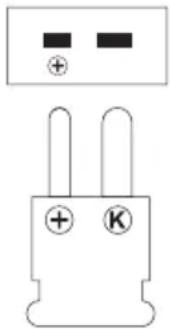
- Push the thermocouple plug of the sensor into the type K connection socket in the proper polarity (15). Observe the mark “+” at the plug and the socket. The plug only fits the socket in the correct polarity.
- Once a thermo sensor is connected to the meter with the type K function active, the display "TK" with the temperature of the sensor appears below the IR measured value in measuring operation.
- Remove the sensor after the end of the measurement and close the cover to prevent ingression of dirt.
natural_image
Pure electrical component diagram showing two terminals with polarity indicators (no text or symbols)
The additional functions "MIN", "MAX", "AVG" and "DIF" are not possible for contact measurement. The information always refers to the IR measurement.
f) Dew point
The menu item “DEW POINT” is used for measurement without the camera. This makes it easier to read the measurements because of the homogeneous image background.
Point the measuring opening (13) at the measured object vertically. Observe that the measured object is not smaller than the IR measuring area of the device.
Push and hold the measuring button (9). In the display, the main measured value and all other enabled parameters are displayed. The displayed main measured value corresponds to the average surface temperature of the IR measuring area. During the measurement, the symbol "Start" in the display is concealed and the symbol "Pause" is shown.
The bar display at the lower edge of the screen shows the correspondence of IR temperature and dew point (DP) in percent for quick overview. It is used as a warning display for possible mould danger.
Blue range: no danger
Yellow range: possible danger
Red range: acute danger
After releasing the measuring button (9), the last measured value is displayed until automatic deactivation (can be pre-set) for better reading. The symbol “Pause” goes out and the display “Start” appears to indicate readiness for measurement.

The dew point and the evaporation temperature are calculated values that result from the IR surface temperature, the ambient temperature and the relative humidity. The sensors for ambient temperature and relative humidity are installed in the meter (14). Observe the delayed measurement by the constructional placement of the sensors. Give the meter enough time to adjust to the ambient conditions (approx. 30 minutes for a stable measured value).
g) Data logger
The menu item "DATA LOGGER" is used to record the measuring progress.
In data logger mode with internal device memory, only the IR temperature is recoded. When using an optional memory card, all measured values are additionally saved in an editable text file (.txt).
Point the measuring opening (13) at the measured object vertically. Observe that the measured object is not smaller than the IR measuring area of the device.
To start recording, push the measuring button (9) briefly. The recording is started with the pre-set measuring interval. The lock symbol marks the locked permanent measuring mode. The measuring button is locked and the data are stored.
In the display, the main measured value is displayed as a figure. The pre-set high and low alarm levels are always displayed as coloured threshold lines.
To terminate the data logger measurement, push the button "ESC". The measuring function is terminated; the data remain in the device memory. The saved data are saved with time and date designation.
h) Data view "Gallery"
In the menu item "GALLERY", the recorded data can be viewed on the meter.
In the submenu, the following data can be selected with the arrow buttons and the button "Enter":
Film For the saved video files
Picture For the saved picture files
Logs For the saved data logging files
The files can be deleted via the menu item "Memory" in the main menu "Settings". Picture files can be deleted in the picture viewing mode.
Individual video and logging files cannot be deleted. It is only possible to delete (format) the entire memory.
Menu item "Film"
Use the arrows to select the automatically created folder and confirm this with the button "Enter". Repeat this for the corresponding video file.
After confirming with the button "Enter", the video will start.
Use the button "Enter" during playback to display an info line with a progress bar at the lower edge of the screen. Pushing the button "Enter" again will stop playback. The symbol "Pause" is displayed. Pushing "Enter" resumes playback.
All video files are played back in sequence. The arrows can be used to select the saved video files forward and backwards.
The button "ESC" ends playback and returns to the video file menu.
Menu item "Picture"
Use the arrows to select the automatically created folder and confirm this with the button "Enter". Repeat this for the corresponding picture file.
After confirming with the button "Enter", the selected picture is displayed.
The arrows can be used to select the saved pictures forward and backwards.
The button "Enter" can be used to open a submenu while viewing a picture.
Remove photograph
Use the button "Enter" to delete the picture. The safety query for deleting must be confirmed (Yes = delete, No = do not delete)
Information on the photograph
The button "Enter" displays file information on the picture. The field "Exit" terminates the display.
Exit
The button "Enter" terminates the submenu and returns to picture viewing.
The button "ESC" ends playback and returns to the picture file menu.
Menu item "Logs"
Use the arrows to select the desired file and confirm this with the button "Enter". The chart is displayed with the first measured temperature.
Use the arrows to control a cursor across the chart. The right arrow moves the cursor to the right, the left arrow moves it to the left. The temperature value at the cursor is displayed at the bottom edge of the screen.
When the cursor reaches the screen edge, the chart is moved on accordingly.
The button "ESC" ends display and returns to the log file menu.
10. Care and cleaning
a) General information
The IR thermometer is maintenance-free apart from occasional cleaning and charging of the rechargeable battery. Always close the safety cover (8) when the device is not in use.
Always observe the following safety information before cleaning the device.
b) Cleaning the lens
Remove loose particles with clean compressed air and wipe off any other deposits with a fine lens brush. Clean the surface with a lens cleaning cloth or a clean, soft and lint-free cloth. To clean finger prints and other grease strains, the cloth can be moistened with water or a lens cleaning fluid. Do not use any acid/alcohol-containing or other solvents and do not use any rough, linty cloth to clean the lens. Avoid excessive pressure when cleaning.
c) Cleaning the housing
Do not use any abrasive, chemical or aggressive cleaning media such as petrols, alcohols or similar for cleaning. They will damage the surface of the device. Furthermore, the fumes are hazardous to your health and explosive. Also do not use any sharp-edged tools, screwdrivers, metal brushes, etc. for cleaning.
Use a clean, lint-free, antistatic and slightly moist cleaning cloth to clean the device or the measuring lines.

Disconnect the product from the mains before each cleaning.
ave any questions about handling of the device, contact our technical support.
11. Troubleshooting
With this IR thermometer, you have purchased a product built to the latest state of the art and operationally safe.
Nevertheless, problems or errors may occur.
For this reason, the following is a description of how you can easily remove possible malfunctions yourself:

Always observe the safety notes!
| Problem Possible cause | |
| The measuring device does not work. Is the rechargeable battery flat?Check the status. | |
| Wrong measured value indication. Is the wrong emission degree set?Is the lens contaminated?Is the measuring surface covered by a glass pane?Is the operating temperature of the environment exceeded or undercut? | |
| The meter no longer reacts. | The system software has a fault. Push the button “RESET” (16) with a pointy object (e.g. a paper clip) and switch on the device again. |

Other repairs than described above must only be performed by an authorised specialist.
If you have any questions about handling of the device, contact our technical support.
12. Disposal
a) Product

Electronic devices are recyclable waste and must not be disposed of in the household waste. At the end of its service life, dispose of the product in accordance with applicable regulatory guidelines.

ve any inserted (rechargeable) batteries and dispose of them separately from the product.
b) (Rechargeable) batteries

You as the end user are required by law (Battery Ordinance) to return all used (rechargeable) batteries. Disposing of them in the household waste is prohibited.
Contaminated (rechargeable) batteries are labeled with this symbol to indicate that disposal in the domestic waste is forbidden. The designations for the heavy metals involved are: Cd = Cadmium, Hg = Mercury, Pb = Lead (name on (rechargeable) batteries, e.g. below the trash icon on the left).
Used (rechargeable) batteries can be returned to collection points in your municipality, our stores or wherever (rechargeable) batteries are sold.
You thus fulfill your statutory obligations and contribute to the protection of the environment.
13. Technical data
Input voltage....Li-ion rechargeable battery 3.7 V 1400 mAh, type 18500
Charge time....approx. 2 hrs
Operating time per battery charge....approx. 4 hrs continuous operation
Trigger time....150 ms
IR spectral range 8 - 14 μm
Emission degree....adjustable from 0.10 to 1.00
Measuring range (IR measurement)....-50 to +1600 °C (-58 to +2912 °F)
Measuring range (contact measurement)....-50 to +1370 °C (-58 to +2498 °F)
Display resolution 0.1 °C/°F < 1000 °C/°F
1^ / ^ > / = 1000^ / ^
IR-lens (D:S)....50:1
Dual laser Output < 1 mW, laser class 2,
Wavelength 630-670 nm
Display....5.6 cm (2.2"), colour LCD
Display resolution 320 x 240 pixels
Camera resolution 640 x 480 pixels
Image format ......jpg
Video format ....mp4
Logging format....bin / .txt
Integrated device memory 300 MB, non-volatile
External memory chute.....up to 32 GB microSDHC
Operating temperature 0 to +50 °C (+32 to 122 °F)
Operating humidity 0 - 100% relative humidity
Storage temperature....-10 to +60 °C (+14 to +140 °F)
Storage humidity....10 - 90% relative humidity, non-condensing
Weight ....approx. 450 g
Dimensions....220 x 62 x 155 mm
Input voltage (USB mains unit)....100 - 240 V/AC 50 - 60 Hz
Protection class....2 (double or reinforced insulation)
Output voltage 5 V/DC
Output current....1000 mA
a) Measuring tolerances
The accuracy is valid for one year at a temperature of +23 to +25 °C (+73 to +77 °F), and at a relative humidity of less than 75%, non-condensing.
Infrared temperature measuring area
| Measuring area °C Accuracy Reproducibility | ||
| -50 to +20 °C ±5 °C ±2 °C | ||
| +20 to +500 °C ±(1.5 % +1.5 °C) ±1 % or ±1 °C | ||
| +500 to +1000 °C ±2 % ±1 % or ±1 °C | ||
| +1000 to +1600 °C ±2.8 % ±1.5 % |
| Measuring range °F Accuracy Reproducibility | ||
| -58 to +68 °F ±9 °F ±4 °F | ||
| +68 to +932 °F ±(1.5 % + 3 °F) ±1 % | or ±1.8 °F | |
| +932 to +1832 °F | ±2 % ±1 % or ±1.8 °F | |
| +1832 to +2912 °F | ±2.8 % ±1.5 % |
Contact temperature measurement type K
| Measuring area °C Accuracy | ||
| -50 to 0 °C | ±3.5 °C | |
| 0 to +1370 °C | ±(1 % + 2 °C) |
| Measuring range °F Accuracy | ||
| -58 to +32 °F ±7 °F | ||
| +32 to +2498 °F | ±(1 % + 4 °F) |
Air temperature measurement
| Measuring area °C Accuracy | ||
| 0 to +50 °C | ±1 °C +10 to +40 °C | |
| ±1.5 °C | Residual range | |
| Measuring range °F Accuracy | ||
| +32 to +122 °F | ±1.8 °F | +50 to +104 °F |
| ±3 °F Residual range | ||
Dew point temperature measurement
| Measuring area °C Accuracy | ||
| 0 to +50 °C | ±1 °C +10 to +40 °C | |
| ±1.5 °C Residual range | ||
| Measuring range °F Accuracy | ||
| +32 to +122 °F | ±1.8 °F +50 to +104 °F | |
| ±3 °F Residual range | ||
Relative humidity measurement
| Measuring range %RH Accuracy | ||
| 0 - 40 %RH ±5 %RH | ||
| 40 - 60 %RH ±4 %RH | ||
| 60 - 80 %RH ±5 %RH | ||
| 80 - 100 %RH ±6 %RH | ||
b) Degree of emission of different surfaces
The emission degrees listed in the table are approximates. Various parameters, such as geometry and surface quality, may influence the emission degree of an object.
The meter is delivered with a pre-set emission degree of 0.95. It matches for most non-metal materials. The IR measuring method is only conditionally suitable for blank metals and requires a special surface treatment (e.g. matte insulation tape, etc.) or pre-setting of the corresponding degree of emission.
| Surface Emission Degree | Surface Emission Degree |
| Aluminium, blank 0.04 Copper, oxidised | 0.60 |
| Aluminium, oxidised | 0.30 Brass, oxidised |
| Asphalt | 0.90 - 0.98 |
| Concrete 0.94 Foods | 0.93 - 0.98 |
| Ice | 0.96 - 0.98 |
| Iron oxide | 0.78 - 0.82 |
| Colour | 0.93 Paper |
| Plaster | 0.80 - 0.90 |
| Glass/porcelain | 0.92 - 0.94 |
| Rubber, black | 0.94 Water |
| Wood | 0.87 - 0.94 |
| Plastic | 0.90 Cement |
| 0.50 | |
| Paints, matte | 0.93 - 0.97 |
| Human skin 0.98 | |
| Plastic | 0.94 |
| 0.97 | |
| Sand | 0.90 |
| Textiles | 0.90 |
| 0.92 - 0.96 | |
| Brick, plaster | 0.93 - 0.96 |
| 0.94 |
Page
France (email): technique@conrad-france.fr
text_image
1 2 3 4 5 6 VOLTCAFT. 8 9 10 7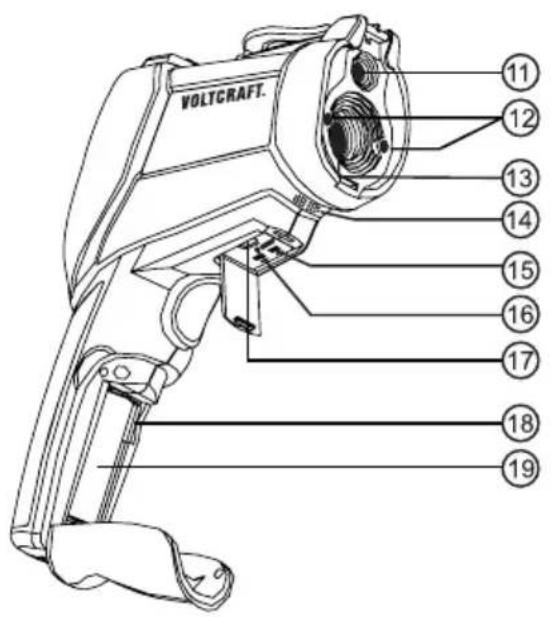
text_image
VOLTGRAFT. 11 12 13 14 15 16 17 18 19natural_image
Simple geometric diagram showing a circle with a dashed inner circle and a star at the center (no text or symbols)
Point laser

Centre
natural_image
Simple geometric diagram with concentric circles and two asterisks at center, no text or symbols present

natural_image
Pure electrical component diagram showing two terminals with polarity indicators (no text or symbols)
text_image
1 2 3 4 5 6 VOLTCAFT. 8 9 10 7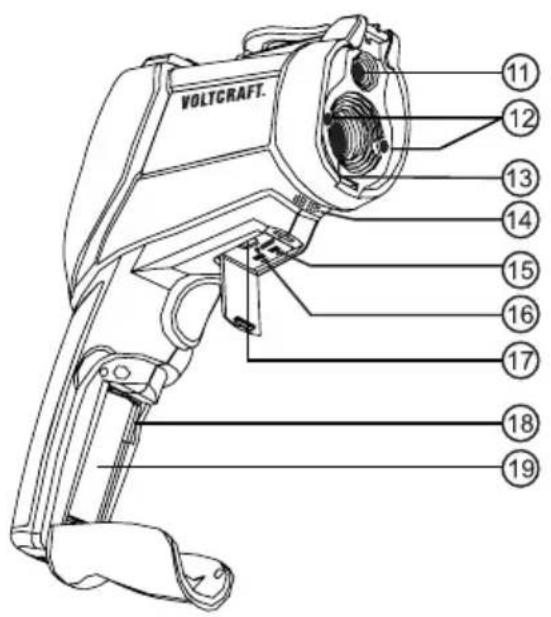
text_image
VOLTGRAFT. 11 12 13 14 15 16 17 18 19natural_image
Two circular diagrams with internal dotted and solid lines, no text or symbols presentnatural_image
Pure electrical component diagram showing two terminals with polarity indicators (no text or symbols)
GB This is a publication by Conrad Electronic SE, Klaus-Conrad-Str. 1, D-92240 Hirschau (www.conrad.com).
All rights including translation reserved. Reproduction by any method, e.g. photocopy, microfilming, or the capture in electronic data processing systems require the prior written approval by the editor. Reprinting, also in part, is prohibited. This publication represent the technical status at the time of printing. Copyright 2021 by Conrad Electronic SE.
Copyright 2021 by Conrad Electronic SE.