Evo HmIPeTRVE - Thermostat Homematic IP - Free user manual and instructions
Find the device manual for free Evo HmIPeTRVE Homematic IP in PDF.



| Product type | Connected radiator thermostat |
| Brand | Homematic IP |
| Model | Evo HmIPeTRVE |
| Dimensions (W x H x D) | 53 x 55 x 94 mm |
| Weight (with batteries) | Approx. 150 g |
| Power supply | 2 LR6/Mignon/AA 1.5 V batteries |
| Battery life | Up to 2 years |
| Protection type | IP20 |
| Ambient temperature | 0 to 50 °C |
| Radio frequency band | 868.0 - 868.6 MHz / 869.4 - 869.65 MHz |
| Max radio transmission power | 10 dBm |
| Typical radio range in open field | 230 m |
| Duty cycle | < 1% per h / < 10% per h |
| Valve connection | Thread M30 x 1.5 mm |
| Included adapters | Danfoss RA, RAV, RAVL, RAV extension |
| Main functions | Scheduling (3 profiles, 13 changes/day), Boost function, open window detection, rotatable display, child lock, manual/auto modes |
| Package contents | Thermostat, 3 adapters, support ring, nut, screws, 2 batteries, user manual |
| Maintenance and cleaning | Soft dry cloth, avoid solvents |
| Safety | Do not open, dry indoor use, explosion risk if batteries incorrectly replaced |
| Spare parts and repairability | Batteries replaceable by user; other repairs by a professional |
| General information | Homematic IP system, requires an access point and the smartphone app |
Frequently Asked Questions - Evo HmIPeTRVE Homematic IP
User questions about Evo HmIPeTRVE Homematic IP
0 question about this device. Answer the ones you know or ask your own.
Ask a new question about this device
Download the instructions for your Thermostat in PDF format for free! Find your manual Evo HmIPeTRVE - Homematic IP and take your electronic device back in hand. On this page are published all the documents necessary for the use of your device. Evo HmIPeTRVE by Homematic IP.
USER MANUAL Evo HmIPeTRVE Homematic IP
Installation and operating manual

1 Package contents. 20
2 Information about this manual. 20
3 Hazard information 20
4 Function and device overview 21
5 General system information 22
6 Start-up 22
6.1 Pairing 22
6.2 Installation 23
6.2.1 Removing a thermostat 23
6.2.2 Mounting the radiator thermostat 24
6.2.3 Support ring 25
6.2.4 Adapter for Danfoss 25
6.3 Adjustment run 26
7 Operation 27
8 Changing the batteries 27
9 Troubleshooting 28
9.1 Weak batteries 28
9.2 Command not confirmed 28
9.3 Duty cycle 29
9.4 Error codes and flashing sequences 30
10 Restoring factory settings 32
11 Maintenance and cleaning 32
12 General information about radio operation 33
13 Disposal. 33
14 Technical specifications 34
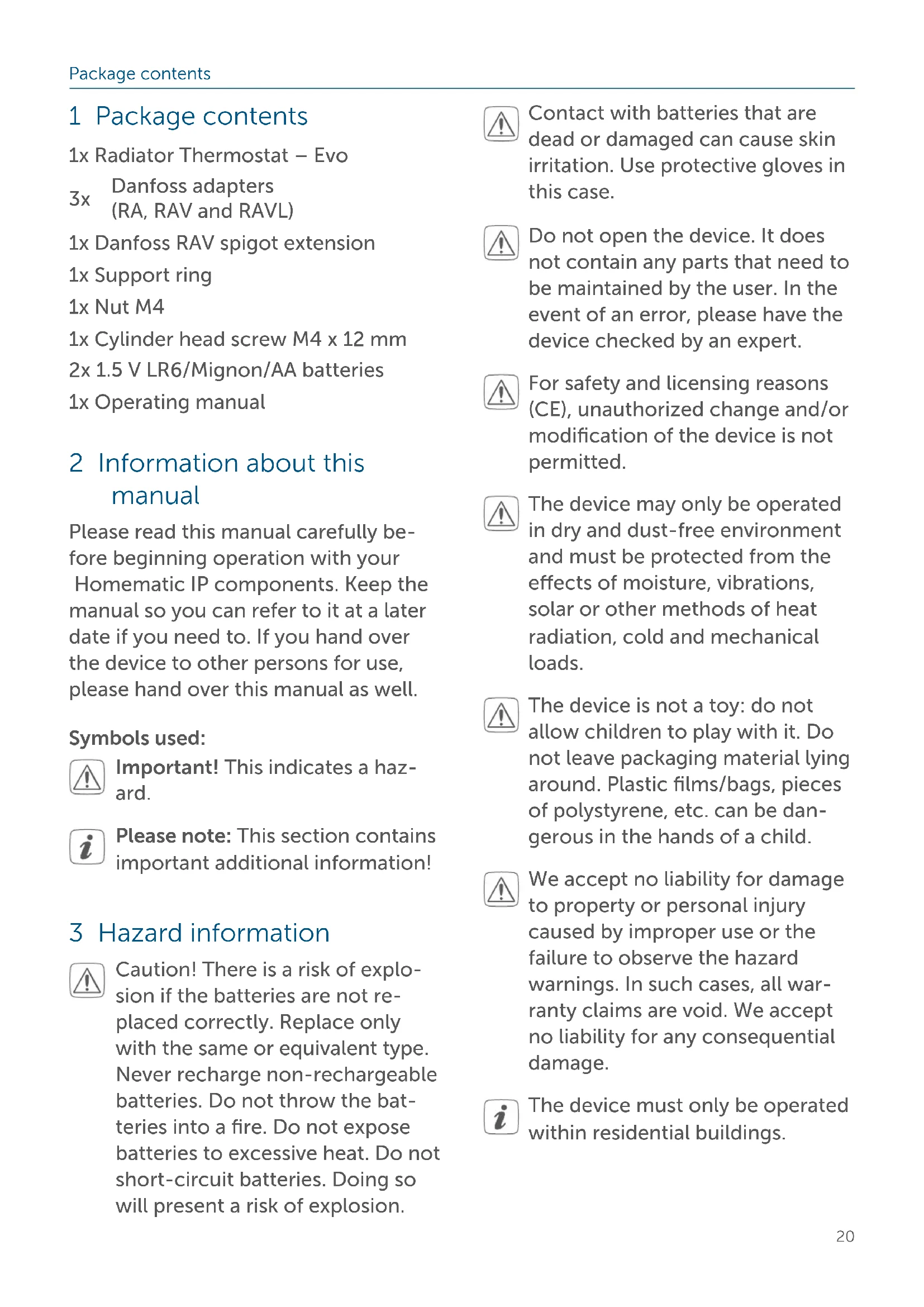
1 Package contents
1x Radiator Thermostat - Evo
3x Danfoss adapters (RA, RAV and RAVL)
1x Danfoss RAV spigot extension
1x Support ring
1x Nut M4
1x Cylinder head screw M4 x 12 mm
2x 1.5 V LR6/Mignon/AA batteries
1x Operating manual
2 Information about this manual
Please read this manual carefully before beginning operation with your Homematic IP components. Keep the manual so you can refer to it at a later date if you need to. If you hand over the device to other persons for use, please hand over this manual as well.
Symbols used:

Important! This indicates a hazard.

Please note: This section contains important additional information!
3 Hazard information

Caution! There is a risk of explosion if the batteries are not replaced correctly. Replace only with the same or equivalent type. Never recharge non-rechargeable batteries. Do not throw the batteries into a fire. Do not expose batteries to excessive heat. Do not short-circuit batteries. Doing so will present a risk of explosion.

Contact with batteries that are dead or damaged can cause skin irritation. Use protective gloves in this case.

Do not open the device. It does not contain any parts that need to be maintained by the user. In the event of an error, please have the device checked by an expert.

For safety and licensing reasons (CE), unauthorized change and/or modification of the device is not permitted.

The device may only be operated in dry and dust-free environment and must be protected from the effects of moisture, vibrations, solar or other methods of heat radiation, cold and mechanical loads.

The device is not a toy: do not allow children to play with it. Do not leave packaging material lying around. Plastic films/bags, pieces of polystyrene, etc. can be dangerous in the hands of a child.

We accept no liability for damage to property or personal injury caused by improper use or the failure to observe the hazard warnings. In such cases, all warranty claims are void. We accept no liability for any consequential damage.

The device must only be operated within residential buildings.
Using the device for any purpose other than that described in this operating manual does not fall within the scope of intended use and will invalidate any warranty or liability.
4 Function and device overview
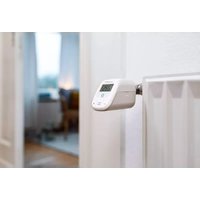
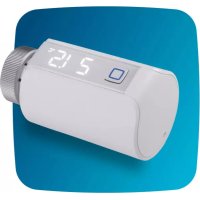
The Homematic IP Radiator Thermostat enables you to regulate the room temperature in your smart home based on the time of day using the Homematic IP smartphone app and to adjust the temperature to your requirements. Customised temperature schedules are easy to create using an app - with up to 3 adjustable heating schedules and 13 changes a day. Alternatively, you can set the temperature directly on the device fully intuitively. With the additional boost function, cool rooms can be heated within short by opening the heating valve. The rotatable display and the contemporary housing design mean that the radiator thermostat fits perfectly into your home environment. Any open windows and doors are detected via an open-window-detection function or even more precisely in combination with a Homematic IP Door / Window Contact. Heating temperatures are automatically lowered so that no energy is wasted. Once the windows are closed, the temperature set for your comfort will be reached again straight away.
The radiator thermostat fits to all common radiator valves and is easy to
mount - without having to drain any water or intervene in the heating system.
Device overview:
(A) Metal nut
(B) Display
(C) Battery compartment (cover)
(D) System button (pairing button, boost button and LED)
(E) Temperature adjustment via gentle turning (clockwise or anticlockwise)
Display overview:
Valve information:
Adjustment run
Valve information:
Initialisation
Setpoint temperature
Open window symbol
Batteries (almost) empty
Boost Boost function
MANU Manual mode
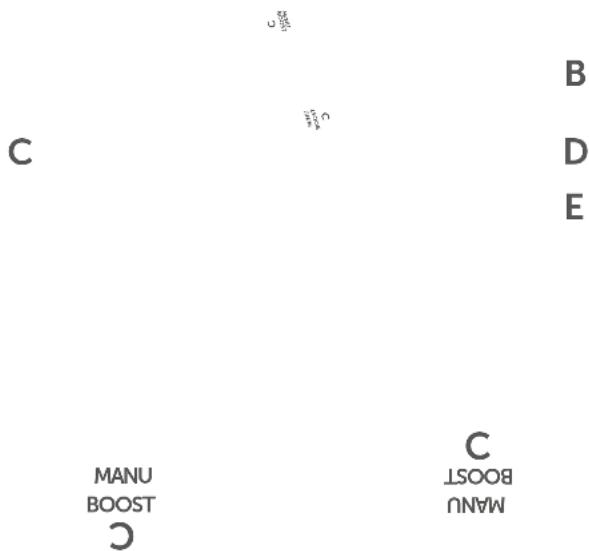
Figure 1
5 General system information
This device is part of the Homematic IP Smart Home system and communicates via the Homematic IP wireless protocol. All devices in the Homematic IP system can be configured easily and individually with a smartphone using the Homematic IP app. Alternatively, you have the option of operating
Homematic IP devices via the CCU3 or in conjunction with many partner solutions. The available functions provided by the system in combination with other components are described in the Homematic IP User Guide. All current technical documents and updates can be found at www.homematic-ip.com.
6 Start-up
6.1 Pairing

Please read this entire section before starting the pairing procedure.

First set up your Homematic IP access point using the Homematic IP app so that you can use other Homematic IP devices in the system. For further information, please refer to the Access Point operating manual.

For more information on pairing and setting up the wall thermostat using a CCU3, please refer to the WebUI manual on our homepage at www.homematic-ip.com.
To integrate the radiator thermostat into your system and enable it to communicate with other Homematic IP de
vices, you must add the device to your Homematic IP Access Point first.
Proceed as follows to add the device:
- Open the Homematic IP app on your smartphone.
- Select "Pair device".
- Open the battery compartment (C) by sliding the battery compartment cover (C) downwards.
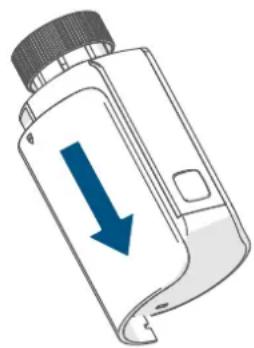
Figure 2
- Remove the insulation strip from the battery compartment of the radiator thermostat. The pairing mode is active for 3 minutes.

Once the insulation strip has been removed, the motor retracts to make subsequent installation easier. Meanwhile, "In" and the activity symbol (U) are displayed.

You can manually start the pairing mode for another 3 minutes by briefly pressing the system button (D). If the display is off, simply press the system button briefly to activate the pairing mode. When "RdR" is shown in the display and you press the system button again, the adjustment run starts. This behaviour can be ignored at this time.
For further Information, (see „1 Package contents" on page 20).
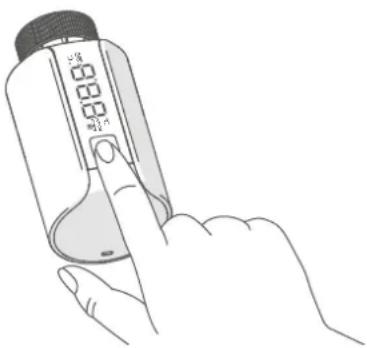
Figure 3
Your device will automatically appear in the Homematic IP app.
- To confirm, enter the last four digits of the device number (SGTIN) in your app, or scan the QR code. The device number can be found on the sticker in the package contents or attached to the device.
- Wait until pairing is completed.
If pairing was successful, the LED (D) lights up green. The device is now ready for use. If the LED lights up red, please try again. - In the app, give the device a name and allocate it to a room.
- Slide the battery compartment cover (C) back up into place.
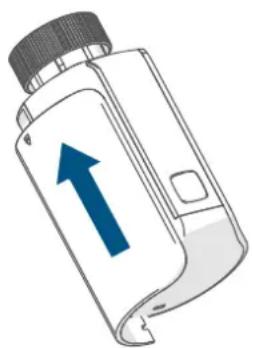
Figure 4
6.2 Installation
i Please read this entire section before starting the installation.
The Homematic IP Radiator Thermostat is easy to install, and can be installed without draining heating water or intervening in the heating system. No special tools are required, nor does the heating have to be switched off.
The metal nut (A) attached to the radiator thermostat can be used universally and without accessories for all valves with a thread size of M30 x 1.5 mm from the most popular manufacturers. An overview and information about compatible manufacturers and valve adapters can be found at www.homematic-ip.com
Using the adapters supplied, the device can also be installed on radiator valves of type Danfoss RA, Danfoss RAV and Danfoss RAVL, (see 6.2.4 Adapter for Danfoss" on page 25).
6.2.1 Removing a thermostat
In case of visible damage to the existing radiator, valve or heating pipes, please consult a specialist.
Remove the old thermostatic head from your radiator valve:
- Rotate the thermostatic head anticlockwise to the maximum value (1). The thermostatic head then no longer presses against the valve spindle, making it easier to remove.
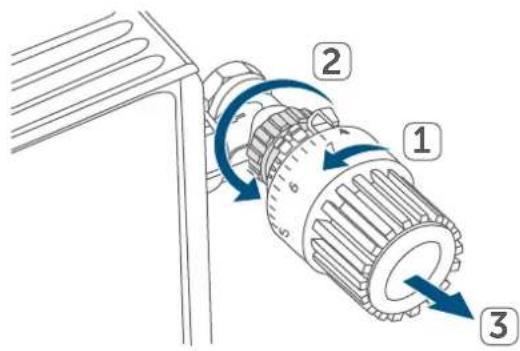
Figure 5
The thermostatic head may be held in place in various ways:
- Union nut: Unscrew the union nut in an anticlockwise direction (2). The thermostat head can then be removed (3).
- Snap-on fastenings: Thermostatic heads that are fastened this way can be detached by turning the fastener/union nut anticlockwise a little. The thermostatic head can then be removed.
- Compression fitting: The thermo-static head is held in place by a mounting ring, which is held together with a screw. Loosen this screw and remove the thermostatic head from the valve.
- Threaded connection with set screw: Loosen the set screw and remove the thermostatic head.
6.2.2 Mounting the radiator thermostat
After removing the old thermostatic head, you can mount the new radiator thermostat on the heating valve:
- Place the radiator thermostat with the metal nut (A) on the heating valve.
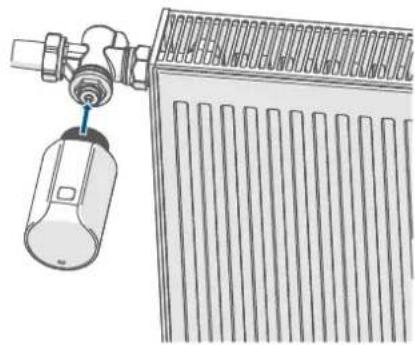
Figure 6
- Tighten the metal nut on the heating valve.
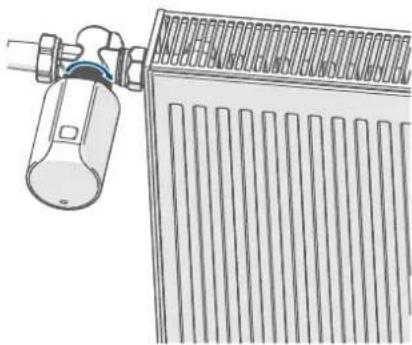

Figure 7
To make installation easier, you can take the batteries out of the battery compartment (C) and press and hold the button in the battery compartment while you are tightening the metal nut on the heating valve. Pressing this button blocks the rotating mechanism in the radiator thermostat, making it easier to move the display to your chosen position.
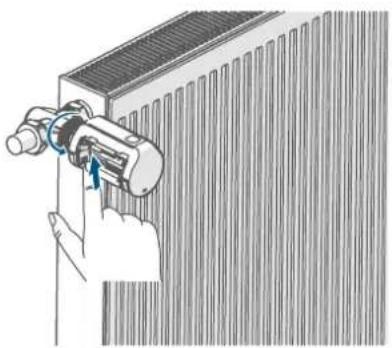
Figure 8
If required, you can use one of the supplied adapters for Danfoss valves, (see 6.2.4 Adapter for Danfoss" on page 25), or the supplied support ring.
6.2.3 Support ring
With some manufacturers' valves, the part of the valve that protrudes into the device has only a small diameter, which causes the radiator thermostat to sit more loosely on the valve. In this case, the provided support ring should be placed into the flange before installing the radiator thermostat. You can then mount the radiator thermostat again as described above.
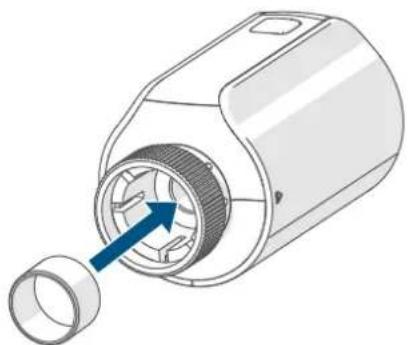
Figure 9
6.2.4 Adapter for Danfoss
One of the adapters supplied is required to attach to Danfoss valves. The assignment of the suitable adapter to the relevant valve is shown in the following illustrations.
Please be careful not to trap your fingers between the two halves of the adapter!
The RA and RAV adapters have been manufactured with pre-tension for a better fit. Use a screwdriver during installation if necessary, and bend it open slightly in the vicinity of the screw.
Danfoss RA
Danfoss valve bodies have elongated notches around their circumference, which also ensure that the adapter is properly seated when it snaps on.
During installation, please ensure that the pins inside the adapter are lined up with the notches on the valve.
- Snap the adapter completely onto the valve.
- Secure the adapter with the enclosed screw and nut.
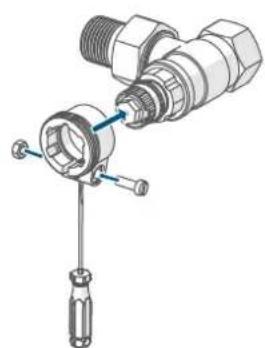
Figure 10
Danfoss RAV
Danfoss valve bodies have elongated notches around their circumference, which also ensure that the adapter is properly seated when it snaps on.

During installation, please ensure that the pins inside the adapter are lined up with the notches on the valve.
-
Snap the adapter completely onto the valve.
-
Secure the adapter with the enclosed screw and nut.
- Place the spigot extension on the valve pin.
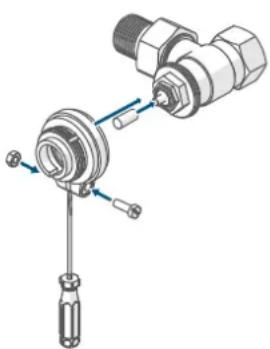
Figure 11
Danfoss RAVL
Danfoss valve bodies have elongated notches around their circumference, which also ensure that the adapter is properly seated when it snaps on.

During installation, please ensure that the pins inside the adapter are lined up with the notches on the valve.
- Snap the adapter completely onto the valve.
- Place the spigot extension on the valve pin.

The RAVL adapter does not need to be screwed on.
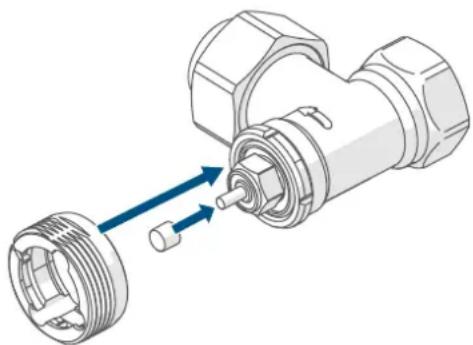
Figure 12
6.3 Adjustment run

When the batteries are inserted, the motor retracts to simplify installation. Meanwhile, "In" and the activity symbol () are displayed.

If the adjustment run was initiated prior to installation, or if an error message (F1, F2, F3) is displayed, press the system button (D): the motor will reverse to the "In" position. The adjustment run can then be restarted.
After the radiator thermostat has been mounted successfully, an adjustment run (RdR) must be performed to adjust the device to the valve. To do this, proceed as follows:
- When "RdR" is shown in the display, press the system button (D) to start the adjustment run.

If the display backlight is off, you must press button (D) a second time to start the adjustment run.
The radiator thermostat performs the adjustment run, During this time, "RdR" and the activity symbol () will be displayed. During this time, no other operation is possible. After the adjustment run has been successful, the display returns to normal. The radiator thermostat can now be operated.
7 Operation
After configuration, simple operations are available directly on the device.

If the radiator thermostat is in standby mode, please press the system button (D) once before operation to activate the device.
-
Temperature: Gently rotate the temperature regulator (E) clockwise or anticlockwise to adjust the temperature of the radiator. In automatic mode, the manually set temperature will remain the same until the next point at which the schedule changes. The heating schedule set via the app will then be reactivated. During manual mode, the temperature remains activated until the next manual change.
-
Boost function: Briefly press the system button (D) to activate the boost function and heat up the radiator quickly and briefly by opening the valve. There will be a pleasant room temperature right away because of the radiated heat.
- Changing the display orientation: Press the system button (D) and at the same time rotate the temperature regulator (E) in the direction
the display is to turn in. The display rotates 180^
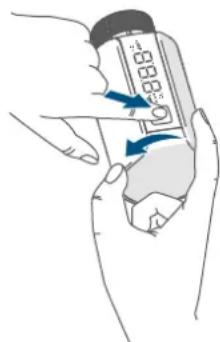

Figure 13
The operating lock of the radiator thermostat can be activated and deactivated via the Homematic IP app. Tap on the menu symbol in the top left of the screen of your app and select the menu item "Device overview". Select the respective radiator thermostat to switch the operating lock "ON" or "OFF".
8 Changing the batteries
If the symbol for empty batteries (L_O) appears in the display or in the app, please replace the used batteries with two new LR6/Mignon/AA batteries. You must observe the correct battery polarity.
To replace the radiator thermostat batteries, please proceed as follows:
- Open the battery compartment (C) by sliding the battery compartment cover (C) downwards ( see figure).
- Remove the used batteries.
- Insert two new 1.5 V LR6/Mignon/ AA batteries into the battery compartment, making sure that you insert them the right way round.
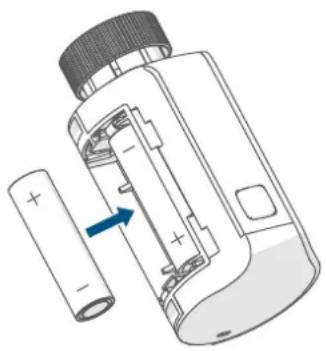
Figure 14
- Slide the battery compartment cover (C) back up ( see figure).

Once the batteries have been inserted, the radiator thermostat will perform a self-test for approx. 2 seconds. After this, the device performs an initialisation (I_IN) and a test display (orange and green lights).

Once the batteries have been inserted, the radiator thermostat will perform a self-test for approx. 2 seconds. After this, the device performs an initialisation (I_in) and a test display (orange and green lights).
- Start the adjustment run (RdR) again by briefly pressing the system button (D).

Caution! Avoid skin and eye contact when handling leaking batteries. Wear suitable protective gloves when removing leaking batteries and residues from a device. Rinse with plenty of water in the event of skin contact.
9 Troubleshooting
9.1 Weak batteries
Provided that the voltage value permits it, the radiator thermostat will remain ready for operation even if the battery voltage is low. Depending on the particular load, it may be possible to send transmissions again repeatedly once the batteries have been allowed a brief recovery period.
If the voltage drops too far during transmission, the empty battery symbol (L) and the corresponding error code will be displayed on the device, (see "6.1 Pairing" on page 22). In this case, replace the empty batteries with two new ones (see "8 Changing the batteries" on page 27).
9.2 Command not confirmed
If at least one receiver does not confirm a command, the LED (D) lights up red at the end of the failed transmission process. The reason for the failed transmission may be radio interference, (see "1 Package contents" on page 20). This may be caused by the following:
- Receiver cannot be reached.
- Receiver is unable to execute the command (load failure, mechanical blockade, etc.).
- Receiver is faulty.
9.3 Duty cycle
The duty cycle is a legally regulated limit of the transmission time of devices in the 868 MHz range. The aim of this regulation is to safeguard the operation of all devices working in the 868 MHz range.
In the 868 MHz frequency range we use, the maximum transmission time of any device is 1% of an hour (i.e. 36 seconds in an hour). Devices must cease transmission when they reach the 1% limit until this time restriction comes to an end. Homematic IP devices are designed and produced with 100% conformity to this regulation.
During normal operation, the duty cycle is not usually reached. However, repeated and radio-intensive pairing processes mean that it may be reached in isolated instances during start-up or initial installation of a system. If the duty cycle is exceeded, this is indicated by three slow flashes of the device LED, and may manifest itself in the device temporarily working incorrectly. The device starts working correctly again after a short period (max. 1 hour).
9.4 Error codes and flashing sequences
| Flashing code / LC display | Meaning Solution | |
| F1 Valve drive sluggish | Please check whether the valve pin is stuck. | |
| F2 Actuating range too wide | Check the radiator thermostat is mounted securely | |
| F3 | Adjustment range too small | Please check whether the valve pin is stuck. |
| Short orange flashes | Radio transmission/attempts to transmit or configuration data being transmitted | Wait until the transmission is completed. |
| 1x long green flash Transmisssion confirmed | You can continue operation. | |
| 1x long red flash | Transmission failed or duty cycle limit reached | Please try again (see „9.2 Command not confirmed" on page 28) or (see „9.3 Duty cycle" on page 29). |
| Short orange flashes (every 10 s) | Pairing mode active | Enter the last four digits of the device serial number to confirm (see „6.1 Pairing" on page 22). |
| 6x long red flashes Device defective | Please see your app for error message or contact your retailer. | |
| Brief steady orange light (after green or red confir-mation) | Batteries empty | Replace the batteries (see „8 Changing the batteries" on page 27). |
| Battery warning (Lo) Battery voltage low | Replace the device batter-ies (see „8 Changing the batteries" on page 27). | |
| Battery warning (Lo) and --- | Valve moved to error position* | Replace the device batter-ies (see „8 Changing the batteries" on page 27). |
| *If empty batteries are not replaced, the radiator thermostat moves to a "valve er-ror position". This avoids a situation where the set temperature in the room cannot be reached any more due to a low battery. A valve error position of 15% is set in the factory settings. | ||
| 1x orange and 1x green light (after inserting batteries) | Test display | You can continue once the test display has stopped. |
| Alternating long and short orange flashing | Software update (OTAU) | Wait until the update is completed. |
10 Restoring factory settings

The factory settings of the device can be restored. If you do this, you will lose all your settings.
To restore the factory settings of the wall thermostat, please proceed as follows:
- Open the battery compartment (C) by sliding the battery compartment cover (C) downwards ( see figure).
- Remove one battery.
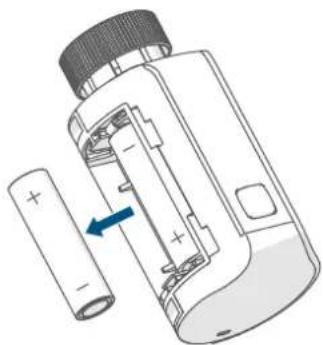
Figure 15
- Press and hold the system button (D) for 4 s and at the same time put the battery back in correctly in accordance with the polarity markings. The LED (D) starts flashing orange quickly and "FES" appears in the display.
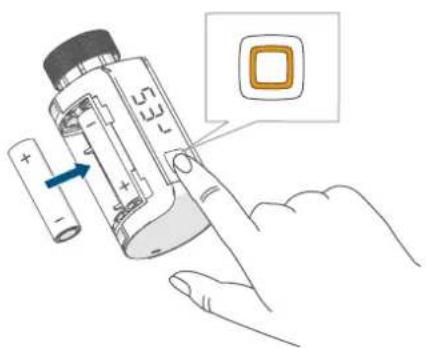
Figure 16
-
Release the system button.
-
Press and hold the system button again for 4 seconds, until the LED lights up green.
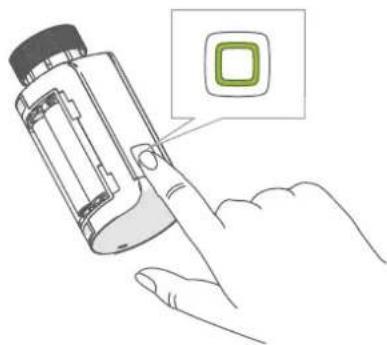
Figure 17
- Release the system button to finish restoring the factory settings.
The device will perform a restart.
11 Maintenance and cleaning

The device does not require you to carry out any maintenance other than replacing the battery when necessary. Leave any maintenance or repair to a specialist.
Clean the device using a soft, clean, dry and lint-free cloth. You may dampen the cloth a little with lukewarm water to remove more stubborn marks. Do not use any detergents containing solvents, as they could corrode the plastic housing and label.
12 General information about radio operation
Radio transmission is performed on a non-exclusive transmission path, which means that there is a possibility of interference occurring. Interference can also be caused by switching operations, electrical motors or defective electrical devices.

The transmission range within buildings can differ significantly from that available in open space. Besides the transmitting power and the reception characteristics of the receiver, environmental factors such as humidity in the vicinity play an important role, as do on-site structural/screening conditions.
eQ-3 AG, Maiburger Str. 29, 26789 Leer, Germany, hereby declares that the radio equipment types Homematic IP HmIP-eTRV-E, HmIP-eTRV-E-S and HmIP-eTRV-E-A are compliant with Directive 2014/53/EU. The full text of the EU declaration of conformity is available at the following internet address: www.homematic-ip.com
13 Disposal
Instructions for disposal

This symbol means that the device and the batteries or accumulators
must not be disposed of with.
sehold waste, the residual waste or the yellow bin or yellow bag.
For the protection of health and the environment, you must take the product, all electronic parts included in the
scope of delivery, and the batteries to a municipal collection point for old electrical and electronic equipment to ensure their correct disposal. Distributors of electrical and electronic equipment or batteries must also take back obsolete equipment or batteries free of charge.
By disposing of it separately, you are making a valuable contribution to the reuse, recycling and other methods of recovery of old devices and old batteries.
You must separate any old batteries and accumulators of old electrical and electronic devices from the old device if they are not enclosed by the old device before handing it over to a collection point and to dispose of them separately at the local collection points.
Please also remember that you, the end user, are responsible for deleting personal data on any old electrical and electronic equipment before disposing of it.
Information about conformity
The CE mark is a free trademark that is intended exclusively for the authorities and does not imply any assurance or guarantee of properties.
i For technical support, please contact your retailer.
14 Technical specifications
Device short description: HmIP-eTRV-E
HmIP-eTRV-E-S
HmIP-eTRV-E-A
Supply voltage: 2x 1.5 V LR6/Mignon/AA
Current consumption: 500mA
Battery life: 2
Protection rating: IP20
Pollution degree: 2
Ambient temperature: 0 to 50^
Dimensions (W x H x D): 53 x 55 x 94 mm
Weight: 190 g (including batteries)
Radio frequency band: 868.0-868.6 MHz
869.4-869.65 MHz
Maximum radiated power:
Receiver category:
Typical range in open space:
Duty cycle:
Construction of the regulation and
control device (RC):
Method of operation:
Connection:
10 dBm
SRD category 2
230 m
independently mounted electronic regulation and control device
Type 1
M30 x 1.5 mm
Subject to modifications.
Table des matieres
Figure 9 Danfoss RAVL
Poids: 190 g (piles comprises)
Si la energia available no longer requires to be supplied by a grid, the term is used to describe the energy that is not available for use in the current market.
Apparaatcode: HmIP-eTRV-E
HmIP-eTRV-E-S
HmIP-eTRV-E-A
Voedingsspanning: 2x 1,5 V LR6/mignon/AA
Stroomopname: 500mA
Free download of the Homematic IPapp!


Download on the
App Store


GET IT ON
Google Play
Bevollmächtiger des Herstellers: Manufacturer's authorised representative.

eQ-3 AG
Maiburger Straße 29
26789 Leer / GERMANY
www.eQ-3.de