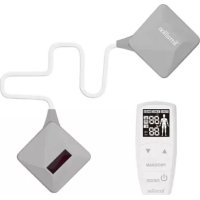
Trio Care+ - Health measuring device TERRAILLON - Free user manual and instructions
Find the device manual for free Trio Care+ TERRAILLON in PDF.


User questions about Trio Care+ TERRAILLON
0 question about this device. Answer the ones you know or ask your own.
Ask a new question about this device
Download the instructions for your Health measuring device in PDF format for free! Find your manual Trio Care+ - TERRAILLON and take your electronic device back in hand. On this page are published all the documents necessary for the use of your device. Trio Care+ by TERRAILLON.
USER MANUAL Trio Care+ TERRAILLON
MANUEL D'UTILISATION – INSTRUCTION MANUAL
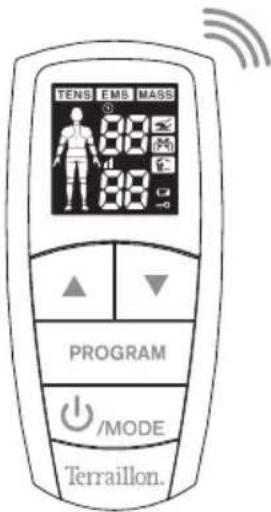
text_image
TENS EMS MASS 88 88 PROGRAM /MODE Terraillon.TRIO CARE+
Terraillon®
LE BIEN-ÊTRE PRÉCISÉMENT
C€0197
_
一
| _
1
TRIO CARE+
FR NOTICE D'UTILISATION 4
EN INSTRUCTION MANUAL 40
NL HANDLEIDING....112
chemical
Chemical structure diagram showing two polyhedral units labeled 'C' and 'Esterilium'natural_image
Technical line drawing of a mechanical component with two views labeled 1 and 2, showing internal structure (no text or symbols present)text_image
Diagram showing a car's internal structure before and after assembly, with labels indicating 'I/P' on the car interior.[Shldr] [Leg] [Joint]
EMS
[Neck] [LBack] [Arm]
[Shldr] [Leg]
MASS
[Tap] [Knead] [Rub]
Terraillon.
DÉCLARATION DE CONFORMITÉ
IMPORTANT SAFETY PRECAUTIONS AND WARNINGS
Dear Customer,
Thank you for purchasing this product.

It is important that you read all the warning and precautions included in this manual because they are intended to keep you safe, prevent injury and avoid a situation that could result in damage to the device.

CONTRAINDICATIONS
Consult with your physician before using this device, because
the device may cause lethal rhythm disturbances in certain, susceptible individuals.
DO NOT USE THIS DEVICE UNDER THESE CONDITIONS:
- If you have a cardiac pacemaker, implanted defibrillator, or other implanted metallic or electronic device. Such use could cause electric shock, burns, electrical interference, or death.
• Together with a life-supporting medical electronic device such as an artificial heart, lung or respirator.
• In the presence of electronic monitoring equipment (e.g., cardiac
monitors, ECG alarms), which may not operate properly when the electrical stimulation device is in use.

WARNING
- On open wounds or rashes, over swollen, red, infected, inflamed areas, or skin eruptions (e.g., phlebitis, thrombophlebitis, varicose veins); or on top of, or in proximity to, cancerous lesions.
Over areas of skin that lack normal sensation.
- On the opposite sides of your head since the effects of stimulation of the brain are unknown.
DO NOT USE ON THESE INDIVIDUALS:
Pregnant women, because the safety of electrical stimulation during pregnancy has not been established.
Terraillon.
EN
- Children or infants, because the device has not been evaluated for pediatric use.
- Persons incapable of expressing their thoughts or intentions.
DO NOT USE THIS DEVICE DURING THESE ACTIVITIES:
- Bathing or showering;
- Sleeping;
- Driving, operating machinery or any activity in which electrical stimulation can put you at risk for injury.
PRECAUTIONS
PAIN MANAGEMENT WARNINGS
- If you have had medical or physical treatment for your pain, consult with your physician before using this device.
- If your pain does not improve, becomes seriously chronic or severe, or continues for more than five days, stop using the device and consult with your physician.
- The mere existence of pain functions as a very important warning telling us that something is wrong. Therefore, if you suffer from any serious illness, consult your physician in order to confirm that it is advisable for you to use this unit.
WARNINGS AND PRECAUTIONS REGARDING THE PADS
- Apply pads to normal, healthy, clean, dry skin (of adult patients).
- If you experience any skin irritation or redness after a session, do not continue stimulation on that area of the skin.
-
Never apply the pads to:
-
The head or any area of the face.
- The neck or any area of the throat because this can cause severe muscle spasms resulting in closure of the airway, difficulty breathing, or adverse effects on heart rhythm or blood pressure.
- Both sides of the thorax simultaneously (lateral or front and back), or across your chest because the introduction of electrical current may cause rhythm disturbances, which could be lethal.
Terraillon.
EN
- Do not bend or fold because the pad may not function properly. Place the pads onto the plastic film and then store in the sealed package when not in use.
- Do not apply ointment or any solvent to the pads or to your skin because it will keep the pads from functioning properly.
- The pads are already pre-gelled and will adhere to your skin.
- To avoid damage to the adhesive surface of the pads, put the pads only on the skin or on the plastic film provided.
- Place pads at least 2 inches apart on your skin. The pads should never touch each other.
- Make sure the components are connected well and the pads are fixed on the part of the body you wish to treat or the therapy may not be effective.
- If the storage area of device differs greatly from that of the service environment, please wait the stimulator to the room temperature about 2 hours.
DO NOT USE YOUR PADS THIS WAY:
- Pads should not touch each other when placed onto your skin.
- Do not place on your spine or backbone.
- Pads should not touch any metal object, such as a belt buckle,
necklace or other jewelry made from metal.
- Pads should not be placed simultaneously on the soles of both feet.
- Pads should not be placed simultaneously on the calves of both legs.
- Do not share pads with another person. This may cause a skin irritation or infection. Pads are intended for use by one person.
- Do not place or relocate the pads while the device is on.
- Always turn the power off before removing or changing the pad location.
- Do not leave pads attached to the skin after treatment.
CAUTION WHILE USING THE UNIT
- If the unit is not functioning properly or you feel discomfort, immediately stop using the device.
- Do not use for any other purpose except as described in this manual.
- Do not insert the electrode plug into any place other than the jack on the main unit.
- Do not mix alkaline and manganese batteries, as this will shorten the battery life.
Terraillon.
EN
- Do not use the device while wearing electronic devices such as watches as this may damage the device.
- Do not use near a cell phone as this may cause the unit to malfunction.
- When removing the cord from the device, hold the plug and pull.
- The size, shape and type of pads may affect the safety and effectiveness of electrical stimulation.
- The electrical performance characteristics of theb pads may affect the safety and effectiveness of electrical stimulation.
- Using pads that are too small or incorrectly applied, could result in discomfort or skin burns.
- Only use the Terraillon electrodes provided for this purpose.
- Do not use the device or an electrode if it is damaged. The continuous use of a damaged unit may cause injury, improper results, or serious danger.
- Do not throw the batteries into a fire. The batteries may explode.
- Dispose of the device, batteries, and components according to applicable legal regulations. Unlawful disposal may cause environmental pollution.
GENERAL PRECAUTIONS
- The long-term effects of electrical stimulation are unknown.
- Apply stimulation to only normal, intact, clean, dry, and healthy skin.
- TENS is not effective in treating the original source or cause of the pain, including headache.
- TENS is not a substitute for pain medications and other pain management therapies.
• TENS devices do not cure disease or injuries. - TENS is a symptomatic treatment and, as such, suppresses the sensation of pain that would otherwise serve as a protective mechanism.
- Effectiveness is highly dependent upon patient selection by a practitioner qualified in the management of pain patients.
Terraillon.
EN
- You may experience skin irritation or hypersensitivity due to the electrical stimulation or electrical conductive medium (gel) on the electrodes.
- If you have suspected or diagnosed heart disease, you should follow precautions recommended by your physician.
- If you have suspected or diagnosed epilepsy, you should follow precautions recommended by your physician.
- Use caution if you have a tendency to bleed internally, such as following an injury or fracture.
- Consult with your physician prior to using the device after a recent surgical procedure, because stimulation may disrupt the healing process.
- This stimulation should not be applied over the menstruating or pregnant uterus.
- This stimulation should not be applied over areas of skin that lack normal sensation.

- Keep unit away from young children. The unit contains small pieces that may be swallowed. Contact your physician immediately if ingested. The electrode cord can cause strangulation.
- For best results use this device with the electrodes and lead wires provided by manufacturer.
- Do not modify the device or the electrodes without authorization of the manufacturer. This could cause improper functioning. Do not use the device or an electrode if it is damaged. Always check the device and the electrodes for damage before use. Never modify any electrodes (e.g. by cutting). This leads to a higher current density and can be dangerous (an effective current density over 2 mA/cm ^2 requires greater attention).
POSSIBLE ADVERSE REACTIONS
- Do not use device to treat one region for extended periods of time (30 minutes per session, maximum 3 times per day) or muscles in that region may become exhausted and sore.
- You may experience skin irritation and burns beneath the stimulation electrodes applied to your skin.
- You may experience headache and other painful sensations during or following the application of electrical stimulation near your eyes and to your head and face.
- You should stop using the device and consult with your physician if you experience adverse reactions from using the device.
Terraillon.
EN
- Do not use this device over your eyes, mouth, face, front of neck (especially in the carotid sinus) head, upper back, or across your heart because this could cause severe muscle spasms resulting in closure of your airway, difficulty breathing or adverse effects on heart rhythm or blood pressure.
- Do not use this device over, or in proximity to cancerous lesions.
- Do not operate in close proximity (e.g. 1m) to shortwave or microwave therapy equipment as it may produce instability in the simulator output.
- Do not use the device if you are connected to high-frequency surgical equipment. This may result in burns on the skin under the electrodes and may damage the device.
- This device should not be applied on or across your head or face since the effects of stimulator of the brain are unknown.
- Use this device with caution if you have a tendency to bleed internally, such as following an injury or fracture.
-
Consult with your physician prior to using this device after a recent surgical procedure, because stimulation may disrupt the healing process.
-
Do not use this device for pain of the central origin, including headache.
- This device is not to be used in the presence of flammable or anesthesia gasses.
- This product is not intended to be used during physical activity as interrupting the current by moving the electrode could result in shock.
- The electrode should not be applied to the skin for long periods of time or when not in use otherwise this could result in skin irritation.
Terraillon.
EN
HOW TENS WORKS FOR PAIN RELIEF
What is it?
TRIO CARE+ is a Dual output channel denice and is highly effective in relieving pain. TENS is now regularly recommended by doctors, physiotherapists and pharmacists throughout the world.
Transcutaneous Electrical Nerve Stimulation (TENS) is a noninvasive, drug-free method of controlling pain. TENS uses tiny electrical impulses sent through the skin to the nerves to modify pain perception. TENS does not cure any physiological problem. It only helps control the pain. TENS does not work for everyone. However, in most patients, it is effective in reducing or eliminating the pain, allowing for a return to normal activity.
How TENS works? TENS EMS MASS
Scientific theory suggests that electrical stimulation therapy may work in several ways:
- The gentle electrical pulses move through the skin to nearby nerves to block the pain message from the source of pain from ever reaching the brain.
- The gentle electrical pulses increase the production of endorphins, the body's natural pain killer.
EN
HOW EMS WORKS FOR MUSCLE STIMULATION
What is it?
EMS works by sending electronic pulses to the muscle needing treatment; this causes the muscle to exercise passively. It is a product derived from the square waveform (ladder shaped). Through the square wave pattern it is able to work directly on muscle motor neurons. This device has low frequency and this in conjunction with the square wave pattern allows direct work on muscle groupings.
How EMS works? TENS EMS MASS
The EMS units send comfortable impulses through the skin that stimulate the nerves in the treatment area. When the muscle receives this signal it contracts as if the brain has sent the signal itself. As the signal strength increases, the muscle flexes as in physical exercise. Then when the pulse ceases, the muscle relaxes and the cycle is repeated. The goal of electrical muscle stimulation is to achieve contractions or vibrations in the muscles. Normal muscular activity is controlled by the central and peripheral nervous systems, which transmit electrical signals to the muscles. EMS works similarly but uses an external source (the stimulator) with electrodes attached
to the skin for transmitting electrical impulses into the body. The impulses stimulate the nerves to send signals to a specifically targeted muscle, which reacts by contracting, just as it does with normal muscular activity.
How MASSAGE works? TENS EMS MASS
The massage stimulation program is a stimulation program that is used with the EMS mode of stimulation to facilitate recovery from muscle fatigue and to help recover muscle strength after training sessions and competitions.
Indications for use:
TENS: The device is designed to be used for temporary relief of pain, including the acute and chronic pain relief.
EMS: The device is designed to be used for stimulate muscles for prevention of muscular atrophy, muscle strengthening and improve and facilitate muscle performance.
Terraillon.
PACKAGE CONTENTS
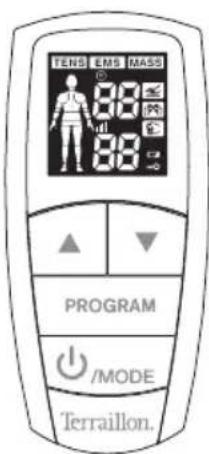
text_image
TENS EMS MASS 88 88 88 PROGRAM /MODE Terraillon.Unit
EN
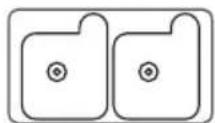
2 electrode pads (50 x 50 mm)
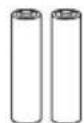
2 AAA batteries 1 USB cable
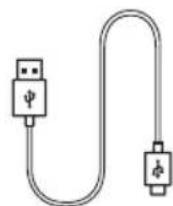

chemical
Chemical structure diagram showing two identical polyhedral units connected by a central bond, labeled 'Esterilium'Electrode cable
Terraillon.
EN
KNOW YOUR DEVICE
Features
- TRIO CARE+ wireless offers 14 programs(6 TENS, 5 EMS, 3 MASSAGE) that are suitable for different parts of the body and pain.
- 60 intensity levels of therapy, one (1) low intensity to 60 high intensity.
Front and rear panel
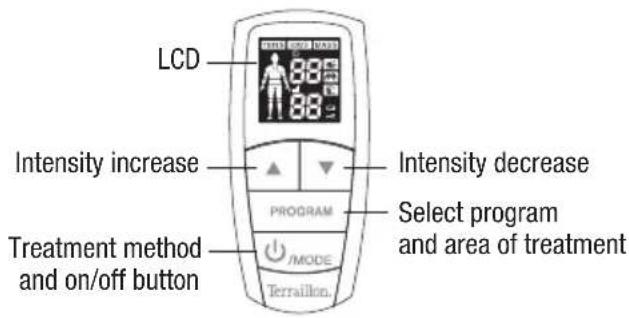
text_image
LCD Intensity increase Intensity decrease PROGRAM Select program and area of treatment Treatment method and on/off button /MODE Terraillon.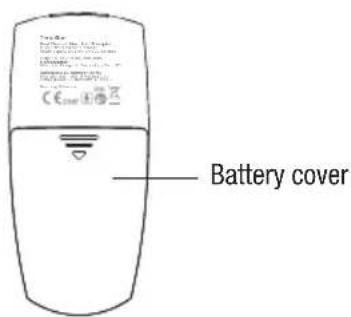
text_image
Battery coverTerraillon.
EN
LCD display
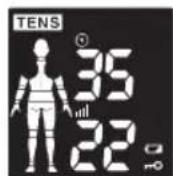
Shoulder Low back Arm
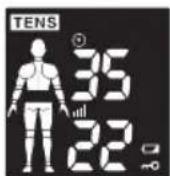
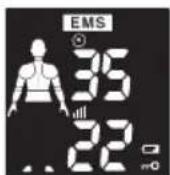
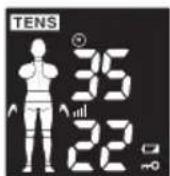
Joint Leg Neck
Relaxation Rubbing Tapping
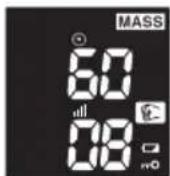
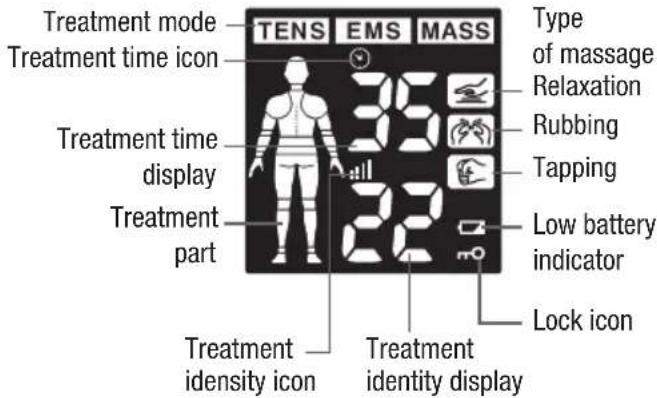
text_image
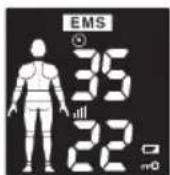
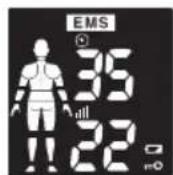
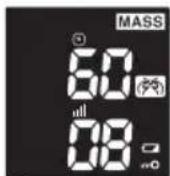
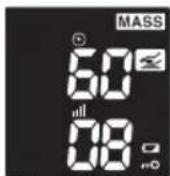
Treatment mode TENS EMS MASS Type of massage Relaxation Treatment time icon Treatment time display Treatment part Low battery indicator Lock icon Treatment identity icon Treatment identity displayTerraillon.
EN
-
On/off button [💡]: Press this button to turn on the device or turn off the device.
-
Green Flashing indicator light: The device hasn't connected with the Remote Controller;
• Continuous orange : The device is in treatment mode; -
Orange flashing : The device is in pauses mode;
-
Indicator light when charging:
• Continuous orange: The battery is charging;
• Continuous green: The battery is fully charged.
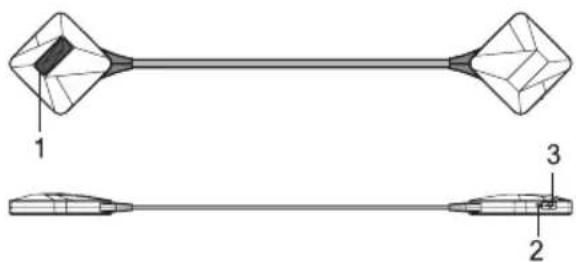
text_image
1 3 2- Device charging port:
- Connect the Micro-USB cable and the adaptor to the device port to charge.
Terraillon.
EN
INSERTING BATTERIES
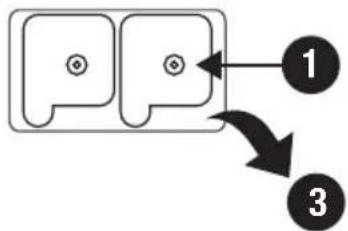
- Remove the battery cover on the back of the device as shown by the graphic to the right.
- Insert 2xAAA batteries. Make sure the positive + and negative - signs correspond with the markings in the device when inserting batteries. Reinstall the battery cover as shown by the graphic to the right.
Notes:
- Please use 2×AAA batteries in this unit.
- Remove the batteries if the device is not in use for long periods of time.
- Do not mix old and new batteries or different types of batteries.
- Warning: If batteries leak and come into contact with the skin or eyes, wash immediately with large amounts of water.
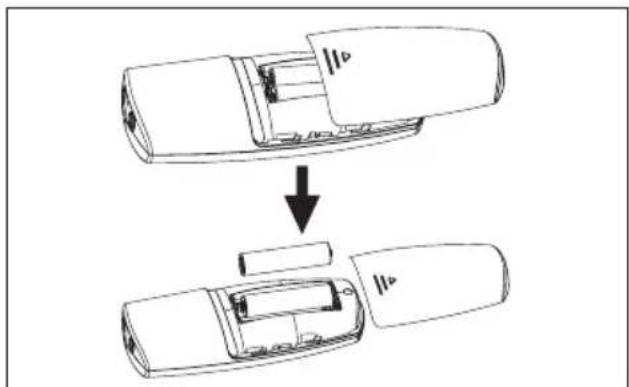
text_image
Diagram showing a car interior with labeled parts and a downward arrow indicating transformation or assembly.- Batteries must be handled by an adult. Keep batteries out of the reach of children.
- Remove exhausted batteries from the unit.
- Dispose the used batteries safely according to local regulations.
Terraillon.
CHARGING
Insert the Micro-USB plug of the Micro-USB cable into the Micro-USB charging port of the LT5018B device, and then connect to the Standard USB plug of the Micro-USB cable to the appropriate power supply device which could output USB 5V, 300 mA. When the battery light goes from continuous orange (which means that the battery is being charged) to a continuous green (the battery is full), remove the micro-USB plug from the micro-USB socket of the device.
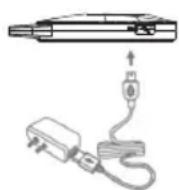
- Only use the Micro-USB cable which is provided by the manufacturer.
- Device must charged prior to first use. Typically it takes 2 hours to charge allows a battery life of about 4 hours continuously when functioning in normal (ambient temperature) conditions.
EN
- Please charge the device fully before beginning each session. If the charge is not complete at the beginning of a program, the battery may become depleted before the end of the session. You cannot use the device while it is charging.

WARNING
- If batteries leak and come into contact with the skin or eyes, wash immediately with copious amounts of water.
- Dispose of the used batteries safely according to the local regulations.
- The life of a battery depends on the number of recharging/rundown cycles it undergoes and how these cycles are performed. Te service life of battery is more than 300 recharging/rundowns cycles. We provide the following suggestions to extend the life of the battery.
- Whenever the device is not used frequently, we recommend recharging the battery once a month.
Terraillon.
EN
OPERATION
STEP 1
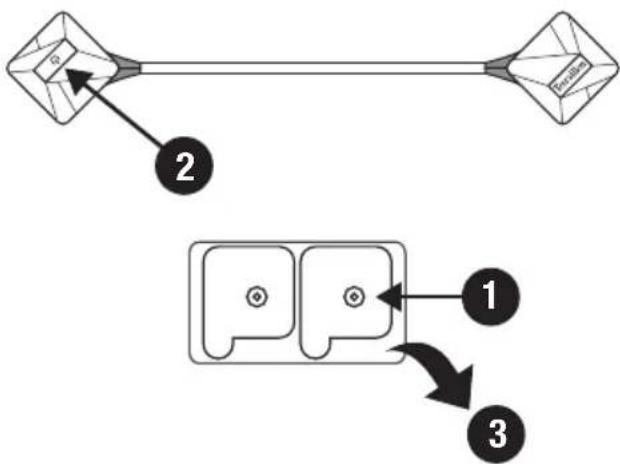
Out the electrodes of the plastic bag.
Connect the electrodes to their cable with snap buttons.
STEP 2
Switch on the electrodes with the button ⏻. An alert signal will sound and the green light will flash.
STEP 3
Pad placement
Take the pads out of the sealed package.
Remove the clear plastic film from the back of the pads.
Place pads on clean, dry and healthy skin, near or surrounding the area with pain at least 2 inches apart, and do not let them touch. Make sure there is a linear path between the two pads.
flowchart
graph TD
    A["Initial State"] --> B["Intermediate State"]
    B --> C["Final State"]
    style A fill:#f9f,stroke:#333
    style B fill:#ccf,stroke:#333
    style C fill:#cfc,stroke:#333
Terraillon.
EN

WARNING: Make sure the device is turned off or the intensities are set to zero (0) levels before placing pads on skin.
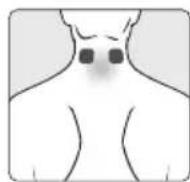
NECK / CERVICAL PAIN
Attach pads on the neck. (Do not place on the carotid artery or throat.)
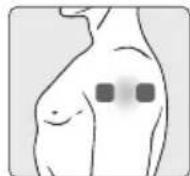
SHOULDER PAIN
Attach the electrodes to the middle of the muscle.
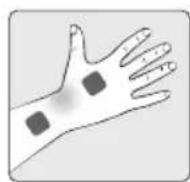
CARPAL TUNNEL / HAND PAIN
Attach pads on the hand where you feel pain.
Never remove the self-adhesive electrodes from the skin when the device is on.
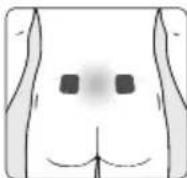
LOWER BACK / LUMBAR PAIN
Attach pads on the lower back with the backbone in the center. Do not place on the backbone or spine.

ELBOW PAIN
Attach pads on either side of the joint with the pain.
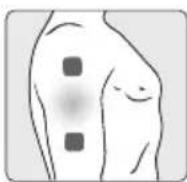
UPPER ARM PAIN
Attach pads on either side of the region where you feel pain.
Terraillon.
EN
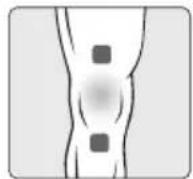
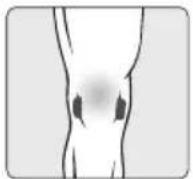
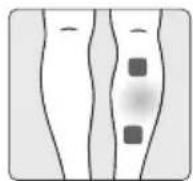
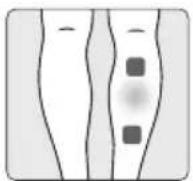
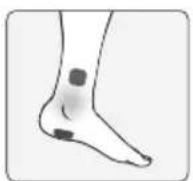
KNEE / JOINT PAIN
Attach pads above the knee or above and below the joint with pain.
CALF PAIN
Attach pads on the calf/leg where you feel pain.
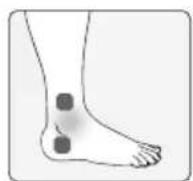
ANKLE / FOOT PAIN
Attach pads per the illustration on the left for pain on the outside of your ankle/foot. Attach the pads per the illustration on the right for pain on the inside of your ankle/foot.
EN
STEP 4
Turn on the remote control
Press the button ⏻ to turn on the device.
Switch on the remote control (the alert signals will stop and the green light on the electrodes will remain fixed.
A long alert signal will sound to signal the end of the cycle.
STEP 5
Select the program
TRIO CARE+ wireless gives you the choice between:
- 3 modes of treatment: TENS / EMS / MASS:
Press the button MODE several times to achieve the desired processing mode. The selected mode flashes. - Up to 6 areas of the body and 3 types of massage: press the button Program to select the part of the body or the type of desired massage. The selection will blink.
MODE and [body area]
TENS
[Neck] [LBack] [Arm]
[Shldr] [Leg] [Joint]
EMS
[Neck] [LBack] [Arm]
[Shldr] [Leg]
MASS
[Tap] [Knead] [Rub]
Terraillon.
STEP 6
Start treatment and adjust intensity
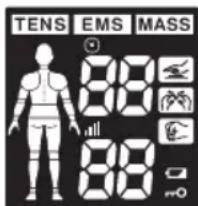
text_image
TENS EMS MASS 88 88 88Press ▲ button to start treatment.
Press ▲ or ▼ button to adjust the output intensity. The stimulator will start to work. The maximum output intensity level is 60.
EN
CAUTION:
- If the electrodes are not placed firmly on skin, or the device has not connected with the electrodes, and the output intensity level is over 5, the intensity will stop automatically.
- If the stimulation levels are uncomfortable or become uncomfortable, reduce the stimulation intensity to a comfortable level and contact your medical practitioner if problems persist.
- If your pain does not improve and you become sore from over-use, refrain from treating those areas for two (2) days. If this issue reoccurs, reduce the treatment time and intensity settings for future treatment.
- If you feel pain, dizziness, discomfort or nausea, call your physician or medical practitioner.
- Caution should be used when working with maximum intensities, (i.e., always at the limit of what you can support.) Do not exceed your comfort level.
Terraillon.
EN
STEP 7
You can turn device off in the following ways:
- The device will turn off automatically after 30 minutes treatment time.
- Press the power button continuously until the LED light turns off.
- Turn the remote control off by pressing the On/Off button.
STEP 8
Storing the electrode pads and lead wire
- Place the pads on the plastic film and store in the sealed package.
Note: To keep the electrodes in good condition and to prevent the hydrogel layer from drying out, always store them in the resealable bag when they are not attached to your body for treatment. Seal the resealable bag to guarantee dust-free storage.
Note: If you want to store electrodes for more than a month, keep them at temperatures between 5^ C and +27^ C. Do not store the electrodes in the freezer or the refrigerator. Avoid high temperatures and exposure to direct sunlight.
Storing the unit
- Store in a dry place, -10°C\~55°C; 10%\~90% relative humidity. Failing to do so may affect the performance of the stimulator.
- Do not store in places that can be easily reached by children.
- Store the device in the dry, clean place. It is forbidden to leave the product exposed to any chemical solvent, lint, dust, direct sunshine or high temperature.
- When not in use for a long period, remove the batteries before storage to avoid liquid discharge from batteries.
EN
OTHER IMPORTANT FUNCTIONS IN THIS STIMULATOR
Safety Lock Feature
The lock function automatically activates after there is no operation in the panel for 30 seconds, and will be indicated by the mO display on the LCD. This is a safety feature to prevent accidental changes to your settings and to prevent accidental increases the output intensity level. Press button ▼ to unlock.
Low battery indicator
When the low power indicator ▼ flashes on LCD, you should replace the batteries as soon as possible. The device will continue to operate for several more hours.
Terraillon.
EN
HOW TO CONTROL AND REDUCE YOUR PAIN
When should the device be used?
Use as soon as your pain begins. Start with one session. If you address your pain early, it may prevent the pain from becoming worse, or even chronic. It is better to get pain under control sooner so it does not reach such a high pain threshold that it limits your daily activities.
Setting the intensity
Intensity is based upon your level of comfort. Begin the first session with a low intensity and a short duration while learning how to operate the device. Therefore, caution should be used when working with maximum intensities. (i.e., always at the limit of what you can support.) Do not exceed your comfort level.
How long should you use the device?
Start with one 30-minute session. Always turn unit off with pads still adhered to skin. Rate your pain to check your progress, 1 low to 60 high. Intensity is based upon your level of comfort. Begin the first session with a low intensity and a short duration while learning how to operate.
Stop the therapy session if pain has reduced or stopped. If your pain does not improve and you become sore from over-use, refrain from treating those areas for 2 days. If this issue reoccurs, reduce the treatment time and intensity settings for future treatment.
Terraillon.
EN
Recommended treatment session:
You may use the device for 30 minutes a day. You may need to use it for longer(maximum 3 times per day and maximum 90 minutes in total) depending on the level of your pain.
When to stop using the device?
1) If you experience an adverse reaction — skin irritation / redness / burns, headache or other painful sensation — or if you feel any unusual discomfort.
2) If your pain does not improve, becomes seriously chronic and severe, or continues for more than five (5) days.
NOTE: If you feel pain, dizziness, discomfort or nausea, call your physician or medical practitioner.
What type of pain is TENS best for?
This therapy works best on acute pain because it is localized. Acute pain occurs in one area for less than three (3) months. If you have chronic pain, you may have pain in more than one area and for longer than six (6) months. Chronic pain may be compounded by other issues that this device cannot address.
Remember this device does not cure your pain or the original cause of the pain. It provides temporary relief or reduction of pain so that you can control your life and activities better.
EN
CLEANING
Cleaning the unit
- Turn off the remote control and the electrodes; disconnect the USB cable if it has been used.
- Clean the device after use with a soft, slightly moistened cloth. Wipe gently.
- Do not use chemicals (like thinner, benzene).
- Do not let water get into the internal area.
Note:
- This device and accessories do not require sterilization.
Cleaning the electrode pads
- Turn the power off and remove the lead wires from the pads.
-
Wash the pads when the adhesive surface becomes dirty and/or the pads are difficult to attach.
-
Wash the pad softly with your fingertips under slow running cold water for several seconds (do not use a sponge/cloth/sharp object like a nail on the adhesive side. Do not use detergents, chemicals or soap).
- Dry the pads and let the adhesive surface air-dry completely (do not wipe with a tissue paper or cloth).

CAUTION:
- The life of pads may vary by the frequency of washing, skin condition, and storage state.
- If the pads no longer sticks to your skin or the pads are broken, you should replace them with new pads.
- Before applying the self-adhesive electrodes, it is recommended to wash and degrease the skin, and dry it.
Terraillon.
EN
- Do not turn on the device when the electrodes are not positioned on the body.
- Never remove the self-adhesive electrodes from the skin while the device is still turned on.
- If replacement electrodes are necessary, use only electrodes that are the same size as the electrodes provided with the device.
- Use of electrodes that are larger may reduce the effect of the stimulation. Use of electrodes that are much smaller than the electrodes provided with the device may increase the chance of skin irritation or electrode burns occurring under the electrodes.
• Always use electrodes with with CE marking.
SPECIFICATIONS
- Power sources: Adapter: I/P:00-240V\~, 50/60Hz, 0.2A.O/P: 5V, 300mA Unit: 2x 1.5V AAA batteries. Electrode cable: Lithium Ion Battery: 3.7V, 250mAh
- Frequency: 2Hz\~150Hz
- Pulse width: 50μs\~370μs
• Output voltage: 0\~60V (at 1000 ohm load)
• Output intensity level: 0\~60 levels
• Treatment time: about 30 minutes - Operating Conditions: 5°C\~40°C; 30%RH\~75%RH ;700hPa-1060hPa
- Storage and Transportation Conditions: -10°C\~55°C; 10%RH\~90%RH;
- Size:
360mm x 59mm x 11.5mm (Electrode cable)
115mm x 53mm x 25mm (Unit)
• Weight: about 101g (without batteries)
Terraillon.
EN
• Service life of the product: 2 years
- Battery life: with new super heavy duty batteries, approx. Two weeks when used for 30 min/day in Arm program at 13 level intensity
• Service life of electrode pads:10\~20 times
- Maximum separation distance between the electrodes and the remote control: 10m (3m recommended)
• Electrode size 50 x 50mm
- Classification of ME Equipment: Internally powered (operating)/Class II (charging)/Continuous
Description of the wireless Functions and Technology:
Frequency band: 2402MHz to 2480MHz
Bluetooth® version: V4.0
Modulation type: GFSK
Number of channels: 40
Channel spacing: 2 MHz
EIRP: <10dBm
PROTECT THE ENVIRONMENT
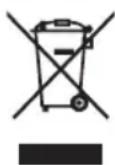
Used batteries should be placed in the appropriate collection bin so they can be recycled. Do not mix different types of batteries, or use new and old batteries at the same time. At the end of its serviceable life, this product must be disposed of at a recycling centre for electrical and electronic equipment.
WARRANTY
This product is guaranteed against defects in materials or manufacturing. During the guarantee period, any such defects will be replaced free of charge (proof of purchase must be shown in the case of a complaint under guarantee). The guarantee does not cover damage resulting from improper use or negligence. In the event of a claim, first contact the shop where you purchased the product.
Terraillon.
EN
TROUBLESHOOTING If the unit does not operate after taking these measures, contact the nearest dealer.
| PROBLEM POSSIBLE CAUSES POSSIBLE SOLUTION | ||
| The unit cannot power on | Are the batteries exhausted? Replace the batteries. | |
| Are the batteries installed correctly? Insert the batteries observing polarity. | ||
| Stimulation weak or cannot feel any stimulation | Electrodes are dried out or dirty. Replace with new electrodes. | |
| Electrodes do not stick to skin well. Replace with new electrodes. | ||
| Stimulation is uncomfortable | Intensity is too high. Decrease intensity. | |
| Electrodes are too close together. Reposition electrodes to be at least 2 inches apart. | ||
| Electrode active area size is too small. | Replace electrodes with ones that have an dia no less than 2 in. | |
| Is the device being operated according to the manual? | Please check the manual before use. | |
| Stimulation is ineffective. | Improper electrode placement. Reposition electrode. | |
| Unknown Contact clinician. | ||
| The skin becomes red and/or you feel a stabbing pain. | Using electrodes on the same site every time. | Reposition the electrodes. If at any time you feel pain or discomfort, stop use immediately. |
| Electrodes are not adhered to the skin properly. | Ensure the electrodes are securely adhered to the skin. | |
| The electrodes are dirty. | Clean the electrodes according to description in this manual or replace with new electrodes. | |
| The surface of the electrode is scratched. Replace with new electrodes. | ||
| Output current stops during therapy. | The electrodes come off the skin. | Turn off the device and place the electrodes on again, or replace with new electrodes. |
| The batteries' power has been exhausted. Replace with new batteries. | ||
Terraillon.
GLOSSARY OF SYMBOLS

Disposal in accordance with Directive 2012/19/EU (WEEE)

Caution

Type BF Applied Part (The applied part is the electrode)

Refer to instruction manual
IP22
The first number 2: Protected against solid foreign objects of 12,5 mm ∅ and greater.
The second number: Protected against vertically falling water drops when enclosure tilted up to 15^ . Vertically falling drops shall have no harmful effects when the enclosure is tilted at any angle up to 15^ on either side of the vertical.
EN

The name and the address of the authorised representative in the European Community

Serial number.

The name and the address of the manufacturer

Complies with the European Medical Device Directive (93/42/EEC) and amended by directive 2007/47/EC requirements. Notified body TÜV Rheinland (CE0197)

Date of Manufacture
DECLARATION OF CONFORMITY
Terraillon SAS hereby declares that Tro Care + complies with all of the essential health and safety regulations. This product meets the essential requirements and other applicable dispositions of the RED European Directive 2014/53/EU. The full text of the declaration of conformity is available on https://teraillonhelp.zendesk.com/hc/fr (under Declaration of Conformity).
Terraillon.
EN
Electromagnetic Compatibility (EMC)
- Use of accessories other than those specified or provided by the manufacturer of this equipment could result in increased electromagnetic emissions or decreased electromagnetic immunity of this equipment and result in improper operation.
- Use of this equipment adjacent to or stacked with other equipment should be avoided because it could result in improper operation. If such use is necessary, this equipment and the other equipment should be observed to verify that they are operating normally.
- Portable RF communications equipment (including peripherals such as antenna cables and external antennas) should be used no closer than 30 cm (12 inches) to any part of the device, including cables specified by the manufacturer. Otherwise, degradation of the performance of this equipment could result.
- When the operating environment is relatively dry, strong electromagnetic interference usually occurs. At this time, the device may be affected as follows:
- the device stops output;
- the device turns off;
- the device restarts;
The above phenomenon does not affect the basic safety and essential performance of the device, and the user can use it according to the instruction. If you want to avoid the above phenomenon, please use it according to the environment
specified in the manual.
Terraillon.
EN
Table 1:
| DECLARATION - ELECTROMAGNETIC EMISSION | ||
| The device is intended for use in the electromagnetic environment specified below. The customer or the user of device should assure that it is used in such an environment. | ||
| Emissions test Compliance Electromagnetic environment - guidance | ||
| RF emissionsCISPR 11 | Group 1 | The device uses RF energy only for its internal function. Therefore, its RF emissions are very low and are not likely to cause any interference in nearby electronic equipment. |
| RF emissionsCISPR 11 | Class B The device is | suitable for domestic establishment and in establishment directly connected to the public low-voltage power supply network that supplies buildings used for domestic purposes. |
| Harmonic emissionsIEC 61000-3-2 | Class A | |
| Voltage fluctuations/flicker emissionsIEC 61000-3-3 | Complies | |
Table 2:
| DECLARATION - ELECTROMAGNETIC IMMUNITY | |||
| The device is intended for use in the electromagnetic environment specified below. The customer or the user of device should assure that it is used in such an environment. | |||
| Immunity test IEC 60601 | test level | Compliance level Electromagnetic environment - guidance | |
| Electrostatic discharge (ESD)IEC 61000-4-2 | ±8 kV contact±2 kV, ±4 kV, ±8 kV, ±15 kV air | ±8 kV contact±2 kV, ±4 kV, ±8 kV, ±15 kV air | Floors should be wood, concrete or ceramic tie.If floors are covered with synthetic material, the relative humidity should be at least 30 %. |
Terraillon.
EN
| Immunity test IEC 60601 | test level | Compliance level Electromagnetic environment - guidance | |
| Electrical fast transient/burstIEC 61000-4-4 | ±2 kV for power supply lines±1 kV for input/output lines | ±2 kV for power supply lines±1 kV for input/output lines | Mains power quality should be that of a typical commercial or hospital environment. |
| Surge IEC 61000-4-5 ± 0.5kV, ± | 1 kV line(s) to lines±0.5kV, ±1 kV, ±2 kV line(s) to earth | ±0.5kV, ±1 kV line(s) to lines±0.5kV, ±1 kV, ±2 kV line(s) to earth | Mains power quality should be that of a typical commercial or hospital environment. |
| Voltage dips, shortinterruptions and voltagevariations on power supplyinput lines IEC 61000-4-11 | 0 % UT; 0.5 cycle At 0°, 45°, 90°,135°, 180°, 225°, 270°and 315°0 % UT; 1 cycle and70 % UT; 25/30 cyclesSingle phase: at 0°0 % UT; 250/300 cycles | 0 % UT; 0.5 cycleAt 0°, 45°, 90°, 135°, 180°, 225°,270°and 315°0 % UT; 1 cycleand70 % UT; 25/30 cyclesSingle phase: at 0°0 % UT; 250/300 cycles | Mains power quality should be that of atypical commercial or hospital environment.If the user of the device requires continued operation during power mains interruptions, it is recommended that the device be powered from an uninterruptible power supply or a battery. |
| Power frequency(50/60 Hz) magnetic fieldIEC 61000-4-8 | 30 A/m 30 A/m Power frequency magnetic fields should be | at levels characteristic of a typical location in a typical commercial or hospital environment. | |
| NOTE: UT is the a.c. mains voltage prior to application of the test level. | |||
Terraillon.
EN
Table 3:
| DECLARATION - ELECTROMAGNETIC IMMUNITY | |||
| The device is intended for use in the electromagnetic environment specified below. The customer or the user of device should assure that it is used in such an environment. | |||
| Immunity test IEC 60601 test level Compliance level Electromagnetic environment - guidance | |||
| Conducted RFIEC 61000-4-6 | 3 V0.15 MHz to 80 MHz6 V in ISM and amateur radio bands between 0.15 MHz and 80 MHz | 3 V0.15 MHz to 80 MHz6 V in ISM and amateur radio bands between 0.15 MHz and 80 MHz | Portable and mobile RF communications equipment should be used no closer to any part of device, than the recommended separation distance calculated from the equation applicable to the frequency of the transmitter.Recommended separation distanced = 1,2 √P 150 KHz to 80 MHzd = 1,2 √P 80 MHz to 800 MHzd = 2,3 √P 80 MHz to 2.7 GHzwhere P is the maximum output power rating of the transmitter in watts (W) according to the transmitter manufacturer and d is the recommended separation distance in meters (m).Field strengths from fixed RF transmitters, as determined by an electromagnetic site survey,a should be less than the compliance level in each frequency range.bInterference may occur in the vicinity of  equipment marked with the following symbol: equipment marked with the following symbol: |
| Radiated RFIEC 61000-4-3 | 10V/m80 MHz to 2.7 GHz | 10V/m | |
EN
NOTE 1: At 80 MHz ends 800 MHz the higher frequency range applies.
NOTE 2: These guidelines may not apply in all situations. Electromagnetic propagation is affected by absorption and reflection from structures, objects and people.
a Field strengths from fixed RF transmitters, such as base stations for radio (cellular/cordless) telephones and land mobile radios, amateur radio, AM and FM radio broadcast and TV broadcast cannot be predicted theoretically with accuracy. To assess the electromagnetic environment due to fixed RF transmitters, an electromagnetic site survey should be considered. If the measured field strength in the location in which device is used exceeds the applicable RF compliance level above, device should be observed to verify normal operation. If abnormal performance is observed, additional measures may be necessary, such as re-orienting or relocating device.
b Over the frequency range 0.15 MHz to 80 MHz, field strengths should be less than 3 V/m..
Terraillon.
EN
Table 4:
| RECOMMENDED SEPARATION DISTANCES BETWEEN PORTABLE AND MOBILE RF COMMUNICATIONS EQUIPMENT AND DEVICE | |||
| The device is intended for use in an electromagnetic environment in which radiated RF disturbances are controlled. The customer or the user of device can help prevent electromagnetic interference by maintaining a minimum distance between portable and mobile RF communications equipment (transmitters) and device, as recommended below, according to the maximum output power of the communications equipment. | |||
| Rated maximum output power of transmitter W | Separation distance according to frequency of transmitter m | ||
| 0.15 MHz to 80 MHzd = 1,2 √P | 80 MHz to 800 MHzd = 1,2 √P | 80 MHz to 2.7 GHzd = 2,3 √P | |
| 0.01 0.12 0.12 0.23 | |||
| 0.1 0.38 0.38 0.73 | |||
| 1 1.2 1.2 2.3 | |||
| 10 3.8 3.8 7.3 | |||
| 100 12 12 23 | |||
EN
For transmitters rated at a maximum output power not listed above, the recommended separation distance d in meters (m) can be estimated using the equation applicable to the frequency of the transmitter, where P is the maximum output power rating of the transmitter in watts (W) according to the transmitter manufacturer
NOTE 1 At 80 MHz and 800 MHz, the higher frequency range applies.
NOTE 2 These guidelines may not apply in all situations. Electromagnetic propagation is affected by absorption and reflection from structures, objects and people.
Terraillon.
DE
chemical
Chemical structure diagram showing two connected polyhedral units labeled 'C' and 'Eccalion'text_image
TENS EMS MASS 36 22 3.0natural_image
Technical line drawing of a mechanical component with labeled parts (1, 2, 3), no readable text or symbols beyond labelstext_image
Diagram showing car interior modification with labeled parts and directional arrow indicating sequence[Shldr] [Leg] [Joint]
EMS
[Neck] [LBack] [Arm]
[Shldr] [Leg]
MASS
[Tap] [Knead] [Rub]
Terraillon.
chemical
Chemical structure diagram showing two connected polyhedral units labeled 'G' and 'Epsilon'natural_image
Technical line drawing of a mechanical component with labeled parts (1, 2, 3), no readable text or symbols beyond labelstext_image
Diagram showing a device being processed into a smaller portion, with labels indicating 'I/P' and directional arrow.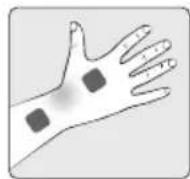
CARPALE TUNNEL / HANDPIJ N
| [Neck] | [LBack] | [Arm] |
| [Shldr] | [Leg] | [Joint] |
EMS
| [Neck] | [LBack] | [Arm] |
| [Shldr] | [Leg] |
MASS
| [Tap] | [Knead] | [Rub] |
STAP 6
chemical
Chemical structure diagram showing two connected polyhedral units labeled 'G' and 'Ethylios'Cavo per elettrodi
Terraillon.
IT
CONOSCERE IL DISPOSITIVO
Caratteristiche
text_image
Diagram showing car door panel assembly process with labeled parts and directional arrow[Shldr] [Leg] [Joint]
EMS
[Neck] [LBack] [Arm]
[Shldr] [Leg]
MASS
[Tap] [Knead] [Rub]
Terraillon.
chemical
Chemical structure diagram showing two identical polyhedral units connected by a central bond, labeled with 'Q' and 'Kerzeller'natural_image
Technical line drawing of a mechanical component with two views (labeled 1 and 2), no text or symbols present.text_image
Diagram showing a device being processed into a larger portion, with Chinese label '||p' indicating the component.flowchart
graph TD
    A["a"] --> B["2"]
    B --> A
flowchart
graph TD
    A["Block 1"] --> B["Block 2"]
    B --> C["1"]
    B --> D["3"]
Terraillon.
ES
[Shldr] [Leg] [Joint]
EMS
[Neck] [LBack] [Arm]
[Shldr] [Leg]
MASS
[Tap] [Knead] [Rub]
Terraillon.
Terraillon SAS France & Headquarters
1, rue Ernest Gouin
78290 Croissy-sur-Seine - France
16 Great Queen Street - Covent Garden
LONDON
WC2B 5AH
support.uk@terraillon.com
Terraillon Asia Pacific Ltd
4/F, Eastern Centre
1065 King's Road
Quarry Bay - Hong Kong
Tel: +852 (0)2960 7200
customerservice@terraillon-asia.com
Terraillon Corp USA
Adresse e-mail : service@e-caretalk.com

Shanghai International Holding Corp. GmbH (Europe)