EufyCam 3 S330 - Surveillance Camera eufy - Free user manual and instructions
Find the device manual for free EufyCam 3 S330 eufy in PDF.



| Product type | Wireless outdoor surveillance camera with solar panel |
| Brand | Eufy |
| Camera model | T8160 |
| HomeBase model | T8030 (S380) |
| Power supply | Integrated solar panel + rechargeable battery via USB-C port (5V) |
| Autonomy | Daily solar panel recharge (at least 2 hours of direct sunlight per day) |
| HomeBase internal storage | 16 GB integrated |
| Compatible external storage | 2.5-inch SATA hard drive or SSD (unlimited capacity, initialization via app) |
| Wi-Fi connectivity | 2.4 GHz (2412-2472 MHz), EIRP power 19.58 dBm (T8030) / 19.86 dBm (T8160) |
| Radio frequency | Sub-1G 866-866.8 MHz (ERP 12.973 dBm) for camera-HomeBase link |
| Night vision | Light sensor, details not provided |
| Audio | Dual microphones and built-in speaker, two-way communication |
| Motion detection | Built-in motion detector with spotlight |
| Spotlight | Integrated, LED lighting |
| Solar panel | Integrated on the camera, converts sunlight into energy |
| Operating temperature (camera) | -20°C to 50°C (charge between 0°C and 45°C) |
| Operating temperature (HomeBase) | -10°C to 45°C |
| Installation | Wall mounting 2-3 m above ground, drilling Ø6 mm, anchors for hard walls |
| Mobile app | eufy Security (iOS/Android) for setup and control |
| Compatibility | Up to 16 cameras per HomeBase |
| Maintenance and cleaning | Clean the solar panel and lens with a soft cloth |
| Safety | Use only the provided adapter (12V/2A), avoid extreme temperatures, do not replace battery with incorrect type |
| Spare parts and repairability | Replaceable hard drive, battery not user-replaceable |
Frequently Asked Questions - EufyCam 3 S330 eufy
User questions about EufyCam 3 S330 eufy
0 question about this device. Answer the ones you know or ask your own.
Ask a new question about this device
Download the instructions for your Surveillance Camera in PDF format for free! Find your manual EufyCam 3 S330 - eufy and take your electronic device back in hand. On this page are published all the documents necessary for the use of your device. EufyCam 3 S330 by eufy.
USER MANUAL EufyCam 3 S330 eufy
eufy
SECURITY
natural_image
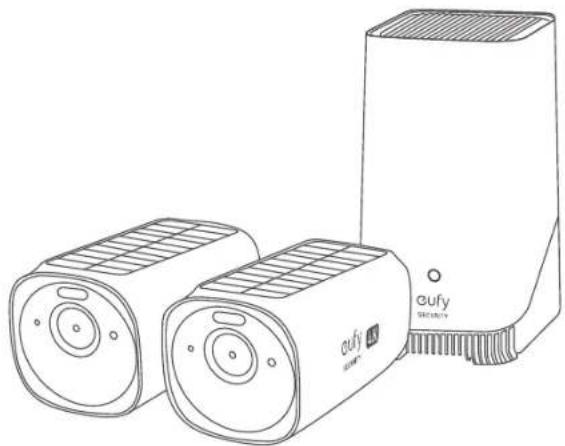
Line drawing of two eufy security cameras and a rectangular device (no text or symbols)S330 eufyCam
QUICK START GUIDE
English
Deutsch
Español
Français
Italiano
Nederlands
Portuguese 103
لغربية
120
AT A GLANCE
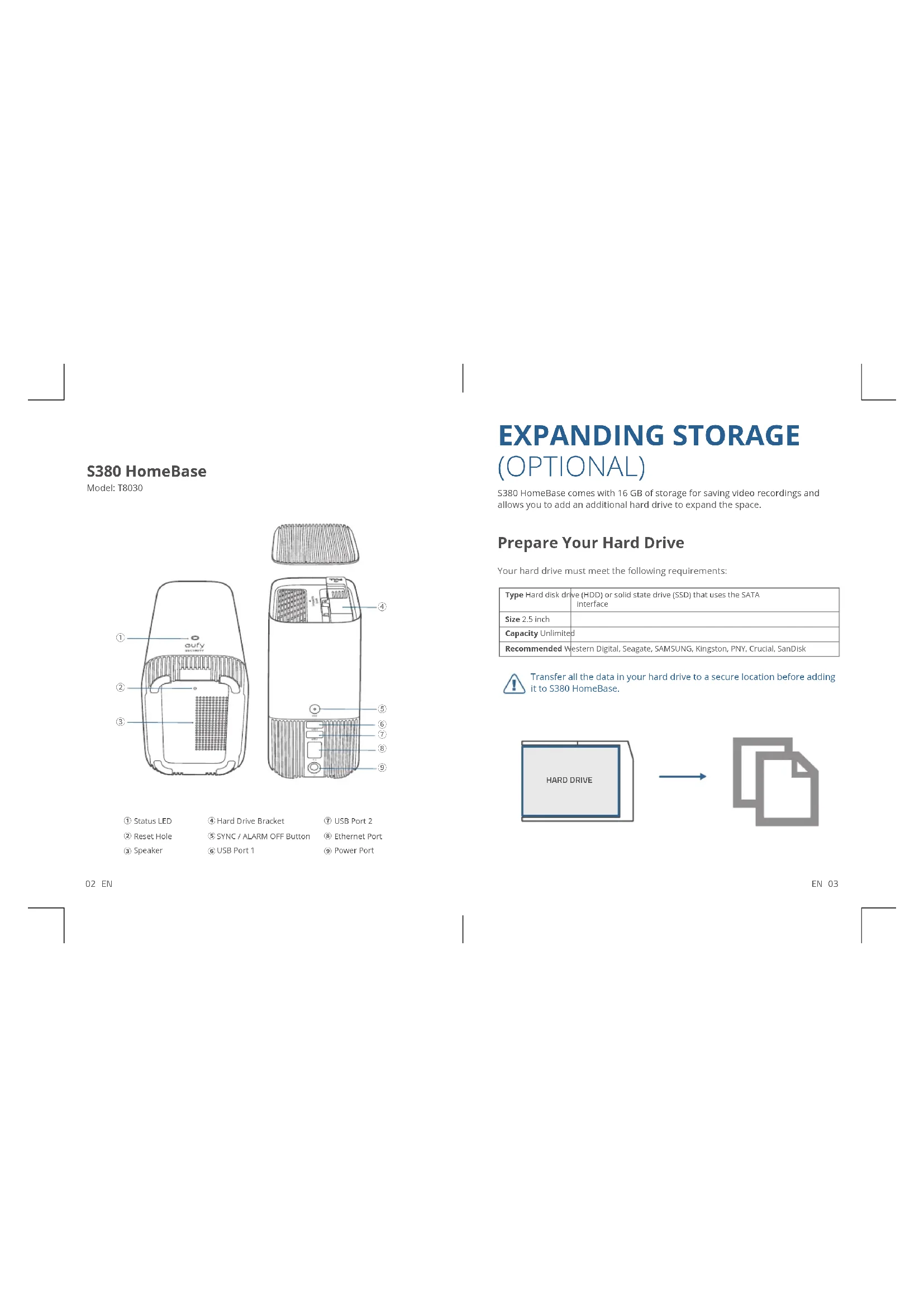
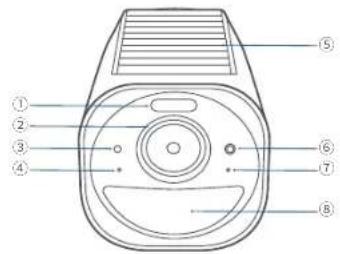
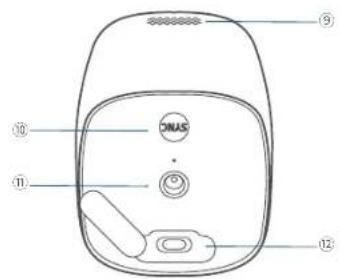
S330 eufyCam
Model: T8160
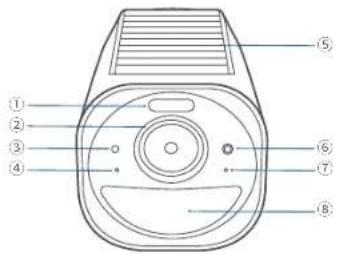
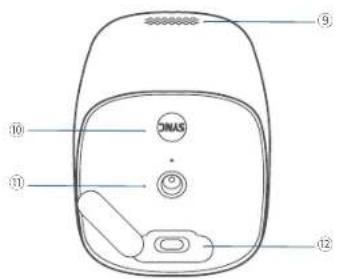
① Spotlight
② Camera Lens
③ Photosensitive Sensor
④ Microphone 1
⑤ Solar Panel
⑥ LED Indicator
⑦ Microphone 2
⑧ Motion Sensor
⑨ Speaker
⑩ SYNC Button
⑪ Mounting Hole
⑫ USB-C Charging Port
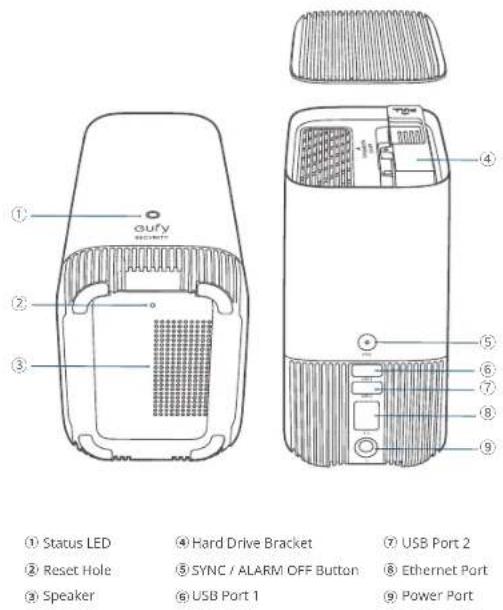
S380 HomeBase
Model: T8030
02 EN
EXPANDING STORAGE
(OPTIONAL)
S380 HomeBase comes with 16 GB of storage for saving video recordings and allows you to add an additional hard drive to expand the space.
Prepare Your Hard Drive
Your hard drive must meet the following requirements:
| Type Hard disk drive (HDD) or solid state drive (SSD) that uses the SATA interface | |
| Size 2.5 inch | |
| Capacity Unlimited | |
| Recommended Western Digital, Seagate, SAMSUNG, Kingston, PNY, Crucial, SanDisk | |

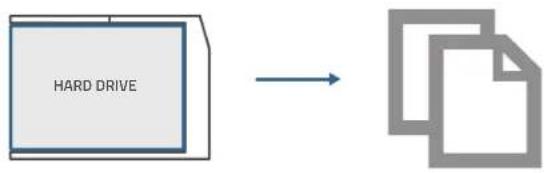
Transfer all the data in your hard drive to a secure location before adding it to S380 HomeBase.
flowchart
graph LR
    A["HARD DRIVE"] --> B["Document"]
    style A fill:#f9f,stroke:#333
    style B fill:#bbf,stroke:#333
EN 03
Install Your Hard Drive

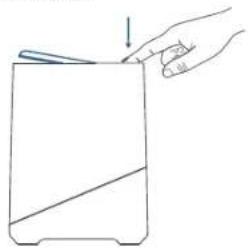
S380 HomeBase must be powered off when you install or remove a hard drive.
- Push down the top lid to remove it.
natural_image
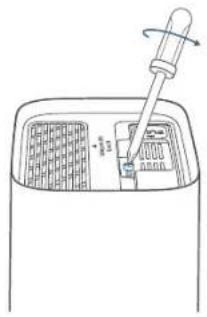
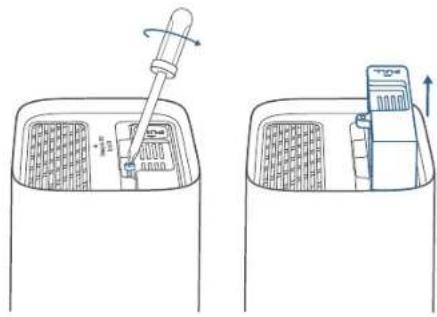
Line drawing of a hand holding a rectangular object with a downward arrow, no text or symbols present- Loosen the screw, then pull out the hard drive bracket.
natural_image
Line drawing of a device with a pipette inserted into a container (no text or symbols)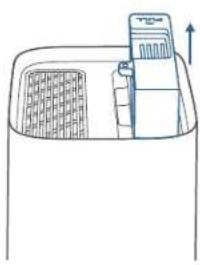
natural_image
Simple line drawing of a container with a lid and upward arrow, no text or symbols present04 EN
- Fix your hard drive to the bracket with the provided screws.
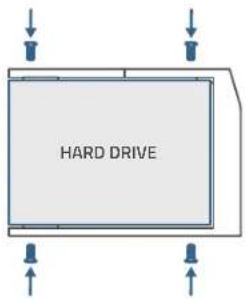
- Insert and screw the bracket back to S380 HomeBase, then put the top lid back into place.
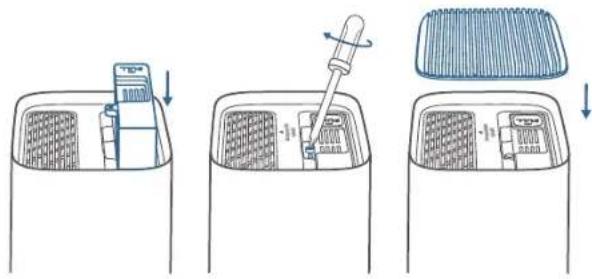
- You can follow the steps above to expand the storage whenever necessary.
- A new hard drive must be initialized through the eufy Security app to work with 5380 HomeBase.
EN 05
SETTING UP
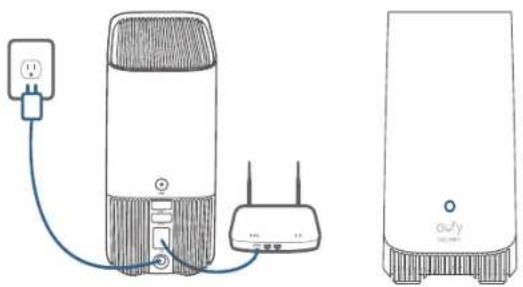
- Power and connect S380 HomeBase to your router. The LED indicator will turn blue (This may take about 1 min) when S380 HomeBase is ready for setup.
natural_image
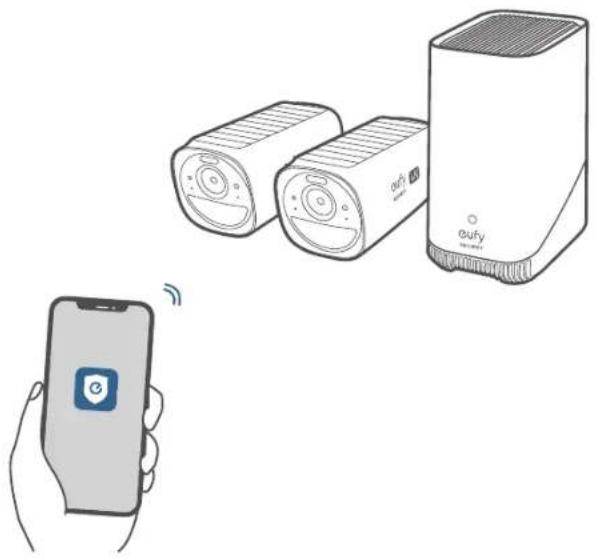
Line drawing of a portable air conditioner connected to a WiFi router via a power outlet (no text or symbols present)- Download and Install the eufy Security app, then sign up for an account.


- Follow on-screen instructions to add S380 HomeBase and the cameras to your device list(*).
natural_image
Illustration showing a smartphone connected to two eufy devices, one emitting signal waves (no text or symbols present)* One S380 HomeBase can pair up to 16 cameras.
CHARGING THE CAMERA
Fully charge both cameras before first use. This may take about 8 hours for each.
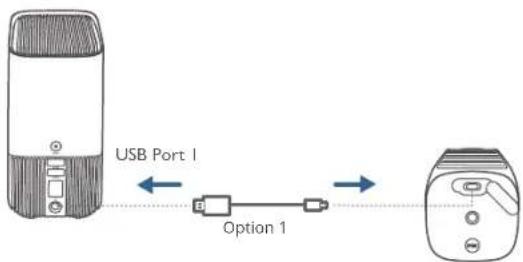
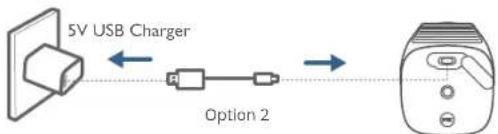
flowchart
graph LR
    A["5V USB Charger"] <--> B["Option 2"]
    B --> C["Device"]
| LED Indicator Description | |
| Blue Charging | |
| OFF Fully charged |
08 EN
natural_image
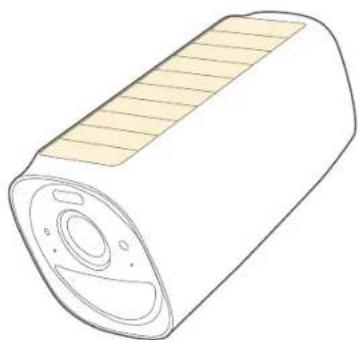
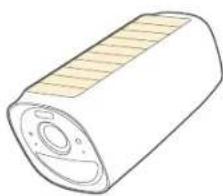
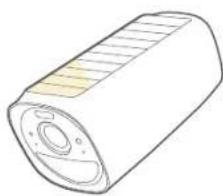
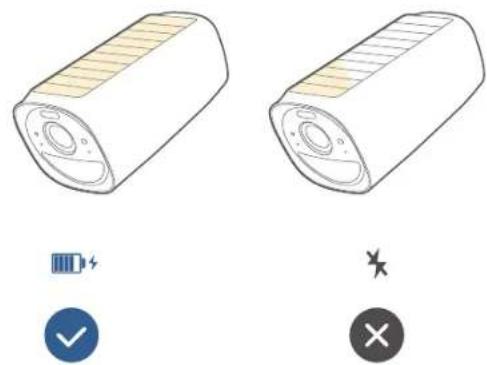
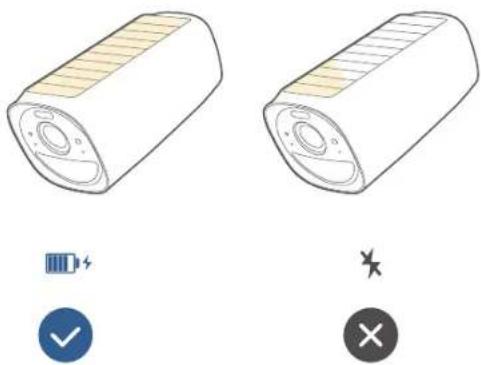
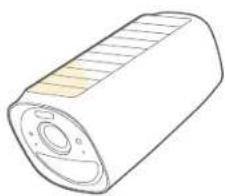
Abstract curved shape in beige and yellow tones, no text or symbols presentS330 eufyCam includes a solar panel that converts sunlight into electrical energy and keeps the built-in battery charged every day.
The charging efficiency fluctuates according to the intensity of the sunlight.
Don't worry when the battery level goes down. It happens when there isn't enough sunlight or the camera is consuming more power than usual. You don't need to charge the camera with a cable until a low battery alarm goes off.
natural_image
Illustration of a cylindrical device with a textured top and central hub (no text or symbols)EN 09
2 HOURS PER DAY*
natural_image
Illustration of a cylindrical battery with a flat top and side casing (no text or symbols)1

natural_image
Illustration of a cylindrical battery with internal structure and mounting holes (no text or symbols)*

* Make sure the solar panel can be fully exposed to direct sunlight for at least 2 hours per day.
MOUNTING THE CAMERA
Select a Location
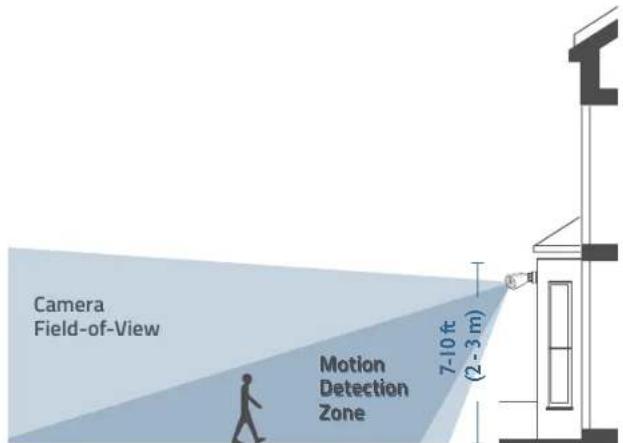
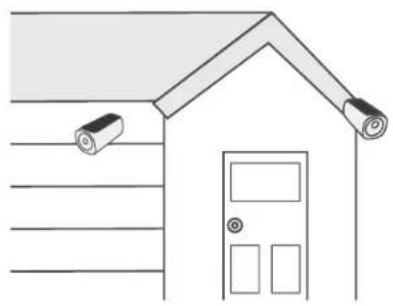
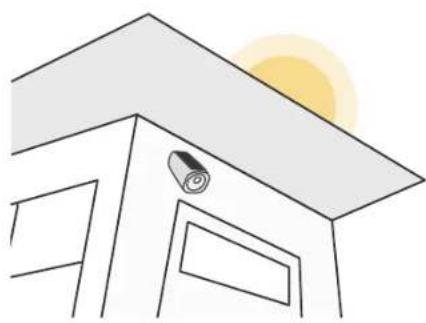
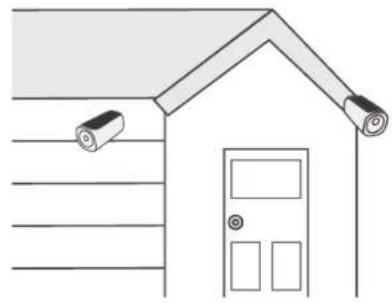
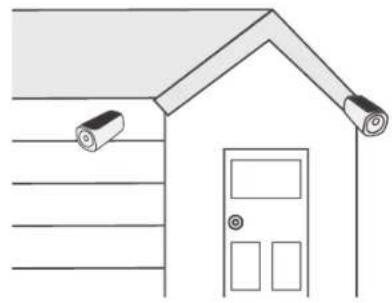
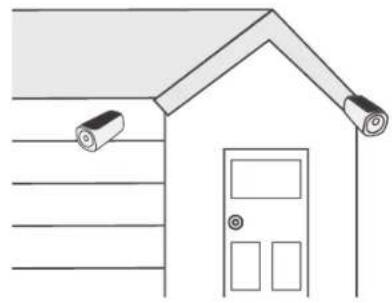
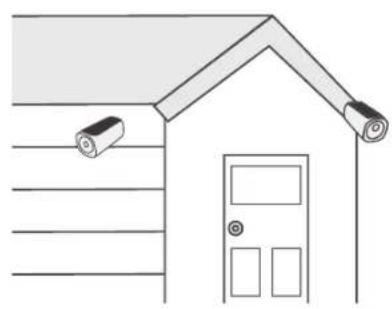
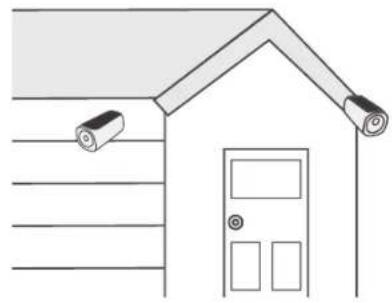
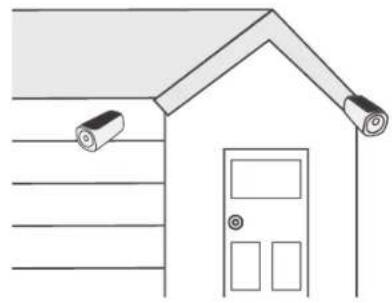
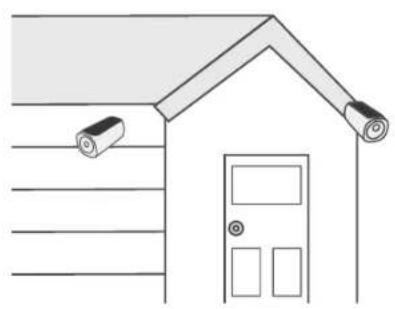
Select a location where you can get the desired view. We recommend hanging the camera 7-10 ft (2-3 m) above the ground.
Up to 26 ft (8 m)
natural_image
Simple line drawing of a house with ceiling-mounted sensors and a door (no text or symbols)Best places to install:
- Wall without eaves
- A pole or fence where
sunlight is not blocked
- Over eaves, If the eaves
are below 3 m high

natural_image
Simple line drawing of a house roof with a sun and a rolled-up cable (no text or symbols)Places not to install:
- Inside your home or
under the porch
- Under or on a tree
- Under slanted eaves

12 EN
Mount the Camera
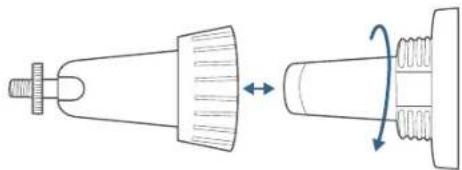
- Turn the knob of the mounting bracket counterclockwise to loosen and disassemble it.
natural_image
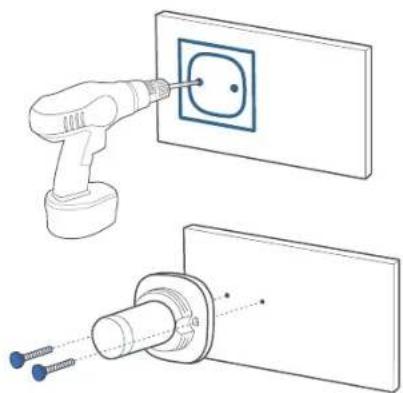
Diagram of a mechanical component with a conical tip and threaded end, showing rotational motion (no text or symbols)- Drill holes with a 15/64 inch (6 mm) drill bit, then insert the anchors into the holes; anchors are necessary for walls that are made out of hard materials such as concrete, brick, or stucco.
natural_image
Technical illustration of a power tool inserting a socket into an electrical outlet (no text or symbols present)EN 13
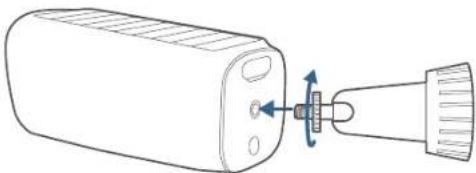
- Firmly screw the knob of the mounting bracket into the mounting hole.
natural_image
Line drawing of a device with a bulb inserted into a port, showing directional arrows (no text or symbols)- Hold and screw the camera to the mounting bracket. Rotate the camera to adjust the view and check it using the live stream, which you can access in the eufy Security app.
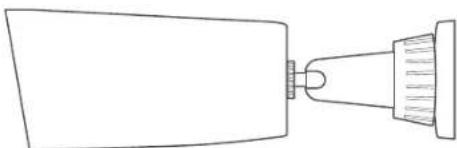
natural_image
Simple line drawing of a tool tip with a pointed tip and handle (no text or symbols)For troubleshooting, check Help on the eufy Security app. Refer to the app page for LED indicator status.
SAFETY
- Do not use the device in the environment at a too high or too low temperature, never expose the device to strong sunshine or too wet environment.
- The suitable temperature for T8030 and accessories is -10°C to 45°C
- The suitable temperature for T8160 and accessories is -20°C to 50°C (Charging temperature is 0°C to 45°C).
- It is recommended to supply the device in an environment with a temperature that ranges from 5°C\~25°C.
- When supplying, please place the device in an environment that has a normal room temperature and good ventilation.
- The adapter shall be installed near the equipment and shall be easily accessible.
- Please ensure to use only the adapter offered by the manufacturer. Using unauthorized adapter may cause danger and violate the authorization of the device and the guarantee article.
- This adapter is for indoor use only. The adapter type (for S380 HomeBase) is KA2401A-1202000DE, rated output voltage/current is 12 Vdc/2A. The plug is considered as disconnect device of adapter.
Warning:
- Replacement of a battery with an incorrect type can defeat a safeguard;
- Disposal of a battery into fire or a hot oven, or mechanically crushing or cutting of a battery can result in an explosion;
- Leaving a battery in an extremely high temperature surrounding environment can result in an explosion or the leakage of flammable liquid or gas; and
- A battery subjected to extremely low air pressure may result in an explosion or the leakage of flammable liquid or gas.

CAUTION: RISK OF EXPLOSION IF BATTERY IS REPLACED BY AN INCORRECT TYPE. DISPOSE OF USED BATTERIES ACCORDING TO THE INSTRUCTIONS.
NOTICE
NOTICE (Europe and United Kingdom)
CE This product complies with the radio interference requirements of the European Community.
Declaration of Conformity
Hereby, Anker Innovations Limited declares that this device is in compliance with the essential requirements and other relevant provisions of Directive 2014/53/EU. For the declaration of conformity, visit the website: https://uk.eufylife.com.
UK CA This product complies with the radio interference requirements of the United Kingdom
Declaration of Conformity
Hereby, Anker Innovations Limited declares that this device is in compliance with Radio Equipment Regulations 2017(SI 2017/1206). The full text of the UK declaration of conformity is available at the following internet address: https://uk.eufylife.com.
RF exposure information:
The Maximum Permissible Exposure (MPE) level has been calculated based on a distance of d=20 cm between the device and the human body. To maintain compliance with RF exposure requirement, use products that maintain a 20cm distance between the device and human body. Frequency bands and power as below:
| Function Bandes Operation Frequency Max.Power | ||||
| Sub-1G for T8030 | sub-1G 866-866.8 MHz ERP 12.973 dBm | |||
| Wi-Fi for T8030 2 | 4GHz 2412-2472MHz EIRP 19.58 dBm | |||
| Wi-Fi for T8160 2 | 4GHz 2412-2472MHz EIRP 19.86 dBm | |||
The following importer is the responsible party (contract for EU matters): Anker Innovations Deutschland GmbH I Georg-Muche-Strasse 3, 80807 Munich, Germany
The following importer is the responsible party (contract for UK matters): Anker Technology (UK) Limited I GNR8, 49 Clarendon Road, Watford, Hertfordshire, WD17 1HP, United Kingdom
16 EN
Your product is designed and manufactured with high quality materials and components, which can be recycled and reused.
This symbol means the product must not be discarded as household waste, and should be delivered to an appropriate collection facility for recycling. Proper disposal and recycling helps protect natural resources, human health and the environment. For more information on disposal and recycling of this product, contact your local municipality, disposal service, or the shop where you bought this product.
Anker Innovations Limited Room 1318-19, Hollywood Plaza, 610 Nathan Road, Mongkok, Kowloon, Hong Kong
AUF EINEN BLICK
S330 eufyCam S380 HomeBase
Modell: T8160 Modell: T8030
flowchart
graph LR
    A["HARD DRIVE"] --> B["Document Icon"]
20 DE
natural_image
Line drawing of a hand holding a rectangular object with a downward arrow, no text or symbols presentnatural_image
Two technical line drawings showing a pipette inserted into a gridded container and a device inside, with no visible text or symbols.DE 21
natural_image
Line drawing of a portable electronic device connected to a network switch and power outlet (no text or symbols)natural_image
Illustration showing a smartphone connected to two smart speakers and a digital speaker (no text or symbols present)natural_image
Illustration of a cylindrical mechanical component with a flanged top and central hub (no text or symbols)26 DE
28 DE
natural_image
Simple line drawing of a house with doors and surveillance cameras (no text or symbols)
natural_image
Simple line drawing of a house roof with a sun and a rolled-up cable (no text or symbols)natural_image
Diagram showing a conical tool interacting with a threaded component, illustrating rotational motion (no text or symbols)natural_image
Technical line drawing showing a tool inserting a square socket into a wall, with two screws inserted (no text or symbols present)30 DE
natural_image
Line drawing of a battery with a lit fuse and arrow indicating rotation (no text or symbols)natural_image
Simple line drawing of a funnel-shaped object with a handle and internal structure (no text or symbols)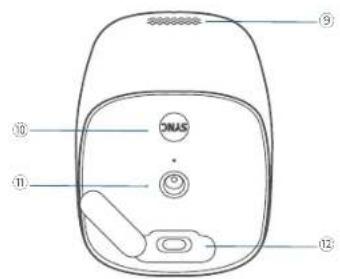
① Foco
① LED de estado
flowchart
graph LR
    A["HARD DRIVE"] --> B["Document Icon"]
37 E5
natural_image
Line drawing of a hand holding a rectangular object with a diagonal line and a small object above it (no text or symbols)natural_image
Two technical line drawings showing a pipette inserted into a gridded container and a device inside, with no visible text or symbols.ES 38
natural_image
Line drawing of a portable air conditioner connected to a WiFi router via a power outlet (no text or symbols)natural_image
Illustration showing a smartphone connected to two smart speakers and a digital device labeled 'oufy' (no text or symbols on devices)natural_image
Abstract curved shape in beige tones, no text or symbols presentnatural_image
Illustration of a cylindrical mechanical component with a flanged top and central hub (no text or symbols)43 E5
2 HOURS PER DAY*
45 E5
natural_image
Simple line drawing of a house with doors and surveillance cameras (no text or symbols)
natural_image
Simple line drawing of a house roof with a sun and a rolled-up cable (no text or symbols)Lugares no
recomendados:
Dentro de la casa o
bajo un portal o
porche
natural_image
Diagram showing a conical tool interacting with a threaded component, illustrating rotational motion (no text or symbols)natural_image
Technical line drawing showing a tool inserting a square socket into a wall, with two screws inserted (no text or symbols present)47 E5
natural_image
Diagram of a device with a lever and pin, showing internal components (no text or symbols)natural_image
Simple line drawing of a funnel-shaped object with a handle and internal structure (no text or symbols)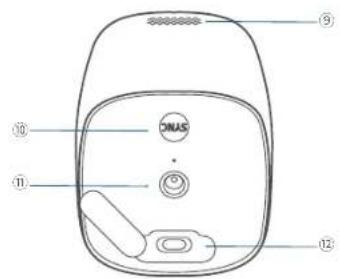
flowchart
graph LR
    A["HARD DRIVE"] --> B["Document Icon"]
54 FR
natural_image
Line drawing of a hand holding a rectangular object with a diagonal line, no text or symbols presentnatural_image
Diagram showing a pipette inserted into a gridded container and finally into a device with an upward arrow (no text or symbols)FR 55
natural_image
Line drawing of a portable air conditioner connected to a WiFi router via a power outlet (no text or symbols present)natural_image
Illustration showing a smartphone connected to two earphones and a digital speaker (no text or symbols present)natural_image
Illustration of a cylindrical device with a lid and internal components (no text or symbols)60 FR
62 FR
natural_image
Simple line drawing of a house with doors and surveillance cameras (no text or symbols)
Meilleurs
emplacements
d'installation :
natural_image
Simple line drawing of a house roof with a sun and a rolled-up cable (no text or symbols)Emplacements
d'installation à
éviter
natural_image
Diagram showing a conical tool interacting with a threaded component, illustrating rotational motion (no text or symbols)natural_image
Technical line drawing showing a tool inserting a square socket into a wall, with two screws inserted (no text or symbols present)64 FR
natural_image
Line drawing of a battery with a lit fuse and arrow indicating rotation (no text or symbols)natural_image
Simple line drawing of a funnel-shaped object with a handle and internal structure (no text or symbols)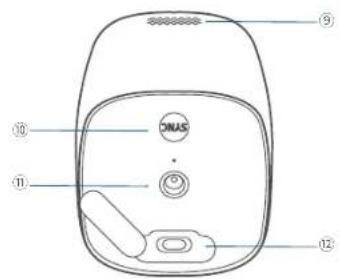
flowchart
graph LR
    A["HARD DRIVE"] --> B["Document Icon"]
71 IT
natural_image
Line drawing of a hand holding a rectangular object with a diagonal line and a small object above it, no text or symbols present.- Allentare la vite, quindi estrarre la staffa del disco rigido.
natural_image
Two technical line drawings showing a pipette inserted into a gridded container and a device inside, with no visible text or symbols.IT 72
natural_image
Line drawing of a portable air conditioner connected to a WiFi router via a power outlet (no text or symbols present)natural_image
Illustration showing a smartphone connected to two earphones and a speaker tower, with no visible text or symbols.natural_image
Illustration of a cylindrical device with a flat top and internal components (no text or symbols)77 IT
natural_image
Simple line drawing of a house with surveillance cameras on the roof and door (no text or symbols)
natural_image
Simple line drawing of a house roof with a sun and a rolled-up cable (no text or symbols)natural_image
Diagram showing a conical tool interacting with a threaded component, illustrating rotational motion (no text or symbols)natural_image
Technical line drawing showing a tool inserting a square socket into a wall, with two screws inserted (no text or symbols present)81 IT
natural_image
Diagram of a device with a lever and pin, showing internal components (no text or symbols)natural_image
Simple line drawing of a funnel-shaped object with a handle and internal structure (no text or symbols)Anker Technology (UK) Limited I GNR8, 49 Clarendon Road, Watford, Hertfordshire, WD17 1HP, United Kingdom


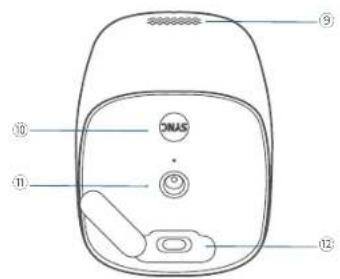
① Spotlight
② Cameralens
① Statusled
natural_image
Line drawing of a hand holding a rectangular object with a diagonal line, no text or symbols presentnatural_image
Diagram showing a pipette inserted into a container with a device inside, and a close-up of the device's internal structure (no text or symbols)NL 89
natural_image
Line drawing of a portable air conditioner connected to a WiFi router via power lines (no text or symbols)natural_image
Illustration showing a smartphone connected to two smart lockers and a digital speaker (no text or symbols present)natural_image
Illustration of a cylindrical device with a textured top surface and central hub (no text or symbols)94 NL
2 HOURS PER DAY*
96 NL
natural_image
Simple line drawing of a house with doors and surveillance cameras (no text or symbols)
De beste
montageplaatsen:
natural_image
Simple line drawing of a house roof with a sun and a rolled-up cable (no text or symbols)natural_image
Diagram of a mechanical component with two views showing internal structure and rotation (no text or symbols)natural_image
Technical illustration of a spray gun inserting into a wall socket, with two screws inserted (no text or symbols present)98 NL
natural_image
Line drawing of a battery with a bulb inserted, showing internal components and a pointer (no text or symbols)natural_image
Simple line drawing of a funnel-shaped object with a handle and base, no text or symbols present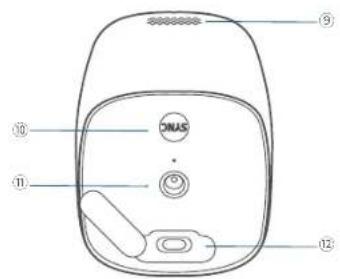
① Lanterna
② Lente da câmara
flowchart
graph LR
    A["HARD DRIVE"] --> B["Document Icon"]
105 PT
Instalar o disco rígido

natural_image
Line drawing of a hand holding a container with a knife, no text or symbols presentnatural_image
Diagram showing a pipette inserted into a gridded container and finally into a device with an upward arrow (no text or symbols)PT 106
natural_image
Line drawing of a portable air conditioner connected to a WiFi router via power lines (no text or symbols)natural_image
Illustration showing a smartphone connected to two smart speakers and a digital speaker (no text or symbols present)natural_image
Illustration of a cylindrical device with a lid and internal components (no text or symbols)111 PT
113 PT
natural_image
Simple line drawing of a house with doors and surveillance cameras (no text or symbols)
natural_image
Simple line drawing of a house roof with a sun and a rolled-up cable (no text or symbols)natural_image
Diagram showing a mechanical component before and after rotation, with no text or symbols present.natural_image
Technical line drawing showing a tool inserting into a socket on a wall, with no text or symbols present.115 PT
natural_image
Line drawing of a cylindrical device with a lever and arrow indicating rotation (no text or symbols)natural_image
Simple line drawing of a funnel with a pointed tip and a base, no text or symbols present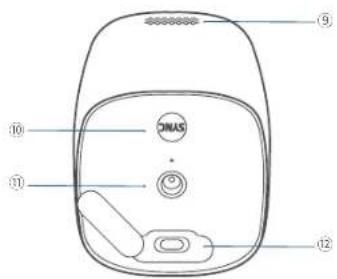
natural_image
Line drawing of a hand holding a rectangular object with a diagonal line, no text or symbols presentnatural_image
Line drawing of a device with a pipette inserted into a container (no text or symbols)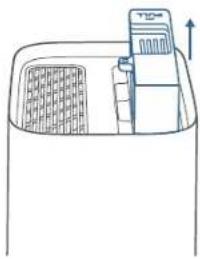
natural_image
Simple line drawing of a container with a lid and side panel, no text or symbols presentزيادة سعة التخزين
(اختياري)
flowchart
graph LR
    A["HARD DRIVE"] --> B["Document Icon"]

natural_image
Line drawing of a WiFi connected to two devices, one with a power outlet and the other with a router (no text or symbols)natural_image
Line drawing of two compact electronic devices with no visible text or symbols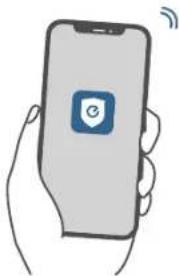
natural_image
Illustration of a hand holding a smartphone with a blue square logo and wireless signal icon (no text or symbols)natural_image
Illustration of a cylindrical battery with a flanged top and side casing (no text or symbols)1

natural_image
Illustration of a cylindrical battery with internal components and fins (no text or symbols)natural_image
Line drawing of a cylindrical mechanical component with a flanged top and central hub (no text or symbols)AR 128
natural_image
Simple line drawing of a house with two surveillance cameras on the roof and a door (no text or symbols)natural_image
Simple line drawing of a house roof with a sun and a rolled-up cable (no text or symbols)أماكن سينة للتركيب:
- داخل منزلك أو
تحت الشركة
Up to 26 ft (8 m)
AR 130
natural_image
Line drawing of a device with a lever and adjustment knob (no text or symbols)natural_image
Simple line drawing of a tool tip with a pointed tip and handle (no text or symbols)natural_image
Diagram of a mechanical component with a conical top and threaded base, showing a rotation arrow (no text or symbols)natural_image
Technical line drawing showing a power tool inserting a socket into a wall, with two screws inserted (no text or symbols present)
Anker Technology (UK) Limited | GNR8, 49 Clarendon Road, Watford,
Hertfordshire, WD17 1HP, United Kingdom

12-month limited warranty

United States
+1 (800) 988 7973
Mon-Sat 6:15AM-6:45PM(PT)
Sun 6:15AM-5:45PM(PT)
United Kingdom
+44 (0) 1604 936 200
Mon-Sun 6:00-19:00
Germany
+49 (0) 69 9579 7960
Mo-Fr 8:00-16:00 Sa 9:00-16:00

support@eufylife.com
Anker Innovations Limited
Room 1318-19, Hollywood Plaza, 610 Nathan Road, Mangkok, Kowloon, Hong Kong