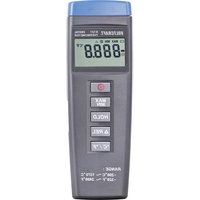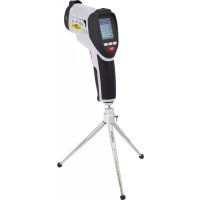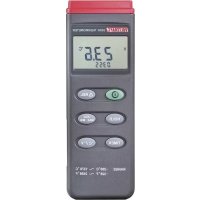
VOLTCRAFT K201 - Thermometer

K201 - Thermometer VOLTCRAFT - Free user manual and instructions

Find the device manual for free K201 VOLTCRAFT in PDF.

📄 66 pages English EN 💬 AI Question
Notice VOLTCRAFT K201 - page 24
View the manual : Français FR Deutsch DE English EN Nederlands NL

Download the instructions for your Thermometer in PDF format for free! Find your manual K201 - VOLTCRAFT and take your electronic device back in hand. On this page are published all the documents necessary for the use of your device. K201 by VOLTCRAFT.
USER MANUAL K201 VOLTCRAFT

CALCAL 99Introduction Dear customer, in purchasing this 300K digital thermometer, you have acquired a temperature- measuring device which incorporates the latest tech- nology. The construction complies with part 1 of the German standard DIN VDE 0411 for measuring devices, i.e., EN 61010-1. Apart from that, it has been tested by the EMV (for household use) and it thereby meets the requirements of applicable European and national guidelines. Conformity has been proven: appropri- ate certifying documents are deposited with the manufacturer. In order to maintain this condition and to ensure safe operation, you - as the first user - must observe these operating instructions! In case of technical questions please contact us: Germany: Tel. 0180/5 31 21 11, Fax 0180/5 31 21 10 E-mail: Please use our contact form in the Internet: www.conrad.de in the category "Contact" Mon to Thurs 8.00am to 4.30pm Fri 8.00am to 2.00pm Use in accordance with the requirements For measuring temperatures in the range of -200°C to +1,370°C, or -328°F to +2,498°F, via an external temperature sensor (K type). For measuring temperatures from -50°C to +200°C max., or -58°F to +392°F., with the K type temperature sensor supplied. Taking a measurement under adverse conditions is not permitted. Adverse conditions are:

20- wetness or too high air-humidity,

- dust and flammable gases, steam or solvents, - thunder storms or similar conditions such as strong, electro- static fields, etc. Any use other than those described above, will cause damage to the measuring device and is additionally associated with dangers such as short-circuiting, fire, electric shock, etc! It is not permitted to modify or dismantle the entire product! The safety advice must be strictly observed! Operating elements Illustration (fold-out page)

4-digit sub-display (smaller) and display of functions and mea- suring units

4. 'HOLD' key for retaining a measured value (for rapidly changing

5. 'TIMER' key for displaying the time-counter (count-up)

6. 'REL' key (for measuring relative values, i.e., reference values)

7. 'MAX MIN AVG' key to record measured values for minimum

value, maximum value and average

8. Change-over key for changing the measuring unit from '°C' to

2111. Supply bush for connecting a suitable power supply adapter, '-' inside

13. Cover for the battery compartment below

  • Index Page Introduction p. 20
  • Use in accordance with the requirements p. 20
  • Operating elements (fold-out page) p. 21
  • Index p. 22
  • Safety advice p. 23
  • Pre-positioning p. 25
  • Handling and commissioning p. 25
  • Carrying out measurements p. 30
  • Disposal p. 31
  • Correcting faults p. 31
  • Maintenance and care p. 31
  • Technical data and measuring tolerances 22Safety advice The guarantee is invalidated for damages caused by not observing the operating instructions! We do not accept any liability for consequential damages resulting from such action. We are not liable for damage to property or personal injury which has been caused by improper handling or non-obser- vance of the safety advice. Such cases invalidate any claim to the guarantee. p. 32
  • The 300K digital thermometer has left the factory in a perfectly safe condition. In order to maintain this condition and to ensure safe operation, the user must observe the ('Attention' and 'Ad- vice') safety advice and warning notices, which are contained in these instructions for use. The following symbols must be ob- served: Read the operating instructions
  • Measuring devices and accessories are not toys and they must therefore never fall into the hands of children!
  • The Federation of Professional Association's accident prevention regulations for electrical installations and device must be ob- served in commercial installations.
  • Trained personnel must monitor the use of measuring devices in schools, training facilities, hobby workshops and self-service workshops.
  • When using the thermometer, take care that the measuring sen- sors are not live! Be particularly careful when using alternating currents of more than 25V (AC), or direct currents of more than 2335 V (DC). Even with these currents, you could receive a fatal electric shock by touching electrical cables.
  • Before taking any measurement, check your measuring device or your temperature sensors for damage(s).
  • The voltage running between measuring device and earth must never exceed 24 V AC rms or 60 V DC.
  • Do not work with the measuring device in rooms where flamma- ble gases, steam or dust are present or could be present; nor in adverse environmental conditions. For your own safety, strictly avoid the measuring device or measuring wires becoming damp or wet. Avoid operationdireclty beside: a) strong magnetic fields (loudspeakers, magnets) b) electromagnetic fields (transformers, motors, coils, relays, fus- es, electromagnets, etc.) c) electrostatic fields(charging / discharging) d) transmission aerials or HF generators
  • Do not use the digital thermometer shortly before, during or shortly after a thunder storm (lighting strike! / energy-charged, excess voltages!). Make sure that your hands, shoes and clothes are completely dry: the same applies for the floor, the measuring device and measuring cables, switches and switching compo- nents.
  • If it is to be assumed that safe operation is no longer possible, then switch off the device and secure it against unsupervised use.It is to be assumed that safe operation is no longer pos- sible if - the device shows visible damage, - the device no longer works and - it has been stored in unfavourable conditions for a long period,

- it has been subjected to considerable stresses during trans- portation. 24• Never switch on the device when it is transferred from a cold room to a warm one. The condensation moisture which is there- by produced could, in certain circumstances, destroy your de- vice. Allow the device to reach room temperature in a switched off condition. Pre-positioning and system prerequisite(s) This 300K digital thermometer with PC connection is equipped with special features which enhance some measurements. By using the 'MAX MIN AVG function for example, it is possible to ascertain and retain either the largest or smallest measured value which occurs, or the average value (so-called mean,however not the arithmetical mean). The 'HOLD' function allows you to retain rapidly changing measured values (for the measurement records). By pressing the'TIMER' key, you can start a time-counter (count- up). By pressing the '°C/°F' key, you can choose between two measuring units: the 'British Imperial' in degrees fahrenheit and the 'Continental' in degrees celsius. If you finally press the REL key (with triangular symbol), the current temperature display will be set to '0.0' and only the difference (delta) will be displayed. The measuring range stretches from -200°C bis +1,370°C or from - 328°F to +2,498°F. However, the supplied sensor's temperature range is limited to -50°C bis +200°C. The 300K digital thermometer is just as universally useful for hobbies as it is for the professional or educational sectors, etc. Handling and commissioning A Inserting the battery - changing the battery In order for your measuring device to function without fault,it must be equipped with a 9 V block battery. You must change the battery 25when a battery symbol appears in the display's top left-hand cor- ner. To do this, proceed as follows: - disconnect your measuring device from the measuring circuit (and from the PC tooif applicable), - remove the temperature sensors from the measuring device, - switch it off and - carefully push the battery compartment cover off in the ar- row's direction. - Disconnect the used battery from the connecting clip and - replace it with an unused one of the same type. - After completing the battery change, replace the connected battery in the battery compartment and - carefully close the cover again. - Be careful when closing the battery compartment to avoid squashing the connecting clip's wires (red / black). Never operate the measuring device when it is in an opened condition. Do not leave any used batteries in the measuring device because even sealed batteries can corrode and thereby release chemicals which can damage your health or destroy the battery compartment. Used batteries must be regarded as special waste and they must therefore be disposed of in an envi- ronmentally friendly way. Special collection recep- tacles are provided for this purpose by specialist dealers and at recycling depots. B Connecting the measuring wires Always use only temperature sensors which have been specifically designed for your measurements (the K type in this case). Before 26making any connection, pay attention to the connection plug's condition or that of the sensors ('pearls') and make sure that the in- sulation is undamaged. Always take care that the temperature sensor only is exposed to temperatures which will be measured. Strictly observe the safety advice and the technical data relating to operating temperature. Never ex- ceed the maximum imput magnitudes. C Commissioning C1 Basic setting up The measuring device is switched on or off with the coloured 'I' key. The device can also be switched off via the 'auto-power off' function. Auto-power off signifies automatic switching off of the de- vice in the so-called 'sleep mode' ('stand-by'). The devicedevice will switch itself to 'off' after approximately 30 minutes if no key has been pressed or the auto-power function has not be switched off in advance.

The auto-power function can be shut down by simultaneously pressing the 'Hold' key when switching on the thermometer. An au- dible signal (two short beeps in succession) indicates that the auto- matic switch-off has been shut down. C2 Key references a) MAX MIN AVG Pressing the 'MAX MIN AVG' key gives you access to the recordingof the maximum, minimum and average values. The high- est and lowest measured temperatures and their average arecon- tinually determined and stored. The value displayed will alternate between the 'MAX' maximum value and the 'MIN' minimum value, or the momentary 'MAX MIN AVG' measured value (flashing), every 27time the key is pressed. Press the 'MAX MIN AVG' key for approx. 2 seconds in order to leave this function. Advice! The measuring unit cannot be changed whilst the maximum, minimum or average value is being displayed. b) TIMER for the time-counter The time-counter can be started by pressing the 'TIMER' key. It counts time forwards ('count-up')since beginning the measure- ment, if this is desired. The display shows minutes and seconds until one hour has been completed. Beyond this, the expired time is displayed in hours and minutes, whereby the symbol 'H' is addi- tionally shown to indicate hours.The time display can be reset to '0000', if you press the 'TIMER' key for approximately 2 seconds. c) The 'HOLD' function The 'HOLD' function can be switched on or off by briefly pressing the key. 'HOLD' signifies that the instantaneously measured value will be registered until the data-hold function is switched off again. Changing over from °C auf °F or vice-versa is just as feasible as activating the time-display, 'MAX MIN AVG' function, or the REL reference value measurement. d) The 'REL' reference value measurement The reference value measurement is started by pressing the 'REL' key. In addition, the current temperature display is set to '0.0', irre- spective of the measuring unit (°C oder °F). Subsequently, only the difference values are still displayed. If the measured temperature then amounts to 5 degrees celsius (°C) less for example, -5 °C will be displayed. On the other hand, if the mea- sured temperature then amounts to 25 degrees fahrenheit (ºF) more, 25 °F will be displayed. Just press the 'REL' key in order to return to the current temperature display. 28Advice! A short 'beep' from the built-in bleeper sounds in confirmation every time a key is pressed. C3 Bush occupancy a) Measuring imput The measuring bush is a so-called unipolar (+ and -) knife-edge contact bush. You must connect this bush to the K type tempera- ture sensor if you want to carry out temperature measurements correspondingly to the sensor specification. Take care that the knife-edge contacts of the connecting plug are of different widths. Never attempt to forcibly replace the connecting plug (+ and -) by pressing on the bushes. The bush- es would be irreparably destroyed and they would have to be renewed. b) Serial RS-232 interface The 'OUTPUT' bush is the serial RS-232 interface in 3.5 mm stereo jack format. The occupancy is established as follows (view of plug). The ground ( = GND = reference magnitude or potential) is at the back of the plug. The RX contact (= 5 V high imput = data imput) is located at the plug's centre. The TX contact is located in front at the tip ( = 5 V high output = data output). First of all, before communication between the thermometer and an IBM-compatible PC can take place the conditions must be set up: A connection between PC and thermometer, and the installation of the software. 29Advice! Both the interface cable and the software are available as an optional package. c) Connecting a mains power supply adapter Finally, we come to the DC 9V bush. A mains power supply device with the following output data can be connected: 9 V direct current - stabilized if possible - with an output current of at least 100 mA, a plug measuring 3.5 mm in diameter externally and a plug measur- ing 1.35 mm in diameter internally. The polarity will be minus '-' in- side and plus '+' outside. D Operating position Always operate the 300K digital thermometer such that you can read the LCD display or the digital display is shown above. Carrying out a measurement The digital thermometer's temperature range spans from -200°C to +1,370°C. The supplied sensor's temperature range spans from - 50°C to 200°C max! Do not use the supplied sensor to measure any temperatures higher than +200°C (=392°F). Care must be taken that 'beyond' the temperature range of +18°C bis +28°C (= range of guaranteed measuring accuracy) only the thermoelement is al- lowed to be exposed to the temperature to be measured. The procedure for measuring the temperature is as follows:

1. According to your requirements, connect either one or two of the

supplied sensors to the thermometer and switch it on. Do not switch on the electric current: it could de- stroy the device.

302. Position the temperature sensor(s) (at the cable end(s)) on or in

the non-electrically charged measuring medium (cooler, etc., but not corrosive or flammable liquids). Advice! If the temperature sensor is incorrectly connected or discon- nected, '- - - -' will be displayed instead of a measured value. Disposal If the 300K digital thermometer does not function or it is irreparable despite an intact energy supply (9 V block battery), it must be dis- posed of according to the applicable, legal regulations. Correction of faults With the 300K digital thermometer, you have purchased a product which has been constructed to incorporate the latest technology. In spite of this, problems or breakdowns can occur. For this reason, the following section describes how you can correct some of these breakdowns relatively eaisly yourself; please observe the safety ad- vice at all times! Fault possible cause No display when the Is the battery run down? device is switched on. Has the measuring device automatically switched itself off after 30 minutes of not being used? Maintenance and calibration In order to ensure the thermometer's accuracy over a longer peri- od, it should be calibrated once a year. Changing the battery is de- scribed under 'handling, commissioning A'. Use a clean, anti-static, 31dry, lint-free, cleaning cloth for cleaning the device or the display window. Do not use any cleaning agent containing carbon for cleaning, nor petroleum spirits, alcohols or simi- lar substances; otherwise the measuring device's surface will be damaged. Apart from that, steams are dangerous to health and explosive. Also, do not use any sharply edged tools, screwdrivers or metal brushes, etc., for cleaning. Technical data and measuring tolerances Technical data Display.................................: 4-digit display up to 9999, with a small 4-digit sub-display, symbol dis- play and measuring units Max. measuring rate ...........: 2.5 measurements per second, i.e., 5 measurements in 2 secs Operating temperature (surrounding the measuring device).................................: 0°C to +50°C (32°F to 122°F) Storage temperature ...........: -10°C to +60°C (14°F to 140°F), bat- tery removedRelative air humidity: 0( bis 80%, non-condensing Temperature for guaranteed accuracy..............................: +23°C ±5 K. Temperature coefficient.......: additional 0.01% of the reading +0.03°C (or 0.01% of the reading +0.06°F) per K, within the range of 0°C to 18°C and from 28°C to 50°C Battery change display........: ' ' from less than approximately

7.3 V of battery voltage

32Battery type.........................: NEDA 1604 9V or 6F22 9V (alkaline) Weight .................................: 210 g (with battery). Measurements(L X W X H) ..: 184 mmm x 64 mmm x 30 mm (with- out cables) Measuring tolerances Information on accuracy is ± (% of the reading + display fault in Kelvin 'K') 'K' for Kelvin represents the absolute value of a temper- ature difference or variance. Accuracy applies for an entire year at a temperature of +23°C ±5K, with a relative air humidity of less than 80 %, non-condensing. The warm-up period is 1 minute. Measuring range Accuracy Resolution Measuring device: -200°C to +200°C ±(0.3%+1K) 0.1°C +200°C to +400°C ±(0.5%+1K) 1°C +400°C to +1,370°C ±(0.3%+1K) 1°C -328°F to -200°F ±(0.3%+2°F) 0.1°F -200°F to +200°F ±(0.5%+2°F) 0.1°F +200°F to +2,498°F ±(0.3%+2°F) 1°F Temperature sensor TP-K01 -50°C to +200°C ±2.2K or ±0.75% -58°F to 392°F ±3.6K or ±0.75% Exceeding the maximum permissible imput magni- tude under unfavourable conditions leads to the measuring device being damaged or to endanger- ing the user's life.

Manual assistant
Powered by ChatGPT
Waiting for your message
Product information

Brand : VOLTCRAFT

Model : K201

Category : Thermometer