Just 5 - Smartphone Konrow - Free user manual and instructions
Find the device manual for free Just 5 Konrow in PDF.


| Product Type | Smartphone |
| Brand | Konrow |
| Model | Just 5 |
| Operating System | Android |
| Dual SIM | Yes |
| Bluetooth | Yes |
| Wi-Fi | Yes |
| Power Supply | 5V/1A mains adapter (model D3-41051000EL) |
| Battery Charging | Via USB port, initial charging time 5 to 8 hours |
| Screen Lock | Password or pattern |
| Factory Reset | Settings > Backup and reset > Factory data reset |
| SAR (head) | 0.327 W/kg |
| Operating Temperature | 0 °C to 40 °C |
| Maintenance and Cleaning | Soft dry or slightly damp cloth |
| Spare Parts and Repairability | Not provided by the manufacturer, repair by qualified technician |
| Warranty | Valid in metropolitan France for normal use, excluding wear, shocks, disassembly |
| Recycling | Do not dispose of with household waste, follow local procedures |
| Compliance | RED Directive, EN 60950-1, EN 50360, etc. |
Frequently Asked Questions - Just 5 Konrow
User questions about Just 5 Konrow
0 question about this device. Answer the ones you know or ask your own.
Ask a new question about this device
Download the instructions for your Smartphone in PDF format for free! Find your manual Just 5 - Konrow and take your electronic device back in hand. On this page are published all the documents necessary for the use of your device. Just 5 by Konrow.
USER MANUAL Just 5 Konrow
natural_image
Close-up of a black tablet device displaying a colorful abstract screen with a blue background (no visible text or symbols)
text_image
just5 simplefeaturesSmartphone's description ....3
Thanks 4
Giftbox content ....5
USER GUIDE 6
Insering a Sim card / Micro SD ......7
Charging the battery 9
Switching the mobile ON and OFF ......13
Unlocking Sim card 14
Locking / Unlocking the screen ......15
Making / Receiving calls 17
Bluetooth / Wifi activation 19
Download an application ......21
Reset 23
LEGAL MENTIONS ......26
French 27
English 32
German 37
Italiano 41
Dutch 45
Spanish 49
DECLARATION OF CONFORMITY ....54
text_image
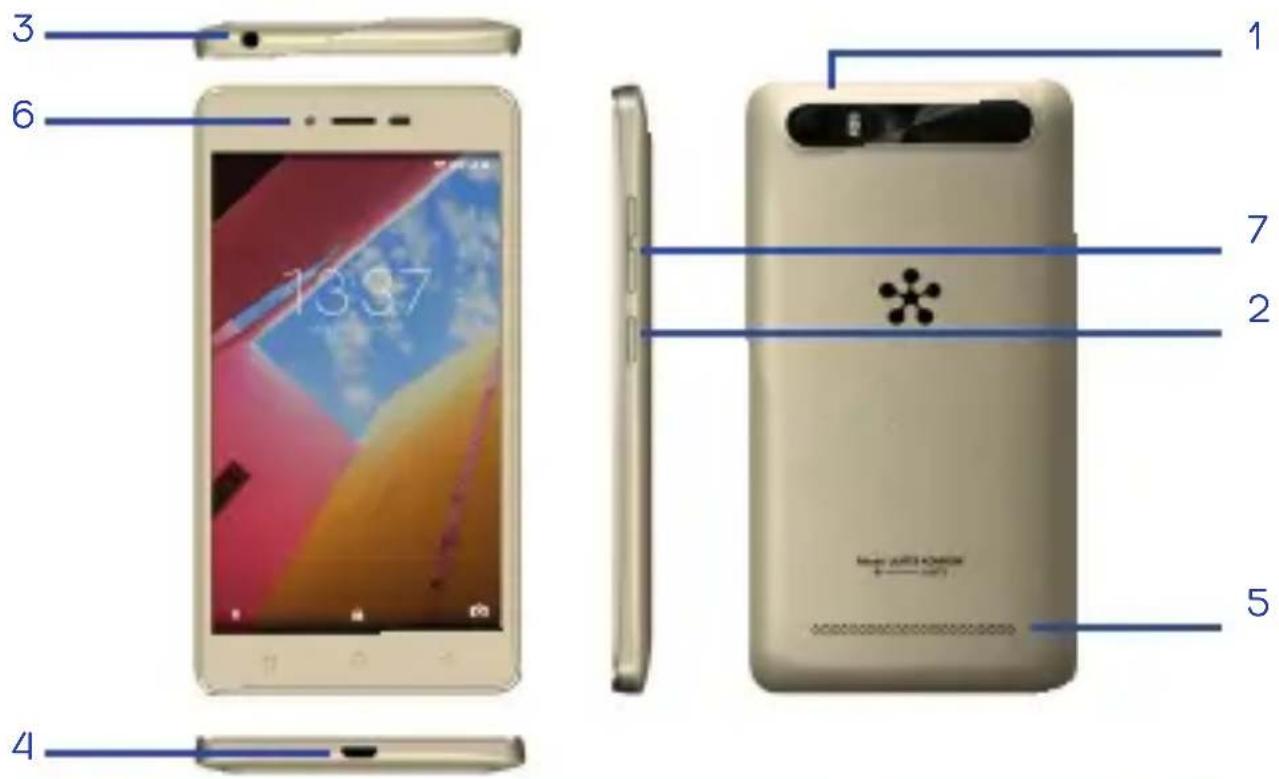
1 2 3 4 5 6 7 18:37| FR | 1. Appareil photo arrière & Flash2. Bouton Marche/Arrêt3. Prise jack | 4. Prise micro USB5. Haut-parleurs6. Appareil photo avant7. Volume |
| EN | 1. Rear camera & flash2. ON/OFF button3. Jack | 4. Micro USB port5. Speakers6. Front camera7. Volume |
| DE | 1. Kamera & Blitz zurück2. in / Aus-Taste3. Buchse | 4. Micro-USB-Buchse5. Lautsprecher6. Frontkamera7. Volume |
| IT | 1. Fotocamera frontale & flash2. Tasto di accensione3. Jack auricolare | 4. Connettore Micro USB5. Altoparlanti6. Fotocamera posteriore7. Volume |
| ND | 1. Achteruitrijcamera & flash2. Knop aan/uit3. Jack Stopcontact | 4. Stopcontact Micro USB5. Luidsprekers6. Camera aan de voorkant7. Volume |
| ES | 1. Cámara trasera & flash2. Botón encendido3. Toma de auriculares | 4. Conector de Micro USB5. Altavoz6. Cámara frontal7. Volumen |
for purchasing Just5 Mobile. You will find all the information regarding the use of this cellphone in this guide.
NOTE: The packaging materials, such as the adhesive tape, plastic film, string and labels are not part of this product.
WARNING: For your safety, please do not remove the screen's protective film, located under the antistatic film (with tab). It protects your screen against slight scratches and provides optimum protection if the phone is dropped.
Konrow danke
natural_image
Close-up of a black electronic device with red LED indicators and a small white component at the bottom (no visible text or symbols)Inserting a Sim Card Inserting a Micro SD
| FR | • Éteignez le téléphone et retirez la coque arrière amovible du téléphone.• Insérez la carte SIM correctement dans l'emplacement prévu à cet eff et (voir le schéma ci-dessous). Vous avez 2 ports de cartes SIM (SIM1 et SIM2). Veiller à respecter le sens d'insertion des cartes.• Remettez ensuite la coque arrière du Smartphone en place.ATTENTION: Les fonctions 3G ne sont utilisables qu'uniquement sur une seule Carte SIM à la fois. | • Éteignez le téléphone et retirez la coque arrière.• Insérez la carte mémoire dans l'emplacement prévu à cet eff et.• Remettez ensuite la coque arrière du Smartphone en place.ATTENTION: L'insertion ou le retrait d'une carte SIM et d'une carte MicroSD requiert l'extinction complète du Smartphone. |
| EN | • Switch off the phone and remove the rear cover.• Insert the SIM card correctly into the relevant card slot (see figure below).• Then replace the battery and cover.CAUTION: The 3G functions can only be used on one SIM card. | • Switch off the phone and remove the rear cover.• Insert the memory card into the relevant slot.• Then attach the rear cover.CAUTION: Inserting or removing a SIM card or a MicroSD card requires the Smartphone to be completely switched off . |
| DEIT | • Schalten Sie dans Telefon aus und entfernen Sie die abnehmbare hintere Abdeckung des Telefons.•• Schalten Sie das Telefon aus und entfernen Sie die abnehmbare hintere Abdeckung des Telefons.• Legen Sie die SIM-Karte richtig in den Steckplatz für diesen Zweck (siehe Diagramm -Dessous). Sie haben zwei SIM-Karten-Anschluss (SIM1 und SIM2). Beachten Sie die Richtung der Einführung der Karten.• Dann ersetzen Sie die hintere Abdeckung des Smartphone an seinem Platz.ACHTUNG: 3G-Funktionen, die nur zu einem Zeitpunkt nur auf einer SIM-Karte verwendet werden.• Spenga il telefono e rimuova la coperta di retro.• Inserisca i SIM cardano correttamente nella fessura di scheda attinente (veda sotto figura).• Poi sostituisca la batteria e coperta.CAUTELA: Le 3G e 3G funzioni possono essere usate solamente uno SIM carda. | • Schalten Sie das Telefon aus und entfernen Sie die hintere Abdeckung.• Setzen Sie die Speicherkarte in den Steckplatz für diesen Zweck.• Dann ersetzen Sie die hintere Abdeckung des Smartphone an seinem Platz..ACHTUNG: Das Einsetzen oder Entfernen einer SIM-Karte und eine MicroSD-Karte erfordert die vollständige Auslöschung des Smartphones.• Spenga il telefono e rimuova la coperta di retro.• Inserisca la scheda di memoria nella fessura attinente.• Poi leghi la coperta di retro.CAUTELA: Inserendo o rimuovendo una scheda di SIM o una scheda di MicroSD costringe lo Smartphone ad essere completamente cambiato via. |
| ND | • Blust de telefoon en trekt de afneembare achter schaal van de telefoon terug.• Neemt de SIM-kaart op juist in de met het oog hierop voorziene plaats (zie het schema hieronder). U hebt 2 SIM-havens van kaarten (SIM1 en SIM2). De richting van integratie van de kaarten ervoor zorgen te eerbiedigen.• Overhandigt vervolgens de achter schaal van Smartphone bestaand.OPGELET: De functies alleen te gebruiken 3G en 3G zijn slechts op één SIM-Kaart tegelijkertijd. | • Schakel de telefoon uit en verwijder de achterdekking.• Neem de geheugenkaart in de relevante groef op.• Dan maak de achterdekking vast.OPGELET: Het opnemen van of het verwijderen van een SIM-kaart of een MicroSD-kaart vereist dat Smartphone volledig worden uitgeschakeld. |
| ES | • Apague el teléfono y retire la tapa posterior amovible del teléfono.• Inserte la tarjeta SIM correctamente en la entrada prevista (véase el esquema por encima). El dispositivo tiene 2 puertos para tarjetas SIM (SIM1 y SIM2). Cerciórese de respetar el sentido de inserción de las tarjetas.• Vuelva a colocar la batería y la tapa posterior del móvil.ATENCIÓN: Las funciones 3G y 3G sólo se pueden utilizar en una tarjeta SIM a la vez. | • Apague el teléfono y quite la tapa posterior y la batería.• Inserte la tarjeta de memoria en la entrada prevista.• Vuelva a colocar la batería y la tapa posterior del móvil.PRECAUCIÓN: Cercíorese de que al insertar o retirar una tarjeta SIM o MicroSD el dispositivo esté complétamente apagado. |
Français
Charging the battery:
- To charge the battery, connect the USB cable (supplied) to the USB port of your Smartphone and the other end to the mains adaptor (supplied). Then connect the mains adaptor to a power outlet.
- The battery charge icon illuminates during charging and indicates the charge status.
- When the battery is fully charged, you can disconnect the USB cable from the device then from the power outlet.
IMPORTANT:
- The Smartphone is only recharged via its USB port.
- Ensure your Smartphone is fully discharged before charging it for the first time.
- The battery must be charged for at least 5 to 8 hours when first charged.
Note: You can use the device when it is being charged. In this case, the battery may take longer to charge fully
Safety information for charging the battery:
• To recharge the battery, only use the mains adaptor supplied with your device. Do not use any other power supply or electrical device. The power outlet to which the device is connected must be near the equipment and must always be easily accessible.
• Always wait at least 5 seconds after switching off the device before restarting it. Switching the device off and then back on again immediately may damage the electrical circuits.
- Do not disassemble the battery. Do not dispose of batteries in fire or water. Do not charge the battery if the room temperature exceeds 45^ C
- For all repairs or to replace the battery, consult a qualified technician.
- The lifetime of the battery depends largely on how you use it. Do not expose the battery to temperatures less than 0^ or greater than 60^ . Its performance may be altered.
- Significant electromagnetic interference or electrostatic discharge may cause malfunction or loss of data. If the device is not working properly, restart the Smartphone or unplug the mains adaptor from the power outlet then plug it in again..
German
Switching the mobile on and off
text_image
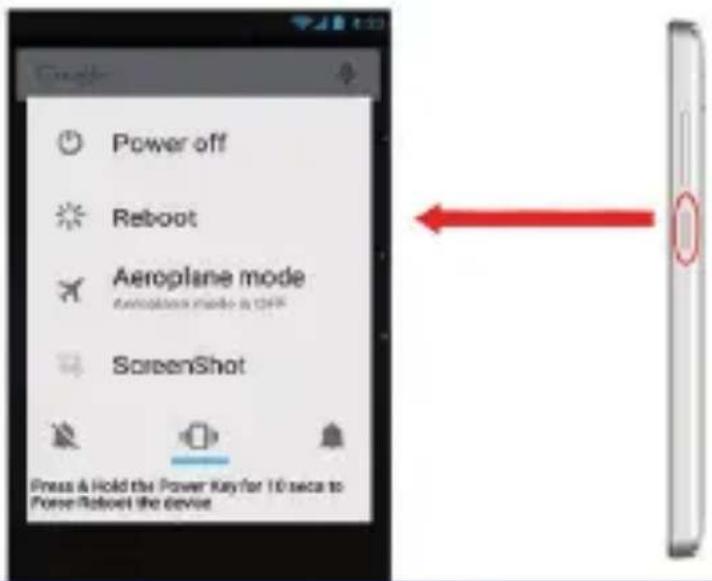
Power off Reboot Aeroplane mode Aeroplane mode is OFF ScreenShot Press & Hold the Power Key for 10 secs to Power Robout the device| FR | Pour allumer le Smartphone, appuyez 3 secondes sur le bouton Marche/Arrêt situé sur la tranche du Smartphone.Si le Smartphone est allumé appuyez brièvement sur le bouton pour le mettre en mode veille. Appuyez encore une fois, pour quitter le mode veille.Pour éteindre le Smartphone, appuyez 3 secondes sur le bouton Marche/Arrêt le temps qu’un menu apparaisse, cliquez ensuite sur le bouton Eteindre puis confirmer. |
| EN | To switch the Smartphone on, press the On/Off button located on the side of the Smartphone for 3 seconds.If the Smartphone is switched on, press for less than a second on the button to put the device into standby mode. Press it again to leave standby mode.To switch off the Smartphone, press the On/Off button for 3 seconds until a menu appears, then touch the Off button and confirm. |
| DE | Um Ihr Smartphone zu drehen, drücken Sie 3 Sekunden auf die Ein / Aus-Taste am Rand des Smartphone befindet.Wenn das Smartphone eingeschaltet ist, drücken Sie kurz die Taste, um es in den Standby-Modus zu schalten. Drücken Sie erneut auf den Standby-Modus zu verlassen.So schalten Sie das Smartphone, drücken Sie 3 Sekunden auf die Ein / Aus-Taste, um die Zeit ein Menü angezeigt wird, klicken Sie auf die Schaltfläche aus und dann bestätigen |
| IT | Accendere lo Smartphone, pigi il Su / Via bottone localizzato sul lato dello Smartphone per 3 secondi.Se lo Smartphone è acceso, pigi meno per che un secondo sul bottone per mettere l’apparecchiatura in maniera di riserva. Lo pigi di nuovo lasciare maniera di riserva.Spegnere lo Smartphone, pigi il Su / Via bottone per 3 secondi finché un menu appare, poi tocchi il Via bottone e confermi. |
| ND | Om de mobiel aan te steken, ondersteunt 3 tweede op de knoopVerloop/Arrest gelegen op het klavier van de mobiel.Als de mobiel wordt aangestoken steunt kort op de knoop om het te zetten in manier toeziet op. Schuift uw Just5 naar boven om de manier te verlaten toeziet op.Om de mobiel te blussen, ondersteunt 3 tweede op de knoop Verloop/Arrest. |
| ES | Para encender el móvil, mantenga pulsado 3 segundos el botón Marcha / detención situado sobre el teclado del móvil (véase el esquema por encima ).Si el móvil está encendido pulse brevemente el botón para ponerlo en modo suspensión. Pulse brevemente otra vez para sacarle del modo suspensión.Para apagar el móvil, mantenga pulsado 3 segundos el botón Marcha / detención situado sobre el teclado del móvil. Pulse Apagar en el menú de opciones y confirme pulsando Ok. |
Unlocking a SIM card
| FR | Votre Just5 est un Smartphone double SIM, il vous permet de téléphoner avec deux abonnements à partir du même appareil.Il y a deux emplacements prévus pour deux cartes SIM.·Au démarrage de votre téléphone ce dernier vous invitera à entrer successivement le code PIN de vos deux cartes SIM. (SIM1 puis SIM 2)·La fonction d'appel d'urgence vous permet d'appeler un numéro d'urgence sans avoir à saisir le code PIN. |
| EN | Your Just5 is a dual SIM Smartphone. It enables you to phone using two lines from the same device. There are two SIM card slots.·When you start up your phone, the latter invites you to enter the PIN codes of your two SIM cards in succession. (SIM1 then SIM 2)The «emergency call» function enables you to call an emergency number without entering the PIN code. |
| DE | Ihre Just5 ist ein Dual-SIM-Smartphone, ermöglicht es Ihnen mit zwei Verbindungen von demselben Gerät zu rufen. Es gibt zwei Steckplätze für zwei SIM-Karten.·Wenn Sie Ihr Telefon starten werden Sie aufgefordert nacheinander die PIN Ihrer zwei SIM-Karten zu gelangen. (SIM1 und SIM 2) |
| IT | Il Suo Just5 è un SIM Smartphone duplice. L'abilita per telefonare due linee che usano dalla stessa apparecchiatura. C'è due scheda di SIM fessure.·Quando Lei avvia sul Suo telefono, il secondo L'invita a entri i codici di Spilla delle Sue due schede di SIM in successione. (SIM1 poi SIM 2)·La «chiamata di emergenza» la funzione L'abilita per chiamare un numero di emergenza senza entrare il codice di Spilla. |
| ND | Uw Just5 is een dubbele mobiel SIM, hij laat u toe om met twee abonnementen vanaf hetzelfde apparaat te telefoneren.Er zijn twee plaatsen voorzien voor twee SIM-kaarten.·Aan de start van uw telefoon zal laatstgenoemde u verzoeken om achtereenvolgens in te gaan de NIP-code van uw twee SIM-kaarten (SIM1 vervolgens SIM 2).·De dringende functie van verzoek laat u toe om een dringend nummer zonder hebben te noemen om de NIP-code in te voeren. |
ES
Lock/Unlock the screen
text_image
12:01 PM Thursday 9:30 AMFrançais
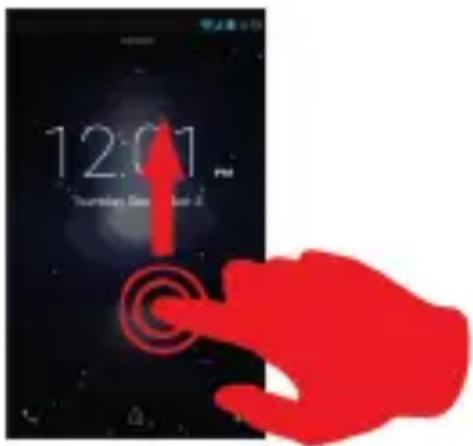
To unlock the screen:
- Press the power key on your phone.
- Hold and drag the unlock icon to the top to unlock the device.
You can configure the screen lock by adding a password or pattern to be replicated when unlocking your Smartphone.
CAUTION: Forgetting your screen lock password, PIN code or pattern permanently blocks your Smartphone
If this is forgotten or lost, the product warranty will not cover such an oversight. Even a "reset"
cannot solve the problem. As a precaution, take a note of your password or pattern. PASSWORD: ____
To lock your device, simply press the on/off button.
German
Making/receiving calls
FR
text_image
Bluetooth Off Bluetooth deactivated Bluetooth OnBluetooth activated
text_image
Wi-Fi deactivated Wi-FiWi-Fi activated
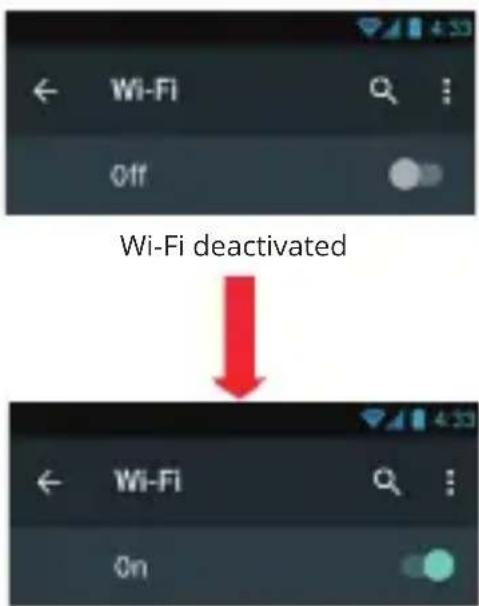
| FR | Note:Afin de limiter votre exposition aux champs électromagnétiques nous vous recommandons de désactiver le Bluetooth lorsqu'il n'est plus utilisé. Vous pouvez activer le Bluetooth par les raccourcis de réglage de base de la barre de notifications ou dans les paramètres du Smartphone.• Appuyez sur le bouton d'activation et faite le glisser sur la droite.• Une fois le Bluetooth activé l'icône apparaît dans votre barre de notification. | Note:Afin de limiter votre exposition aux champs électromagnétiques nous vous recommandons de désactiver le Wi-Fi lorsqu'il n'est plus utilisé. Vous pouvez activer le Wi-Fi par les raccourcis de réglage de base de la barre de notifications ou dans les paramètres du Smartphone.• Appuyez sur le bouton d'activation et faite le glisser sur la droite.• Une fois le Wi-Fi activé l'icône apparaît dans votre barre de notification. |
| EN | Note:To limit your exposure to EMF we recommend you to deactivate Bluetooth when it is not any more used.You can activate Bluetooth by the shortcuts of basic regulation of the notification bar or in the parameters of the Smartphone.• Click on the activation button and scroll to the right.• When the Bluetooth is activated you will see the icon on the notification bar. | Note:To limit your exposure to EMF we recommend you to deactivate Wi Fi when it is not any more used.You can activate Wi Fi by the shortcuts of basic regulation of the notification bar or in the parameters of the Smartphone.• Click on the activation button and scroll to the right.• When the Wi-Fi is activated you will see the icon on the notification bar. |
| DE | Hinweis:Um die Belastung durch elektromagnetische Felder zu begrenzen, empfehlen wir, dass Sie Bluetooth deaktivieren, wenn sie nicht in Gebrauch ist.Sie können Bluetooth aktivieren, indem Grundeinstellung Verknüpfungen Benachrichtigungsleiste oder in den Einstellungen des Smartphone.• Drücken Sie die Aktivierungstaste und schieben Sie sie nach rechts.• Nach der Aktivierung des Bluetooth-Symbol in der Benachrichtigungsleiste angezeigt wird. | Hinweis:Um die Belastung durch elektromagnetische Felder zu begrenzen, empfehlen wir das Ausschalten Wi-Fi, wenn sie nicht in Gebrauch ist.Sie können die Grundeinstellung Shortcuts Benachrichtigungsleiste oder in den Einstellungen des Smartphone auf Wi-Fi einzuschalten.• Drücken Sie die Aktivierungstaste und schieben Sie sie nach rechts.• Einmal aktiviert das WiFi-Symbol in der Benachrichtigungsleiste angezeigt wird. |
| IT | Nota:Limitare la Sua esposizione ad EMF, noi La raccomandiamo a disattivi Bluetooth quando non è alcuno più usato.Lei può attivare Bluetooth dalle scorciatoie di regolamentazione di base della sbarra di notificazione o nei parametri dello Smartphone.• Clicchi sul bottone di attivazione ed arrotoli alla destra.• Quando il Bluetooth è attivato Lei vedrà l'icona su la sbarra di notificazione. | Nota:Limitare la Sua esposizione ad EMF, noi La raccomandiamo a disattivi Wi Fi quando non è alcuno più usato.Lei può attivare Wi Fi dalle scorciatoie di regolamentazione di base di la sbarra di notificazione o nei parametri dello Smartphone.• Clicchi sul bottone di attivazione ed arrotoli alla destra.• Quando il Wi-Fi è attivato Lei vedrà l'icona sul sbarra di notificazione. |
| ND | De aantekening:Teneinde uw tentoonstelling te beperken tot de elektromagnetische velden bevelen wij u aan om désactiver Bluetooth wanneer hij niet meer wordt gebruikt.U kunt Bluetooth door de basiskortere wegen van regelen van de staaf van kennisgevingen of in de parameters van Smartphone activeren.Steunt op de knoop van activering en gelaten het uitglijden op de rechterkant.Eens Bluetooth geactiveerd komt de ikoon in uw kennisgevingsstaaf voor. | De aantekening:Teneinde uw tentoonstelling te beperken tot de elektromagnetische velden bevelen wij u aan om désactiver WiFi wanneer hij niet meer wordt gebruikt.U kunt WiFi door de basiskortere wegen van regelen van de staaf van kennisgevingen activeren of in de parameters van Smartphone.Steunt op de knoop van activering en gelaten het uitglijden op de rechterkant.Eens WiFi geactiveerd komt de ikoon in uw kennisgevingsstaaf voor. |
| ES | Nota:Para limitar su exposición a los campos magnéticos le recomendamos desactivar la función Bluetooth cuando no la utilice.Puede activar el Bluetooth por medio de los atajos de ajustes básicos de la barra de notificaciones o de los parámetros del móvil.Toque el botón de activación y deslicelo hacia la derecha.Una vez el Bluetooth activado el icono aparece en la barra de notificacionesn | Nota:Para limitar su exposición a los campos magnéticos le recomendamos desactivar la función WiFi cuando no se utilice.Puede activar el WiFi por medio de los atajos de ajustes básicos de la barra de notificaciones o de los parámetros del móvil.Toque el botón de activación y deslicelo hacia la derecha.Una vez el WiFi activado el icono aparece en la barra de notificación. |
Download an application
Français
Your Just5 Smartphone is supplied with the Google™ on-line store enabling you to download applications such as utilities and games.
To access these to the store, go to the application page using the button located on the
home page and tap the Play Store icon.
Google, Google Play and Android are trademarks of Google Inc. registered
Note: The availability of access to Google Play™ Store depends on your phone operator and the country in which you
are located. Access to the on-line store requires an account to be created.
NOTE: Konrow shall under no conditions be responsible for the content on the online store. The product warranty will not cover any malfunction due to an application from on-line stores.
German
text_image
Settings ACCOUNTS Language & Input Backup & reset System State & time Scheduled power on & off Backup & reset Backup & reset Backup account Newport or the backup account Automatic refresh Prior reclassifying any app restore <|vision_start|> self-continued data Personal data DRAM reset Delete all DPM licenses Factory data reset This will release all data from your phone's internal storage, including • Your Google account • System and app data and settings • Downloaded apps • Myself • Photoe • Other user data Factory data reset Reset Phone Factory data reset This will release all data from your phone's internal storage, including • Your Google account • System and app data and settings • Downloaded apps • Myself • Photoe • Other user data Reset Phone Create all your personal information and downloaded app? You cannot reverse this action! SENSE EVERY-ENDFrançais
If you want to reset your smartphone, you can do a reset of data from the operating system Android™.
CAUTION: A reset data erase all your personal data, all contacts in your phone and the applications you have installed. That is why we recommend that you make a backup of your data before starting the procedure. However the information stored on the external memory card will not be erased.
To do a reset of the data:
- In Settings, click "Factory data reset" and "Factory data reset".
- Click "Reset phone" and confirm "Erase everything".
The smartphone will turn off and on rebooting the system will reset.
NOTE : If you have any problem with your device, please try to reset the system before sending it back.
German
text_image
Warning symbol with a sine wave inside a triangle, indicating sound or sound pressure.- Before using the pedestrian kit, check that the volume is not set to maximum to prevent hearing loss.
- The high volume settings are intended for individuals with reduced hearing capacity and not for those with normal hearing.
- Do not use the pedestrian kit while driving.
- Adjust the volume so that you can hear the sounds around you.
• To prevent possible hearing damage, do not listen at high volume levels for long periods. - Listening to a portable audio player at high volumes can damage your hearing and
- lead to hearing impairment (deafness, ringing ears, tinnitus and hyperacusis).
- In order to prevent these risks it is recommended not to use the device at full volume; use must not exceed one hour per day.
- Do not use pre-amplified or amplified models of headphones or pedestrian kit (i.e. with individual volume control and/or self-powered by batteries), as they do not ensure adherence to the maximum volume.
text_image
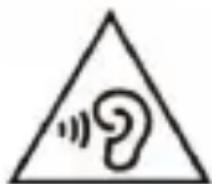
Warning symbol with a sine wave inside a triangle, indicating sound or audio hazard.This product complies with the EN 60950-1:2006/A12:2011 standard “Information technology equipment - Safety - Part 1: General requirements” in accordance with the order of 25 July 2013 implementing Article L. 5232-1 of the French Public Health Code concerning portable audio players.
Electromagnetic waves safety information (SAR)
Your Just5 mobile is designed to not exceed the radio wave limits recommended by the European authorities. These limits include safety margins to ensure the protection of all persons regardless of their age or health.
The SAR (specific absorption rate) of mobile phones quantifies the maximum level of exposure of the user to electromagnetic waves for aural use. French legislation stipulates that the SAR must not exceed the maximum value of 2 W/kg over 10g of tissue.
The value of the SAR is determined on the basis of the highest level of radio frequencies emitted during laboratory tests.
The actual value of the SAR during use of the phone is lower than this level.
The value of the SAR of the phone can vary according to the following factors: how far/close the phone is to a relay antenna, use of accessories and others.
NOTE: The SAR value may vary, depending on national reporting and testing requirements and the network band.
NOTE:
- Do not use your mobile in certain locations such as aircraft, hospitals, service stations and professional garages or while driving a vehicle. The electromagnetic waves from the mobile can disrupt the performance of electronic devices used in these locations.
- We recommend that you switch off your phone or switch it to flight mode in these locations to avoid interference.
- If you use an electronic implant (pacemakers, insulin pumps, neurostimulators, etc), please keep a distance of 15cm between the mobile and your electronic implant.
- When using a hands-free kit, pregnant women should keep the phone away from their abdomen and teenagers should keep the phone away from their lower abdomen.
Advice to reduce the level of exposure to radiation:
- Please use your mobile where reception is good to reduce the quantity of radiation received (avoid using in an underground car park or when travelling (train or car)).
- A reception icon indicates the quality of reception on your phone. A 4-bar display means that reception is good.
- Use of a hands-free kit also allows the level of exposure to be reduced.
Safety and care information
- Read these instructions carefully.
- Keep these instructions.
- Follow all these instructions.
- Heed the warnings.
- Clean only with a soft cloth (dry or slightly damp).
- Do not attempt to disassemble the device; it would no longer be covered by the warranty.
- Do not exert excessive pressure on the screen and do not put objects on it. This could damage the screen.
- Use the spare parts specified by the manufacturer.
• After any service or repair carried out on this product, ask the technician to perform a safety check. - Use only the spare parts/accessories specified by the manufacturer.
- Refer to a qualified person for any repairs. Repair is required if the device is damaged in some manner or other, if the power cord or plug is damaged, if liquid has been spilled or objects have fallen on the device or if the device has been exposed to rain or moisture or has been dropped.
- Do not expose the device to direct sunlight or other source of extreme heat or cold.
- Respect the privacy of others when using your mobile.
- Keep the device away from all metal objects (coins, keys, etc).
- Do not leave near a magnetic field as this could cause data to be lost or could damage the device.
- Do not drop the device.
- Do not expose the device to shocks, friction or impact.
• In order to prevent data loss, remember to make a (computer or paper) back-up of information saved on the device.
• To prevent interference, do not use the device near other electronic devices, a pacemaker or medical equipment. - Operating temperature: 0^ and 40^ .
NOTE: In order to reduce any risk of fire or electric shock:
- Do not expose this device to rain or moisture.
- Do not expose the product to water droplets or to splashes and do not place any object filled with liquid, such as a vase, on the device.
- Do not use the product near flammable or explosive materials.
- The power plug is used to disconnect the device and must always be easily accessible.
- In order to completely disconnect the device from the electricity supply, the power plug must be disconnected from the power outlet.
- Do not attempt to override the safety features of the polarised plug or the earth connection. A polarised plug has two pins, one of which is wider than the other. A plug with an earth connection has two flat pins and a third round pin for the earth connection. The widest pin and the third pin constitute the important safety features designed to protect you. If you cannot manage to fully insert the plug into the wall outlet, contact your electrician to replace the obsolete wall socket.
- Disconnect this device during electrical storms or when not in use for an extended period.
- Switch off the device in places presenting risk of explosion and when travelling by plane.
-
Do not touch the power cord with wet hands and do not pull on the charger to disconnect it.
-
The power cord must be placed so that it will not be stepped on or crushed particularly at the outlet, where it is plugged in or where it is connected to the device.
- Do not overload the power outlet. Use the power supply only as indicated. Do not install this device near heat sources such as electric hobs, cookers or others (including amplifiers).
Warning on using the phone while driving
In France, in accordance with Article R412-6-1 of the French Highway Code, drivers are not permitted to use hand-held phones whilst the vehicle is moving.
The penalty for non-compliance with this article is a fine and point penalty on your driving licence.
The use of a hands-free kit is permitted. However, Article R412-6 of the French Highway Code provides for a fine without licence penalty points if the driver is not in a position to carry out required manoeuvres comfortably and without delay when using his hands-free kit whilst driving.
NOTE: this legislation applies only in France. During trips abroad, please refer to the legislation in place in the country you are/go.
Epilepsy warning
Please read before using a video game or allowing your children to use one.
Some people are susceptible to epileptic seizures or loss of consciousness when exposed to certain flashing lights or light patterns in everyday life. Such people may have a seizure while watching television images or playing certain video games. This may happen even if the person has no medical history of epilepsy or has never had any epileptic seizures. If you or anyone in your family has ever had symptoms related to epilepsy (seizures or loss of consciousness) when exposed to flashing lights, consult your doctor prior to playing. We advise that parents should monitor the use of video games by their children. If you or your child has the following symptoms while playing a video game, discontinue use IMMEDIATELY and consult your doctor: dizziness, blurred vision, eye or muscle twitches, loss of consciousness, disorientation, any involuntary movement or convulsion.
Precautions to take during use of any video game:
- Do not sit too close to the screen. Sit a good distance away from the television screen, as far away as the length of the cable allows.
- Preferably play the game on a small television screen. Avoid playing if you are tired or have not had much sleep.
- Make sure that the room in which you are playing is well lit.
- Rest for ten to fifteen minutes per hour while playing a video game.
This software is partially based on the work of the Independent JPEG Group.
Bluetooth is a trademark of Bluetooth SIG, Inc.
The MPEG Layer-3 audio encoding technology and patents are licensed by Fraunhofer IIS and Thomson.
THIS PRODUCT IS LICENSED UNDER THE MPEG4 PATENT PORTFOLIO LICENSE FOR THE PERSONAL AND NON-COMMERCIAL USE OF A CONSUMER TO
(i) ENCODE VIDEO IN COMPLIANCE WITH THE MPEG4 STANDARD ("MPEG4 VIDEO") AND/OR (ii) DECODE MPEG4 VIDEOS THAT WAS ENCODED BY A CONSUMER ENGAGED
IN A PERSONAL AND NON-COMMERCIAL ACTIVITY AND/OR WAS OBTAINED FROM A VIDEO PROVIDER LICENSED TO PROVIDE MPEG4 VIDEO. NO LICENSE IS GRANTED OR SHALL BE IMPLIED FOR ANY OTHER
USE. ADDITIONAL INFORMATION MAY BE OBTAINED FROM MPEG LA, L.L.C. SEE http://mpegla.com.
All other names of systems, products and services are trademarks or registered trademarks of their respective owners. The symbols ((TM)) or (R) are not used in this guide.
Charging the battery
Always wait at least 5 seconds after switching off the device before restarting it. Switching the device off and then back on again immediately may damage the electrical circuits.
Do not disassemble the battery. Do not dispose of batteries in fire or water. Do not charge the battery if the room temperature is below 0^ C or exceeds 45^ C. For all repairs or to replace the battery, consult a qualified technician. The lifetime of the battery depends largely on how you use it. To recharge the battery, only use the mains adaptor supplied with your device. Do not use any other power supply or electrical device.
The power outlet to which the device is connected must be near the equipment and must always be easily accessible. The power cord must be placed so that it will not be stepped on or crushed particularly at the outlet, where it is plugged in or where it is connected to the device.
Do not overload the power outlet. Use the power supply only as indicated. Disconnect this device during electrical storms or when not in use for an extended period. Do not touch the power cord with wet hands and do not pull on the charger to disconnect it.
The product should only be connected to a USB interface of version USB2.0 or higher and that the connection to a power USB is prohibited. This charger is for indeed use only.
Only use adapter as per below:
Manufacturer name: Shenzhen Diasinger Digital Co., LTD
Manufacturer address: Floor 3-4, Building 1, Yu Sheng Industrial Park, Jiuwei, Xixiang, Baoan District, Shenzhen City
Importer name: HEM France
Importer address: 27 Boulevard d'Arras 13004 Marseille FRANCE
Model name: D3-41051000EL
Rated Input: AC 100-240V\~50/60Hz
Rated Output: DC 5.0V, 1A
While driving
In France, in accordance with Article R412-6-1 of the French Highway Code, drivers are not permitted to use hand-held phones nor the use of a device or a hands-free kit capable of distracting the attention whilst the vehicle is moving. The penalty for non-compliance with this article is a fine and point penalty on your driving licence.
NOTE: this legislation applies only in France. During trips abroad, please refer to the legislation in place in the country you are/go.
According to each environment
Do not use your device in certain locations such as aircraft, hospitals, service stations and professional garages or while driving a vehicle. The electromagnetic waves from the device can disrupt the performance of electronic devices used in these locations. We recommend that you switch off your device or switch it to flight mode in these locations to avoid interference.
If you use an electronic implant (pacemakers, insulin pumps, neurostimulators, etc), please keep a distance of 15cm between the device and your electronic implant.
Do not expose the device to direct sunlight or other source of extreme heat or cold. Operating temperature: -10^ and 40^ .
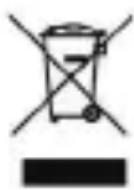
The symbol shown here and on the product means that the product is classed as Electrical or Electronic Equipment and should not be disposed with other household or commercial waste at the end of its working life.
The Waste Electrical and Electronic Equipment (WEEE) Directive (2012/19/EU) has been put in place to recycle products using best available recovery and recycling techniques to minimise the impact on the environment, treat any hazardous substances and avoid the increasing landfi II.
Product disposal instructions for residential users:
If you no longer use the device, remove and dispose of the battery, as well as the device, in compliance with the local recycling procedures. For more information please contact your local authority or the retailer where the product was purchased.
Product disposal instructions for business users:
Business users should contact their suppliers and check the terms and conditions of the purchase contract and ensure that this product is not mixed with other commercial waste for disposal.
If you have any problem:
Please contact the after-sales service on the contact page of our website: www.konrow.com
Made in PRC
2018 Konrow.
If unresolved problem, contact your retailer.
The Konrow supplier warranty is valid for normal use of the device as defined in the instructions. This warranty excludes damage caused by external circumstances.
Specifically, the warranty does not apply if the device is damaged as a result of a bump or drop, an operating error, a connection that does not comply with these instructions, lightning, a surge, or inadequate protection against heat, humidity or freezing temperatures.
The warranty is applicable only in metropolitan France.
- The warranty does not cover user manuals or applications, settings, content or data of any kind.
- The warranty does not cover normal usury of the product (screens, batteries and camera).
- The warranty does not cover damage to the product due to misuse, including in particular those caused by objects, a pressure drop.
- The warranty does not cover any use of the label with the precautions outlined in the manual.
- The warranty does not cover defects caused to the product with another product connected or used with an accessory or software not provided by Konrow.
- The warranty does not cover any damage to the battery.
- The warranty does not cover the product or its accessories if it has been disassembled or modified in any way.
- The warranty does not cover any unidentifiable product by serial number or IMEI number(s). If its elements have been removed, altered or defaced, the warranty does not apply.
- The warranty does not cover damage done to the product caused by exposure to moisture, conditions that extreme heat or cold, corrosion, oxidation, with any liquid whatsoever
- The warranty does not cover any damage to SIM player(s) or SIM MicroSD reader.
- The legal warranty for hidden defects applies in compliance with Articles 1641 et seq. of the French Civil Code.
text_image
Warning symbol with a sine wave inside a triangle, indicating sound or audio hazard.text_image
Warning symbol with a triangle containing a stylized 'e' and sound waves, indicating noise or sound pressure.text_image
Warning symbol with a sine wave inside a triangle, indicating sound or audio hazard.text_image
Warning symbol with a sine wave inside a triangle, indicating sound or hearing hazard.PHOENIX TESTLAB Königswinkel 10, D-32825 Blomberg, Germany.
Téléphone: +49(0)5235-9500-24
Fax: +49(0)5235-9500-28
27/03/2018 Maurice Haddad / CEO
WCDMA Band VIII (Corps) = 0.601 W/Kg
UG_20180327
Declaration of conformity

text_image
KONROWWe, Konrow - 27 boulevard d'Arras - 13004 Marseille - FRANCE,
hereby declare that the Konrow Just5 Mobile complies with the essential requirements of the Directive RED applicable to the following European standards:
Safety: EN 60950-1:2006+A11:2009+A1:2010+A12:2011+A2:2013; EN 50332-1:2013
Safety adaptor: EN 60950-1:2006+A11:2009+A1:2010+A12:2011+A2:2013 Healt: EN 50360:2001+A1:2012; EN 62209-1: 2006; IEC 62209-1: 2005; IEC 62209-2:2010; EN 62209-2:2010; EN 50566:2013; EN 62479:2010 EMC: EN 301 489-1 V2.2.0: 2017-03; EN 301 489-3 V2.2.1: 2017-03; EN 301 489-17 V3.2.0: 2017-03; EN 301 489-52 V1.1.0: 2016-11; EN 55032:2012/AC:2013; EN 61000-3-2:2014; EN 61000-3-3:2013; EN 55024:2010 Radio: EN 301 511 V12.5.1; EN 300 328 V2.1.1; EN 301 908-1 V11.1.1; EN 301 908-2 V11.1.1; EN 300 440 V2.1.1
Notified
The procedure of Declaration of conformity RED was conducted under the supervision of the following organisation:
PHOENIX TESTLAB Königswinkel 10, D-32825 Blomberg, Germany.
Phone: +49(0)5235-9500-24
Fax: +49(0)5235-9500-28
The full text of the device's Declaration of conformity is available on written request to the following address :
27/03/2018 Maurice Haddad / CEO
Date (Name and signature of the duly authorised person)
Specific Absorption Rate:
GSM 900 (Head) = 0.327 W/Kg
WCDMA Band VIII (Body) LTE = 0.601 W/Kg
UG_20180327
French regulation require that the SAR does not exceed the maximum value of 2W/kg on 10g of tissue.
Manufacturer: HEM France
Address: 27 Boulevard d'Arras 13004 Marseille FRANCE
Importer: HEM France
Address: 27 Boulevard d'Arras 13004 Marseille FRANCE
| WWAN | |
| Bandes de fréquences / Frequency Band | Puissance max. / Max. RF Output Power |
| GSM 850 / 900 / 1800 / 1900 Max. 2W / Max. | 1W |
| UTRA FDD BAND I / VIII 0.25 W | |
| WLAN (Wi-Fi) | ||
| Standard Fréquence / Frequency Puissance max. / | Max. RF Output Power | |
| 802.11b/g/n 2412 - 2472 MHz 13.61 dBm EIRP | ||
| Bluetooth | ||
| Version Fréquence | / Frequency range | Puissance max. / Max. RF Output Power |
| BT 2.1 2402 - 2480MHz 2.92 | dBm EIRP | |
| Divers / Other | ||
| Type Fréquence | / Frequency range | Puissance max. / Max. RF Output Power |
| GPS 1575.42 MHz (Only receive) / | ||
| VHF band II: 87.5-108 MHz / | ||
The device complies with radio frequency regulations when the device is used at the ear and at a distance of 5mm from the body.