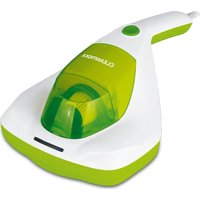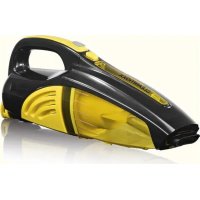
01463 - Vacuum Cleaner Cleanmaxx - Free user manual and instructions
Find the device manual for free 01463 Cleanmaxx in PDF.



| Product type | Rechargeable handheld vacuum cleaner |
| Brand | Cleanmaxx |
| Model | 01463 |
| Power supply | Li-Ion batteries 3.7 V, 1300 mAh Mains adapter 100-240 V, 50/60 Hz, output 5.3 V, 500 mA |
| Runtime | Approximately 10 minutes (with fully charged batteries) |
| Charging time | Approximately 3 hours |
| Power | 25 W |
| Recovery tank capacity | Liquids up to 100 ml (MAX mark) |
| Main functions | Dry and wet vacuuming, crevice nozzle, brush attachment, water nozzle |
| Included accessories | Water nozzle, crevice nozzle, brush attachment, wall mount with screws, mains adapter |
| Maintenance | Recovery tank washable with warm water, dust filter tap clean (do not wash with water) |
| Safety | Do not vacuum ashes, flammable materials, fine dust; use only indoors |
| Spare parts and repairability | Contact DS Produkte GmbH customer service for parts and repairs |
| Dimensions (estimated) | Approximately 40 x 10 x 10 cm |
| Weight (estimated) | Approximately 0.5 kg |
| Warranty | Exclusion for improper use, normal wear |
Frequently Asked Questions - 01463 Cleanmaxx
User questions about 01463 Cleanmaxx
0 question about this device. Answer the ones you know or ask your own.
Ask a new question about this device
Download the instructions for your Vacuum Cleaner in PDF format for free! Find your manual 01463 - Cleanmaxx and take your electronic device back in hand. On this page are published all the documents necessary for the use of your device. 01463 by Cleanmaxx.
USER MANUAL 01463 Cleanmaxx
natural_image
Person using a handheld vacuum cleaner to clean or residue dark material on a white armchair (no text or symbols visible)01463
DE
Gebrauchsanleitung
ab Seite 3
EN
Instruction manual
starting on page 14
FR
Mode d'emploi
natural_image
Black and white photo of a handheld vacuum cleaner (no text or symbols visible)natural_image
Close-up of a hand holding a transparent cylindrical device with a black arrow pointing to the right side (no visible text or symbols)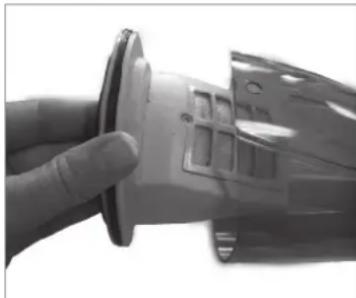
natural_image
Close-up of a hand holding a small mechanical component with a circular base (no visible text or symbols)natural_image
Exterior view of a transparent cylindrical device with a pointed tip and mounting base (no text or symbols visible)Safety Instructions 15
Items Supplied 18
Device Overview 18
Before Initial Use 19
Attaching the Wall Bracket 19
Charging Up the Battery 20
Use 20
Cleaning and Storage 21
Troubleshooting 22
Technical Data 23
Disposal 23
Explanation of Symbols

Danger symbols: These symbols indicate a risk of injury. Read through the associated safety instructions carefully and follow them.
Safe electrical isolation (transformer fail-safe)

Energy efficiency class V
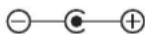
Polarity of the barrel connector (mains adapter)

Switching power supply

Symbol for direct current

Protection class II

Only use indoors!
Read operating instructions before use!

Supplementary information
Explanation of the Signal Words
DANGER
warns of serious injuries and danger to life
warns of possible
WARNING
serious injuries and danger to life
CAUTION
warns of slight to moderate injuries
NOTICE
warns of material damage
Dear Customer,
We are delighted that you have chosen this cordless hand-held vacuum cleaner.
Before using the device for the first time, please read the operating instructions carefully and keep them for future reference. If the device is given to someone else, it should always be accompanied by these operating instructions. They are an integral part of the device.
The manufacturer and importer do not accept any liability if the information in these operating instructions is not complied with.
If you have any questions about the device and about spare parts/accessories, please contact the customer service department via our website:
- This device is intended to be used to suck up dry and wet dirt (without turbo nozzle) and small quantities of liquid of up to 100 ml.

On no account should the device be used to suck up the following:
– glowing ash, cigarette ends, matches, etc.
- i n fl ammable or explosive substances
– very fi ne dust (e.g. concrete dust), ash or toner
- pointed, hard objects such as large pieces of broken glass
- The device is for personal domestic use only and is not intended for commercial applications.
- The device should only be used as described in the operating instructions. Any other use is deemed to be improper.
- The warranty does not cover faults caused by incorrect handling, damage or attempted repairs. The same applies to normal wear and tear.
Safety Instructions
This device may be used by children aged 8 and over and by people with reduced physical, sensory or mental abilities or a lack of experience and/or knowledge if they are supervised or have received instruction on how to use the device safely and have understood the dangers resulting from failure to comply with the relevant safety precautions.
■ Children must not play with the device.
- Cleaning and user maintenance may not be performed by children, unless they are older than 8 years of age and are supervised.
■ Children younger than 8 years of age and animals must be kept away from the device, the mains adapter and the mains cable.
- The device must always be disconnected from the mains adapter and thus from the mains power when it is not being supervised and before assembling, disassembling or cleaning the device.
- Never immerse the device, mains adapter or mains cable in water or other liquids and ensure that they cannot fall into water or become wet.
- Charge up the battery only with the mains adapter supplied with it. Do not use the mains adapter supplied with the device to charge up any other devices.
In the interest of your own safety, you should inspect the device for damage each time before you use it. The device may only be used if it has no visible signs of damage! If the device, the mains adapter or the mains cable are damaged, they must be replaced by the manufacturer, customer service department or a similarly qualified person (e.g. specialist workshop) in order to avoid any hazards.

DANGER – Risk of Electric Shock!
■ Use and store only in closed rooms.
- Do not use the device in rooms with high humidity.
- Should the device fall into water, switch off the power supply immediately. Do not attempt to pull the device out of the water while it is still connected to the mains power!
- Never touch the device, mains cable or mains adapter with wet hands when these components are connected to the mains power.
- Keep the motor unit away from moisture or wet conditions!
If the device is to be used as a hand-held vacuum cleaner for cleaning a car, ensure that the device is not exposed to rain.

WARNING – Danger of Injury!
■ Danger of suffocation! Keep children and animals away from the packaging material.
- Danger of strangulation! Make sure that the mains cable is always kept out of the reach of small children and animals.
- Danger of burns! If the battery has leaked, do not allow your skin, eyes and mucous membranes to come into contact with the battery acid. If you touch battery acid, rinse the affected sites with abundant fresh water immediately and contact a doctor as soon as possible.
■ Danger of becoming stuck! Keep animals, hair, jewellery, wide clothing, fingers and all other body parts away from the nozzles of the device. They could become
stuck to the device. Should the vacuum cleaner become stuck, switch the device off immediately.
- Danger of tripping! Make sure that the connected mains cable does not present a trip hazard.

WARNING – Danger of Fire!
- Do not use the device in rooms containing easily ignitable substances or poisonous and explosive fumes.
- Do not charge the device in the vicinity of highly flammable materials (curtains, textiles, etc.).
- Do not cover the device during operation in order to prevent it from catching fire. Do not insert anything into the ventilation openings of the device and make sure that these do not become clogged.
NOTICE – Risk of Damage to Material and Property
- Only connect the mains adapter to a socket with safety contacts that is properly installed and matches the technical data of the device. The socket must also be readily accessible after connection so that the connection to the mains can quickly be isolated.
■ Remove the mains adapter from the plug socket if a fault occurs during charging or before a thunderstorm. - When you pull it out of the socket, always pull on the mains adapter and never the cable!
■ Make sure that the mains adapter cable is not squashed, bent or laid over sharp edges and does not come into contact with hot surfaces. Do not wrap the cable around the mains adapter (danger of the cable breaking).
The device should only be used if it has been completely and correctly assembled! The collecting container and the dust filter must be inserted and must not be damaged! If dirt were to get inside the motor unit, this could damage the motor. - Protect the device from heat, naked flames, sub-zero temperatures, persistent moisture, wet conditions and impacts.
■ Use only original spare parts from the manufacturer in order to guarantee that there is no interference that may prevent the device from working and to avoid damage. - Do not place or lay any heavy objects on the device, the mains adapter or the cable of the mains adapter.
Items Supplied
- Motor unit with integrated battery
• Collecting container
• Dust filter with filter holder - Wet nozzle
- Crevice nozzle
- Brush attachment
• Wall bracket incl. fastening material - Mains adapter
- Instruction manual
Check the items supplied for completeness and transport damage. If you find any damage to the components, do not use them (!), but contact our customer service department.
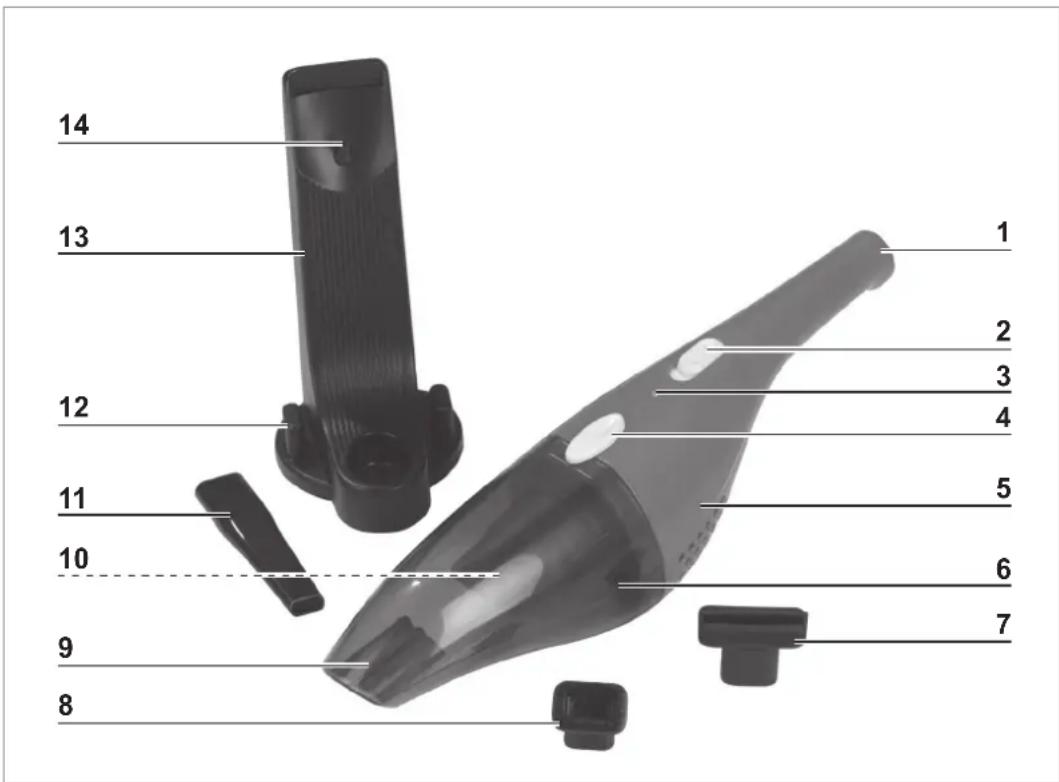
Device Overview
text_image
14 13 12 11 10 9 8 1 2 3 4 5 6 71 Handle
2 On / Off switch
3 Charging control lamp
4 Release button for the collecting container
5 Motor unit
6 Collecting container
7 Wet nozzle
8 Brush attachment
9 Suction opening
10 Dust filter with filter holder (inside the collecting container)
11 Crevice nozzle
12 Storage area for nozzles
13 Wall bracket
14 Barrel connector of the mains adapter
Accessories
- Use the crevice nozzle (11) to suck up dirt and dust. It is ideal for places which are hard to get to, such as corners, crevices or recesses.
- The brush attachment (8) is placed directly onto the crevice nozzle. Use to remove dust from delicate objects such as picture frames, lamp shades, keyboards, books etc.
- Use the wet nozzle (7) to remove wet dirt and small quantities of liquid on smooth surfaces.
- The wall bracket (13) with storage area for the nozzles (12) and a recess for the barrel connector (14) of the mains adapter is intended to be used for storing the device in a way that saves space and for charging the battery.
Before Initial Use
- Before using the device, remove all packaging materials and any labels that may be on the device and are used for protection during transportation or for advertising. Never remove the rating plate and any possible warnings!
- Attach the wall bracket (13) (see the "Attaching the Wall Bracket" chapter).
- Charge the battery (see the "Charging Up the Battery" chapter).
Attaching the Wall Bracket
PLEASE NOTE!
- Use the fastening material supplied to hang up the wall bracket. If you are unsure whether the fastening material supplied is suitable for the wall, seek advice from a specialist stockist.
-
Hang the wall bracket in a secure and solid place.
■ Before drilling, ensure that there are no pipes or cables behind the intended drilling point. -
Drill holes at the correct distance into the wall and place dowels in them.
- Screw the screws into the dowels. They should protrude by approx. 5 mm out of the wall.
- Hang the wall bracket on the screws.
Charging Up the Battery

PLEASE NOTE!
- Pull the mains adapter out of the plug socket if it is not used for a lengthy period of time.

- It is essential that you charge up the battery fully before you first use the device in order to achieve the maximum charging capacity. The first charging process will last for approx. 3 – 4 hours.
- If the battery is fully discharged during use, it will take approx. 3 hours for the battery to be recharged.
natural_image
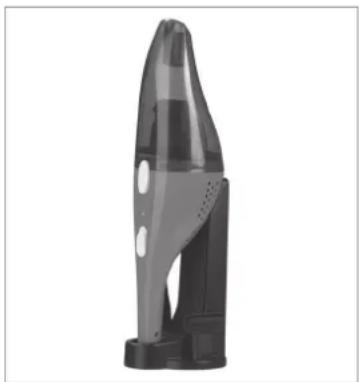
Black and white photo of a sleek, pointed object resembling a stylized rocket or device (no text or symbols visible)- Insert the device with the handle (1) pointing downwards into the wall bracket (13) and, as you do this, make sure that the barrel connector (14) is plugged into the connecting socket on the bottom of the motor unit (5).
- Connect the mains adapter to a properly installed, easily accessible plug socket.
-
Allow the battery of the device to charge up for around 3 – 4 hours in order to achieve the maximum charging capacity. The control lamp lights up when the device is connected to the mains power.
-
First disconnect the mains adapter from the mains power and then take the device out of the wall bracket and thus disconnect it from the barrel connector.
Use

PLEASE NOTE!
■ Ensure that there are no larger, sharp objects on the surface which is to be cleaned.
■ Make sure that the MAX marking on the collecting container is not exceeded.
■ Always hold the device horizontally when liquids are sucked up. Make sure that sucked-up liquids do not get into the motor unit.
- Do not use the device when it is connected to the mains adapter.
- Select a nozzle (see the "Device Overview" chapter – "Accessories"). The nozzles are inserted into the suction opening (9) on the front of the device. The brush attachment (8) is placed directly onto the crevice nozzle.
- Switch on the device by sliding the On / Off switch (2) to position I. The device will start vacuuming immediately.
- Move the device over the surface to be cleaned.
- After cleaning, switch off the device by sliding the On / Off switch to position 0.
Cleaning and Storage

PLEASE NOTE!
■ Never use soap or other cleaning products to clean the dust filter. This would cause damage to the dust filter.
■ The dust filter must not be cleaned with water.
■ Only reassemble the device once all of the parts are completely dry.
- Do not use any sharp or abrasive cleaning agents for cleaning. They could damage the surfaces.
natural_image
Close-up of a hand holding a transparent plastic device with a black arrow pointing to the right side (no visible text or symbols)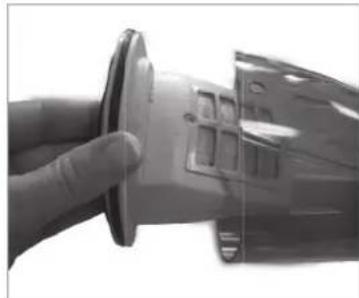
natural_image
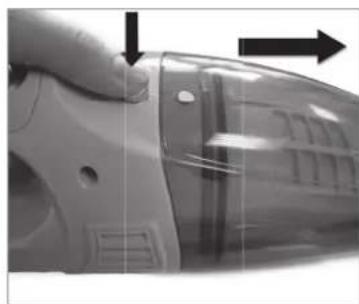
Close-up of a hand holding a mechanical component, possibly a cutting tool or grinder, with no visible text or symbols.- Hold the device securely by the handle (1) and press the release button (4). The collecting container (6) is released and can be pulled off.
- Pull the dust filter (10) with the filter holder out of the collecting container.
-
Pull the dust filter out of the filter holder.
-
Empty the collecting container over a dustbin.
- Tap out the dust filter over a dustbin. Brush off with a soft brush if necessary.
- Clean the collecting container and the filter holder with clear, lukewarm water if necessary.
- Allow all parts to dry completely before reassembling them. Only ever dry them in the air, and never use a hair dryer to do so.
Storage
natural_image
Exterior view of a transparent cylindrical device with a pointed top and base, featuring a small protrusion at the base (no text or symbols visible)- Store the device in a cool, dry place which is protected from direct sunlight and is out of the reach of children and animals.
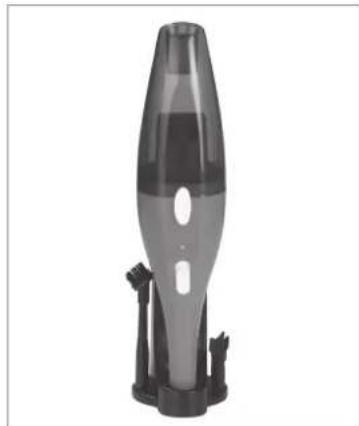
- For easy storage, hook the device with the handle (1) pointing downwards into the wall bracket that is also supplied and place the nozzles into the storage area (12).
Troubleshooting
If the device does not work properly, check whether you are able to rectify the problem yourself. If the problem cannot be solved with the steps that are listed, contact the customer service department.

Do not attempt to repair an electrical device yourself!
| Problem Possible cause / solution | |
| The device only works slowly or does not start. | • Is the battery fl at? Charge the battery (see the "Charging Up the Battery" chapter). |
| Low suction force. | • Is the collecting container (6) full? Clean the collecting container regularly (see the "Cleaning and Storage" chapter).• Is the dust filter (10) heavily clogged up? Clean the dust fi lter (see the "Cleaning and Storage" chapter).• Is the suction opening (9) blocked? Switch off the device and remove the blockage.• It is also possible that some smaller items will remain stuck to the carpet or will be too big / heavy to be picked up by the device. Remove these foreign objects by hand. |
| Dust escapes from the device during cleaning. | • Check whether the collecting container and dust filter have been inserted correctly and adjust the fit if necessary. |
| The control lamp does not light up when the device is connected to the mains power. | • Is the mains adapter plugged correctly into the plug socket and is the barrel connector in the connecting socket of the device? Correct the fi t if necessary.• Is the plug socket defective? Try another plug socket.• Check the fuse of the mains connection. |
| Unusual odour | • A new odour is normal when the device is used for the fi rst time. This should disappear over time. |
Technical Data
Article number: 01463
Manual ID: Z 01463 M DS V1 1018
Device
Model number: Y8291BL
Battery voltage: 3.7 V DC (Li-ion battery, 1300 mAh)
Power: 25 W
Battery charge time: approx. 3 hours
Battery operating time: approx. 10 minutes (with fully charged battery)
Mains adapter
Model number: ZD5C053050EUE
Power supply: 100 – 240 V\~ 50 / 60 Hz
Output: 5.3 V DC = 500 mA
Protection class: II

Disposal

Dispose of the packaging material in an environmentally friendly manner so that it can be recycled.
This device is governed by the European Directive 2012/19/EU on waste electrical and electronic equipment (WEEE). Do not dispose of this device as normal domestic waste, but rather in an environmentally friendly manner via an officially approved waste disposal company.

The battery should be removed prior to disposal of the device and disposed of separately from the device. To protect the environment, batteries may not be disposed of with the normal household waste, but must be taken to suitable collection points.
Disconnecting the Mains Adapter from the Wall Bracket
The wall bracket (13) and the mains adapter must be disposed of separately.
- Undo the screw on the back of the wall bracket.
- Remove the cover.
- Pull the barrel connector (14) of the mains adapter out of the recess and pull the cable out of the wall bracket.
- Dispose of the wall bracket in an environmentally friendly manner.
- Dispose of the mains adapter in an environmentally friendly manner via an officially approved waste disposal company.
Removing the Battery

PLEASE NOTE!
■ The motor unit may only be opened for the disposal of the battery.
■ Take care when opening the motor unit, short-circuits must be avoided.
- Do not open the battery as there is a danger of a short-circuit; irritant vapours or caustic liquids may also escape.
- The battery must not be taken apart, thrown into a fire, immersed in liquids or short-circuited.
- Do not expose the battery to strong sunlight, heat or fire as there is a risk of explosion.
This device contains a rechargeable battery, which must be removed prior to disposal of the used device.
- Undo the screws on the side of the motor unit.
- Take apart the side parts.
- Remove the battery pack from the device.
- First disconnect the red, then the black connecting cable.
- Dispose of the rechargeable battery in an environmentally friendly manner via an offi cially approved waste disposal company.
Customer Service / Importer:
DS Produkte GmbH
Am Heisterbusch 1, 19258 Gallin, Germany
Tel.: +49 38851 314650
(Calls to German landlines are subject to charges. The cost varies depending on the service provider.)
All rights reserved.
Contenu
Installation du support mural 30
Installation du support mural