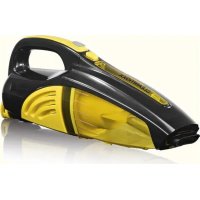
00973 - Vacuum Cleaner Cleanmaxx - Free user manual and instructions
Find the device manual for free 00973 Cleanmaxx in PDF.

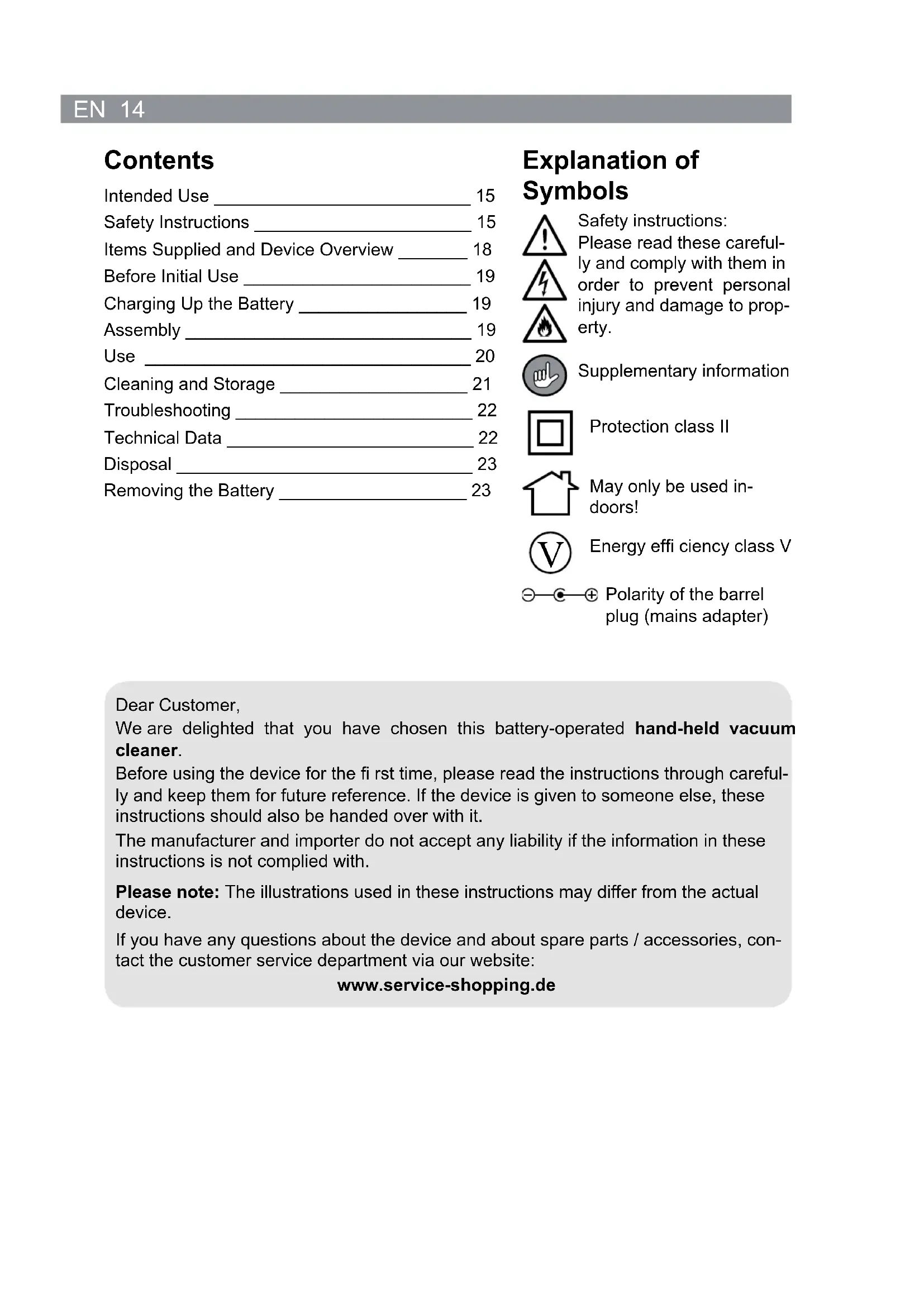


| Product Type | Cordless Handheld Vacuum Cleaner |
| Brand | Cleanmaxx |
| Model | 00973 |
| Power Supply | Mains power adapter 100-240 V, 50/60 Hz, output 9 V, 300 mA |
| Appliance Supply Voltage | 7.4 V (2 Li-Ion batteries 1500 mAh) |
| Power | 35 W |
| Battery Type | Rechargeable Lithium-Ion (Li-Ion) |
| Battery Capacity | 1500 mAh each |
| Charging Time | Approximately 6 to 7 hours (first charge: 7 to 11 hours) |
| Runtime | Approximately 15 to 20 minutes (fully charged batteries) |
| Included Accessories | Brush nozzle, crevice nozzle, water nozzle |
| Filter Type | Washable water filter |
| Dust Container Capacity | MAX mark not to be exceeded |
| Intended Use | Dry surfaces; suction of small amounts of liquid with water nozzle |
| Protection Class | II (double insulation) |
| Protection Degree | IP20 (indoor use only) |
| Cleaning and Maintenance | Container, filter and accessories washable with water; fully dry before reassembly |
| After-Sales Service | DS Produkte GmbH, Am Heisterbusch 1, 19258 Gallin, Germany, Tel. +49 38851 314650 |
| Weight (approx.) | Approximately 0.5 kg |
Frequently Asked Questions - 00973 Cleanmaxx
User questions about 00973 Cleanmaxx
0 question about this device. Answer the ones you know or ask your own.
Ask a new question about this device
Download the instructions for your Vacuum Cleaner in PDF format for free! Find your manual 00973 - Cleanmaxx and take your electronic device back in hand. On this page are published all the documents necessary for the use of your device. 00973 by Cleanmaxx.
USER MANUAL 00973 Cleanmaxx
www.service-shopping.de
Safety Instructions 15
Items Supplied and Device Overview 18
Before Initial Use 19
Charging Up the Battery 19
Assembly 19
Use 20
Cleaning and Storage 21
Troubleshooting 22
Technical Data 22
Disposal 23
Removing the Battery 23
Explanation of Symbols

Safety instructions:
Please read these carefully and comply with them in order to prevent personal injury and damage to property.


Supplementary information


Protection class II

May only be used indoors!

Energy efficiency class V

Polarity of the barrel plug (mains adapter)
Dear Customer,
We are delighted that you have chosen this battery-operated hand-held vacuum cleaner.
Before using the device for the first time, please read the instructions through carefully and keep them for future reference. If the device is given to someone else, these instructions should also be handed over with it.
The manufacturer and importer do not accept any liability if the information in these instructions is not complied with.
Please note: The illustrations used in these instructions may differ from the actual device.
If you have any questions about the device and about spare parts / accessories, contact the customer service department via our website:
www.service-shopping.de
Intended Use
- This device is intended to be used for vacuum cleaning on dry surfaces.

-
On no account should the device be used to suck up the following:
-
glowing ash, cigarette ends, matches, etc.
-infl ammable or explosive substances, -
very fine dust (e.g. concrete dust), ash or toner,
pointed, hard objects such as large pieces of broken glass. -
The device is for personal use only and is not intended for commercial applications.
- Use the device only as described in the instructions. Any other use is deemed to be improper.
- The following are excluded from the warranty: all defects caused by improper handling, damage or unauthorised attempts at repair. This also applies to normal wear and tear.
Safety Instructions
This device may be used by children ages 8 and over as well as persons with impaired physical, sensory or mental capacities or those lacking experience and/or knowledge if they are supervised or have been instructed in how to safely use the device and have understood the risks associated with operating the device.
Children must not play with the device.
- Cleaning and user maintenance must not be performed by unsupervised children.
- Keep children under 8 years of age and animals away from the device and the connection line! Improper use may result in injury and electrical shock.
If the device is not supervised, before assembling, disassembling or cleaning the device, it must always be disconnected from the power supply. - Only ever charge up the rechargeable battery using the adapter which is supplied with the device. Do not charge up any other devices using the charger which is supplied with the device.
- Never immerse the device, mains cable or mains plug in water or other liquids and ensure that they cannot fall into water or become wet.
If the device, the connection line or the device plug is damaged, it must be replaced by the manufacturer, customer service or by a similarly qualified person (e.g. qualified workshop) to avoid any risks.

Risks of injury
Children and animals must be kept away from the device and packaging material. There is a danger of injury and suffocation!
- Keep animals, hair, jewellery, loose-fi tting clothing, fi ngers and all other body parts away from the suction opening of the device. They could be caught in the vacuum cleaner. If the device attaches itself when vacuuming, immediately turn it off.
■ Ensure that the connected mains cord does not pose a tripping hazard.
Do not use the device if it is damaged.
- Do not disassemble the device (except for removing the rechargeable battery prior to disposal of the device). Only have the device repaired by a qualified workshop or by customer service.

Danger of electrocution
- Only use and store the device in enclosed areas. Do not operate the device in rooms with high humidity.
If you use the device as a handheld vacuum cleaner for cleaning the inside of a car, make sure that it is not exposed to rain or moisture. - Never touch the device, the mains cord or the mains plug with wet hands.
If the device does fall in water, immediately disconnect the power supply. Never attempt to pull the device out of the water when it is connected to the mains supply! -
Only connect the device to a socket, whose mains voltage complies with the data on the name plate. The socket must also be easily accessible after the device has been connected. Only use proper extension cords, whose technical data correspond to those of the device.
Turn the device off and pull the mains plug out of the socket: -
in the event of a storm,
- in the event of damages / faults (e.g. unusual noises, formation of odour or smoke),
- if foreign bodies have found their way into the device,
- if the device has fallen down.
Before using the device again, have it checked by a qualifi ed workshop.
The device must be switched off when you pull out the mains plug or connect it with a socket.
- Do not use the device when it is still connected to the adapter or the power source.
Always pull on the plug itself and never on the mains cord!
Make sure that the mains cord does not get pinched, kinked or laid over sharp edges and does not come into contact with hot surfaces. Do not wind the mains cord around the charger (danger of breaking the cable).
Fire hazard
- Do not use the device in rooms containing easily flammable substances or toxic and explosive vapours.
- Do not operate the device on hot surfaces or near open fl ames.
- Do not cover the device during operation to prevent the device from catching fire. Do not insert anything in the device's vents and ensure that they are not plugged.
In case of fire: Do not use water to extinguish it! Smother the flames using a fire blanket or a suitable fire extinguisher.

Danger from Rechargeable Batteries
- Rechargeable batteries can be deadly if swallowed. Seek medical attention immediately if a battery has been swallowed.
If the battery has leaked, do not allow your skin, eyes and mucous membranes to come into contact with the battery acid. If you touch battery acid, rinse the affected sites with abundant fresh water immediately and contact a doctor as soon as possible.
The battery must not be taken apart, thrown into a fire, immersed in liquids or short-circuited.
Danger of damages to material, property and the device
Each time before you use the device and accessories, check it and the accessories for damages. Do not use the device if you identify damages!
- Only use the device if it has been completely and correctly assembled! The collecting container, filter compartment and the filter must be in place and undamaged! Dirt that penetrates the inside of the motor unit could damage the motor.
Pay attention to the collecting container's MAX mark. If the mark is reached during use, empty the collecting container. The fi iter compartment and the fi iter must also be cleaned regularly to prevent the motor from being overloaded.
After being washed out, the collecting container, fi iter compartment and the fi iter must be completely dry before they may be inserted in the device.
- Do not expose the device to extreme temperatures or severe fluctuations in temperature.
- Do not allow the device to fall or be exposed to severe impact.
Only use original accessories provided by the manufacturer.
Store the device so that it is not accessible to children and animals in a cool, dry location that is not exposed to direct sunlight.
Items Supplied and Device Overview
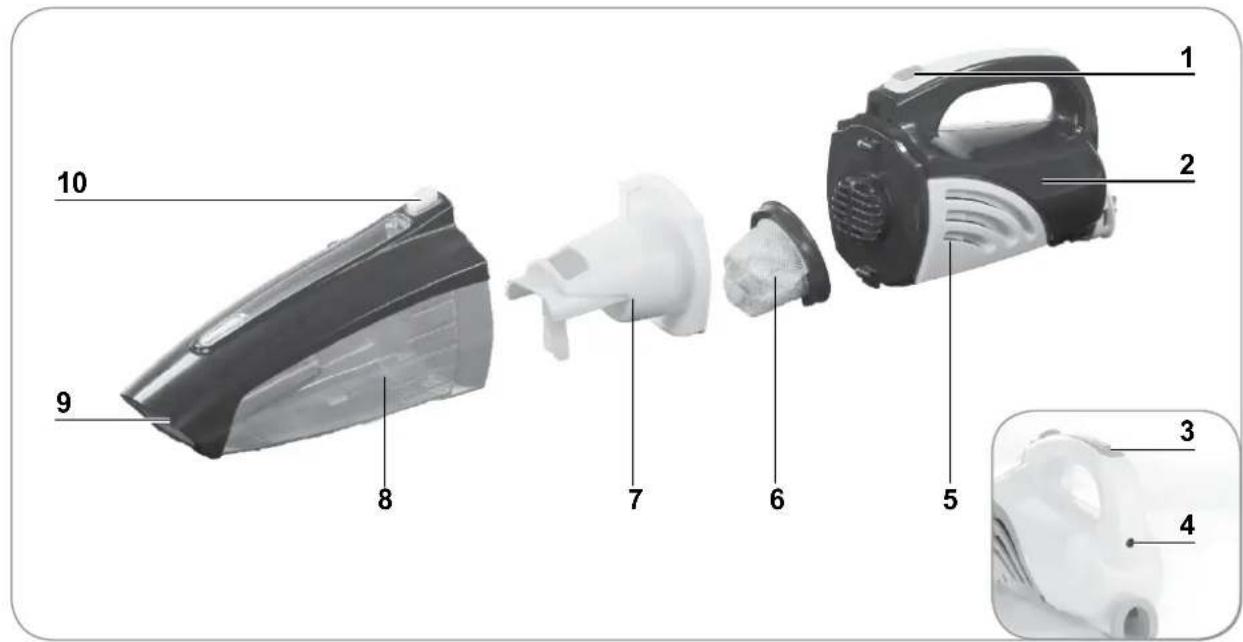
1 Handle with On / Off switch
2 Main unit
3 Charging control lamp
4 Socket for the mains adapter
5 Ventilation openings
6 Filter
7 Filter compartment
8 Collecting container
9 Suction opening and nozzle attachment point
10 Release switch for the collecting container
Not shown:
- Mains adapter
Suction Nozzles
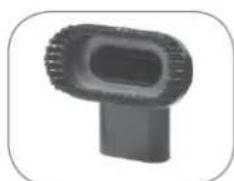
- Brush nozzle: Use the brush nozzle to remove dust from delicate objects such as picture frames, lamp shades, keyboards, books etc.
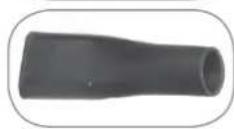
- Crevice nozzle: Use the crevice nozzle to vacuum in folds in fabrics, corners, recesses or other places which are hard to reach.
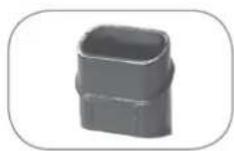
- Wet nozzle: You can use this nozzle to suck up small quantities of liquids (e.g. spilt mineral water).
Before Initial Use

CAUTION!
-
Keep children away from the packaging material. There is a danger of suffocation!
-
Unpack all parts and check the items supplied for completeness (see the "Items Supplied and Device Overview" chapter) and transport damage. Comment: Note that two nozzles may be placed inside each other. If you find any damage to the components, do not use them (!); instead, contact our customer service department.
- Remove any fi Ims or stickers that may be present from the device and accessories.
- Charge up the battery (see the "Charging Up the Battery" chapter).
Charging Up the Battery
CAUTION!
■ Risk of short-circuits! Do not insert any conducting objects (e.g. screwdrivers or similar items) into the charging socket of the main unit.
The battery may only be charged using the adapter which is supplied with the device. Do not use the adapter to charge up other batteries.
- Remove the mains plug of the adapter from the plug socket if you are not using it for a prolonged period.
It is essential that you charge up the battery fully before you first use the device in order to achieve the maximum charging capacity. The first charge will last for 7 - 11 hours.
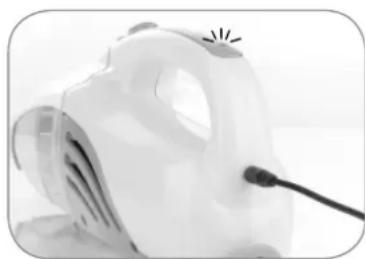
- First connect the adapter to the socket on the main unit and then to a properly installed and easily accessible plug socket. The charging control lamp on the handle of the main unit will light up.
-
Allow the battery of the device to charge up for approx. 7-11 hours on the first charge and then for approx. 6-7 hours. The charging control lamp goes out when the battery is fully charged.
-
Disconnect the adapter from the mains power and then from the device. Store it out of the reach of children.
Assembly
Attaching / Removing Suction Nozzles
- Plug the nozzle you want as far as it will go into the suction opening on the front of the collecting container and check that it fits securely.
- To remove a suction nozzle, pull it out of the suction opening.
Removing / Inserting the Collecting Container
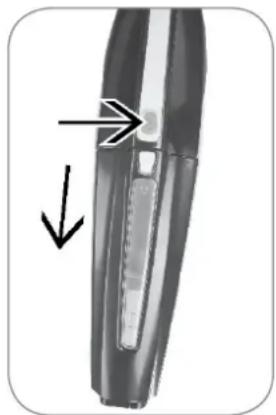
- Removing: Hold the device with the collecting container pointing downwards. Press the button for releasing the collecting container and remove the main unit from the collecting container.
- Inserting: On the bottom edge of the main unit there is a locking lug. Plug this into the associated slot in the collecting container. Then press the two parts of the device together at the top until the locking mechanism is heard to lock in place. It may be necessary to press the release button here. Then check whether the collecting container is fitted in place properly.
Use

CAUTION!
- Never hold the nozzles close to parts of your body or animals during use and do not place your hands inside the nozzles. They could become stuck to the device / injured. Should the cordless vacuum cleaner become stuck, switch the device off immediately.
-
Switch on the device only once you have ensured that the suction nozzle, the collecting container, the fi liter compartment and the fi liter have been inserted correctly.
Always switch the device off fi rst before you attach or remove a nozzle!
On no account should the device be used to suck up the following: -
Glowing ash, cigarette ends, matches, etc.
- Infl ammable or explosive substances
- Very fine dust (e.g. concrete dust), ash or toner
-
Pointed, hard objects such as large pieces of broken glass
-
Empty and clean the collecting container after each use (see the "Cleaning and Storage" chapter).
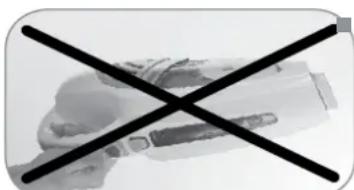
IMPORTANT: If there is liquid in the collecting container, do not overfill it and do not turn the device over with the top pointing downwards so that no water can get into the ventilation opening in the fiiter compartment and thus to the motor!
- Do not use the device when it is connected to the adapter.

Switch the device off after each surface has been cleaned as this will considerably increase the operating time on each battery charge.
- Place one of the nozzles into the suction opening. However, you can also use the cordless vacuum cleaner without a nozzle.
- Press the On/Off switch to switch on the device.
- Guide the nozzle over the surface to be cleaned. During use, check whether the collecting container is already full. If this is the case, it needs to be emptied.
21 EN
- To switch off the cordless vacuum cleaner, press the On/Off switch.
- Empty the collecting container after use and clean the fi iter compartment and the fi iter on a regular basis (see the "Cleaning and Storage" chapter).
- Charge up the battery again if necessary (see the "Charging Up the Battery" chapter).
Cleaning and Storage
CAUTION!
Make sure that the device is switched off before cleaning it.
- Never immerse the device, the adapter or the cable in water or other liquids.
- Make sure that no liquid gets into the main unit during cleaning. Only the collecting container, the fiiter compartment, the fiiter and the suction nozzles may be cleaned with water.
- Never use soap or other cleaning products to clean the fi liter. This would cause damage to the fi liter.
The fi ler is neither machine-washable, dishwasher-safe nor suitable for tumble drying! Only ever dry the fi ler in the air, and never use a hair dryer to do so.
Only reassemble the device once all of the parts are completely dry!
- Do not use any corrosive or abrasive cleaning agents to clean the housing. They could damage the surfaces. If necessary, clean the housing using a slightly damp, soft cloth.

The filter may lose some of its colour over time. This is normal and does not have any adverse effect on function. However, if it is damaged or worn, it must be replaced.
- It needs to be emptied by no later than when the collecting container is full, and after each use (see the "Emptying the Collecting Container and Cleaning the Filter" section).
- Clean the housing of the main unit if necessary using a damp, soft cloth. Then dry it with a soft cloth.
- Remove hair and fluff from the nozzles at regular intervals.
- Check the adapter and its mains cable for damage at regular intervals.
- Keep the device ready for operation. Charge up the battery after each use (see the "Charging Up the Battery" chapter).
Emptying the Collecting Container and Cleaning the Filter
- Carefully remove the collecting container from the main unit (see the "Assembly" chapter, "Removing / Inserting the Collecting Container" section).
- Remove the fi ler compartment and fi ler from the collecting container.
-
Clean the collecting container, the fi iter compartment and the fi iter:
-
If you have sucked up dry dirt, empty the collecting container over a rubbish bin. Tap out the fi liter compartment and the fi liter. Then wipe them down using a damp cloth.
-
If there is wet dirt in the collecting container, rinse these parts under running water.
-
Let all parts dry completely in the air before you put them back together. CAUTION: Never re-insert the filter and the filter compartment if they are still damp. The device is assembled in the reverse order.
- Store the device and the accessories in a dry place that is protected from sunlight and is not accessible to children and animals.
Troubleshooting
If the device stops working properly, first check whether you are able to correct the problem yourself.

Do not attempt to repair a defective electrical device yourself!
| Problem Possible cause / solution | |
| The device only works slowly or does not start. | Is the battery fl at? Recharge it. |
| Low suction force. | Is the collecting container full? Empty it. Is the fi liter heavily clogged up? Clean it. Is the suction opening / nozzle blocked? Switch off the device and remove the blockage. It is also possible that some smaller items will remain stuck to the carpet or will be too big/heavy to be picked up by the device. |
| Dust escapes from the device during cleaning. | Check whether the collecting container, fi liter compartment and fi liter are inserted correctly and adjust the fi tting if necessary. |
| The charging control lamp does not light up when the device is connected to the mains power. | Is the mains adapter connected to the plug socket and the connecting socket on the device properly? Is the plug socket defective? Try another plug socket. Check the fuse of your mains connection. Is the battery fully charged? |
Technical Data
Device
Model number:
Article number:
Voltage supply:
Power:
Battery
Charging time:
Operating time:
PC-P003WH
00973 (black/yellow)
01883 (blue/silver)
7.4 V (2x Li-ion 1500mAh)
35W
approx. 6-7 hours
approx. 15-20 minutes
(if battery is fully charged)
Customer Service / Importer:
DS Produkte GmbH
Am Heisterbusch 1
19258 Gallin
Germany
Tel.: +49 38851 314650
(Calls to German landlines are subject to charges. The cost varies depending on the service provider.)
Mains adapter
Model number: XS-0900300HEUD
Input: 100 - 240V 50 / 60Hz,0.3A
Output: 9 V DC, 300 mA
Protection class: II, IP20

Disposal
The packaging material is recyclable. Please dispose of it in an environmentally friendly manner and take it to a recycling centre.
Dispose of the device in an environmentally friendly manner. It should not be disposed of in the normal domestic waste. Dispose of it at a recycling centre for used electrical and electronic devices.
You can obtain more information from your local authorities.
The non-rechargeable battery should be removed prior to disposal of the device and disposed of separately from the device. To protect the environment, non-rechargeable and rechargeable batteries may not be disposed of with normal household waste, but must be taken to suitable collection points. Also note the relevant statutory regulations governing the disposal of batteries.
Removing the Battery
CAUTION!
- Do not open the battery as there is a danger of a short-circuit; irritant vapours or caustic liquids may also escape.
Do not expose the battery to strong sunlight, heat or fire as there is a risk of explosion.
This device contains a rechargeable battery, which must be removed prior to disposal of the used device.
- Undo the screw on the main unit.
- Remove the cap on the opening for plugging in the handle rod.
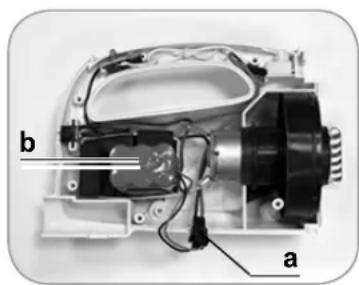
- Take the two halves of the main unit apart.
- Remove the battery pack (b) from the device. You may need to apply a little force to do this.
- Open the clip (a) on the connecting cable.
- Dispose of the battery in an environmentally friendly manner (collection points or retailers).
Contenu
Chere cliente, cher client,
www.service-shopping.de
www.service-shopping.de