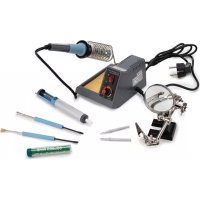
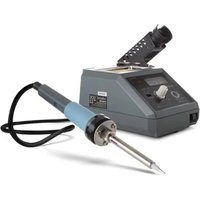
VTSS4NSET - Welding machine VELLEMAN - Free user manual and instructions
Find the device manual for free VTSS4NSET VELLEMAN in PDF.



| Product Type | Electronic Soldering Station |
| Brand | Velleman |
| Model | VTSS4NSET |
| Power Supply | 220-240 V~, 50 Hz |
| Power Consumption | 48 W |
| Temperature Range | 150-480 °C |
| Weight | 1.26 kg |
| Included Accessories | Third hand with magnifier, desoldering pump, lead-free solder, accessory kit (brush, scraper), two spare tips |
| Tip Included | Copper-iron tip |
| Recommended Alloy Type | 60/40 tin-lead or lead-free (RoHS) |
| Normal Operating Temperature (tin-lead) | 270-320 °C |
| Normal Operating Temperature (lead-free) | 300-360 °C |
| Cleaning Sponge | Included, moisten with water |
| Iron Holder | Integrated, with sponge slot |
| Safety | Shutdown with automatic cooling; do not unplug during cooling |
| Tip Maintenance | Clean with damp sponge; tin before storage; polish with 600-800 grit emery paper if oxidized |
| General Maintenance | Clean with damp cloth and mild detergent; do not immerse |
| Repairability | User-replaceable tip; internal repair by qualified technician |
| Warranty | 24 months for consumers (terms apply) |
| Intended Use | Electronic soldering on printed circuit boards |
| Required Ventilation | Well-ventilated area or under fume extractor |
| Storage Ambient Temperature | Room temperature, after complete cooling |
| Moisture Protection | Use indoors, away from water |
Frequently Asked Questions - VTSS4NSET VELLEMAN
User questions about VTSS4NSET VELLEMAN
0 question about this device. Answer the ones you know or ask your own.
Ask a new question about this device
Download the instructions for your Welding machine in PDF format for free! Find your manual VTSS4NSET - VELLEMAN and take your electronic device back in hand. On this page are published all the documents necessary for the use of your device. VTSS4NSET by VELLEMAN.
USER MANUAL VTSS4NSET VELLEMAN
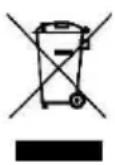
To all residents of the European Union Important environmental information about this product
This symbol on the device or the package indicates that disposal of the device after its lifecycle could harm the environment. Do not dispose of the unit (or batteries) as unsorted municipal waste; it should be taken to a specialized company for recycling.
This device should be returned to your distributor or to a local recycling service. Respect the local environmental rules.
If in doubt, contact your local waste disposal authorities.
Thank you for choosing Velleman! Please read the manual thoroughly before bringing this device into service. If the device was damaged in transit, do not install or use it and contact your dealer.
2. Safety Instructions
This device can be used by children aged from 8 years and above, and persons with reduced physical, sensory or mental capabilities or lack of experience and knowledge if they have been given supervision or instruction concerning the use of the device in a safe way and understand the hazards involved. Children shall not play with the device. Cleaning and user maintenance shall not be made by children without supervision.

Read and understand this manual and all safety signs before using this appliance.

Indoor use only. Keep this device away from rain, moisture, splashing and dripping liquids. Never put objects filled with liquids on top of or close to the device.

Always disconnect mains power when the device is not in use or when servicing or maintenance activities are performed. Handle the power cord by the plug only.
Caution! After switching off, leave the power cord plugged in for a few minutes. When you switch off the unit, the automatic cooling function blows cooling air through the heater pipe for a short period. This protects the heater from damage and extends its lifetime. Do not disconnect the mains plug during this cooling process.
Do not crimp the power cord and protect it against damage.
Warning! If the power cord is damaged, it must be replaced by the manufacturer, its service agent, or similarly qualified persons in order to avoid any hazard.
Make sure that the available voltage does not exceed the voltage stated in the specifications of this manual.
Plug the power cord into a suitable, earthed mains outlet.
Risk of electroshock when opening the cover.
Touching live wires can cause life-threatening electroshocks. Do not disassemble or open the housing yourself. Have the device repaired by qualified personnel.
Do not operate the device with wet hands.
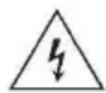
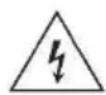
Never use the device on live electronic circuits. Make sure power to the work piece is cut and capacitors are discharged.
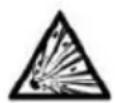
Do not use near inflammable products or in explosive atmospheres. Heat can cause fire to inflammable products even when they are not in sight. Only use in properly ventilated rooms.
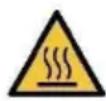
Incorrect use may cause fire.
Do not touch the shafts, tips, or hot air gun as this can cause serious burns. Keep the tips and hot air away from the body, clothes, or other flammable material. Do not aim the hot air gun at the eyes. Use gloves and/or heat-resistant tools to pick up the PCB assembly to prevent burns. Always return the irons and gun to their stands between uses; always let the device cool down after use and before storage.
Place the device on a level, stable, and fire resistant working surface.

WARNING! - This tool must be placed on its stand when not in use; do not leave the tool unattended when switched on.

Do not inhale solder fumes. The vapours that are released during soldering are harmful. Therefore, you shall only use the soldering station in well-ventilated areas or under an exhaust hood (solder fume extractor). Dispose of fume filters and solder residue in accordance with local regulations.
- Use the soldering iron on a heatproof workbench.
- Place the soldering iron in its holder after use.
- Let a hot soldering iron cool down naturally and do not immerse in water.
3. General Guidelines
Refer to the Velleman® Service and Quality Warranty on the last pages of this manual.
- All modifications of the device are forbidden for safety reasons. Damage caused by user modifications to the device is not covered by the warranty.
- Only use the device for its intended purpose. Using the device in an unauthorised way will void the warranty.
- Damage caused by disregard of certain guidelines in this manual is not covered by the warranty and the dealer will not accept responsibility for any ensuing defects or problems.
- Nor Velleman NV nor its dealers can be held responsible for any damage (extraordinary, incidental or indirect) - of any nature (financial, physical...) arising from the possession, use or failure of this product.
- Keep this manual for future reference.
4. Overview
Refer to the illustrations on page 2 of this manual.
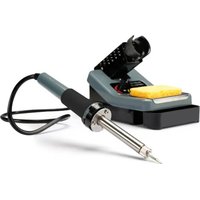
| 1 | on-off switch |
| 2 | temperature control |
| 3 | sponge |
| 4 | iron stand |
| 5 | bit |
| 6 | heating element |
| 7 | antiskid rubber |
| 8 | handle |
5. Instructions
5.1 Preparation
- Put the soldering iron holder in the corresponding hole in the casing of the soldering station.
- Make sure the sponge is completely saturated with clean water and let it drip off before you put it in the sponge tray.
- Put the soldering tip into the shaft and attach it to the soldering iron with a coupling nut. Only change a soldering tip when the soldering iron has cooled down. Loosen the coupling nut and gently pull out the soldering tip. Check the screw fitting regularly and tighten it when necessary.

WARNING! - Never use the soldering iron without the soldering tip.
VTSS4NSET
5.2 Electrical Connection
- Put the on-off switch in the 0-position (off) and connect the device to a 220 - 240V , 50Hz power supply. The soldering station is now ready for use.
5.3 Temperature Setting
- Switch on the soldering station by putting the on-off switch in the 1-position (on) (the red switch will light). You can set the temperature between 150^ and 450^ .
5.4 Operation
-
Prerequisite for clean joints is the use of suited solder and a correct use of the soldering station. We recommend the use of solder with a resin flux core. Halogen containing solder should not be used in any case. Before the first uses, you should tin the new soldering tip. Switch on the soldering station and apply some solder to the soldering tip at a temperature of 200^ . Perfect joints are only possible at the right soldering temperature. When the soldering temperature is too low, the solder will not melt enough causing unclean (cold) soldering points. At too high temperatures, the solder will burn and the tin-solder will not flow. Moreover, there is the danger of damaging the PCB or the components. Only when the temperature of the soldering tip is perfectly adapted to the solder will you have clean joints.
-
The most common soldering alloys used in the electronics industry consist of 60% tin and 40% lead. The operating temperature of this type of solder is detailed below and can vary from manufacturer to manufacturer. However, to meet RoHS requirements, these solders are no longer allowed and are replaced by lead-free solders that require a working temperature, which is ± 30^ ( 54^ ) higher.
| leaded solder | lead-free | |
| melting point | 215 °C (419 °F) | 220 °C (428 °F) |
| normal operation | 270-320 °C (518-608 °F) | 300-360 °C (572-680 °F) |
| production line operation | 320-380 °C (608-716 °F) | 360-410 °C (680-770 °F) |
- The included soldering tip consists of copper-plated iron. Used correctly, the soldering tip has a long durability. Clean the tip immediately before use by rubbing it on the moist sponge. By doing so residues of unequivaporated solder, oxides or other impurities will be removed.
Before you put the soldering iron back into the holder, you should clean it again and apply some fresh solder. It is important to keep the tip covered with some solder as it will become passive, not accepting any more solder after a while.
5.5 Use
- Thanks to the user-friendliness and the short soldering times this soldering station makes for carefree soldering. But please be careful! In order to ensure safe use and protect against damage, you should heed the safety instructions and the warning notices as well as the legal VDE regulations when soldering.
6. Care and Maintenance
6.1 Tip Maintenance
The soldering uses extremely high temperatures. Make sure that the unit is switched off for maintenance purposes.
Remove the tip and clean it after heavy or moderate use. We recommend cleaning the tip daily if the station is used frequently.
Always tin the tip before returning it to the holder, prior to turning off the station or to storing it for long periods of time. Wipe the tip on a wet sponge or use our tip cleaner before activating the device.
- Using excessive temperatures (more than 400^ or 750^ ) will shorten the life span of the tip.
- Do not exercise excessive pressure on the tip while soldering, as this may cause damage to the tip.
- Never clean the tip with a file or with abrasive materials.
- Do not use flux containing chloride or acid. Use only resinous fluxes.
- If an oxide film has formed, you should remove it by buffing carefully with a 600-800 grit emery cloth or by using isopropyl alcohol and consequently applying a new protective layer of solder.
- Set the desired temperature after allowing the unit to idle at 250^ for three minutes. The station will be ready for use once the set temperature is reached.
- Wet the sponge with nothing but water.

Remove and clean the tip daily. Remove excess solder from the barrel nut assembly when installing a new tip.
6.2 General Maintenance

Always shut off the soldering station and disconnect it from the mains before cleaning and changing the soldering tip. Make sure the soldering iron has cooled down and has reached room temperature; otherwise it can cause severe burns! Damage to the soldering station may occur if the system is left on and the removed tip has not been replaced.
- Unscrew the coupling nut on the soldering iron and remove the soldering tip. Clean off the rust, which may have formed in the cylinder. Never try to remove the soldering tip during use (burn hazard). If the soldering tip should loosen during use, turn off the soldering station and let the soldering iron cool down until it has reached room temperature. Then tighten the coupling nut.
- After removing the tip, you should blow out any oxide dust that may have formed in the tip receptacle. Be careful not to get dust in your eyes. Replace the tip and tighten the screw. Pliers can be used to avoid contact with hot surfaces BUT SHOULD BE USED WITH CAUTION because over-tightening may cause damage to the element or fuse the tip to the element.
- The outer cover of the iron and station may be cleaned with a damp cloth using small amounts of liquid detergent. Never submerse the unit in liquid or allow any liquid to enter the case of the station. Never use any solvent to clean the case.
- If the iron or station should become faulty or, for some reason does not operate normally, the system should be returned to the service department of your authorized dealer or service agent.
VTSS4NSET
7. Technical Specifications
power supply 220-240 V\~, 50 Hz
power consumption 48 W
temperature range 150-480 °C
weight 1.26 kg
accessories
helping hand magnifier
desoldering pump
lead-free soldering wire (10 g)
soldering aid kit (brush and scraper)
two soldering tips
Use this device with original accessories only. Velleman nv cannot be held responsible in the event of damage or injury resulting from (incorrect) use of this device. For more info concerning this product and the latest version of this manual, please visit our website www.velleman.eu. The information in this manual is subject to change without prior notice.
© COPYRIGHT NOTICE
The copyright to this manual is owned by Velleman nv. All worldwide rights reserved. No part of this manual may be copied, reproduced, translated or reduced to any electronic medium or otherwise without the prior written consent of the copyright holder.
HANDLEIDING
1. Inleiding
loodvrij soldeertin (10 g)
set met soldeeraccessoires (borstel en schraper)
twee soldeerpunten
5.3 Regular a temperature
Velleman® Service and Quality Warranty
Since its foundation in 1972, Velleman® acquired extensive experience in the electronics world and currently distributes its products in over 85 countries.
All our products fulfil strict quality requirements and legal stipulations in the EU. In order to ensure the quality, our products regularly go through an extra quality check, both by an internal quality department and by specialized external organisations. If, all precautionary measures notwithstanding, problems should occur, please make appeal to our warranty (see guarantee conditions).
General Warranty Conditions Concerning Consumer Products (for EU):
-
All consumer products are subject to a 24-month warranty on production flaws and defective material as from the original date of purchase.
-
Velleman® can decide to replace an article with an equivalent article, or to refund the retail value totally or partially when the complaint is valid and a free repair or replacement of the article is impossible, or if the expenses are out of proportion.
You will be delivered a replacing article or a refund at the value of 100% of the purchase price in case of a flaw occurred in the first year after the date of purchase and delivery, or a replacing article at 50% of the purchase price or a refund at the value of 50% of the retail value in case of a flaw occurred in the second year after the date of purchase and delivery.
- Not covered by warranty:
-
all direct or indirect damage caused after delivery to the article (e.g. by oxidation, shocks, falls, dust, dirt, humidity...), and by the article, as well as its contents (e.g. data loss), compensation for loss of profits;
-
consumable goods, parts or accessories that are subject to an aging process during normal use, such as batteries (rechargeable, non-rechargeable, built-in or replaceable), lamps, rubber parts, drive belts... (unlimited list);
-
flaws resulting from fire, water damage, lightning, accident, natural disaster, etc....
-
flaws caused deliberately, negligently or resulting from improper handling, negligent maintenance, abusive use or use contrary to the manufacturer's instructions;
-
damage caused by a commercial, professional or collective use of the article (the warranty validity will be reduced to six (6) months when the article is used professionally);
-
damage resulting from an inappropriate packing and shipping of the article:
-
all damage caused by modification, repair or alteration performed by a third party without written permission by Velleman®.
-
Articles to be repaired must be delivered to your Velleman® dealer, solidly packed (preferably in the original packaging), and be completed with the original receipt of purchase and a clear flaw description.
-
Hint: In order to save on cost and time, please reread the manual and check if the flaw is caused by obvious causes prior to presenting the article for repair. Note that returning a non-defective article can also involve handling costs.
-
Repairs occurring after warranty expiration are subject to shipping costs.
-
The above conditions are without prejudice to all commercial warranties.
The above enumeration is subject to modification according to the article (see article's manual).
NL

- To all residents of the European Union Important environmental information about this product
- Safety Instructions
- Incorrect use may cause fire.
- General Guidelines
- Overview
- Instructions
- Preparation
- VTSS4NSET
- Electrical Connection
- Temperature Setting
- Operation
- Use
- Care and Maintenance
- Tip Maintenance
- General Maintenance
- Technical Specifications
- © COPYRIGHT NOTICE
- HANDLEIDING
- Inleiding
- Regular a temperature
- Velleman® Service and Quality Warranty
- General Warranty Conditions Concerning Consumer Products (for EU):
- - Not covered by warranty:
- NL
Brand : VELLEMAN
Model : VTSS4NSET
Category : Welding machine