USER MANUAL L3818 LENCO
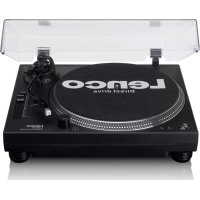
User manual - Direct drive turntable with USB recording
PykoBODTO NOIb3OBaTeJI - BnHIOBbI npOnrpbIBaTeJIc npRbIM npNBOOM
fynkne3aanncyepe3 USB
INDEX
English 3
Nederlands 17
Deutsch 35
Francais. 52
Espanol 69
Italiano 86
Pycckn 102
English
CAUTION:
Usage of controls or adjustments or performance of procedures other than those specified herein may result in hazardous radiation exposure.
KEEP THESE INSTRUCTIONS IN MIND:
- Do not cover or block any ventilation openings. When placing the device on a shelf, leave 5cm (2^ ) free space around the whole device.
- Install in accordance with the supplied user manual.
- Keep the device away from heat sources such as radiators, heaters, stoves, candles and other heat-generating products or naked flame. The device can only be used in moderate climates. Extremely cold or warm environments should be avoided. Working temperature between 0^ and 35^ .
- Avoid using the device near strong magnetic fields.
- Electrostatic discharge can disturb normal usage of this device. If so, simply reset and restart the device following the instruction manual. During file transmission, please handle with care and operate in a static-free environment.
- Warning! Never insert an object into the product through the vents or openings. High voltage flows through the product and inserting an object can cause electric shock and/or short circuit internal parts. For the same reason, do not spill water or liquid on the product.
- Do not use in wet or moist areas such as bathrooms, steamy kitchens or near swimming pools.
- The device shall not be exposed to dripping or splashing and make sure that no objects filled with liquids, such as vases, are placed on or near the apparatus.
- Do not use this device when condensation may occur. When the unit is used in a warm wet room with damp, water droplets or condensation may occur inside the unit and the unit may not function properly; let the unit stand in power OFF for 1 or 2 hours before turning on the power: the unit should be dry before getting any power.
- Although this device is manufactured with the utmost care and checked several times before leaving the factory, it is still possible that problems may occur, as with all electrical appliances. If you notice smoke, an excessive build-up of heat or any other unexpected phenomena, you should disconnect the plug from the main power socket immediately.
- This device must operate on a power source as specified on the specification label. If you are not sure of the type of power supply used in your home, consult your dealer or local power company.
- Keep away from animals. Some animals enjoy biting on power cords.
- To clean the device, use a soft dry cloth. Do not use solvents or petrol based fluids. To remove severe stains, you may use a damp cloth with dilute detergent.
- The supplier is not responsible for damage or lost data caused by malfunction, misuse, modification of the device or battery replacement.
- Do not interrupt the connection when the device is formatting or transferring files. Otherwise, data may be corrupted or lost.
- If the unit has USB playback function, the USB memory stick should be plugged into the unit directly. Don't use an USB extension cable because it can cause interference resulting in failing of data.
- The rating label has been marked on the bottom or back panel of the device.
- This device is not intended for use by people (including children) with physical, sensory or mental disabilities, or a lack of experience and knowledge, unless they're under supervision or have received instructions about the correct use of the device by the person who is responsible for their safety.
- This product is intended for non-professional use only and not for commercial or industrial use.
- Make sure the unit is adjusted to a stable position. Damage caused by using this product in an unstable position vibrations or shocks or by failure to follow any other warning or precaution contained within this user manual will not be covered by warranty.
-
Never remove the casing of this device.
-
Never place this device on other electrical equipment.
- Do not allow children access to plastic bags.
- Only use attachments/accessories specified by the manufacturer.
- Refer all servicing to qualified service personnel. Servicing is required when the device has been damaged in any way, such as the power supply cord or the plug, when liquid has been spilled or objects have fallen into the device, when the device has been exposed to rain or moisture, does not operate normally, or has been dropped.
- Long exposure to loud sounds from personal music players may lead to temporary or permanent hearing loss.
-
If the product is delivered with power cable or AC power adaptor:
-
If any trouble occurs, disconnect the AC power cord and refer servicing to qualified personnel.
- Don't step on or pinch the power adaptor. Be very careful, particularly near the plugs and the cable's exit point. Do not place heavy items on the power adaptor, which may damage it. Keep the entire device out of children's reach! When playing with the power cable, they can seriously injure themselves.
- Unplug this device during lightning storms or when unused for a long period.
- The socket outlet must be installed near the equipment and must be easily accessible.
- Do not overload ac outlets or extension cords. Overloading can cause fire or electric shock.
- Devices with class 1 construction should be connected to a main socket outlet with a protective earthed connection.
- Devices with class 2 construction do not require a earthed connection.
- Always hold the plug when pulling it out of the main supply socket. Do not pull the power cord. This can cause a short circuit.
-
Do not use a damaged power cord or plug or a loose outlet. Doing so may result in fire or electric shock.
-
If the product contains or is delivered with a remote control containing coin/cell batteries: Warning:
-
"Do not ingest battery, Chemical Burn Hazard" or equivalent working.
- [The remote control supplied with] This product contains a coin/burner cell battery. If the battery is swallowed, it can cause severe internal burns in just 2 hours and can lead to death.
- Keep new and used batteries away from children.
- If the battery compartment does not close securely, stop using the product and keep it away from children.
-
If you think batteries might have been swallowed or placed inside any part of the body, seek immediate medical attention.
-
Caution about the use of Batteries:
-
Danger of explosion if battery is incorrectly replaced. Replace only with the same or equivalent type.
- Battery cannot be subjected to high or low extreme temperatures, low air pressure at high altitude during use, storage or transportation.
- Replacement of a battery with an incorrect type that can result in an explosion or the leakage of flammable liquid or gas.
- Disposal of a battery into fire or a hot oven, or mechanically crushing or cutting of a battery that can result in an explosion.
- Leaving a battery in an extremely high temperature surrounding environment that can result in an explosion or that leakage of flammable liquid or gas.
- A battery subjected to extremely low air pressure that may result in an explosion or the leakage of flammable liquid or gas.
- Attention should be drawn to the environmental aspects of battery disposal.
Deliver Content
1 x Manual

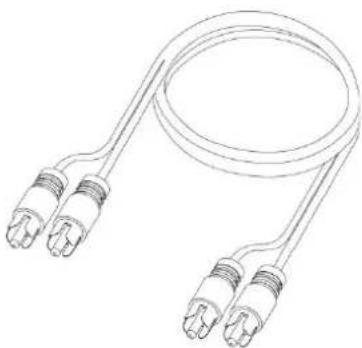
1 x RCA audio cable
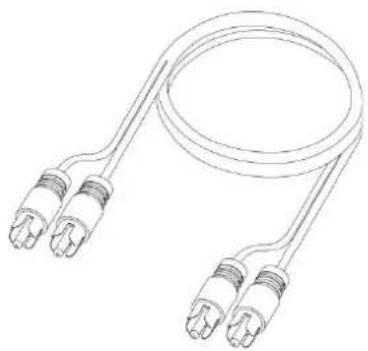
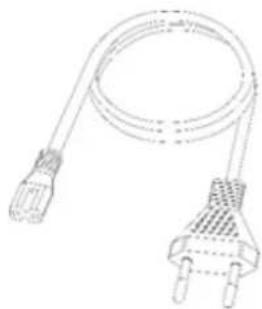
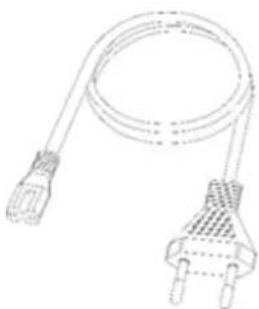
1 x Power cord
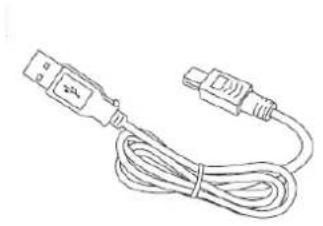
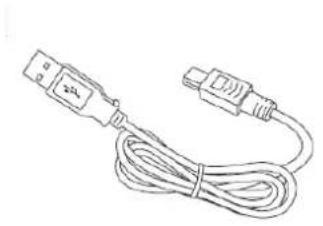
1xUSB connection cable
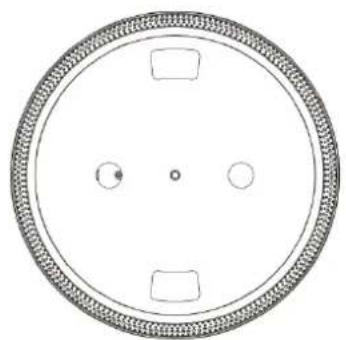
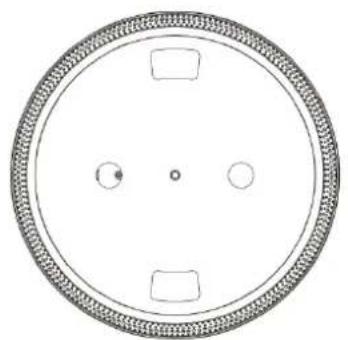
1 x Platter
1x Felt mat
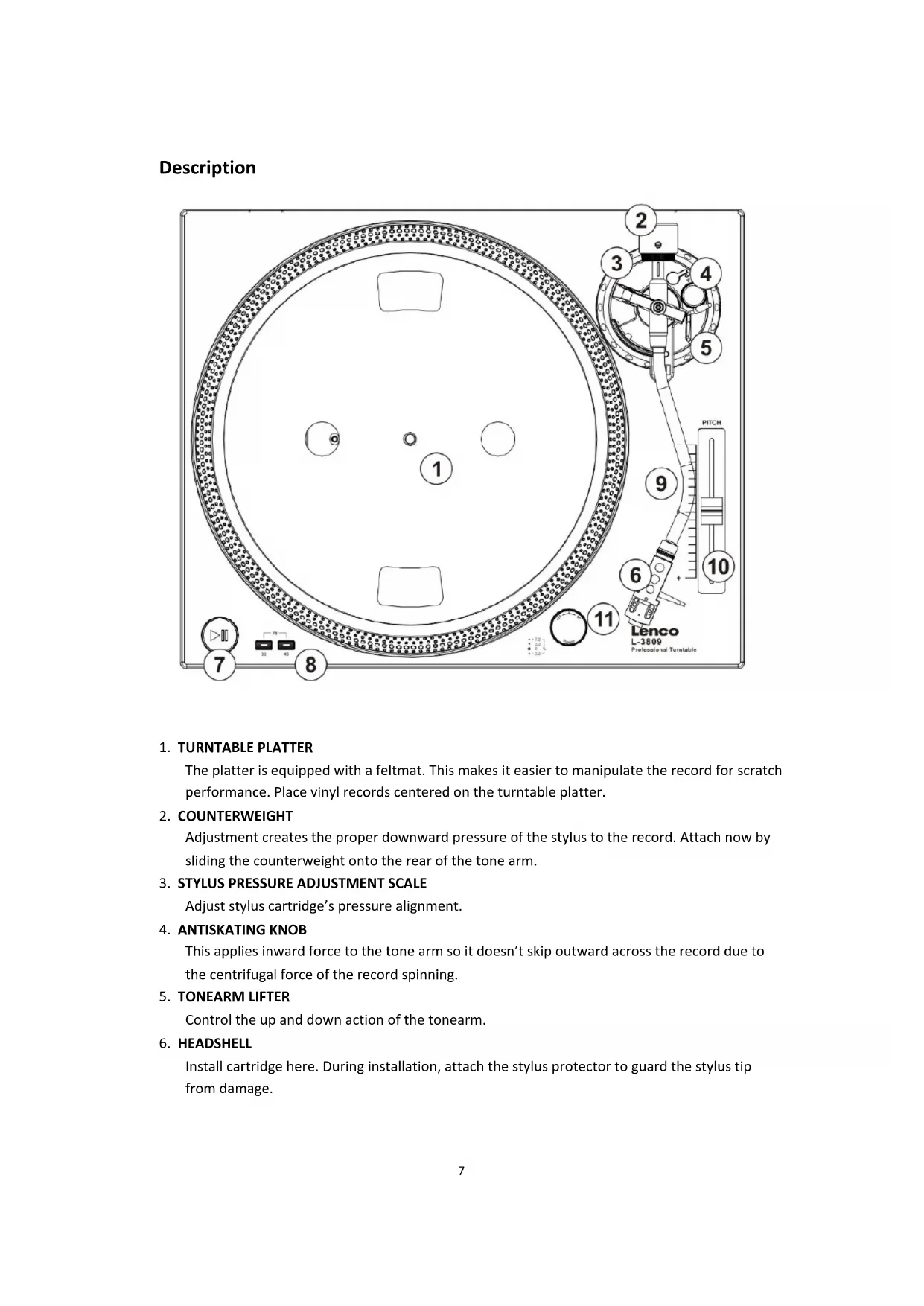
Description
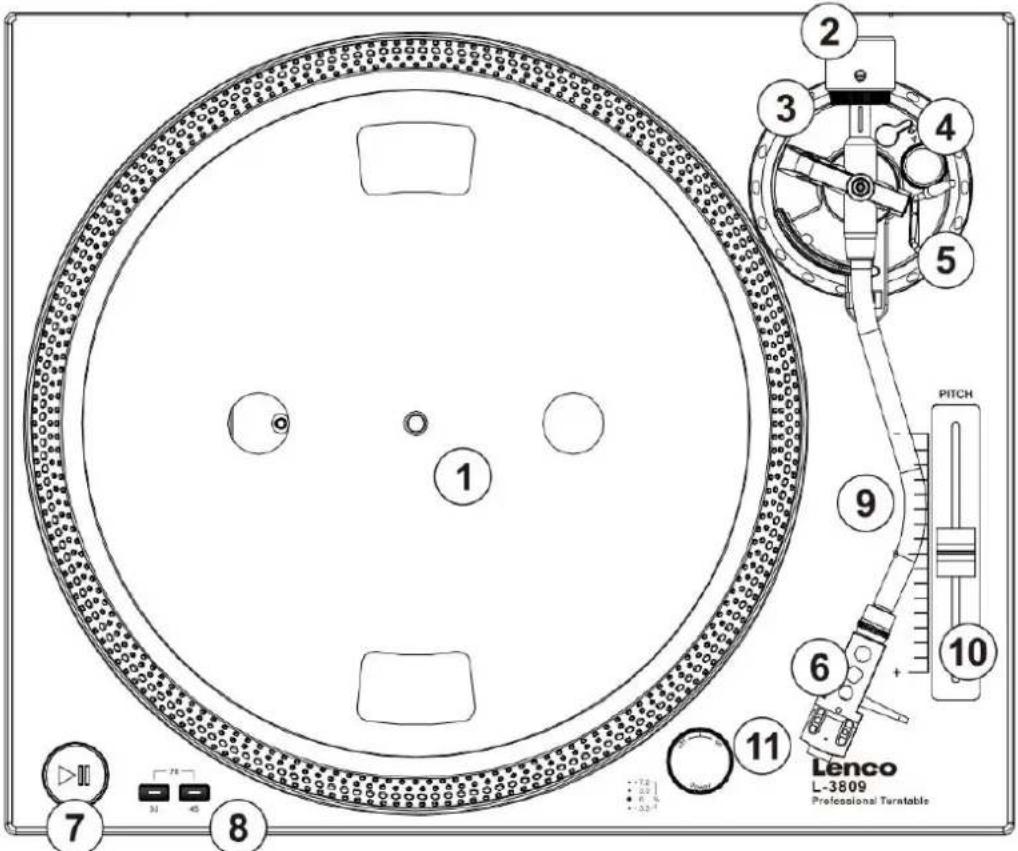
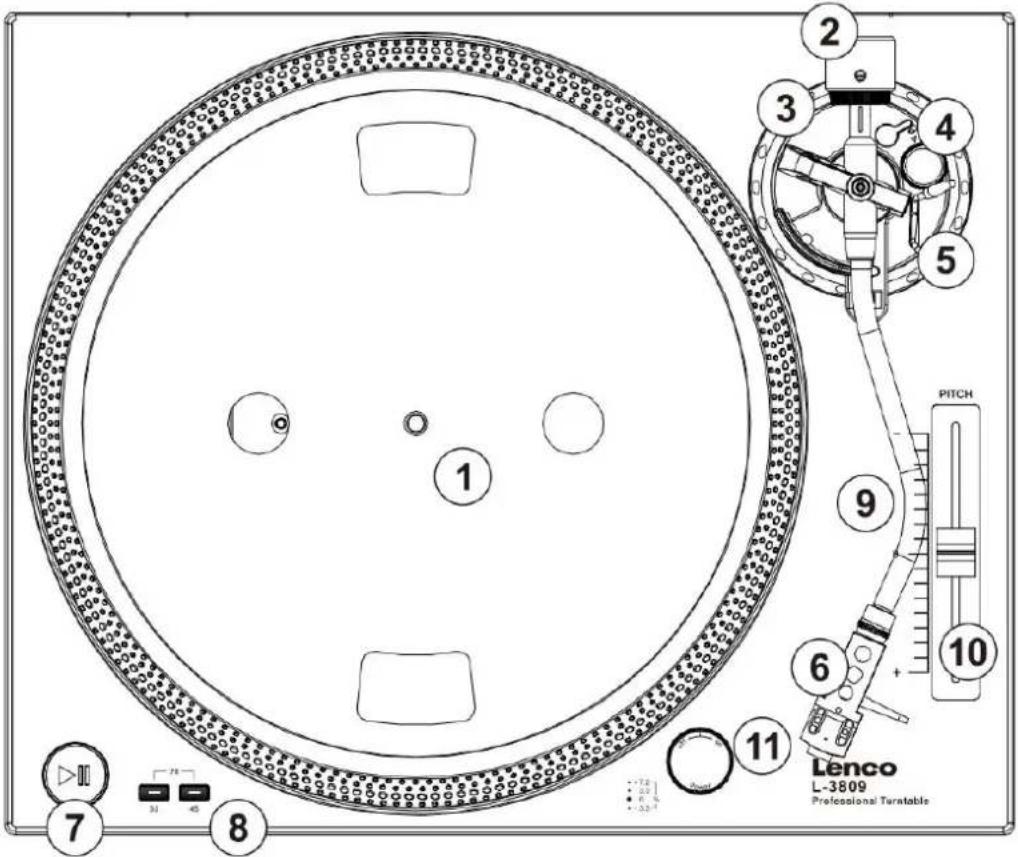
1. TURNTABLE PLATTER
The platter is equipped with a feltmat. This makes it easier to manipulate the record for scratch performance. Place vinyl records centered on the turntable platter.
2. COUNTERWEIGHT
Adjustment creates the proper downward pressure of the stylus to the record. Attach now by sliding the counterweight onto the rear of the tone arm.
3. STYLUS PRESSURE ADJUSTMENT SCALE
Adjust stylus cartridge's pressure alignment.
4. ANTISKATING KNOB
This applies inward force to the tone arm so it doesn't skip outward across the record due to the centrifugal force of the record spinning.
5. TONEARM LIFTER
Control the up and down action of the tonearm.
6. HEADSHELL
Install cartridge here. During installation, attach the stylus protector to guard the stylus tip from damage.
Attach wires as follows:
White (L + )
Left channel +
Blue (L-)
Left channel -
Red (R+)
Right channel +
Green (R-)
Right channel -
Press this button to start playback or to resume playback after a pause.
Select 33 or 45 RPM platter speed. 78 RPM is selected by pressing both the 33 and 45 buttons simultaneously; both buttons should be illuminated.
9. Headshell locking nut
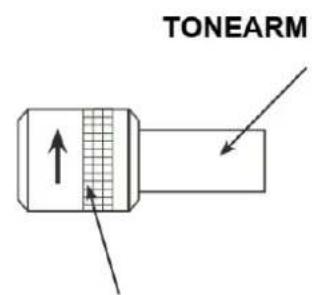
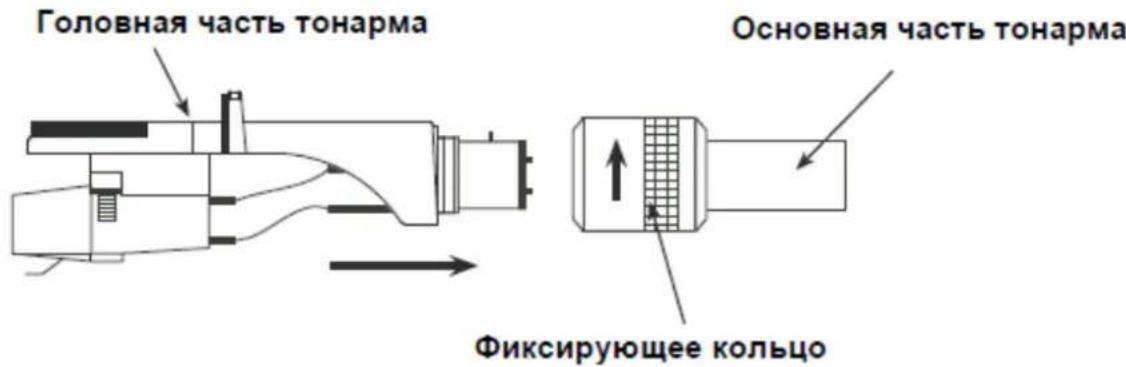
Attach the head shell by inserting it into the front end of the tone arm and then turn the locking nut clockwise.
10. Pitch fader
Used to change the playback speed of the playing trace.
11. Power switch / Stroboscopic light
Turn the switch clockwise to turn on the unit. Turn the switch counter-clockwise to turn off the unit. The stroboscopic light will automatically turn on when the unit is on.
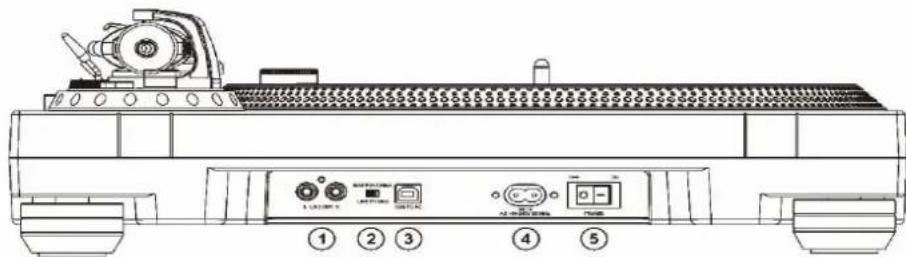
1. RCA OUTPUT
OUTPUT L and R are used for connecting the turntable to the RCA analog input on your amplifier.
2. LINE/PHONO SWITCH
The turntable has a built-in PHONO pre-amplifier that is disengaged if you have an external pre-amplifier. If you want to use the signals amplified by the internal amplifier of the turntable, move the switch to LINE. If you want to use an external PHONO preamplifier, move the switch to PHONO.

With the PRE-AMP switch at ON never connect to a Phono input.
Audio will be strongly distorted then and there is a risk that Amplifier and/or speakers will be damaged.
3. USB PORT
The sound of your vinyl record is converted to digital with a maximum resolution of 48KHz / 16bits. Use the USB cable that came with the device to connect the turntable to your computer. The Audacity software should be downloaded
4. ACIN
Plug the power cord here.
5. POWER ON/OFF
Use to turn the turntable on and off.
Turntable Assembly:
1. Removing from carton:
Carefully remove the main unit with the packing material intact from the box. Remove the packing material once the unit has been removed from the shipping carton. Be sure to locate all the accessories located in the packing material.
2. 45rpm Adapter:
Locate and remove the 45-rpm adapter from the packing material and place it in the 45 adapter cutout on the top of the main unit.
3. Turntable Platter:
Remove the turntable platter from the packing material and gently place the platter onto the CENTER SPINDLE of the turntable base.
4. Feltmat:
Remove the black feltmat from the packaging and place it on the PLATTER.
5. Headshell:
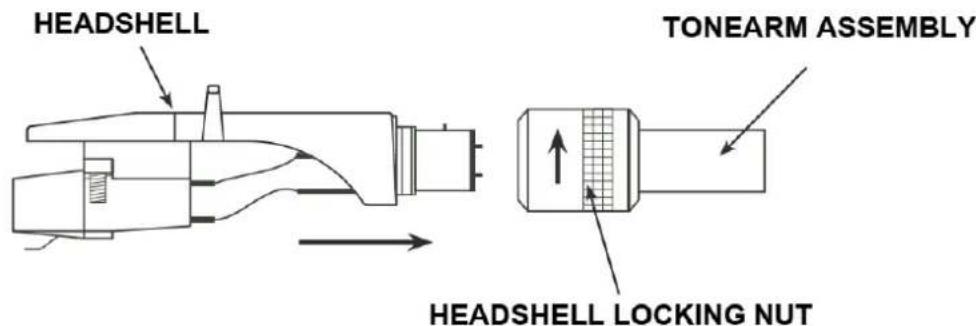
Insert the HEADSHELL into the front end of the TONEARM ASSEMBLY. While holding HEADSHELL firmly into the front end of the tonearm assembly, turn the HEADSHELL LOCKING NUT counterclockwise to firmly secure the HEADSHELL to TONEARM ASSEMBLY.
6. Counterweight:
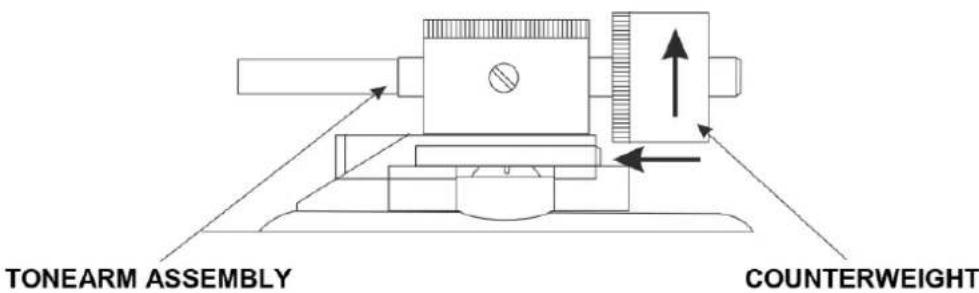
Locate and remove the tonearm COUNTERWEIGHT from the packaging. Slide COUNTERWEIGHT onto the rear of the TONEARM ASSEMBLY. Turn it lightly and it will screw onto the rear shaft of the tonearm.
Turntable Quick-Start:
1. Changing Platter Speed
Press the 33/45 ROTATION SPEED SETTING buttons to change the platter rotation speed.
When you press 33 and 45 buttons together, the platter will rotate at 78RPM. This is for old records. To play those 78RPM records you need to change the cartridge and stylus! Your turntable is equipped with an Audio-technica AT-3600E which can not support 78RPM records.
Please refer to the Audio-Technica website to select the compatible cartridge.
2. Starting and Stopping the Platter
Use the PLAY/PAUSE BUTTON to switch back and forth between platter rotations and pause modes.
3. Pitch Control
1) The pitch adjustment is a fine adjustment to the platter's RPMs.
2) The pitch adjustment is variable and may be adjusted between -10% and +10% of the platter-selected speed.
3) The pitch is changed by sliding the Pitch Slider in an up and down motion.
4) The indicator dots on the rim of the TURNTABLE PLATTER can be used to visual approximate the platter pitch. These indicators are lit by the STROBOSCOPIC LIGHT as they pass by the POWER SWITCH. At different pitch levels each row of STROBE INDICATORS may appear stand still.
Note: The use of heavy fluorescent lighting directly above the turntable will defeat the STROBE LAMP PILOT LAMP affect indicator accuracy.
Set-up
Turntable Installation:
- Do not place the unit in a location where it will be exposed to direct sunlight or near any type of heating appliance.
- Do not place the unit in a location where there is high humidity or a lot of dust.
- Cartridge may pick up slight sound pressure or vibrations of nearby speakers. For best results, do not install this unit too close to speakers.
- Install this unit on a horizontal surface that is stable and vibration free.
- The rubber feet have been specially designed to isolate the unit from excess vibration. The feet may also be used to stabilize the main body horizontally. Adjust the height of the unit by turning the feet in a clockwise or counter-clockwise direction.
Tonearm Balance and Stylus Pressure:
- Adjustment of horizontal zero balance and stylus pressure:
- Remove the stylus protective cover, if so equipped. Never touch the stylus tip during the adjustment.
- Lower the TONEARM LEVER.
-
Release the tonearm clamp and release the tonearm from the arm rest.
-
Set the ANTI-SKATE adjustment to zero.
- Rotate the COUNTERWEIGHT in either direction until the TONEARM is perfectly balanced horizontally (floats freely).
- Return the TONEARM to the arm rest and lock it in place.
- Hold the COUNTERWEIGHT stationary with one hand and rotate only the stylus-pressure ring (3) bring the number "0" of the ring into alignment with the center line on the tonearm rear shaft.
- Rotate the COUNTERWEIGHT counterclockwise until the scale value corresponding to the recommended stylus pressure.
Note: The recommended stylus pressure of the cartridge that is included with your unit is 2,5 to 3,5 grams. For all other cartridge systems please refer to the manufactures specification included with the cartridge.
Anti-Skate:
The anti-skate adjustment prevents the TONEARM ASSEMBLY from skipping across the record from the centrifugal force that is caused spinning rotation of the PLATTER. The ANTI-SKATING control knob should be set to the same value as the stylus pressure. For example if your COUNTERWEIGHT is set to 2.5 grams the ANTI-SKATE value should also be set to 2.5.
Product Service:
- Clean the stylus periodically with a soft brush to prevent the accumulation of dust.
- When sound becomes distorted or noisy, check the stylus. If the stylus is worn out, replace it with a new one.
- From time to time, the dust cover and turntable cabinet should be wiped down with a soft, dry cloth.
- Volatile materials should not be used, such as: alcohol, thinner, benzine etc. They may remove the paint or damage the luster.
Audacity software overview
Audacity is free software, licensed under the GNU General Public License (GPL). More information as well as open source code can be found on the web at https://www.audacityteam.org/download/
- Please ensure you have installed the software before starting.
Setting up your PC to work with Audacity
- Connect the provided USB cable to the turntable.
- Connect the left USB plug of this USB cable to your pc.
-
Install the Audacity recording software.
-
Open the Audacity program.
- Select Preference from the Edit tab in the Audacity Menu.
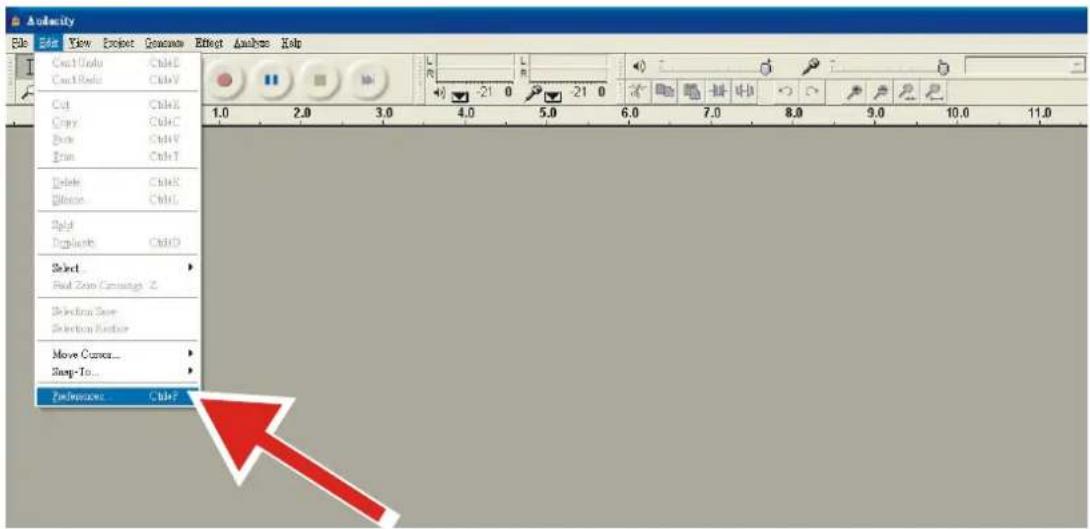
-
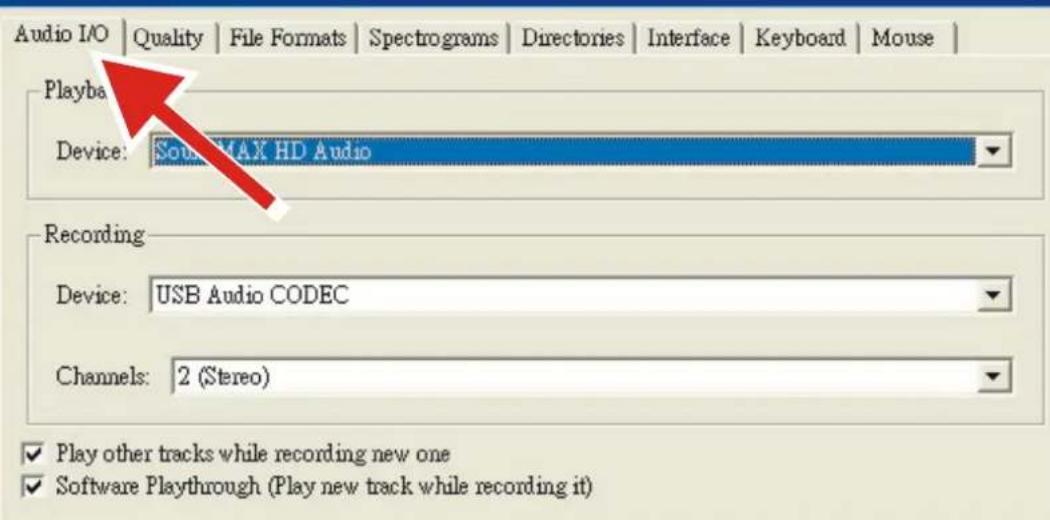
Select Audio I/O tab at the top left.
-
Under Playback, Device, select your internal sound card.
- Under Recording, Device, select USB Audio CODEC.
Under Recording, Channels, select 2 (Stereo).
- Check the box marked Play other tracks while recording new one.
- Check the box marked Software Playthrough.
Audacity Preferences
Audio I/O | Quality | File Formats | Spectrograms | Directories | Interface | Keyboard | Mouse
Playba
Device: S0s MAX HD Audio
Recording
Device: USB Audio CODEC
Channels: 2 (Stereo)
Play other tracks while recording new one
Software Playthrough (Play new track while recording it)
Recording Albums with Audacity
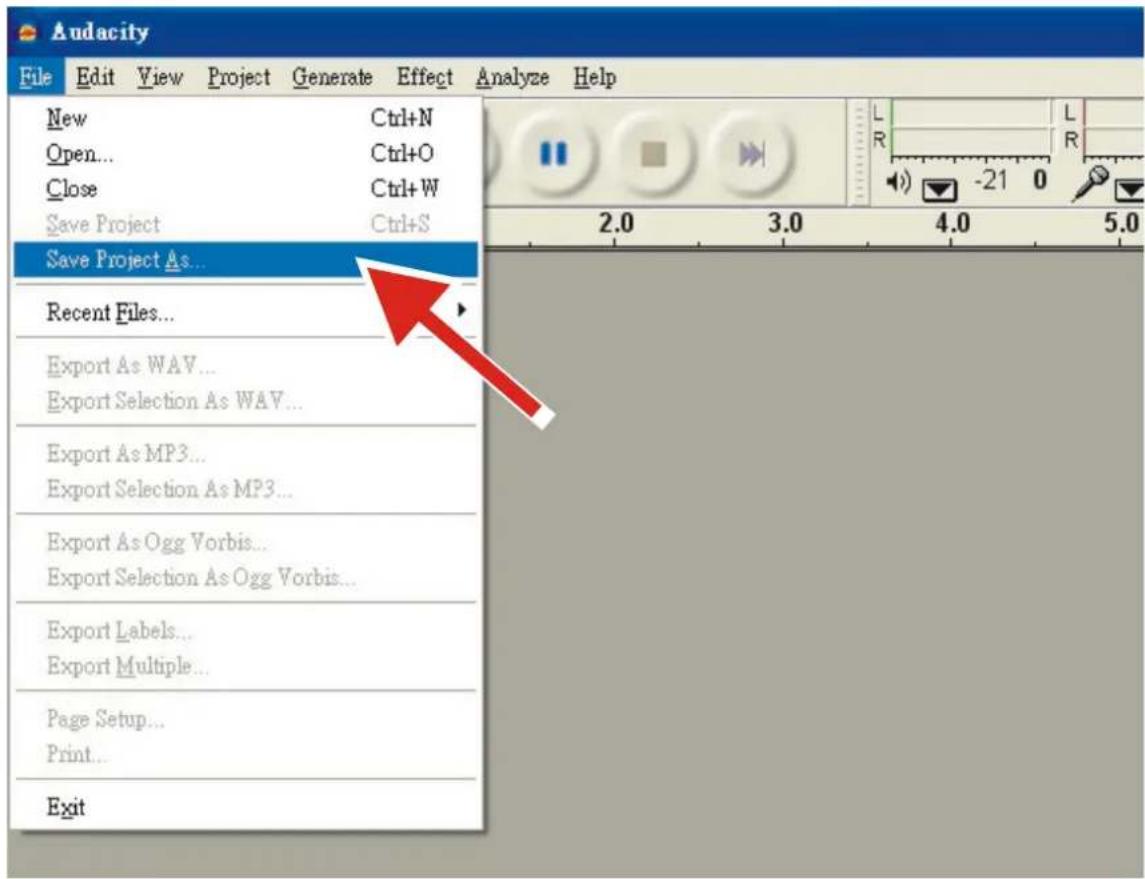
1. Saving a project
- Audacity writes all the changed and recorded audio to a directory called Projectname_data, which is located right where you saved the project file itself.
-
Thus, select Save Project as from your Audacity File tab and choose a location and filename for your project.
-
Please note that when you startup Audacity fresh, only the "Save As..." menu option is available.
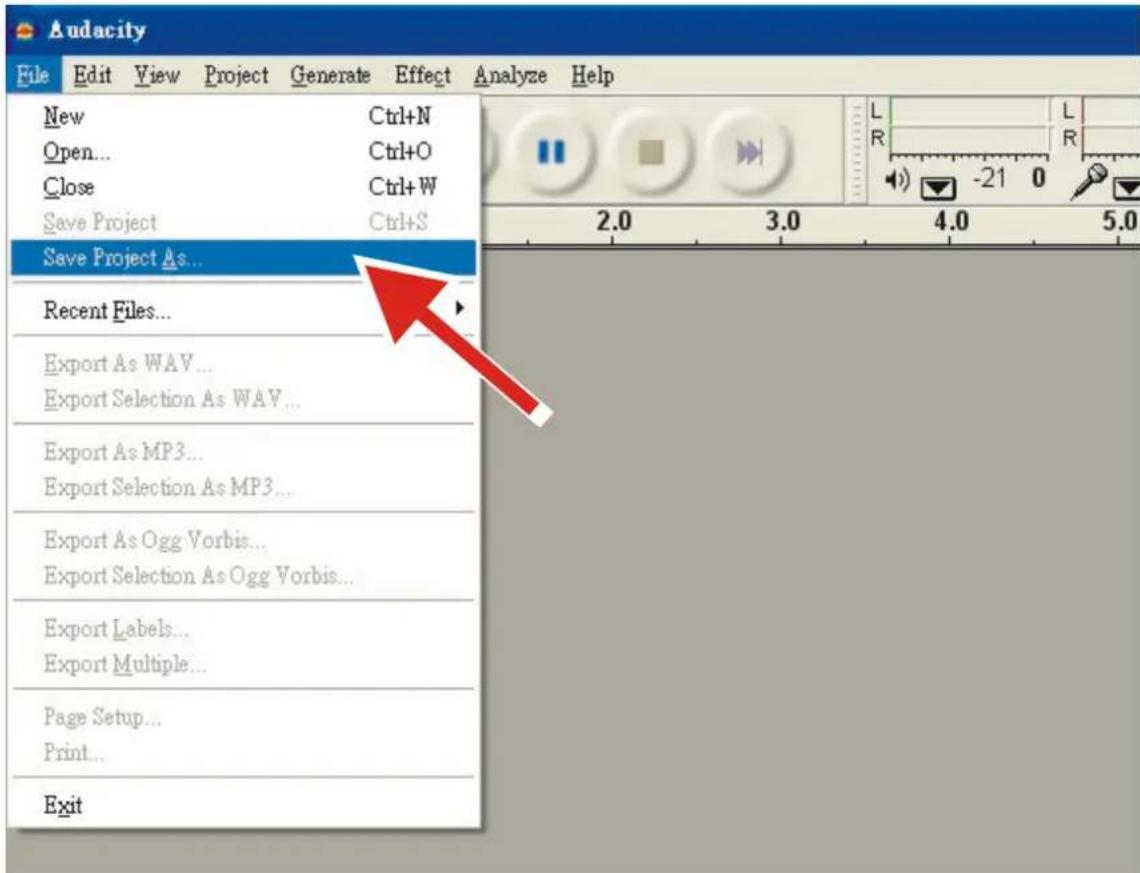
2. How to record
- Set your USB turntable up to play the song or album you want to record.
- Click on the red Record button to begin recording.
- Lower tone arm on USB turntable onto album and track you want to record.
- Click on the blue Pause button to pause the recording. Press it again to continue.
- Click on the yellow Stop button
That's it. You can now play around with your recording and explore the editing capabilities of Audacity. Remember that you can use the Undo function almost without limits while the project is open.
NOTE: CD's cannot be burned directly from the Audacity application. Other CD burning applications should be used.
Specification
General
Model: L-3809 / L-3818
Dimensions: 430(W) x 350(D) x 155(H)mm
Weight: 6.18Kg
Power supply: AC 230V 50Hz (Netherlands); AC 240V 50Hz(U.K.)
Power consumption: 30W
Standard test condition: Ambient Temperature: 20 + / - 2 deg.C
Relative Humidity: 65% + / - 5%
NOTE: Measurements can be carried out between 5 deg.C to 35 deg.C and 45% to 85% relative humidity.
Turntable Section:
Type: 3-speed full manual
Motor: 16pole,3phase,brushless
Driving Method: Direct drive
Turntable Platter: 332mm (Aluminum)
Speeds: 33_1/3, 45rpm and 78rpm
Wow and Flutter: Less than 0.3% WRMS (JIS WTD) with 33_1/3 rpm
S/N Ratio: More than 50dB (DIN-B)
Pitch Controls: +/- 10%
Starting Torque: More than 3.6 kgf.cm
Braking System: Electronic brake
Starting Time: Less than 1 sec.
Braking Time: Less than 1 sec.
Time for Speed Change: Less than 1 sec. from 33_1/3 to 45 rpm.
Less than 1 sec. from 45 to 33_1/3 rpm.
USB Function: USB rec. Function
16BIT 44.1KHz or 48KHz
Computer interface: USB 1.1 compliant 7/8/10 or MAC OSX
Tonearm section:
Type: Static balanced S-shaped tone arm
Effective Arm Length: 220mm
Overhang: 10mm
Tracking Error Angle: Less than 3 degree
Tracking Force Adjustment Range: 3-4g
Cartridge MM Type: Audio Technica AT-3600L
Stylus pressure: 3 ± 0.5 ~g
Cartridge weight: 5 ± 0.5g
Anti-skating Range: 0 4g
Channel Separation: More than 18 dB
Channel Balance: Within 2.5dB at 1KHz
Pre-Amplifier
Output:
150mV +/−4dB (IN: 2.5mV 1KHz)
RIAA (Frequency Response):
20Hz~20KHz +1/-3dB (IN: 1.5mV 1KHz)
Guarantee
Lenco offers service and warranty in accordance with the European law, which means that in case of repairs (both during and after the warranty period) you should contact your local dealer.
Important note: It is not possible to send products that need repairs to Lenco directly.
Important note: If this unit is opened or accessed by a non-official service center in any way, the warranty expires.
This device is not suitable for professional use. In case of professional use, all warranty obligations of the manufacturer will be voided.
Disclaimer
Updates to Firmware and/or hardware components are made regularly. Therefore some of the instruction, specifications and pictures in this documentation may differ slightly from your particular situation. All items described in this guide for illustration purposes only and may not apply to particular situation. No legal right or entitlements may be obtained from the description made in this manual.
Disposal of the Old Device
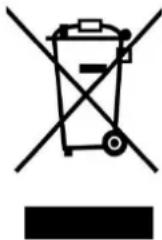
This symbol indicates that the relevant electrical product or battery should not be disposed of as general household waste in Europe. To ensure the correct waste treatment of the product and battery, please dispose them in accordance to any applicable local laws of requirement for disposal of electrical equipment or batteries. In so doing, you will help to conserve natural resources and improve standards of environmental protection in treatment and disposal of electrical waste (Waste Electrical and Electronic Equipment Directive).
CE Marking

Products with the CE marking comply with the EMC Directive (2014/30/EU) and the Low Voltage Directive (2014/35/EU) issued by the Commission of the European Community.
Hereby, Commaxx B.V. Wiebachstraat 37, 6466 NG Kerkrade, The Netherlands, declares that this product is in compliance with the essential requirements.
The declaration of conformity may be consulted at techdoc@lenco.com
Service
For more information and helpdesk support, please visit www.lenco.com
Commaxx B.V. Wiebachstraat 37, 6466 NG Kerkrade, The Netherlands.
Nederlandsl
LET OP:
Remove the black feltmat from the packaging and place it on the PLATTER.
5. Kopbehuizing:
Pitchregeling: +/- 10%
RIAA (frequentierespons):
20 Hz~20 KHz +1/-3 dB (IN: 1,5 mV, 1 KHz)
Garantie
m = 311
m = 311
1 Tappetino in feltro
Descrizione
1. PIATTO GIREVOLE
4. Tappetino in feltro:
HEADSHELL LOCKING NUT
| EN | IT |
| HEADSHELL | PORTASTINA |
| TONEARM ASSEMBLY | GRUPPO BRACCIO |
| HEADSHELL LOCKING NUT | DADO DI BLOCCAGGIO PORTASTINA |
6. Contrappeso:
Intervallo anti-skating: 0 4g
MEPbI INPEIOCTOPOXHOCTN INEPED 3KCNLYATAUNEI
COBLODAITE CLEUYIOUINE INHCTPYKUNI:
- He 3akpbiaTe Hne 6loKpyTe BeHTnlaUHNoHHbIe OTBepctna. Ppi pa3MeueHn yCTpoiCTBa Ha noJIke octaBbTe BOKpyr Hero 5 cm (2 dIOmA) cBO6oHDoro npocTpaHCTBa.
- YcTaHOBInTe yCTpOInCTBO B COOTBeTCTBnC pyKOBOInCTBOM NOLb3OBaTeJI, BXoJaIIM B KOMNJIeKT NOCTaBKn.
- YcTPOCTBO DOnKHO HaxoHbC BdAJI N OT NcTOHKnOB TeNla, TaKnx KaK 6aTapeH, O6OrpeBaTeJn, HArpeBaTeJbHbIe Neu, CBeyn Ipyrne N3deJIny, BblJeJIOUe TeNLO, INN OTKpbIToE Nama. YcTPOCTBO MOxHO NcNoJb3OBAbT ToJbKO BycNOBnX yMepeHHoro KInMaTa. CLeDyET N36eRaT bYpe3MepHO BbcOKNX INN Hn3Knx TempepaTyop OkpyKaIoSe cpebl.Pa6Oaay TempepaTypa coctabJre ot 0^ do 35^ ..
- He nCnoB3yIte yCTpoJcTBO B6JIa3n CInbHbIX MaTHHTbIX NOJe.
- ΘleKtpocTaTnueckn pa3pIaMD MoKeT NOMEwA Tb HOpMaIbHOg EKcnLyatauN yCTpoiCTBa. EcIn 3To TaK, npocTo nepe3arpy3nte n nepe3anyctnte yCTpoiCTBO, cJeDy INHCTpykunno EKcnLyatauN. Co6IoDaIte octopoxHocTh npn nepeJaue foaiIOB n EKcnLyatnpyTe yCTpoiCTBO B CpeDe, CBO6oHDHOOT aTMOCepHBIX NOMex.
- IpeynpeKdHeH! He BCTabTne KaKe-Im6o npEdmTeB n3dJeHne uee3 BeHTnlaUHOHbI OTBepCTnI nnI npoeMbI. Ype3 n3dJeHne npoxOHT BbcOKoe HapJxHe, IN BCTaBLeHHbI npEMeT MoKeT Bbl3BaTb NopaxHne 3JIeKtpueCKm TOkOM n/nn KOPOTKe 3AmbKaHne BHyTpEHnX qAcTeI. Po ToJ Xe npuHne He npolnBaTe Ha n3dJeNBEy nnIIO6yIO dpyrYIO XnIDKOcTb.
- He nCnoB3yIte yCtpoiCTBO B NOMeueHnX C NOBbIeHHoB BLaJHKoCTbO, TAKNX KAK BaHHbIe KOMHaTbI, KYXHn, HAcblEHHbIe napom, IIN OkOLO 6accseHOB.
- He donyckaite nonadaHna yctpoCTBO kaneIb nn 6pb3r. CneIte 3a TeM, YTO6bl Ha yctpoCTBO nIN pAOM c Hm He CTabUInc b PpeDMeTbI, HAnOJIHeHHbIe JxNdkocTbIO, HanpImep Ba3bl.
- He nCnoB3yIte 30 yCTpoiCTBO B cpeIe, rIe BO3MOxHO o6pa3OBaHHe KOHDeHcata. Ipn IcNoB3OBAHH B TeNLOM N BIAKHom NOMEuEHN, BByTpN yCTpOiCTBa MOKeT O6pa3OBbIBaTbcra KOHdeHcaT, YTO npINBeTe K HeKOppeKTHo pa6ote npOnrpbBaTeJI. OctabTe npOnrpbBaTeJIb B BBKIIIOUeHHOM COCTOHHn Ha 1-2 qaca N TOJbKO NOcIe 3TOrO BKIOUaTE 3aHOBO. IpeEd BKIOUeHHem y6eINTEcb, YTO yCTpoiCTBO NONHOCTbBO BBICOXNo.
- Hecmotpna To, yTo 3To yCtpoNCTBO n3rOToBJeHO C OcO6o TuaTeJIbHOCTbH N HeCKoIbKO pa3 npOBepeHo nepei BblYcKOM C 3aBoJa, Bo3HnKHOBeHne np6IeM BCE Jke BO3MOXHO, KaN i CO BCemn 3LeKtpnuecknmi np6Opam. Ecn Bbl 3aMeTnIbIM, Ype3MePHOe HarpeBaHne IIN LIO6bIe DpyrHe HeoXnDaHHbe AByEHHa, Bam cIeDyET HeMeJEnHO OTKIIouHTb BnIKy OT po3EtKn 3LeKtpOnNTAHn.
- 3TO yCTPOIcBO DOJXHO pa6oTaB OT TAkORO nCTOCHNka NITAHNA, KAK YKA3aHO Ha 3aBOIDCKo T a6nUKe co CneuΦnKaunm. EcIn BbI He yBepeHb I Tom, KaKo TnI nCTOCHNka NITAHNA NCNoJIb3yETcB BaWeM DOME, pOKOHcyIbTpyIteCb c BaIM TOPROBbIM NocpeHNKOM INI MeTHOn 3JIeKToPOneHepreTIueckO KOMNaHne.
- Pa3MeaTe ycToe TBO nOdaJIbWe OT KINBOTbIX. HeKOTOpbIM KINBOTbIM HpaBNTcKycCaTb
13.Дяоctkn yctpoctBa nCnoIb3yIte Mrykyo cyxyo TkaHb.He nCnoIb3yIte paCTbOpnte nnJxNdkocTn Ha OCHOBe 6eH3nHa.YTO6bI ydaJIntb yctOuNBbIe PTHa,Bbl MoKTe NcNoIb3OBAtB BLaXHHyIO TkaHb Cpa36abLeHHbIM MOUUM CpeDCTBOM.
- NocTabuHK He Hecet OTBeTCTBeHHoCTn 3a NOBpeKJeHne IIN NoTePIO DaHHbIX, Bbl3BaHHbIe HEnCnpaBHocTbIO, HEnpaBnIbHbIM NcNoJIb3OBAHHeM, peKOHCTpyKUneYcTpoiCTBa IIN 3ameHoi 6aTapen.
-
He npepbBaIte coeHHeHne, KOrda yctpoCTBO foOpMaTHpye Tnnn pepeaet faJIb.I npOTNBOM clyuae daHHBe MOrT 6bITb NOBpeKJeHb I nn yTePraHbI.
-
EcnB yctpoiCTBe ecTh fynKcua Bocnpoun3BeDHeHnuepe3 USB, KapTy namrtn USB cneyet NOkNIOUaTb Hapmyo K yctpoiCTBy. He nCNoIb3yTe ydINHnTeJbHbI Ka6eJb USB, TaK KaOH MoKeT Bbl3bBaTb NOMExu, YTO npNBeDet K noTepe daHHbx.
- Ta6nUka c TexHueckmN daHHbIMn HaxOHTcra Ha HuxKHe nn 3aDHe naHeJyCTpoiCTBa.
- 3TO yCTpoiCTBO He npedHa3HauEHO dIy IcnoB3OBAHnI JIObMn (BKIOUaJeTei) c Φn3NueCKIMN, YMCTBeHHbIMn paCCTPOiCTBaMn, paCCTPOiCTBaMn YyBCTBeHHORO BOCpNtIa HIN C HeIOCTaTKOM ObIbTa N3HaHIn, eCIN OHn HE HaxoJrTc NOd Ha6JIIODeHHeM HIn He NoJIyUHIn NHCTpyKcII N IO npaBnIbHOMy IcNOB3OBAHIO yCTpoiCTBa co CTOpOHbI IuCa, OTBeuaIoJero 3a IN 6e3OnacHocTb.
- 3To n3dJIeNe He npEaHa3HaeHo IJI npOeCCnHOHaIbHO, KOMMepueckoro IJI npomblJeHHoro NcNoJIb3OBAHNA.
- y6eHntecb, yTO yCTpoNcTBO yCTaHOBJeHO B yCTOuHBoE nOLOKeHne. IapaHTnHa He pacnpocTpaHareTcH NaIOBpeKdEHH, Bbl3BaHhIe 3KcNpyaTuNeH eTOrO n3DeHnB HecTa6NbHOM nOLOKeHH, Bn6paunMm nn YdaPAMn, IIno HecO6LnOHeHem LIO6bIX dpyrHX npdeUynpeKdEHH nn MeP npEOCTOpOJXHOCTn, COepKaUnxC B daHHom pyKOBOcTBe noMb3OBaTeJI.
- HNKoRda He ChnMaIte Kopnyc 3TOrO yCTpoiCtBa.
- HnKoIa He NomeaTe 3To yCtpoNCTBO Ha npyroe 3Jektpnueckoe o6OpydoBaHne.
- He onyckaTe nrg deTei c nlaactIKOBbIMn NaKeTaMn, IcNoJIb3yeMbIMn dIy ynaKOBKn ycTpoiCTBa.
- IcnoIb3yIte ToIbKO npncnO6leHn/npHaJdJeXHoCTn, yKa3aHHbe npOn3BoUTeJIeM.
- Nopuynte Bce 06cnykubAHne KBaHnHnIupOBAHOMy 06cnykubHOJemy nepcohany. O6cnykubAHne Tpe6yeTcra, KOrda yCTpoiCTBO 6blno NOBpeJdeHo, HApnpimep, ero shHyp 3JIeKTPoNTaHnRA nn BnIka, KOrda 6blna npOHTa JNIDKOCTb nn KaKHe-Jn6o npEdmTebl YnAHI Ha yCTpoiCTBO, KOrda yCTpoiCTBO NOBeprIOcB 03DeJCTBNO DOxJa nn Blaru, KOrda yCTpoiCTBO pa6oTaET HeHOpMaIbHO, nII KOrda npOn3OJNo naJeHne yCTpoiCTBa.
26.ДиTeIbHoe BO3dEiCTBnE rPOMKx 38yKO BInuHbIX My3bIkaJIbHbIX npOnrPbIBaTeJe MoKeT npINBeCTN K BpeMeHHo INI NOcToAHHO NoTepe Clyxa.
-
Ecn ycTpoiCTBO NOCTabJIeTcB KOMnJIeKTe c aIaIaTepom NITAHIN IIN KaBeJEM NITAHIN:
-
Пив ВОЗнКНовен Кaknx-лбо побlem, OTKИЧУТЕ aДАNTЕ рпт haNЯ n3 po3eTkn N
6ратTeCB K KBaIIHФIцINpoBAHHOMy cepBUCHOMY nHKeHepy.
He HacTypaIte Ha aadantep nItaHn I He 3aKImaIte erO. BybTe oeyh boctopoKhbI, ocobehHO BO3Je 7TeKepeB N Ka6eIbHoro BbIOda. He pa3MeuaIte Ha aadantpe 3JIeKTponNTAHN TAgKeIbIe PpeMTeB, TaK KaK OH MOrYT nobPeDITb erO. XpaHInTe yCTPOJCTBO B HeOCTyHOM DnA DeTe N MeCt! IVrpa C Ka6eIem 3JIeKTponNTAHN, OH MoYr T cepBe3HO nopAHHTbcR.
- OTKIIHouaIte 3To yCTpoIcTBO OT cETN BO BpeMra Ipo3bl Nn Ecn He NcNoJIb3YeTe B TeueHne DInTeJIbHOBO BpeMeHn.
- WTeNcBHa pO3EtKa DOnKHa 6bITb yCTaHOBHeHa prAOM c O6OpyDObAHnEM N 6bITb B HEnOCpeDCTBHeHOM DoCTyne.
He neperpykaTe po3eTKn nepemEnHoro ToKa IINyUdInHnTeNbHbIe UHypbl. Neperpyka MoKeT Bbl3BaTb Bo3ropaHne IIN npaKeHne 3JIeKtpnueckm TOKOM.
- UcTpoIcTBa, cnPoEKTnpOBaHHbIe B COOTBeTCTBn C nepBbIM KJIacCOM 3JIeKtpoO6OpyIDOBaHnI NO eBpOneNCKm CTaNapTaM, «class 1», Heo6xoJIMO NODKNIOuA Tb K 3a3eMJIeHHbIM PO3eTKaM 3JIeKtponITAHnI.
- UcTpoIcTbA, cnPoEKTIPOBaHHbIe B COOTBETCTBnC O BTOpbIM KlaCCOM 3JIeKtpoO6OpyIDOBaHnI NO eBpOeNcKIM CTAHdApTaM, «class 2», He Tpe6yIOT HAnuHn3a3EmHeHnB C cTeN 3JIeKtponITAHnI.
-
BbHIMMa BnIky n3 wTeNceJIbHOJ po3eTK, Bcerda epKHTecb 3a BnIky. He TAHnte 3a Hyp nITaHna. 3TO MOKeT BbI3BaTb KOpOTKoe 3AmbIkaHne.
He nCnoIb3yIte NOBpeJxHnHbI uHyp nHTaHnI, BUNKy IINn IINOxo 3aKpeJIeHHyU pO3eTky. 3To MoKeT npBecTu K BO3rOpauHnIO IINn IopaxeHHIO 3JeKtpuYeCKM TOKOM.
-
Ecn npOdyKT cOeepKHT nIIN nocTabIaTeTc C NyIbTOM dNCTaHIOHOHoro ynpabHeHnC 6atapee Tnna «Ta6JIeTKa»/ «MOHeTKa»:
PpeynpeKdHne:
- «He nporlaTbBaTb 6aTapeH, onacHocTb XIMnueCKoro OxKora» nIi aHaIOrnHbIe DeIcTBn.
[PyIbT IInCTaHIOHOYnpAbeHn, BxOJaunB KOMJIeKT] 3OT npOdyKT coepKHT 6aTapeKy Tna «Ta6JeTK>/ «MOHeTK». Ecn npOrIoNTb 6aTaapeKy, 3TO MOKeT Bbl3BaTb cepBe3HbIe BHyTpEHHne OXORn BCero 3a 2 Yaca n npNBecTN K CmepTN.
XpaHHTe HOBbie u nCnoJIb3OBAHHbIe 6aTapeu B HeIOCTynHom IJr JTei MeTe.
- Ecni 6aTapeHbI OTcEK 3aKpbBaTeC HeHaJeXHO, npeKpaTHe NcNoB3OBAHne npOdyKaTn XpaHHTe ero B HeNOCTyHOM DnA DeTeN MeCTe.
- Ecnn BbI cunTaete, yTo 6aTapeKn MoTn 6bITb npOrIoNTb nn OH MoTn nonactb Kakyo-nlo YoacTeHa, HEmeJeHHO o6paTntEc3a MeuHckO nOMoBHO.
-
PpeoctepeKeHne npn nCnoB0aHHn 6aTapeek:
-
Onachocb B3pbBa, ecn6baTapeKeKa 3aMeHeHa HeKOppeKTHo. NcnoIb3yIte TOnbKO 6baTapeKn aHaIOruHoro Tnna.
He noDBepraIte 6aTapeiKn BBICOKIM IIN HN3KIM TempeaTpaM, HN3KOMy IIN BBICOKOMy DaBHeHIO.
3aMeHa Ha HeKOppeKTHyU 6aTapeuKy MoKe T npNBecTu K B3pblBy nIIN npoTeKaHIO orHeonachOH KNDKOCTN.
He noDBepraIte 6atapeKn BO3deICTBnHO OTkpBIToro OTHr HIN MUKPOBOHOBbIX BONH. N36eraTe MexaHueCKORO BO3deICTBnI.
- PpOKcYbTnpyTeCb C MeCTbIM 3aKoHOdaTeIbCTBOM KacaTeIbHO YTuIN3aUN6aTaapeek.
KOMNJIeKT NOCTABKN
PykoBoCTBONoIb3ObaTeTn-1uT.

Ka6eJb RCA-1 wT.
Ka6eJb nHTaHn-1 uT.
Ka6eJb USB-1 wtT.
OnopHbI dNcK (TapeJIka) -1 wT.
BoJIOuHbI MaT (CInnMaT)-1 wT.
3IementbI ynpablenn n fynkun
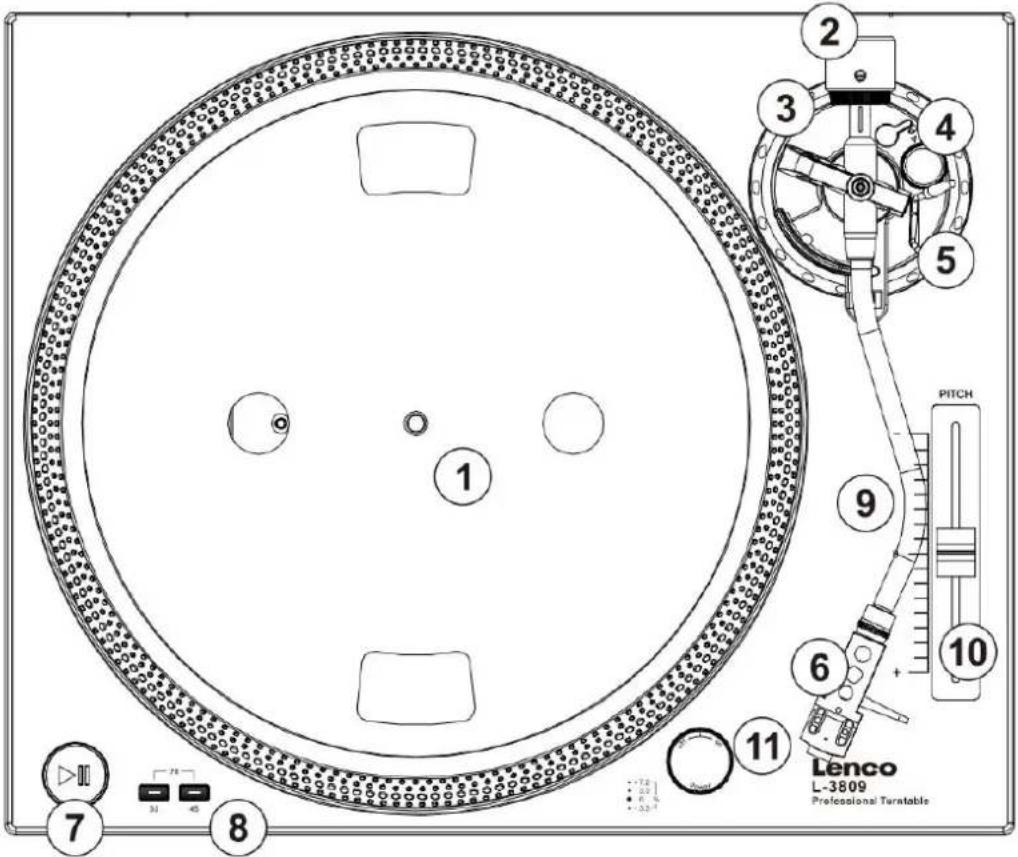
1. ONOPHbI INCK
OnopHbI DNCK KOMNJIeKTyETcC NINMaTOM N3 BOIIOKa YTO 6NaIorPnAHTHO cKa3bIBAeTcHa BOCpON3BeDeHN 3aIncEi N 3aunuaeTnx. Pa3MeuaTe 3aIncn No eHTpy DNcKa.
2. INPOTNBOBEC
IpoTnBOBec NcNoJIb3yeTcIg 6aJIaHcnpOBaHnToHApMa I yCTaHOBKn Heo6XoDmOu CnblI DaBHeHnN rIbI 3ByKOCHMaTeJI.
3. ⅢKAJA IPNXIMHOI CINbI INJIbI
HactpoKa npKHMHO cnblkapTpndka.
4. PEGYJINPOBKA AHTN-CKEITNHRA
CnCTema aHTN-cKeiTHra KOMneHcnpyET cIeHTpO6KHyU cnly, npEdoTbpaaJapnockalb3bBaHne IroJKN 3ByKOCHMaTeJI B OBeM BoBpeM BocnpOn3BeJeHn. Puyka peryIinpoBKn Cnbl aHTN-cKeiTHra DoJIkHa 6bItb yTaHOBLeHa Ha To Je 3HaueHne, UTo n Cnla daBHeHn Nfbl 3ByKOCHMaTeJI.
5.PbI4YCTAHOBKTOHAPMA
3TOTpbIarNo3BOLJeTnlaBHOOnyckaTbNIOdHIMMaTbTOHaPmHeNOBpeJdaNOBepxHocTb NlaCTNHKn.
6. TOJIOBHAR YACTb TOHAPMA
MecTo yCTaHOBKn KapTpndka. Bo BpeMa ycTaHOBKn HaJeHbTe 3aunTHyO KpbIshKy Ha nIpy,
yTO6bI n36eKaTbe ee IOBpeKdEHHa.
IopKnIOuHTe npoBOda cNeDuOUM o6pa3OM:
Bebi (L+)
Jebbi KaHaan +
Cnnn (L-)
JIeBbI KaHaJ-
KpaChbR+
PpaBbI KaHaJ+
3eIeHbI (R-)
PpaBbI KaHaJ-
7. KHONKA PLAY/PAUSE
HaKMTe 3Ty KHONky, YTO6bI HauaTb npOnrpbiaHne IIN BO3o6HOBHTb npOnrpbIBaHne NocLe nay3bl.
8. Khonkn ckopoctn ncka
BbI6epnte ckopoctb dNcKa 33 nnn 45 o6/MnH. Ckopoctb 78 o6/MnH BKNIOaETc npn OndHOBpeMeHHOM hXaTm KHOJOK 33 n 45. HdNKaTOpbI obex KHOJOK DOJIKNHc CBETNTbcR.
9. Ctonopnha raiKa roIobKn ToHaPma
YcTaHOBnTe KapTpIaX BCTaBnB erO Bo fpoHTaIbHyIO YacTb ToHApMa I 3akpyTnB CToNOpHyIO raKy IO YacBOB n CTpeJIke.
10.CIAI DEP IOCTPOKNI TOHA (Pitch fader)
3TOT cIaIdep no3B0JareT nIaBHO I3MeHraTb CKOpocTb BpaUeHnI, COOTBeTCTBeHHO, CKOpocTb IN TOH 3ByaHnI 3aIncn.
11. Khonka nHTaHn/ CToPo6 CBET
NobepHnTe nepeKniUoyaTeIb no yacOBoi CTpeJIke, YTO6bl BKNIOUYtB npOINrpBaTeIb.
NoBepHnTe nepeKluoyateIb npOTNB YacOB N CTePkn, TTo6bl BbIKHOHTb npOITpblBaTeIb.
Ctpo6 cbET BkIIOUHTcra ABToMaTnHeckn NocLe BkJIIOUeHn npOnrpbBaTeJIA.
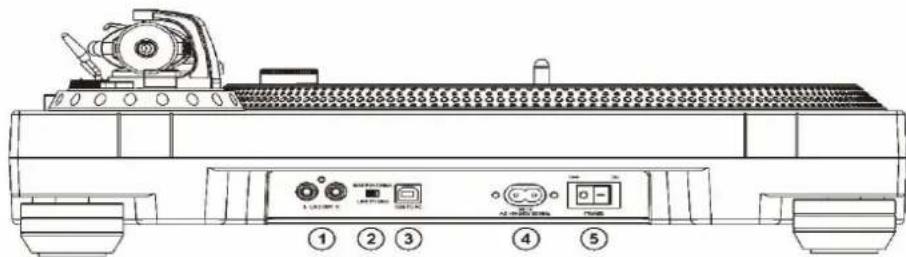
1. BbIXOndHbIe PA3bEMbl RCA
Pa3bEmblncnIb3yIOTcIgI NOkNIOUeHnKo BXOdy yCUNITeIa, npEynuNTeIa IIN
foHOKoppeKTopaB 3aBNCIMocTOn OT noLoXeHnNE peeknOaTeIa 一 _ 一 PHONO/LINE).KpaChra N
BeJAM MapKnPOBa pa3bEmOB RCA o6o3Naaet npAByi nJeBbIKaHaJIcoOTBeTCTBEHNO.
3a3emHeHne NOkNIOUaETcK K 三 eMLe 一 npEynuNTeIa IIN foHOKOppeKTopa.
4.BoIIouHbI MaT (cInnMaT):
I3BLeKInTe BOJIOHbIM Mat (cINMaT) n3 yNaKOBKn pa3MeCtNeHa Dncke.
5. KaptpnIx:
BCTaBbTe KapTpIxK BO φpoNTaJIbHyO qactb TOHApMa. PpNepJKBaB BCTaBJIeHHb I TOHApM KapTpIxK aKKypaTHO 3aKpyTInTe cTOnOpHyIO raIKy pPOTNB YacOBo CtpeKN, YTO6bl 3aΦNKcIPOBaTB KapTpIxK B ToHApMe.
6. ПOTиBOBec:
HaIInTe Hn3BLeKIne H3 ynaKOBKn npOTNBObEc. Pa3MeCTnTe npOTNBObEc B 3aDHeN qactn TOHapMa. Cnerka npOBepHnTe, YTO6bl npOTNBObEc HaJeLcRa Ha 3aDHeIO qACTb ToHapMa.
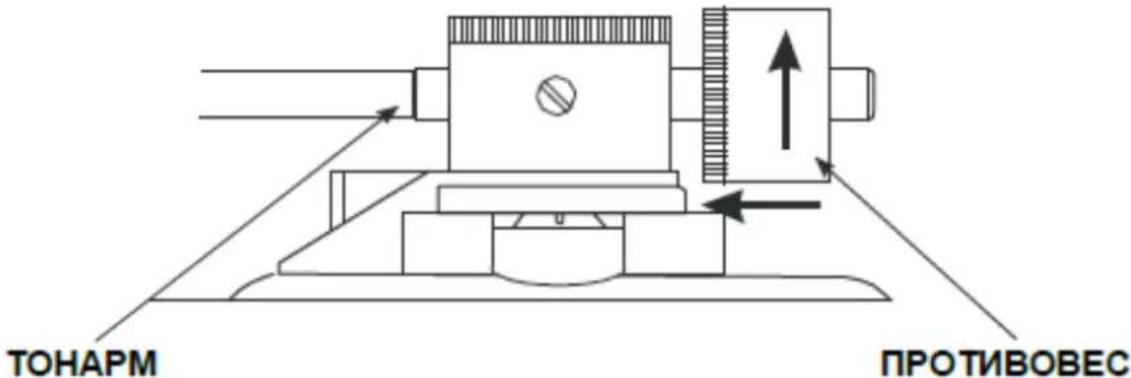
Haayano pa6oTbI c yctpoiCTBOM:
1.Измehнсckopoctn nponrpbBaHn3anncsei
HaKImaTe KhoNky BbI6opa ckopoCTn 33/45 o6oPoTob, uTo6bl n3MeHraTb ckopoCTb BpaueHn nncka.
Пи OДНOBpeMeHOM HaKaTи KhoNOK 33 n 45 nck 6yJeT BpaaTaBcA co CkopoocTBIO 78 06/MnH. 3Ta cKopoocTB npEHa3NaHeHa dIa CtapbIX nlaCTIHNOK. YTo6bl BocnpoIN3BeCTn 3TN pIaCTnHKn co cKopoocTBIO 78 06/MnH, Bam Notpe6yeTcmeHntb KapTpndxN nIry! BaW npOnrpbBaTeIb ocHaSeH KapTpndxem Audio-technica AT-3600E, KoTOpBn He noDdePknBaET BOCnpoIN3BeDeHne co cKopoocTBIO 78 06/MnH. YTo6bl Bbl6paTb COBMecTmBn KaPtpndxN, nocTeIte Be6-caIT KOMnaHIn Audio-Technica.
2. 3anyck n octaHOBka nicka
NcnoB3yTe KhoNky PLAY/PAUSE, yTo6bl 3anyckaTb NocTaHaBnBaTb BpaueHne Dncka.
3. Повстpoиka тona (Pitch Control)
1)ПодстpoикaToHaNo3BOLЯET6OJIeTeTOUHOHAcTpoINbCKOpocTbBOcPpOn3BeDeHnIa,NO cpaBHeHnIOco CKOpocTbIOBpaUeHnIaNCKa.
2) Hac trojka ToHa BapnaTnBHa n Imeet Bb6op MeJdy -10% n +10% OT Bb6paHNo CKOpOCTN BpaueHn DaCKa.
3) HacpoiKa ToHa npOn3BODnTcpeBoDom COOTBeTCTByIOeIro NOn3YHka BBepx n BHn3.
4) INHДИКaTOpHbIe ToUKn Ha DnCke MOryT NcNoJIb3OBAbTcBdЯ IJN pPIMePHoro NOHMaHnRA TeKyuSei HAcToPoRkn ToHa. DaHbIe ToUKn NpOcBeyHbIoTcA CToPo6 NpOcBETkoB BO BpeMnIX npoxOxKeHn PdOM C KHOhKO BkJIbUeHn. Pn pa3HbIX yPOBHX ToHa MOKeT NOKa3aTbcA, YTO INHДИKaTOpbl HaxOJaTcB HHeNODbWxHOM COCToHnN.
Примechан: Исторьанes Флуорис ent HBix lamn, pacnoLoxeHHbIX HaД npOnrpbIbATEleM, moKet npInBecTи K hapyuWeHIO TOUHOCTN OTO6paKeHn INHdkaTopamn.
YCTaHOBKa
YcTaHOBka npOnrpbIbATEJIa:
- He pa3MeaIte npOnrpbIbATEIb B MeCTax, rJe OH MoXeT 6bITb NOBBePrHyT BO3dEiCTBIO npAmbix CoJIHeuHbIX Lyuei IIN dpYrIM NcToUHnKam TeIIa.
- He pa3MeaTe npOnrpbIbATEIb BmEcTe C BBICOKO BlaXHOCTbIO HIN 6oJIbsoi KOHcHTpaUneI nbII.
- Kaptpindk MoKet 3axBaTbIBaTb 3Byk nIIN Bn6paunIO OT HaxOJaUxxCra pAdOM KOLOHOK.Длгдостижен MaKcImaJIbHO YnCToRo 3Byka, He pa3MeaIte npOnIrpbIbTeIb prdOM cKOJOhKaMn.
- Pa3meuatae npoIrpblbATEb Tolbko Ha poBbIX ropu3oHTaIbHbIX nobepxHocTax, He noDBepeKeHHbIX Bn6paqnaM.
- Ipope3HHeHHbIe HOKKn pa3pa6oTaHbI c 9eJIbIO MNHMn3aunn Bn6paunn. TaKKe IN MoKHO nCNoJIb3OBaTb dIy 6OJee ToUHorO paCNOLOXeHNr yCTpoNCTBa no rOpN3OHTaIN - dIy 3TOrO DOCTaToCHHO NOBepHyTb ONDy N3 HOKe N O YacOBOn, IIn6 IpOTNB YacOBON CTpeKN.
BalaHcnpOBKa ToHApMa n npKMMHa cHa nrlbl:
- HactpoRka ropu3OHTaIbHOrO 6aIaHcToHaPma n npNkMHO cnblnflbl:
- YdaJInte 3aunTHbI KOJINaQOK c HJIbI, npn erO haJIuHn. He npnKacaiTe K KOHcKy HJIbI BO BpeMa HAcTpoiKn!
- Onyctnte pbIar ToHapaMa.
- Pa36loKpyTe ToHaMp N IOnHmIte ero.
- YctaHOBInTe aHTnCKeTINHnB nIOJOKeHne HOJIb.
- ПовернITE npOTIBOBEC B IIO6OM HAnpaBHeHn Do TOrO MOMeHTa, KOrda OH 6ydt NdeAalbHO c6aIahCnpoBaH (6ydt CBO6OdNo nepeDbuRaTbcra).
- BepHnTe ToHaPm Ha MeTo n 3aФнKcnpyTe ero nOLOKeHne.
- YdeprnBaa npotnbOBeC oHoi pyKo, npokpyTte KOIbUo peYIpOBKn pnnKmHO nJIbI nrbl (3) dpyro pyKo. LioPpa (Hoi) doJxHa 6bITb TOnHO nocepeDInHe 3aDHe qactn ToHapMa.
- PpokpyTte npotnBOBec npotNB yacobN cTpeKN, noka Ha He nokaKeTc3HaueHne npnxHMHO cnbl, peKomeHdyemoe dnyyCTaHOBHeHHO Hrbl.
Приимechанe: PekOMeHdyemoe Давелhoe Na Иглу KapTpndжa, ВхODЯшeroВ кOMnJIeKТ NOCTabkN, coCTabJЯт ot 2,5do 3,5r. Пи Исноьзовани дpyгnx модени KapTpndжe CM.TexHnueckne xapakTepeHCTNK npOn3BODHTeI, npInaraeMbIe K KapTpndjxy.
ANTNCKeTnHr:
HactpoKa aHTnCKeTnHra He Daet ToHaPMy Cbe3KaTb C dopOxek Ha 3aIncn H3-3a DeIcTBna ceHTpOBeXHO nCnbl. Pyka KOHTpOJa aHTnCKeTnHra DOnJXHa 6bITb yCTaHOBneHa B TOM JKe INoLOXeHN, YTO n npNXmHa cNla nIgbl. IInr npIMepa: npu yCTaHOBke npOTnBOBeCa B 3NaueHne 2,5 rpaMa, aHTnCKeTnHr DoJIxeh 6bITb yCTaHOBHe B NOLOXeHne 2,5.
06cnykBaHne:
- PepnoDnueckn ouuuaTe nIy c nOmoUbIO MArKoN uetKn, UTo6bI n36eKaTb cKoJIeHnny nbIIN.
- Ecn 3ByK HaponHnIcR WymAmN, npOBepbTe nRny. Ecn nra n3HocnIacb, 3aMeHnTe ee Ha HOByIO.
- Bpemr ot Bpemn npotnpaTe 3aunTHyIO KpbIuKy N Kopnyc C nomoubIO MrgKoN, cyxon TkaHbIO.
- He nCnoB3yIe IJRA OUHCTKn BeIeCTBa TUNa 6EH3NuHa, CnnpTa, pAcTBOpHTeJIr N TaK daJeE. OhmoryT noBpeIbT bODeJIky npOnrpbIbaTeJIa.
Audacity software overview
Audacity Preferences
3aHnCb aIb6oMoB B nporpaMme «Audacity»
1. Co3dahne n coxpaheHne npoeKta
- ПО «Audacity» coхсангье ВсиMuHeHnI n Фальbl 3anceB nanke «Projectname_data», habояшеньсь ТOTиж e DupeKTopuN, rde 6bl coxpaneH fai npoeKta.
- Ддя нада pa6obtbi coxpaHnte faI npoeKta, bbl6paB nyHKT «Save Project as...» B MeHIO «File».
- Пи заунcke ПО «Audacity» сдданн HOBOтdoCTунha TOLько Функця «Save Project as...», ТAK сдданн КЕт eше He 6bl coхраен.
2. How to record
- 3anycntteBpauence noOpHoro dNcKa Ha npOnrpBaTeJe KhoNko «START/STOP»..

BПО«Audacity»ДЯнЧанэЗпс.
Onyctnte nroIky 3ByKoCHMaTeIHa nIaCTnHKy, IcNoIb3y pyuIar yCTaHOBKn ToHApMa.
-Дя npnoctaHOBK 3aIncn IcnoJIb3yIte KhONky «Pause» Повторно HaXatne 3ToN KhONKn CHOBA 3anyckaT 3annCb.

-ДяоctaHOBKиЗапсинHAЖМЛТe KHOПКу «Stop».

BOT N BCE. Nocne 3aBepeHn 3aINcN Bbl MoKeTe BOCpOn3BOdntb ee Ha KOMMbIOTpe n
peJaTnpoBaTb IIO «Audacity».ФyHKuIg «Undo»No3BOLaTe BO3BpaUaTbcHa IIO6oe KOJIInueCTBO WaOB Ha3aI npn BHeceHn N3MeHeHn B 3aNNc b Do MOMeHTa 3aKpbITna npoeKTA.
PIMMEAHNE: IO «Audacity» He ImeeT cyHKcun 3aHncn Ha CD dNcK. IJra 3aHncn CD Heo6xOIMO nCNoB3OBaTb DOnoHnteHbHoe IO.
Cneunokkaua
06uaHnΦopMaun
Data n3roTOBLeHn npOdyKcnn
Iod n Mecau n3roTOBLeHn npOdyKcun yKa3aHb B HOMepe napTn N cepHOM HOMepe npOdykTa. Hxke OncaHb cnocoby yToCHHeNnaTOn DaTbl.
- ПО Homepy napTIN (Homep napTIN yka3aH IIn6o Ha ynaKOBKe yCTpoiCtBa, IIn6o H TpaHCnOpTnpOBOUHOy ynaKOBKe).
OΦopMaTHOMepa napTN:AAAABDDMY
- IIO cepnHOMy HOMep npOdyKta (cepNHBiH HOMep yKa3aHa YCTpoCTBe).
OΦopMaT cepuHoro Homepa: AAAABDDMYSSSSS
IeM (BOcMbON CnMBOJ CnEBA) paBEN MeCAy npOn3BOODCTBA, a Y (JeBtBm CnMBoN CnEBA) paBEN rOdy npOn3BOODCTBA. MeCAu npOn3BOODCTBA yKa3bBaETcA OdHOH n3 6yKB IaTHNcKOro aIaABTa.
COOTBETCTBnE 6yKBeHHbIX 6o3HaueHm MecaIa PpOn3BOcTBA: