EasyManual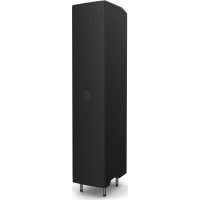
MAILA COL - Speaker LD Systems - Free user manual and instructions
Find the device manual for free MAILA COL LD Systems in PDF.



User questions about MAILA COL LD Systems
0 question about this device. Answer the ones you know or ask your own.
Ask a new question about this device
Download the instructions for your Speaker in PDF format for free! Find your manual MAILA COL - LD Systems and take your electronic device back in hand. On this page are published all the documents necessary for the use of your device. MAILA COL by LD Systems.
USER MANUAL MAILA COL LD Systems
CONNECTIONS, CONTROLS AND INDICATORS 10
ENGLISH YOU MADE THE RIGHT CHOICE! This device was developed and manufactured under high quality requirements to ensure many years of trouble-free operation. This is what LD Systems stands for with its name and many years of experience as a manufacturer of high-quality audio products. Please read these operating instructions carefully so that you can quickly and optimally use your new LD Systems product. You can find more information about LD SYSTEMS on our website WWW.LD SYSTEMS.COM
- Read the safety instructions and the entire manual carefully before starting up.
- Observe the warnings on the device and in the operating instructions.
- Always keep the operating instructions within reach.
- If you sell or pass on the device, be sure to also pass on these operating instructions, as they are an integral part of the product. INTENDED USE The product is a device for professional audio installation! The product has been developed for professional use in the field of audio installation and is not suitable for use in households! Furthermore, this product is only intended for qualified users with specialist knowledge of dealing with audio installations! Use of the product outside of the specified technical data and operating conditions is considered improper use! Liability for damage and third-party damage to persons and property due to improper use is excluded! The product is not suitable for:
- People (including children) with reduced physical, sensory or mental abilities or lack of experience and knowledge.
- Children (Children must be instructed not to play with the device).
EXPLANATIONS OF TERMS AND SYMBOLS
1. DANGER: The word DANGER, possibly in combination with a symbol, refers to directly dangerous
situations or conditions for life and limb.
2. WARNING: The word WARNING, possibly in combination with a symbol, refers to potentially
dangerous situations or states of life and limb.
3. CAUTION: The word CAUTION, possibly in combination with a symbol, refers to situations or conditions
that can lead to injuries.
4. ATTENTION: The word ATTENTION, possibly in combination with a symbol, refers to situations or
states that can lead to damage to property and/or the environment. DEUTSCHFRANCAIS ESPAÑOL ENGLISH ITALIANO POLSKI4 This symbol indicates hazards that can cause an electric shock. This symbol indicates danger spots or dangerous situations. This symbol indicates danger from hot surfaces. This symbol indicates danger from high volumes. This symbol indicates supplementary information on the operation of the product. This symbol denotes a device that does not contain any user-serviceable parts. SAFETY INSTRUCTIONS
2. If your device is no longer working properly, liquids or objects have gotten inside the
device, or the device has been damaged in any other way, switch it off immediately and disconnect it from the power supply. This device may only be repaired by authorized specialist personnel.
3. For devices of protection class 1, the protective conductor must be connected correctly.
Never interrupt the protective conductor. Protection class 2 devices do not have a protective conductor.
4. Ensure that live cables are not kinked or otherwise mechanically damaged.
5. Never bypass the device fuse.
1. The device must not be put into operation if it shows obvious signs of damage.
2. The device may only be installed in a voltage-free state.
3. If the power cord of the device is damaged, the device must not be put into operation.
4. Permanently connected mains cables may only be replaced by a qualified person.
1. Do not operate the device if it has been exposed to severe temperature fluctuations (e.g.
after transport). Humidity and condensation could damage the device. Do not switch on the device until it has reached the ambient temperature.
2. Make sure that the voltage and frequency of the mains supply correspond to the values
indicated on the device. If the device has a voltage selector switch, do not connect the device until this is set correctly. Only use suitable power cords.
3. To disconnect the device from the mains at all poles, it is not enough to press the on/off
switch on the device.
4. Ensure that the fuse used corresponds to the type printed on the device.
5. Make sure that appropriate measures against overvoltage (e.g. lightning) have been
6. Note the specified maximum output current on devices with a power out connection.
Make sure that the total power consumption of all connected devices does not exceed the specified value.
1. Danger of suffocation! Plastic bags and small parts must be kept out of the reach of
people (including children) with reduced physical, sensory or mental abilities.
2. Danger from falling! Make sure the device is installed securely and cannot fall. Only use
suitable tripods or attachments (especially for fixed installations). Make sure accessories are properly installed and secured. Make sure that the applicable safety regulations are observed.
1. Only use the device in the manner intended.
2. Only operate the device with the accessories recommended and intended by the manu-
3. During installation, observe the safety regulations applicable in your country.
4. After connecting the device, check all cable routes to avoid damage or accidents, e.g. B. to
avoid tripping hazards.
5. Be sure to observe the specified minimum distance to normally flammable materials!
Unless this is explicitly stated, the minimum distance is 0.3 m. ATTENTION:
1. There is a risk of jamming with moving components such as mounting brackets or other
2. In the case of devices with motor-driven components, there is a risk of injury from the
movement of the device. Sudden device movements can lead to startle reactions. DEUTSCHFRANCAIS ESPAÑOL ENGLISH ITALIANO POLSKI6
1. Do not install or operate the device near radiators, heat registers, stoves or other heat
sources. Make sure that the device is always installed in such a way that it is sufficiently cooled and cannot overheat.
2. Do not place any sources of ignition such as burning candles near the device.
3. Ventilation openings must not be covered and fans must not be blocked.
4. Use the original packaging or packaging provided by the manufacturer for transport.
5. Avoid shock or shock to the device.
6. Observe the IP protection class and the environmental conditions such as temperature
and humidity according to the specification.
Devices can be continuously developed. In the event of deviating information on operating conditions, performance or other device properties between the operating instructions and the device labeling, the information on the device always has priority.
8. The device is not suitable for tropical climate zones and for operation above 2000 m
above sea level. ATTENTION: Connecting signal cables can result in significant noise interference. Make sure that devices connected to the output are muted during plugging. Otherwise, noise levels can cause damage. ATTENTION HIGH VOLUMES WITH AUDIO PRODUCTS! This device is intended for professional use. The commercial operation of this device is subject to the applicable national regulations and guidelines for accident prevention. Hearing damage due to high volumes and continuous exposure: The use of this product can generate high sound pressure levels (SPL) which can cause hearing damage. Avoid exposure to high volumes. ITALIANO POLSKI ESPAÑOL FRANCAIS DEUTSCHENGLISH7 SIGNAL TRANSMISSION VIA RADIO (e.g. W-DMX or audio radio systems, Bluetooth): The quality and performance of wireless signal transmissions generally depends on the environmental conditions. Influence on the range and signal stability, for example:
- Shielding (e.g. masonry, metal structures, water)
- High radio traffic (e.g. strong W-LAN networks)
- Electromagnetic radiation (e.g. LED video walls, dimmers) All range specifications refer to free field use with visual contact without interference! The operation of transmitters is subject to official regulations. These can vary from region to region and must be checked by the operator before commissioning (e.g. radio frequency and transmission power).
Devices with wireless signal transmission are not suitable for operation in sensitive areas in which radio operation can lead to possible interactions. These include, for example:
- Hospitals, health centers or other healthcare facilities that perform patient treatments with specialized staff and equipment.
- Class I, II and III hazardous areas
- airplanes or vehicles
- Areas where cell phone use is prohibited
Temporary operation! Event equipment is basically only designed for temporary operation.
2. Continuous operation or permanent installation can lead to impairment of the function
and premature aging of the devices.
Remove the product from the packaging and remove all packaging material. Check the completeness and integrity of the delivery andpleasenotify yourdistributor immediately after purchase if the delivery is not complete or damaged. Included in the scope of delivery of the product are:
- Operating instructions DEUTSCHFRANCAIS ESPAÑOL ENGLISH ITALIANO POLSKI8 PROPERTIES The MAILA® COL full-range column module makes MAILA® truly versatile. The elegant column element with its 4x 6.5'' woofers not only provides an extended low-mid range, but also includes a 4-channel DSP amplifier with 2.5 kW total power, which drives both the column itself and the MAILA® SAT satellites. In this way, MAILA® sets with column module can not only be used as a ground stack variant, but also as a flown array consisting of MAILA® COL and up to eight MAILA® SAT - particularly useful for festivals and fixed installations. In addition, as with a classic line array, users can select different subwoofer arrangements and adapt them to the sound reinforcement requirements on site. On the ground, the use of MAILA® COL provides a further advantage: The interconnected column module allows ground stack sound reinforcement to be implemented that is significantly higher (up to 3.2 metres) than conventional systems and, with its greater throw, also enables uniform sound coverage in the far field. With LogoLink®, LD Systems has added another innovation to MAILA®. Via the free MAILA® app (iPadOS), every MAILA® system can be adapted quickly, easily and in detail and supplied with software updates wirelessly. Once connected, the app automatically recognises the existing MAILA® components and allows the system to be optimally set up in advance as well as during an event. The clincher: The required wireless antennas are invisibly integrated into the LD logo of the MAILA® COL. MAILA® APP (iPadOS) The MAILA® app for iPadOS is available free of charge in the App Store.
Always place the speaker system in a suitable location on a sufficiently stable, level and horizontal surface. Make sure that the speaker system cannot fall off the edge of a stage (e.g. due to vibration).
Overhead installation requires extensive experience, including calculation of working load limits, installation materials used and regular safety checks of all installation materials and equipment. If you do not have these qualifications, do not attempt an installation yourself, but use the help of professional companies. There is a risk that equipment that has not been correctly mounted and secured will come loose and fall down. This can seriously injure or kill people. The LD MAILA® COL speaker column has 2 ergonomic carrying handles for comfortable transport. To mount the speaker column on the subwoofer, insert the 4 steel bolts on the underside of the speaker column into the 4 retaining sockets of the connecting plate in the subwoofer as far as they will go. MAILA ITALIANO POLSKI ESPAÑOL FRANCAIS DEUTSCHENGLISH9 Use the optionally available EasyMount+ flying bracket for truss mounting (item number LDMAILATMB). To secure the MAILA COL speaker column during truss mounting, there is an M10 thread on the back of the enclosure in the recessed grip
Remove the inserted blind screw using a suitable tool. An M10 eyebolt is included in the scope of delivery of the MAILA COL. Screw the eyebolt into the now free thread and make sure it is firmly fixed. Use a suitable safety rope to secure the speaker column and also take into account the total weight of the satellite speakers mounted on the column. NOTE The satellites do not need to be secured by a safety rope, as the SmartLink+® connection meets the criteria for inherent safety. However, if desired, the satellite speakers can be secured using the second M10 thread
on the speaker column if desired.
CONNECTIONS, CONTROLS AND INDICATORS
POWER INPUT PowerCON TRUE1 Mains input socket. A suitable mains cable is included in the scope of delivery
INPUT Balanced line input with lockable female 3-pin XLR connector. ITALIANO POLSKI ESPAÑOL FRANCAIS DEUTSCHENGLISH11
THRU Balanced line output for forwarding the line input signal (male 3-pin XLR socket).
LC-DISPLAY Multifunctional graphic LC display with illumination.
Rotary-push encoder for navigating in the main menu and submenus and for adjusting system settings. Select the individual menu items in the main menu and in the submenus by turning the encoder and confirm the selection by pressing the encoder. Change a numerical value or status in a menu item by turning the encoder and confirm the change by pressing the encoder. To move up one level in the menu structure, select the arrow symbol < and confirm the selection. Press the encoder for about 2 seconds to mute the speaker column and again for about 2 seconds to unmute it.
LEDS TO INDICATE THE STATUS OF THE UNIT PWR – (Power) The PWR indicator lights up white when the unit is correctly connected to the mains and is switched on. SIG – (Signal) The SIG indicator lights up white when an audio signal is present in the unit. LIMIT – (Limiter) The LIMIT indicator lights up yellow when the amplifier module is operated in the upper limit range. Brief illumination of the LED is not critical. To protect the system, any excessive signal level is lowered smoothly by the integrated limiter. The level reduction is shown graphically under GR in the display (Gain Reduction). If the limiter LED remains lit for a longer period, or permanently, reduce the volume level. PROT – (Protect) The PROT indicator lights up red if the speaker column is overloaded or overheating. The loudspeaker column is automatically muted. After reaching normal operating conditions, the unit returns to the normal operating mode after a few minutes.
VENTS To prevent damage to the unit, do not cover the ventilation openings on the back and ensure that air can circulate freely.
On the rear upper edge of the speaker column is the release button for detaching a mounted satellite speaker.
RETAINING BUSHES & STEEL BOLTS
On the underside of the speaker column are the retaining sockets for the EasyMount+ ® flying bracket LD MAILA ® TMB and the steel bolts for mounting the column on the subwoofer LD MAILA ® SUB and also an M20 knurled screw for securing to the subwoofer. DEUTSCHFRANCAIS ESPAÑOL ENGLISH ITALIANO POLSKI12 OPERATION NOTES When switching on, all settings, such as VOLUME and EQUALIZER, are loaded as they were set before the speaker column was previously switched off. After a short time, the speaker column is ready for operation. After about 30 seconds without any input by rotary-push encoder, the display system leaves lower levels in the menu structure and the main display with the VOLUME selection is automatically shown. MAIN DISPLAY In normal operation, the main display is activated, showing VOLUME with the current value, the set delay and the number of satellites used. The Bluetooth status, the volume level (LVL), the gain (VOL) and the status of the automatic equaliser (AUTO EQ) and the automatic satellite detection (AUTO DETECT) are displayed graphically. The level reduction by the integrated limiter is displayed under GR (Gain Reduction). If the red CLIP indicator lights up, this signals that the input stage is being operated above the distortion limit. Reduce the output level of the feed device (e.g. mixing console) until the CLIP indicator no longer lights up and the amplifier module plays back audio signals without distortion. VOLUME Adjust the level of the amplifier module by using the encoder directly from the main display, or select VOLUME from the main menu, confirm and then set the desired value from -40 dB to +10 dB. LVL VOL
Seated OFF Sat. Height
Mute: Press the encoder for about 2 seconds to mute the speaker column and again for about 2 seconds to unmute it (at all menu levels). LVL VOL
Seated OFF Sat. Height
SPLAY ANGLES Mounting on subwoofer: To enable the automatic calculation of the optimal spreading angles of the satellites, the rotation of the display must be set correctly. ROTATION menu item, status: standing The number of satellite speakers used is automatically detected by the module electronics if the status ON is set in the menu item SATELLITES under AUTO DETECT . Alternatively, enter the corresponding number of satellites manually under QUANTITY and deactivate the automatic detection(AUTO DETECT OFF). To enter the relevant data of the audience area and the height at the measuring point, select SPLAY ANGLES in the main menu, confirm, then select the corresponding submenu item and confirm again. ITALIANO POLSKI ESPAÑOL FRANCAIS DEUTSCHENGLISH13 Select at Sat. Height the adequate value for the height of the bottom edge of the lowest satellite measured from the audience‘s location and the distance from the array system to the back row of the audience (coverage) in metres. Under Seated, enter standing (Seated OFF) or seated audience (SeatedON). Now the optimal spreading angles for each satellite are automatically displayed. To exit the menu level, select the arrow symbol and confirm the selection. The spread angles are set manually on the satellite speakers. The correct setting of the indicated spreading angles is a prerequisite for the optimal sound distribution on the indicated listening area. LVL VOL 2 sec
Seated OFF Sat. Height
Truss mounting: To enable the automatic calculation of the optimal spreading angles of the satellites and the optimal hanging point of the EasyMount+® flying bracket (for traverse mounting), the rotation of the display must be set correctly. ROTATION menu item, status: flying The number of satellite speakers used is automatically detected by the column electronics. To enter the relevant data of the audience area and the height at the measuring point, select SPLAY ANGLES in the main menu, confirm, then select the corresponding sub menu item and confirm again. The number of satellite speakers used is automatically detected by the module electronics if the status ON is set in the menu item SATELLITES under AUTO DETECT . Alternatively, enter the corresponding number of satellites manually under QUANTITY and deactivate the automatic detection(AUTO DETECT OFF). To enter the relevant data of the audience area and the height at the measuring point, select SPLAY ANGLES in the main menu, confirm, then select the corresponding submenu item and confirm again. Choose from Rig. Height the adequate value for the height of the top edge of the uppermost satellite measured from the audience‘s location and the distance from the array system to the back row of the audience (coverage) in metres. Under Seated, enter standing (Seated OFF) or seated audience (SeatedON). Now the optimal spreading angles for each satellite are automatically displayed. To exit the menu level, select the arrow symbol and confirm the selection. The spread angles are set manually on the satellite speakers. The correct setting of the indicated spreading angles is a prerequisite for the optimal sound distribution across the indicated listening area. The optimum hanging point is displayed under PICK. LVL VOL 2 sec
Seated OFF Sat. Height
DEUTSCHFRANCAIS ESPAÑOL ENGLISH ITALIANO POLSKI14 SATELLITES The number of satellite speakers used is automatically detected by the module electronics if the status ON is set in the menu item SATELLITES under AUTO DETECT. Alternatively, enter the corresponding number of satellites manually under QUANTITY and deactivate the automatic detection (AUTO DETECT OFF). AUTO EQ ON: An intelligent equaliser automatically equalises the system according to the number of satellites used and the specifications under Sat. or Rig. Height, Coverage and Seated. If automatic equalisation is not desired, it can be deactivated (AUTO EQ OFF). The AUTO EQ works independently of the fully parametric 10-band equaliser. LVL VOL 2 sec
LVL VOL Coverage35 mSeated OFF
LVL VOL 0°1°2°1° 4 Sat Coverage20.0 mSeated OFFSat. Height 2.0 mAASPLAY ANGLESVOLUME
LVL VOL Coverage35 mSeated OFF
LVL VOL 0°1°2°1° 4 Sat Coverage20.0 mSeated OFFSat. Height 2.0 mAASPLAY ANGLESVOLUME
LVL VOL Coverage35 mSeated OFF
LVL VOL 0°1°2°1° 4 Sat Coverage20.0 mSeated OFFSat. Height 2.0 mAASPLAY ANGLESVOLUME
LVL VOL Coverage35 mSeated OFF
LVL VOL 0°1°2°1° 4 Sat Coverage20.0 mSeated OFFSat. Height 2.0 mAASPLAY ANGLESVOLUME
LVL VOL Coverage35 mSeated OFF
LVL VOL 0°1°2°1° 4 Sat Coverage20.0 mSeated OFFSat. Height 2.0 mAASPLAY ANGLESVOLUME
EQUALIZER The integrated DSP (Digital Signal Processor) has a powerful 10-band fully parametric equaliser. Select EQUALIZER in the main menu and confirm the selection. LVL VOL 2 sec
LVL VOL0°1°2°1°4 SatCoverage20.0 mSeated OFFSat. Height 2.0 mAASPLAY ANGLESVOLUME
4 SatLVL VOLEQUALIZERDELAYAA ITALIANO POLSKI ESPAÑOL FRANCAIS DEUTSCHENGLISH15 The function of the equalizer bands 1 and 10 can optionally be set as fully parametric or as low-shelf (band 1, LS) or hi-shelf (band 10, HS).
-20 – +10 To set the frequency in hertz under FREQ, the Q factor or the functioning of bands 1 and 10 under Q and the gain in dB under GAIN, select the corresponding column in the desired equaliser band (NR
1 - 10), confirm, set the value as desired and confirm again. The selected value is displayed with a white
background. The EQ bands can be deactivated individually by selecting and confirming the band number. Instead of a tick symbol, an X is now displayed and the values in the corresponding band appear greyed out. Select and confirm again to activate the band. The entire equaliser can be deactivated by selecting the EQ line, confirming, then selecting OFF and confirming again. All values in the equaliser are now greyed out. To activate the equaliser, select ON and confirm. To exit the menu level, select the arrow symbol and confirm the selection. DEUTSCHFRANCAIS ESPAÑOL ENGLISH ITALIANO POLSKI16 DELAY To delay the audio signal, select DELAY, confirm, then select the desired submenu item and confirm again. The value or status can now be set as desired, confirm each entry. LVL VOL 2 sec
Seated OFF Sat. Height
Seated OFF Sat. Height
POLARITY Normal Normal polarity Inverted Inverted polarity ROTATION To set the rotation of the display, select ROTATION, confirm, then select the desired status and confirm the selection. To enable the automatic calculation of the optimal spreading angles of the satellites and the optimal hanging point of the EasyMount+® flying bracket (for truss mounting), the rotation of the display must correspond to the mounting type.
- Mounting on spacer bar: ROTATION standing
LVL VOL0°1°2°1°4 SatCoverage20.0 mSeated OFFSat. Height 2.0 mAASPLAY ANGLESVOLUME
4 SatLVL VOLEQUALIZERDELAYAA ROTATION Standing Upright Flying Truss assembly SETTINGS To enter the system settings menu, select SETTINGS and confirm the selection. Then select the desired submenu item and confirm the selection. LVL VOL 2 sec
LVL VOL0°1°2°1°4 SatCoverage20.0 mSeated OFFSat. Height 2.0 mAASPLAY ANGLESVOLUME
PIN LOCK * * * * Enter PIN code to LOCK Protect the speaker column from accidental and unauthorised operation by activating the lock function. Enter a 4-digit PIN and confirm the entry. Access can now only be achieved by entering the PIN. Reset PIN: Press and hold the encoder when switching on (connect the unit to the mains). BLUETOOTH OFF EQ ON
2 sec Bluetooth deactivated.
2 sec Bluetooth activated: access to the system via tablet App enabled. DISPLAY Brightness Adjust the display brightness from 10% to 100%. Screensaver active Deactivation of the display illumination after approx. 1 minute without input via rotary-push encoder. inactive Display lighting permanently on. FIRMWARE System xxx Display of the system firmware. Wireless xxx.xxx Display of the firmware of the wireless module. RESET FACTORY DEFAULT Restore factory settings: Select RESET and confirm RESET (the illustrations in the unit menu may vary slightly depending on the software version) DEUTSCHFRANCAIS ESPAÑOL ENGLISH ITALIANO POLSKI18 MAILA® APP Download the MAILA® app, which is available free of charge in the App Store, onto your tablet and install it. Activate Bluetooth in the system settings of the active MAILA® components. Also activate Bluetooth in the system settings of your tablet and start the MAILA® app. The MAILA® components with activated Bluetooth within range are now automatically displayed in the MAILA® app after a short time. FIRMWARE UPDATE Use the MAILA® app to check whether a new firmware is available for your unit. Start the update procedure via MAILA® App. Make sure that there is a stable wireless connection between the device and the tablet and do not switch off the device or the tablet until the update procedure is complete. Cancelling the update procedure may cause the unit to malfunction. The MAILA® app for iPadOS is available free of charge in the App Store. INDICATION-LED The speaker column has a white indicator LED on the front behind the front grille. This can be activated for easy identification of the speaker column using the MAILA® app. The MAILA® app for iPadOS is available free of charge in the App Store. OPTIONAL ACCESSORIES LDMAILAFC2 (Flightcase for 4x SAT, 1x COL, 1x EasyMount+®) LDMAILATMB (EasyMount+® flying bracket)
CARE, MAINTENANCE AND REPAIR
To ensure the proper functioning of the unit in the long term, it must be regularly maintained and serviced as required. The need for care and maintenance depends on the intensity of use and the environment. We generally recommend a visual inspection before each commissioning. Furthermore, we recommend that all the maintenance measures listed below be carried out every 500 hours of operation, or at the latest after one year in the case of less intensive use. Defects caused by insufficient care may result in limitations of the warranty claims. CARE (CAN BE CARRIED OUT BY THE USER) WARNING! Before carrying out any maintenance work, the power supply and, if possible, all device connections must be disconnected. NOTE! Improper care can lead to impairment or even destruction of the unit.
1. Housing surfaces must be cleaned with a clean, damp cloth. Make sure that no moisture can
2. Air inlets and outlets must be regularly cleaned of dust and dirt. If compressed air is used, make sure
that damage to the unit is prevented (e.g. fans must be blocked for this case).
3. Cables and plug contacts must be cleaned regularly and freed from dust and dirt.
4. In general, no cleaning agents or agents with an abrasive effect may be used for maintenance,
otherwise the surface finish is likely to be impaired.
5. Units should generally be stored in a dry place and protected from dust and dirt.
ITALIANO POLSKI ESPAÑOL FRANCAIS DEUTSCHENGLISH19 MAINTENANCE AND REPAIR (BY QUALIFIED PERSONNEL ONLY) DANGER! There are live components in the unit. Even after disconnecting the mains connection, residual voltage may still be present in the unit, e.g. due to charged capacitors. NOTE! There are no assemblies in the unit that require maintenance by the user. NOTE! Maintenance and repair work may only be carried out by specialist personnel authorised by the manufacturer. If in doubt, contact the manufacturer. NOTE! Improperly performed maintenance work may affect the warranty claim. DIMENSIONS (mm) 204,6 204,6 179,6 967,5 60,1 354,4 306,4 MAILA COL 1:15 204,6 204,6 179,6 967,5 60,1 354,4 306,4 MAILA COL 1:15 DEUTSCHFRANCAIS ESPAÑOL ENGLISH ITALIANO POLSKI20 TECHNICAL DATA Item number LDMAILACOL Product type MAILA® Column Type Powered Low/mid Woofer dimensions 4 x 6.5 " Woofer dimensions (mm) 16.51 mm Woofer magnet Neodymium Woofer brand Custom-made Woofer voice coil 2 " Woofer voice coil (mm) 50 mm Amplifier Class D System Power (RMS) 2500 W Frequency response (–6dB) 105 Hz – 500 Hz Max. SPL Peak (Pink noise) 130 dB (fullspace @1m, Crest factor 4) Max. SPL Peak (Sine burst) 125.4 dB (fullspace @1m, 10% THD) Max. SPL Average (Sine burst) 122 dB (100 Hz – 2 kHz, fullspace @1m, 10% THD) Protection circuits limiter, over-current, thermal overload Input impedance 20000 Ohm(s) Controls Rotary/push encoder Indicators Indication LED, LC display, Limit, Power, Protect, Signal Line inputs 1 Line input connectors XLR Line outputs 1 Line output connectors XLR Speaker output connections SmartLink+® Wireless Connectivity LogoLink® for App Control Operating voltage SMPS Power consumption (max.) 800 W Operating voltage 100 – 240 V AC, 50 – 60 Hz Operating Temperature 0 – 40 °C Relative Humidity < 80 %, not condensing Cabinet material Die-cast aluminium unibody Cabinet surface Powder-coated Cabinet construction Bass Reflex Mounting 3 x M10, 4 x Pin, EasyMount+® ITALIANO POLSKI ESPAÑOL FRANCAIS DEUTSCHENGLISH21 Item number LDMAILACOL Handles 2 Width 205 mm Height 1028 mm Depth 354 mm Weight 36.195 kg DSP Characteristic Bit depth AD/DA converter 24 bit Sampling frequency 48 kHz Bluetooth Bluetooth version 4.2 Bluetooth transmission power 9 dBm Bluetooth frequency range 2402 – 2480 MHz DISPOSAL Packing:
1. Packaging can be fed into the recycling system via the usual disposal channels.
2. Please separate the packaging according to the disposal laws and recycling regulations in
your country. Device:
1. This appliance is subject to the European Directive on Waste Electrical and Electronic
Equipment as amended. WEEE Directive Waste Electrical and Electronical Equipment. Old appliances and batteries do not belong in household waste. The old appliance or batteries must be disposed of via an approved waste disposal company or a municipal waste disposal facility. Please observe applicable regulations in your country!
2. Observe all disposal laws applicable in your country.
3. As a private customer, you can obtain information on environmentally friendly disposal
options from the dealer from whom the product was purchased or from the relevant regional authorities. Batteries and rechargeable batteries:
1. Batteries and rechargeable batteries do not belong in household waste. Batteries and
rechargeable batteries must be disposed of via an authorised disposal company or a municipal disposal facility.
2. Observe all disposal laws and regulations applicable in your country.
3. As a private customer, you can obtain information on environmentally friendly disposal
options from the dealer from whom the product was purchased or from the relevant regional authorities.
4. Appliances with batteries or accumulators that cannot be removed by the user must be
handed in at a collection point for electrical appliances. DEUTSCHFRANCAIS ESPAÑOL ENGLISH ITALIANO POLSKI22 MANUFACTURER DECLARATION
MANUFACTURER’S WARRANTY & LIMITATION OF LIABILITY
Adam Hall GmbH, Adam-Hall-Str. 1, D-61267 Neu Anspach / Email Info@adamhall.com / +49 (0)6081 / 9419-0. For our current warranty terms and limitation of liability see: https://cdn-shop.adamhall.com/media/pdf/MANUFACTURERS-DECLARATIONS_LD_SYSTEMS.pdf. In the event of service, please contact your sales partner. UKCA- CONFORMITY Hereby, Adam Hall Ltd. declares that this product meets the following guidelines (where applicable) Electrical Equipment (Safety) Regulations 2016 Electromagnetic Compatibility Regulations 2016 (SI 2016/1091) The Restriction of the Use of Certain Hazardous Substances in Electrical and Electronic Equipment Regulation 2012 (SI 2012/3032) Radio Equipment Regulations 201 7(SI 2016/2015)
UKCA- DECLARATION OF CONFORMITY
Products that are subject to Electrical Equipment(Safety)Regulation 2016, EMC Regulation 2016 or RoHS Regulation can be requested at info@adamhall.com. Products that are subject to the Radio Equipments Regulations 2017 (SI2017/1206) can be downloaded from www.adamhall.com/compliance/ FCC STATEMENT
1. This device complies with Part 15 of the FCC Rules. Operation is subject to the following two conditions:
(1) This device may not cause harmful interference, and (2) This device must accept any interference received, including interference that may cause undesired operation.
2. Changes or modifications not expressly approved by the party responsible for compliance could void
the user’s authority to operate the equipment. ITALIANO POLSKI ESPAÑOL FRANCAIS DEUTSCHENGLISH23
RADIATION EXPOSURE STATEMENT
This equipment complies with FCC radiation exposure limits set forth for an uncontrolled environment. This equipment should be installed and operated with minimum distance 20cm between the radiator & your body. NOTE: This equipment has been tested and found to comply with the limits for a Class B digital device, pursuant to Part 15 of the FCC Rules. These limits are designed to provide reasonable protection against harmful interference in a residential installation. This equipment generates, uses and can radiate radio frequency energy and, if not installed and used in accordance with the instructions, may cause harmful interference to radio communications. However, there is no guarantee that interference will not occur in a particular installation. If this equipment does cause harmful interference to radio or television reception, which can be determined by turning the equipment off and on, the user is encouraged to try to correct the interference by one or more of the following measures:
- Reorient or relocate the receiving antenna.
- Increase the separation between the equipment and receiver.
- Connect the equipment into an outlet on a circuit different from that to which the receiver is connected.
- Consult the dealer or an experienced radio/TV technician for help.
EU DECLARATION OF CONFORMITY
Seated OFF Sat. Height
Seated OFF Sat. Height
Seated OFF Sat. Height
Seated OFF Sat. Height
LVL VOL0°1°2°1°4 SatCoverage20.0 mSeated OFFSat. Height 2.0 mAASPLAY ANGLESVOLUME
LVL VOL Coverage35 mSeated OFF
LVL VOL 0°1°2°1° 4 Sat Coverage20.0 mSeated OFFSat. Height 2.0 mAASPLAY ANGLESVOLUME
LVL VOL Coverage35 mSeated OFF
LVL VOL 0°1°2°1° 4 Sat Coverage20.0 mSeated OFFSat. Height 2.0 mAASPLAY ANGLESVOLUME
LVL VOL Coverage35 mSeated OFF
LVL VOL 0°1°2°1° 4 Sat Coverage20.0 mSeated OFFSat. Height 2.0 mAASPLAY ANGLESVOLUME
LVL VOL Coverage35 mSeated OFF
LVL VOL 0°1°2°1° 4 Sat Coverage20.0 mSeated OFFSat. Height 2.0 mAASPLAY ANGLESVOLUME
LVL VOL Coverage35 mSeated OFF
LVL VOL 0°1°2°1° 4 Sat Coverage20.0 mSeated OFFSat. Height 2.0 mAASPLAY ANGLESVOLUME
Seated OFF Sat. Height
Seated OFF Sat. Height
Seated OFF Sat. Height
LVL VOL0°1°2°1°4 SatCoverage20.0 mSeated OFFSat. Height 2.0 mAASPLAY ANGLESVOLUME
LVL VOL0°1°2°1°4 SatCoverage20.0 mSeated OFFSat. Height 2.0 mAASPLAY ANGLESVOLUME
Seated OFF Sat. Height
Seated OFF Sat. Height
Seated OFF Sat. Height
Seated OFF Sat. Height
LVL VOL0°1°2°1°4 SatCoverage20.0 mSeated OFFSat. Height 2.0 mAASPLAY ANGLESVOLUME
LVL VOL Coverage35 mSeated OFF
LVL VOL 0°1°2°1° 4 Sat Coverage20.0 mSeated OFFSat. Height 2.0 mAASPLAY ANGLESVOLUME
LVL VOL Coverage35 mSeated OFF
LVL VOL 0°1°2°1° 4 Sat Coverage20.0 mSeated OFFSat. Height 2.0 mAASPLAY ANGLESVOLUME
LVL VOL Coverage35 mSeated OFF
LVL VOL 0°1°2°1° 4 Sat Coverage20.0 mSeated OFFSat. Height 2.0 mAASPLAY ANGLESVOLUME
LVL VOL Coverage35 mSeated OFF
LVL VOL 0°1°2°1° 4 Sat Coverage20.0 mSeated OFFSat. Height 2.0 mAASPLAY ANGLESVOLUME
LVL VOL Coverage35 mSeated OFF
LVL VOL 0°1°2°1° 4 Sat Coverage20.0 mSeated OFFSat. Height 2.0 mAASPLAY ANGLESVOLUME
Seated OFF Sat. Height
Seated OFF Sat. Height
Seated OFF Sat. Height
LVL VOL0°1°2°1°4 SatCoverage20.0 mSeated OFFSat. Height 2.0 mAASPLAY ANGLESVOLUME
LVL VOL0°1°2°1°4 SatCoverage20.0 mSeated OFFSat. Height 2.0 mAASPLAY ANGLESVOLUME
Seated OFF Sat. Height
Seated OFF Sat. Height
Seated OFF Sat. Height
4 Sat Coverage 20 m Seated OFF Sat. Height
LVL VOL0°1°2°1°4 SatCoverage20.0 mSeated OFFSat. Height 2.0 mAASPLAY ANGLESVOLUME
LVL VOL Coverage35 mSeated OFF
LVL VOL 0°1°2°1° 4 Sat Coverage20.0 mSeated OFFSat. Height 2.0 mAASPLAY ANGLESVOLUME
LVL VOL Coverage35 mSeated OFF
LVL VOL 0°1°2°1° 4 Sat Coverage20.0 mSeated OFFSat. Height 2.0 mAASPLAY ANGLESVOLUME
LVL VOL Coverage35 mSeated OFF
LVL VOL 0°1°2°1° 4 Sat Coverage20.0 mSeated OFFSat. Height 2.0 mAASPLAY ANGLESVOLUME
LVL VOL Coverage35 mSeated OFF
LVL VOL 0°1°2°1° 4 Sat Coverage20.0 mSeated OFFSat. Height 2.0 mAASPLAY ANGLESVOLUME
LVL VOL Coverage35 mSeated OFF
LVL VOL 0°1°2°1° 4 Sat Coverage20.0 mSeated OFFSat. Height 2.0 mAASPLAY ANGLESVOLUME
LVL VOL0°1°2°1°4 SatCoverage20.0 mSeated OFFSat. Height 2.0 mAASPLAY ANGLESVOLUME
Seated OFF Sat. Height
Seated OFF Sat. Height
Seated OFF Sat. Height
LVL VOL0°1°2°1°4 SatCoverage20.0 mSeated OFFSat. Height 2.0 mAASPLAY ANGLESVOLUME
Seated OFF Sat. Height
Seated OFF Sat. Height
Seated OFF Sat. Height
4 Sat Coverage 20 m Seated OFF Sat. Height
LVL VOL0°1°2°1°4 SatCoverage20.0 mSeated OFFSat. Height 2.0 mAASPLAY ANGLESVOLUME
LVL VOL Coverage35 mSeated OFF
LVL VOL 0°1°2°1° 4 Sat Coverage20.0 mSeated OFFSat. Height 2.0 mAASPLAY ANGLESVOLUME
LVL VOL Coverage35 mSeated OFF
LVL VOL 0°1°2°1° 4 Sat Coverage20.0 mSeated OFFSat. Height 2.0 mAASPLAY ANGLESVOLUME
LVL VOL Coverage35 mSeated OFF
LVL VOL 0°1°2°1° 4 Sat Coverage20.0 mSeated OFFSat. Height 2.0 mAASPLAY ANGLESVOLUME
LVL VOL Coverage35 mSeated OFF
LVL VOL 0°1°2°1° 4 Sat Coverage20.0 mSeated OFFSat. Height 2.0 mAASPLAY ANGLESVOLUME
LVL VOL Coverage35 mSeated OFF
LVL VOL 0°1°2°1° 4 Sat Coverage20.0 mSeated OFFSat. Height 2.0 mAASPLAY ANGLESVOLUME
LVL VOL0°1°2°1°4 SatCoverage20.0 mSeated OFFSat. Height 2.0 mAASPLAY ANGLESVOLUME
Seated OFF Sat. Height
Seated OFF Sat. Height
Seated OFF Sat. Height
LVL VOL0°1°2°1°4 SatCoverage20.0 mSeated OFFSat. Height 2.0 mAASPLAY ANGLESVOLUME
Seated OFF Sat. Height
Seated OFF Sat. Height
Seated OFF Sat. Height
4 Sat Coverage 20 m Seated OFF Sat. Height
LVL VOL0°1°2°1°4 SatCoverage20.0 mSeated OFFSat. Height 2.0 mAASPLAY ANGLESVOLUME
LVL VOL Coverage35 mSeated OFF
LVL VOL 0°1°2°1° 4 Sat Coverage20.0 mSeated OFFSat. Height 2.0 mAASPLAY ANGLESVOLUME
LVL VOL Coverage35 mSeated OFF
LVL VOL 0°1°2°1° 4 Sat Coverage20.0 mSeated OFFSat. Height 2.0 mAASPLAY ANGLESVOLUME
LVL VOL Coverage35 mSeated OFF
LVL VOL 0°1°2°1° 4 Sat Coverage20.0 mSeated OFFSat. Height 2.0 mAASPLAY ANGLESVOLUME
LVL VOL Coverage35 mSeated OFF
LVL VOL 0°1°2°1° 4 Sat Coverage20.0 mSeated OFFSat. Height 2.0 mAASPLAY ANGLESVOLUME
LVL VOL Coverage35 mSeated OFF
LVL VOL 0°1°2°1° 4 Sat Coverage20.0 mSeated OFFSat. Height 2.0 mAASPLAY ANGLESVOLUME
LVL VOL0°1°2°1°4 SatCoverage20.0 mSeated OFFSat. Height 2.0 mAASPLAY ANGLESVOLUME
Seated OFF Sat. Height
Seated OFF Sat. Height
Seated OFF Sat. Height
LVL VOL0°1°2°1°4 SatCoverage20.0 mSeated OFFSat. Height 2.0 mAASPLAY ANGLESVOLUME