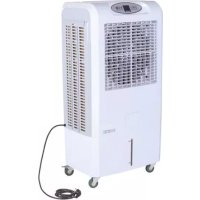
CCX 4.0 - Air Conditioning Master - Free user manual and instructions
Find the device manual for free CCX 4.0 Master in PDF.



| Product type | Evaporative air cooler (adiabatic cooling) |
| Brand | Master |
| Model | CCX 4.0 |
| Power supply | 220-240 V ~ 50 Hz (refer to rating plate) |
| Maximum power | Not specified in the manual |
| Water tank | Capacity not specified, fill between MIN and MAX marks |
| Fan speeds | 3 speeds: LOW, MID, HIGH |
| Operating modes | Cooling (COOL), Ionization (ANION), Vertical oscillation (SWING) |
| Timer | 1 to 9 hours (automatic on/off) |
| Control panel | Buttons: ON/OFF, SPEED, COOL, SWING, ANION, TIMER, digital display |
| Filter type | Washable filter with water and mild detergent |
| Minimum safety distance | 0.5 meters from walls or objects |
| Protection | Automatic shutdown when tank is empty (flashing droplet icon + beep) |
| Operating conditions | Ambient temperature 18 °C to 45 °C, water temperature < 45 °C |
| Water connection | Possible on some models (connection hose, Fig. 13) |
| Maintenance | Empty and clean the tank regularly; clean the filter frequently; disinfect monthly |
| Safety | Do not cover the appliance, do not block air inlets/outlets, unplug before maintenance |
| Use | Indoor only, stable and level surface, do not move while operating |
| Included accessories | Wheels (to install depending on model), drain cap |
| Repairability | Have all repairs carried out by an approved after-sales service; power cable replaced only by after-sales service |
| Disposal | Do not dispose of with household waste, follow WEEE directive (2012/19/EU) |
Frequently Asked Questions - CCX 4.0 Master
User questions about CCX 4.0 Master
0 question about this device. Answer the ones you know or ask your own.
Ask a new question about this device
Download the instructions for your Air Conditioning in PDF format for free! Find your manual CCX 4.0 - Master and take your electronic device back in hand. On this page are published all the documents necessary for the use of your device. CCX 4.0 by Master.
USER MANUAL CCX 4.0 Master
MCS® MASTER SOLUTIONS
CE
USER AND MAINTENANCE BOOK
HEFTE FOR BRUK OG VEDLIKEHOLD
ANVÄNDAR- OCH UNDERHÅLLSHANDBOK
INSTRUKCJA OBSŁUGI I KONSERWACJI
natural_image
White portable air purifier with ventilation grille and wheels (no visible text or symbols)1

natural_image
Hand placing a white plastic door panel into a wall, with a black arrow indicating the direction of change (no text or symbols visible)2
Figures and texts of this book are protected by COPYRIGHT.
FIGURES - FIGURE - ABBILDUNGEN - FIGURAS - FIGURES - FIGUREN
- FIGURAS - FIGURER - KUVAT - FIGURER - FIGURER - ILUSTRACJE
- ИЛЛЮСТРАЦИИ - OBRÁZKY - ÁBRÁK - SLIKE - ŞEKİLLER - SLIKE -
ILIUSTRACIJOS - ATTĚLI - JOONISED - IMAGINI - OBRÁZKY - CXEMI - ДАHI
- EIKONEΣ - 圖示 - СУРЕТТЕМЕЛЕР
natural_image
Person pouring liquid into a white industrial container labeled 'MASTER CLIMATE SOLUTION' (no other text or symbols visible)3

4
Figures and texts of this book are protected by COPYRIGHT.
FIGURES - FIGURE - ABBILDUNGEN - FIGURAS - FIGURES - FIGUREN
- FIGURAS - FIGURER - KUVAT - FIGURER - FIGURER - ILUSTRACJE
- ИЛЛЮСТРАЦИИ - OBRÁZKY - ÁBRÁK - SLIKE - ŞEKİLLER - SLIKE -
ILIUSTRACIJOS - ATTĚLI - JOONISED - IMAGINI - OBRÁZKY - CXEMI - ДАHI
- EIKONEΣ - 圖示 - СУРЕТТЕМЕЛЕР

5
natural_image
Close-up of a hand inserting a black plastic plug into a white electrical outlet (no text or symbols visible)6
Figures and texts of this book are protected by COPYRIGHT.
FIGURES - FIGURE - ABBILDUNGEN - FIGURAS - FIGURES - FIGUREN
- FIGURAS - FIGURER - KUVAT - FIGURER - FIGURER - ILUSTRACJE
- ИЛЛЮСТРАЦИИ - OBRÁZKY - ÁBRÁK - SLIKE - ŞEKİLLER - SLIKE -
ILIUSTRACIJOS - ATTĚLI - JOONISED - IMAGINI - OBRÁZKY - CXEMI - ДАНИ
- EIKONEΣ - 圖示 - СУРЕТТЕМЕЛЕР
7

8
Figures and texts of this book are protected by COPYRIGHT.
FIGURES - FIGURE - ABBILDUNGEN - FIGURAS - FIGURES - FIGUREN
- FIGURAS - FIGURER - KUVAT - FIGURER - FIGURER - ILUSTRACJE
- ИЛЛЮСТРАЦИИ - OBRÁZKY - ÁBRÁK - SLIKE - ŞEKİLLER - SLIKE -
ILIUSTRACIJOS - ATTĚLI - JOONISED - IMAGINI - OBRÁZKY - CXEMI - ДАHI
- EIKONEΣ - 圖示 - СУРЕТТЕМЕЛЕР

9

natural_image
Hand holding a white plastic component with a black arrow pointing downward, next to a brick wall (no text or symbols visible)10
Figures and texts of this book are protected by COPYRIGHT.
FIGURES - FIGURE - ABBILDUNGEN - FIGURAS - FIGURES - FIGUREN - FIGURAS - FIGURER - KUVAT - FIGURER - FIGURER - ILUSTRACJE - ИЛЛЮСТРАЦИИ - OBRÁZKY - ÁBRÁK - SLIKE - ŞEKİLLER - SLIKE - ILIUSTRACIJOS - ATTĚLI - JOONISED - IMAGINI - OBRÁZKY - CXEMI - ДАНИ - EIKONEΣ - 圖示 - СУРЕТТЕМЕЛЕР

natural_image
White industrial container with blue wheels and a metallic pipe flowing through it, placed on a perforated concrete floor (no text or symbols visible)11

natural_image
Hand holding a white plastic component with a curved arrow indicating rotation (no text or symbols visible)12
Figures and texts of this book are protected by COPYRIGHT.
FIGURES - FIGURE - ABBILDUNGEN - FIGURAS - FIGURES - FIGUREN - FIGURAS - FIGURER - KUVAT - FIGURER - FIGURER - ILUSTRACJE - ИЛЛЮСТРАЦИИ - OBRÁZKY - ÁBRÁK - SLIKE - ŞEKİLLER - SLIKE - ILIUSTRACIJOS - ATTĚLI - JOONISED - IMAGINI - OBRÁZKY - CXEMI - ДАHI - EIKONEΣ - 圖示 - СУРЕТТЕМЕЛЕР

natural_image
Close-up of a hand adjusting a red and green hose component on a white metal panel (no text or symbols visible)13

14
Figures and texts of this book are protected by COPYRIGHT.
FIGURES - FIGURE - ABBILDUNGEN - FIGURAS - FIGURES - FIGUREN - FIGURAS - FIGURER - KUVAT - FIGURER - FIGURER - ILUSTRACJE - ИЛЛЮСТРАЦИИ - OBRÁZKY - ÁBRÁK - SLIKE - ŞEKİLLER - SLIKE - ILIUSTRACIJOS - ATTĚLI - JOONISED - IMAGINI - OBRÁZKY - CXEMI - ДАНИ - EIKONEΣ - 圖示 - СУРЕТТЕМЕЛЕР

natural_image
Illustration of a hand reaching toward a smartphone screen with floating objects, no text or symbols present15
16
Figures and texts of this book are protected by COPYRIGHT.
▶▶1. INFORMATION REGARDING SAFETY
IMPORTANT: READ AND UNDERSTAND THIS OPERATIONAL MANUAL BEFORE ASSEMBLING, COMMISSIONING OR PERFORMING MAINTENANCE ON THIS APPLIANCE. INCORRECT USE OF THE APPLIANCE CAN CAUSE SERIOUS INJURY. KEEP THIS MANUAL FOR FURTHER REFERENCE.
IMPORTANT: This appliance is not suitable for use by persons (including children) with reduced physical, sensory and mental capacities or with lack of experience or knowledge unless supervised by a person responsible for their safety. Children must be supervised to make sure they do not play with the appliance.
▶1.1. Fill the appliance tank only with clean water.
▶1.2. Switch off and disconnect the appliance from the mains before filling it.
▶1.3. Do not move the appliance, once the tank has been filled.
▶1.4. When using the appliance, comply with all local regulations and Standard in force.
▶1.5. Keep the appliance dry, in order to avoid electric shocks. Hands must always be dry.
▶1.6. Use only in ventilated and dry areas.
▶1.7. For indoor use only.
▶1.8. Power the appliance only with voltage and frequency as specified on the data plate.
▶1.9. Only use extensions with three wires appropriately connected to earth.
▶1.10. Do not cover the appliance with paper, cardboard, plastic, metal sheets or any other inflammable material during use, in order to prevent any risk.
▶1.11. The appliance must be used on a stable and levelled surface, in order to prevent any risk.
▶1.12. When it is not used, disconnect the appliance from the power plug.
▶1.13. Do not block the air vent or the air outlet (front side) of the appliance.
▶1.14. The minimum safety distance recommended between the appliance and walls or other items is 0,5 m.
▶1.15. When the appliance is connected to the mains or running, it must never be moved, handled, topped-up or subject to any maintenance operation.
▶1.16. The appliance (power cable included) must be kept at a suitable safety distance from heat sources.
▶1.17. In any case, the appliance must be opened and/or repaired by authorised after-sales centre.
▶1.18. If the power cable is damaged, it must be replaced by the technical after-sales centre, in order to prevent any risk.
▶1.19. Rinse the case with clean water and clean it before using, after the period during which the cooler was not in use.
▶1.20. In the case of improper operation of the product at the start, disconnect it from the power supply immediately and contact service point.
▶1.21. Protect the power supply cord from damage as a result of movement of the vehicles or
pedestrians. The connection of improper electrical voltage or improper installation, will cause the electrical shock hazard.
▶1.22. Conditions of use:
A) Air temperature: 18^ C to 45^ C; Water temperature: <45^ C.
B) The air supply must be free of dust, pollutants, or additional cleaning should be used.
▶▶2. UNPACKING
▶2.1. Remove all packaging materials used to wrap and deliver the appliance and dispose of them in compliance with the Standards in force.
▶2.2. Extract all items from the packaging.
▶2.3. Verify if damage undergone during transport. If the appliance appears damaged, inform the dealer, where the purchase was made, immediately.
▶▶3. ASSEMBLY
The device is equipped with wheels to facilitate handling. Depending on the model, wheels can be found already installed or not. Components equipped with relative nuts and bolts are found inside the packaging (Fig. 1).
▶▶4. OPERATION
WARNING: Thoroughly read the "INFORMATION REGARDING SAFETY", before switching the appliance on.
WARNING: Only use clean water to prevent failures or other anomalies.
WARNING: Verify if your electronic system is earthed correctly. Connection to the mains must be made in compliance with the National Standards in force. Power the appliance only with voltage and frequency as specified on the data plate.
NOTE: These models can be connected to the water mains, by connecting the pipe to the fitting (Fig. 13).
▶▶4.1. SWITCHING ON:
▶4.1.1. Open the tank door (Fig. 2).
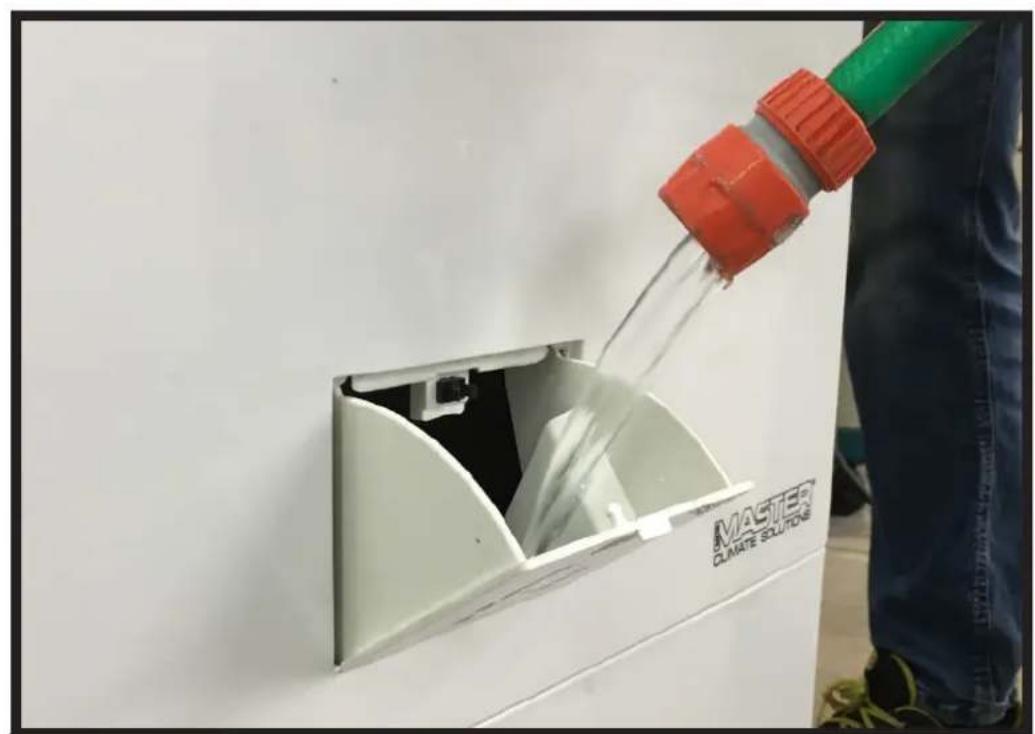
▶4.1.2. Fill the tank with water (Fig. 3); water level must be within MIN and MAX level of the graduated scale (Fig. 4), in order to prevent risks.
▶4.1.3. Close the tank door (Fig. 5).
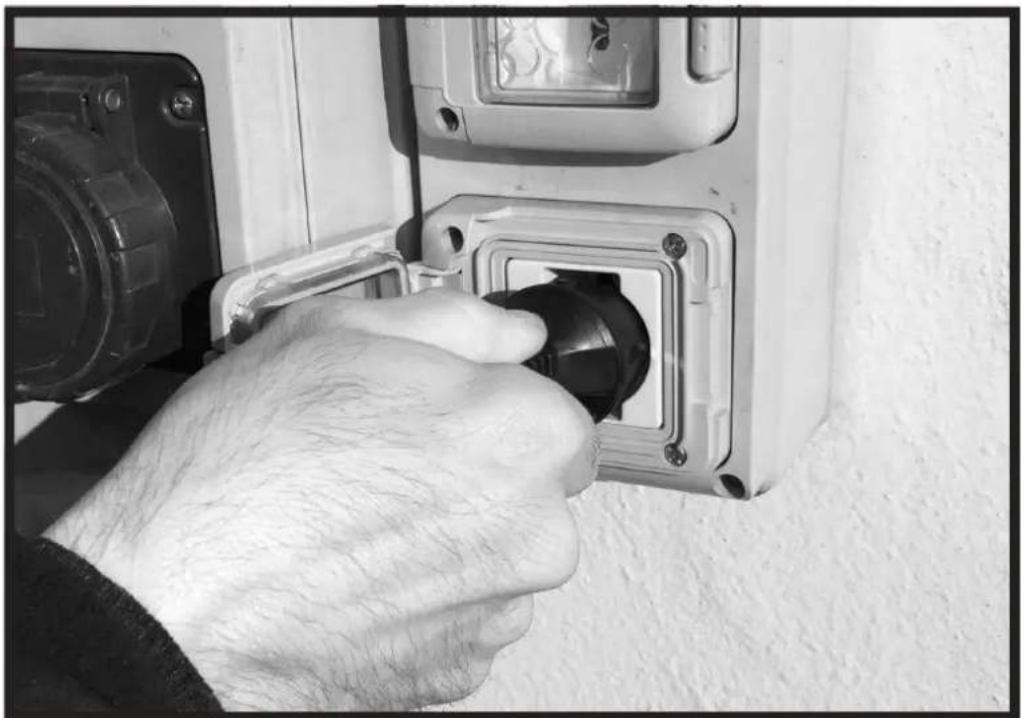
▶4.1.4. Connect the power plug to the mains (Fig. 6).
▶4.1.5. Press the ON/OFF button to switch on the appliance (Fig. 9).
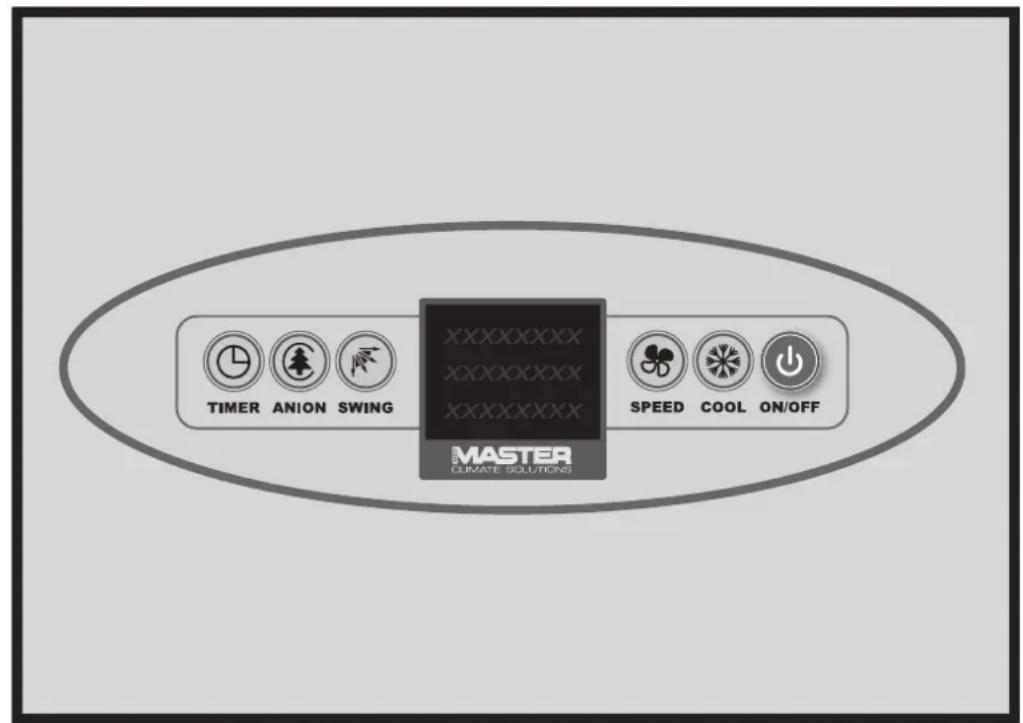
▶▶4.2. CONTROL PANEL, USE AND FUNCTIONS (Fig. 7-8):
▶ ON/OFF: Allows turning on or off the cooler.
▶SPEED: Increases or decreases the ventilation speed of the device. You can choose from three speeds: LOW, MID and HIGH.
▶COOL: Enables or disables the cooling mode.
▶ SWING: Enables or disables the automatic swing of the fins to direct the air flow.
▶ANION: Enables or disables the ionisation mode, that is, the release of negative ions in the atmosphere, to make air healthier.
▶ TIMER: Enables or disables the timer for automatically turning the cooler on or off (from 1 to 9 hours).
NOTE: When the control panel display shows the icon “DROP” (flashing), accompanied by a beep, it means that the tank is empty and must be refilled to reactivate the “COOL” function.
▶▶4.3. SWITCHING OFF:
▶4.3.1. Press the ON/OFF button to switch off the appliance (Fig. 9).
▶4.3.2. Empty the tank using the drain cap (Fig. 10-11-12).
▶▶5. CLEANING AND MAINTENANCE
WARNING: BEFORE PERFORMING ANY MAINTENANCE OR REPAIR, DISCONNECT THE POWER CABLE FROM THE MAINS.
DEPENDING ON THE ENVIRONMENT WHERE THE APPLIANCE IS USED, DUST, DIRT OR WATER QUALITY CAN AFFECT THE PERFORMANCE OF THE UNIT. THEREFORE, CLEANING THE FOLLOWING COMPONENTS CAN BE NECESSARY:
▶▶5.1. TANK:
We recommend changing the water frequently.
▶5.1.1. Switch off the appliance and remove the plug from the mains (Fig. 9-6).
▶5.1.2. Remove the drain plug in order to empty the tank (Fig. 11-12-13).
▶▶5.2. FILTERS:
It is recommended to clean the filters frequently.
WARNING: Dirty filters can lead to a significant drop in performance of the device.
▶5.2.1. Switch off the appliance and disconnect the plug from the mains (Fig. 9-6).
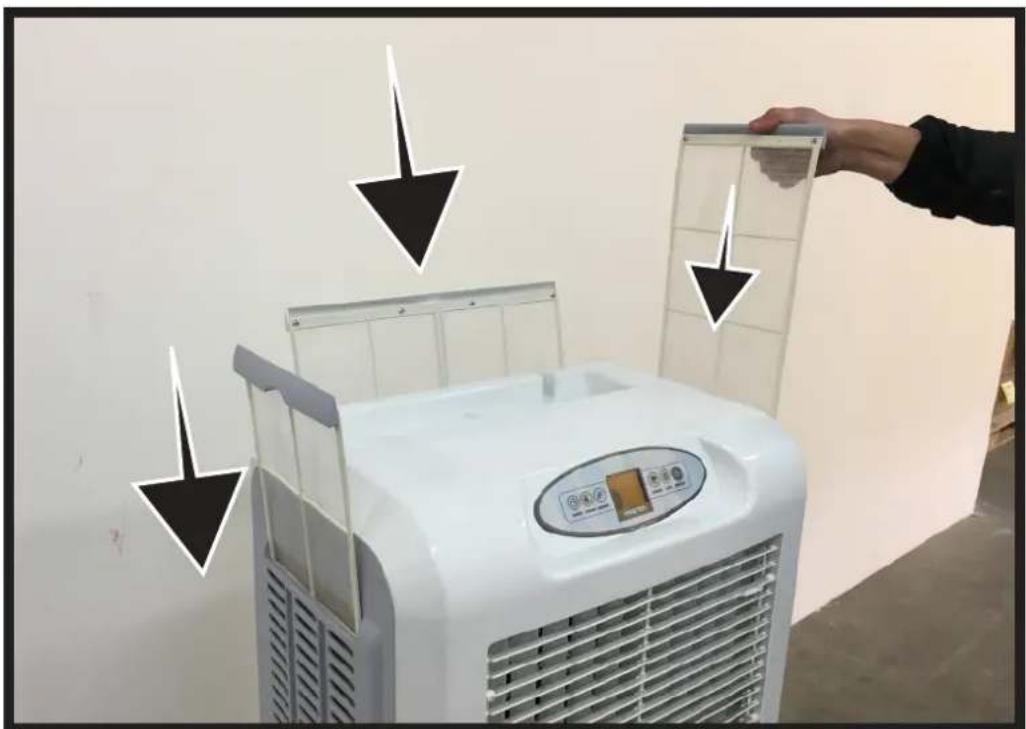
▶5.2.2. Remove the filters upwards (Fig. 14).
▶5.2.3. Clean the filters using a mild detergent and a clean cloth (Fig. 15). Ensure the filter is fully dry.
▶5.2.4. Place the filter back into its housing (Fig. 16).
▶▶5.3. WATER CIRCUIT:
▶5.3.1. To ensure proper operation of the cooler, turn off COOL mode a few minutes before completely switching off the appliance, in order to avoid stagnant water.
▶5.3.2. Once a month we recommend performing a complete cycle using clean water and appropriate disinfection products, running the cooler outdoors.
▶▶6. TROUBLESHOOTING
| FUNCTIONING ANOMALIES | CAUSES SOLUTIONS | |
| The display doesn’t work | 1. No power supply2. Defective equipment | 1a. Check whether the device is connected to power supply1b. Contact service point2. Contact service point |
| No air flow or too low | 1. Obstruction of the air intake on the back2. Defective equipment | 1a. Keep the back side far from walls that can block air inlet1b. Remove objects from inlet air section1c. Contact service point2. Contact service point |
| The device does not respond to commands | 1. Defective equipment 1. Contact service point | |
| The device leak water | 1. The drain cap is loose2. The drain is dirty and the cap doesn’t fit3. The tank leak4. The panel drip | 1. Close the drain cap2. Clean the drain and close the cap3. Contact service point4. Contact service point |
▶▶4.1. INBETRIEBNAHME:
▶▶4.2. PANEL KONTROLNY, UŻYTKOWANIE I FUNKCJE (Rys. 7-8):
▶▶5.3. KYKΛΩMA NEPOY:
IMPORTANT: In order to have a correct function you must use an electrical generator in class G3 or more (frequency variation ±1%, tension variation ±2%). The maximum power of electrical generator must be three time the nominal power of device that you must connect.
WIRING DIAGRAMS - SCHEMI ELETTRICI - SCHALTPLÄNE - ES-QUEMAS ELÉCTRICOS - SCHEMAS ELECTRIQUES - ELEKTRISCHE SCHEMA'S - ESQUEMAS ELÉCTRICOS - ELEKTRISKE SKEMAER - SÄHKÖKAAVIOT - KOPLINGSSKJEMA - ELEKTRISKA KOP- PLINGSSCHEMAN - SCHEMATY ELEKTRYCZNE - ЭЛЕКТРИЧЕСКИЕ CXEMЫ - ELEKTRICKÁ SCHÉMATA - VILLANYBEKÖTÉSI RAJ-ZOK - ELEKTRIČNE SHÈME - ELEKTRÍE MÁLARI - ELEKTRIČNE SHEME - ELEKTROS SCHEMOS - ELEKTRISKÄS SHÊMAS - ELE-KTRISKEEMID - SCHEME ELECTRICE - ELEKTRICKÉ SCHÉMY - ЕЛЕКТРИЧЕСКИ CXEMИ - ЕЛЕКТРИЧНІ CXEMИ - ELEKTRIČNE ŠEME - НЛЕКТРИКА ΣΧΕΔΙΑ - 线路图 - ЭЛЕКТРЛІ СУЛБЕЛЕР

flowchart
graph TD
    A["MOTOR"] --> B["PUMP M"]
    A --> C["SWING M"]
    A --> D["CAPACITOR"]
    A --> E["Ground"]
    A --> F["HIGH"]
    A --> G["MED"]
    A --> H["LOW"]
    A --> I["ACL"]
    J["WATER SWITCH"] --> K["Temperature Sensor"]
    L["ACN"] --> M["N"]
    N["ACL"] --> O["L"]
    P["PCB"] --> Q["DISPLAY PANEL"]
| CE CONFORMITY CERTIFICATE | CE |
| CE CONFORMITY CERTIFICATE - DICHIARAZIONE DI CONFORMITÀ CE - EG-KONFORMITÄT-SERKLÄRUNG - DECLARACIÓN DE CONFORMIDAD CE - DECLARATION DE CONFORMITE CE - EG-CONFORMITEITVERKLARING - DECLARAÇÃO DE CONFORMIDADE CE - EU-OVERENSSTEMMELSESERKLÆRING - EY-VAATIMUSTENMUKAISUUSVAKUUTUS - CE-SAMSVAR-SERKLÆRING - EG-FÖRSÄKRAN OM ÖVERENSSTÄMMELSE - DEKLARACJA ZGODNOŚCI WE - ДЕКЛАРАЦИЯ О COOTBETCTВИИ CE - PROHLÁŠENÍ O SHODĚ CE - EK MEGFELELŐSÉGI NYILATKOZAT - IZJAVA O SKLADNOSTI IN OZNAKA CE - CE UYGUNLUK BEYANI - IZJAVA CE O SUKLADNOSTI - ES ATITIKTIES DEKLARACIJA - EK ATBILSTĪBAS - DEKLARĀCIJA - EŪ VA-STAVUSDEKLARATSIOON - DECLARAȚIE DE CONFORMITATE CE - PREHLÁSENIE O ZHODE CE - ДЕКЛАРАЦИЯ ЗА СЪВМЕСТИМОСТ CE - ДЕКЛАРАЦІЯ ВІДПОВІДНОСТИ CE - IZJAVA CE O PRIKLADNOSTI ΔΗΛΩΣΗ ΣΥΜΜΟΡΦΩΣΗΣ CE - CE 符合性声明DANTHERM S.p.A. Via Gardesana 11, -37010- Pastrengo (VR), ITALYProduct: - Prodotto: - Produkt: - Produkt: - Producto: - Produit: - Produkt: - Produkt: - Produkt: - Tuote: - Produkt: - Produkt: - Produkt: - Изделие: - Výrobek: - Termék: - Izdelek: - Ürün: - Proizvod: - Gaminys: - Ierice: - Toode: - Produsul: - Výro-bok: - Продукт: - Виріб: - Proizvod: - Проїїв: - 产品: | |
| CCX 4.0 | |
| We declare that it is compliant with: - Si dichiara che è conforme a: - Es wird als konform mit den folgenden Normen erklärt: - Se declara que está en conformidad con: - Nous déclarons sa conformité à: - Hierbij wordt verklaard dat het product conform is met: - Declara-se que está em conformidade com: - Vi erklærer at produktet er i overensstemmelse med: - Vakuutetaan olevan yhdenmukainen: - Man erklærer at apparatet er i overensstemmelse med: - Härmed intygas det att produkten är förenlig med följande: - Oświadcza się, że jest zgodny z: - Заявляем о соответствии требованиям: - Prohlašuje se, že je v souladu s: - Kijelentjük, hogy a termék megfelel az alábbiaknak: - Izpolnjuje zahteve: - Aşağıdaki standartlara uygun olduğunu beyan ederiz: - Izjavljuje se da je u skladu s: - Pareiškiame, kad atitinka: - Tiek deklarëts, ka atbilst: - Käesolevaga deklareeritakse, et toode vastab: - Declarăm că este conform următoarelor: - Prehlasuje sa, že je v súlade s: - Декларира се че отговаря на: - Відповідає вимогам: - Izjavljuje se da je u skladu s: - Δηλώνουμε ότι είναι σύμφωνο με: - 兹证明符合:2014/35/EU, 2011/65/EUEN 60335-1:2012/A11:2014, EN 60335-2-98:2003/A2:2008Sofy UPastrengo, 2019Stefano Verani (Member of the Board) | |
NOTE:
NOTE:
NOTE:
▶en - DISPOSAL OF THE PRODUCT
-This product has been designed and manufactured with top-quality materials and components, which can be re-cycled and re-used. -When a crossed-wheely bin symbol is attached to the product, it means that the product is protected by the, 2012/19/UE European Directive.
-Please obtain information regarding the local differentiated collection system for electrical and electronic products.
-Respect local Standards in force and do not dispose of old products as normal domestic waste. Correct disposal of the product helps to prevent possible negative consequences for health, the environment and mankind.
▶pl - UTYLIZACJA PRODUKTU
▶ Iv - PRODUKTA IZNĪCINĀŠANA
Pastrengo (VR), Italy
Dantherm Sp. z o.o.
ul. Magazynowa 5A,
62-023 Gądki, Poland
Dantherm LLC
ul. Transportnaya - 22 ownership 2,
142802, STUPINO, Moscow region, Russia
Dantherm China LTD
Unit 2B, 512 Yunchuan Rd.,
Shanghai, 201906, China
Dantherm SP S.A.
C/Calabozos, 6 Polígono Industrial, 28108
Alcobendas (Madrid) Spain
Dantherm S.p.A.
Виа Гардесана 11, 37010


- MCS® MASTER SOLUTIONS
- CE
- ▶▶1. INFORMATION REGARDING SAFETY
- ▶1.22. Conditions of use:
- ▶▶2. UNPACKING
- ▶▶3. ASSEMBLY
- ▶▶4. OPERATION
- ▶▶4.1. SWITCHING ON:
- ▶▶4.2. CONTROL PANEL, USE AND FUNCTIONS (Fig. 7-8):
- ▶▶4.3. SWITCHING OFF:
- ▶▶5. CLEANING AND MAINTENANCE
- ▶▶5.1. TANK:
- ▶▶5.2. FILTERS:
- ▶▶5.3. WATER CIRCUIT:
- ▶▶4.2. PANEL KONTROLNY, UŻYTKOWANIE I FUNKCJE (Rys. 7-8):
- ▶▶5.3. KYKΛΩMA NEPOY:
- NOTE:
- ▶en - DISPOSAL OF THE PRODUCT
- ▶pl - UTYLIZACJA PRODUKTU
- ▶ Iv - PRODUKTA IZNĪCINĀŠANA
Brand : Master
Model : CCX 4.0
Category : Air Conditioning