HQMC10011 - Microphone HQ Power - Free user manual and instructions
Find the device manual for free HQMC10011 HQ Power in PDF.



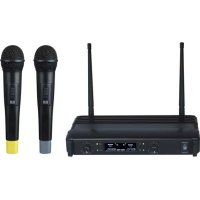
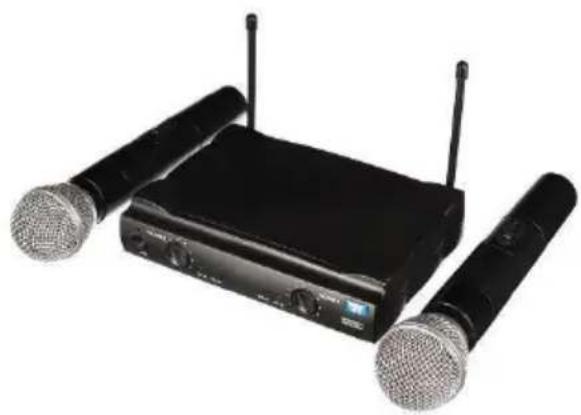
| Brand | HQ Power |
| Model | HQMC10011 |
| Category | Wireless microphone |
| Type | Handheld microphone with receiver |
| Frequency range | 864.000 MHz |
| Reception system | PLL synthesis |
| Frequency stability | ± 0.005 % |
| Signal-to-noise ratio | 100 dB |
| Dynamic range | >100 dB |
| Frequency response | 40 Hz - 18 kHz |
| Receiver power supply | 12 VDC, 500 mA |
| Operating range | 100 m (max) |
| Receiver dimensions | 195 x 140 x 40 mm |
| Receiver weight | 920 g |
| Microphone RF output power | 30 mW max |
| Microphone power supply | 2 AA/R6 batteries |
| Microphone dimensions | 45 x 250 mm |
| Microphone weight | 250 g |
| Battery life | Approximately 8 hours |
| Audio outputs | 1/4" unbalanced, XLR balanced |
| Maintenance | Clean with a soft cloth and mild detergent |
| Safety | Indoor use, do not open the housing |
| Warranty | 24 months (consumer) |
Frequently Asked Questions - HQMC10011 HQ Power
User questions about HQMC10011 HQ Power
0 question about this device. Answer the ones you know or ask your own.
Ask a new question about this device
Download the instructions for your Microphone in PDF format for free! Find your manual HQMC10011 - HQ Power and take your electronic device back in hand. On this page are published all the documents necessary for the use of your device. HQMC10011 by HQ Power.
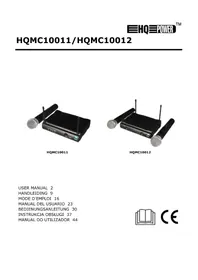
USER MANUAL HQMC10011 HQ Power
natural_image
Black WTR ultrasonic device with microphone and external antenna (no visible text or symbols)HQMC10011
natural_image
Black wireless router with two external microphone units (no visible text or labels)HQMC10012
USER MANUAL 2
HANDLEIDING 9
MODE D'EMPLOI 16
MANUAL DEL USUARIO 23
To all residents of the European Union
Important environmental information about this product
This symbol on the device or the package indicates that disposal of the device after its lifecycle could harm the environment. Do not dispose of the unit (or batteries) as unsorted municipal waste; it should be taken to a specialized company for recycling. This device should be returned to your distributor or to a local recycling service. Respect the local environmental rules.
If in doubt, contact your local waste disposal authorities.
Thank you for choosing HQPower™! Please read the manual thoroughly before bringing this device into service. If the device was damaged in transit, do not install or use it and contact your dealer.
2. Safety Instructions

Read and understand this manual and all safety signs before using this appliance.
Indoor use only.
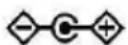
Power supply polarisation.
- This device can be used by children aged from 8 years and above, and persons with reduced physical, sensory or mental capabilities or lack of experience and knowledge if they have been given supervision or instruction concerning the use of the device in a safe way and understand the hazards involved. Children shall not play with the device. Cleaning and user maintenance shall not be made by children without supervision.
- Always disconnect mains power when the device is not in use or when servicing or maintenance activities are performed. Handle the power cord by the plug only.
- All cords and cables should be routed so that they will not be walked on or pinched by items placed upon or against them. Pay particular attention to the point where they exit the unit.
- Remove all flammable materials close to the device before switching on.
- Do not install the device on a flammable surface (linoleum, carpet, wood, paper, cardboard, plastic, etc.).
- Protect this device from heat sources such as radiators, heat registers, stoves, or other appliances (including amplifiers) that produce heat.
- Do not remove the cover under any conditions. There are no user-serviceable parts inside. Never operate this device when its cover is removed.
- Do not operate a visibly damaged device. Do not attempt to operate this device if the power cord has been frayed or broken.
- Always mount this device in a safe and stable manner. Mount this device in an area that will allow proper ventilation. Allow about 15 cm between this device and a wall.
- Familiarise yourself with the functions of the device before actually using it.
- Always make sure to connect the device to an alternating current matching the value stated on the device.
- Always install the device in a well-ventilated location.
- Keep this device away from dust and extreme temperatures. Make sure the ventilation openings are clear at all times. For sufficient air circulation, leave at least 2.5 cm in front of the openings.
- Never connect the device to a dimmer or rheostat.
- In the event of an operating problem, stop using the device immediately.
- Never try to repair the device. There are no user-serviceable parts inside the device. Refer to an authorized dealer for service and/or spare parts.
- This device is not designed for permanent operation: regular operation breaks will prolong its live.
3. General Guidelines
- Refer to the Velleman ^® Service and Quality Warranty on the last pages of this manual.
- All modifications of the device are forbidden for safety reasons. Damage caused by user modifications to the device is not covered by the warranty.
- Only use the device for its intended purpose. Using the device in an unauthorised way will void the warranty.
- Damage caused by disregard of certain guidelines in this manual is not covered by the warranty and the dealer will not accept responsibility for any ensuing defects or problems.
- Nor Velleman nv nor its dealers can be held responsible for any damage (extraordinary, incidental or indirect) – of any nature (financial, physical...) arising from the possession, use or failure of this product.
- Keep this manual for future reference.
4. Overview
Refer to the illustrations on page 2 of this manual.
Front Panel
HQMC10011
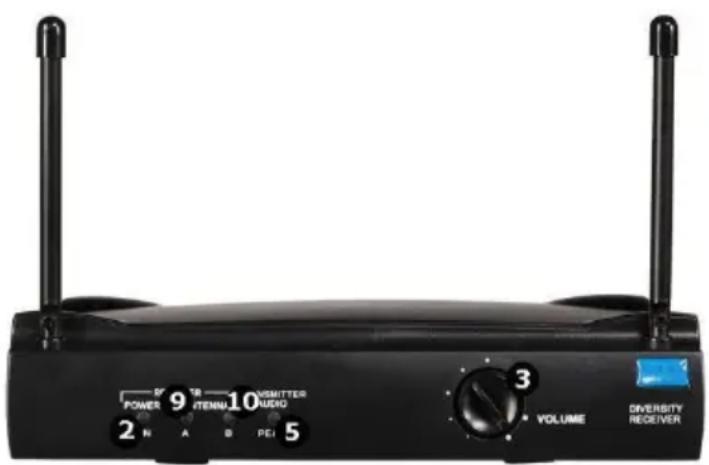
text_image
POWER 9 ITEMN 10 VSMITTER AUDIO 2 N A B PEI 5 3 VOLUME DIVERSITY RECEIVERHQMC10012
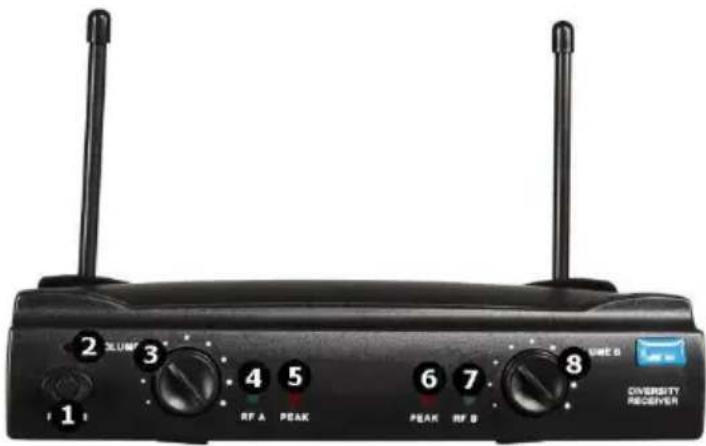
text_image
2 3 4 5 6 7 8 1 RF A PEAK PEAK RF B DIVERSITY RECEIVER| 1 | power switch |
| 2 | power LED |
| 3 | channel A volume control |
| 4 | channel A signal LED |
| 5 | channel A audio level LED |
| 6 | channel B volume control |
| 7 | channel B signal LED |
| 8 | channel B audio level LED |
| 9 | channel A antenna LED |
| 10 | channel B antenna LED |
Back Panel
HQMC10011
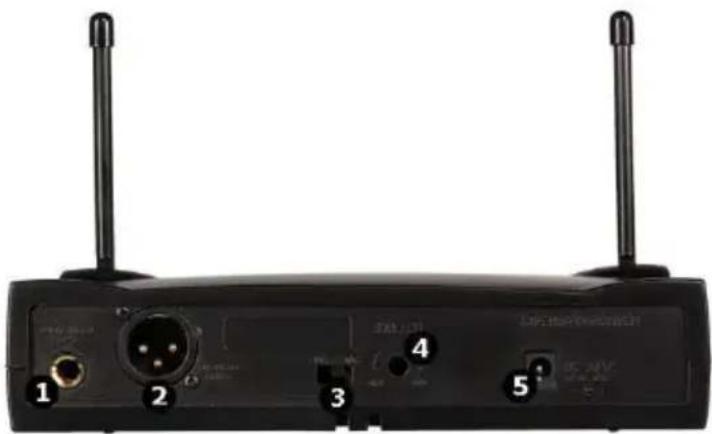
natural_image
Back view of a black wireless router with two antennas and labeled ports (no readable text beyond labels)| 1 | 14 ” unbalanced output |
| 2 | XLR balanced microphone output |
| 3 | balanced/unbalanced switch |
| 4 | squelch control |
| 5 | power input |
HQMC10012
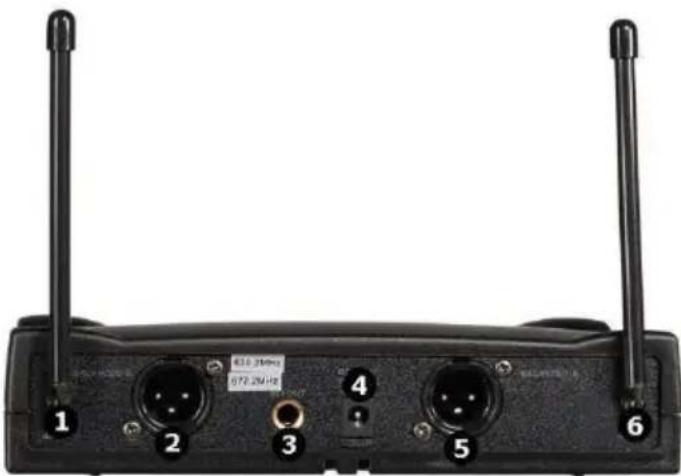
text_image
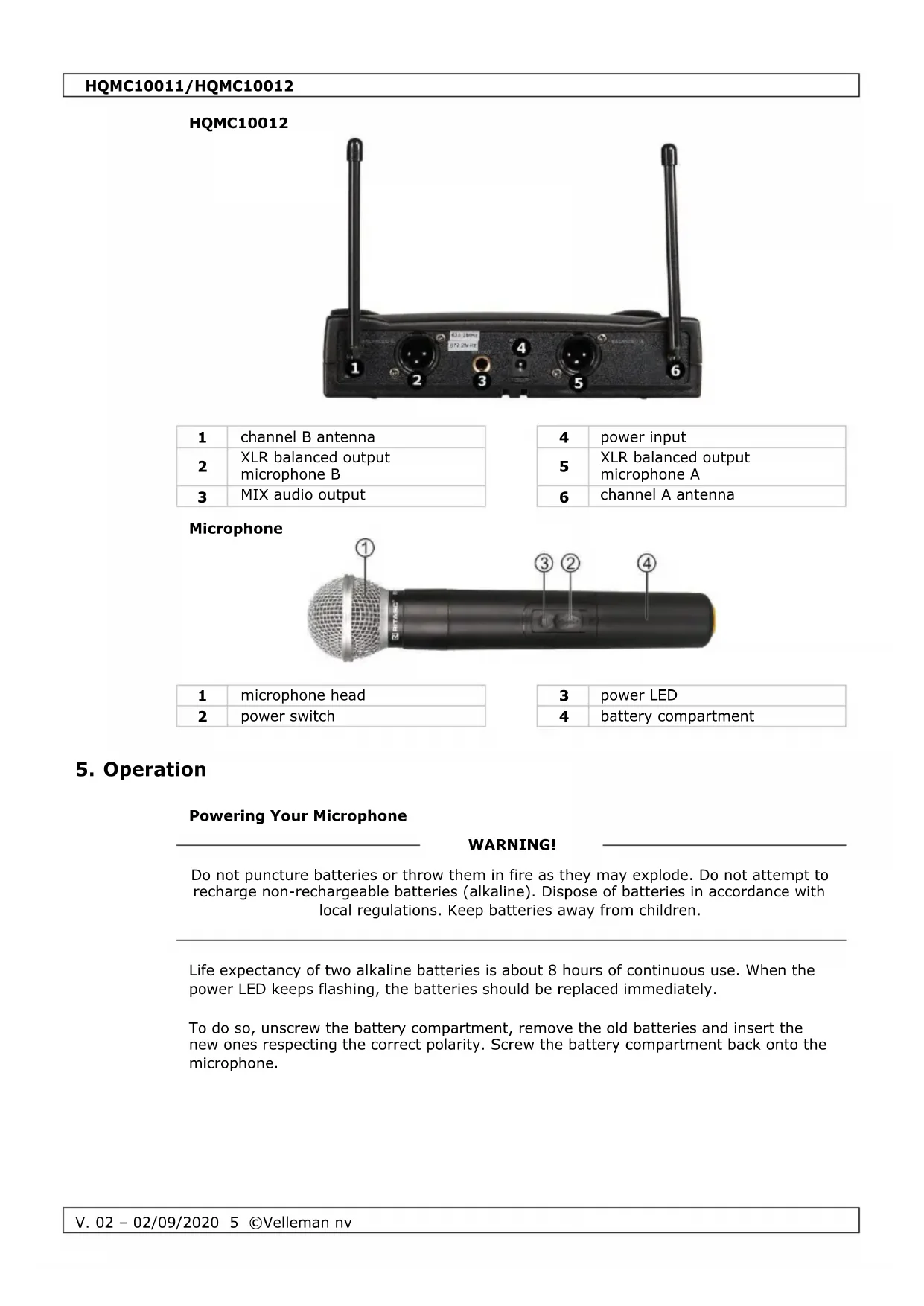
1 2 3 4 5 6 E10.21GHz 072.2M/Hz| 1 | channel B antenna |
| 2 | XLR balanced output microphone B |
| 3 | MIX audio output |
| 4 | power input |
| 5 | XLR balanced output microphone A |
| 6 | channel A antenna |
Microphone
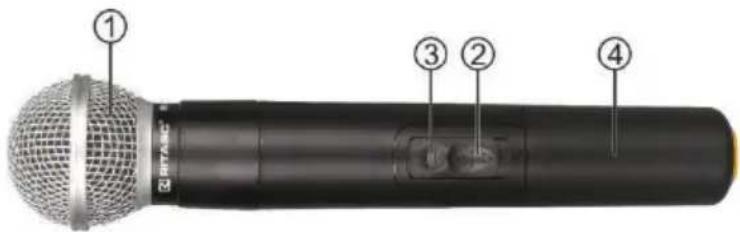
text_image
① ③ ② ④| 1 | microphone head |
| 2 | power switch |
| 3 | power LED |
| 4 | battery compartment |
5. Operation
Powering Your Microphone
WARNING!
Do not puncture batteries or throw them in fire as they may explode. Do not attempt to recharge non-rechargeable batteries (alkaline). Dispose of batteries in accordance with local regulations. Keep batteries away from children.
Life expectancy of two alkaline batteries is about 8 hours of continuous use. When the power LED keeps flashing, the batteries should be replaced immediately.
To do so, unscrew the battery compartment, remove the old batteries and insert the new ones respecting the correct polarity. Screw the battery compartment back onto the microphone.
Connecting and Powering Your Receiver
- Connect the receiver's XLR balanced output to a mixing panel.
- Connect the receiver's XLR unbalanced output to a power amplifier.
- Connect the receiver to the mains using the power adapter.
- Install the antennae on the receiver and erect them.
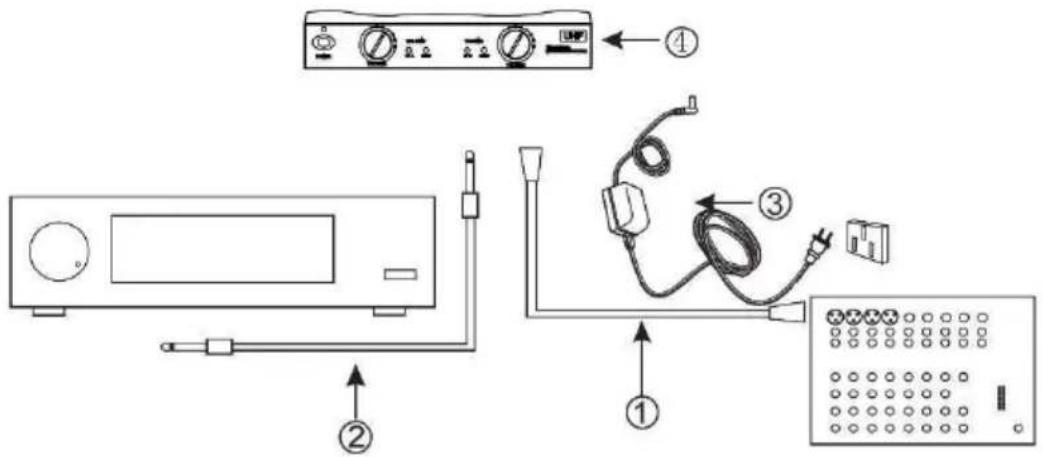
text_image
Diagram showing components of a washing machine with labeled parts including control panel, power cord, and terminal panel.REMARK
The maximum working range is about 100 m depending on surroundings. Ideal working distance is 60 m. Keep the microphone and the receiver within the ideal working distance for best results.
6. Troubleshooting
| Issue | Reason | Solution |
| The LED does not light. | No power or wrong battery installation. | Assure power, replace or re-insert the batteries correctly. |
| The LED flashes. | Low battery power. | Replace the batteries. |
| No reception or sound. | One of the appliances is not powered. | Check and power all appliances. |
| Frequency mismatch. | Make sure the microphone and receiver us the same frequency. | |
| The maximum working range is exceeding. | Move microphone and receiver within the ideal working distance. | |
| Wrong connection. | Check the connection between receiver and power amplifier/mixing panel. | |
| Low volume level. | Slowly increase the volume level. |
HQMC10011/HQMC10012
| Distorted sound. | Presence of appliances working at the same frequency. | Remove the appliances or change the used frequency. |
| Feedback. | High volume level. | Decrease the volume level. |
| Speaker placement. | Do not point the microphone to the speaker output or install the speaker in front of the microphone. |
7. Care and Maintenance
Cleaning
- Before starting any cleaning or maintenance activities, unplug the appliance from its power source.
- Wipe all exterior surfaces of the appliance clean with a soft cloth dampened with a soap and water solution. Do not immerse or submerge any part of the appliance in water or any other liquid. Never use solvents or cleaning agents containing petroleum (petrol, kerosene, oil), paint thinner, turpentine, alcohol, or ammonia.
Maintenance
- This appliance does not need any maintenance. Do not open exterior casing of the appliance. There are no user-serviceable parts inside. Opening or visible attempts to open or repair the appliance may void any guarantee and/or cause damage to the product or personal injury.
Storage
- Store the appliance and its accessories in its original package in a clean and dry area.
8. Technical Specifications
receiver
| frequency rangeHQMC10011....864.000 MHzHQMC10012....863.050 MHz/865.000 MHzreceiving system....PLL composedreceiving module....single (fixed) channelfrequency stability....± 0.005 %S/N ratio....100 dBdynamic range....>100 dBfrequency response....40 Hz to 18 kHzpower supply....12 VDC, max. 500 mAworking range....100 m (depending on surroundings)dimensions....195 x 140 x 40 mmweight....920 g |
microphone
frequency range
HQMC10011....864.000 MHz
HQMC10012....863.050 MHz/865.000 MHz
RF power output.... max. 30 mW
vibration mode.... PLL composed
frequency stability ....± 0.002 %
power ratings....85 mA, 2.4 V
power supply 2 x AA/R6 battery (incl.)
dimensions ....∅ 45 x 250 mm
weight 250 g
Use this device with original accessories only. Velleman nv cannot be held responsible in the event of damage or injury resulting from (incorrect) use of this device. For more info concerning this product and the latest version of this manual, please visit our website www.hqpower.eu. The information in this manual is subject to change without prior notice.
RED Declaration of Conformity
Hereby, Velleman NV declares that the radio equipment type HQMC10011 + HQMC10012 is in compliance with Directive 2014/53/EU.
The full text of the EU declaration of conformity is available at the following internet address: www.velleman.eu.
© COPYRIGHT NOTICE
The copyright to this manual is owned by Velleman nv. All worldwide rights reserved. No part of this manual may be copied, reproduced, translated or reduced to any electronic medium or otherwise without the prior written consent of the copyright holder.
HANDLEIDING
1. Inleiding
natural_image
Back view of a black wireless router with two antennas and labeled ports (no readable text or symbols beyond labels)text_image
Diagram showing labeled components of a device setup including control panel, power cord, and terminal block with numbered parts.OPMERKING
natural_image
Back view of a black wireless router with two antennas and labeled ports (no readable text or symbols beyond labels)text_image
Diagram showing wiring and control components with numbered labels for installation or connection stepsREMARQUE
natural_image
Back view of a black wireless router with two antennas and labeled ports (no readable text or symbols beyond labels)| 1 | salida no balanceada de 1⁄4” |
| 2 | salida de micrófono XLR balanceada |
| 3 | interruptor balanceada/no balanceada |
text_image
Diagram showing components of a washing machine with labeled parts including control panel, power cord, and terminal panel.OBSERVACIÓN
natural_image
Back view of a black wireless router with two antennas and labeled ports (no readable text or symbols beyond labels)text_image
Diagram showing labeled components of a device setup including front panel, control panel, and wiring connectionsBEMERKUNG
natural_image
Back view of a black wireless router with two antennas and labeled ports (no readable text or symbols beyond labels)text_image
Diagram showing components of a washing machine with labeled parts including control panel, power cord, and terminal panel.UWAGA
natural_image
Back view of a black wireless router with two antennas and labeled ports (no readable text or symbols beyond labels)text_image
Diagram showing wiring and control components with numbered labels for installation or connection stepsOBSERVAÇÃO
Velleman® Service and Quality Warranty
Since its foundation in 1972, Velleman® acquired extensive experience in the electronics world and currently distributes its products in over 85 countries.
All our products fulfil strict quality requirements and legal stipulations in the EU. In order to ensure the quality, our products regularly go through an extra quality check, both by an internal quality department and by specialized external organisations. If, all precautionary measures notwithstanding, problems should occur, please make appeal to our warranty (see guarantee conditions).
General Warranty Conditions Concerning Consumer Products (for EU):
- All consumer products are subject to a 24-month warranty on production flaws and defective material as from the original date of purchase.
- Velleman® can decide to replace an article with an equivalent article, or to refund the retail value totally or partially when the complaint is valid and a free repair or replacement of the article is impossible, or if the expenses are out of proportion.
You will be delivered a replacing article or a refund at the value of 100% of the purchase price in case of a flaw occurred in the first year after the date of purchase and delivery, or a replacing article at 50% of the purchase price or a refund at the value of 50% of the retail value in case of a flaw occurred in the second year after the date of purchase and delivery.
• Not covered by warranty:
- all direct or indirect damage caused after delivery to the article (e.g. by oxidation, shocks, falls, dust, dirt, humidity...), and by the article, as well as its contents (e.g. data loss), compensation for loss of profits;
- consumable goods, parts or accessories that are subject to an aging process during normal use, such as batteries (rechargeable, non-rechargeable, built-in or replaceable), lamps, rubber parts, drive belts... (unlimited list);
- flaws resulting from fire, water damage, lightning, accident, natural disaster, etc....;
- flaws caused deliberately, negligently or resulting from improper handling, negligent maintenance, abusive use or use contrary to the manufacturer's instructions;
- damage caused by a commercial, professional or collective use of the article (the warranty validity will be reduced to six (6) months when the article is used professionally);
- damage resulting from an inappropriate packing and shipping of the article:
- all damage caused by modification, repair or alteration performed by a third party without written permission by Velleman®.
- Articles to be repaired must be delivered to your Velleman® dealer, solidly packed (preferably in the original packaging), and be completed with the original receipt of purchase and a clear flaw description.
- Hint: In order to save on cost and time, please reread the manual and check if the flaw is caused by obvious causes prior to presenting the article for repair. Note that returning a non-defective article can also involve handling costs.
• Repairs occurring after warranty expiration are subject to shipping costs.
- The above conditions are without prejudice to all commercial warranties.
The above enumeration is subject to modification according to the article (see article's manual).