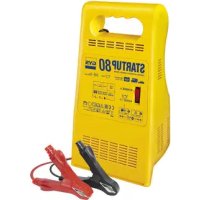
Start UP 80 - Battery charger GYS - Free user manual and instructions
Find the device manual for free Start UP 80 GYS in PDF.



| Product type | Battery charger |
| Brand | GYS |
| Model | Start UP 80 |
| Rated battery voltage | 12 V (6 cells of 2 V) |
| Compatible battery capacity | 45 to 170 Ah |
| Power supply | 230 V / 50 Hz |
| Main functions | Automatic charging, battery tester, start assistance (Boost) |
| Tester mode (mains off) | LED indicator: red < 12.3 V, orange 12.3-12.6 V, green > 12.6 V |
| Automatic charger mode | Automatic stop at 14.8 V; indefinite maintenance without risk |
| Starter mode (Boost) | Pre-charge of 10 min before starting |
| Integrated protections | Polarity reversal (audible signal), short circuit (automatic circuit breaker), thermal (cooling ~15 min), overcurrent fuse |
| Compatible battery type | Lead-acid with liquid electrolyte |
| Warranty | 2 years (parts and labor) |
| Routine maintenance | Dust with compressed air; clean surfaces with a dry cloth |
| Safety precautions | Use in a ventilated area, avoid flames/sparks, wear glasses and gloves |
| Electrical class | Class II |
| Protection rating | Indoor use, do not expose to rain |
| Replaceable spare parts | Front fuse, power cable (by qualified after-sales service) |
| Recycling | Selective collection – do not throw in household waste |
Frequently Asked Questions - Start UP 80 GYS
User questions about Start UP 80 GYS
0 question about this device. Answer the ones you know or ask your own.
Ask a new question about this device
Download the instructions for your Battery charger in PDF format for free! Find your manual Start UP 80 - GYS and take your electronic device back in hand. On this page are published all the documents necessary for the use of your device. Start UP 80 by GYS.
USER MANUAL Start UP 80 GYS
natural_image
Line drawing of a modern electronic device casing with ventilation grilles and a central door (no text or symbols)
FR 2-8 / 50-52
EN 9-15 / 50-52
DE 16-22 / 50-52
ES 23-29 / 50-52
RU 30-35 / 50-52
NL 36-42 / 50-52
IT 43-49 / 50-52
START UP 80
INSTRUCTIONS DE SÉCURITÉ

ANOMALIES, CAUSES, REMÈDES
This manual includes guidelines on the operation of your device and the precautions to follow for your own safety. Ensure it is read carefully before first use and keep it handy for future reference. These instructions should be read and understood before anyone operates the product. Any modifications or maintenance that are not specified in the manual should not be undertaken. The manufacturer is not liable for any injury or damage due to non-compliance with the instruction manual. In case of problems or uncertainties, please consult a qualified person that is able to handle the device correctly. This device should only be used for charging and start-up within the limits indicated on the device and in the manual. The safety instructions must be followed. In case of improper or unsafe use, the manufacturer cannot be held responsible.

Device suitable for indoor use only. Do not expose to rain or excessive moisture.
This device may be used by children from age 8 and by persons with reduced physical, sensory or mental capabilities or lack of experience and knowledge, provided that they are under supervision or have been told how to use the device safely and are aware of the potential risks. Children must not use the device as a plaything. Cleaning and servicing tasks may not be carried out by children unless they are supervised. Do not use for charging non-rechargeable batteries.
Do not operate the device with a damaged power supply cord or a damaged mains plug.
Never charge a frozen or damaged battery.
Do not cover the device
Do not place the device near a fire or subject it to heat or to longterm temperatures exceeding 50°C
Do not obstruct the cooling vents. Refer to the installation section before operating the machine.
The automatic mode of operation and usage restrictions are explained below in these operating instructions.
Risk of explosion and fire!
A battery being charged can emit explosive gas.
- During the charge, the battery must be placed in a well ventilated area.
- Avoid flames and sparks. Do not smoke.
- Protect the electrical contacts of the battery against short-circuiting.

natural_image
Three black-and-white warning symbols: triangular warning triangle, house with window, and triangular hazard symbol (no text or labels)


Acid projection hazard!
- Wear safety goggles and protective gloves
- If your eyes or skin come into contact with battery acid, rinse the affected part of the body with plenty of water and seek immediate medical assistance.
Connection / disconnection:
- Disconnect the power supply before connecting/disconnecting the device to/from the battery.
- The terminal of the battery that is not connected to the car frame must be connected first. The other connection must be made on the car frame, far from the battery and the fuel line. The battery charger must be connected to the power supply network.
- After the charging process, disconnect the battery charger from the power supply network and remove the connector from the car frame and then the connector from the battery, in this order.
Connection:

- Class II device.
- This machine is fuse-protected.
Maintenance:

- If the power supply cable is damaged, it must only be replaced by a cable specified or supplied by the manufacturer or its after-sales service.
- Service should be performed by a qualified person.
- 'If the internal fuse is blown, it must be replaced by the manufacturer, its after-sales service or an equally qualified person.
- Warning! Always remove the power plug from the wall socket before carrying out any work on the device.
- Regularly take off the cover and remove dust with an air gun. Take the opportunity to have a qualified person check the electrical connections with an insulated tool.
- Under no circumstances should solvents or other aggressive cleaning agents be used.
- Clean the device's surfaces with a soft, dry cloth.

Réglementation :
C ∈
- The device complies with European Directive.
- The certificate of compliance is available on our website.
• EAC conformity mark (Eurasian Economic Commission) - Equipment in compliance with British requirements. The British Declaration of Conformity is available on our website (see home page).
- Equipment in conformity with Moroccan standards. The declaration C_ (CMIM) of conformity is available on our website (see cover page).
EAC
UK CA


Mise au rebut :
- This product should be disposed of at an appropriate recycling facility. Do not dispose of in domestic waste.
- Product whose manufacturer is involved in the packaging's recycling process by contributing to a global system of sorting, collecting and recycling of households' packaging waste.
• 'Recyclable product that falls within waste sorting recommendations


GENERAL DESCRIPTION
The START'UP 80 is designed to charge liquid or gel electrolyte lead-acid batteries, nominal voltage of 12V (6 2V elements), and with a capacity from 45 to 170 Ah. Thanks to its BOOST function and to a 10mn pre-charge, it enables to help starting your vehicle if necessary.
When it is not connected to the mains supply, this charger is a battery tester. It lets you know the state of the battery. The integrated voltmeter informs you by three LEDs:

Red: <12.3V: battery to be charged

Orange: between 12.3 and 12.6V: middle charge

Green: >12.6V: charged
CONNECTION IN CHARGER FUNCTION
Preliminary precautions
- For indoor use, with good ventilation.
- Remove the battery caps if there are, and check the level of liquid. If it is not correct, filled up with distilled water. Clean well the battery terminals.
- Check if the battery capacity (Ah) and voltage (V) are compatible with your charger.
Connection and disconnection
- Do not connect to the mains supply at the beginning :
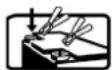
- Connect the clamps (+ red, - black) to + and - battery terminals, making sure you get a good electric contact, respecting the following order.
- Connect first the battery terminal not connected to the chassis of the vehicle.
- Then connect the other connection to the chassis remote from the battery and any fuel line.

- Switch on the CHARGE position.

- At last, plug in your charger to 230 V 50Hz mains supply.

- After charging :
- Disconnect the battery charger from mains supply.
- Then remove the chassis connection and the battery connection, in this order.

Automatic charge
The 3 red, orange and green indicators show the battery charge condition:

Both red and orange indicators show the charge is in progress.
- At 14.8V; the green indicator shows the end of the charge. The charger automatically stops.
This function enables to let the battery indefinitely in charge, without risk.
If the charger remains in charge more than 24h (red and orange indicators on), stop the charge (see sulfated batteries).
STARTER MODE USE (BOOST)
Prior precautions
- Do not disconnect the vehicle battery. The battery disconnecting can result in information loss and in an eventual restarting impossibility.
- The engine must be stopped.
Connection and disconnection
Do not connect to the mains supply at the beginning:

- Connect the clamps (+ red, - black) to + and - battery terminals, making sure you get a good electric contact.
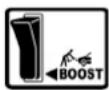
- Switch on the BOOST position.
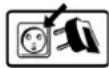
- Plug in your charger to 230 V 50 Hz mains supply.

- Let in charge for 10 minutes. This pre-charge is necessary to bring the energy for an eventual start.
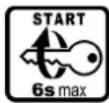
- By switching on the ignition key, you will activate the STARTER function. This function provides only a part of the energy needed to start the engine.

- If your engine does not start, do again a 10mn pre-charge cycle before any new attempts to start it (wait 10 minutes between each cycle).
Nb : If your engine does not start after several attempts, it is because the battery needs to be fully charged or because there is another breakdown (either mechanical or electrical...)

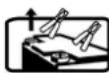
• After this step,
• Unplug the battery charger from the mains supply
- then, remove the clamps.
PROTECTIONS
Your product has been developed with a maximum of protections:
- The clamps of the battery are isolated.
- In case of polarity inversion, a buzzer sounds.
- Polarity inversion and short circuits are not dangerous. The protection is ensured by an automatic internal circuit breaker, automatically restarting.
- Your machine is protected against over-intensity peaks which can be created by faulty batteries or manipulations.
- Thermal protection: the transformer of the product is protected by a thermal switch (cooling: about 1/4 h).
SULFATED BATTERIES - START
- This START'UP 80 does not detect sulfated batteries.
Your battery is highly damaged:
- If the charger remains in charge (red or orange indicators on) more than 24h
- If in charge mode the Start'Up 80 indicates, after few seconds, that your battery is charged but after using it, it appears that it still does not work.

Do not use your charger like an auxiliary power supply. It is forbidden to pull up current from the battery when the battery is connected to the charger.
TROUBLESHOOTING
| Symptoms Causes Remedies | ||
| None of the indicators that indicate the state of charge are switching on | No mains voltage Check that the power cord is plugged to a 230V 50/60Hz socket. Check the power supply network. | |
| Clamps in short circuit or polarity reversal. | Remove the clamps. Check that the fuses have not melted and that the circuit breaker is not tripped | |
| The charger is properly connected but it does not charge the battery | Bad clamp connections. Clean the terminals and the clamps. Check the state of the cables and clamps. | |
| Wrong charge settings Check that the selected voltage matches the battery voltage. | ||
| Following intensive use, your device has entered thermal protection mode. | Wait 1/4h so the device can cool down. | |
| The fuse blows every time it is replaced | Polarity reversal Connect the + clamp to the battery's (+) and the + clamp to the battery's (-). | |
| Wrong charge settings Check that the selected voltage matches the battery voltage. | ||
| Current overconsumption on the battery | Do not draw any of the battery's current during the charge | |
| After charging for a whole day, the end of charge indicator does not switch on. | The battery is damaged Change the battery. | |
WARRANTY
The warranty covers faulty workmanship for 2 years from the date of purchase (parts and labour).
The warranty does not cover:
- Transit damage.
- Normal wear of parts (eg. : cables, clamps, etc..).
- Damages due to misuse (power supply error, dropping of equipment, disassembling).
- Environment related failures (pollution, rust, dust).
In case of failure, return the unit to your distributor together with:
- The proof of purchase (receipt etc ...)
- A description of the fault reported
natural_image
Three black-and-white warning symbols: triangular warning triangle, house with window, and triangular hazard symbol (no text or labels)
natural_image
Three black-and-white icons representing basic electrical components: battery, gloves, and test tube (no text or symbols)

- START UP 80
- INSTRUCTIONS DE SÉCURITÉ
- Risk of explosion and fire!
- Acid projection hazard!
- Connection / disconnection:
- Connection:
- Maintenance:
- Réglementation :
- C ∈
- EAC
- UK CA
- Mise au rebut :
- GENERAL DESCRIPTION
- CONNECTION IN CHARGER FUNCTION
- Preliminary precautions
- Connection and disconnection
- Automatic charge
- STARTER MODE USE (BOOST)
- Prior precautions
- PROTECTIONS
- SULFATED BATTERIES - START
- WARRANTY
Brand : GYS
Model : Start UP 80
Category : Battery charger