LMTBUL - Photoelectric sensor LIFT-MASTER - Free user manual and instructions
Find the device manual for free LMTBUL LIFT-MASTER in PDF.


| Product Type | Continuous monitored beam photoelectric sensor |
| Brand | LIFT-MASTER |
| Model | LMTBUL |
| Maximum Range | 27.4 m (90 ft) |
| Dimensions (with cover) | 5.81 cm (L) x 9.45 cm (H) x 7.01 cm (D) |
| Cable Length | 3 m (10 ft) |
| Operating Temperature | -40 °C to 65 °C (-40 °F to 149 °F) |
| Protection Rating | NEMA 4X (outdoor) |
| Input Voltage (sensor) | 6.8 V DC, 20 mA (red/black wires) |
| Input Voltage (heater) | 10-40 V DC or 8-28 V AC (green/white wires) |
| Heater Power | 4 W max, 170 mA per pair at 24 V, 340 mA per pair at 12 V |
| Compatibility | UL-listed LiftMaster® barrier operators |
| Main Functions | Non-contact entrapment protection, continuous monitored beam, obstacle detection with barrier reversal |
| Mounting | Vertical, on post or flat surface, with supplied brackets |
| Alignment | Red LED (misaligned), blue LED (weak to optimal signal) |
| Maintenance and Cleaning | Gently clean the lens with a soft damp cloth |
| Safety Instructions | Disconnect power before installation, test monthly, install at regulatory height |
| Spare Parts and Accessories | LMSGBP (take-up plate), LMEHUL (extended cover), APOW1 (transformer) |
| Warranty | 2 years (material and workmanship defects) |
Frequently Asked Questions - LMTBUL LIFT-MASTER
User questions about LMTBUL LIFT-MASTER
0 question about this device. Answer the ones you know or ask your own.
Ask a new question about this device
Download the instructions for your Photoelectric sensor in PDF format for free! Find your manual LMTBUL - LIFT-MASTER and take your electronic device back in hand. On this page are published all the documents necessary for the use of your device. LMTBUL by LIFT-MASTER.
USER MANUAL LMTBUL LIFT-MASTER
MONITORED THROUGH BEAM PHOTOELECTRIC SENSOR Model LMTBUL
Introduction
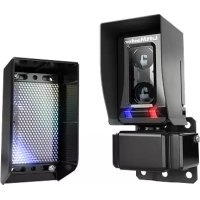
The LiftMaster® Photoelectric Sensors provide non-contact monitored entrapment protection. For use with LiftMaster® UL Listed gate operators. The sensors are UL recognized components and meet UL 325 requirements. Monitored external entrapment protection devices MUST be installed at each Entrapment Zone. Refer to gate operator manual for compatibility with LMTBUL sensor.
Specifications
Max Range: 90 ft. (27.4 m)
Sensor Dimensions with Hood: 2.29" W x 3.72" H x 2.76" D
Cable Length: 10 ft. (3 m)
Operating Temperature: -40°C to 65°C (-40°F to 149°F)
Outdoor Rating: Nema 4X
Heater: Thermostatically controlled, NOT recommended for solar applications
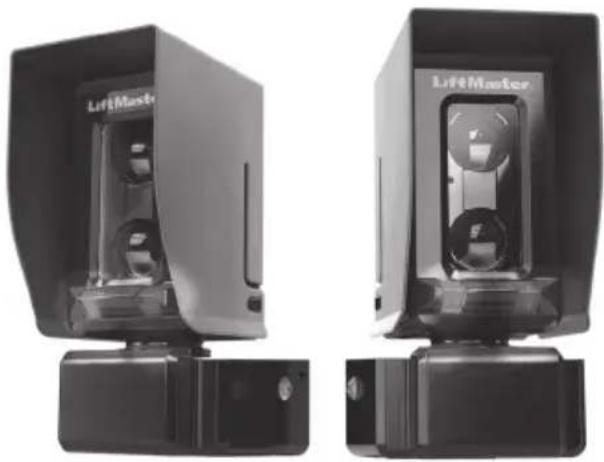
natural_image
Two black liftMaster devices with visible branding and control buttons, shown from different angles (no text or symbols on the devices themselves)Input Voltage:
Sensor: Black/red wires 6.8 VDC, 20mA Heater: Green/white wires 10-40VDC or 8-28 VAC, 4 watts max., 170mA per pair @ 24 VDC/VAC, 340mA per pair @ 12 VDC/VAC
WARNING
To prevent possible SERIOUS INJURY or DEATH from a closing gate or door:
- Read and follow ALL instructions.
- Be sure to DISCONNECT ALL POWER to the operator BEFORE installing the photoelectric sensors.
- The gate or door MUST be in the fully opened or closed position BEFORE installing the LiftMaster® Monitored Entrapment Protection device.
- Correctly connect and align the photoelectric sensor.
- Install the photoelectric sensor so that the center of the sensor window is NO HIGHER than 4-1/2" (11.4 cm) above the floor for door operators and 26" (66 cm) above grade for gate operators.
- Monitored external entrapment protection devices MUST be installed per the operator installation manual at each Entrapment Zone.
• The sensors MUST be mounted vertically. - Test the gate operator and ALL photoelectric sensors monthly. Replace ANY damaged devices.
- SAVE THESE INSTRUCTIONS.
Carton Inventory
- Emitter with hood and bracket
- Receiver with hood and bracket
- Wire covers (2)
- Screws 8-32x3/8" (4)
- Screws 1/4"-20x1-1/4" (8)
-
Lock nuts 1/4"-20 (4)
-
Thread-locking screws 10-32x1" (4)
- M3 screw (2)
- Set screw 10-32x3/8" (2)
• 5/32 Allen key
• 3/32 Allen key
Tools Needed
• Philips screwdriver
- 7/16" socket
Installation
IMPORTANT: Disconnect ALL power to the operator.
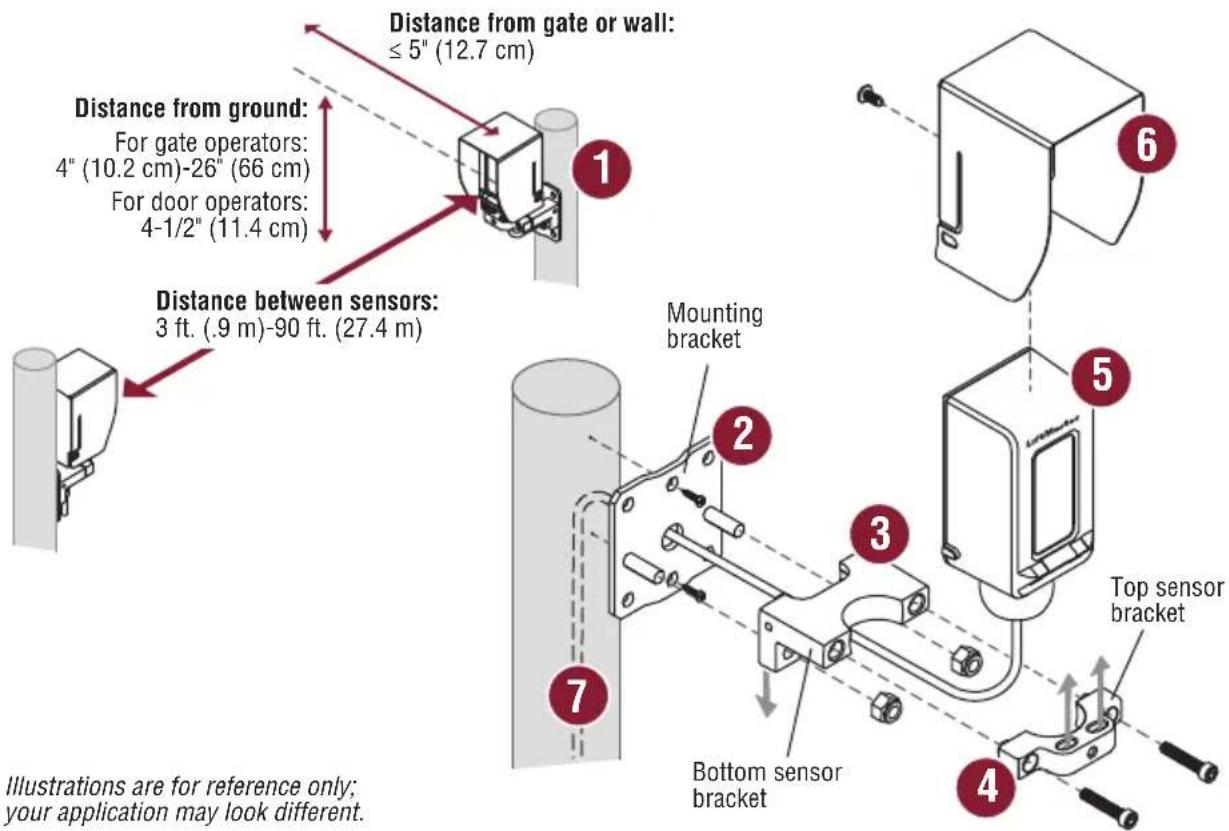
- Determine the mounting locations for the sensors following the measurements below. If installing multiple sensors in close proximity, mount the emitters on opposite sides to avoid crosstalk. The receiver and emitter can be identified by the labels on the back.
- Attach the mounting bracket to the post with 1/4"-20 screws. Drill a hole in the post through the center hole in the bracket. Optional: If installing to a square post or flat surface, you may attach the sensor bracket directly to the post without using the mounting bracket.
- Slide the bottom sensor bracket onto the studs of the mounting bracket and secure with 1/4"-20 lock nuts. Make sure the bracket legs are facing down.
- Loosely attach the top sensor bracket with 10-32x1" thread-locking screws. Make sure the slots are facing up.
- Place the sensor in the bracket and tighten the screws just enough to allow the sensor to rotate inside the bracket.
- Slide the hood over the sensor until it snaps into place. Secure hood with the M3 screw.
- Route wires through the center hole of the mounting bracket and into the post. Optional: Use conduit with NEMA 4X compatible 1/2"-14 NPT fi tting (not provided).
text_image
Distance from gate or wall: ≤ 5" (12.7 cm) Distance from ground: For gate operators: 4" (10.2 cm)-26" (66 cm) For door operators: 4-1/2" (11.4 cm) Distance between sensors: 3 ft. (.9 m)-90 ft. (27.4 m) Mounting bracket Illustrations are for reference only; your application may look different. Bottom sensor bracket Top sensor bracket 6 5 7Illustrations are for reference only; your application may look different.
Wiring
Sensor wiring (red and black wires): Wire the photoelectric sensors (red [+] and black [-] wires) to the appropriate inputs on the operator or expansion board as shown.
Heater wiring (green and white wires):
- OPTION 1 - Connect to the ACCESSORY POWER ON terminal on the control board (NOT polarity specific).
- OPTION 2 - Connect to an external 12V to 24V DC or AC power supply (not provided) with adequate current to power all sensors.
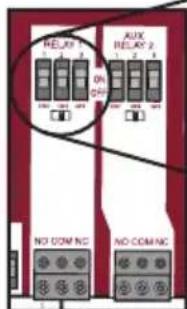
- OPTION 3 - For use with battery backup. Connect to ACCESSORY POWER ON and AUX RELAY terminals. Set AUX RELAY switches as shown. In this configuration, the heater will switch off during a power failure to extend the battery life.
DO NOT overload the accessory power output on the control board or the external power supply.
NOTE: Heater feature is not recommended for ANY solar installations.
Sensor Wiring
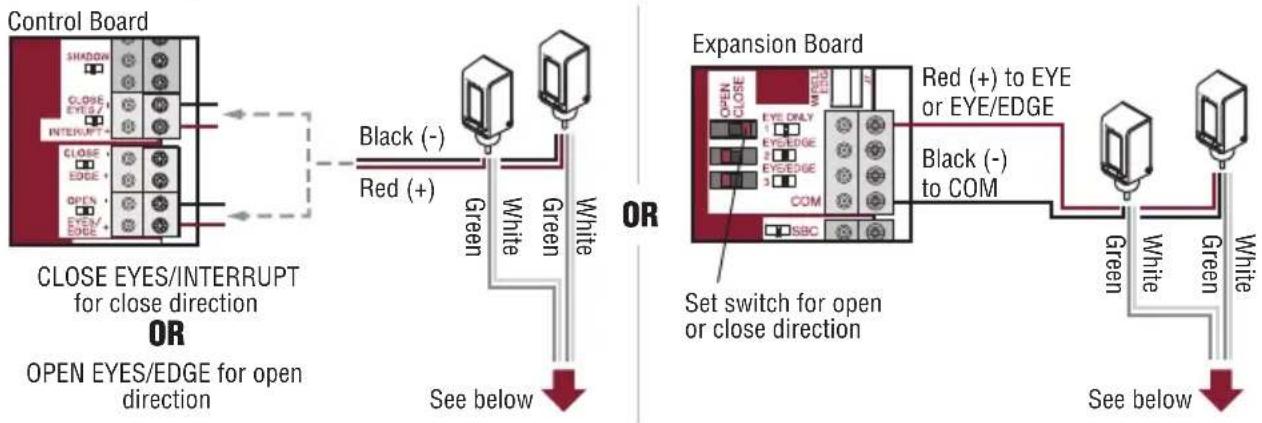
flowchart
graph TD
    A["Control Board"] --> B["CLOSE EYES/INTERRUPT for close direction OR"]
    B --> C["OPEN EYES/EDGE for open direction"]
    C --> D["See below"]

    E["Expansion Board"] --> F["Set switch for open or close direction"]
    F --> G["See below"]

    style A fill:#f9f,stroke:#333
    style E fill:#f9f,stroke:#333
    style F fill:#ccf,stroke:#333
Heater Wiring
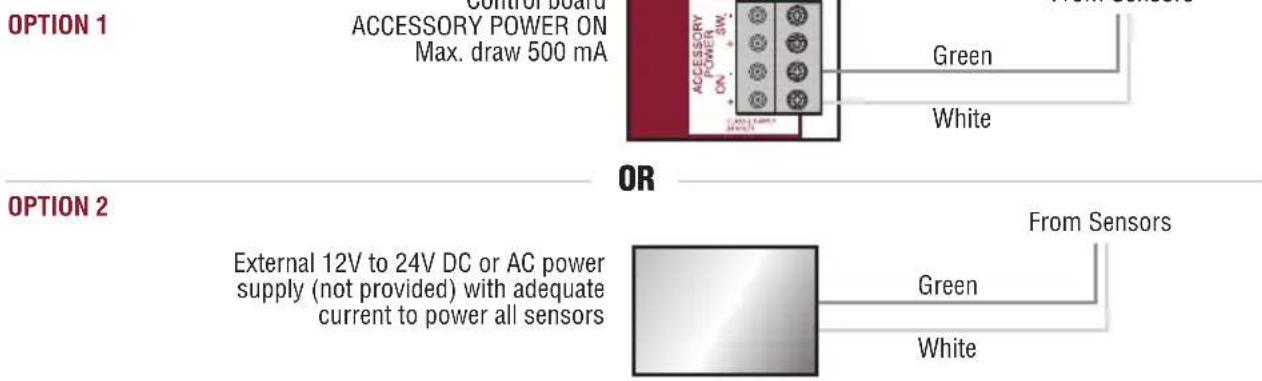
text_image
OPTION 1 Control board ACCESSORY POWER ON Max. draw 500 mA GREEN White OPTION 2 OR External 12V to 24V DC or AC power supply (not provided) with adequate current to power all sensors From Sensors Green White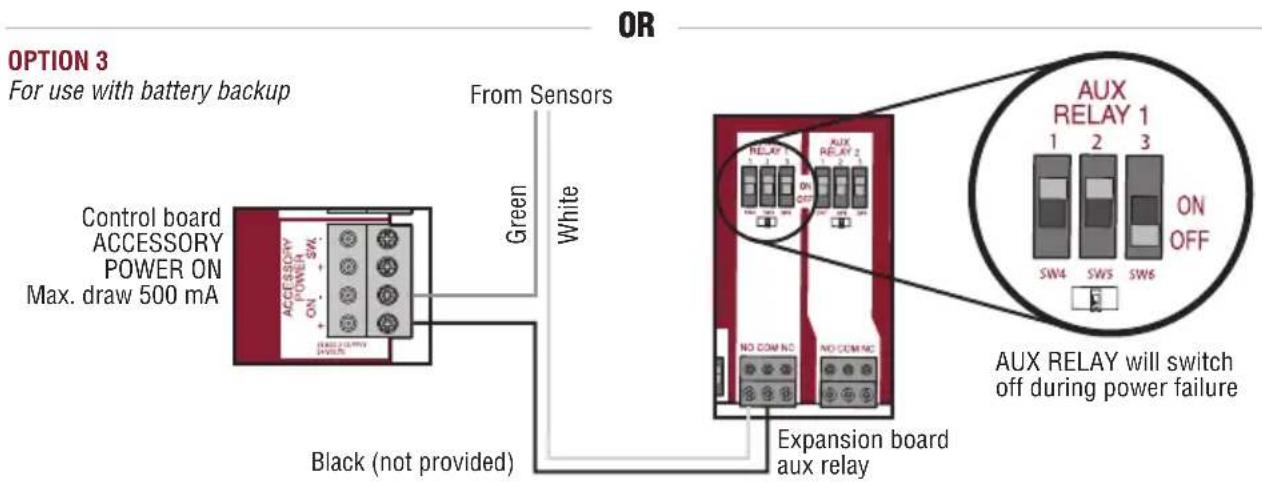
text_image
OPTION 3 For use with battery backup OR From Sensors Green White Control board ACCESSORY POWER ON Max. draw 500 mA Black (not provided) Expansion board aux relay AUX RELAY 1 1 2 3 ON OFF SW4 SW5 SW6 AUX RELAY will switch off during power failureAlignment
Reconnect power to the operator.
- Align the sensors. The LEDs on the RECEIVER indicate alignment. The red LED indicates misalignment or blocked sensor. The blue LED indicates signal strength. Slow blinking indicates weak signal. Fast blinking indicates stronger signal. Solid blue LED on the receiver indicates optimal alignment. NOTE: Solid blue LED on the EMITTER indicates the sensor is powered.
- When the sensors are optimally aligned, tighten the sensor bracket screws to secure the sensors in place (about 24in-lb of torque). For extra security, tighten with the set screw until it grips the sensor.
- Place the wire covers onto the sensor brackets. Make sure the tabs on the wire cover slide into the slots on the sensor bracket. Secure the wire covers with 8-32x3/8" screws. Wire covers are NOT intended for use with conduit installations.
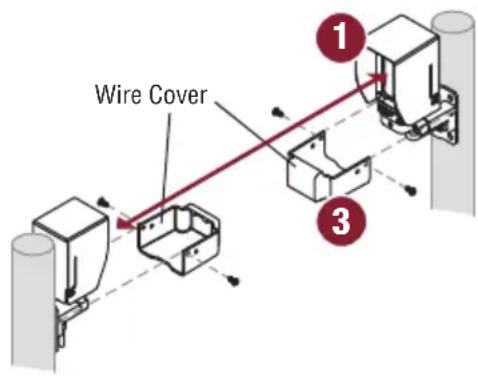
text_image
Wire Cover 1 3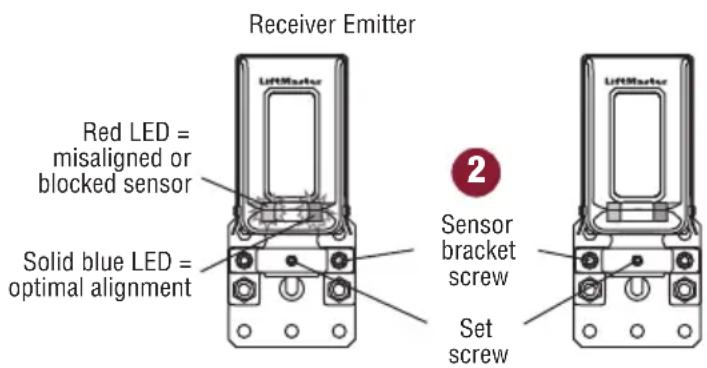
text_image
Receiver Emitter Red LED = misaligned or blocked sensor Solid blue LED = optimal alignment Sensor bracket screw Set screwTest
Test ALL installed sensors for proper operation. Place an obstruction in the path of the beam while the gate is in motion. The operator will reverse direction of the gate and then stop. If the gate does not stop and reverse, refer to Troubleshooting below. Perform the test with the obstruction in three locations:
• Halfway between the emitter and receiver
- Near the receiver
- Near the emitter
Reset Range Mode
The sensors automatically adapt to the distance they are installed from each other. The installed range is saved to memory, optimizing performance for the installation environment. If the installation environment changes in a way that reduces the beam strength (longer range for example), it may be necessary to reset the sensors so they can learn the new environment.
To reset the sensors:
- Disconnect power to the sensors for 5 seconds or longer (disconnect black and red wires or power down the operator).
- Reconnect power to the sensors.
- Block and clear the beam 10 times within 30 seconds of power up. The receiver may indicate the beam is blocked (solid red LED), but if the emitter and receiver are visually aligned, continue with the procedure.
- The red and blue LEDs on the receiver will blink together rapidly for 2 seconds indicating sensors are reset.
- The sensors will then learn the new installed range and save it to memory.
Troubleshooting
| Symptom Possible Cause Solution | ||
| Gate does not move 1. Minimum number of entrapment protection devices not installed2. Sensors are obstructed | 1. Review sensor connections. Slide gate operators require a minimum of two external monitored devices; one in the close and one in the open direction.2. Check for obstructions. | |
| RECEIVER: Solid Red LED | 1. Sensors are not aligned2. Sensors are too far apart3. Sensor lenses are dirty4. Object is obstructing beam5. Condensation on sensor lenses6. Sensor has adapted to short range use but is installed in a long range application. | 1. Align the sensors until the blue light is solid2. Decrease the distance between the sensors. NOTE: Sensors must be 3 ft. (.9 m) - 90 ft. (27.4 m) apart.3. Gently clean the sensors with a soft damp towel4. Remove any objects obstructing beam5. Gently clean the sensors with a soft towel; make sure sensor heaters are connected.6. Follow the instructions in the Reset Range Mode section to reset sensor. |
| RECEIVER: Blinking Blue LED | 1. Sensors are not optimally aligned2. Sensors are too far apart or too close together3. Sensor lenses are dirty | 1. Align the sensors until the blue light on the receiver is solid2. Adjust the distance between the emitter and receiver. NOTE: Sensors must be 3 ft. (.9 m) - 90 ft. (27.4 m) apart.3. Gently clean the sensors with a soft damp towel |
| EMITTER and RECEIVER: Blinking Red LED | Incorrect wiring Check for proper connection of sensor wiring. If the issue continues, replace sensor. | |
| EMITTER or RECEIVER: Red/Blue LEDs blinking together | Internal memory fault | Disconnect all power, wait 15 seconds, then reconnect power. If issue continues, replace sensor. |
| EMITTER or RECEIVER: Red/Blue LEDs alternate blinking | Internal fault | |
Accessories
LMSGBP: Photoelectric sensor gang box plate
LMEHUL: Photoelectric sensor extended hood further enhances reliability in extreme weather conditions
APOW1: Plug in transformer
Warranty
LiftMaster® warrants to the first consumer purchaser of this product that it is free from defect in materials and/or workmanship for a period of 2 years from the date of purchase.
NOTICE: This device complies with Part 15 of the FCC rules and Industry Canada's license-exempt RSSs. Operation is subject to the following two conditions: (1) this device may not cause harmful interference, and (2) this device must accept any interference received, including interference that may cause undesired operation. Any changes or modifications not expressly approved by the party responsible for compliance could void the user's authority to operate the equipment.
This device has been tested and found to comply with the limits for a Class B digital device, pursuant to part 15 of the FCC rules and Industry Canada ICES standard. These limits are designed to provide reasonable protection against harmful interference in a residential installation. This equipment generates, uses and can radiate radio frequency energy and, if not installed and used in accordance
with the instructions, may cause harmful interference to radio communications. However, there is no guarantee that interference will not occur in a particular installation. If this equipment does cause harmful interference to radio or television reception, which can be determined by turning the equipment off and on, the user is encouraged to try to correct the interference by one or more of the following measures:
- Reorient or relocate the receiving antenna.
- Increase the separation between the equipment and receiver.
- Connect the equipment into an outlet on a circuit different from that to which the receiver is connected.
- Consult the dealer or an experienced radio/TV technician for help.
natural_image
Two black industrial devices labeled 'LifeMaster' with no visible text or symbols on the device surfaces.text_image
ACCESSION POWER + SW + - TEN12 2.0V/453 453 0.012 VertNoir (non fournis)
Blanc
text_image
RELAY ON OUT AUX RELAY 2 NO COM NC NO COM NCnatural_image
Two black industrial water level transducers with 'LifeMaster' branding, shown from front and side views (no visible text or symbols on the devices themselves)Voltaje de entrada:
Sensor: Cables negro/rojo 6.8 VCC, 20 mA