MSW 82000 - Battery charger GYS - Free user manual and instructions
Find the device manual for free MSW 82000 GYS in PDF.


User questions about MSW 82000 GYS
0 question about this device. Answer the ones you know or ask your own.
Ask a new question about this device
Download the instructions for your Battery charger in PDF format for free! Find your manual MSW 82000 - GYS and take your electronic device back in hand. On this page are published all the documents necessary for the use of your device. MSW 82000 by GYS.
USER MANUAL MSW 82000 GYS
FR 2-6/31-32
EN 7-10/31-32
DE 11-14/31-32
ES 15-18 / 31-32
RU 19-22/31-32
NL 23-26/31-32
IT 27-30/31-32
MSW 82000
INSTRUCTIONS DE SÉCURITÉ

CHAMPS D'APPLICATION
This manual includes guidelines on the operation of your device and the precautions to follow for your own safety. Ensure it is read carefully before first use and keep it handy for future reference. These instructions should be read and understood before anyone operates the product. Any modifications or maintenance that are not specified in the manual should not be undertaken. The manufacturer is not liable for any injury or damage due to non-compliance with the instruction manual. In case of problems or uncertainties, please consult a qualified person that is able to handle the device correctly. This device should only be used for power supply within the limits indicated on the device and in the manual. The safety instructions must be followed. In case of improper or unsafe use, the manufacturer cannot be held responsible

Device suitable for indoor use only. Do not expose to rain or excessive moisture.
Do not cover the device
Do not place the device near a fire or subject it to heat or to longterm temperatures exceeding 50^
Do not obstruct the cooling vents. Refer to the installation section before operating the machine.
The automatic mode of operation and usage restrictions are explained below in these operating instructions.

Risk of explosion and fire!
A battery being charged can emit explosive gas.
- During the charge, the battery must be placed in a well ventilated area.

-
Avoid flames and sparks. Do not smoke.
-
Protect the electrical contacts of the battery against short-circuiting.

Acid projection hazard!

- Wear safety goggles and protective gloves
- If your eyes or skin come into contact with battery acid, rinse the affected part of the body with plenty of water and seek immediate medical assistance.

Connection:
- This device must be connected to an earthed power supply

Maintenance:
Service should be performed by a qualified person.
- Under no circumstances should solvents or other aggressive cleaning agents be used.
- Clean the device's surfaces with a soft, dry cloth.

Regulations :
The device complies with European Directive.
The certificate of compliance is available on our website."
EAC conformity mark (Eurasian Economic Commission)
- Equipment in compliance with British requirements. The British Declaration of Conformity is available on our website (see home page).
- Equipment in conformity with Moroccan standards.
- The declaration C_ (CMIM) of conformity is available on our website (see cover page).
Disposal:
- This product should be disposed of at an appropriate recycling facility. Do not dispose of in domestic waste.
DESCRIPTION
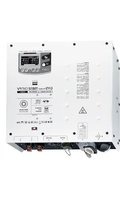
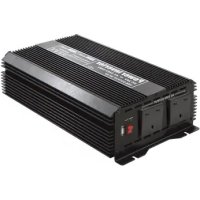
The MSW 82000 inverter is a product that converts DC electricity to AC electricity to provide the power needed to operate small electrical equipment and digital products. It is widely used in cars, boats, mobile offices, post and telecommunications, public safety, emergencies, and so on.
This inverter has adopted the internal electronics of this Power Inverter follow the pilot circuit international standard with the benefits of being small, light, stable and with a high conversion efficiency. It includes five functions: low input voltage protection, input overvoltage protection, overload protection, overtemperature protection, output short-circuit. These five functions protect the vehicle's power supply, the equipment and the vehicle's circuit.
PRODUCT INTERFACE
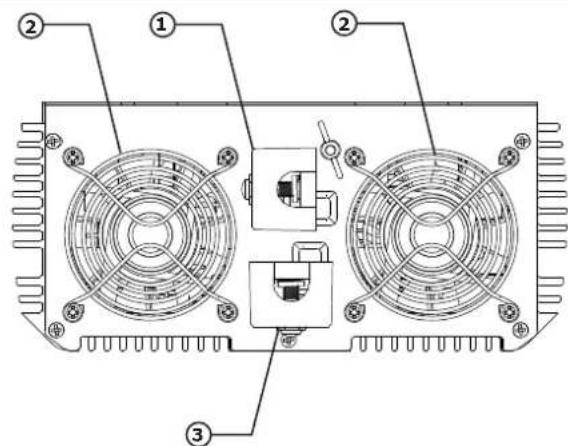
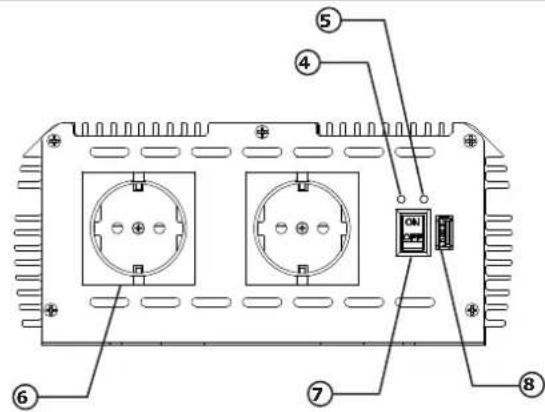
| 1 | DC current input -Terminal "-"(Black) | 5 | Fault indicator (Red) |
| 2 | Fan 6 AC output sockets | ||
| 3 | DC current input - Terminal << (red) 7 ON / OFF switch | ||
| 4 | Power indicator (green) 8 USB output |
CONNECTION
| △ | Follow these steps to ensure proper use of the product. A bad connection can destroy the inverter. |
| △ | Before connecting the inverter to the battery, make sure that the switch is set to OFF. |
- The inverter is supplied with two red and two black cables.
Connect the red cables to the positive input terminals of the inverter and the positive terminal of the battery. Connect the black cables to the negative input terminals of the inverter and the negative terminal of the battery.
| △ | Don't reverse polarities, it may damage the inverter. Make sure that the cables are firmly connected. |
-
Before starting the inverter and connecting electrical equipment, please observe the following instructions:
-
Before charging, carefully check whether the charging current of the device is lower than the inverter current. If it is higher than the converter charging current, do not make the connection that may damage the USB port.
- For safety reasons, it is not recommended to exceed a consumption of 2000 W per AC output socket (7). Try to share the global consumption on all sockets.
- Certains appareils doivent être recharges avec leur chargeur d'origine, ne pas le faire avec le port USB.
-
For best operation, it is recommended to use a battery exceeding 200 Ah.
-
Set the switch to the ON position. The green indicator comes on.
- Insert the electrical device plug into the AC (7) output socket of the inverter.
APPLICATIONS
- Applications
a. Use only for class II devices.
b. Fields of application of the electrical device that are not applicable :
- All electrical appliances that exceed the inverter's power rating.
- Generally, capacitive charging devices are not applicable: air conditioning, electric drill, refrigerator, microwave, blender.

We do not recommend using this inverter with devices that have strict power supply requirements, such as precision equipment. Using the inverter with this kind of device may affect the measurement data..
c. Scope of the electrical device that is not applicable with USB :
-
USB does not have a data exchange function.
-
Check carefully the voltage before usage:
-
the input voltage of the inverter must be the same as the battery;
- the operating voltage of the device must be the same as the output voltage of the inverter;
-
once all identical, connect them correctly by following the «connection explanations» in this manual.
-
Use the inverter in a ventilated condition to make sure that the fan is not blocked. Do not place the inverter under rain or in a humid place, keep it dry to maintain a long lifespan. Use the inverter below 85% of the corresponding power.
-
The inverter includes an input overvoltage protection function, an overload protection function, an overtemperature protection function and a short-circuit protection function. In each case the inverter stops working. To make it work again, turn it off, correct the defect, then turn it on again.
-
To increase the efficiency, the fan will not work unless the following two situations:
a. When the load is higher than 30% of the inverter power.
b. When the inverter temperature exceeds 60^
- Using an extension cable:
a. It is not recommended to use an extension cable between the inverter and the battery, as this would cause DC electricity loss and affect the inverter's performance.
b. If you need to use an extension cable, use a high quality one to reduce power loss.
7. Other questions
a. It is a modified sinusoidal inverter; to measure the voltage, use specific equipment. (RMS)
b. If power is supplied to an audio system, radio or television, interference may occur, which is normal.
c. In order to protect the vehicle's battery, stop using the inverter when the engine is turned off.
d. Do not dismantle the inverter. For any maintenance or repair, please contact a professional.
SECURITY MATTERS
- Do not operate the inverter with wet hands. Keep the product away from children.
- The temperature of the casing will be high after a long working period. Let it cool for a few minutes before touching the product.
- Do not put metal in the inverter as this may cause an electric shock..
- Do not touch the plug metal when plugging it into the inverter socket.
- Keep the inverter away from explosives.
- Keep all AC electricity away from the inverter, as this could damage it and also cause electric shock.
ALERT LIST
| Function | State description | Restart the working method | ||
| LED light | Alarm | AC output | ||
| Low Input vol-tage alarm | Green:on Red: off | Yes Yes | When the battery voltage returns to the corresponding range, the alarm stops automatically.. | |
| Low voltage shutdown | Green:on Red: on | Yes No | When the battery voltage returns to the corresponding range, turn the inverter off for 3 to 5 seconds, then turn it on to restart: green light on, red light off.24V battery restart tension : DC 23.4 V - 24.6 V | |
| Input overvol-tage protection | Green:on Red: on | No No | When the battery voltage returns to the corresponding range, turn the inverter off for 3 to 5 seconds, then turn it on to restart: green light on, red light off. | |
| Overload pro-tection | Green:on Red: on | No No | Reduce the load to the corresponding range, turn the inverter off for 3 to 5 seconds, then turn it on to restart: green light on, red light off. | |
| Overheating shutdown | Green:on Red: on | Yes No | When the inside temperature returns to the corresponding range, turn the inverter off for 3 to 5 seconds, then turn it on to restart: green light on, red light off. | |
| Output short-circuit | Green:on Red: on | No No | When the short-circuit is rectified, the inverter restarts automat-ically. | |
WARRANTY
The warranty covers faulty workmanship for 2 years from the date of purchase (parts and labour).
The warranty does not cover:
- Transit damage.
Normal wear of parts (eg.: cables, clamps, etc.). - Damages due to misuse (power supply error, dropping of equipment, disassembling).
- Environment related failures (pollution, rust, dust).
In case of failure, return the unit to your distributor together with:
- The proof of purchase (receipt etc ...)
- A description of the fault reported
Pnck KNCJIoTHbIX 6pbI3r!
Hocnte 3auntbIe ouKn n nepuATkn.
Bcnyae KOHTaKaTa c rla3amn nn KoKei, npOMoIte 6nbHO BODOn n npOKOHcyNbTnpuYTe Bpaua 6e3 npOmeJdJeHna.
PoiKJIoueHne:
- 3TO yCTpOiCTBO DoJXHO 6bITb B pO3eTKy C 3a3emJIeHHeM.

yxo4:
- TexHnueckoe 06cIyXnBaHne I0JxHO IPOIN3BOINTBcT TOJIbKO KBaIIHnIuNPOBaHHbIM CNeUaJIInCTOM.
- Hn B Koem Cnyuae He nCnoIb3OBAtB paCTBOpHTeIN IIn dpyrne Koppo3HbIe MOIOUne CpeDCTBa.
OuHCTnTb NOBepxHOCTb aannapat C NOMOsbU CyXo TpAINK.

Hopmbi npaBnla:
- AnnapaT COOTBETCTBYET DnpeKTHBam Ebpoco103a
-Декларачи COOTBETCTBЯ ectb Ha Haujem caite.
3HaK COOTBETCTBnE EAC (EBpa3nCKoe COOTBETCTBne KaueCTBa)
MaTePnA1 COOTBeTCTByeT Tpe6OBAHnM BeJIko6pTuHn. 3aIbLeHne O COOTBETCTBnN dJa BeJIko6pTuHn DoCTyInHO Ha HauWeM Be6-caTe (cM. rIaNbHyIO cTpaHnU). - TOBAP COOTBECTBYET HOPMaM MapOKKO.
-Декларачиу(CMIM)doCTynHaДЯСkaUBAHЯHaHaшем caHTe (CM Ha THTyIbHOI CTpaHnce).

YTNIN3aCnA:
- ΘTOT annapaT noIeKNT nepepa6oTke. He BbI6paCbIBaTb B o6uH Mycopoc6opHnK.
ONICAHNE
KoHbepTeP MSW 82000 npedHa3NaueH dIra TpaHcfoMaun NoCToHHoro ToKa DC b NpeMeHHbI AC dIy o6ceueHn 6ecnepe6oHoi pa6Otby domaunx 3JeKTOp-np6OpOB. Annapat uNPOKO npimeHReTcB aBTOMo6nJx, Kopa6Jx, MoNbIbHbIX ofncax, Ha noUte n TeleKOMMyHKaunx, B O6uectBeHHo 6eONaCHOCTn.
KoHBePTeP OChaSeH PnAToH UnpaBHeHMeKdyHapOndHOrO CtaHdApTa N TaKx e 6bJaAeT DOnOHnTeJbHbIM npEnMyuIeCTBOM, npH He 60JIbXn Pa3Mepax N Bece OH ouYeH Cta6NtBHy N cAmoe rIabHoe 3ΦΦeKTHBHy. 6bJaAeT 5IO FyHKzmaMn 3aunTbI: OT Hn3KOrO BxOndHOrO HAnpJxHeH, OT nepeHaPrjxHeHn Ha BXOe, OT npeRpy3Kn, OT npeRpeBa, n TAKKe 3aunToN OT KOpOTkN X 3aMbKaHn Ha BbIXOe. 3TN 5 CnOCobB 3aunTbI NOMrY T 3aunTnTb, KaK cam annapaT, TAK I annapaTy K KOtoPoh OH 6yDet NODKlNoeH.
HHTEPΦEIC YCTPOICTBA
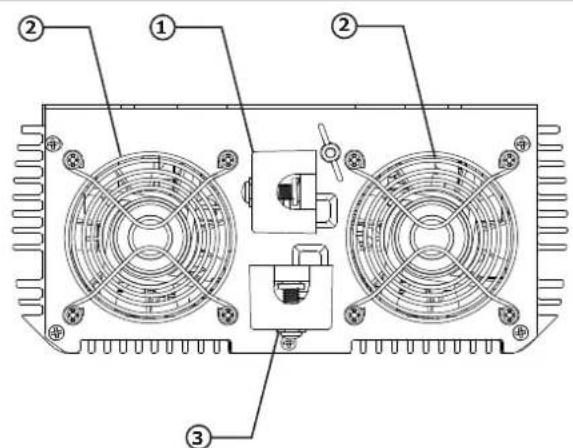
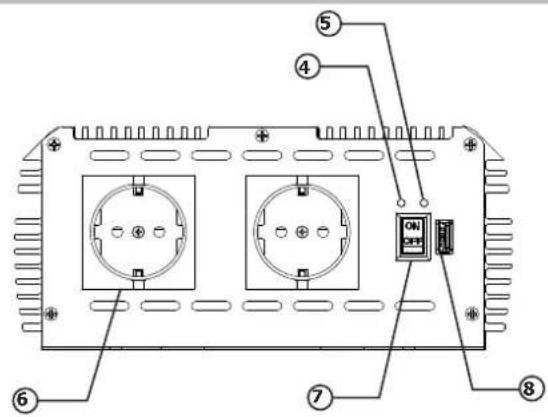
- The PSW are supplied with a remote control to control the converter remotely (max 5 m). Its digital display also provides information on the battery status and W consumption of the connected electrical device.