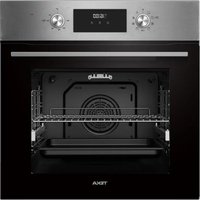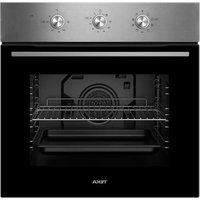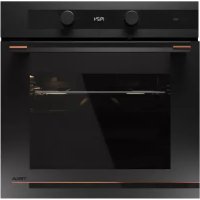
HLB 85G1 P - Oven TEKA - Free user manual and instructions
Find the device manual for free HLB 85G1 P TEKA in PDF.


User questions about HLB 85G1 P TEKA
0 question about this device. Answer the ones you know or ask your own.
Ask a new question about this device
Download the instructions for your Oven in PDF format for free! Find your manual HLB 85G1 P - TEKA and take your electronic device back in hand. On this page are published all the documents necessary for the use of your device. HLB 85G1 P by TEKA.
USER MANUAL HLB 85G1 P TEKA
natural_image
Pure architectural line drawing of a room layout with no text, numbers, or symbolsInstallation & Maintenance 3
Instruction manual.... 101
Cooking guide 209
HLB 85-G1 P BM
ES PT EN
FR DE NL
EL
INSTALLATION & MAINTENANCE
Installation and maintenance instructions index
SAFETY INSTRUCTIONS 31
Electrical safety
Child safety
Oven use safety 32
Safety in cleaning
and maintenance
Safety when using the
pyrolytic cleaning cycle 33
INSTALLATION 35
Before installation 35
Column installation ....
Undercounter installation ....
Electrical connection
Oven installation
ENVIRONMENTAL INFORMATION ...... 36
Disposal of the ecological packaging .. 36
Product disposal
Energy information
BEFORE FIRST USE 36
OTHER IMPORTANT
INSTRUCTIONS 36
ACCESSORIES 37
Assembling the telescopic runners ..... 37
32Telescopic runners with folding clip. 37
Telescopic runners with direct clip .. 37
CLEANING AND MAINTENANCE...... 38
3 Cleaning the oven exterior and accessories 38
Cleaning the oven interior 38
Assembling the side supports ..... 38
Assembling the supports ....
Dismantling the bottom panel ..... 38
35 Ovens with a folding grill 39
Cleaning the oven door 39
35 Dismantling/assembling the door
with hinge on body 39
35 Dismantling/assembling the door
with hinge on door 39
Dismantling/assembling the
interior glass panes of the door ..... 40
Changing the oven light bulb 40
36Changing the upper bulb 40
Changing the side bulb 40
Changing the LED lamp 40
Trouble shooting
Technical Specifications ....
FIGURES 95
SAFETY INSTRUCTIONS
Read these instructions carefully to obtain the best performance from your oven, safely and correctly. Keep this manual so that it can be read by a new owner.
Electrical safety
- If the power cable is not supplied with the oven, the following cables may be used in non-pyrolytic ovens: H05RR-F / H05VV-F / H05V2V2-F / H07RN-F / H05SS-F. In pyrolytic ovens, only the H05SS-F-type cable may be used. The connection diagram is shown in Figure 1.
- The oven must always be plugged into a sound earth connection and its installation must comply with current regulations.
- This appliance is intended for use at a maximum altitude of 2,000 m.
- When installing the oven, total disconnection means must be incorporated into the fixed installation in accordance with the installation regulations (adapted to the current to be supported and with a minimum space between the contacts of 3 mm) based on surge protection category III conditions, for disconnection in the event of an emergency and when cleaning or changing the bulb. Under no circumstances must the earth wire pass through this switch.
- This switch may be replaced by a plug, provided it is accessible for normal use.
- Any Nhandling Nor Nrepair Nto Nthe Nappliance, Nincluding Nrement of Nthe Npower Ncable, Nshould Nbe Ncarried Nout by Naised Technical Service Personnel using original spare parts. Repairs or handling by others may damage the appliance or cause malfunctioning that could be hazardous to your safety.
- Unplug your oven if it malfunctions.
- In combined ovens with countertops and to avoid potential risks, only those recommended by the manufacturer may be assembled.
Child safety
- Do not allow children to come near the oven while in use or during the pyrolytic cleaning cycle as it can reach very high temperatures.
- Children under 8 years of age should be kept away from the appliance unless they are under constant supervision. Children should not be allowed to play with the appliance.
- The appliance may be used by children over the age of 8 and people with reduced physical, sensory or mental capacities or a lack of experience or know-how, provided they been given appropriate instructions or supervision on how to use the appliance safely and they understand the dangers involved.
Oven use safety
- The oven must always be operated with the door closed.
- Only use the oven after it has been installed inside the kitchen unit (See Installing the oven).
- Do not install the oven behind decorative doors. This can cause it to overheat.
- The manufacturer is not responsible for any use of the oven other than for the home preparation of food.
- Do not cover the bottom of the oven with aluminium foil, or any other material, as this may affect cooking performance and damage the enamel inside the oven and the interior of your kitchen unit.
- Do not store oil, fats or inflammable materials inside oven. This may be dangerous if the oven is turned on.
-
Do not lean or sit on the open oven door. It could be damaged and you could be injured.
-
The Ntray Nand Nrack Nhave Na Nsystem Nfor Neasy Npartial and handling of food. Always place these accessories inside the oven, as indicated in the Accessories section.
- The oven heats up when in use, so always use oven gloves when performing operations inside the oven and avoid touching the heating elements.
- Only use the supplied temperature probe inside the oven (in models that come with this feature).
Safety for cleaning and maintenance
- Disconnect the appliance from the mains power supply before any operation.
- Do not use steam cleaners or pressurised water to clean the oven.
- Do not use metal scouring pads, wire brushes or commercially available or abrasive powder cleansers to clean the oven door as they can scratch the surface and cause the glass to break.
- Cleaning Nand Nmaintenance Ntasks Nto Nbe Ncarried Nout N user should not be done by children without supervision.
- Before replacing a bulb, first make sure that the oven has been disconnected from the mains to avoid the possibility of receiving an electric shock.
- Remove all accessories and dishes from the oven, including the shelf supports and/or telescopic runners.
- Clean any spillages or Nexcess dirt, as during Nthe Npyrolytic cleaning cycle these could ignite and become a fire hazard.
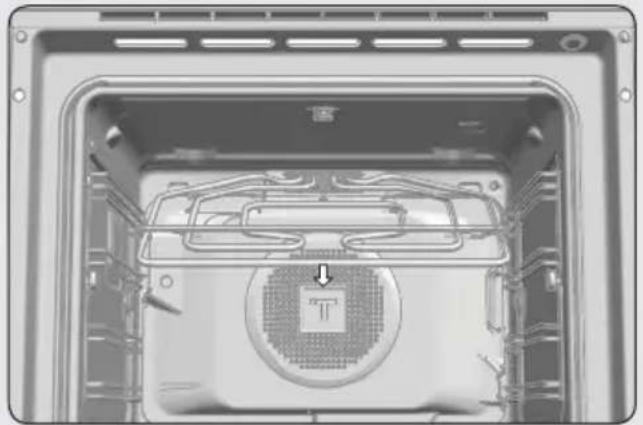
- For Nyour Nsafety, Nnever Noperate Nthe Noven Nwithout Nth panel (that protects the fan) in place.
Safety when using the pyrolytic cleaning cycle
Before starting the cleaning cycle:
- CAUTION: Remove all accessories and dishes from the oven, including the shelf supports and/or telescopic runners.
- Clean any spillages or excess dirt, as during the pyrolytic cleaning cycle these could ignite and become a fire hazard.
- Remove any dirt from the oven gasket.
- Carefully follow the instructions for programming the pyrolytic cleaning cycle.
During the pyrolytic cleaning process:
- Do not leave any cloths or fabric hanging from the oven handle or in close contact with it.
- For safety reasons, if the oven has been installed below the counter, the hob must not be in use while the oven is in pyrolytic mode.
- The oven’s inside light will remain off and cannot be turned on.
- The oven is equipped with a safety lock mechanism that prevents the door from being opened during the cleaning cycle. Do not try to open the door while the lock is activated.

FORMATION
This manual describes general oven characteristics, and so they may not correspond in full to those of your oven. Consult Nthe NUser's Nguide Naccompanying Nthis Nmanual M learn about the specific features and equipment of your oven.
The manufacturer reserves the right to change the product characteristics in order to improve its operation.
Installation
This information is exclusively for the installer who is responsible for assembly and electrical connection. The manufacturer will not accept liability for possible damage caused if you install the oven yourself.
BEFORE INSTALLATION
- To handle the oven, use the grips sides. Do not use the door handle to lift the oven.
- When installing the oven under a c follow the instructions for installing it.
- In general, protruding elements (furniture reinforcements, pipes, socket bases, etc.) at the back of the unit must be avoided.
- When the base of the main power socket is inside the unit in which the oven is installed, this must be done in the shaded area. Figure 2.
- The unit in which the oven is installed and adjacent units must withstand temperatures higher than 85 °C.
- The installation instructions must be hered to strictly. If not, the oven's ventilation circuit may become blocked, causing high temperatures that could damage the kitchen unit and the appliance itself.
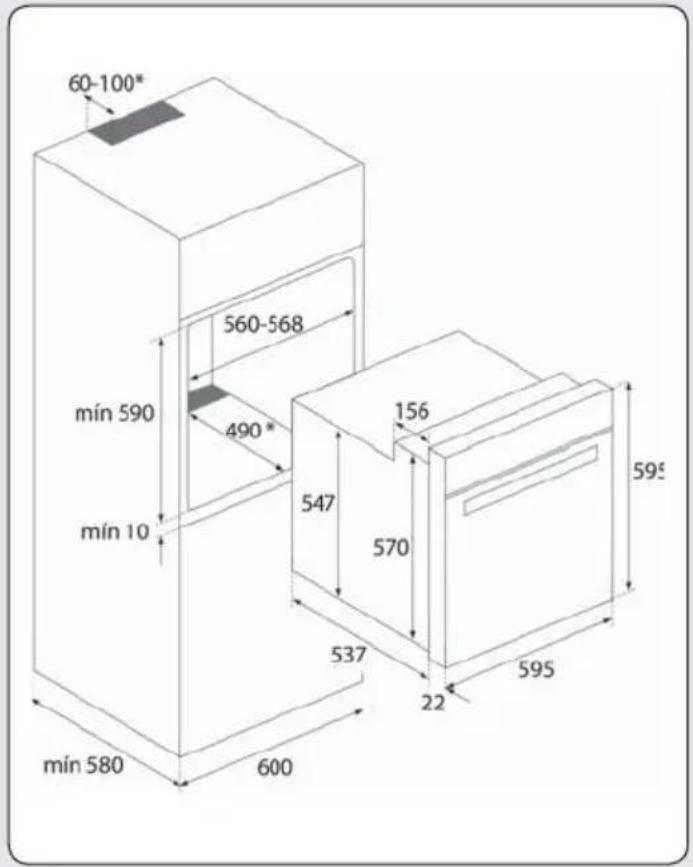
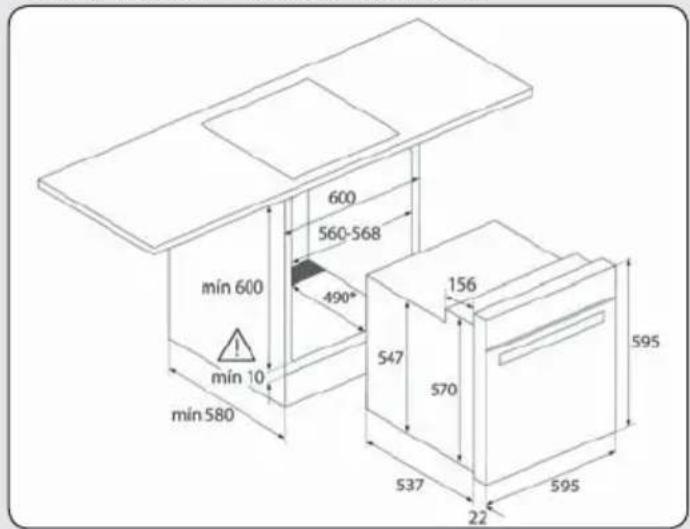
- For this purpose, check the unit measurements and those of the holes to be drilled in the units, as shown in the following figures: 2.
counter,
Column installation.
60 cm oven: Figure 7*.
45 cm oven: Figure 8*.

CAUTION
* When installing pyrolytic ovens, DO NOT drill any holes in the unit inside the shaded areas.
Undercounter installation.
60 cm oven: Figure 9*.
45 cm oven: Figure 10*.

WARNING
* When installing pyrolytic ovens, DO NOT drill any holes in the unit inside the shaded areas.
ELECTRICAL CONNECTION
The fitter must ensure that:
- The mains power voltage and frequency correspond to what is marked on the identification plate.
- The domestic wiring system can withstand the maximum power marked on the identification plate.
- After connecting the power supply, check that all electrical parts of the oven are working correctly.
ad-OVEN INSTALLATION
For all ovens. After the electrical connection has been done:
- Position the oven inside the unit and ensure that the feed cable is not trapped or in contact with parts of the oven that heat up.
- Make sure that the body of the oven is not in contact with the walls of the unit and that there is a minimum space of 2 mm between adjacent units.
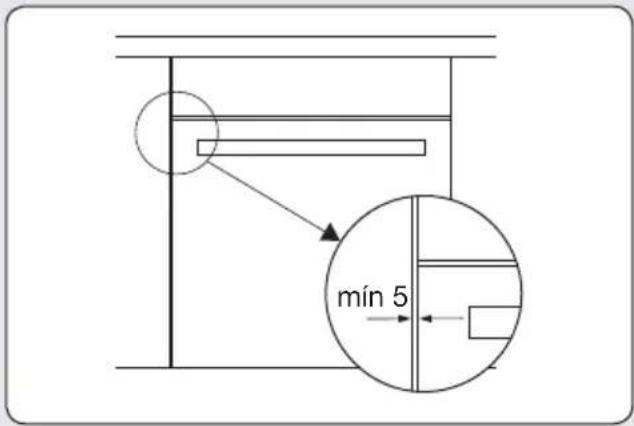
- Centre the oven in the unit so that there is a minimum space of 5mm between the oven and the doors of the furniture that surrounds it. Figure 3.
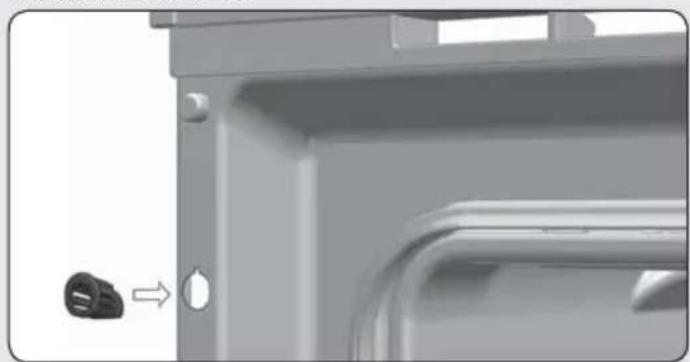
- Open the door and insert the plastic plugs supplied with the oven into their respective housings. Figure 11.
- Fasten the oven to the unit with the screws supplied, screwing them into the unit through the stops.
Environmental information
DISPOSAL NOF NTHE NECOLOGICAL NPACKAGING
The packaging is made from totally recyclable materials which can be put to other uses. Consult your local council regarding the necessary procedures for disposing of these materials.
Contact your local council, household waste disposal service or the establishment where you bought the product from for more information on recycling the appliance.
PRODUCT DISPOSAL

RNING
The symbol on the product or packaging indicates that this appliance cannot be disposed of as normal household waste. It should be taken to an electrical and electronic equipment collection point for recycling. In this way, any negative consequences for the environment and public health from incorrect handling can be avoided.
ENERGY INFORMATION
Tested to comply with the requirements of the 66/2014 (Eco-Design) and 65/2014 (Energy Labelling) regulations in accordance with Regulation EN 60350-1.
Energy consumption measurements taken under different conditions may give different values from those indicated for your oven.
Consult the User's guide accompanying this manual to learn about the energy consumption of your oven.
Before first use
There may be traces of fat and other substances in the oven as a result of the manufacturing process. These should be removed using the following procedure:
- Remove all the packaging from your oven, including the protective plastic, if any.
-
Turn your oven to 📄 / , or if this setting is not available to ✕️ / ✕️ at 200 °C for 1 hour. Consult the User’s guide accompanying this manual on how to do this.
-
Cool the oven with the door open so that it ventilates and no odours remain inside it.
-
Once cold, clean the oven and the accessories.
During this first operation, smoke and sme will be produced. The kitchen should therefore be well ventilated.
Other important instructions
Do not pour water on the bottom surface when in use; this may damage the enamel.
It is normal for condensation to occur on the oven door when cooking food with a high liquid content.
When closing the oven door during cooking, door when it is closed, guaranteeing the sound of the air inside it can be heard. This sealing of the cavity. effect is normal due to the pressure exerted by
Accessories
Do not leave any containers or food on the oven floor. Always use the trays and racks supplied with the oven.
To prepare yoghurt, place the jars on the oven floor.
To cook any other food, insert the tray or rack into the runners inside the oven.
- Between the two rails of the side supports or on any of the extractable runners, if the oven has them.
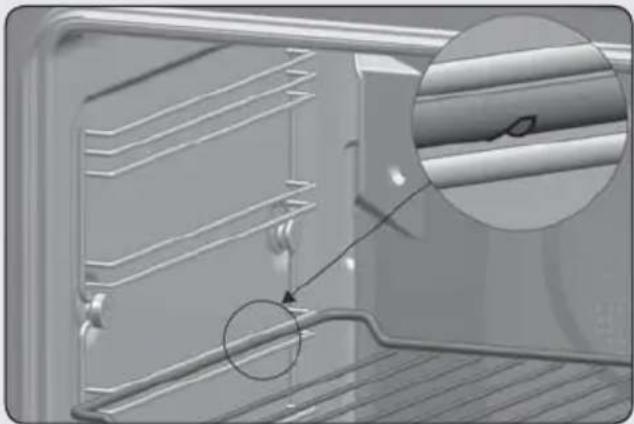
- The rack and some of the trays have retention grooves to prevent them from accidentally being removed. Place these grooves towards the back of the oven, facing downwards. Figure 4.
- The surface of the rack on which the container will rest must be below the side rails. This prevents the container from accidentally sliding. Figure 5.
- The trays have a tab at the front to facilitate their removal. Place the tray with the tab facing towards the outside of the oven. Figure 6.
ASSEMBLING NTHE NTELESCOPIC NRUNNERS.
Some oven models have a telescopic runner kit accessory.
To assemble the telescopic runners on the chrome-plated supports, proceed as follows:
Telescopic runners with folding clip

WARNING
The runners must be placed at height 2, starting from below. Figure 12.
- Remove the protective film.
- Hook the large clips on the upper rail and extend the runner until it hooks on the small clips on the lower rail. Figure 12.
- You will hear a "click" when the runner is correctly secured. Figure 13.
- The notch to fix the tray/support must main at the front part of the oven. Figure 13.
Telescopic runners with direct clip

WARNING
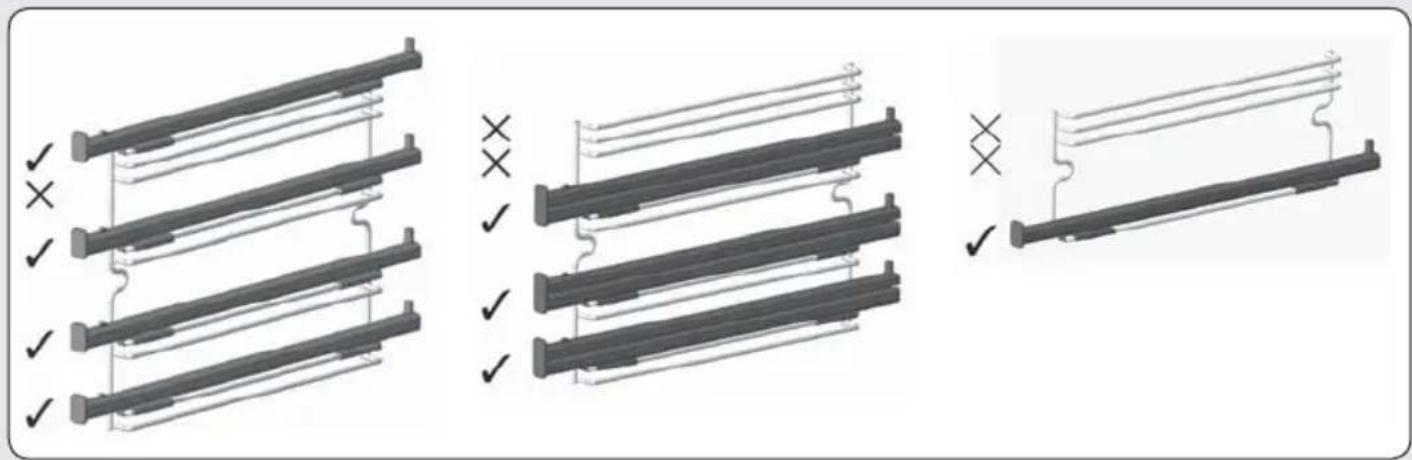
The single extraction runners must be placed at heights 1, 2, 3 and 5 starting from below. Figure 14.
The double extraction runners must be placed at heights 1, 2 and 3 starting from below. Figure 15.
In 45 cm ovens, the telescopic runners are positioned at height 1. Figure 16.
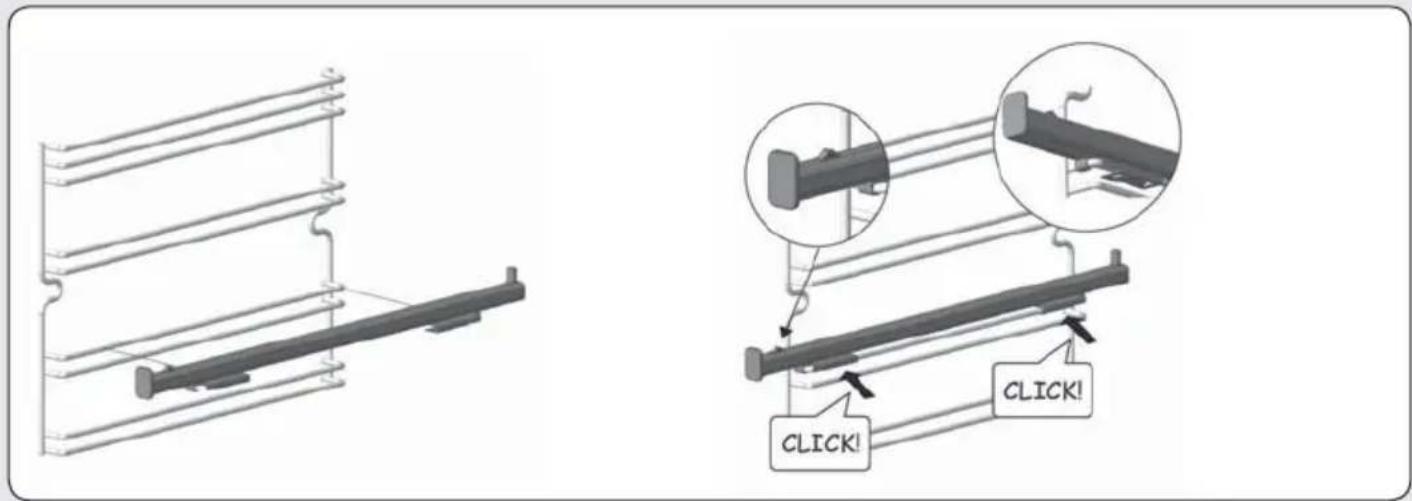
- Hook the clip on the top rail at the desired level. Figure 17.
- You will hear a "click" when the runner is correctly secured. Figure 18.
- The notch to fix the tray/rack support must remain at the front part of the oven. Figure 18.
Cleaning and maintenance

WARNING
Disconnect the appliance from the mains power supply before any operation.
CLEANING THE OVEN EXTERIOR AND OVEN ACCESSORIES
Clean the outside of the oven and accessories with warm soapy water or with a mild detergent.
Take great care when cleaning stainless steel or painted surfaces. Use only sponges or cloths that do not scratch.

CAUTION
The telescopic runners must not be placed in the dishwasher. This will remove the fat that enables them to slide and the runners will become blocked, making them useless.
CLEANING THE OVEN INTERIOR
Clean the oven interior regularly to remove traces of fat or food, which can later give off smoke and odours and cause stains to appear.
Use nylon brushes or sponges with warm soapy water to clean enamelled surfaces such as the bottom of the oven. Clean when the oven is cold. Use oven-cleaning products only on enamelled surfaces and always follow the manufacturer's instructions.

WARNING
Do not clean the oven interior with steam or pressurised-water cleaning equipment.
Do not use metal scouring pads, wire brushes or any utensil that can scratch the enamel.
Over time, certain types of food such as toma-
toes, vinegar and salt-baked dishes may cause the enamel to change colour. This is normal and does not affect the functioning of the oven. Do not try to remove these stains using aggressive methods such as those described, as this could cause permanent damage to the surface.
Clean the oven seal regularly to eliminate all traces of fat or food. This will prevent the seal from becoming damaged and breaking during subsequent cooking operations.
It is advisable to clean this seal without removing it.
Dismantling the side supports
- Remove all accessories from inside the oven.
- Completely loosen the nut at the front of the fastening element (A), pull the supports forward (B) and remove them. Figure 19.
Assembling the supports
- Insert the rear notch into the rear fastening nut.
- Fix the front fastening nut (C) in the notch of the support. Figure 20.
- Secure the support with the nut (D) and turn until it is fully adjusted (E). Figure 20.
Dismantling the bottom panel

INFORMATION
To dismantle the bottom panel first dismantle the side supports, following the instructions set out in the previous section.
Then:
- Remove the bottom screws (A) and then the top screw (B). Figure 21.
- To assemble the bottom panel, proceed in the reverse order.

WARNING
For your safety, never operate the oven without the back panel (that protects the fan) in place.
Ovens with a folding grill
To clean the top part of the oven:
- Wait until the oven is cold.
- Push the rail of the grill element (A) with both hands towards the back of the oven, to release it from the upper fastening nut (B). Figure 22.
- Let the element fall and clean the top part of the oven. Figure 23.
- Then put the grill element back in place in its original position and proceed in the reverse order.
Ovens with the Teka Hydroclean® function
Please consult the oven User's guide.
Ovens Nwith Nthe NPyrolytic NSelf-Cleaning Function
Please consult the oven User's guide.
CLEANING THE OVEN DOOR
For easy cleaning, the door can be dismantled. To do this, follow the instructions for the type of door your oven has.
Dismantling/assembling the door with hinge on body
-
Open the oven door fully.
-
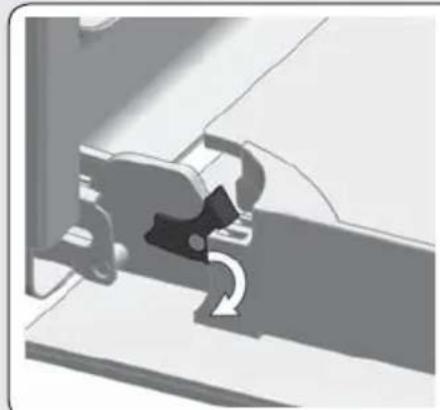
Block the hinge by turning the latches Figure 24.
-
Close the door to the locked position. Figure 25.
- Hold the door with both hands holding on to both sides, lift up and pull out the oven door until the hinges are fully detached Figure 25.
Assembling the door
-
Hold the door with both hands at the lower part of the sides, insert the hinge arms into their housings and let the door fall as far as it will go. Figure 26.
-
Open the oven door fully. Figure 26.
-
Turn the latches back to their original position.

WARNING
Make sure the door is inserted completely by turning the latches. If not, it can become blocked when trying to close it.

INFORMATION
If the latches are hard to turn, use a flat tool to turn them.
Dismantling/assembling the door with hinge on door
- Open the oven door fully.
- Block the hinge by turning both latches. Figure 27.
- Close the door to the locked position. Figure 28.
- Hold the door with both hands holding on to both sides, lift up and pull out the oven door until the hinges are fully detached. Figure 28.
To assemble the door, carry out the steps in the reverse order.
Dismantling/assembling the interior glass of the door

WARNING
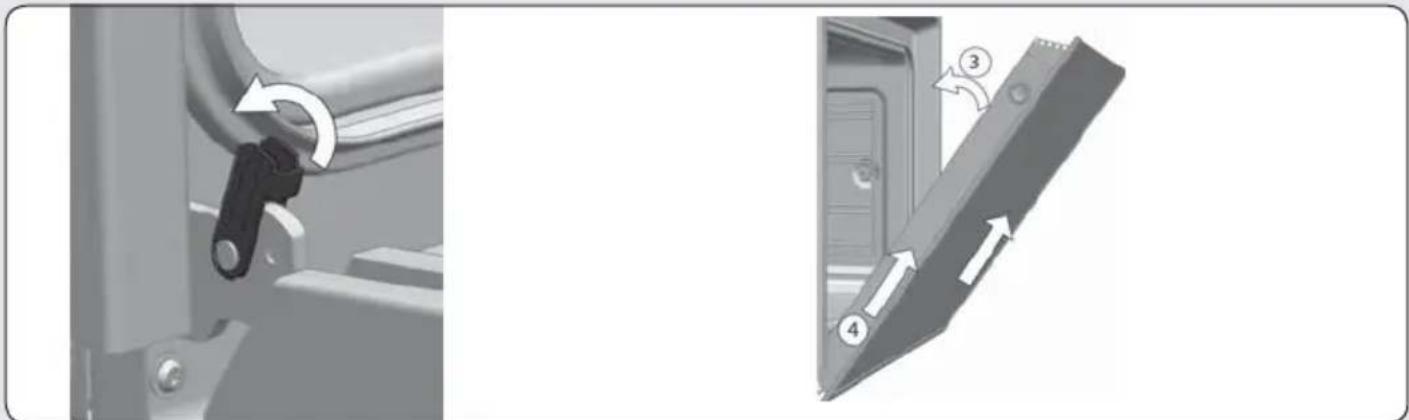
If dismantling the glass panes with the door fitted in the oven, always do it with the hinge in the locked position. If not, the door will close and the unmounted glass panes could break and cause injury.

INFORMATION
To prevent this, dismantle the glass panes with the door removed, following the instructions in the previous section.
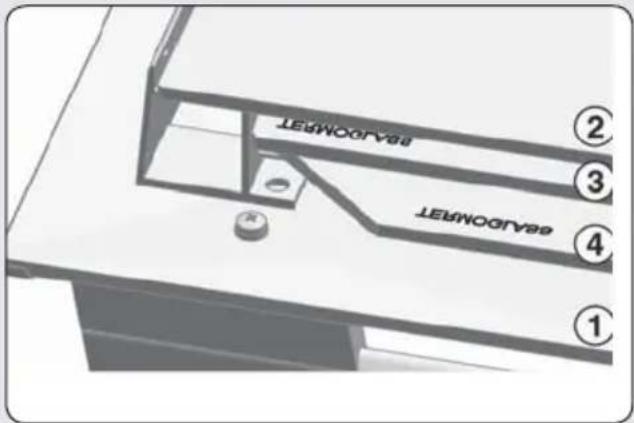
Depending on the model, your oven may have 2, 3 or 4 panes of glass. Follow the instructions for the type of door your oven has.
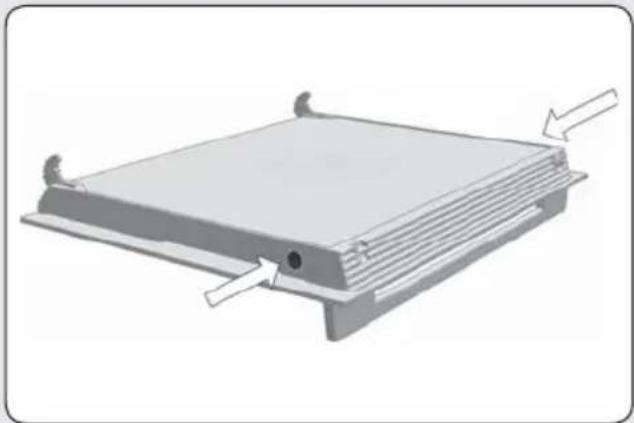
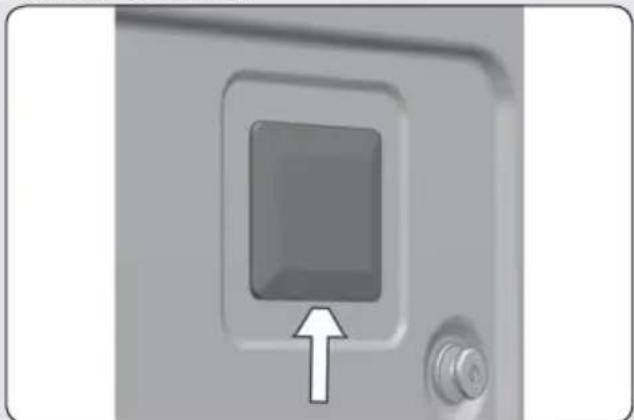
- Using your fingers, press the buttons located at the top of both sides of the oven door. Figure 29.
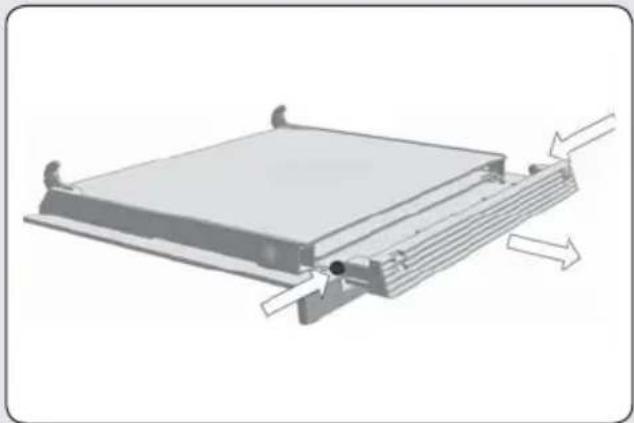
- Keep them pressed and pull on the plastic seal above the door. Figure 30.
- Remove the glass panes from the door. Clean them with a glass cleaner or soap and water and a soft cloth.

WARNING
Pay attention to the order and position of the glass panes when removing them as they must be reassembled in the same order and position when you have finished cleaning them.
- Once clean, insert pane no. 3 into the same position so that the TERMOGLASS indication printed on it is visible as shown in Figure 31.
-
In pyrolytic ovens, the TERMOGLASS indication on panes numbers 3 and 4 must be visible as shown in Figure 32.
-
Insert pane no. 2 with the printed part facing toward the inner side of the door.
- Re-attach the top seal of the door, making sure that the side tabs fit into their housings.

WARNING
Never switch the oven on if any of the glass panes on the door are missing.
CHANGING THE OVEN LIGHT BULB

WARNING
Make sure the oven has been disconnected from the mains before changing the bulb.
The replacement bulb must withstand temperatures up to 300 °C. You can order them from the Technical Assistance Service Department.
Changing the upper bulb
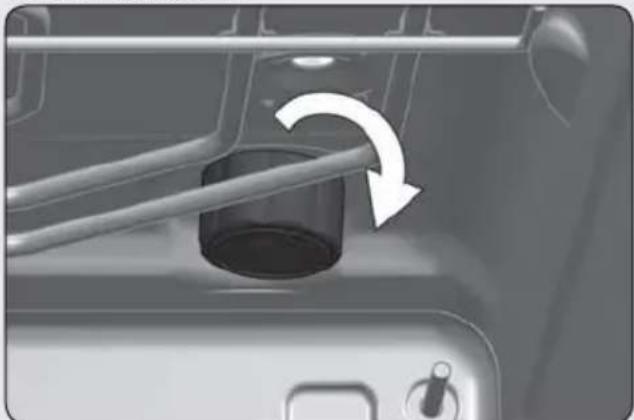
- Unscrew the glass cover of the bulb-holder. Figure 33.
- Replace the bulb and reassemble the glass cover.
Changing the side bulb
- Lift off the bulb-holder glass cover with a flat-ended tool. Figure 34.
- Change the bulb and reassemble the glass cover, ensuring that everything fits in the correct position.
Changing the LED lamp
Call the Technical Assistance Service Department.
Trouble shooting
This section describes some of the most frequent problems that can affect your oven,
along with the most common causes and possible solutions.
The oven stops working
- NCheck the power connection.
- NCheck the fuses and the circuit breaker of your installation.
- NMake sure the timer is either in the manual or programmed setting.
- NCheck the position of the control and temperature dial.
The inside light does not go on
- NChange the bulb.
- NCheck it has been properly installed as set out in the Installation Instructions.
The heating pilot light does not turn on
- NSelect a temperature.
- NSelect a setting.
- Nlt Nshould Nonly Ncome Non Nwhile Nthe Noven'Nish heating up to the selected temperature.
Oven smoking during use
- NNormal during first use.
- NClean the oven regularly.
- NReduce the amount of fat or oil in the tray.
- NDo not cook at temperatures higher than those indicated in the cooking chart.
The expected cooking results are not achieved
- NCheck the cooking charts for guidance on how your oven operates.
My accessories and shelf supports are damaged
- NYou did not remove the accessories and supports during the pyrolytic cleaning cycle.
- NYou must replace them and remove them during subsequent cleaning cycles.
The enamel colour has changed or stains have appeared
- NThe chemical Ncomposition Nof some Nfood-stuffs may cause changes in the enamel.
- NThis is Nnormal Nand Ndoes not Ndamage Nthe properties of the enamel.
The oven is off, the symbol 🔒 lights up and the door will not open
- NThe door lock is activated.
- NDeactivate the Ndoor lock Nfollowing the instructions in the User's guide supplied with this manual.
The oven is on, the symbol 🔒 lights up but the door will not open
- NThe door lock is activated.
-
NTurn the control dial to position ^○ .
-
NDeactivate the door lock following the instructions in the User's guide supplied with this manual.
- NTo continue cooking, re-select the desired cooking function.
I have turned the control dial to position and selected a pyrolysis programme (P1, P2 or P3) but the symbol flashes quickly and a buzzer sounds
- NThe Noven Ndoor Nis Nnot Nclosed Nproperly, the door cannot be locked and the pyro- lytic process has been blocked.
- NCheck the door and make sure it is properly closed. Then set the control dial to the ○ position and repeat the sequence to activate the pyrolysis.
I have turned the control dial to position and selected a pyrolysis programme (P1, P2 or P3) but the symbol does not light up and the oven does not heat up
- NThe Ndoor Nswitch Nis Nnot Nworking Neven though the door is properly closed.
- NCall the NTechnical Assistance Service Department as there is a fault in the door switch.
The pyrolysis programme has ended and the oven is cold, but the door is locked and symbol 📁 and 0:00 are flashing
- NYou did not turn the control dial to position
- when the pyrolysis programme ended.
- NSet the control dial to positionN.
The control dial is in position ○ and the door is still locked
• NThe oven has not cooled down to the safe temperature limit.
- NWait until the oven Ncools Nand Nthe Nsymbol goes off.
Technical specifications

WARNING
If these problems persist despite these tips, contact the Technical Service Department.
Inform the Technical Service Department of the kind of problem you are experiencing and give the:
- NSerial Number (S-No)
- NModel of Appliance (Mod.)
This Ninformation Nis Non Nthe Noven Nidentificatio plate which is on one side of the opened door.
Informations techniques ....
FIGURES 95
CONSIGNES DE SÉCURITÉ
INSTALLATION DU FOUR
REEMPLACEMENT DE L'AMPOULE DU FOUR

MISE EN GARDE
natural_image
Technical diagram of a mechanical component with a 90-unit dimension label (no text or symbols beyond the dimension)FIG. / AFB. / EIK. 4 FIG. / AFB. / EIK. 5
natural_image
Close-up of a refrigerator interior showing metal shelving and a magnified view of a cylindrical component (no text or symbols visible)natural_image
Interior view of a microwave oven with a circular vent and a directional arrow indicating airflow or movement (no text or symbols)FIG. / AFB. / EIK. 3
text_image
mín 5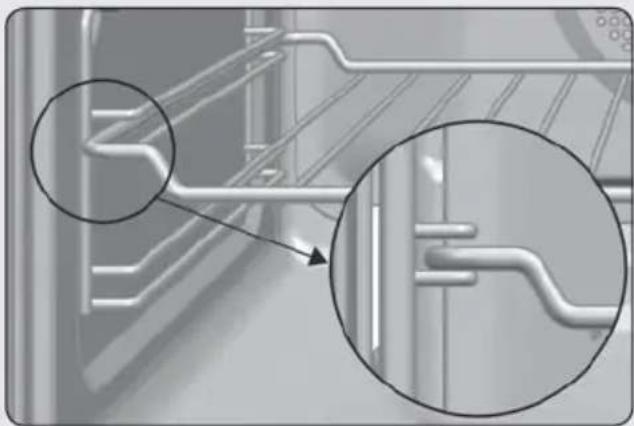
natural_image
Close-up of a mechanical component with two magnified views highlighting internal channels (no text or symbols)FIG. / AFB. / EIK. 7 FIG. / AFB. / EIK. 8
text_image
60-100* 560-568 490* min 590 min 10 547 156 570 537 22 595 595 min 580 600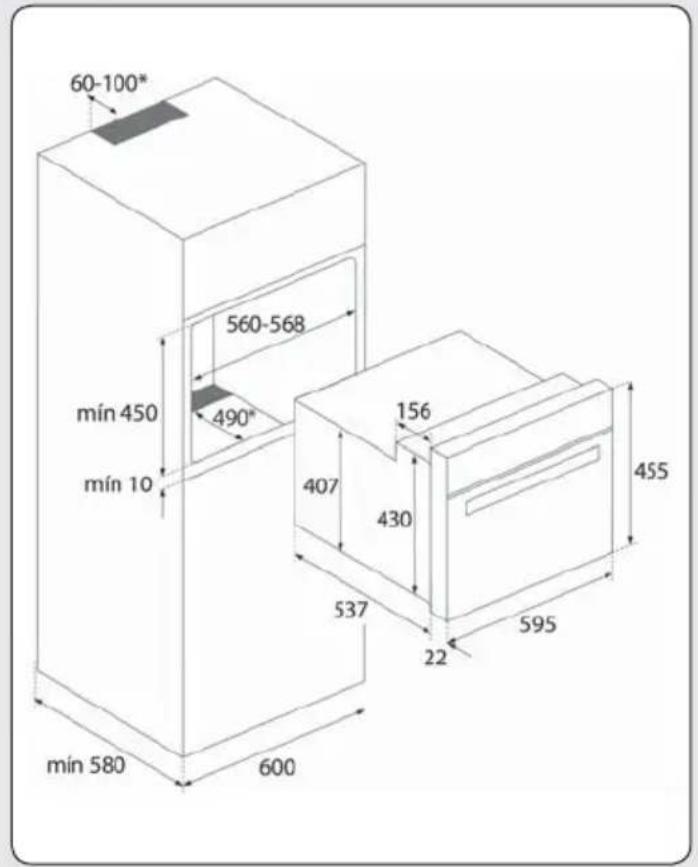
text_image
60-100* 560-568 490* min 450 min 10 407 156 430 537 22 595 455 min 580 600FIG. / AFB. / EIK. 9 FIG. / AFB. / EIK. 10
text_image
600 560-568 490° min 600 min 10 min 580 156 547 570 537 22 595 595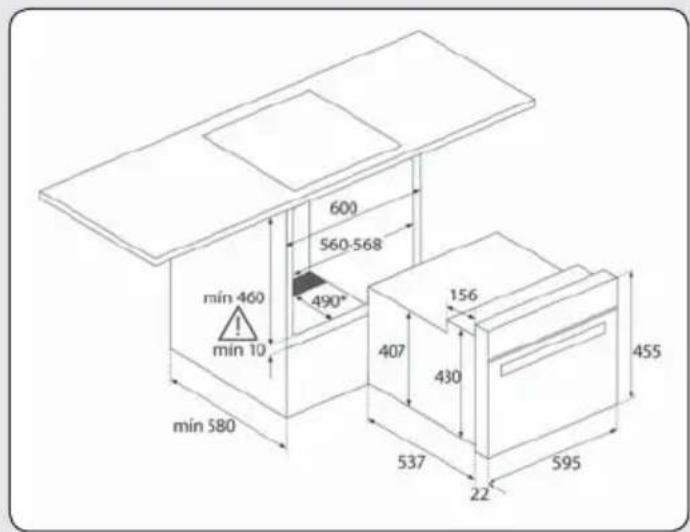
text_image
600 560-568 490° min 460 ! min 10 407 156 430 455 min 580 537 22 595FIG. / AFB. / EIK. 11
natural_image
Close-up of a mechanical component with a black connector and directional arrow indicating motion (no text or symbols)* Para hornos pirolíticos NO realizar las aperturas.
* Para fornos pirolíticos, NÃO faça as aberturas.
* For pyrolytic ovens, DO NOT drill any holes.
* NE PAS réaliser d'ouverture pour des fours pyrolytiques.
* Für die Pyrolyseöfen NICHT die Öffnungen sägen.
* Voor pyrolytische ovens GEEN gaten maken.
* MHN κάνετε τα ανοίγματα όταν πρόκειται
πυρολυτικος φορνους.
ύ ú
FIG. / AFB. / EIK. 12 FIG. / AFB. / EIK. 13

text_image
Technical diagram showing two mechanical assembly configurations with magnified views and instructional labels like 'CLICK!' and directional arrows.FIG. / AFB. / EIK. 14
FIG. / AFB. / EIK. 15
FIG. / AFB. / EIK. 16
text_image
Technical diagram showing three stages of a mechanical assembly with checkmarks indicating status or modification.FIG. / AFB. / EIK. 17 FIG. / AFB. / EIK. 18
text_image
Technical diagram showing two mechanical assembly configurations with labeled click points and a magnified detail view.FIG. / AFB. / EIK. 19 FIG. / AFB. / EIK. 20
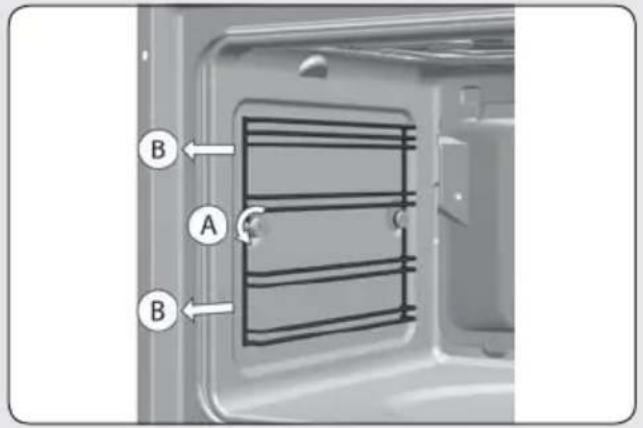
text_image
B A B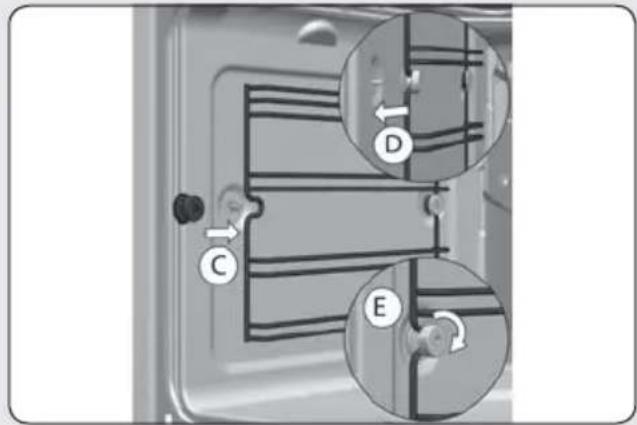
text_image
Diagram of a refrigerator interior with labeled parts C, D, and E showing internal wiring or ventilation system connections.FIG. / AFB. / EIK. 21 FIG. / AFB. / EIK. 22
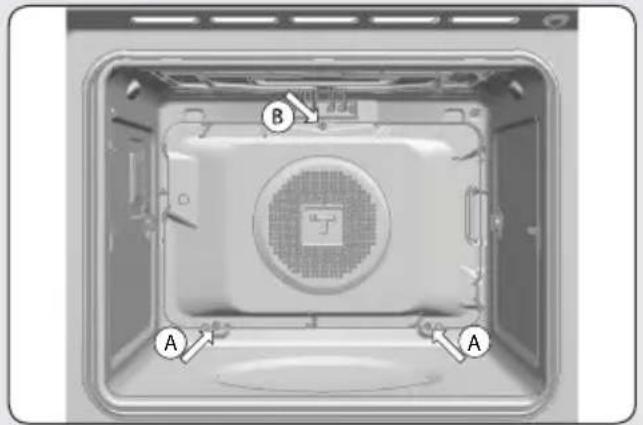
text_image
B A A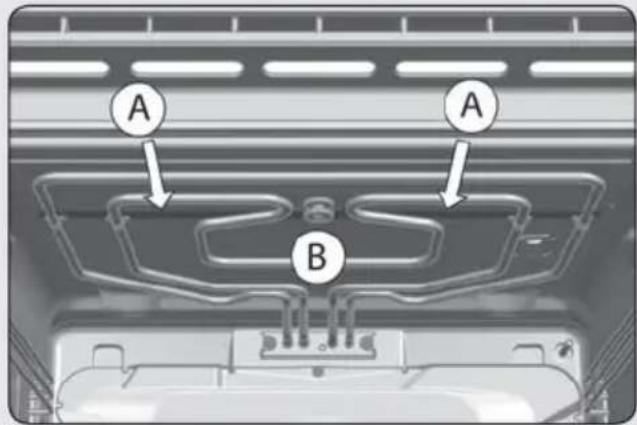
text_image
A A BFIG. / AFB. / EIK. 23
natural_image
Interior view of a server rack with internal components and a central indicator (no visible text or symbols)FIG. / AFB. / EIK. 25
FIG. / AFB. / EIK. 26
FIG. / AFB. / EIK. 24
natural_image
Mechanical component diagram showing a lever mechanism with motion arrows (no text or symbols)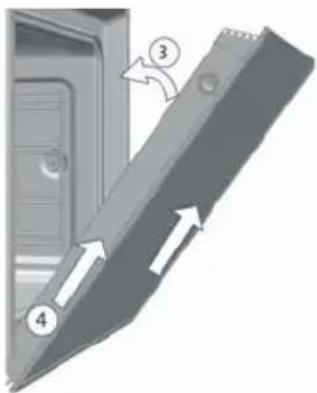
text_image
Diagram showing a mechanical component with numbered parts and directional arrows indicating motion or force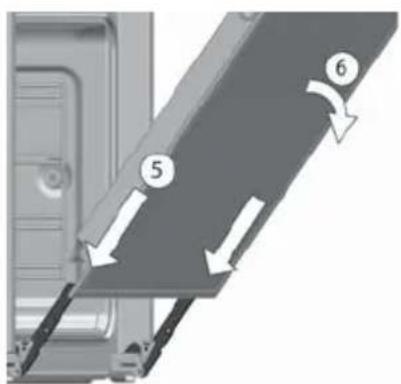
text_image
Diagram showing a mechanical or structural component with numbered parts and directional arrows indicating motion or flow.FIG. / AFB. / EIK. 27 FIG. / AFB. / EIK. 28
natural_image
Mechanical assembly diagram showing a lever mechanism and a door panel with directional arrows (no text or symbols)FIG. / AFB. / EIK. 29
natural_image
3D diagram of a rectangular electronic component with mounting base and side supports, showing internal structure and directional arrows (no text or symbols)FIG. / AFB. / EIK. 31

text_image
TERMOILASS ① ② ③FIG. / AFB. / EIK. 33
natural_image
Close-up of a mechanical component with a rotating shaft and handle, showing no visible text or symbols.FIG. / AFB. / EIK. 30
natural_image
Diagram of a layered electronic component with directional arrows indicating movement or force (no text or symbols present)FIG. / AFB. / EIK. 32
text_image
sealabonnet sealabonnet ① ② ③ ④FIG. / AFB. / EIK. 34
natural_image
Close-up of a door panel with a square button and an arrow pointing to it (no text or symbols visible)Teka Subsidiaries
| Country Subsidiary | Address | City | Phone |
| AustriaKüppersbusch Austria | Eitnergasse, 13 | 1231 Wien | +43 18 668 022 |
| BelgiumKüppersbusch Belgium S.P.R.L. | Doomveld Industrie, Asse 3, No. 11 - Boite 7 | 1731 Zellik | +32 24 668 740 |
| BulgariaTeka Bulgaria EOOD | Blvd. "Tsarigradsko Shosse" 135 | 1784 Sofia | +359 29 768 330 |
| ChileTeka Chile S.A. | Avd El Retiro Parque los Maitenes, 1237. Parque Enea | Pudahuel, Santiago de Chile | +56 24 386 000 |
| ChinaTeka International Trading (Shanghai) Co. Ltd. | No.1506, Shengyuan Henghua Bldg. No.200 Wending Rd. | Xuhui, Dist. 200030 Shanghai | +86 2 153 076 996 |
| Czech RepublicTeka CZ S.R.O. | V Holesovickách, 593 | 182 00 Praha 8 - Liben | +420 284 691 940 |
| EcuadorTeka Ecuador S.A. | Parque Ind. California 2, Via a Daule Km 12 | Guayaquil | +593 42 100 311 |
| GreeceTeka Hellas A.E. | Thesi Roupaki - Aspropyrgos | 193 00 Athens | +30 2 109 760 283 |
| HungaryTeka Magyarország Zrt. | Terv u. 92 | 9200 Mosonmagyaróvár | +36 96 574 500 |
| IndonesiaPT Teka Buana | Jalan Menteng Raya, Kantor Taman A9 Unit A3 | 12950 Jakarta | +62 215 762 272 |
| MalaysiaTeka Küchentechnik (Malaysia) Sdn Bhd | 10 Jalan Kartunis U1/47, Temasya Park, Off Glenmarie | 40150 Shah Alam, Selangor Darul Ehsan | +60 376 201 600 |
| MexicoTeka Mexicana S.A. de C.V. | Blvd Manuel A. Camacho 126, Piso 3 Col. Chapultepec | 11000 Mexico D.F. | +52 5 551 330 493 |
| MoroccoTeka Maroc S.A. | 73, Bd. Slimane, Depôt 33, Route de Ain Sebaa | Casablanca | +212 22 674 462 |
| PeruTeka Küchentechnik Perú S.A. | Av. El Polo 670 local A 201, CC El polo, Surco | Lima | +51 14 363 078 |
| PolandTeka Polska Sp. ZO.O. | ul. 3-go Maja 8 / A2 | 05-800 Pruszkow | +48 227 383 270 |
| PortugalTeka Portugal S.A. | Estrada da Mota - Apdo 533 | 3834-909 Ilhavo, Aveiro | +35 1 234 329 500 |
| RomaniaS.C. Teka Küchentechnik Romania S.R.L. | Sevastopol str., no 24, 5th floor, of. 15 | 010992 Bucharest Sector 1 | +40 212 334 450 |
| Russia/PоссияTeka Rus LLC/000 "Teka Pyc" | Neverovskogo 9, Office 417, 121170, Moscow, Russia | 121087 Россия, Москва | +7 4 956 450 064 |
| SingaporeTeka Singapore PTE Ltd | Clemenceau Avenue, 83, 01-33/34 UE Square | 239920 Singapore | +65 67 342 415 |
| SpainTeka Industrial, S.A. | C/ Cajo,17 | 39011 Santander | +34 942 355 050 |
| ThailandTeka (Thailand) Co. Ltd. | 364/8 Sri-Ayuttaya Road, Phayathai, Ratchatavee | 10400 Bangkok | +66-26 424 888 |
| TurkeyTeka Teknik Mutfak Aletleri Sanayi Ve | Büyükdere Cad. 24/13 | 80290 Mecidiyeköy, Istanbul | +90 2 122 883 134 |
| UkraineTeka Ukranie LLC | 86-e, Bozhenko Str .2nd floor,4th entrance | 03150 Kyiv | +380 444 960 680 |
| United Arab EmiratesTeka Middle East Fze | Building LOB 16, Office 417 | P.O. Box 18251 Dubai | +971 48 872 912 |
| United Arab EmiratesTeka Küchentechnik U.A.E LLC | Bin Khedia Centre | P.O. Box 35142 Dubai | +971 42 833 047 |
| VenezuelaTeka Andina S.A. | Ctra. Petare-Santa Lucia, km 3 (El Limoncito) | 1070 Caracas | +58 2 122 912 821 |
| VietnamTEKA Vietnam Co., Ltd. | 803, FI 8th, Daiminh Convention Center, 77, Hoang Van | Thai, Tan Phu Ward, District 7, Ho Chi Minh | +84 854 160 646 |
INSTRUCTION MANUAL
ESPAÑOL

Before using your oven for the first time, please carefully read the installation and maintenance instructions that come with it.
Depending on the model, the accessories included in your oven may vary from those shown in the pictures.
FRANÇAIS

text_image
Labeled diagram of an oven interior with numbered components for identificationnatural_image
Simple line drawing of a human eye and target with measurement scale (no text or symbols)COMO UTILIZAR LA PIEDRA PIZZA
natural_image
Interior view of an oven with internal compartments and ventilation ducts (no text or symbols visible)natural_image
Interior view of a microwave oven with visible tray and vent (no text or symbols)natural_image
3D rendering of a container with a metallic cup pouring liquid onto a flat surface (no text or symbols visible)text_image
Labeled diagram of an oven interior with numbered components for identificationnatural_image
Simple line drawing of a human eye and target with no text or symbolsnatural_image
Interior view of a microwave oven with visible internal compartments and ventilation ducts (no text or symbols)natural_image
Interior view of an oven with a circular vent and tray (no text or symbols visible)PROGRAMAR A FUNÇÃO TEKA HYDRO- CLEAN®

ATENÇÃO
natural_image
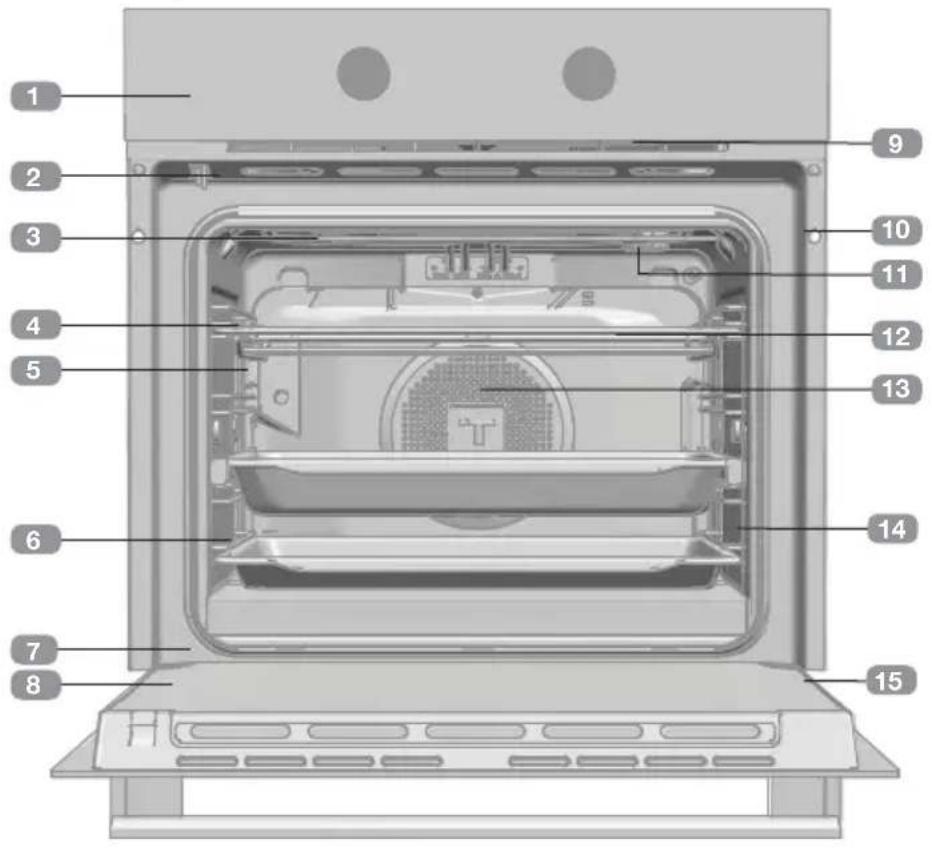
Close-up of a metal cup pouring liquid onto a flat surface, with no visible text or symbols.Description of the oven
text_image
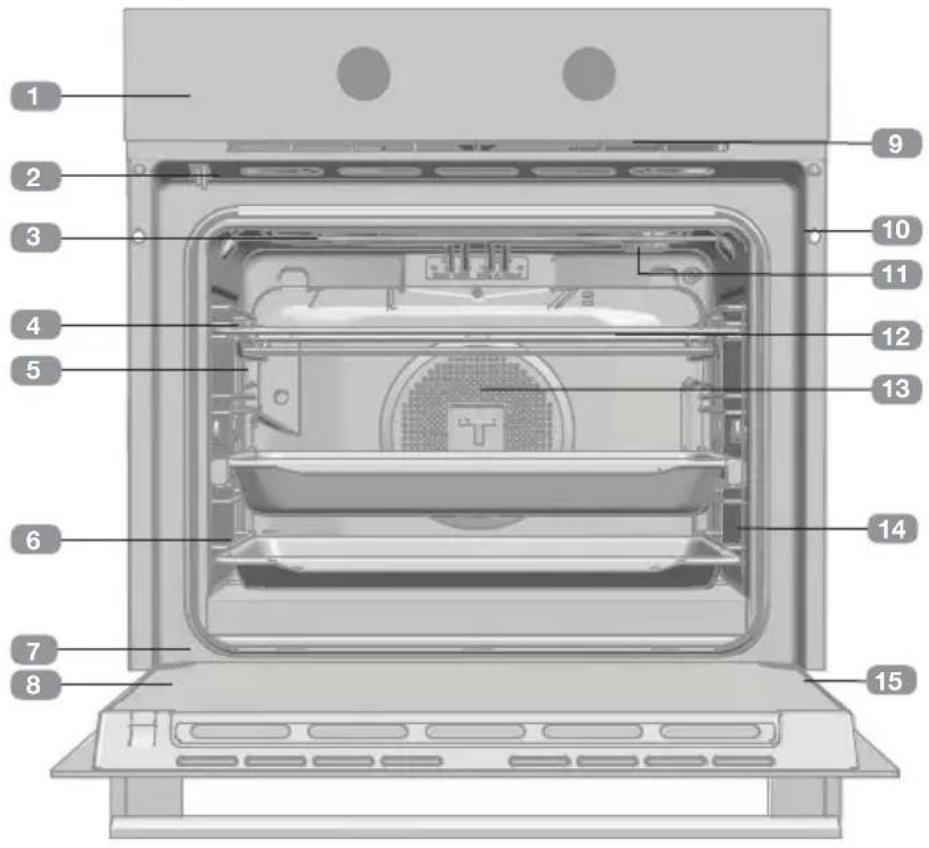
Labeled diagram of an oven interior with numbered components for identification1 Front control panel
2 Door lock
3 Grill heating element
4 Tray support
5 Pizza stone and oven grid
6 Tray
7 Hinge
8 Inner glass
9 Air cooling outlet
10 Unit mounting
11 Lamp
12 Rear Panel
13 Fan
14 Oven door seal
15 Door
Front control panel

text_image
HLB P Models 12 12:001 Function control dial
2 Electronic clock/timer
3 Temperature control dial
Function control dial symbols

Models HLB 85-G1 P BM


ECO


Oven functions

ORMATION
For a description of how to use each of the functions, please see the cooking guide provided with the oven.

SWITCHING OFF THE OVEN

FAST PREHEATING

CONVENTIONAL: UPPER AND LOWER HEATING

GRILL

MAXIGRILL

TURBO

LOWER ELEMENT+TURBO
ECO
ECO

DEFROST

PYROLYSIS

HYDROCLEAN
MAESTRO PIZZA
Introducing the MAESTRO PIZZA
Your new MAESTRO PIZZA oven will revolutionize homemade pizza making, thanks to the exclusive special heating process at high temperature. The special heating function combined with the pizza stone also supplied, will allow you to prepare delicious pizzas in just a few minutes, using fresh homemade pizza dough, just like in the best Pizzerias.
The oven is electric and operates at very high temperatures (340 °C). The special design of the structure and the reinforced insulation prevent the intense heat from the inside of the oven from being transferred to the outside, allowing you to cook at home in complete safety and comfort. In addition to cooking pizzas made using perfect fresh dough, with your MAESTRO PIZZA oven it
is possible to cook all sorts of conventional pizzas, including precooked, ready-made dough, frozen pizzas, etc.
The MAESTRO PIZZA is a state-of-the-art multi-function oven which can also be used to prepare traditional meals as in a traditional oven. Lastly, cleaning becomes a fast, simple and comfortable task, without the need for chemical products or effort. Select the appropriate pyrolysis cycle depending on how dirty the oven is. When the cycle has finished, just wipe the surfaces with a damp cloth to remove any traces of ash (see cleaning function).
Description of the electronic clock/timer
text_image
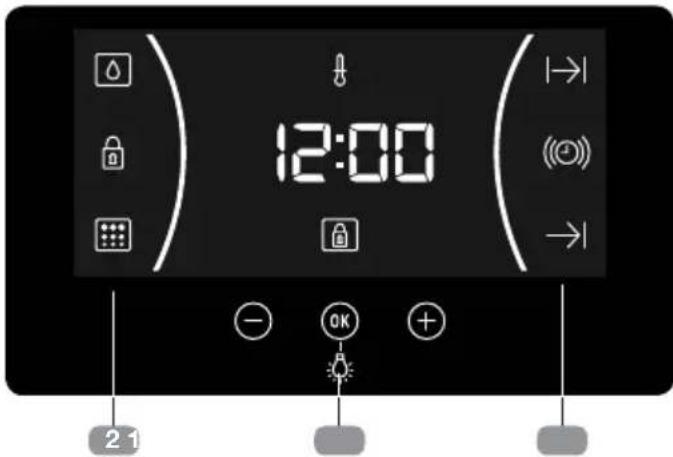
12:00 2 11 KEYS
-, and : Permits the programming of the functions of the electronic clock/timer
2 SYMBOLS
Clock Functions
(©) BUZZER: Lights up on selecting the buzzer function of the clock. Generates an acoustic signal when the time is up. The oven does not turn off at the end of the timer period. This function can also be used while the oven is in use.
I→l and -PROGRAMMING: Lights up to in-dicate that the oven is programmed (cooking time, stop time or total).
- |→| Cooking Time: This function allows you to programme the cooking time, after which the oven will turn off automatically.
- →I Cooking Stop Time: This function allows you to programme the cooking stop time, after which the oven will turn off automatically.
- I→I and →Cooking Time and Cooking Stop Time: This setting allows you to programme the cooking time and cooking stop time. The oven switches on automatically at the set time and operates for the selected cooking time (Cooking Time). It then switches off automatically at the indicated time (Cooking Stop Time).
CLOCK/TIMER LOCK: Indicates that the touch keys for the clock/timer are locked, preventing modifications by small children.
Other functions
HEATING: Indicates that the oven is transmitting heat to the food.
HYDROCLEAN: Lights up while the Teka Hydroclean® function is in progress.
PYROLYSIS: Only for pyrolytic models. Lights up while the Pyrolytic function is in progress.
DOOR LOCK: Only for pyrolytic models. Indicates that the door is locked, either manually or automatically while the pyrolytic function is in progress.

WARNING
The sensitivity of the touch keys adapts continually to environmental conditions. Make sure the surface of the front control panel is clean and free of obstacles when plugging in the oven. If the clock does not respond correctly when you touch the keys, unplug the oven for a few seconds and then plug it in again. In this way, sensors adjust automatically so that they will react once more to fingertip control.
SETTING THE TIME
- To set the oven time, the controls on the function and temperature control dials must be turned to position ○.
- On plugging in the oven, the time flashes on the clock.
- Press ⊖ or ⊕ to adjust the hours and then the minutes. Two beeps, one after the other, confirm the selected time.
- To change the time, press ⏻ or ⚠ until the time starts flashing. Press Ⓞ and follow the instructions in the previous point.

NOTE
The clock light has a night mode so the display light will dim between 00:00 and 6:00 hours.

WARNING
In the event of a power failure, your electronic clock/timer settings will be erased. If this occurs, turn the function and temperature control dials to position ○.
The time 12:00 is displayed, and you will then be able to set the time as described above. If the oven door was locked before the power cut, the locked symbol will be lit up until the door is unlocked.
This may take several minutes, depending on the temperature inside the oven, and during this time you cannot reset the time. Once the door has been unlocked, you will be able to set the time as described above.
Using your oven
MANUAL OPERATION
- After setting the clock, the oven is ready for use. Select a cooking function and temperature.

INFORMATION
In models with an electronic temperature control, when the selector switch is turned, the clock display will show the temperature.
After selecting the temperature, the clock display will automatically reappear.
To display the temperature during the cooking process, turn the temperature control dial to change the temperature.
- You will notice that symb lights up during cooking to indicate that heat is being transmitted to the food. This symbol disappears when the selected temperature has been reached.
- Set the controls to to turn off the oven.

INFORMATION
When you start cooking, your oven will show the time the oven has been cooking.
OVEN TIMER FUNCTION
Programming the Buzzer
- Press ⏻ or ⓣt until symbol flashes on the screen and press ⓄK. The time 00:00 is displayed on the screen.
- Select the time after which you want the alarm to sound by pressing ⏻ or ⚠You will hear 2 beeps to confirm that the time has been set and the clock will start counting down from the selected time. Symbol (©) flashes slowly.
- Once the time has expired, an acoustic signal will sound for 90 seconds and symbol (©) will flash quickly.

NOTE
With the Buzzer function, the oven will not turn off when the time expires.
- Push any key to stop the alarm. Symbol (①) will then disappear.
If you wish to modify the time on the buzzer, repeat the steps shown. Upon entering the timer control, the time currently remaining will appear, which you will be able to adjust.

NOTE
With the Buzzer function, the remaining time will show permanently on the display. With this programmed function, it is not possible to view the time or the total programmed cooking time.
Programming Cooking Time
- Press ⊖ or ⊕ until symbol |→| flashes on the screen and press OK. The time 00:00 is displayed on the screen.
- Select the time after which you want the alarm to sound by pressing ☐ or . You will hear 2 beeps to confirm that the time has been set and the clock will start counting down from the selected time. Symbol |→| flashes slowly.
-
Select a function and a cooking temperature using the oven commands.
-
Once the cooking time is up, the oven will turn off, an alarm will sound and symbol will flash quickly.
- Press any key to stop the alarm and turn off symbol . The oven will switch on again.
- Set the controls to position to turn off the oven.
You can change the remaining cooking time at any time by pressing ⏻ or ⚠ until symbol ↗I starts to flash quickly. Now press OK to change the time.

NOTE
With the Cooking Time function, the remaining time will be permanently displayed on the screen. You cannot see the current time on the display when this function is set.
Programming the Cooking Stop Time
- Press ⏻ or ⓣ until symbol flashes on the screen and press Ⓞ. You will see the current time on the timer display.
- Select the time after which you want the alarm to sound by pressing ☐ or . You will hear 2 beeps to confirm that the time has been set and the clock will start counting down from the selected time. Symbol → | flashes slowly.
- Select a cooking function and temperature.
- When the cycle is finished, the oven will turn itself off, a buzzer will sound and symbol I will flash quickly.
- Press any sensor to stop the alarm and to turn off symbol → I. The oven will switch on again.
- Set the controls to position oto turn off the oven.
You can change the remaining cooking time at any time by pressing ⏻ o ⚠ until symbol →l starts to flash quickly. Now press Ⓦ to change the time.
Programming Cooking Time and Cooking Stop Time
- Press ⊖ or ⓣ until symbol flashes on
the screen and press OK The time 00:00 is displayed on the screen.
- Select the cooking time, by pressing ⊖ or ⊕. Next, two beeps are heard, the remaining time appears on the display and symbol |→| flashes slowly.
- Press ⏻ or ⓣtntil symbol flashes on the screen and press ⓄK. You will see the expected completion time on the timer display.
- Select the cooking end time by pressing ⊖ or ⊕. Next, a double beep is heard and the current time is displayed on the screen.
-
Select a cooking function and temperature. The oven will remain disconnected with symbols | and lit up. The oven is now programmed.
-
When it is time to start cooking, the oven will turn on and will operate for the programmed cooking time.
- While cooking, the remaining cooking time is displayed and symbol flashes slowly.
- When the set cooking time has ended, the oven will turn off, a buzzer will sound, and symbol will flash quickly.
- Press any sensor to stop the alarm and to turn off symbol I. The oven will switch on again.
- Set the controls to do turn off the oven. You can change the remaining cooking time at any time by pressing ⊖ or ⭕ until symbol ↗I→I starts to flash quickly. Now press OK to change the time.
Cooking with MAESTRO PIZZA
To use your MAESTRO PIZZA, first preheat the oven to the ideal cooking conditions (340 °C). To do so:
- Place the oven grid on the telescopic rails fitted inside your oven.
- Next, place the pizza stone on the oven grid.
- Remove the enameled tray supplied with the oven and close the door.

WARNING
Remember that it is very important during the preheating to ensure that the pizza stone has been placed inside the oven. This is to guarantee that the pizza stone reaches the correct temperature and the optimum cooking results are obtained.
-
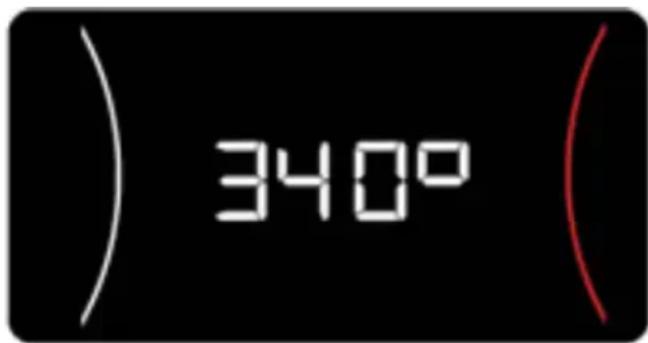
Turn the cooking control dial to MAESTRO PIZZA 340°C MAESTRO PIZZA.
-
The value 340^ is displayed on the clock screen.
text_image
340°- When the OK sensor on the glass of the front control panel is pressed, a buzzer
confirms the operation and the oven starts to preheat until reaching the optimum working temperature.
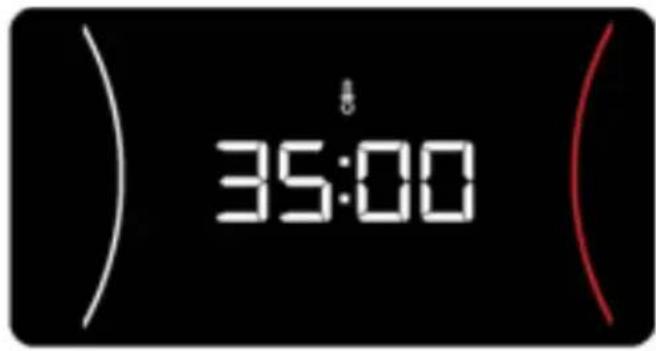
- The preheating lasts 35 minutes. The time remaining for the preheating operation is displayed on the clock.
text_image
35:00
WARNING
Remember that you need 35 minutes to preheat the oven before starting to cook the pizzas.
-
At the end of the 35 minute period, the oven emits a buzzing sound and 340^ flashes on the clock display.
-
Touch the OK sensor to switch off the buzzer.
-
Open the door and insert the pizza in the oven using the pizza peel.
-
On closing the door, the oven cooking time is displayed in the clock display.
-
Leave the pizza to cook for the time required (see table with cooking times for each pizza type).

WARNING
Do not open the door unnecessarily while cooking your pizzas to prevent heat losses.
If the door is opened and closed, the cooking time displayed in the clock display returns to 00:00.
- When you have finished cooking your pizzas, turn the control dial to 0 to switch off the oven.

WARNING
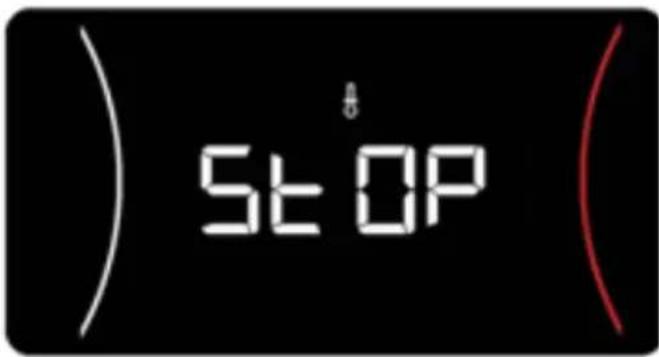
Remember you have 90 minutes to cook your pizzas. After this period, the oven will switch off for safety reasons and the message "STOP" is displayed.
The message STOP in the clock display will only disappear when the oven has cooled.
text_image
STOP
CAUTION
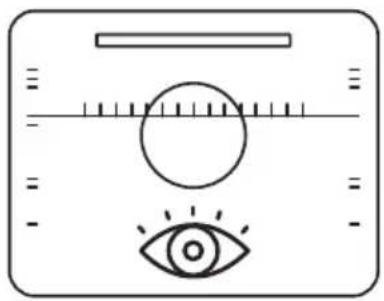
The cooking process is very fast when you use the MAESTRO PIZZA function. Therefore we recommend you monitor the progress and cooking time at all times to guarantee the best results. If you do not monitor the oven, your pizza may dry out or burn.
natural_image
Simple line drawing of a human eye and target with measurement scale (no text or symbols)HOW TO USE THE PIZZA STONE
For the best results when cooking with your pizza stone supplied with the oven, the pizza stone must first be preheated with the oven empty. This will ensure that the perfect temperature is reached for cooking your pizzas.
natural_image
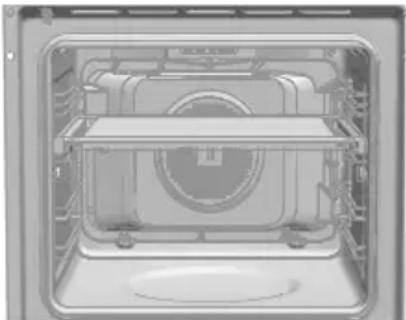
Interior view of an oven with internal equipment and ventilation slots (no visible text or symbols)Place the pizza stone on the grid supported on the telescopic rails supplied with the oven. This will help you to insert and remove the stone.
COOKING FROZEN PIZZAS

This type of pizza requires different cooking conditions. Proceed as follows:
- Do not use the pizza stone.
- Turn the cooking control dial to
- Turn the temperature control dial until the clock displays 200 °C or the recommended by the pizza supplier.
-
Preheat the oven until the required temperature is reached. When this temperature is reached, the thermostat symbol ⚠️ switches off.
-
Place the pizza on the oven grid.
- Cook the pizza for 10-12 minutes (time recommended by the pizza supplier).
The lights inside the oven are normally switched off during the cooking process, regardless of the function selected.
If you need to switch on the interior lighting while cooking:
- Touch the OK sensor ☐ on the front control panel and the interior light will come on.
- If the OK sensor is touched again, the interior light switches off.
- After 30 seconds, the light will switch off automatically.
- When the oven door is opened, the interior light will come on.

INFORMATION
temperature During the MAESTRO PIZZA preheating function, the lamp remains off and the OK sensor is disabled.
PIZZA COOKING TABLE - TYPES OF PIZZA
You can cook the following types of pizza with your MAESTRO PIZZA oven, using this cooking table:
| TYPE OF PIZZA | Function control dial | Tempera-ture con-trol dial | Approximate cooking time | Pizza stone | Oven pre-heating time |
| Fresh homemade dough |  | ---- 3-4 | min YES 35 min | ||
| Ready-made fresh dough |  | ---- 3-4 | min YES 35 min | ||
| Rolled thin base |  | ---- 3-4 | min YES 35 min | ||
| Rolled standard dough |  | ---- 3-4 | min YES 35 min | ||
| Fresh precooked pizzas |  | 220 °C 8 | min NO 15 min | ||
| Frozen pizzas |  | 210 °C 10 | min NO 15 min |
In short, for the best results:
- Fresh dough and thin-base rolled dough pizzas using the MAESTRO PIZZA function
- Frozen and precooked pizzas with the
function


WARNING
For optimum results when cooking pizzas with fresh dough, roll out the dough as much as possible. If the dough is not correctly rolled out, the results will be uneven.

WARNING
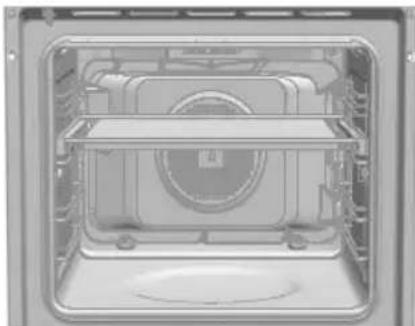
When cooking fresh dough pizzas, use the pizza stone at the height shown in the figure.
natural_image
Interior view of a microwave oven with visible internal components and ventilation duct (no text or symbols)Safety functions
CHILD SAFETY LOCK
This function can be selected at any time while using the oven.
To activate the function, press and hold OK until you hear one beep and symbol 🔒 is displayed on the screen. The clock/timer is locked.
If the oven is off and you activate the child safety function, the oven will not work even if a cooking function is selected.
If this function is activated while you are cooking, it will only lock the electronic clock/timer settings.
To activate the function, press and hold OK until you hear one beep.
MANUAL DOOR LOCK
Available in pyrolytic models only.
This function allows the oven door to be locked.

IMPORTANT
This function can only be selected when the oven control dial is in the rest position ○. Once the door is locked, you can start cooking normally.
To activate/deactivate the door lock, proceed as follows:
- Press ⊖ or ⓣ until symbol flashes on
Teka Hydroclean® function
This function is used to clean the grease and dirt on the walls of the oven. To make it easier to clean the oven, do not allow dirt to build up. Clean the oven often.
the screen. The current state of the door lock is displayed. "On" if the lock is active and "Off" if it is deactivated.
- Press OK. A beep is heard and the lock starts to close if it was «Off» and to open if it was «On».

WARNING
Before turning on the lock, check that the oven door is correctly closed. If the door is not correctly closed, it will not lock and an alarm is heard. if this happens, switch off the alarm by pressing any key on the clock, close the door correctly and activate the lock again, following the instructions above.
- Once the door has been completely locked/unlocked, the new state of the door is displayed on the screen. If the lock is on, symbol ⏻ remains lit on the screen.

IMPORTANT
To unlock the door while cooking, turn the control dial to rest ◦ and unlock the door following the instructions above. When the door is unlocked, turn the control dial to the previous position to continue cooking.
PROGRAM THE TEKA HYDROCLEAN® FUNCTION

WARNING
Do not pour water inside the hot oven. This could damage the enamel on the oven.
Always run the cycle when the oven is cold. If the oven is too hot, the results may be affected and the enamel damaged.
First remove the trays and all the accessories from inside the oven, including the supports for the trays or telescopic guides. Follow the in-
structions given in the Installation and Maintenance Manual provided with your oven.
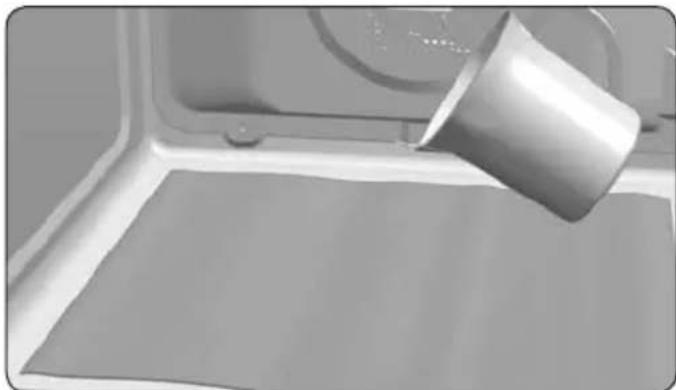
- When the oven is cold, wipe the base of the oven with a cloth.
natural_image
Close-up of a metal cup pouring liquid onto a flat surface in a kitchen setting (no text or symbols visible)- Slowly pour 200 ml of water inside the oven chamber.

INFORMATION
For the best results, add a teaspoon of mild washing up liquid in the water chamber before pouring it over the cloth.
-
Turn the control dial to ☐.
-
A beep is heard to confirm that the Teka Hydroclean® function has started, symbol flashes slowly and the time remaining to the end of the cycle is displayed on the screen.

IMPORTANT
The duration of this function cannot be changed. To end the cycle early, turn the control dial to 0.
- At the end of the cycle, the oven switches off, a beep is heard and symbol flashes quickly.

IMPORTANT
Do not open the oven door until the end of the Hydroclean® function. The cooling phase is essential for the correct operation of the function.
-
Touch any key to stop the beeping and switch off the symbol ☐.
-
Turn the control dial to position o .
-
The oven is ready to remove any remaining dirt and water with the cloth.
The Hydroclean ^® function runs at low temperature. However, the cooling times may vary depending on the ambient temperature.

WARNING
Before touching the interior surface of the oven, make sure that it has cooled.
If, after running the Hydroclean® function, a more thorough clean is required, use neutral detergents and non-abrasive sponges.
Pyrolysis self-cleaning function

WARNING
Before running the pyrolysis cleaning cycle, please read the safety instructions given at the start of the Installation and Maintenance manual closely.
This function allows you to run a pyrolysis cleaning cycle during which, due to the high temperatures reached inside the oven, the accumulated grease is carbonized.
As a general rule, a pyrolysis cycle should be run every 4-5 cooking cycles, using the most suitable program for the amount of dirt in the oven. The more dirt, the longer the program.
During the pyrolysis cycle, the light inside the oven remains off.
PROGRAM THE PYROLYSIS FUNCTION

IMPORTANT
Before starting the pyrolysis function, you must remove all the accessories and dishes from the oven, including the supports of the tray and/or telescopic guides. Follow the instructions given in the Installation and Maintenance Manual provided with your oven.

WARNING
Remove any spills or excess dirt from the inside of the oven, as these could catch fire during the pyrolysis function with the consequent risks.

WARNING
Before starting the pyrolysis check that the oven door is correctly closed.
- Turn the cooking control dial to Pyrolysis:
-
After a few seconds, symbol lights up on the clock display and indication read (pyrolysis program 2).
-
Now you can change the pyrolysis program to P1, P2, P3 using keys ⊖ or ⊕
P1: Mild pyrolysis. One hour.
P2: Normal pyrolysis. One and a half hours.
P3: Intensive pyrolysis. Two hours.
- After selecting the required program, press OK. Immediately afterwards, the automatic door lock is activated.

WARNING
If the door is not correctly closed, it will not lock, an alarm is heard and the pyrolysis will not start.
If this happens, switch off the alarm by pressing any key on the clock, close the door correctly, turn the control dial to ○ and select the pyrolysis program again, following the instructions above.
- When the door is locked, symbol 🔒 lights up on the clock display and the time remaining until the end of the pyrolysis function is displayed.

IMPORTANT
At this point, the oven is programmed and runs the pyrolysis cleaning cycle. While this cycle is running, it is not possible to select any of the oven clock functions, except the child safety function.
Do not try to open the oven door as this may interrupt the cleaning process.
- When the pyrolysis cleaning ends, a beep is heard, symbol 📄 flashes and 0:00 is displayed on the clock.
- Press any key on the clock to stop the beeping.
- Turn the control dial to position ○ .
- The oven heating process has ended. However, the oven is too hot and cannot be used.
The cooling function will continue and the
symbol ☐ remains lit until the oven has cooled.

IMPORTANT
Due to the high temperatures inside the oven, the cooling times may vary depending on the ambient temperature.
- When the oven has cooled, symbol switches off.
- Open the oven door and wipe the inside with a cloth, removing the ashes produced during the cleaning cycle. Use a non-metal scourer to clean parts of the oven interior that are not easily accessible.
- When the inside of the oven is clean, do not forget to replace the supports and accessories.
- The oven is ready to start cooking again.

IMPORTANT
If you encounter any problems with the programming and use of this function, please see the Installation and Maintenance guide included with your oven.
CANCELLATION OF THE PYROLYSIS FUNCTION
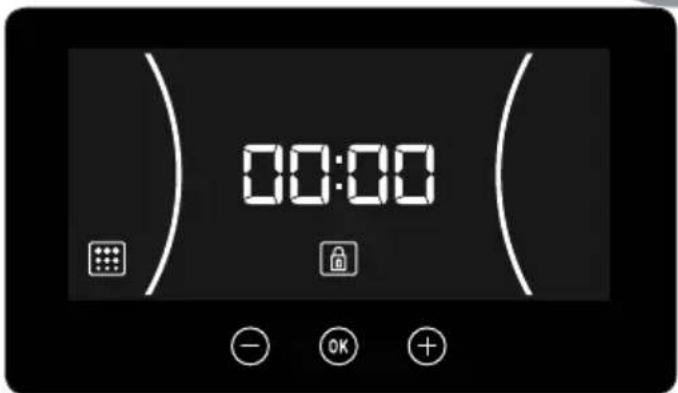
The pyrolysis function is automatic and as such it can only be activated using the clock programming function. To cancel an ongoing pyrolysis cycle, it is necessary to de-programme the oven, as follows:
- Set the control dial to position o.
The following is displayed on the clock:
text_image
00:00- Depending on the temperature inside the oven, there are two possible situations:
a) Hazardous interior temperature: In this case, the door remains locked until the temperature reaches a safe value.
b) Safe interior temperature: If the temperature inside the oven is safe, the door will unlock immediately.
- Once the door has unlocked and can be opened, the time is once again displayed on the clock.
Tips for optimum cleaning of the Pizza stone.
To clean the Pizza Stone, wipe with a damp cloth or sponge and do not use soap or detergent.

HAZARD
Never wet the stone under the tap with water as in this case it will absorb too much water and the stone may break when it is heated inside the oven.

WARNING
Remember to always dry the stone before placing it in the oven.
If the stone has traces of solid food attached to it, use a plastic spatula to remove it.

HAZARD
Never use metal spatulas or sharp knives as this may damage the surface of the stone or break the stone.
Remember that after the pizza stone has been used, it will not look the same as before the first time.
Cleaning the Pizza Stone will give you the following benefits:
- Prevent the appearance of ash and carbonized remains on the food.
- Extend the life of the pizza stone.
- Help to obtain better cooking results.
CLEANING METHOD FOR EXTERNAL GLASSES.
Use microfaser and water, in case of need, add mild soap.
Aggressive cleaning material or detergent should not be used.
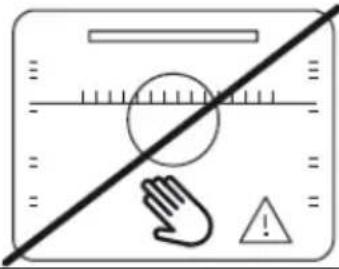 | 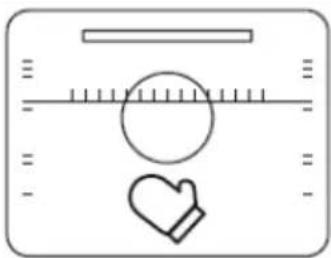 |
| DO NOT TOUCH THE INSIDE OF THE OVEN WITHOUT PROTECTION WHEN IT IS HOT. | USE PROTECTION TO REMOVE THE TRAYS AND GRILLS. |
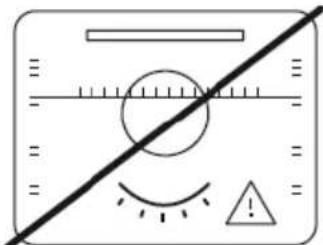 | 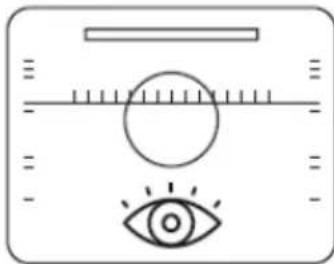 |
| DO NOT LEAVE THE OVEN UNATTENDED WHILE SOMETHING IS COOKING INSIDE. | SUPERVISE THE OVEN DURING THE COOK-ING PROCESS. |
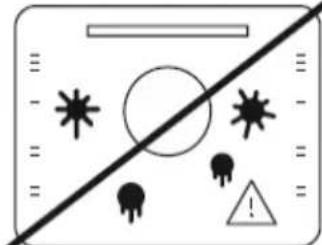 | 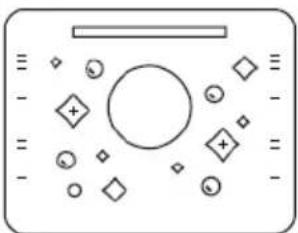 |
| DO NOT ALLOW DIRT TO BUILD UP. | KEEP THE OVEN CLEAN. |
Description du four
text_image
Labeled diagram of an oven interior with numbered components for identificationnatural_image
Simple line drawing of a human eye and target with ruler, no text or symbols presentCOMMENT UTILISER LA PIERRE À PIZZA
natural_image
Interior view of a microwave oven with visible internal compartments and ventilation slots (no text or symbols)natural_image
Interior view of an oven with a circular vent and tray (no text or symbols visible)natural_image
3D rendering of a container with a metallic cup pouring liquid onto a flat surface (no text or symbols visible)ANNULATION DE LA FONCTION PYRO-LYSE
text_image
Labeled diagram of an oven interior with numbered components for identificationnatural_image
Simple line drawing of a human eye and target with measurement scale (no text or symbols)natural_image
Interior view of a microwave oven with visible internal compartments and mounting feet (no text or symbols)natural_image
Interior view of a microwave oven with visible internal components and ventilation duct (no text or symbols)natural_image
Close-up of a metallic cup pouring liquid onto a flat surface, with no visible text or symbols.text_image
Labeled diagram of an oven interior with numbered components for identification1 Voorkant bedieningspaneel
2 Deurvergrendeling
3 Grillverwarmingselement
4 Bakbliksteun
5 Pizzasteen en ovenrooster
6 Bakplaat
7 Scharnier
8 Binnenglas
9 Koelluchtuitlaat
10 Unitbevestiging
11 Lamp
12 Achterpaneel
13 Turbine
14 Afdichting ovendeur
15 Deur
natural_image
Simple line drawing of a human eye and eye with a circular target on the left (no text or symbols)GEBRUIK VAN DE PIZZASTEEN
natural_image
Interior view of a washing machine showing internal components and casing (no text or symbols visible)natural_image
Interior view of a microwave oven with visible cooling fan and ventilation slots (no text or symbols)Veiligheidsfuncties
KINDERSLOT
natural_image
Close-up of a metal cup pouring liquid onto a flat surface, with no visible text or symbols.- Schenk 200 ml water in de ovenholte.

INFORMATIE
text_image
Labeled diagram of an oven interior with numbered components for identificationnatural_image
Simple line drawing of a human eye and target with measurement scale (no text or symbols)natural_image
Interior view of a microwave oven with visible internal compartments and ventilation duct (no text or symbols)natural_image
Interior view of an oven with visible internal components and ventilation duct (no text or symbols)natural_image
Close-up of a metal cup pouring liquid onto a flat surface, with no visible text or symbols.• Description of oven cooking functions....219
- Other oven functions....220
- Environmentally-friendly use of the oven 220
• Cooking guide.... 221
- Defrosting 221
- Tables of Temperatures and Times....238
Poultry 238
Meat 240
Fish 244
Pizza 246
Bread 246
Starters and pasta dishes 248
Cakes and pastries 250
Defrosting 256
Description of oven cooking functions

WARNING
Please remember that the available functions will vary according to each model.
To check which functions are available on your oven, see the User Manual provided with this Cooking Guide.

CONVENTIONAL
This function is for use when baking cakes where the heat should be even to give a spongy texture.

CONVENTIONAL WITH FAN
Suitable for roasts and baking. The fan distributes the heat evenly around the inside of the oven to reduce cooking time and temperature.

GRILL AND LOWER ELEMENT
Ideal for roasts. This setting can be used for any cuts of meat, regardless of size.

MAXIGRILL
For toasting larger surfaces than possible with the Grill setting, with greater toasting power for faster food browning.

GRILL
Toasting and browning. This setting allows the surface to be browned without affecting the inside of the food. Suitable for flat foods such as steaks, ribs, fish and toast.

GRILL / MAXIGRILL WITH FAN
For even roasting and simultaneous surface browning. Ideal for mixed grills. Perfect for bulky pieces such as poultry and game. The meat should be placed on the grid shelf with the tray below to collect meat juices.

LOWER HEAT (FLOOR)
Heat only comes from the lower part. Suitable for warming dishes or letting dough or similar products rise.

TURBO + LOWER HEAT (PIZZA)
Ideal for cooking pizzas and baking pies, fruit tarts and sponge cakes.

TURBO
The fan distributes the heat coming from an element located at the back of the oven. As a result of the evenly-distributed temperature, food can be cooked on two shelves at the same time.

SLOW COOKER
Specially designed for cooking traditional casseroles, stews, etc... and for any dishes specifying particularly long cooking times and low heat.
For the best results, we recommend using covered casserole pans with lids, first making sure they can be used in the oven.
ECO ECO
For cooking in the oven with the minimum energy consumption possible. The oven uses convention heating, and depending on the model, switches off a few minutes before the end of cooking, using the residual heat inside the oven and completing the dish perfectly. Recommended for fish and all types of meat roasts.

DEFROSTING
This function is suitable for slowly defrost-ing food, particularly food consumed un-heated, such as soups, pastries, tarts, cakes, etc.
In some models, the defrost function can be used to heat food using a hot air system on two levels. HI is suitable for meat in general and LO is used for fish, pastry and bread.
RISING DOUGH
Specially designed for allowing dough for bread and pastry to rise.
FAST PREHEATING
This function allows the oven to be quickly pre-heated to the selected temperature. Use this function when your recipe requires the oven to be at a specific temperature before use.
Other oven functions
For more details on how to use these functions, see the User Guide for your oven.
TEKA HYDROCLEAN®
The TEKA HYDROCLEAN® function makes it easy to remove grease and other food debris that may have stuck to the sides of the oven. During the cleaning cycle the light inside the oven will remain off.
PYROLYSIS
This pyrolytic cleaning cycle uses high temperatures inside the oven to cause the oxidisation and carbonisation of grease accumulated during cooking. During the cleaning cycle the light inside the oven will remain off.
Environmentally-friendly use of the oven
Energy-saving tips:
- Remove any accessories not in use from the oven.
- Use oven-proof dishes, preferably darkoured.
- Open the oven door as little as possible during cooking.
-
Avoid preheating the oven while empty. Whenever the recipe allows, place the food in the cold oven.
-
If your oven has an ECO function, function whenever the recipe allows.
- For recipes with long cooking times, switch off the oven 5 to 10 minutes before the end of the total cooking time to make use of the residual heat.
- If your oven has fan features, cook m dishes at once.

Cooking guide
Cooking functions vary between models. The tables provided show the key cooking times.
The times and temperatures shown in the chart are given as a guide. It is advisable to start with the lowest figures and increase as necessary.
For 45 cm ovens: Cooking times and temperatures are normally slightly less than for 60 cm ovens. Always use the lower end of the range given in the tables.
In general, the times shown on the Tables are calculated for placing food in a cold oven.
Recipes requiring the oven to be pre-heated will expressly mention this.
Some models come with a Rapid Pre-heating function. This function reduces the cooking time in relation to the figures given in the Tables. When using this function, wait until the selected temperature has been reached before placing the food in the oven.
The shelf levels for cooking are as follows (from the bottom):
1: Low.
2: Medium.
3: High.
Levels 4 and 5 are suitable for grilling and toasting.
For 45 cm ovens: The most suitable level for cooking is always level 1. Levels 2 and 3 are suitable for grilling and toasting.
Place the food in the centre of the shelf or rack for the most even result possible.
Defrosting
When defrosting, remember:
- Food should be removed from its packaging and placed on the oven tray or on a dish.
- Defrost large cuts of meat or fish by placing them on the grid shelf with a tray underneath to collect any liquid.
-
Meat and fish do not need to be completely thawed before cooking. It is enough for the surface to be soft to enable it to be seasoned.
-
Food should always be cooked after defrosting.
- Do not re-freeze food once thawed.
The times shown in the chart* are a guideline. The time needed for defrosting will depend on the ambient temperature, weight of the food and how deeply frozen it is.
Sommaire
* For these dishes, pre-heat the empty oven and then place the food in the oven once the selected temperature has been reached.
* For these dishes, pre-heat the empty oven and then place the food in the oven once the selected temperature has been reached.
* For these dishes, pre-heat the empty oven and then place the food in the oven once the selected temperature has been reached.
*** Place the yoghurt pots directly on the bottom of the oven.</
* For these dishes, pre-heat the empty oven and then place the food in the oven once the selected temperature has been reached.