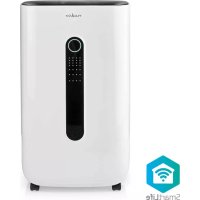
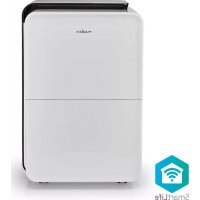
USER MANUAL DEHU20WTW NEDIS
with 20/30 L/Day capacity
DEHU20WTW / DEHU30WTW

natural_image
Line drawing of a white portable air purifier with ventilation slots and wheels (no text or symbols)

natural_image
Line drawing of a portable air purifier unit with ventilation slots and control panel (no text or symbols)


ned.is/dehu20wtw
ned.is/dehu30wtw

Quick start guide 4

Kurzanleitung 7

* The real dehumidification performance depends on the actual temperature and humidity.
A

natural_image
Line drawing of a portable air purifier device with labeled parts (no text or symbols on the device itself)

DEHU20WTW


DEHU30WTW
B
DEHU20WTW

DEHU30WTW

Quick start guide
Wi-Fi Smart Dehumidifier
DEHU20WTW /
DEHU30WTW

For more information see the extended manual online: ned.is/dehu20wtw ned.is/dehu30wtw
Intended use
The Nedis DEHU20WTW / DEHU30WTW is a dehumidifier that can decrease the surrounding air humidity.
The product can be used as a dryer for clothing and upholstery, a ventilator, or for continuous dehumidification of a room.
The product has a timer function that switches off the product after a set amount of time.
This product uses R290 gas. R290 is a refrigerant gas that complies with the European directives on the environment.
The product is intended for indoor use only.
Any modification of the product may have consequences for safety, warranty and proper functioning.
The product is intended for use in household environments for typical housekeeping functions that may also be used by non-expert users for typical housekeeping functions, such as: shops, offices other similar working environments, farm houses, by clients in hotels, motels and other residential type environments and/or in
bed and breakfast type environments.
This product can be used by children aged from 8 years and above and persons with reduced physical, sensory or mental capabilities or lack of experience and knowledge if they have been given supervision or instruction concerning use of the product in a safe way and understand the hazards involved. Children shall not play with the product. Cleaning and user maintenance shall not be done by children without supervision.
Main parts (image A)
1 Control panel
2 Humidity indicator LED
3 Power cable
4 Air outlet
5 Handle
6 Air inlet
7 Water hose connection
8 Water tank
9 Water hose
10 Cable reel
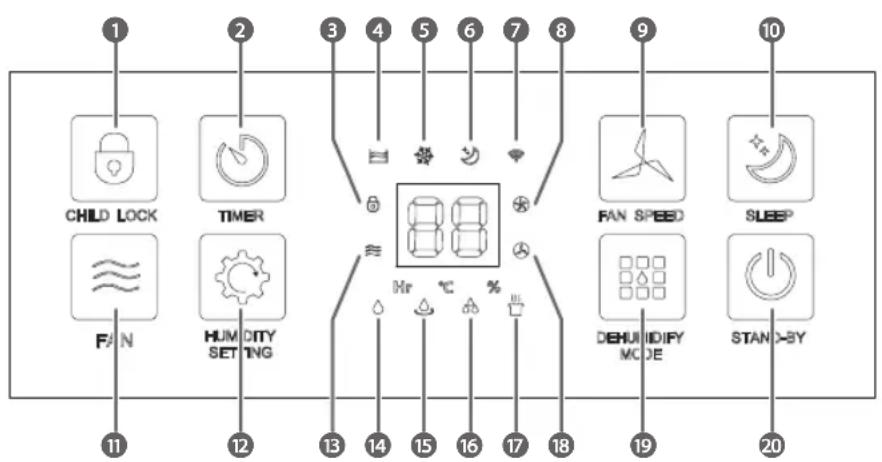
Control panel (image B)
1 Child lock button
2 Timer button
3 Child lock indicator LED
4 Water full indicator LED
5 Defrost indicator LED
6 Sleep mode indicator LED
7 Wi-Fi indicator LED
8 High fan speed indicator
LED
9 Fan speed button
10 Sleep button
11 Fan button
12 Humidity setting button
13 Ventilation mode indicator LED
14 Dehumidification mode indicator LED
15 Continuous dehumidification mode indicator LED
16 Max+ dehumidification mode indicator LED
17 Dry laundry dehumidification mode indicator LED
18 Low fan speed indicator LED
19 Dehumidify mode button
20 On / standby button
Safety instructions
| Icon Description | |
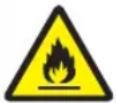 | Indication to explain that the product:Contains one or more (extremely/highly) flammable components. |
 | Indication to explain that the product:Contains one or more (extremely/highly) flammable components. |
WARNING
Installing the product
Make sure the product is placed on a flat and stable surface. Keep a minimum of 300 mm of free space around the product. Only move the product in an upright position.
This product might cause interference with nearby devices. To avoid interference keep 700 mm distance between the product and other devices.
Plug the power cable A3 into a power outlet.
Assembling for continuous dehumidification (optional)
- Remove the water plug from the water hose connection A 7.**
- Remove the water tank A 8.*
- Place the water hose A ⑨ into A7.
- Connect 19 to a water container or drainage system (not included).
Ensure that A 9 is hanging down from A 7, so that the water cannot flow back into the product.
*Only for DEHU20WTW
**Only for DEHU30WTW
Installing the Nedis SmartLife app
- Download the Nedis Smartlife app for Android or iOS on your phone via Google Play or the Apple App Store.
- Open the Nedis Smartlife app on your phone.
- Create an account with your mobile phone number or your e-mail address and tap Continue.
- You will receive a verification code on your mobile phone or e-mail address.
- Enter the received verification code.
-
Create a password and tap Done.
-
Tap Add Home to create a SmartLife Home.
- Set your location, choose the rooms you want to connect with and tap Done.
Adding a product to the Nedis SmartLife app
- Press the Stand-by button B 20 to switch the product to standby mode.
- Press and hold the dehumidify mode button B 19 for five seconds. The Wi-Fi indicator LED B 7 blinks fast and the buzzer sounds to indicate pairing mode is active.
- Tap + in the Nedis SmartLife app.
- Select the product type you want to add from the list.
- Follow the instructions in the Nedis SmartLife app.
- After confirming you can control the product with your smartphone.
To connect your SmartLife account to Amazon Alexa and/or Google Home, set it up using the "Smart Life" action or skill. For more details check the instruction on either Amazon or Google.
B.7 lights up when the product is connected.
Using the control panel
| Button Function | |
| Child lock buttonB1 | Press and hold for 5 seconds to lock or unlock the control panel A1. The child lock indicator LED B3* or the light above B1** lights up. |
| Timer button B2 | Press to cancel or set the duration of dehumidification. The timer can be set to a maximum of 24 hours. The duration is shown in hours. When the timer function is activated, Hr* or the light above B2** lights up. The settings cannot be changed when the timer is set. The timer cannot be set during the continuous dehumidification mode. |
| Fan speed buttonB9 | Press during the dehumidification or ventilation mode to switch between the high and low fan speed. The low fan speed B18 or high fan speed indicator LED B8 lights up. |
| Sleep button B10 | Press to switch off all the lights of the product after 5 seconds, except for B7 and the sleep mode indicator LED B6. |
| Fan button B11* | Press to activate the ventilation mode. The ventilation mode indicator LED B13 lights up. The dehumidification function is switched off. |
| Humidity setting button B12 | Press to set the desired humidity level within a range of 30% to 80%. |
| Dehumidify mode button B19 | Press to choose from four different modes: |
| DEHU20WTW Dehumidification Continuous dehumidification Max+ dehumidification Dry laundry | DEHU30WTW Dehumidification Continuous dehumidification Dry laundry Ventilation |
| On / standby buttonB20 | Press to switch the product on or off. |
*Only for DEHU20WTW
**Only for DEHU30WTW
The product might make some noise when it is used for the first time or after a long period when the product was not used. This is normal and does not affect the safety of the product.
Keep the doors and windows closed to allow the product to work more efficiently.
The room temperature might increase during use, because the product does not have a cooling function.
The buzzer sounds when the water tank is removed during the operation of the product.
Operation modes
| Dehumidification The | hygrostat keeps the room at a pre-set humidity level.Switch on the dehumidification and ventilator of the product.The humidity level and fan speed can be set manually.The dehumidification mode indicator LED B14 lights up. |
| Continuous dehumidification | The product runs continuously without interruption at low fan speed.Switch on the dehumidification and ventilator of the product.Set humidity level and fan speed are disabled.When the humidity level is below 30%, the dehumidification is disabled as the ventilator keeps running on low speed.The continuous dehumidification mode indicator LED B15 lights up.See assembling for continuous dehumidification for the water hose connection. |
| Max+ dehumidification* | All settings are set to maximum performance for rapid moisture extraction.Switches the ventilator to high speed and switches on continuous dehumidification.Set humidity level and fan speed are disabled.The Max+ dehumidification mode indicator LED B16 lights up. |
| Dry laundry Continuous | dehumidifying on the highest speed level to speed up the drying process of wet clothing.Switches the ventilator to high speed and switches on continuous dehumidification.Set humidity level and fan speed are disabled.The dry laundry mode indicator LED B17 lights up. |
| Ventilation The dehumidifier works as a ventilator, it creates a nice breeze without dehumidifying the air.Only switch on the ventilator of the product. The dehumidification function is disabled.B13 lights up. |
*Only for DEHU20WTW
Frost protection function
The product automatically switches on the frost protection status for a few minutes at certain room temperatures.
Switches off the dehumidification and sets the ventilator to high fan speed.
Frost protection is not active during the ventilation mode.
The defrost indicator LED B5 lights up.
Do not switch off the product.
| DEHU20WTW |
| Room temperature Dehumidification time | Defrosting time |
| 24 °C ≤ temperature Continuous No | |
| 18 °C < temperature ≤ 23 °C 120 minutes 5 minutes | |
| 12 °C < temperature ≤ 18 °C 25 minutes 5 minutes | |
| 5 °C < temperature ≤ 12 °C 20 minutes 5 minutes | |
| DEHU30WTW |
| Room temperature Dehumidification time | Defrosting time |
| 16 °C ≤ temperature 22 minutes 5 minutes | |
| 12 °C < temperature ≤ 16 °C 25 minutes 5 minutes | |
| 5 °C < temperature ≤ 12 °C 20 minutes 6 minutes | |
The overflow protection function
If water exceeds the warning level, the buzzer sounds for 20 seconds and the water full indicator LED B4 lights up.
Troubleshooting
| Problem Possible cause | Possible solution | |
| The product does not work. | The power outlet has no power. | Plug the power cable into a power outlet with power. |
| B4 lights up. | Drain the water from the reservoir of the product. |
| The water tank is not inserted correctly. | Place the water tank correctly into the product. |
| Very little water is collected in the water tank. | The filter is dirty. Clean the filter. |
| The air inlet or outlet is blocked. | Clear obstructions. |
| The product is in ventilation mode. | Change the mode to dehumidification. |
| The product makes abnormal noises. | The product is not placed on a flat surface. | Place the product on a flat and hard surface to reduce the noise. |
| The product stops during operation. | The ambient temperature is too low or too high. | Use the product in a room with a temperature between 5-35 °C. |
| Clothing and upholstery do not dry. | The clothing and upholstery are not in the air flow of the product. | Place the clothing and upholstery in the air flow of the product. |
| The ambient temperature is low. | Use the product in a room with an higher ambient temperature. |
We, Nedis B.V. declare as manufacturer that the product DEHU20WTW / DEHU30WTW from our brand Nedis ^* , produced in China, has been tested according to all relevant CE standards and regulations and that all tests have been passed successfully. This includes, but is not limited to the RED 2014/53/EU regulation.
The complete Declaration of Conformity (and the safety datasheet if applicable) can be found and downloaded via:
nedis.com/DEHU20WTW#support
nedis.com/DEHU30WTW#support

Kurzanleitung
1 Knappen Child lock
2 Knappen Timer
9 Fan speed-knapp
10 Sleep-knapp
11 Fan-knapp
12 Humidity setting-knapp
13 Ventileringsmodus-indikator-LED
14 Avfuktingsmodus-indikator-LED
15 Kontinuerlig avfuktingsmodus-indikator-LED
16 Max+ avfuktingsmodus-indikator-LED
17 Tørk vask avfuktingsmodus-indikator-LED
18 Lav viftehastighetsindikator-LED
19 Dehumidify mode-knapp
20 På / standby-knapp
*Kun for DEHU20WTW
**Kun for DEHU30WTW
Installation af Nedis SmartLife-appen