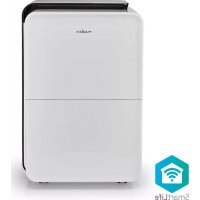
DEHU30WTW - Dehumidifier NEDIS - Free user manual and instructions
Find the device manual for free DEHU30WTW NEDIS in PDF.


| Product Type | Smart Wi-Fi Dehumidifier |
| Brand | Nedis |
| Model | DEHU30WTW |
| Refrigerant | R290 (flammable) |
| Supply Voltage | 220-240 V~, 50 Hz |
| Operating Modes | Dehumidification, Continuous Dehumidification, Dry Laundry, Ventilation |
| Humidity Setting | 30% to 80% RH |
| Timer | 1 to 24 hours |
| Fan Speed | Fast / Slow |
| Drainage | Manual (tank) or continuous (optional hose) |
| Special Functions | Child lock, Sleep mode, Frost protection, Overflow protection |
| Connectivity | Built-in Wi-Fi, Nedis SmartLife app, compatible with Amazon Alexa and Google Home |
| Operating Temperature | 5°C to 35°C |
| Minimum Room Area | Greater than 4 m² |
| Dimensions (approx.) | Approx. 35 x 25 x 55 cm |
| Weight (approx.) | Approx. 12 kg |
Frequently Asked Questions - DEHU30WTW NEDIS
User questions about DEHU30WTW NEDIS
0 question about this device. Answer the ones you know or ask your own.
Ask a new question about this device
Download the instructions for your Dehumidifier in PDF format for free! Find your manual DEHU30WTW - NEDIS and take your electronic device back in hand. On this page are published all the documents necessary for the use of your device. DEHU30WTW by NEDIS.
USER MANUAL DEHU30WTW NEDIS
Wi-Fi Smart Dehumidifier with 20/30 L/Day capacity
DEHU2OWTW/DEHU30WTW

Quick start guide 4

Kurzanleitung 7

- The real dehumidification performance depends on the actual temperature and humidity.
A
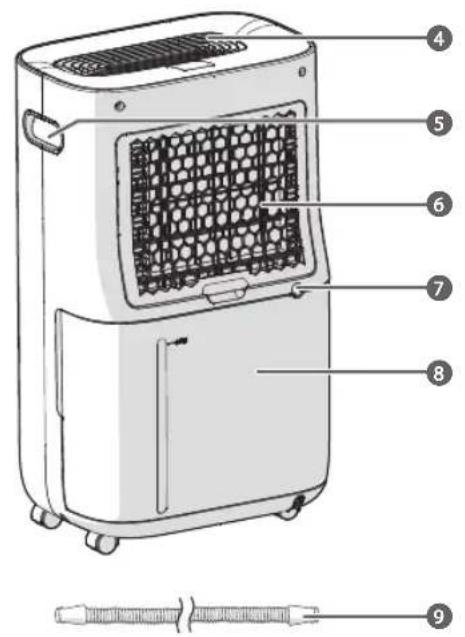
DEHU20WTW
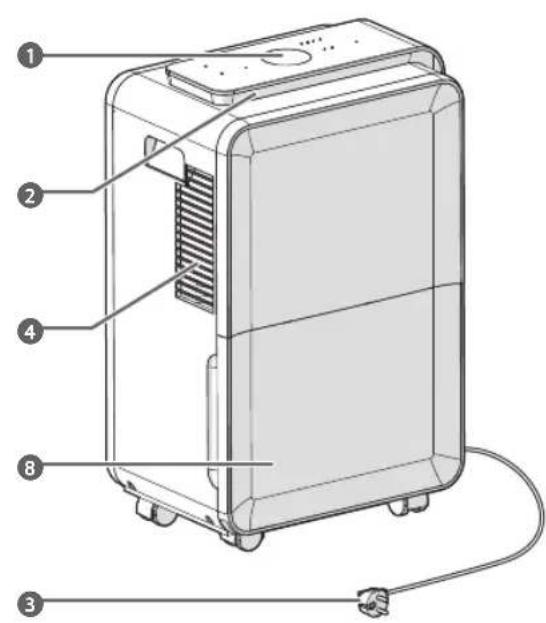
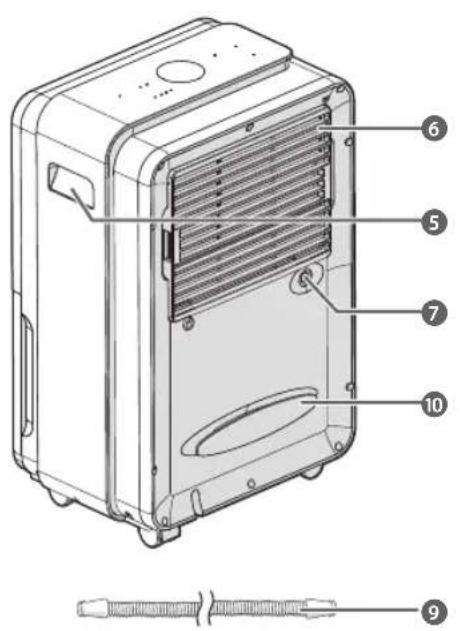
DEHU30WTW
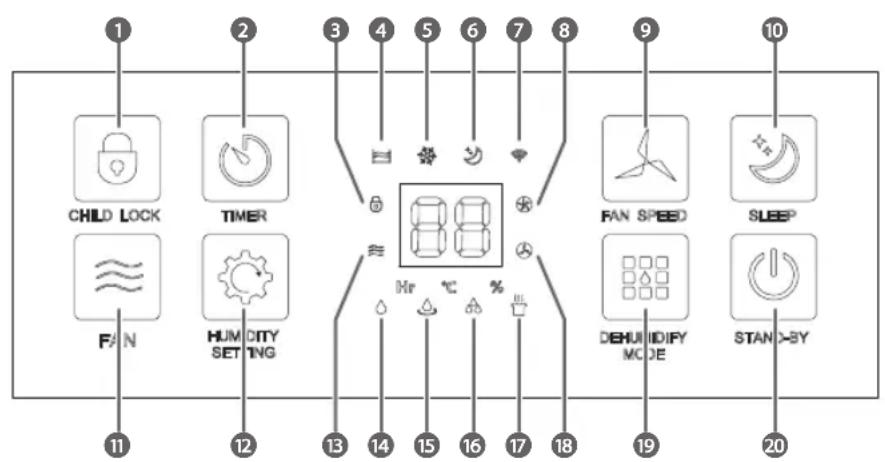
B
DEHU20WTW
DEHU30WTW

Quick start guide
Wi-Fi Smart Dehumidifier
DEHU20WTW/
DEHU30WTW

For more information see the extended manual online:
ned.is/dehu20wtw ned.is/dehu30wtw
Intended use
The Nedis DEHU20WTW / DEHU30WTW is a dehumidifier that can decrease the surrounding air humidity.
The product can be used as a dryer for clothing and upholstery, a ventilator, or for continuous dehumidification of a room.
The product has a timer function that switches off the product after a set amount of time.
This product uses R290 gas. R290 is a refrigerant gas that complies with the European directives on the environment.
The product is intended for indoor use only.
Any modification of the product may have consequences for safety, warranty and proper functioning.
The product is intended for use in household environments for typical housekeeping functions that may also be used by non-expert users for typical housekeeping functions, such as: shops, offices other similar working environments, farm houses, by clients in hotels, motels and other residential type environments and/or in
bed and breakfast type environments.
This product can be used by children aged from 8 years and above and persons with reduced physical, sensory or mental capabilities or lack of experience and knowledge if they have been given supervision or instruction concerning use of the product in a safe way and understand the hazards involved. Children shall not play with the product. Cleaning and user maintenance shall not be done by children without supervision.
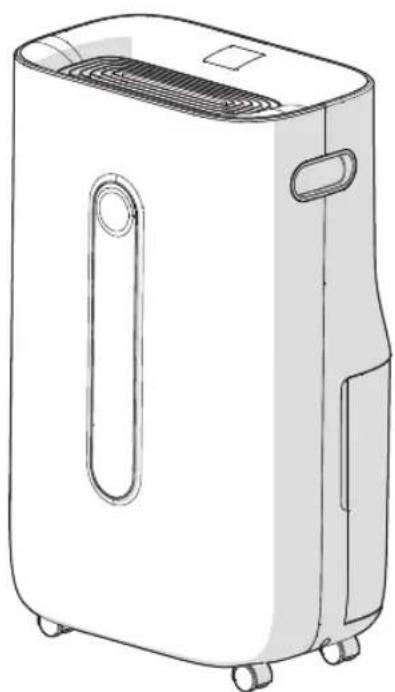
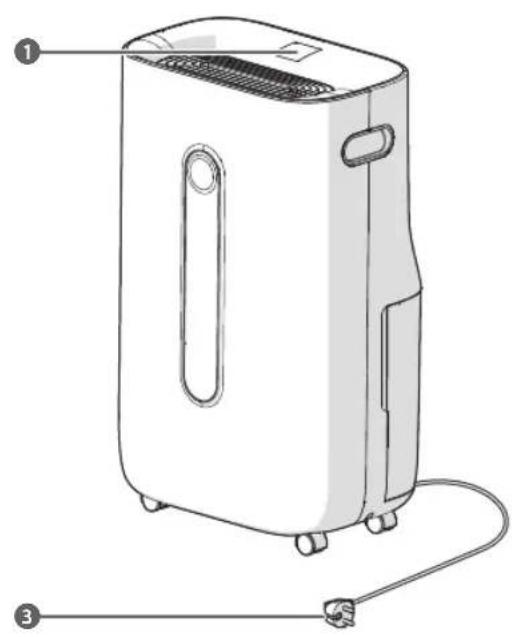
Main parts (image A)
Control panel
Humidity indicator LED
3 Power cable
Air outlet
5 Handle
6 Air inlet
Water hose connection
Water tank
Water hose
10 Cable reel
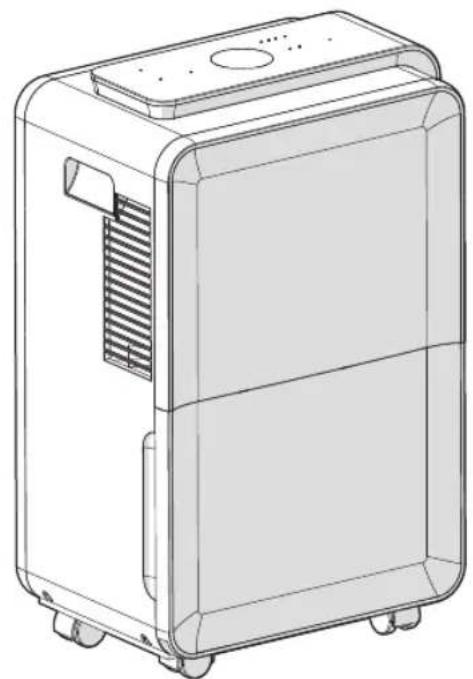
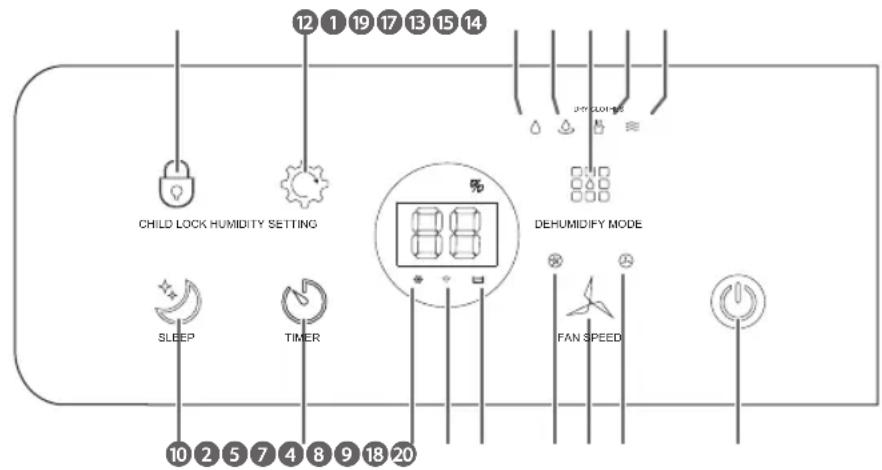
Control panel (image B)
Child lock button
2 Timer button
Child lock indicator LED
4 Water full indicator LED
5 Defrost indicator LED
6 Sleep mode indicator LED
Wi-Fi indicator LED
8 High fan speed indicator
LED
9 Fan speed button
10 Sleep button
1 Fan button
12 Humidity setting button
Ventilation mode indicator LED
14 Dehumidification mode indicator LED
15 Continuous dehumidification mode indicator LED
16 Max+ dehumidification mode indicator LED
Dry laundry dehumidification mode indicator LED
18 Low fan speed indicator LED
19 Dehumidify mode button
20 On/standby button
Safety instructions
Icon Description
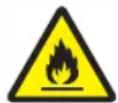
Indication to explain that the product: Contains one or more (extremely/highly) flammable components.

Indication to explain that the product: Contains one or more (extremely/highly) flammable components.
WARNING
- Ensure you have fully read and understood the instructions in this document before you install or use the product. Keep the packaging and this document for future reference.
Only use the product as described in this document. - Do not use the product if a part is damaged or defective. Replace a damaged or defective product immediately.
- Do not drop the product and avoid bumping.
- This product may only be serviced by a qualified technician for maintenance to reduce the risk of electric shock.
- Do not expose the product to water or moisture.
- Disconnect the product from the power source before service and when replacing parts.
If the power cable is damaged, it must be replaced by the manufacturer, its service agent or similarly qualified persons in order to avoid a hazard. - Do not plug or unplug the power cable with wet hands.
- Do not use the product in dusty environments.
- Do not use near gas or other flammable materials.
- Do not spray the product with chemicals, acids, gasoline or oil.
- Do not place near other heat sources.
- Install the product in accordance with national wiring.
Always check that the voltage of the product corresponds to the mains voltage. - Do not pull the power cord to shut down the heater, always use the on/off switch.
- Do not use the product when the cable or plug is damaged
Make sure that the electrical supply in your area matches a voltage of 220 - 240 VAC and a frequency of 50Hz - Connect to a grounded socket only.
If necessary, use an earthed extension cable of a suitable diameter. - Fully extend the power cord and make sure the power cord does not contact the product.
- When using an extension cord, use one which is as short as possible and fully extended.
- Do not let the power cable touch hot surfaces.
- Do not close a door on the power cable.
- Do not put any objects into openings. Do not use with any opening blocked.
- Do not drink water from the product. This may cause illness.
-
Do not use the product without the air inlet and outlet covers in place to avoid touching hot and moving parts that may cause injuries.
-
Be aware that the refrigerants should be odourless.
- The refrigerants should be added by the manufacturer, its service agent or similar qualified persons.
- Do not use mechanical products or other means to accelerate the defrosting process, other than those recommended by the manufacturer.
- Do not use the product in temperatures below 0^ .
- Do not sit on the product.
- Unplug the power cable when the product is not in use for a long time.
- Do not block the air in- and outlets of the product.
- Some wireless products may interfere with implantable medical devices and other medical equipment, such as pacemakers, cochlear implants and hearing aids. Consult the manufacturer of your medical equipment for more information.
- Do not use the product at locations where the use of wireless devices is prohibited due to potential interference with other electronic devices, which may cause safety hazards.
- Only install, operate and store the product in a room with a floor area above 4m^2
- Only store the product in a well-ventilated area.
- Do not use external timers or remote control systems to switch the product on or off.
- Place the product in an area without any continuous sources of ignition (for example: open flames, gas or electrical appliances in operation).
- When the product is installed, operated or stored in a non-ventilated area, make sure the room is designed to prevent the accumulation of refrigerant leaks resulting in a risk of fire or explosion due to ignition of the refrigerant caused by electric heaters, stoves, or other sources of ignition.
- When defrosting and cleaning the product, do not use any means other than those recommended by the manufacturing company.
- Do not puncture or heat any part of the refrigerant circuit.
Installing the product
Make sure the product is placed on a flat and stable surface. Keep a minimum of 300mm of free space around the product. Only move the product in an upright position.
This product might cause interference with nearby devices. To avoid interference keep 700mm distance between the product and other devices.
Plug the power cable A3 into a power outlet.
Assembling for continuous dehumidification (optional)
- Remove the water plug from the water hose connection A 7.**
- Remove the water tank A 8.*
- Place the water hose A 9 into A7
- Connect to a water container or drainage system (not included).
Ensure that A9 is hanging down from A7, so that the water cannot flow back into the product.
*Only for DEHU20WTW
**Only for DEHU30WTW
Installing the Nedis SmartLife app
- Download the Nedis Smartlife app for Android or iOS on your phone via Google Play or the Apple App Store.
- Open the Nedis Smartlife app on your phone.
- Create an account with your mobile phone number or your e-mail address and tap Continue.
- You will receive a verification code on your mobile phone or e-mail address.
- Enter the received verification code.
-
Create a password and tap Done.
-
Tap Add Home to create a SmartLife Home.
- Set your location, choose the rooms you want to connect with and tap Done.
Adding a product to the Nedis SmartLife app
- Press the Stand-by button B to switch the product to standby mode.
-
Press and hold the dehumidify mode button B for five seconds. The Wi-Fi indicator LED B blinks fast and the buzzer sounds to indicate pairing mode is active.
-
Tap + in the Nedis SmartLife app.
-
Select the product type you want to add from the list.
- Follow the instructions in the Nedis SmartLife app.
- After confirming you can control the product with your smartphone.
To connect your SmartLife account to Amazon Alexa and/or Google Home, set it up using the "Smart Life" action or skill. For more details check the instruction on either Amazon or Google.
B7 lights up when the product is connected.
Using the control panel
| Button Function | ||
| Child lock button B1 | Press and hold for 5 seconds to lock or unlock the control panel A1. The child lock indicator LED B3* or the light above B1** lights up. | |
| Timer button B2 | Press to cancel or set the duration of dehumidification. The timer can be set to a maximum of 24 hours. The duration is shown in hours. When the timer function is activated, Hr* or the light above B2** lights up. The settings cannot be changed when the timer is set. The timer cannot be set during the continuous dehumidification mode. | |
| Fan speed button B9 | Press during the dehumidification or ventilation mode to switch between the high and low fan speed. The low fan speed B18 or high fan speed indicator LED B8 lights up. | |
| Sleep button B10 | Press to switch off all the lights of the product after 5 seconds, except for B7 and the sleep mode indicator LED B6. | |
| Fan button B11* | Press to activate the ventilation mode. The ventilation mode indicator LED B15 lights up. The dehumidification function is switched off. | |
| Humidity setting button B12 | Press to set the desired humidity level within a range of 30% to 80%. | |
| Dehumidify mode button B13 | Press to choose from four different modes: | |
| DEHU20WTW Dehumidification Continuous dehumidification Max+ dehumidification Dry laundry | DEHU30WTW Dehumidification Continuous dehumidification Dry laundry Ventilation | |
| On / standby button B20 | Press to switch the product on or off. | |
*Only for DEHU20WTW
**Only for DEHU30WTW
The product might make some noise when it is used for the first time or after a long period when the product was not used. This is normal and does not affect the safety of the product.
Keep the doors and windows closed to allow the product to work more efficiently.
The room temperature might increase during use, because the product does not have a cooling function.
The buzzer sounds when the water tank is removed during the operation of the product.
Operation modes
| Dehumidification The | hygrostat keeps the room at a pre-set humidity level. Switch on the dehumidification and ventilator of the product. The humidity level and fan speed can be set manually. The dehumidification mode indicator LED B 14 lights up. |
| Continuous dehumidification | The product runs continuously without interruption at low fan speed. Switch on the dehumidification and ventilator of the product. Set humidity level and fan speed are disabled. When the humidity level is below 30%, the dehumidification is disabled as the ventilator keeps running on low speed. The continuous dehumidification mode indicator LED B 15 lights up. See assembling for continuous dehumidification for the water hose connection. |
| Max+ dehumidification* | All settings are set to maximum performance for rapid moisture extraction. Switches the ventilator to high speed and switches on continuous dehumidification. Set humidity level and fan speed are disabled. The Max+ dehumidification mode indicator LED B 16 lights up. |
| Dry laundry Continuous | dehumidifying on the highest speed level to speed up the drying process of wet clothing. Switches the ventilator to high speed and switches on continuous dehumidification. Set humidity level and fan speed are disabled. The dry laundry mode indicator LED B 17 lights up. |
| Ventilation The dehumidifier works as a ventilator, it creates a nice breeze without dehumidifying the air. Only switch on the ventilator of the product. The dehumidification function is disabled. B 18 lights up. | |
*Only for DEHU20WTW
Frost protection function
The product automatically switches on the frost protection status for a few minutes at certain room temperatures.
Switches off the dehumidification and sets the ventilator to high fan speed.
Frost protection is not active during the ventilation mode.
The defrost indicator LED B lights up.
Do not switch off the product.
| DEHU20WTW | ||
| Room temperature Dehumidification time | Defrosting time | |
| 24 °C ≤ temperature Continuous No | ||
| 18 °C < temperature ≤ 23 °C | 120 minutes 5 minutes | |
| 12 °C < temperature ≤ 18 °C | 25 minutes 5 minutes | |
| 5 °C < temperature ≤ 12 °C | minutes 5 minutes | |
| DEHU30WTW | ||
| Room temperature Dehumidification time | Defrosting time | |
| 16 °C ≤ temperature 22 minutes 5 minutes | ||
| 12 °C < temperature ≤ 16 °C 25 minutes 5 minutes | ||
| 5 °C < temperature ≤ 12 °C 20 minutes 6 minutes | ||
The overflow protection function
If water exceeds the warning level, the buzzer sounds for 20 seconds and the water full indicator LED B4 lights up.
Troubleshooting
| Problem Possible cause | Possible solution | |
| The product does not work. | The power outlet has no power. | Plug the power cable into a power outlet with power. |
| B4 lights up. | Drain the water from the reservoir of the product. | |
| The water tank is not inserted correctly. | Place the water tank correctly into the product. | |
| Very little water is collected in the water tank. | The filter is dirty. Clean the filter. | |
| The air inlet or outlet is blocked. | Clear obstructions. | |
| The product is in ventilation mode. | Change the mode to dehumidification. | |
| The product makes abnormal noises. | The product is not placed on a flat surface. | Place the product on a flat and hard surface to reduce the noise. |
| The product stops during operation. | The ambient temperature is too low or too high. | Use the product in a room with a temperature between 5-35 °C. |
| Clothing and upholstery do not dry. | The clothing and upholstery are not in the air flow of the product. | Place the clothing and upholstery in the air flow of the product. |
| The ambient temperature is low. | Use the product in a room with an higher ambient temperature. | |
Declaration of Conformity
We, Nedis B.V. declare as manufacturer that the product DEHU20WTW / DEHU30WTW from our brand Nedis, produced in China, has been tested according to all relevant CE standards and regulations and that all tests have been passed successfully. This includes, but is not limited to the RED 2014/53/EU regulation.
The complete Declaration of Conformity (and the safety datasheet if applicable) can be found and downloaded via:
nedis.com/DEHU20WTW#support
nedis.com/DEHU30WTW#support

Kurzanleitung
- Quick start guide
- Wi-Fi Smart Dehumidifier
- Intended use
- Main parts (image A)
- Control panel (image B)
- Safety instructions
- Icon Description
- WARNING
- Installing the product
- Assembling for continuous dehumidification (optional)
- Installing the Nedis SmartLife app
- Adding a product to the Nedis SmartLife app
- Frost protection function
- The overflow protection function
- Declaration of Conformity
- Kurzanleitung
Brand : NEDIS
Model : DEHU30WTW
Category : Dehumidifier