Icon Mini - Docking station soundcore - Free user manual and instructions
Find the device manual for free Icon Mini soundcore in PDF.



| Product Type | Portable Bluetooth Speaker with Charging Station |
| Brand | Soundcore |
| Model | Icon Mini |
| Weight | 215 g (without packaging) |
| Power Supply | USB input 5 V / 1 A |
| Battery Capacity | 900 mAh |
| Charging Time | 3 hours |
| Playback Duration | Up to 8 hours (varies with volume and content) |
| Bluetooth Version | V4.2 |
| Bluetooth Range | 30 m (clear line of sight) |
| Audio Output Power | 3 W |
| Connectors | Micro USB port (charging), 3.5 mm AUX audio input |
| Main Features | Bluetooth, AUX-in mode, True Wireless Stereo (TWS), hands-free calls, voice commands (Siri) |
| Water Resistance | Immersion up to 1 meter for 30 minutes (IPX7) |
| Care and Cleaning | Do not use corrosive cleaners or oil. Store in a cool place. |
| Safety | Do not disassemble, do not drop, avoid extreme temperatures, do not use outdoors during storms. |
| Spare Parts and Repairability | Not specified. In case of issues, contact Soundcore support. |
| General Information | User manual available in multiple languages. Compatible with voice assistants. |
Frequently Asked Questions - Icon Mini soundcore
User questions about Icon Mini soundcore
0 question about this device. Answer the ones you know or ask your own.
Ask a new question about this device
Download the instructions for your Docking station in PDF format for free! Find your manual Icon Mini - soundcore and take your electronic device back in hand. On this page are published all the documents necessary for the use of your device. Icon Mini by soundcore.
USER MANUAL Icon Mini soundcore
EN Safety Instructions
- Avoid dropping.
• Do not disassemble. - Soundcore Icon Mini can be immersed in water up to 1m for up to 30 minutes.
- Avoid extreme temperatures.
• Do not use the device outdoors during thunderstorms.
• Do not use any corrosive cleaner / oil to clean.
What's Included
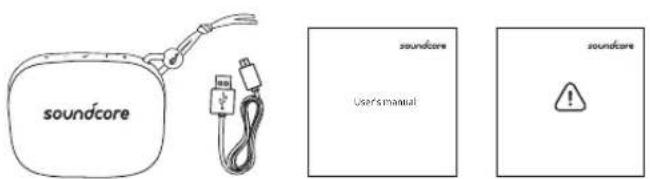
text_image
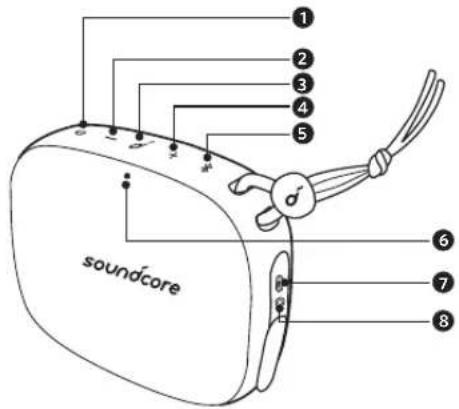
soundcore soundcore Users'manual soundcoreAt a Glance
text_image
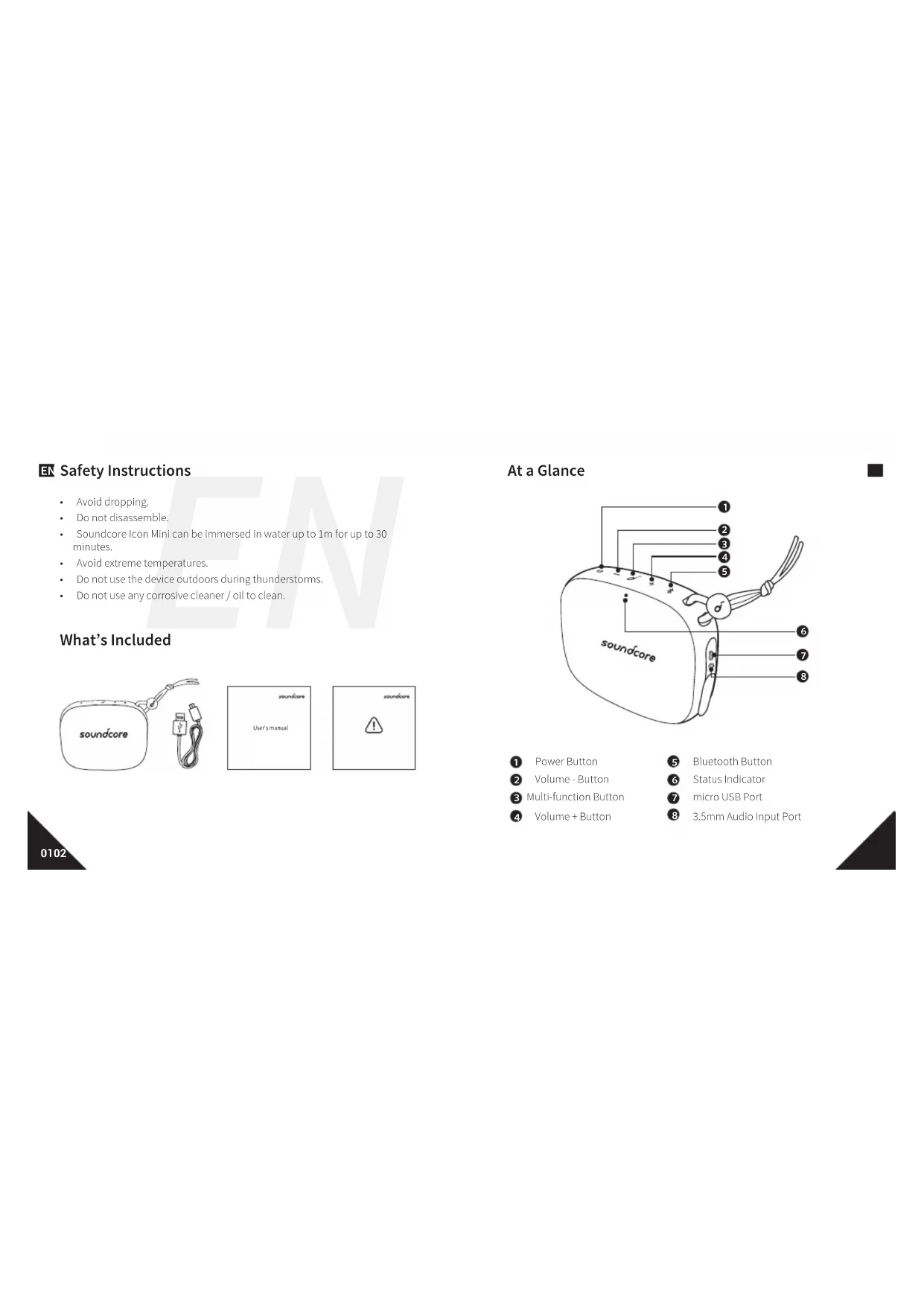
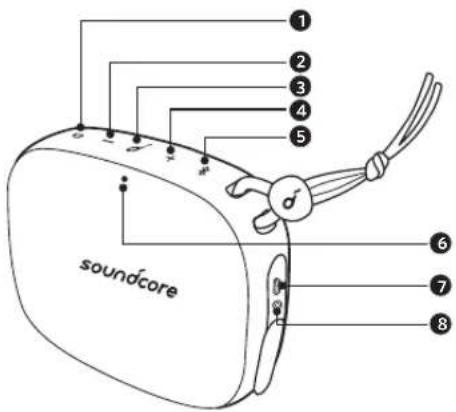
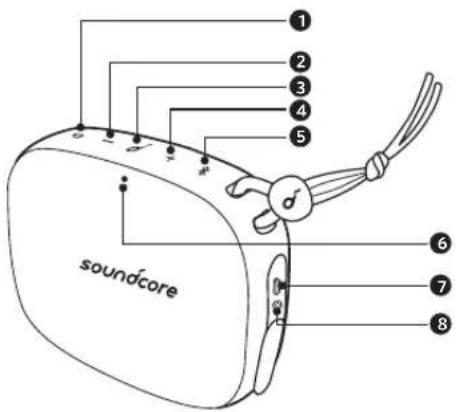
soundcore ① ② ③ ④ ⑤ ⑥ ⑦ ⑧1 Power Button
2 Volume - Button
3 Multi-function Button
4 Volume + Button
5 Bluetooth Button
6 Status Indicator
7 micro USB Port
8 3.5mm Audio Input Port
EN Using Your Soundcore Icon Mini
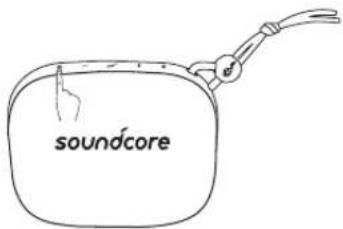
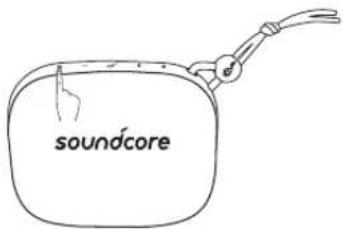
- Turn On / Off
text_image
soundcoreON Press
OFF Press and hold for more than 2 seconds
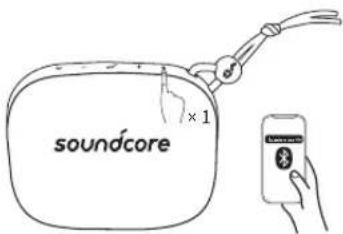
a. Bluetooth mode
text_image
soundcore ×1
Rapidly Flashing Blue Bluetooth Pairing Mode

Solid Blue Connected to a device

Slow Flashing Blue
Idle mode
Note: The speaker enters idle mode
when connection is taking too long or it's
disconnected for more than 3 mins. Press
Bluetooth button to re-enter Bluetooth pairing
mode.
text_image
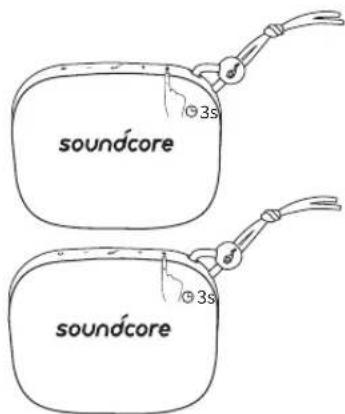
soundcore soundcore| Enter True Wireless Stereo Group Mode / Disconnect True Wireless Stereo | ||
| Double Flashing Blue | True Wireless Stereo Group Mode | |
| Solid Blue | Connected to True Wireless StereoNote: When True Wireless Stereo group is successful, the LED indicator on the first speaker will flash in blue, the LED indicator on the second speaker will be solid blue. | |

With True Wireless Stereo technology, you can pair your Soundcore Icon Mini with another Soundcore Icon Mini to explore the best sound effects with left and right sound channels separated on both speakers.

Play / Pause

Play Next Song

Play Previous Song

Answer Call / End Call

Reject Call / Switch between a call on hold and an active call

End current call and answer incoming call / End current call and switch to call on hold

Switch audio source between Speaker and Phone

Activate Siri / Other Voice Control Software

Volume Up / Down

Solid Blue On a Call

Flashing Blue Incoming Call

When turned on, Soundcore Icon Mini will automatically connect to the last connected device if available. If not, press the Bluetooth button to activate pairing mode.
To pair a different device, press the Bluetooth button to re-enter pairing mode. Then repeat the pairing steps. Having connection problems? Remove Soundcore Icon Mini from your device's Bluetooth history and ensure it's less than 3 feet away. Then try pairing again. To get the best sound quality, make sure there is a clear line of sight between the connected device and your speaker.

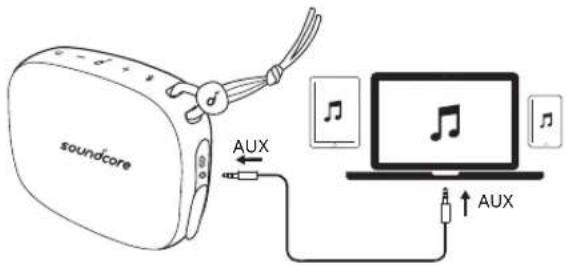
b. AUX-In mode
text_image
soundcore AUX AUX* SoundLine AUX cable sold separately.

Plugging in an audio cable will automatically switch to AUX mode. When using AUX mode, control audio playback via the connected device. True Wireless Stereo mode cannot be used in AUX mode.
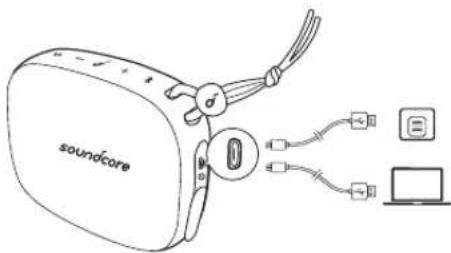
Charging your Soundcore Icon Mini
text_image
soundcore
Slow Flashing Red Low Battery

Solid Red Charging
Off
Fully Charged

Use the included USB cable to charge your Soundcore Icon Mini and make sure it is fully charged before its first use. Disconnect your speaker from the charger when fully charged. Do not charge your speaker for extended periods. When not in use, store your speaker in a cool place.
EN Specifications

Specifications are subject to change without notice.
Input: 5 V ≡ A
Audio output: 3 W
Battery capacity: max. 900 mAh
Charging time: 3 hours
Playtime (varies by volume level and music content): 8 hours
Size: 95 x 76 x 36 mm / 3.7 x 2.9 x 1.4 inch
Weight (without packaging): 215 g / 7.6 oz
Bluetooth version: V4.2
Bluetooth range: 30m/99ft
text_image
soundcore 3s soundcore 3s
True Wireless Stereo-Gruppenmodus starten / True Wireless Stereo trennen

Dimensions: 95 x 76 x 36 mm
text_image
soundcore 3s soundcore 3s
text_image
soundcore 3s soundcore 3s
text_image
soundcore soundcore User's manual soundcoreEt overblik
text_image
soundcore ① ② ③ ④ ⑤ ⑥ ⑦ ⑧1 Tænd/sluk-knap
2 Knappen Volume -
3 Multifunktionsknap
4 Knappen Volume +
5 Bluetooth-knap
6 Statusindikator
7 Micro USB-porL
8 3,5 mm lydindgangsport
DA Sådan bruger du Soundcore Icon Mini
- Tænd/sluk
text_image
soundcoretext_image
soundcore 3s soundcore 3stext_image
soundcore 3s soundcore 3s
text_image
soundcore 3s soundcore 3s
text_image
soundcore soundcore User's manual soundcoreNC Kort oppsummert
text_image
soundcore ① ② ③ ④ ⑤ ⑥ ⑦ ⑧text_image
soundcore 3s soundcore 3s
Koble til True Wireless Stereo-paringsmodus / koble fra True Wireless Stereo

Blinker blätt to True Wireless Stereo-paringsmodus ganger

text_image
soundcore soundcore User's manual soundcoreRU
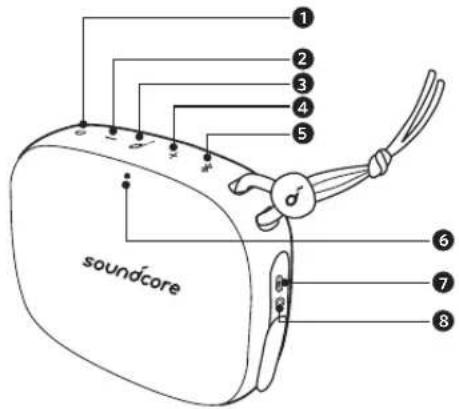
RU Краткий обзор
text_image
soundcore 1 2 3 4 5 6 7 8text_image
soundcore 3s soundcore 3s
text_image
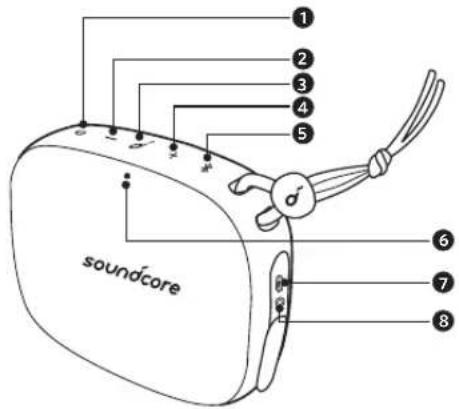
soundcore soundcore User's manual soundcoreJP 外觀
text_image
soundcore 1 2 3 4 5 6 7 8text_image
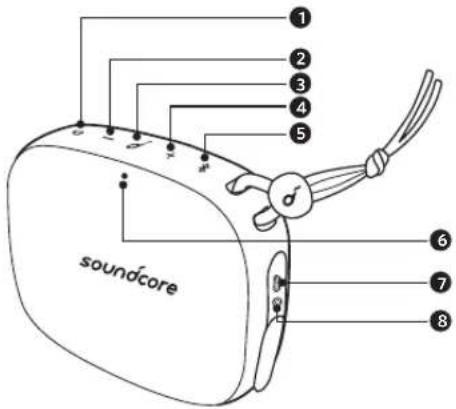
soundcore soundcore User's manual soundcore soundcore개요
text_image
soundcore ① ② ③ ④ ⑤ ⑥ ⑦ ⑧Bluetooth 범위:30m/99ft
安全须知
text_image
soundcore 3s soundcore 3s
text_image
soundcore 3s soundcore 3sAR
Declaration of Conformity
Hereby, Anker Innovations Limited declares that the radio equipment type A3121 is in compliance with Directive 2014/53/EU. The full text of the EU declaration of conformity is available at the following internet address: www.soundcore.com
Maximum output power: 1.0dBm
Frequency band: 2.4G band (2.4000GHz-2.4835GHz)
Anker Innovations Limited
Room 1318-19, Hollywood Plaza, 610 Nathan Road, Mongkok, Kowloon, Hong Kong
FCC Statement
This device complies with Part 15 of the FCC Rules. Operation is subject to the following two conditions: (1) This device may not cause harmful interference, and (2) this device must accept any interference received, including interference that may cause undesired operation.
Warning: Changes or modifications not expressly approved by the party responsible for compliance could void the user's authority to operate the equipment.
Customer Service
Zäkaznický servis | Kundenservice | Kundenservice |カスタマーサポート |Asiakaspalvelu Service Client |Servizio ai Client |Atención al Cliente | Serviço de Apoio ao Cliente Kundservice |Klantenservice |Kundeservice |客服支持|고객 서비스 Обслуживание клиентOA |خمنة العلامة

24-month limited warranty
24 měsíční omezená záruka | 24 máneders begrenset garanti 24 Vonate beschränkte Herstellergarantie | 24 月保証 | 24 kuukauden rajoltetu takuu Garantie limitée de 24 mois | Garantia limitata 24 mesi | Garantia limitada de 24 meses 24 meses de garantia limitada | 24 mándares begränsad garanti 21 maanden beperkte garantie | 24-måneders begrænset garanti | 24个月质保期 24개월 보증 | Ограниченная гарантия на 24 месяцев Uzbekistan 24 مостерина

Lifetime technical support
Doživotní technická podpora | Teknisk støtte i apparatets levetid Lebenslangertrechnischer Support | テクニカルサポート | Elinikäinen tekninen tukli Support technique à vie | Supporto tecnico a vita | Asistencia técnica de por vida Suporte técnico ao longo da vida útil do produto Teknisk support under hela livslängden | Levenslang technisch support Teknisk support under produktets samlede levetid |终身客服支持 Technическая поддержка на весь срок эксплуатации | 挂생 기술 지원 | 加眠ickest Despite 的帮助

service@soundcore.com

+1 (800) 988 7973 (US) Mon-Fri 9:00 - 17:00 (PT) +44 (0) 1604 936200 (UK) Mon-Fri 6:00 - 11:00 (GMT) +49 (0) 69 9579 7960 (DE) Mon-Fri 6:00 - 11:00 +81 03 4455 7823 (日本) 月-金 9:00 - 17:00 +86 400 0550 036 (中国) 同一至周五 9:00 - 17:30 +82 2 6464 7088 (한국) 월\~금 9:00 - 17:30
For FAQs and more information, please visit:
soundcore.com/support


@SoundcoreAudio @soundcoreaudio@soundcoreaud