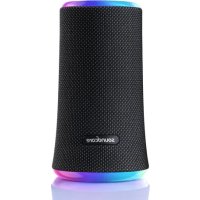
Flare 2 - Docking station soundcore - Free user manual and instructions
Find the device manual for free Flare 2 soundcore in PDF.



| Product Type | Portable Bluetooth Speaker / Audio Docking Station |
| Brand | Soundcore |
| Model | Flare 2 |
| Bluetooth Version | 5.0 |
| Bluetooth Range | 20 meters |
| Output Power | 2 x 10 W |
| Frequency Response | 50 Hz - 20 kHz |
| Power Supply | Rechargeable lithium battery 2600 mAh, 7.4 V |
| Charging | USB-C, 5 V / 2 A |
| Charging Time | 3.5 hours |
| Battery Life | Up to 12 hours (depending on volume and content) |
| Main Functions | Play/Pause, track navigation, bass boost (BassUp), multi-color light effects, PartyCast mode (connect up to 100 speakers), hands-free calls, voice assistant |
| Dedicated App | SoundCore (light effects, equalizer, updates) |
| Maintenance and Cleaning | Wipe with a soft, dry cloth. Do not use corrosive cleaner or oil. |
| Safety | Do not drop, do not disassemble, avoid extreme temperatures. Disconnect during thunderstorms. |
| Package Contents | Flare 2 speaker, USB cable, quick start guide |
Frequently Asked Questions - Flare 2 soundcore
User questions about Flare 2 soundcore
0 question about this device. Answer the ones you know or ask your own.
Ask a new question about this device
Download the instructions for your Docking station in PDF format for free! Find your manual Flare 2 - soundcore and take your electronic device back in hand. On this page are published all the documents necessary for the use of your device. Flare 2 by soundcore.
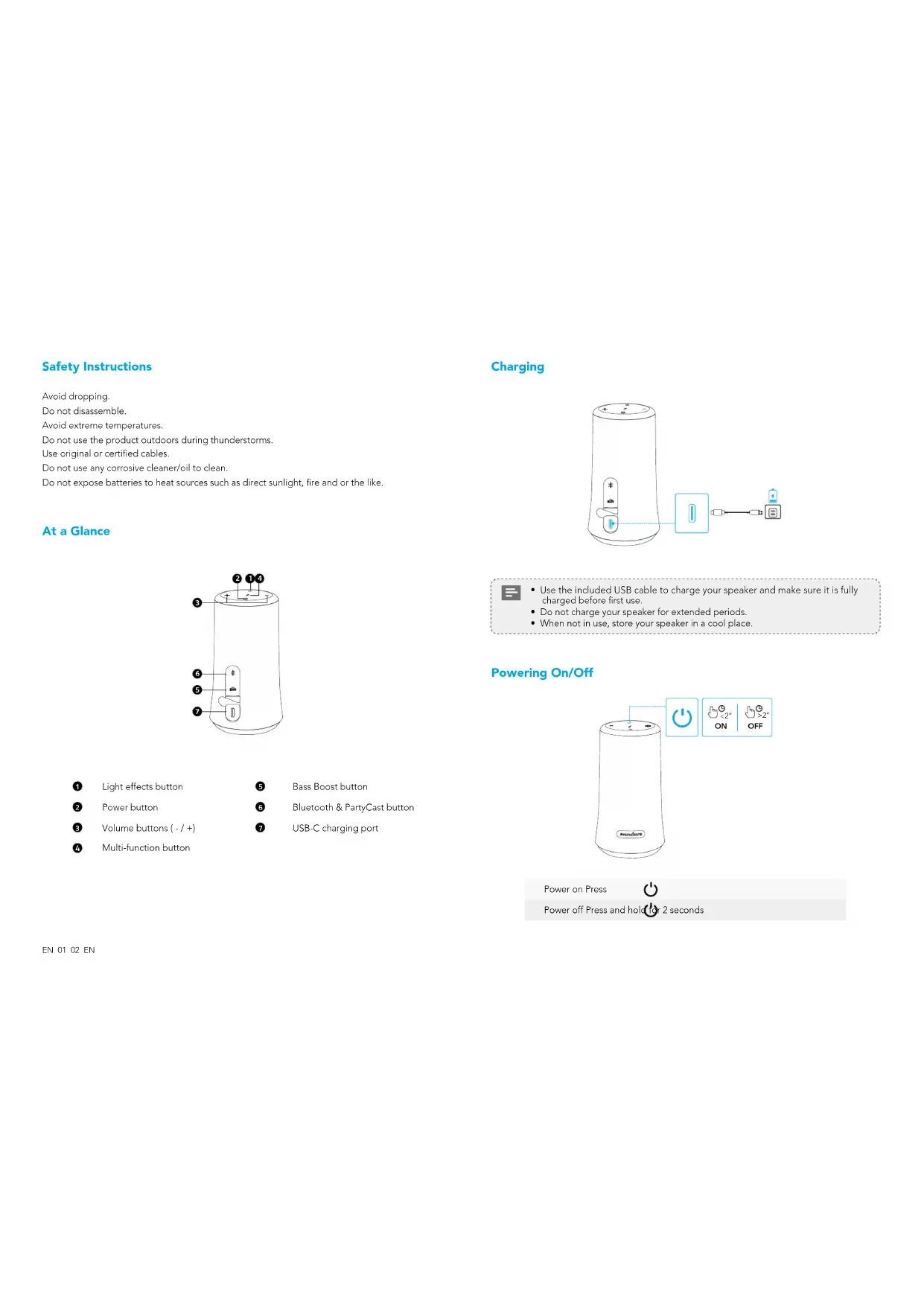
USER MANUAL Flare 2 soundcore
natural_image
Line drawing of a soundcore device with no text or symbols on the body, featuring a cylindrical top and label 'soundcore' at the bottom (no other text or symbols)Soundcore Flare 2
USER MANUAL
Do not use the product outdoors during thunderstorms.
Use original or certified cables.
Do not use any corrosive cleaner/oil to clean.
Do not expose batteries to heat sources such as direct sunlight, fire and or the like.
At a Glance
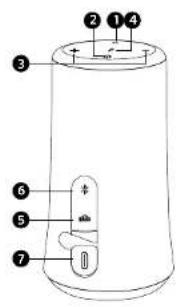
1 Light effects button
5 Bass Boost button
2 Power button
6 Bluetooth & PartyCast button
3 Volume buttons (- / +)
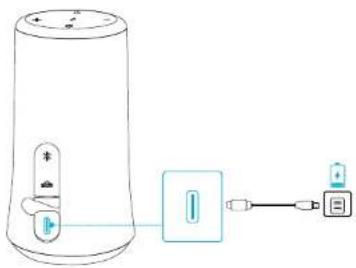
7 USB-C charging port
4 Multi-function button
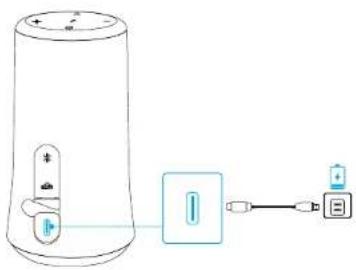
Charging
natural_image
Diagram of a cylindrical device connected to a battery and a USB port, showing signal flow (no text or symbols)
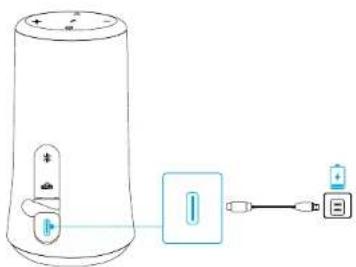
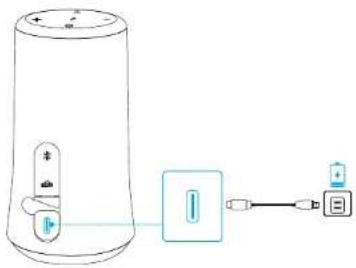
- Use the included USB cable to charge your speaker and make sure it is fully charged before first use.
- Do not charge your speaker for extended periods.
- When not in use, store your speaker in a cool place
Powering On/Off
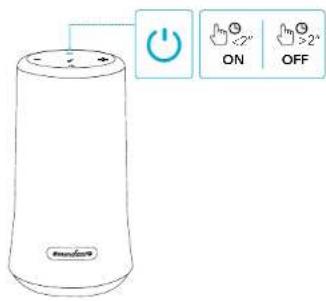
Power on Press

Power off Press and hold for 2 seconds
Bluetooth Pairing
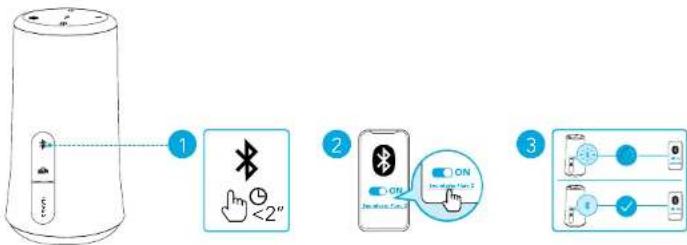

Press Enter Bluetooth pairing mode

Flashing blue Bluetooth pairing

Steady blue Bluetooth connected

- When powered on, the speaker will automatically connect to the last connected device if available within the Bluetooth range. If not, press the Bluetooth button to enter the Bluetooth pairing mode.
- To pair with another device, press the Bluetooth button to re-enter the pairing mode.
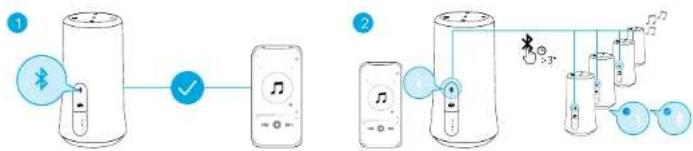
PartyCast Mode
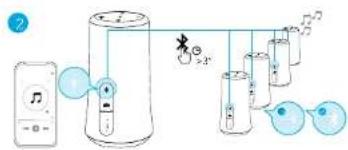
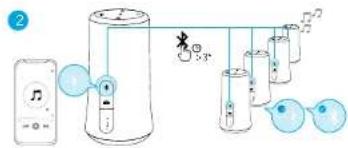
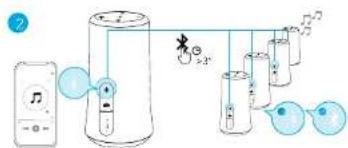
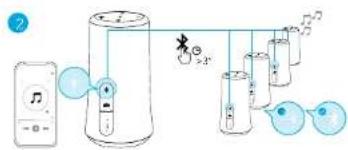
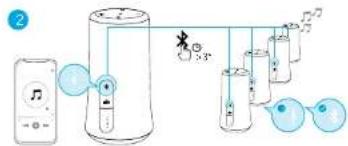
Set up one Flare 2 as the primary speaker and connect it with more than 100+ secondary Flare 2 speakers to control audio and all the light effects.
Set up the primary speaker:
- Connect one Flare 2 speaker to your phone or other devices via Bluetooth. When successfully connected, the Bluetooth LED will turn blue.
- Press and hold the Bluetooth button on this Flare 2 for 3 seconds until you hear a sound and the Bluetooth LED flashes white to indicate this Flare 2 is the primary speaker.

• The Bluetooth LED on the primary speaker will keep flashing white.
Connect with secondary speakers:
- Make sure the secondary speakers aren't connected to any Bluetooth devices.
EN 03 04 EN

- Press the Bluetooth button to disconnect Flare 2 from a device, the Bluetooth LED will flash blue.
- Press the Bluetooth button for 3 seconds until you hear a sound and the Bluetooth LED flashes white to indicate the secondary speaker is in connection mode.
- When the secondary speakers are close to the primary speaker, they will connect to the primary speaker automatically. When successfully connected, the Bluetooth LED on the primary speaker will continue flashing white, while on the secondary speakers will turn white.
flowchart
graph LR
    A["1"] --> B["2"]
    B --> C["3"]
    C --> D["4"]
    D --> E["5"]
    E --> F["6"]
    F --> G["7"]
    G --> H["8"]
    H --> I["9"]
    I --> J["10"]
    J --> K["11"]
    K --> L["12"]
    L --> M["13"]
    M --> N["14"]
    N --> O["15"]
    O --> P["16"]
    P --> Q["17"]
    Q --> R["18"]
    R --> S["19"]
    S --> T["20"]
When successfully enter the PartyCast mode:
- you can power off, adjust the volume, or switch light effects for all speakers by controlling the primary speaker only;
- you can power off or switch light effects for each secondary speaker individually;
- you can't adjust the volume for each secondary speaker individually;
- to exit the PartyCast mode, press the Bluetooth button either on the primary speaker or on the primary speaker for 3 seconds until the Bluetooth LED flashes blue.
Button Controls
| Play / Pause | X1 | Press |
| Next track | X2 | Press twice |
| Previous track | X3 | Press thrice |
| Bass Boost On / Off | BASSX1 | Press |
Volume up / down Press

 | ||
| Answer / End a call |  | Press |
| Reject a call | [70W3] | Press and hold for 2 seconds |
 | ||
| Activate Siri or other voice assistant software |  | Press and hold for 2 seconds |
Light Effects

Download the Soundcore App to check all available light effects.
Turn on / Switch light effects

Turn off

Press
Press and hold for 2 seconds
Soundcore App
Download the Soundcore App for light effects, EQ settings, firmware update and more.
Soundcore


GETITON
Google Play

Download on the
App Store
Google Play and the Google ParLogo are trademarks of Google Inc.
Apple and the Apple logo are trademarks
of Apple Inc.
Specifications
EN 05 06 EN

Specifications are subject to change without notice.
Input 5 V 2 A
Rated output power 2 x 10 W
Battery capacity 2600 mAh, 7.4 V
Charging time 3.5 hours
Playtime (varies by volume level and content) 12 hours
Frequency response 50 Hz - 20 kHz
Bluetooth version V 5.0
Bluetooth range 20 m / 66 ft
Bezpečnostní pokyny
natural_image
Diagram of a cylindrical device connected to a battery and a connector (no text or symbols)
flowchart
graph LR
A["Device with indicator lights"] --> B["Bluetooth icon: <2", Button click"]
B --> C["Smartphone with ON/OFF switch icons"]
C --> D["ON/OFF switch: 1, 2, 3"]

natural_image
Diagram of a cylindrical device connected to a rectangular device with ports and cables (no text or symbols)
Google Play and the Google Play large are trademarks of Google Inc.
Apple and the Apple logo is a mechanism of Apple Inc.
Specifikationer

natural_image
Line drawing of a device with a speaker and connected to a battery (no text or symbols)

Technische Daten
natural_image
Diagram of a portable electronic device connected to a power connector and a USB cable (no text or symbols present)

Πιέστε το κουμπί.
flowchart
graph LR
    A["Device 1"] -->|Wireless Signal| B["Device 2"]
    B -->|Battery Charging| C["Device 3"]
    C -->|Battery Charging| D["Device 4"]
Google Play and the Google Play logo are trademarks of Google Inc.

Προδιαγραφές

natural_image
Diagram of a cylindrical device connected to a battery and a power connector (no text or symbols)
Google Play and the Google Play logo are trade-arks of Google, Inc.

Especificaciones

1 Valotehostepainike
5 Bassotehostepainike
2 Virtapainike
6 Bluetooth- ja PartyCast-painike
natural_image
Diagram of a cylindrical device connected to a battery and a USB port, with no visible text or symbols.
flowchart
graph LR
A["Device"] -->|1| B["Bluetooth Icon: <2", Button: 0.5"]
B --> C["Phone with ON/Off Switch Interface"]
C --> D["OK/Cancel On/OFF Switch Interface"]

Google Play and the Google Play logo are trade-arks of Google, Inc.

Tekniset tiedot

natural_image
Diagram of a cylindrical device connected to a battery and a USB cable, with no visible text or symbols.
flowchart
graph LR
A["Device with indicator lights"] --> B["Bluetooth icon: <2", Button click"]
B --> C["Smartphone with ON buttons: 2x2, 3x2, 4x2"]
C --> D["Analog/Control interface: 0, 1, 2"]

flowchart
graph LR
    A["Speaker with Bluetooth icon"] --> B["Switch"]
    B --> C["Audio jack with musical note"]
    C --> D["Audio jack with microphone"]
    D --> E["Audio jack with audio key"]
    E --> F["Audio jack with audio key"]
    style A fill:#f9f,stroke:#333
    style B fill:#ccf,stroke:#333
    style C fill:#cfc,stroke:#333
    style D fill:#fcc,stroke:#333
    style E fill:#cff,stroke:#333
    style F fill:#ffc,stroke:#333
natural_image
Diagram of a device with a cylindrical container connected to a rectangular device and a separate output port (no text or symbols present)

Specifikációk
natural_image
Diagram of a cylindrical device connected to a battery and a power connector (no text or symbols)
Accensione Premere
natural_image
Diagram of a cylindrical device connected to a rectangular device with ports and cables (no text or symbols)

Druk op de knop
Google Play and the Google Play logo are trade-arks of Google, Inc.
Apple and the Apple logo are trademarks of Apple Inc.
Specifications

1 Lyseffektknapp
2 Av/på-knapp
3 Volum-knapp (- / +)
4 Flerfunksjonsknapp
5 Bassforsterkerknapp
6 Bluetooth- og PartyCast-knapp
7 USB-C-ladekabel
Lader
natural_image
Diagram of a cylindrical device connected to a battery and power supply unit (no text or symbols)

Trykk Gå inn i Bluetooth-paringsmodus

Blinker blätt Bluetooth-paring

Google Play and the Google Play large are trademarks of Google Inc.
Apple and the Apple logo is a mechanism of Apple Inc.
Spesifikasjoner

natural_image
Diagram of a cylindrical device connected to a battery and a power connector (no text or symbols)

Google Play and the Google Play logo are trade-arks of Google, Inc.
Apple and the Apple logo are trademarks of Apple Inc.
Dane techniczne

natural_image
Diagram of a cylindrical device connected to a battery and a power connector (no text or symbols)
Google Play and the Google Play logo are trade-arks of Google, Inc.

Apple and the Apple logo are trademarks of Apple Inc.
Especificações

natural_image
Diagram of a portable electronic device connected to a battery and via a cable (no text or symbols present)
natural_image
Diagram of a cylindrical device connected to a battery and a power connector (no text or symbols)
Google Play and the Google Play logo are trade-arks of Google, Inc.
Apple and the Apple logo are trademarks of Apple Inc.
Technické údaje

natural_image
Diagram of a cylindrical device connected to a battery and a power connector (no text or symbols)
flowchart
graph LR
A["Device with indicator lights"] --> B["Bluetooth <2""]
B --> C["Smartphone with ON status"]
C --> D["Digital lock icon with ON/LOCK icons"]
D --> E["User interface with 'OK' button"]

Pritisnite
Tehnični podatki
1 Ljuseffektsknapp
2 Strömknapp
3 Volymknappar (- / +)
4 Flerfunktionsknapp
natural_image
Diagram of a cylindrical device connected to a battery and a power connector (no text or symbols)

Google Play and the Google Play logo are trade-arks of Google, Inc.

Specifikationer

natural_image
Diagram of a device with a speaker and connected to a battery (no text or symbols present)
flowchart
graph LR
A["Device with indicator lights"] --> B["Bluetooth <2""]
B --> C["Smartphone with ON buttons"]
C --> D["Analog button with ON signal"]
D --> E["Analog button with OFF signal"]

Google Play and the Google Play logo are trade-arks of Google, Inc.

Apple and the Apple logo are trademarks of Apple Inc.
Teknik özellikler

natural_image
Diagram of a cylindrical device connected to a battery and a USB cable, showing signal flow (no text or symbols)
Google Play and the Google Play logo are trade-arks of Google, Inc.

Apple and the Apple logo are trademarks of Apple Inc.
仕様

natural_image
Diagram of a cylindrical device connected to a battery and a power connector (no text or symbols)
flowchart
graph LR
A["Device"] --> B[" notification <2""]
B --> C[" Phone Icon"]
C --> D[" Interface Button 2"]

사양

1 灯光效果按钮
5 低音增强按钮
2 电源按钮
6 蓝牙和 PartyCast 按钮
3 音量按钮(降低/升高)
7 USB-C充电端口
4 多功能按钮
充电
natural_image
Diagram of a cylindrical device connected to a battery and a USB cable, showing signal flow (no text or symbols)
flowchart
graph LR
A["Device Start"] --> B["Bluetooth Icon: <2", Time Indicator: 1"]
B --> C["Phone Icon: ON, Off Switch Interface"]
C --> D["ON/Off Switch Interface"]

按下进入蓝牙配对模式

蓝色闪烁蓝牙配对

蓝色常亮 蓝牙已连接

产品参数
natural_image
Diagram of a cylindrical device connected to a battery and a power connector (no text or symbols)
flowchart
graph LR
A["Device Start"] --> B["Bluetooth Icon: <2""]
B --> C["Phone with ON/OFF Switch Icon"]
C --> D["Device End"]

按下進入藍牙配對模式

閃爍藍燈 藍牙配對

持續亮起藍燈 藍牙已連線

Google Play and the Google Play large are trademarks of Google Inc.


Apple and the Apple logo are trademarks of Apple Inc.
規格

規格可能隨時變更,恕不另行通知。
输入5V 2A
-
額定輸出功率 2×10W
電池容量 2600 mAh,7.4 V
充電時間 3.5 小時
natural_image
Diagram of a device with a cylindrical container connected to a battery and a separate connector (no text or symbols)
flowchart
graph LR
A["Device with indicator lights"] --> B["1: Bluetooth icon <2""]
B --> C["2: Bluetooth icon with ON/OFF signal"]
C --> D["3: Connection icons with ON/OFF labels"]

Pressione Acesse o modo de emparelhamento Bluetooth

Luz azul piscante Emparelhamento Bluetooth

Luz azul constante Bluetooth conectado

Google Play and the Google Play logo are trade-offs of Google Inc.

Apple and the Apple logo are trademarks of Apple Inc.
Especificações

زر تعزيز الصوت
5
زر تأثيرات الإضاءة
1
PartyCast, Bluetooth
6
زر الطاقة
2
natural_image
Diagram of a cylindrical device connected to a battery and a USB port, with no visible text or symbols.Google Play and the Google Play logo are read-anka of Google Inc.
Apple and the Apple logo are trademarks of Apple Inc.
المواصفات
PartyCast-1 Bluetooth
USB-C
5
הכלהה
6
הכלה
7
(+ / -) 3
'הכלה-הכלה'
natural_image
Diagram of a device with a speaker and connected to a battery and an external connector (no text or symbols)בְרַעָה
| V=2 A 5 | ### |
| x 10 W 2 | ### |
| mAh, 7.4 V 2600 | ### |
| ### 3.5 | ### |
| ### 12 | ### (###) |
| Hz - 20 kHz 50 | ### |
| V 5.0 | Bluetooth |
| ### 66/### 20 | Bluetooth |


- At a Glance
- Charging
- Powering On/Off
- Bluetooth Pairing
- PartyCast Mode
- Set up the primary speaker:
- Connect with secondary speakers:
- When successfully enter the PartyCast mode:
- Button Controls
- Light Effects
- Soundcore App
- Specifications
- Bezpečnostní pokyny
- Specifikationer
- Προδιαγραφές
- Especificaciones
- Tekniset tiedot
- Specifikációk
- Lader
- Spesifikasjoner
- Dane techniczne
- Especificações
- Technické údaje
- Tehnični podatki
- Teknik özellikler
- 仕様
- 사양
- 充电
- 产品参数
- 規格
- المواصفات
Brand : soundcore
Model : Flare 2
Category : Docking station