EasyManual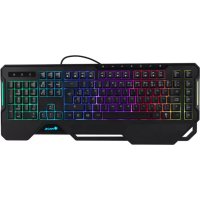
GKX450 - Keyboard NGS - Free user manual and instructions
Find the device manual for free GKX450 NGS in PDF.


User questions about GKX450 NGS
0 question about this device. Answer the ones you know or ask your own.
Ask a new question about this device
Download the instructions for your Keyboard in PDF format for free! Find your manual GKX450 - NGS and take your electronic device back in hand. On this page are published all the documents necessary for the use of your device. GKX450 by NGS.
USER MANUAL GKX450 NGS
I NORSK I SUOMI I SVENSKA I DANSK I LIETUVIŲ
Press the REC key The LED indicators will flash Press the macro key you want to record “G1 / G2 / G3 / G4 / G5” Press the keys you want to appear in the configuration of that macro key. Press the REC key to exit the Macro keystroke recording mode. Note: After 30 seconds of inactivity or 30 bytes, it will automatically exit the recording mode.ENGLISH
PROGRAMMING OF KEYS WITH THE SOFTWARE
Each key can be programmed in various different ways, follow the steps in the section that corresponds to the mode that you think is appropriate for each key.ENGLISH
SINGLE KEY Select the key you want to change the current one to, press OK and then save its settings.USER’S MANUAL
MACRO SETTING Select a key that has been edited or create a new one. Press M1, then REC and press the desired macro key you want to record onto. Finally, press REC to finish the recording Note: The LED indicators will flashENGLISH
MULTIMEDIA Select from the options that appear on the drop-down menu, press OK and save the settings.USER’S MANUAL
FUNCTION Select from the options that appear on the drop-down menu, press OK and save the settings.ENGLISH
If at any time in the future you should need to dispose of this product please note that: Waste electrical products should not be disposed of with household waste. Please recycle where facilities exist. Check with your Local Authority or retailer for recycling advice. (Waste Electrical and Electronic Equipment Directive) Special keys with padded touch for games 104 backlit keys 19 multimedia keys 5 macro keys RGB lights of up to 16.8 million colours Wrist support
1.8 m braided cable ±10%
Compatible with video game consoles via USB port