RG360 - Smartphone RugGear - Free user manual and instructions
Find the device manual for free RG360 RugGear in PDF.



| Product Type | Rugged Smartphone |
| Brand | RugGear |
| Model | RG360 |
| Power Supply | Rechargeable lithium-ion battery via USB-C (5V/1A) |
| Operating Temperature | -10°C to 50°C |
| Charging Temperature | +0°C to +45°C |
| Connectivity | USB-C, 3.5mm headphone jack, Bluetooth, Wi-Fi (not specified), dual SIM (micro-SIM), microSD |
| Dedicated Buttons | SOS, PTT/Customization, Power, Volume, Android 3 (Home/Apps/Back) |
| Main Functions | Multifunction alarm (LWP), Talkback, rear camera, speaker, main and secondary microphone, belt clip |
| Water and Dust Resistance | Rubber gaskets for protection against water and dust |
| Maintenance | Clean with a soft, damp, antistatic cloth, no chemicals |
| Safety | Do not open the device, repairs by authorized specialists, keep a safety distance of 15 cm from pacemakers |
| Spare Parts and Repairability | Removable battery, access to SIM and microSD cards, fixing screws |
| Recycling | Do not dispose of with household waste, take to an approved collection center |
| SAR Certification | Maximum value head: 0.816 W/kg, body: 0.774 W/kg (distance 5 mm) |
| Warranty | Visit www.RugGear.com for details |
Frequently Asked Questions - RG360 RugGear
User questions about RG360 RugGear
0 question about this device. Answer the ones you know or ask your own.
Ask a new question about this device
Download the instructions for your Smartphone in PDF format for free! Find your manual RG360 - RugGear and take your electronic device back in hand. On this page are published all the documents necessary for the use of your device. RG360 by RugGear.
USER MANUAL RG360 RugGear
4th Floor, A Section, Languang Science&technology
Building, No.7 Xinxi RD, Hi-Tech Industrial Park North,
Nanshan District, ShenZhen, P.R.C
ENGLISH
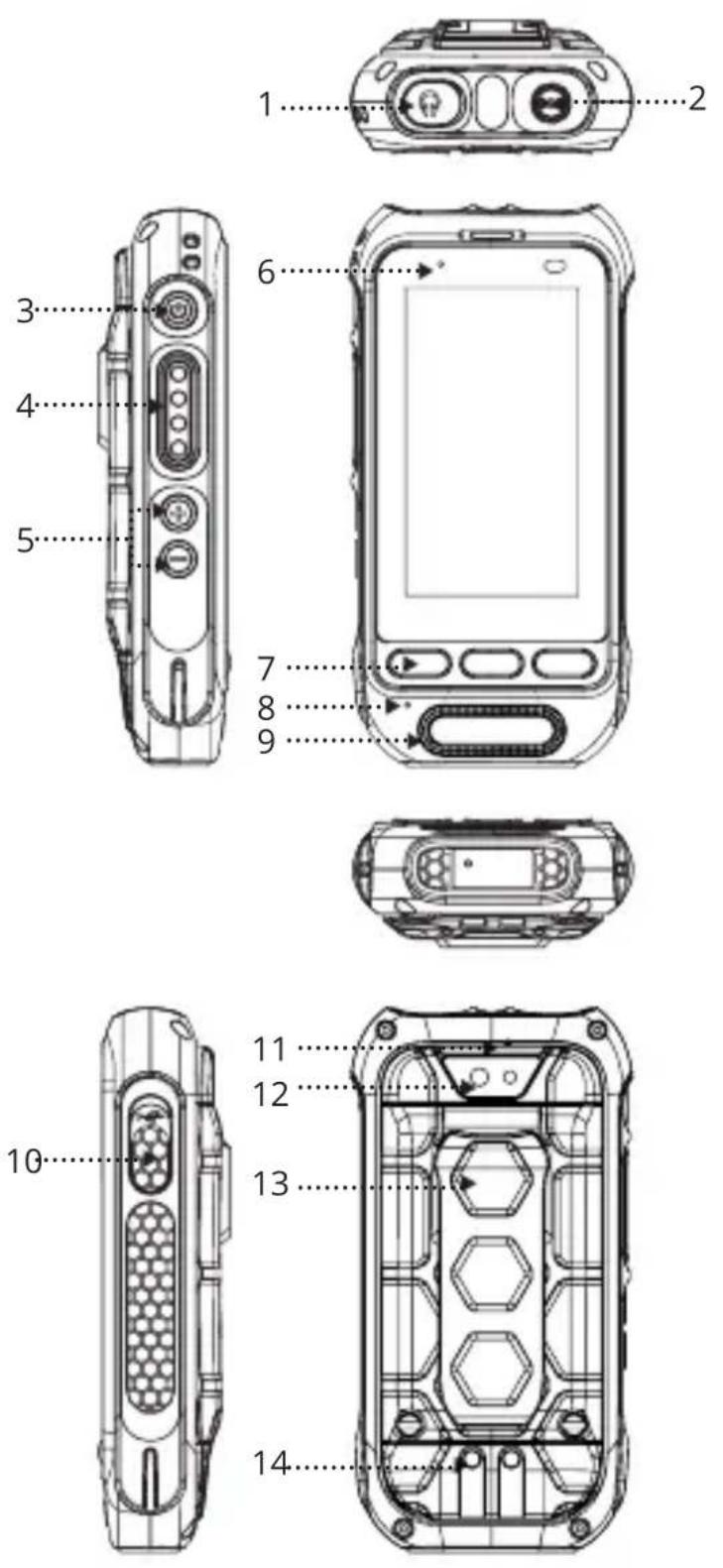
1. KEYS AND FEATURES (SEE ILLUSTRATION ON PAGE 3)
1.3.5mm audio jack:Connect to the 3.5mm headphone or the 3.5mm wired hand microphone
2_SOS key: Long pressing it for 3 sec to trigger SOS function and it will automatically select an emergency number stored by you. This function can only be used together with an optionally available LWP app.
3_Power button: Long press to power ON or OFF the device. Short press to turn ON or OFF the display
4_PTT/customized button : Custom sidekey, please refer to part 8.1
5_Volume buttons: Volume up/Volume down.
6_LED indicator: indicates charging and notification.
7Android 3 key:Home key/Recent application/Return key.
8(Main Mic: used for calling, PTT talking or recording
9_Loudspeaker
10_USB interface: Type-C interface for mobile phone charging and data transfer.
11_Sub-Mic: noise reduction and used for hands-free calls
12 Rear camera
13_Waist clip
14_Pogo desk charger
2. INTRODUCTION
This document contains information and safety regulations that must be observed for the safe operation of device RG360 under the described conditions. Non-observation of information and instructions can have serious consequences and may violate regulations.Please read the manual and these safety instructions before using the device.In the case of any doubt, the English version takes precedent.The current EU declaration of conformity, certificates, safety instructions and manuals can be found at www.RugGear.com or can be requested from Power Idea Technology (Shenzhen) Co., Ltd.
3. RESERVATION
The content of this document is presented as it currently exists. Power Idea Technology (Shenzhen) Co., Ltd. does not provide any explicit or tacit guarantee for the accuracy or completeness of the content of this document, including, but not restricted to, the tacit guarantee of market suitability or fitness for a specific purpose unless applicable laws or court decisions make liability mandatory.
Power Idea Technology (Shenzhen) Co., Ltd. reserves
the right to make changes to this document or to withdraw it any time without prior notice. Changes, errors and misprints may not be used as a basis for any claim for damages. All rights reserved.
Power Idea Technology (Shenzhen) Co., Ltd. cannot be held responsible for any data or other loss and direct or indirect damages caused by any improper use of this device.
EN
4. EU DECLARATION OF CONFORMITY
The EU declaration of conformity can be found at the end of this manual.

5.SAFETY ADVICE
-
Do not touch the screen of the device with sharp objects. Dust particles and fingernails can scratch the screen. Keep the screen clean. Gently remove dust from the screen with a soft cloth and do not scratch the screen.
-
Do not leave the device in environments with excessive temperatures, as this could lead to the battery overheating, resulting in fire or explosion.
-
Do not charge the device near any flammable or explosive substances.
-
Only charge the device in dry indoor conditions.
-
Do not charge the device in dusty or humid environments.
-
Do not use the device in any areas where use is prohibited by regulations or legislation.
-
Do not expose the device or charger to strong magnetic fields, such as those emitted from induction ovens or microwaves.
-
Do not attempt to open or repair the device. Incorrect repair or opening can lead to the destruction of the device, fire or explosion.
-
Only authorized personnel are permitted to repair the device.
-
Only use accessories approved by Power Idea Technology (Shenzhen) Co., Ltd.
-
Power off the device in hospitals or other places where the use of mobile phones is prohibited This device may adversely affect medical equipment, such as pacemakers.
-
Always keep a distance of at least 15cm between the device and such equipment.
-
Make sure the volume level is not set at an excessive level when connecting earphones and headphones to protect your hearing.
-
Observe all corresponding laws that are in force in the respective countries regarding

the use of devices while operating a vehicle.
- Power off the device and disconnect the charging cable before cleaning the device.
- Do not use any chemical cleaning agents to clean the device or the charger.
- Use a damp and anti-static soft cloth for cleaning.
- The adapter must be installed near the equipment and be easily accessible.
The device must only be connected to a USB interface, version USB2.0. - Do not discard old and abandoned lithium batteries into household waste, take them to a designated waste disposal point.
- The user is solely liable for any and all damages and liabilities caused by malware downloaded when using the network or other data-exchange functions of the device. Power Idea Technology (Shenzhen) Co., Ltd. cannot be held responsible for any such claims.
Warning
Power Idea Technology (Shenzhen) Co., Ltd. will not assume any liability for damage caused by disregarding any of this advice or by any inappropriate use of the device.
6. BATTERY
There is a risk of explosion if the battery is replaced by an incorrect type. Dispose the used batteries according to the instructions.
7. PREPARATION
7.1 Inserting the battery/ the Micro SIM card and Micro SD card
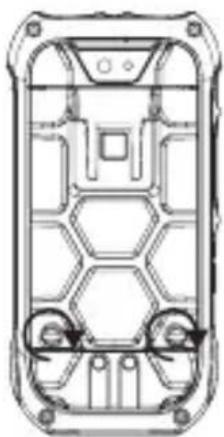
7.1.1 Rotate the battery assembly screw with a screwdriver as shown in the picture then remove the battery.
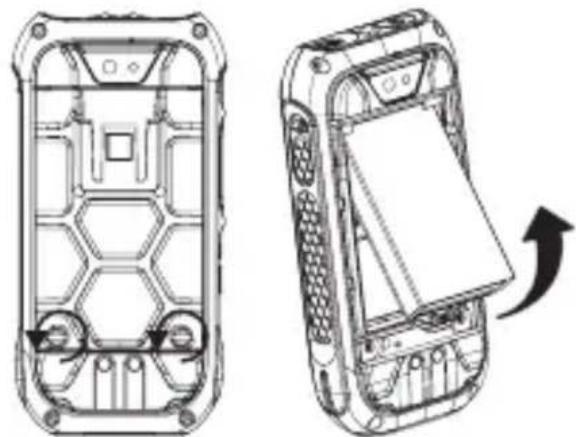
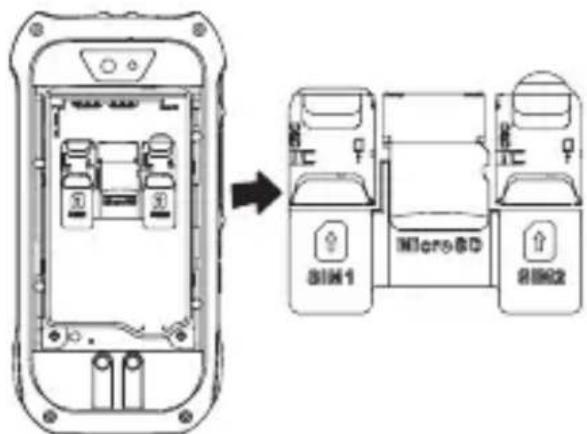
7.1.2 Insert the nano SIM card and Micro SD card as shown in the picture.

7.1.3 After the cards are inserted, press the battery into the battery compartment.

7.1.4 Close the battery cover and rotate the battery cover screw clockwise.
EN
Note:
Make sure that the rubber cover on the earphone and UEBconmctor of the device are fully sealed to ensure complete waterproofing and dustproofing. No special declaration will be made in the future.
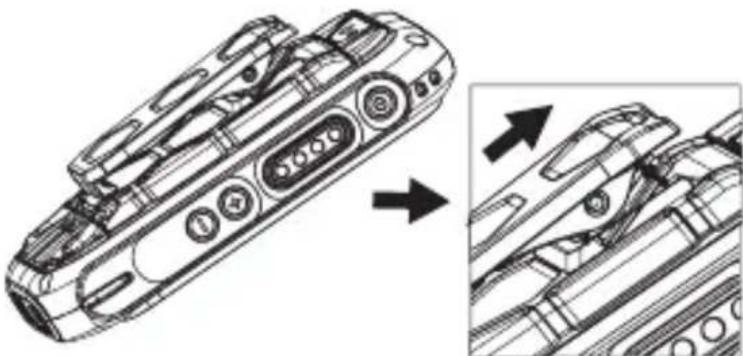
7.2. Attaching and removing the waist clip
Attaching and removing the waist clip
7.3 CHARGING
The RG360 supports 5V/1A charging, Only use valid RugGear licensed chargers and cables because unlicensed products may cause the battery to explode or damage the device.
The device must only be charged in an ambient temperature range of +0^ to +45^ . The normal operating temperature of this mobile phone is -10^ to 50^ .

8. Function introduction
8.1 PTT/Customized button
The PTT button also acts as the customize function keys, so you can choose and modify the features that you want
to. When using it for the first time, it must be set it in your APP (CustomKey), as below

EN
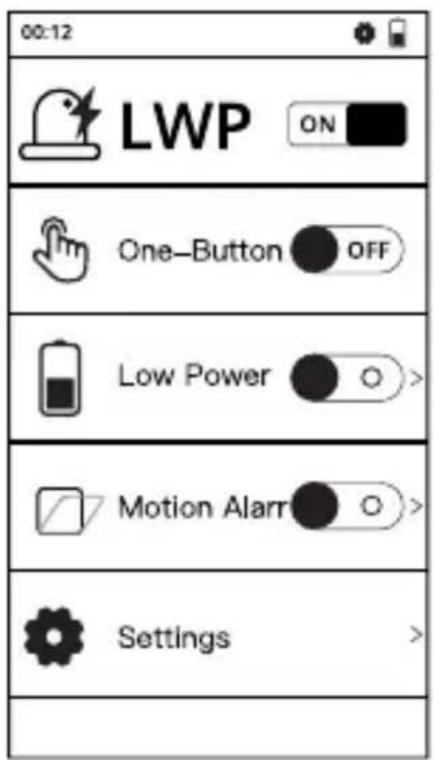
8.2 Lone Worker Protection (LWP)
The LWP is to protect workers from the risks associated with working alone via phone calls or SMSs.
- Default password: 1122.
- After opening the application for the first time, a default phone number is required to be set for the alarm.
- If the mobile phone uses two SIM cards, a default phone number is required to be set for calling/SMS.
9. RECYCLING
The crossed-out wheelie-bin symbol on the product, battery, literature, or packaging is a reminder that all electrical and electronic products, batteries, and accumulators must be taken to separate collection points at the end of their working life. This requirement applies in the European Union. Do not dispose of these products as unsorted municipal waste. Always return used electronic products, batteries, and packaging
materials to dedicated collection points. This helps prevent uncontrolled waste disposal and promotes the recycling of materials. More detailed information is available from the product retailer, local waste authorities, national producer responsibility organisations, or your local Power Idea Technology (Shenzhen) Co., Ltd. representative.

10. INFORMATION concerning CE SAR certification (Specific Absorption Rate)
The SAR limit of Europe is 2.0W/ kg for the head and Body, 4.0W/kg for the limbs. The device has been tested against this SAR limit. The highest SAR value reported under this standard during product certification for use at the ear is 0.816W/kg and when correctly worn on the body is 0.774W/kg,limbs is 1.453W/kg. This device was tested for typical body
worn operations with the back of the handset kept 5mm from the body. The device complies with RF specifications when used at 5mm from the body. Belt clips, holsters and similar accessories used should not contain metallic components in the assembly. The use of accessories that do not satisfy these requirements may not comply with RF exposure requirements, and should be avoided.
EN
11. TRADEMARKS
All other trademarks and copyrights are the properties of their respective owners.
12. WARRANTY
- European customers, please check: https://ruggear.com/warranty-terms/
- Customers in the Americas, please check: https://ruggear.com/terms-and-conditions-americas/
- For FCC information, please go to www.RugGear.com under the "Support" section.
FRANÇAIS
7.1.2 Install the Micro SIM card and Micro SD card as picture showed.
- For European customers please check: https://ruggear.com/warranty-terms/
For Customers in Americas please check: https://ruggear. com/terms-and-conditions-americas/
- Per i clienti europei, controllare: https://ruggear.com/warranty-terms/
Per i clienti nelle Americhe, controllare: https://ruggear.com/terms-and-conditions-américas/.
7.1.3 BCTaBnB KapTbI, BCTaBbTe 6atapeo o6paTHo B 6atapeHbI OtceK.
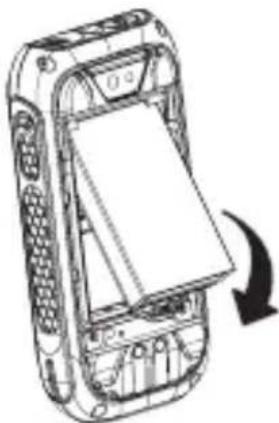
RU
7.1.4 3akpoIte KpbIuKy 6aTapeHoro OTceKa n 3aTAHnTe BnHT KpbIuKn 6aTapeHoro OTceKa no yacobov CTpeIke.
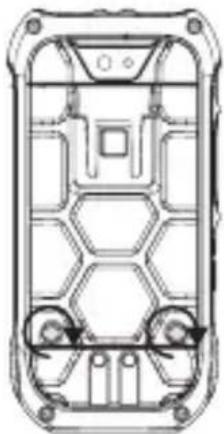
PnmuMeuHne.
Y6eHntecb,уTo pe3nHOBbIe KoxyN rHe3da nIa HayuHnKOB u USB-pa3bema yCTpoiCTBa noJIHoCTbIO repMeTnUHbI u ObecneuHaOT erO BDO- n IblJeHepOnHuaemocTb.
Danee 3TO OTdEJIbHO ynomHaTbcr He 6yJeT.
7.2.YctaHOBka npa36Opka 3axmApJkpenJIeHnA
K NORCHOMY pEMHIO

7.3 3APRAKA
Power Idea Technology (Shenzhen) Co., Ltd. is
aaii iiaaii aaii iaiiiie
aaii i 1
y
1
jia 1go jiaiuiyai 1go yin
jbjjial jie jieall jai
a a a a a a a a a a a a a a a a
cysyollolololololololololololololololololololololololololololololololololololololololololololololololololololol
jlll jll lJ 15 Jd jdl
aaii i 1
aaiiill aiee i 10
a a a a a a a a a a a a a a a a a a a a a a a a
.USB2.0JUUSUBa
Lalj j sJg aagall g aagall g aagall y
. 1
i 100000000000000000000000000000000000000
Jalj tllb j kaii aie iie y jit gill jilall Jai
as j. jzll ssjCul
Clll ball oio joc i ci ij jn
- Power Idea Technology (Shenzhen) Co., Ltd.
Power Idea Technology (Shenzhen) Co., Ltd. is a joint venture company
ililil 1000
jie 1
A. 1,2,3,4,5,6
jai jg jbjn 10i jgi jgi jgi jgi jgi jgi jgi jgi jgi jgi jgi jgi jgi jgi jgi jgi jgi jgi jgi jgi jgi jgi jgi jgi jgi jgi jgi jgi jgi jgi jgi jgi jgi jgi jgi jgi jgi jgi jgi jgi jgi jgi jgi jgi jgi jgi jgi jgi jgi jgi jgl
Clllill, aalaaalll llll no
1.2.3.7
.3.1111111111111111111111111111111111111111111111111111
pai jssall gaaagaaaslaaiaipnly aajlll aagaaegejrl7.1.1
aj bj c_j


AR
.000000000000000000000000000000000000000000000000000000000000000000000

yjlll jSo JdJyjllgie biai, cillbail 7.1.3

aclll ojie oy jyjall cbe g yj yjblc bte 7.1.4

左向右异
USB 1 aclal blll 1 j 5
i
45g ydi 7.2
S OBC = S BOC + S_ CBA

7.3
RugGear jn 1/5 nLg RG360
y
45+0+ 0+ 0+ 0+ 0+ 0+ 0+ 0+ 0+ 0+ 0+ 0+ 0+ 0+ 0+ 0+ 0+ 0+ 0+ 0+ 0+ 0+ 0+ 0+ 0+ 0+ 0+ 0+ 0+ 0+ 0+ 0+ 0+ 0+ 50+10- y Jn all lglall Jn all Jn all Jn all Jn all Jn all Jn all Jn all

AR
aill 8
J/PTT .8.1
jag aaiall gll jia jia 1 pTT gai jai
gai jai iis iis iis iis iis iis iis iis iis iis iis

(LWP) 8.2
i 1111111111111111111111111111111
.1122: 4a
aill jai jai jai jai jai jai jai jai jai jai jai jai jai jai jai jai jai jai jai jai jai jai jai jai jai jai jai jai jai jai jai jai jai jai jai jai jai jai jai jai jai jai jai jai jai jai jai jai jai jai jali jali jali jali jali jali jali jali jali jali jali jali jali
j 3
a

jiee jieeall jieyjaiy jieiialle g yjaiai iiaai aai jai
Clllal
gai jiy la yac aydi ic alaaia ac gao 1i cai jall
00 000000000000000000000000000000000000
Aeioa yie aia Caiaiis ciiall.
aag cjjjll jaiiill aij jil l iiaai
a jll oia iclw, lai aiaial gail jla qil
al gall ydi sale! g jy jy aasall yge clll lno yaliell gao.
aaiall ciilll iialal gaii all gni no aiaia ayaiill clogleall no yjno
https://ruggear.com/warranty-terms
: 10
https://ruggear.com/terms-and-conditions-americas
www.RugGear.com FCC
"ac dll" aaaa 4aee
MAXIMUM OUTPUT POWER
| Frequency bands | Maximum output power |
| GSM 850 | 32dBm |
| GSM 900 | 32.72dBm |
| GSM 1800 | 28.28dBm |
| GSM 1900 | 29.66dBm |
| WCDMA Band 1 | 21.32dBm |
| WCDMA Band 2 | 21.43dBm |
| WCDMA Band 4 | 21.86dBm |
| WCDMA Band 5 | 22.38dBm |
| WCDMA Band 8 | 22.25dBm |
| FDD-LTE Band 1 | 21.51dBm |
| FDD-LTE Band 2 | 21.95dBm |
| FDD-LTE Band 3 | 22.48dBm |
| FDD-LTE Band 4 | 22.48dBm |
| FDD-LTE Band 5 | 22.69dBm |
| FDD-LTE Band 7 | 21.38dBm |
| FDD-LTE Band 8 | 22.69dBm |
| FDD-LTE Band 20 | 22.88dBm |
| FDD-LTE Band 28 | 23.21dBm |
| TDD-LTE Band 38 | 22.91dBm |
| TDD-LTE Band 40 | 22.92dBm |
| TDD-LTE Band 41 | 22.82dBm |
| BT | 5.83(EIRP) |
| WIFI | 17.6(EIRP) |
| NFC(13.56MHz) | 54.44(dBμV/m) |
The device for operation in the band 5150-5250 MHz is only for indoor use to reduce the potential for harmful interference to co-channel mobile satellite systems.
RugGae
EU - Declaration of Conformity
according to directives 2014/53/EU and 2011/65/EU (2015/863/EU)
The company Power Idea Technology (Shenzhen) Co., Ltd. declares under its sole responsibility that the product to which this declaration relates is in accordance with the provisions of the following data, directives and standards:
| Name & address of the manufacturer | Power Idea Technology (Shenzhen) Co., Ltd. 4th Floor, A Section, Languang Science&technology Building, No.7 Xinxi RD, Hi-Tech Industrial Park North, Nanshan District, ShenZhen, P.R.C |
| Description of the device: | LTE SMARTPHONE |
| Type designation(s): PSLOSS | |
| Trademark: | RugGear |
| Conformity statement 2014/53/EU issued by | PHOENIX TESTLAB GmbH Königswinkel 10 D-32825 Blomberg, Germany |
| Conformity statement 2015/863/EU amending 2011/65/EU issued by | SHENZHEN MORLAB COMMUNICATIONS TECHNOLOGY Co., Ltd. FL1-3, Building A, FeiYang Science Park, No.8 LongChang Road, Block67, BaoAn District, ShenZhen, GuangDong Province, P. R. China |
| Applied harmonized standards ETSI EN 301 489-1 V2.2.3; ETSI EN 301 489-3 V2.1.1 Final draft ETSI EN 301 489-17 V3.2.3; ETSI EN 301 489-19 V2.1.1; Draft ETSI EN 301 489-52 V1.1.0; ETSI EN 301 511 V12.5.1; ETSI EN 301 908-1 V13.1.1; ETSI EN 301 908-2 V11.1.2; ETSI EN 301 908-13 V13.1.1; ETSI EN 300 330 V2.1.1; ETSI EN 300 328 V2.2.2; ETSI EN 301 893 V2.1.1; ETSI EN 300 440 V2.2.1; EN 50360:2017;EN 50566:2017; EN 62209-1 :2016;EN 62209-2:2019;EN 50663:2017 EN 62368-1:2014+A11:2017; EN 50332-2:2013; | |
Signed for and on behalf of:
Shenzhen, 27/10/2020
Place and date of issue
Alex Ma, R&D Director
This device is restricted to indoor use where operated in the European Community using frequency in 5150MHz-5350MHz to reduce the potential for interference.
| AT | BE | BG | HR | CY | CZ | DK |
| EE | FI | FR | DE | EL | HU | IE |
| IT | LV | LT | LU | MT | NL | PL |
| PT | RO | SK | SI | ES | SE | UK |
| CH | IS | LI | NO | TR |
Power Idea Technology (Shenzhen) Co., Ltd.
4th Floor, A Section, Languang Science& technology Building, No.7 Xinxi RD, Hi-Tech Industrial Park North, Nanshan District, ShenZhen, P.R.C
www.RugGear.com