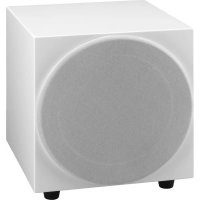
ESUB8FWS - Subwoofer Monacor - Free user manual and instructions
Find the device manual for free ESUB8FWS Monacor in PDF.



| Product type | Active subwoofer |
| Brand | Monacor |
| Model | ESUB8FWS |
| Speaker | 20 cm (8") |
| RMS power | 50 W |
| Maximum power | 90 W |
| Frequency response | 30 – 250 Hz |
| Maximum sound pressure | 105 dB |
| Low-pass filter | 50 – 250 Hz, 12 dB/octave |
| Line inputs (LINE IN) | Stereo RCA, sensitivity 185 mV, impedance 9 kΩ |
| Speaker inputs (HIGH LEVEL IN) | Screw terminals with 4 mm banana plug, sensitivity 4 V, impedance 480 Ω |
| Outputs | LINE OUT (RCA), HIGH LEVEL OUT (screw terminals) |
| Power supply | 230 V / 50 Hz |
| Maximum power consumption | 152 VA |
| Standby power consumption | 0.8 VA |
| Operating temperature | 0 – 40 °C |
| Dimensions (W × H × D) | 300 × 330 × 340 mm |
| Weight | 9.8 kg |
| Adjustments | Volume, Crossover, Phase, Auto standby mode |
| Cleaning | Dry, soft cloth, no chemicals or water |
| Use | Indoor only |
Frequently Asked Questions - ESUB8FWS Monacor
User questions about ESUB8FWS Monacor
0 question about this device. Answer the ones you know or ask your own.
Ask a new question about this device
Download the instructions for your Subwoofer in PDF format for free! Find your manual ESUB8FWS - Monacor and take your electronic device back in hand. On this page are published all the documents necessary for the use of your device. ESUB8FWS by Monacor.
USER MANUAL ESUB8FWS Monacor
ESUB-8F/WS
English ...... Page 8
Français ...... Page 12
HIGH LEVEL IN

HIGH LEVEL OUT
Aktiv-Subwoofer
These operating instructions are intended for users with basic knowledge in audio technology. Please read the instructions carefully prior to operating the unit and keep them for later reference.
All operating elements and connections described can be found on the fold-out page 3.
Contents
1 Operating Elements and Connections 8
2 Safety Notes 9
3 Applications....9
4 Setting Up and Connecting ..... 9
4.1 Stereo input LINE IN ..... 9
4.2 Stereo input HIGH LEVEL IN ..... 10
4.3 Power supply ..... 10
5 Operation 10
6 Specifications 11
1 Operating Elements and Connections
1 POWER LED green subwoofer in operation red subwoofer in standby mode
2 VOLUME control
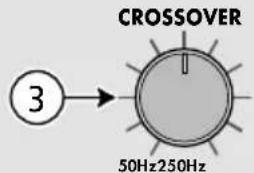
3 CROSSOVER control to adjust the cutoff frequency (50 - 250 Hz) of the low pass filter
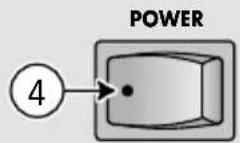
4 POWER switch
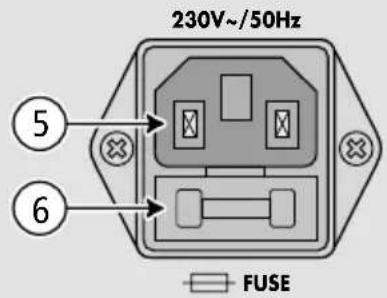
5 Mains jack for connection to a mains socket (230 V/50 Hz) by means of the mains cable provided
6 Support for the mains fuse; always replace a blown fuse by one of the same type
7 Stereo signal input LINE IN (RCA jacks)
8 Feed-through output LINE OUT to route the signals available at the jacks LINE IN to the amplifier of a speaker system, for example
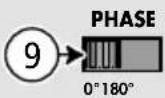
9 PHASE reversal switch
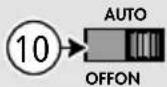
10 Selector switch position OFF: always in standby mode position ON: always in operation position AUTO: switching between the modes operation and standby depending on the signal level
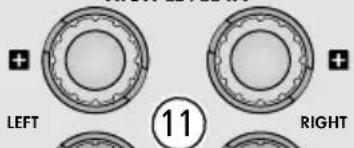
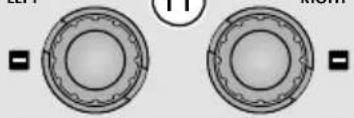
11 Stereo signal input HIGH LEVEL IN for connection to the speaker output of an amplifier There are banana jacks under the protective caps of the screw terminals.
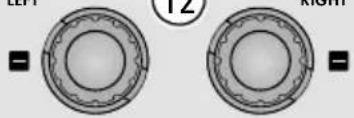
12 Feed-through output HIGH LEVEL OUT, connected to the corresponding jacks HIGH LEVEL IN (11), for connecting the other speakers There are banana jacks under the protective caps of the screw terminals.
2 Safety Notes
This unit corresponds to all relevant directives of the EU and is therefore marked with C€
WARNING
The unit uses dangerous mains voltage. Leave servicing to skilled personnel only. Inexpert handling or modification of the unit may result in electric shock.
- The unit is suitable for indoor use only. Protect it against dripping water and splash water, high air humidity and heat (admissible ambient temperature range 0–40°C).
- Do not place any vessel filled with liquid on the unit, e. g. a drinking glass.
- The heat generated inside the unit must be dissipated by air circulation. Do not cover the air vent (bass-reflex opening).
- Do not operate the unit or immediately disconnect the mains plug from the socket
- if the unit or the mains cable is visibly damaged,
- if a defect might have occurred after the unit was dropped or suffered a similar accident,
- if malfunctions occur.
In any case the unit must be repaired by skilled personnel. - Never pull the mains cable to disconnect the mains plug from the socket, always seize the plug.
- For cleaning only use a dry, soft cloth; never use water or chemicals.
- No guarantee claims for the unit and no liability for any resulting personal damage or material damage will be accepted if the unit is used for other purposes than originally intended, if it is not correctly connected or operated, or if it is not repaired in an expert way.
If the unit is to be put out of operation definitively, take it to a local recycling plant for a disposal which is not harmful to the environment.
3 Applications
This compact active subwoofer is used as a low-frequency complement of existing audio systems for hi-fi applications, home cinema and home recording applications. It is equipped with a 20 cm (8") bass speaker. Its amplifier offers a peak output power of 90 W.
The subwoofer features an adjustable low pass filter, a volume control, a phase reversal switch and an automatic standby mode.
Two stereo inputs are available (each with a feed-through output): one input for connection to an output with line level and one input for connection to a speaker output.
4 Setting Up and Connecting
Set up the subwoofer on a flat surface. It is not important to place the subwoofer exactly in the middle between the stereo speakers as it will not be possible to precisely locate the very low frequencies reproduced by the subwoofer. However, do not place it too close to walls or in corners; this would distort the frequency response and prevent the heat dissipation of the integrated amplifier. Likewise, do not cover the bass reflex opening on the rear side.
Prior to making or changing any connections, switch off the subwoofer and the units to be connected.
Connect a signal source via one of the two connection options described in chapters 4.1 and 4.2.
4.1 Stereo input LINE IN
If a stereo output with line level is provided (e. g. output of a preamplifier or mixer), connect this output to the input LINE IN (7) on the subwoofer. From the two stereo channels, a mono signal will be created internally for the subwoofer.
If the outputs of the preamplifier or mixer are already used for the existing audio system, use an adapter to divide the output signal (e.g. ACA-120 from MONACOR). As an alternative, the feed-through output LINE OUT (8) can be used to divide the output signal: Feed the output signal of the preamplifier/mixer to the input LINE IN (7) and then, via the output LINE OUT, route it to the audio system.
4.2 Stereo input HIGH LEVEL IN
If no output with line level is available, connect the input HIGH LEVEL IN (11) to the speaker output of the amplifier (LEFT = left channel, RIGHT = right channel). Observe the correct polarity of the connections. When connecting, always switch off the amplifier. Make sure that the cable ends used for connection to the screw terminals are only stripped as far as necessary and that no bare wires stick out (danger of contact and short circuit). The output jacks HIGH LEVEL OUT (12) are directly connected to the corresponding jacks HIGH LEVEL IN. Use these jacks to connect the other speaker systems.
There are banana jacks under the protective caps of the screw terminals.
WARNING
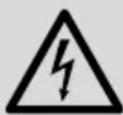
If an amplifier is connected to the inputs HIGH LEVEL IN (11), cover all banana jacks not used with the protective caps; touching the connections may result in electric shock.
4.3 Power supply
Use the mains cable provided to connect the mains jack (5) to a mains socket (230 V/ 50 Hz).
5 Operation
CAUTION Never adjust the audio system to a very high volume. Permanent high volumes may damage your hearing! Your ear will get accustomed to high volumes which do not seem to be that high after some time. Therefore, do not further increase a high volume after getting used to it.
Note: To prevent switching noise, always switch on the units connected before switching on the subwoofer and switch it off first after use.
1) Set the VOLUME control (2) to MIN (left stop) for the time being and switch on the subwoofer with the POWER switch (4). The LED (1) will light up. 2) Use the switch (10) to switch the automatic standby mode on and off.
Position "AUTO":
The automatic standby mode is activated. The subwoofer will automatically be in operation once an input signal has been applied. The LED (1) will show green. If the signal level falls below a certain value for a few minutes, the subwoofer will return to the standby mode; the LED will show red.
Position "ON":
The automatic standby mode is deactivated. After switching on, the subwoofer will always be in operation. The LED (1) will show green.
Position "OFF":
The subwoofer is always in standby mode. The LED (1) will show red. Thus, it will be possible to set the subwoofer to the standby mode immediately, e. g. for testing the switch-on threshold in the position "AUTO" subsequently.
3) Reproduce sound, e. g. music, via the existing audio system and add the desired low bass part with the VOLUME control (2). Only turn up the control to such an extent that the sound reproduced will not be distorted.
4) Use the control CROSSOVER (3) to adjust the cutoff frequency of the low pass filter so that the subwoofer will optimally complement the frequency response of the other speakers.
If required, readjust the volume balance with the VOLUME control (2).
5) Different distances of speakers to the listener may result in phase cancellation (certain frequencies will have a lower volume). To compensate this, the phase of the subwoofer signal is reversible with the PHASE reversal switch (9).
Test both switch positions to find the position offering the bass reproduction of the highest volume at the listening position. Then readjust the volume balance with the VOLUME control (2), if required.
6) If the automatic standby mode is deactivated (step 2), switch off the subwoofer with the POWER switch (4) after use.
To prevent unnecessary power consumption, it is always recommended to switch off the subwoofer when not in use for longer periods.
6 Specifications
Frequency range: ..... 30–250 Hz
Amplifier power
RMS power: ..... 50W
Maximum power: ..... 90W
Sensitivity
of the speaker: ..... 87 dB (1 W/1 m)
Max. SPL: 105 dB
Low pass filter: ..... 50 - 250 Hz, 12 dB/oct.
Inputs (sensitivity, impedance, connection)
LINE IN: 185 mV, 9 kΩ, RCA
HIGH LEVEL IN: .....4 V, 480 Ω, screw terminal with 4 mm banana jack
Power supply: 230 V/50 Hz
Power consumption: .... 152 VA max.
Standby: 0.8 VA
Ambient temperature: .. 0–40°C
Dimensions
(W × H × D): .............................................................................................
Weight: 9.8kg
Subject to technical modification.
Subwoofer actif


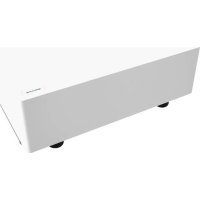
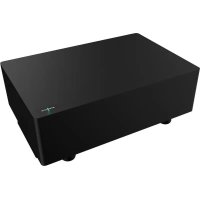
Brand : Monacor
Model : ESUB8FWS
Category : Subwoofer